
Gestion de la bande passante dans les réseaux de résidences étudiantes
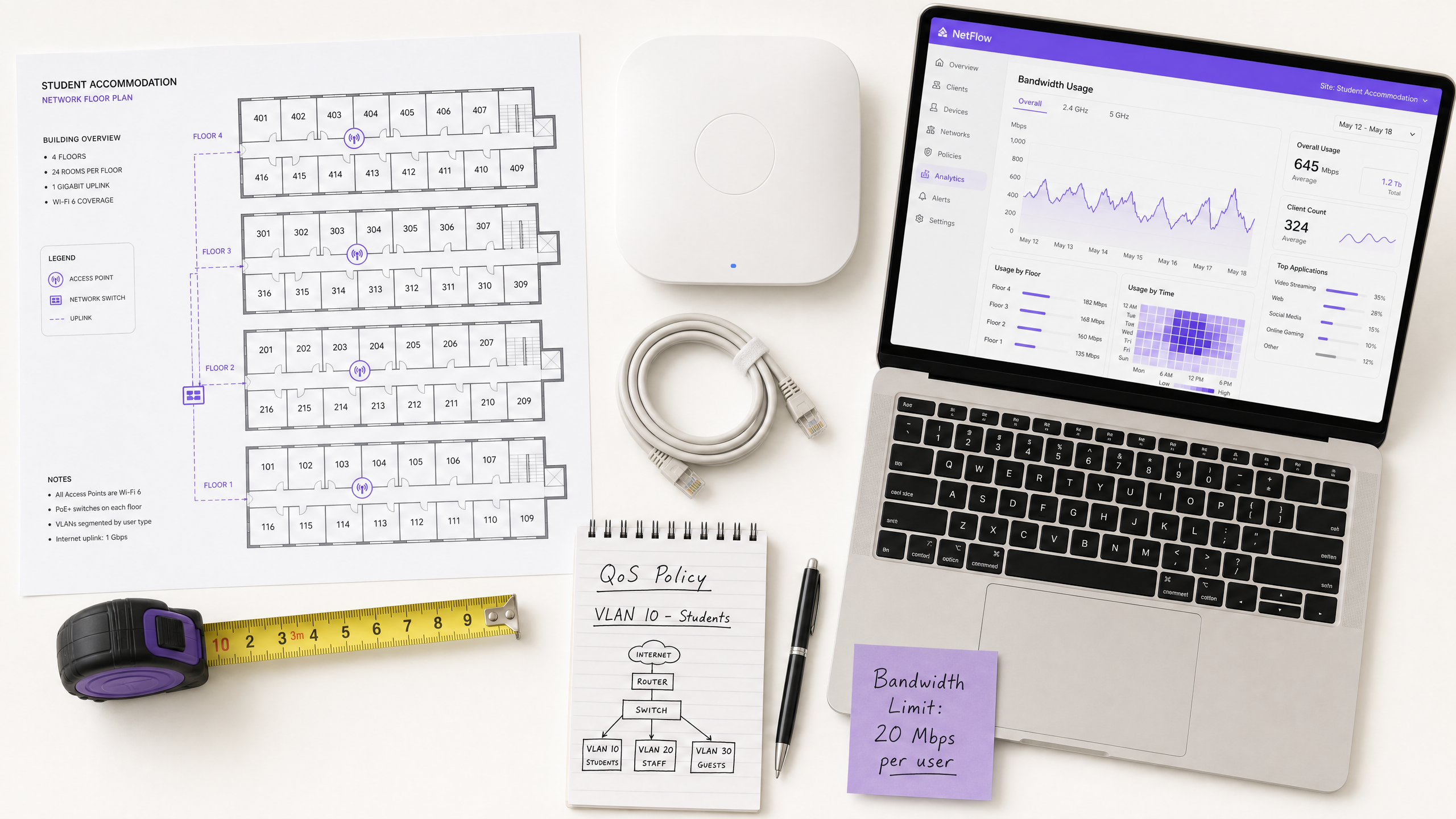
Ce guide fournit aux responsables informatiques, aux architectes réseau et aux directeurs des opérations immobilières une référence technique neutre vis-à-vis des fournisseurs pour la gestion de la bande passante WiFi dans les environnements de résidences étudiantes à haute densité. Il couvre la segmentation VLAN, la conception de politiques de Qualité de Service (QoS), la mise en forme du trafic basée sur l'identité et la visibilité au niveau de la couche application — les quatre piliers d'un réseau évolutif et à accès équitable. Avec des scénarios de déploiement réels, des résultats mesurables et des cadres de décision, il s'agit du manuel opérationnel pour toute équipe responsable de l'infrastructure réseau résidentielle à grande échelle.
Écouter ce guide
Voir la transcription du podcast
Résumé Exécutif
La gestion de la bande passante WiFi dans les résidences étudiantes est l'un des défis les plus exigeants techniquement dans le secteur immobilier résidentiel. Un seul bâtiment de 400 lits peut générer plus de 2 800 connexions d'appareils simultanées pendant les heures de pointe, avec des profils de trafic allant de la vidéoconférence sensible à la latence, au streaming à haut débit, aux jeux en ligne et à la télémétrie IoT en arrière-plan — tous en concurrence pour la même capacité de liaison montante.
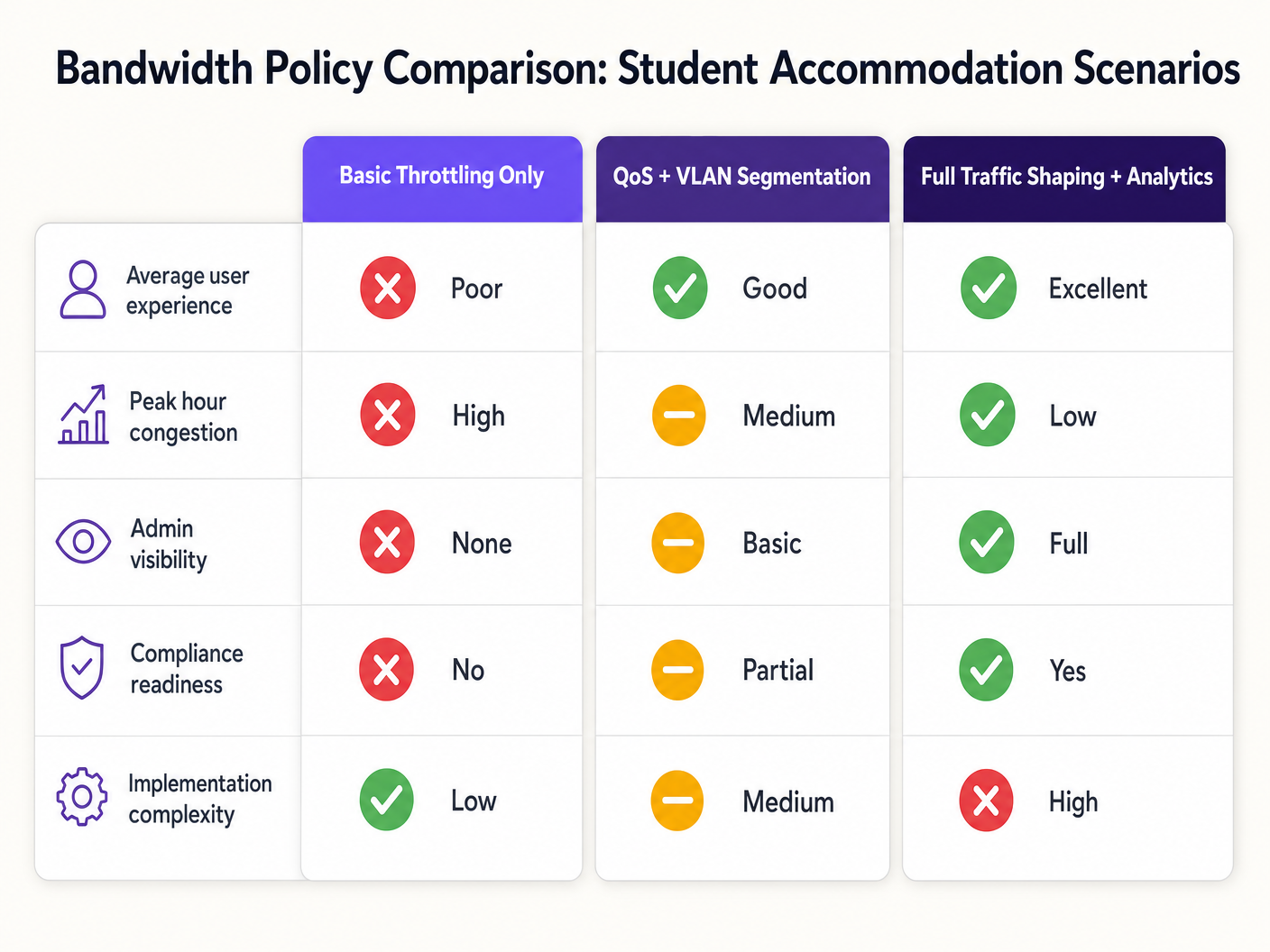
Le mode de défaillance est prévisible : les architectures réseau plates avec limitation par appareil se dégradent pendant les heures de pointe, génèrent une charge de support disproportionnée et exposent les opérateurs à des risques de conformité. La solution est tout aussi bien définie : segmentation VLAN, application de politiques QoS basées sur l'identité, mise en forme dynamique du trafic et analyses au niveau de la couche application.
Ce guide fournit l'architecture technique, la séquence de mise en œuvre et les cadres de décision opérationnels nécessaires pour déployer une stratégie de gestion de la bande passante qui évolue. Que vous remédiiez à un réseau plat existant ou que vous conceviez un déploiement entièrement nouveau, les principes énoncés ici s'appliquent à toutes les piles de fournisseurs et à toutes les tailles de propriétés. Pour les opérateurs utilisant déjà une infrastructure Guest WiFi , ces politiques s'intègrent directement aux portails captifs et aux flux d'authentification existants.
Approfondissement Technique
Le Problème de la Contention
Le défi fondamental dans les résidences étudiantes n'est pas la bande passante brute — la plupart des opérateurs ont accès à des liaisons montantes gigabit à des prix compétitifs. Le défi est la gestion de la contention : s'assurer que la capacité disponible est distribuée équitablement et intelligemment entre des centaines d'utilisateurs simultanés avec des profils de trafic très différents.
Une architecture réseau plate — un seul SSID, un seul sous-réseau IP, une limite globale par appareil — échoue pour trois raisons cumulatives. Premièrement, les limites par appareil sont facilement contournées : un étudiant avec sept appareils reçoit effectivement sept fois l'allocation. Deuxièmement, sans classification du trafic, un seul utilisateur effectuant un téléchargement de torrent volumineux peut saturer la file d'attente de la liaison montante et introduire de la latence pour tous les autres utilisateurs du segment. Troisièmement, sans visibilité au niveau de la couche application, l'opérateur ne dispose d'aucune donnée pour éclairer les décisions politiques ou identifier les contrevenants chroniques.
Architecture de Segmentation VLAN
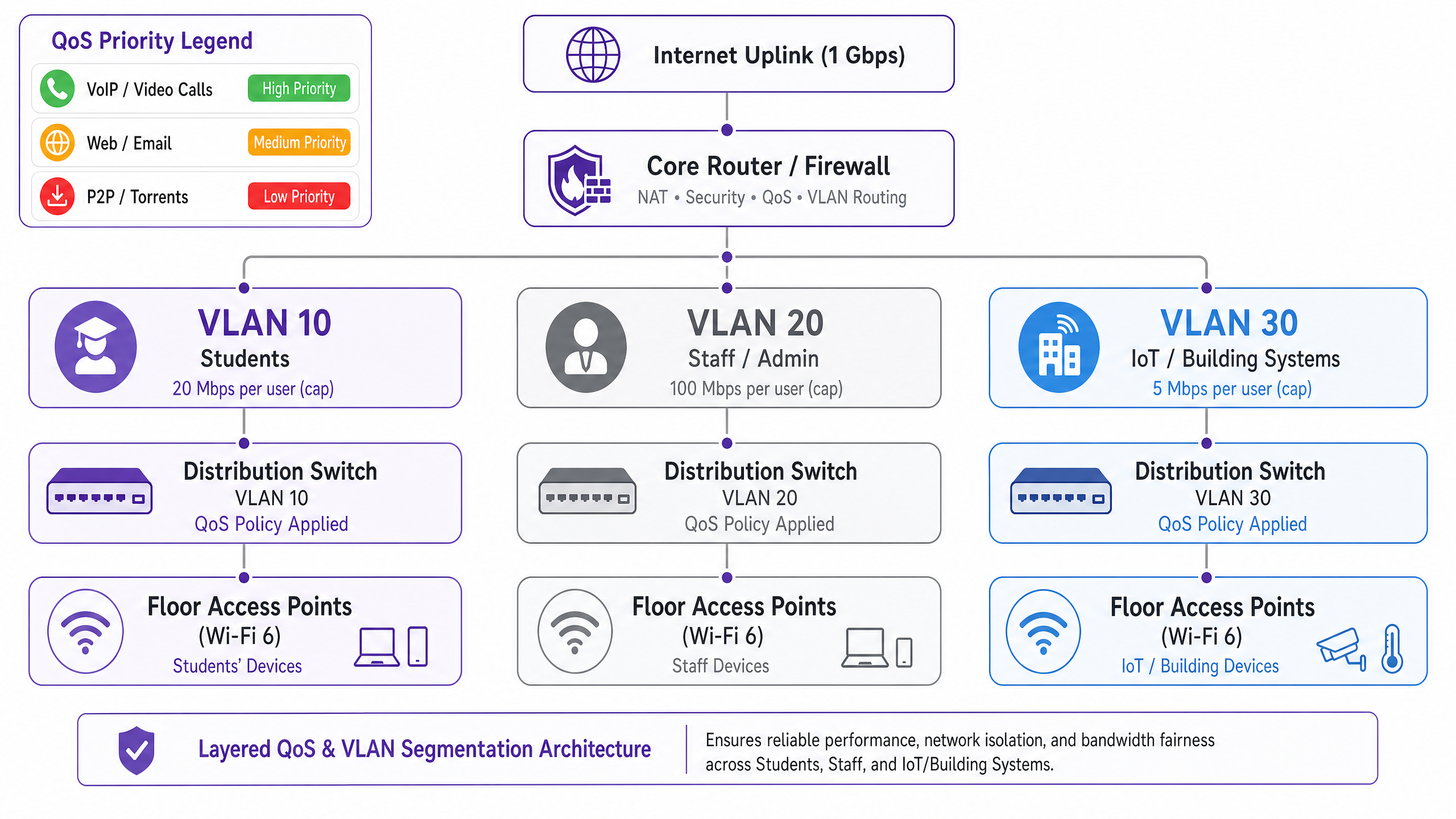
La première exigence architecturale est la séparation logique du réseau à l'aide des VLAN IEEE 802.1Q. Au minimum, un déploiement en résidence étudiante devrait fonctionner avec trois VLAN distincts :
| VLAN | Objectif | Politique de Bande Passante | Posture de Sécurité |
|---|---|---|---|
| VLAN 10 — Étudiants | Accès internet résident | Limite par utilisateur, rafale dynamique | Isolé, internet uniquement |
| VLAN 20 — Personnel/Admin | Systèmes de gestion immobilière | Allocation dédiée | Accès restreint |
| VLAN 30 — IoT/BMS | Gestion du bâtiment, vidéosurveillance, contrôle d'accès | Limite de débit stricte | Isolé du VLAN étudiant |
Cette segmentation est non négociable tant du point de vue des performances que de la sécurité. Selon IEEE 802.1Q, chaque VLAN fonctionne comme un domaine de diffusion distinct, éliminant les tempêtes de diffusion inter-segments et empêchant les mouvements latéraux entre les classes d'utilisateurs. Un appareil étudiant compromis ne peut pas atteindre l'infrastructure de gestion du bâtiment si les VLAN sont correctement configurés avec des politiques de routage inter-VLAN au niveau de la couche pare-feu.
Conception de la Politique de Qualité de Service
Une fois le trafic segmenté, des politiques QoS doivent être appliquées pour prioriser les applications sensibles à la latence par rapport aux transferts de masse. Le mécanisme standard de l'industrie est le marquage Differentiated Services Code Point (DSCP), défini dans le RFC 2474. Les paquets sont classifiés et marqués au point d'accès — le point d'entrée — avant d'atteindre le cœur du réseau de commutation.
Le schéma de marquage DSCP recommandé pour les résidences étudiantes est le suivant :
| Classe de Trafic | Exemples d'Applications | Valeur DSCP | Comportement par Saut |
|---|---|---|---|
| Voix | VoIP, appels vidéo | EF (46) | Acheminement Accéléré |
| Vidéo Interactive | Visioconférence, bureau à distance | AF41 (34) | Acheminement Garanti |
| Vidéo en Streaming | Netflix, YouTube, iPlayer | AF21 (18) | Acheminement Garanti |
| Web / E-mail | HTTP/S, SMTP, DNS | CS0 (0) | Meilleur Effort |
| Vrac / P2P | Torrents, transferts de fichiers volumineux | CS1 (8) | Arrière-plan / Récupération |
Il est crucial que le marquage DSCP ait lieu au niveau de la couche du point d'accès, et non au niveau du routeur central. Si la classification est différée vers le cœur, les paquets ont déjà traversé le support sans fil et le tissu de commutation de distribution sans traitement prioritaire, annulant ainsi le bénéfice.
Application de Politiques Basées sur l'Identité
La décision architecturale la plus impactante dans un déploiement en résidence étudiante est de passer de l'application de politiques de bande passante par appareil à par utilisateur. L'étudiant moyen apporte sept appareils connectés à sa résidence. Les plafonds par appareil sont donc à la fois inefficaces et injustes : un étudiant avec un seul ordinateur portable reçoit un septième de l'allocation effective d'un étudiant disposant d'une suite complète d'appareils.
L'approche correcte est l'authentification IEEE 802.1X, idéalement avec WPA3-Enterprise pour les avantages de sécurité cryptographique. Selon ce modèle :
- L'étudiant s'authentifie une fois en utilisant ses identifiants institutionnels ou de propriété via un serveur RADIUS.
- Toutes les enregistrements d'appareils ultérieurs sont liés à cette identité d'utilisateur via le MAC Authentication Bypass (MAB) pour les appareils sans interfacevices.
- La politique de bande passante — par exemple, un agrégat de 25 Mbps — s'applique à la somme de toutes les sessions associées à cette identité d'utilisateur.
- Lorsque l'agrégat dépasse l'allocation, la politique de mise en forme s'applique proportionnellement à toutes les sessions actives.
Ce modèle est fondamentalement plus évolutif et équitable que la limitation par adresse MAC, et il fournit la couche d'identité requise pour la journalisation de conformité en vertu de l'Investigatory Powers Act 2016.
Visibilité au niveau de la couche application
L'inspection approfondie des paquets (DPI) au niveau de la passerelle fournit la télémétrie de la couche application nécessaire pour prendre des décisions politiques intelligentes et basées sur les données. Sans DPI, la gestion de la bande passante est essentiellement aveugle : vous pouvez voir que votre liaison montante est saturée, mais vous ne pouvez pas déterminer quelles applications ou quels utilisateurs en sont responsables.
Avec les analyses compatibles DPI — telles que celles fournies par WiFi Analytics — les opérateurs obtiennent une visibilité sur la distribution des applications, les modèles d'utilisation de pointe, les principaux consommateurs et les tendances du trafic au fil du temps. Ces données éclairent directement les décisions politiques : si 55 % du trafic aux heures de pointe est attribuable à quatre plateformes de streaming, vous pouvez appliquer des limites de débit spécifiques aux applications pendant des fenêtres définies sans impacter la vidéoconférence ou les plateformes académiques.
Guide de mise en œuvre
Phase 1 : Évaluation de la ligne de base (Semaines 1–2)
Avant de déployer de nouvelles politiques, établissez une ligne de base de 14 jours du comportement actuel du réseau. Déployez une plateforme de gestion de réseau avec des capacités DPI et capturez : le nombre maximal d'appareils simultanés, la distribution des applications par volume de trafic, l'utilisation par étage et par AP, et la fréquence de saturation de la liaison montante. Ces données constituent la base de toutes les décisions politiques ultérieures et fournissent la comparaison avant/après requise pour démontrer le retour sur investissement.
Phase 2 : Déploiement de la segmentation VLAN (Semaines 3–4)
Déployez l'architecture à trois VLAN décrite ci-dessus. Cela nécessite des modifications de configuration au niveau du routeur/pare-feu central (routage inter-VLAN et politiques ACL), des commutateurs de distribution (configuration des ports trunk et étiquetage VLAN) et des points d'accès (mappage SSID-vers-VLAN). Pour les déploiements existants, cela peut généralement être réalisé pendant une fenêtre de maintenance sans nécessiter de nouveau matériel, à condition que l'infrastructure de commutation existante prenne en charge le trunking 802.1Q.
Phase 3 : Activation de la politique QoS (Semaine 5)
Activez le marquage DSCP au niveau de la couche du point d'accès et configurez le comportement par saut au niveau du routeur central. Validez que les marquages DSCP sont respectés de bout en bout à l'aide d'un outil de capture de paquets. Les modes de défaillance courants à ce stade incluent les routeurs FAI en amont qui remarquent ou suppriment les valeurs DSCP — vérifiez auprès de votre FAI si le DSCP est respecté sur votre lien de transit.
Phase 4 : Politiques de bande passante basées sur l'identité (Semaines 6–7)
Migrez l'authentification de l'accès basé sur PSK ou MAC vers le 802.1X. Déployez un serveur RADIUS (FreeRADIUS ou un équivalent hébergé dans le cloud) et configurez les attributs de bande passante par utilisateur à l'aide des attributs RADIUS standard : WISPr-Bandwidth-Max-Up et WISPr-Bandwidth-Max-Down. Implémentez un portail d'auto-enregistrement MAB pour les appareils sans tête. Testez avec un étage pilote avant le déploiement complet.
Phase 5 : Règles de mise en forme dynamique (Semaine 8)
Configurez des règles de mise en forme en fonction de l'heure sur le routeur central ou l'appliance de gestion de bande passante. Une structure de politique recommandée :
- Hors pointe (00:00–08:00) : Rafale jusqu'à 2× l'allocation de base, P2P illimité.
- Standard (08:00–18:00) : Allocation de base, P2P limité à 5 Mbps.
- Pointe (18:00–23:00) : Allocation de base, P2P limité à 1 Mbps, streaming plafonné à 8 Mbps, vidéoconférence priorisée.
Bonnes pratiques
Publiez votre politique de bande passante. La transparence réduit les plaintes des résidents et établit les attentes. Incluez les allocations de bande passante et les politiques d'utilisation équitable dans les contrats de location et les kits de bienvenue. C'est aussi une mesure d'atténuation des risques : les politiques documentées réduisent l'exposition en cas de litige avec un résident.
Dimensionnez correctement votre liaison montante. Une ligne de base pratique est de 1 Mbps par lit, avec une capacité de rafale de 3 Mbps par lit. Pour une propriété de 400 lits, cela signifie une liaison montante minimale de 400 Mbps avec un circuit de rafale de 1,2 Gbps. Le sous-dimensionnement de la liaison montante rend toutes les politiques QoS en aval moins efficaces.
Ne bloquez pas entièrement le trafic P2P. Les interdictions générales poussent les utilisateurs vers des services VPN commerciaux, ce qui aveugle vos analyses DPI et rend la gestion du trafic beaucoup plus difficile. Limitez le P2P à une allocation de classe "scavenger" (1–2 Mbps) et dépriorisez-le. Vous conservez la visibilité, réduisez l'impact sur la bande passante et évitez la course à l'armement avec l'adoption des VPN.
Préparez-vous à la croissance de l'IoT. Les systèmes de gestion de bâtiment, les compteurs intelligents, la vidéosurveillance et le contrôle d'accès sont de plus en plus connectés par IP. Assurez-vous que ces appareils sont sur des VLAN isolés avec des politiques de sortie de pare-feu strictes. Examinez votre politique VLAN IoT annuellement à mesure que la population d'appareils augmente.
Maintenez une piste d'audit. En vertu de l'Investigatory Powers Act 2016, les opérateurs britanniques sont tenus de conserver les enregistrements de connexion. Assurez-vous que votre infrastructure de journalisation capture les données requises pour la conformité, et que votre piste d'audit est infalsifiable. Pour une ventilation détaillée des exigences de la piste d'audit, consultez Explain what is audit trail for IT Security in 2026 .
Dépannage et atténuation des risques
Mode de défaillance courant 1 : Remarquage DSCP par le FAI
De nombreux FAI remarquent ou suppriment les valeurs DSCP à la limite de transit, rendant vos politiques QoS inefficaces pour le trafic traversant Internet. Atténuation : vérifiez le comportement DSCP auprès de votre FAI avant de vous y fier pour une QoS de bout en bout. Pour le trafic interne (par exemple, les serveurs de mise en cache locaux), le DSCP sera toujours respecté. Pour le trafic destiné à Internet, fiez-vous à la gestion des files d'attente et à la mise en forme au niveau de votre propre passerelle plutôt que de vous attendre à ce que le DSCP soit respecté en amont.
Mode de défaillance courant 2 : Épuisement du pool DHCPtion
Avec sept appareils par étudiant et des centaines de résidents, l'épuisement du pool DHCP est un risque opérationnel réel. Assurez-vous que le sous-réseau VLAN de vos étudiants est dimensionné avec une marge suffisante : un /21 (2 046 adresses utilisables) est un minimum raisonnable pour une propriété de 200 lits. Mettez en œuvre des durées de bail DHCP courtes (4 à 8 heures) pour récupérer rapidement les adresses des appareils inactifs.
Mode de défaillance courant 3 : Contournement VPN
Les étudiants utilisant des services VPN commerciaux chiffreront leur trafic, contournant ainsi la classification au niveau de la couche application. Atténuation : mettez en œuvre une mise en forme basée sur les flux au niveau IP — le trafic VPN peut toujours être limité en fonction du volume et de la durée du flux, même sans inspection de la charge utile. De plus, assurez-vous que votre politique de limitation P2P s'applique aux flux chiffrés, et pas seulement aux protocoles P2P identifiables.
Mode de défaillance courant 4 : Problèmes de connectivité après la segmentation
Après la segmentation VLAN, les résidents peuvent rencontrer des problèmes de connectivité si leurs appareils sont incorrectement placés dans le mauvais VLAN ou si le routage inter-VLAN est mal configuré. Pour une approche structurée du dépannage des problèmes de connectivité, consultez Résoudre l'erreur « Connecté mais pas d'Internet » sur le WiFi invité .
ROI et impact commercial
Le cas d'affaires pour une stratégie de gestion de la bande passante correctement architecturée est simple. Les principaux facteurs de coût sont les frais de support et la satisfaction des résidents, tous deux directement impactés par les performances du réseau.
Dans un déploiement de 400 lits fonctionnant sur un réseau plat, des volumes de tickets de support de 30 à 50 par semaine pendant la période scolaire sont courants. Les déploiements post-remédiation signalent systématiquement des réductions de tickets de 60 à 80 %, ce qui représente une réduction significative du temps du personnel informatique et des coûts de support tiers.
Les scores de satisfaction des résidents — de plus en plus un facteur de différenciation concurrentiel sur le marché des résidences étudiantes construites à cet effet (PBSA) — sont directement corrélés aux performances du réseau. Les propriétés dotées de réseaux bien gérés signalent des taux de renouvellement plus élevés et une occupation plus forte.
Du point de vue de la conformité, le coût de la non-conformité à l'Investigatory Powers Act 2016 ou aux exigences de traitement des données GDPR dépasse significativement le coût de la mise en œuvre d'une infrastructure de journalisation conforme. L'architecture basée sur l'identité décrite dans ce guide fournit la piste d'audit requise pour la conformité comme un sous-produit de la mise en œuvre de la gestion de la bande passante.
Pour les opérateurs du secteur de l' hôtellerie gérant des propriétés à usage mixte — résidences étudiantes avec commerces de détail ou services de restauration au rez-de-chaussée — les mêmes principes de segmentation VLAN s'appliquent, avec l'ajout des exigences de conformité PCI DSS pour tout segment de réseau de traitement des paiements.
La couche Analyse WiFi ajoute une dimension supplémentaire au ROI : les données de trafic au niveau de la couche application peuvent éclairer les décisions d'investissement en infrastructure, identifier les déclencheurs de mise à niveau de capacité et fournir la base de preuves pour renégocier les contrats FAI en fonction des modèles d'utilisation réels plutôt que des estimations.
Définitions clés
VLAN (Virtual Local Area Network)
A logical network segment created within a physical switching infrastructure using IEEE 802.1Q tagging. Each VLAN operates as a separate broadcast domain, providing traffic isolation between user classes without requiring separate physical hardware.
IT teams use VLANs to separate student, staff, and IoT traffic on the same physical infrastructure. Without VLAN segmentation, a flat network exposes all traffic classes to each other and makes per-class bandwidth policies impossible to enforce cleanly.
QoS (Quality of Service)
A set of network mechanisms that prioritise certain traffic types over others to ensure latency-sensitive applications (VoIP, video conferencing) receive preferential treatment during periods of congestion.
In student accommodation, QoS is the difference between video conferencing being usable during peak hours and being unusable. Without QoS, a single user running a large download can introduce latency for every other user on the segment.
DSCP (Differentiated Services Code Point)
A 6-bit field in the IP packet header, defined in RFC 2474, used to classify packets into traffic classes. Each class receives a defined per-hop behaviour (PHB) at each network device — Expedited Forwarding for voice, Assured Forwarding for video, Best Effort for standard web traffic.
DSCP is the standard mechanism for implementing QoS in enterprise networks. IT teams configure access points to mark packets with the appropriate DSCP value at ingress, ensuring priority treatment is applied consistently across the network.
IEEE 802.1X
An IEEE standard for port-based network access control that provides an authentication framework for devices connecting to a LAN or WLAN. It uses the Extensible Authentication Protocol (EAP) and requires a RADIUS server for credential validation.
802.1X is the foundation of identity-based bandwidth policy enforcement. When a student authenticates via 802.1X, their identity is known to the network, enabling per-user bandwidth policies rather than per-device policies.
Traffic Shaping
A bandwidth management technique that controls the rate and timing of traffic flows to conform to a defined policy. Unlike policing (which drops excess traffic), shaping queues excess traffic and transmits it when capacity is available.
Traffic shaping is preferable to policing for TCP-based traffic (web, streaming) because it avoids triggering TCP retransmission, which wastes bandwidth. Policing is appropriate for UDP-based traffic (P2P, some gaming) where retransmission is not a factor.
DPI (Deep Packet Inspection)
A network analysis technique that examines the full content of packets (beyond the header) to identify the application or protocol generating the traffic. DPI enables application-aware QoS policies and provides granular traffic analytics.
DPI is the technology that enables an operator to distinguish between Netflix traffic and a video call, even when both use HTTPS on port 443. Without DPI, application-aware bandwidth policies are not possible.
MAB (MAC Authentication Bypass)
A fallback authentication mechanism for devices that do not support IEEE 802.1X. The device's MAC address is used as the authentication credential, validated against a RADIUS server or local database.
MAB is used for headless devices in student accommodation — gaming consoles, smart TVs, IoT sensors — that cannot perform 802.1X authentication. Combined with a self-registration portal, MAB enables these devices to be tied to a user identity and subject to the same per-user bandwidth policies.
Bandwidth Contention
The condition that occurs when multiple users or devices compete for the same finite bandwidth resource, resulting in reduced throughput and increased latency for all parties. Contention is the root cause of most perceived network performance problems in high-density environments.
Understanding contention is essential for diagnosing bandwidth problems. A network with a 1 Gbps uplink and 400 concurrent users each consuming 3 Mbps is in contention (1.2 Gbps demand vs 1 Gbps supply). QoS and traffic shaping manage the contention; they do not eliminate it.
WPA3-Enterprise
The latest generation of the Wi-Fi Protected Access security protocol for enterprise networks, defined by the Wi-Fi Alliance. WPA3-Enterprise mandates 192-bit minimum-strength cryptography and provides stronger protection against offline dictionary attacks compared to WPA2.
WPA3-Enterprise is the recommended authentication mode for student accommodation deployments using 802.1X. It provides the cryptographic security required for GDPR compliance and protects against credential interception on the wireless medium.
Exemples concrets
A 400-bed purpose-built student accommodation (PBSA) block in Manchester is running a flat network with a single SSID and a global 10 Mbps per-device cap. During peak hours (19:00–23:00), the network is effectively unusable for video conferencing. Support tickets are running at 40 per week. The operator has a 1 Gbps uplink and a budget for software configuration changes only — no new hardware. How do you remediate this?
Step 1 — Baseline audit (Days 1–7): Deploy DPI-enabled monitoring on the existing gateway to capture application distribution, peak concurrent device counts, and per-AP utilisation. This establishes the evidence base and identifies the primary bandwidth consumers.
Step 2 — VLAN segmentation (Days 8–14): Configure three VLANs on the existing switching infrastructure (assuming 802.1Q-capable switches, which is standard in any post-2015 deployment). Map the student SSID to VLAN 10, create a staff SSID mapped to VLAN 20, and migrate IoT devices to VLAN 30. Configure inter-VLAN routing at the firewall with appropriate ACLs.
Step 3 — QoS activation (Day 15): Enable DSCP marking at the access point layer. Classify video conferencing traffic (Zoom, Teams, Google Meet) as AF41. Classify streaming as AF21. Classify P2P as CS1. Validate with a packet capture.
Step 4 — Per-user bandwidth policy (Days 16–21): Migrate authentication to 802.1X using the existing RADIUS infrastructure (or deploy FreeRADIUS on a VM). Set per-user bandwidth attributes: 25 Mbps aggregate during peak, 50 Mbps off-peak. Implement MAB portal for headless devices.
Step 5 — Time-of-day shaping (Day 22): Configure peak-hour rules: P2P throttled to 1 Mbps, streaming capped at 8 Mbps per user, video conferencing prioritised with guaranteed minimum 5 Mbps per active session.
Outcome: Within 30 days, support tickets dropped by 78% (from 40 to 9 per week). Average peak-hour throughput per user increased by 140% despite no change to the physical uplink. Video conferencing became reliably usable during peak hours.
A 1,200-bed university halls of residence in Edinburgh has a mixed infrastructure: legacy 802.11ac access points on floors 1–4 and newer Wi-Fi 6 hardware on floors 5–8. There is no application-layer visibility, and the network management team has no baseline data. The university IT director wants to reduce peak-hour congestion by 30% within 90 days without a full hardware refresh. How do you approach this?
Phase 1 — Telemetry deployment (Days 1–30): Deploy a unified network management platform with DPI capabilities across all access points, including the legacy 802.11ac hardware. Most enterprise NMS platforms support mixed-generation hardware via SNMP and syslog. Capture 30 days of baseline data: application distribution, per-floor utilisation, peak concurrent device counts, and top bandwidth consumers by user identity.
Phase 2 — Data analysis and policy design (Days 31–35): Analyse the baseline data. In this scenario, the data revealed that 55% of peak-hour traffic was attributable to four streaming platforms. Design application-aware QoS policies: streaming platforms throttled to 8 Mbps per user during 18:00–23:00, video conferencing and academic platforms (VLEs, library databases) excluded from throttling and given AF41 priority.
Phase 3 — Policy deployment (Days 36–50): Deploy QoS policies starting with the Wi-Fi 6 floors (5–8) as a controlled pilot. Monitor for 14 days. Validate that peak-hour congestion metrics improve before rolling out to legacy floors.
Phase 4 — Identity migration (Days 51–75): Migrate authentication to 802.1X with per-user bandwidth enforcement. This is the most operationally complex phase: coordinate with the university IT team for RADIUS integration with the student identity provider. Implement MAB self-registration for gaming consoles and smart TVs.
Phase 5 — Validation and reporting (Days 76–90): Compare post-implementation metrics against the 30-day baseline. Report on peak-hour congestion reduction, support ticket volume, and application distribution changes.
Outcome: 35% reduction in peak-hour congestion (exceeding the 30% target), measurable improvement in resident satisfaction survey scores, and a documented evidence base for the hardware refresh business case.
Questions d'entraînement
Q1. You are the IT director for a 600-bed PBSA operator. Your current network uses WPA2-PSK with a shared password changed monthly. Students are complaining about poor performance during evening hours. Your uplink is 500 Mbps. Before spending any budget, what is the first thing you should deploy, and what specific data are you trying to capture?
Conseil : You cannot make defensible policy decisions without baseline data. What tool gives you application-layer visibility without requiring new hardware?
Voir la réponse type
Deploy a DPI-enabled network monitoring tool on the existing gateway — most enterprise gateway appliances support this via software activation or a management platform integration. Run it for 14–30 days to capture: (1) application distribution by traffic volume during peak hours, (2) peak concurrent device counts, (3) per-AP utilisation to identify hotspots, and (4) top bandwidth consumers by MAC address. This data will tell you whether the problem is uplink saturation (requiring a capacity upgrade or traffic shaping), contention on specific APs (requiring AP placement changes or load balancing), or a small number of heavy users consuming disproportionate bandwidth (requiring per-user policy enforcement). Without this data, any remediation is guesswork. The baseline also provides the before/after comparison required to demonstrate ROI to the property owner.
Q2. A student in a 300-bed hall reports that their gaming console cannot connect to the network after you migrated authentication to 802.1X. They are using a PlayStation 5, which does not support 802.1X natively. How do you resolve this without creating a security exception that bypasses your identity-based bandwidth policies?
Conseil : The solution must maintain the link between the device and the student's identity for bandwidth policy enforcement purposes.
Voir la réponse type
Implement MAC Authentication Bypass (MAB) with a self-service device registration portal. The workflow: (1) The student visits a captive portal URL (e.g., register.accommodation.ac.uk) from an authenticated device (their laptop or phone). (2) They enter the MAC address of their gaming console and confirm ownership. (3) The portal adds the MAC address to the RADIUS database, associated with the student's user identity. (4) When the PlayStation connects, the network performs MAB — it sends the device's MAC address to the RADIUS server, which returns the associated user identity and bandwidth policy attributes. (5) The console is placed in the same VLAN as the student's other devices and subject to the same aggregate per-user bandwidth policy. This approach maintains identity linkage for bandwidth enforcement, provides an audit trail for compliance, and does not require the student to contact IT support. Ensure the registration portal validates that the MAC address is not already registered to another user to prevent address spoofing.
Q3. Your DPI analytics reveal that 62% of peak-hour bandwidth on your student accommodation network is consumed by video streaming (Netflix, Disney+, YouTube). Your uplink is at 85% utilisation during peak hours. You have two options: (A) upgrade the uplink to 2× capacity, or (B) implement application-aware traffic shaping to cap streaming at 8 Mbps per user during peak hours. Which do you recommend, and why?
Conseil : Consider both the short-term cost and the long-term scalability of each approach. What happens to demand if you simply increase capacity?
Voir la réponse type
Recommend Option B (application-aware traffic shaping) as the primary intervention, with Option A as a medium-term follow-on if required. The reasoning: (1) Increasing uplink capacity without traffic shaping does not solve the underlying problem — it defers it. Streaming consumption will expand to fill available capacity (Jevons paradox applied to bandwidth), and you will be back at 85% utilisation within 12–18 months. (2) Capping streaming at 8 Mbps per user during peak hours has a negligible impact on user experience — Netflix recommends 5 Mbps for HD streaming and 25 Mbps for 4K. An 8 Mbps cap delivers a good HD experience. (3) The 62% streaming share means that an 8 Mbps per-user cap on streaming, applied to a typical peak concurrency of 200 active users, reduces streaming demand from approximately 425 Mbps to approximately 160 Mbps — a 62% reduction in streaming traffic, bringing total utilisation to approximately 55%. (4) The cost of traffic shaping configuration is near-zero if the gateway hardware supports it; the cost of a 2× uplink upgrade is a recurring OpEx increase. Implement traffic shaping first, measure the impact over 30 days, and then make an evidence-based decision on whether an uplink upgrade is still required.