
Retail WiFi : Comment le WiFi en magasin stimule les ventes, la fidélité et la fréquentation
Ce guide de référence technique faisant autorité explique en détail comment les équipes informatiques et opérationnelles des entreprises peuvent déployer le WiFi de vente au détail comme un actif commercial stratégique. Il couvre la transition d'une connectivité de base vers une infrastructure génératrice de revenus grâce à la capture de données de première partie, à l'analyse de la fréquentation et à une architecture réseau sécurisée à haute densité.
Écouter ce guide
Voir la transcription du podcast
Fait partie de notre série principale : WiFi Analytics Guide →

Executive Summary
For modern venue operators and retail enterprises, providing in-store WiFi is no longer merely a utility or a minor customer convenience; it is a critical commercial infrastructure layer. When IT architects and marketing leaders align on deployment, retail store WiFi transforms into a powerful engine for first-party data capture, footfall analytics, and personalised customer engagement.
This guide provides senior IT managers, CTOs, and network architects with a strategic framework for deploying high-density WiFi in retail stores. It moves beyond the basic provisioning of internet access to explore how the network access layer, captive portals, and analytics integrations combine to deliver measurable Return on Investment (ROI). We will examine the technical architecture required to support hundreds of simultaneous connections securely, the compliance mandates governing data collection, and the integration of platforms like Purple's Guest WiFi to drive loyalty and sales. Whether you are upgrading a single flagship location or standardising infrastructure across a global retail chain, this reference outlines the vendor-neutral best practices and architectural decisions necessary to build a network that serves both the user and the business.
Technical Deep-Dive: Architecture and Standards
A robust retail WiFi deployment requires a structured, multi-tiered architecture to ensure reliability, security, and data extraction capabilities. The infrastructure must support high client density while maintaining strict isolation between guest traffic and corporate or Point-of-Sale (POS) systems.
The Radio Access Layer
The foundation of any modern retail deployment is the radio access layer, which must be built on the IEEE 802.11ax standard, commercially known as WiFi 6. For any new deployment in retail stores with WiFi, WiFi 6 is the mandatory baseline. Its primary advantage in retail environments is not merely peak throughput, but its ability to handle high client density efficiently through Orthogonal Frequency-Division Multiple Access (OFDMA) and Basic Service Set (BSS) Colouring.
OFDMA allows a single wireless channel to be divided into smaller sub-channels, enabling an access point to communicate with multiple client devices simultaneously. In a busy retail environment, such as a department store during a peak trading period, this prevents the network degradation that plagued older WiFi 5 deployments. BSS Colouring mitigates co-channel interference, which is particularly critical in multi-tenant retail parks where adjacent networks often overlap.
Network Infrastructure and Switching
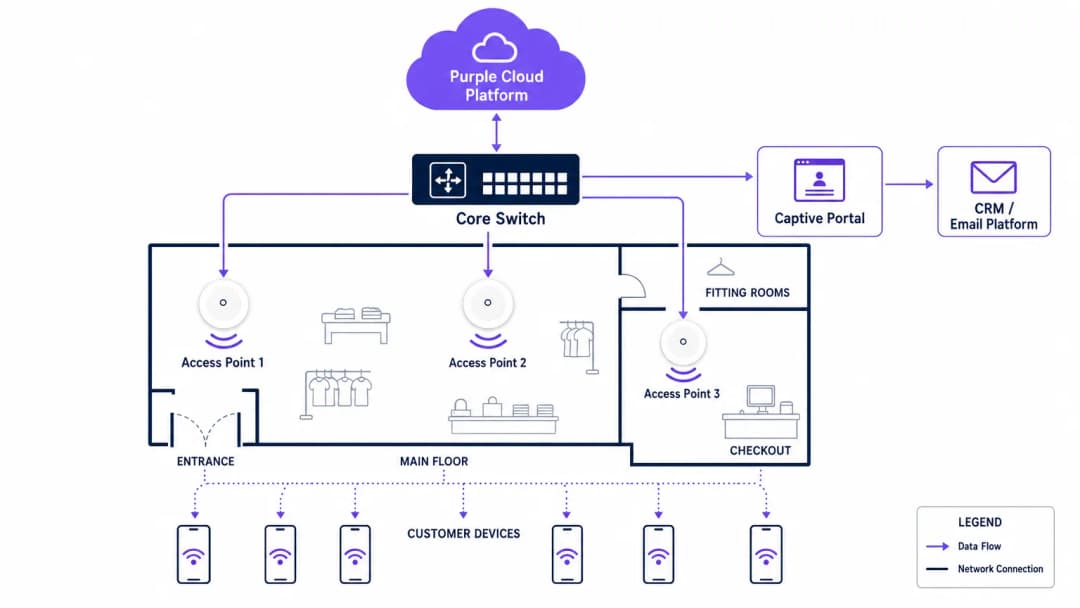
Access points must connect back to a resilient wired infrastructure. Core and edge switches should provide adequate Power over Ethernet (PoE+) to support modern access points, alongside sufficient uplink capacity. A standard mid-sized retail store requires at least a 1-Gigabit uplink from edge to core, while high-density environments or flagship stores should aggregate at 10-Gigabit speeds.
The external internet circuit is frequently a neglected bottleneck. Venue operators should prioritise dedicated, symmetrical connections. As detailed in our guide on What Is a Leased Line? Dedicated Business Internet, a dedicated circuit provides the Service Level Agreements (SLAs) necessary to guarantee uptime for both guest services and critical retail operations.
Authentication and the Captive Portal
The captive portal is the critical interface where technical infrastructure meets commercial strategy. When a user connects to the guest network, they are intercepted and redirected to a branded portal requiring authentication. This is the mechanism for capturing first-party data.
Authentication methods typically include email, SMS, or social login, though email remains the most robust for long-term CRM integration. The portal must operate over HTTPS to secure user credentials in transit. Furthermore, the authentication process must integrate seamlessly with a WiFi Analytics backend to correlate the device's MAC address with the authenticated user profile, enabling subsequent behavioural tracking.
Security and Compliance
Security in a retail WiFi environment is twofold: protecting the corporate network and protecting the guest.
- Network Segmentation: Guest traffic must be logically isolated from corporate and POS traffic using Virtual Local Area Networks (VLANs). This is a mandatory requirement for Payment Card Industry Data Security Standard (PCI DSS) compliance. Mixing guest and payment traffic on the same subnet will result in an immediate audit failure.
- Encryption Standards: While open networks with captive portals remain common, the industry is shifting towards WPA3 encryption. WPA3-SAE (Simultaneous Authentication of Equals) provides forward secrecy, protecting past sessions even if a password is compromised. For enterprise devices, 802.1X authentication should be strictly enforced.
- Data Privacy (GDPR): The collection of first-party data via the captive portal must comply with regional privacy regulations, such as the GDPR in Europe. Consent must be explicitly given, specific, and unbundled from general terms and conditions. The WiFi platform provider must act as a compliant data processor.
Vous avez des questions sur votre configuration spécifique ?
Notre équipe collabore avec des exploitants de sites, des responsables informatiques et des ingénieurs réseau au sein de 80 000 sites. Réservez un appel de 20 minutes et nous vous montrerons comment d'autres professionnels comme vous ont résolu ce problème.
Implementation Guide
Deploying a commercial-grade WiFi network requires a systematic approach to ensure both technical performance and business alignment.
Step 1: Requirements Gathering and Stakeholder Alignment
IT must not operate in a silo. Before selecting hardware, IT architects must align with marketing and operations directors to define the commercial objectives. Determine the required data capture fields for the captive portal, the integration points with existing CRM systems, and the specific analytics required (e.g., dwell time, zone flow).
Step 2: RF Site Survey and Predictive Modelling
A professional Radio Frequency (RF) site survey is non-negotiable. Relying on floor plans to estimate access point placement often results in coverage gaps in critical areas like fitting rooms or checkout queues.
Engineers should use predictive modelling software, followed by an active on-site survey, to account for attenuation caused by shelving, inventory, and architectural features. A general rule of thumb is one access point per 150-200 square metres, but high-density zones require specific capacity planning rather than just coverage planning.
Step 3: Infrastructure Deployment and Configuration
During physical installation, ensure all cabling meets Cat6a standards to support future multi-gigabit access points. Configure the network controllers to enforce client isolation on the guest VLAN, preventing peer-to-peer communication between connected devices. Implement Quality of Service (QoS) policies to throttle guest bandwidth, ensuring that critical retail operations (such as inventory scanners and POS terminals) receive priority.
Step 4: Captive Portal and CRM Integration
Design the captive portal to reflect the brand's identity while minimising friction. Keep data capture fields to a minimum - typically name and email address - to maximise conversion rates. Integrate the portal with the brand's CRM or marketing automation platform via API. This ensures that when a customer authenticates, their profile is immediately updated or created in the central database, triggering automated welcome workflows or loyalty program integrations.
Step 5: Analytics Calibration and Review
Once the network is live, calibrate the analytics platform to define specific physical zones within the store (e.g., 'Menswear', 'Entrance', 'Checkout'). Establish a monthly review cadence where IT and marketing teams analyse footfall trends, dwell times, and network performance metrics to refine both the network configuration and the store layout.

Best Practices
To maximise the ROI of retail WiFi, adhere to the following industry best practices:
- Prioritise First-Party Data: With the deprecation of third-party cookies, in-store WiFi is one of the most reliable sources of first-party data. Ensure your captive portal strategy is optimised for consent-driven data capture.
- Implement Profile-Based Authentication: Moving towards seamless, secure authentication methods, such as Passpoint (Hotspot 2.0), allows users to connect automatically across different venues without repeatedly navigating captive portals, significantly improving the user experience and data continuity.
- Leverage Location Analytics: Use the presence data generated by connected devices to understand customer flow. As seen in Retail environments, analysing which aisles receive the most traffic can inform merchandising and staffing decisions.
- Ensure Vendor Neutrality: Choose an analytics and captive portal overlay, like Purple, that is hardware-agnostic. This prevents vendor lock-in at the infrastructure layer and allows for standardised analytics across a mixed-hardware estate.
Troubleshooting & Risk Mitigation
Even well-designed networks encounter issues. Understanding common failure modes is essential for maintaining service continuity.
| Failure Mode | Symptom | Root Cause & Mitigation |
|---|---|---|
| Captive Portal Failure | Users connect to the SSID but receive no internet access and no login prompt. | Cause: DNS redirection failure or SSL certificate errors on the portal controller. Mitigation: Ensure the Walled Garden configuration allows DNS resolution and access to the portal's IP/hostname before authentication. Verify SSL certificates are valid and trusted. |
| High-Density Degradation | Slow throughput and frequent disconnects during peak trading hours. | Cause: Co-channel interference or insufficient AP capacity (too many clients per radio). Mitigation: Implement dynamic channel assignment. Upgrade to WiFi 6 access points. Reduce transmit power to shrink cell sizes and encourage roaming to less congested APs. |
| Rogue Access Points | Unauthorised networks appearing with similar SSIDs (Evil Twin attacks). | Cause: Malicious actors attempting to intercept guest credentials. Mitigation: Enable Wireless Intrusion Prevention Systems (WIPS) on the network controller to detect and suppress rogue APs automatically. |
| VLAN Leakage | Guest devices can ping corporate IP addresses. | Cause: Misconfigured switch ports or missing Access Control Lists (ACLs) on the core router. Mitigation: Conduct regular penetration testing. Strictly enforce client isolation and verify ACLs block all RFC 1918 private address space from the guest VLAN. |
ROI & Business Impact
The ultimate measure of a retail WiFi deployment is its impact on the bottom line. IT leaders must articulate this value to the wider business.
- Increased Dwell Time: Reliable WiFi encourages customers to spend more time in-store, which directly correlates with increased basket size.
- Marketing Attribution: By tracking device MAC addresses, retailers can measure the offline impact of online campaigns. If a customer receives a promotional email and visits the store three days later, the WiFi network provides the attribution data.
- Loyalty Acquisition: The captive portal is a high-conversion acquisition channel for loyalty programs. Offering high-speed access in exchange for loyalty registration rapidly scales the program's user base.
- Operational Efficiency: Footfall analytics enable dynamic staffing models, ensuring adequate coverage during peak periods and reducing wage costs during quiet times.
By treating in-store WiFi as a strategic asset rather than a sunk cost, retail enterprises can build a network that not only connects devices but fundamentally drives sales, loyalty, and operational intelligence.
Définitions clés
Captive Portal
Une page web qu'un utilisateur d'un réseau d'accès public est obligé de consulter et avec laquelle il doit interagir avant de se voir accorder l'accès. C'est le mécanisme principal pour l'authentification, l'acceptation des conditions d'utilisation et la collecte de données.
Les équipes informatiques déploient des captive portals pour sécuriser le réseau et garantir la conformité légale, tandis que les équipes marketing les utilisent pour acquérir des données clients et encourager les inscriptions aux programmes de fidélité.
Adresse MAC (Media Access Control)
Un identifiant unique attribué à un contrôleur de carte réseau (NIC) pour être utilisé comme adresse réseau dans les communications au sein d'un segment de réseau.
Dans l'analyse du WiFi pour le commerce de détail, l'adresse MAC est utilisée pour suivre de manière anonyme les déplacements des appareils dans le magasin, fournissant des données sur les temps de séjour et les visites répétées, même si l'utilisateur ne s'est pas authentifié.
WiFi 6 (802.11ax)
La sixième génération de la norme WiFi, conçue spécifiquement pour améliorer les performances dans les environnements à haute densité grâce à des technologies telles que l'OFDMA et le BSS Colouring.
Lors de la mise à niveau de l'infrastructure de vente au détail, les responsables informatiques spécifient le WiFi 6 pour s'assurer que le réseau peut gérer des centaines d'acheteurs simultanés sans dégradation des performances.
VLAN (Virtual Local Area Network)
Un sous-réseau logique qui regroupe une collection d'appareils provenant de différents réseaux locaux physiques. Il permet aux administrateurs réseau de partitionner un réseau commuté unique pour répondre aux exigences fonctionnelles et de sécurité de leurs systèmes.
Les VLANs sont essentiels dans le commerce de détail pour séparer le trafic WiFi invité non sécurisé du trafic hautement sensible des points de vente (POS), garantissant ainsi la conformité PCI DSS.
Données de première partie (First-Party Data)
Informations qu'une entreprise collecte directement auprès de ses clients et qu'elle possède entièrement, telles que les adresses e-mail, l'historique des achats et les données de session WiFi.
Avec le déclin des cookies de suivi tiers, les spécialistes du marketing de détail s'appuient fortement sur le réseau WiFi invité pour collecter des données de première partie destinées à des campagnes ciblées.
Walled Garden
Une configuration réseau qui permet aux utilisateurs non authentifiés d'accéder à un ensemble limité de sites web ou d'adresses IP spécifiques, tout en bloquant tout autre accès à Internet.
Les équipes informatiques configurent des walled gardens afin que les utilisateurs puissent accéder à la page de connexion du captive portal et aux services d'authentification nécessaires (comme les API de réseaux sociaux) avant d'être entièrement autorisés sur le réseau.
Temps de séjour (Dwell Time)
La durée pendant laquelle un client reste dans une zone spécifique d'un magasin, mesurée en suivant la connexion de son appareil ou les requêtes de sonde (probe requests) vers les points d'accès WiFi.
Les directeurs des opérations utilisent les analyses de temps de séjour pour évaluer l'efficacité de l'agencement des magasins, des vitrines et des têtes de gondole promotionnelles.
PCI DSS (Payment Card Industry Data Security Standard)
Une norme de sécurité de l'information pour les organisations qui gèrent des cartes de crédit de marque provenant des principaux réseaux de cartes.
Les architectes informatiques doivent concevoir le réseau de vente au détail de manière à ce que l'accès WiFi invité ne compromette pas la sécurité de l'infrastructure de paiement, évitant ainsi de lourdes sanctions financières.
Exemples concrets
Une chaîne nationale de vente au détail comptant 50 points de vente enregistre des taux d'inscription marketing faibles (inférieurs à 5 %) sur son réseau WiFi invité actuel, qui utilise une page d'accueil générique et sans marque. Le CTO doit augmenter la capture de données pour soutenir une nouvelle initiative de fidélisation omnicanale.
L'équipe informatique déploie une solution de Captive Portal centralisée et indépendante du matériel sur les 50 sites. Elle remplace la page d'accueil générique par un portail de marque réactif qui formule clairement l'échange de valeur : « Connectez-vous pour bénéficier d'un accès WiFi haut débit gratuit et d'un code de réduction immédiat de 10 % ». Le portail est configuré pour capturer uniquement le nom et l'adresse e-mail, réduisant ainsi les frictions. De plus, la plateforme est intégrée via API au CRM du détaillant. Lorsqu'un utilisateur s'authentifie, ses coordonnées sont envoyées au CRM, déclenchant un e-mail automatisé contenant le code de réduction. Le réseau est également configuré pour mémoriser l'adresse MAC de l'appareil, permettant une authentification transparente lors des visites ultérieures dans l'un des 50 points de vente.
Un grand grand magasin souffre d'une grave congestion du réseau le week-end. Les clients se plaignent que le WiFi invité est inutilisable, et le directeur du magasin signale que les terminaux de point de vente (qui partagent l'infrastructure réseau physique) perdent occasionnellement la connexion.
L'architecte réseau effectue une analyse du spectre RF et identifie de graves interférences co-canal et une saturation des points d'accès. Le plan de remédiation comprend trois étapes : 1) Mettre à niveau les zones à plus forte densité (espace restauration, entrée principale) avec des points d'accès WiFi 6 pour exploiter l'OFDMA. 2) Mettre en œuvre des politiques de QoS strictes sur le routeur central, garantissant la bande passante pour le VLAN des points de vente et limitant le trafic du VLAN invité à 5 Mbps par client. 3) Activer l'attribution dynamique des canaux et réduire la puissance de transmission des points d'accès pour réduire la taille des cellules, encourageant ainsi les appareils clients à itinérer plus efficacement et réduisant le chevauchement.
Questions d'entraînement
Q1. Votre client du secteur de la vente au détail souhaite mettre en œuvre un réseau WiFi invité pour collecter les adresses e-mail des clients. Il prévoit d'utiliser son architecture réseau plate existante, en connectant les nouveaux points d'accès invités directement au même commutateur que celui qui gère les terminaux de point de vente (POS), sans segmentation VLAN. Quel est le risque principal de cette approche ?
Conseil : Considérez les normes de sécurité requises pour le traitement des paiements.
Voir la réponse type
Le risque principal est une violation grave de la conformité PCI DSS. Un réseau plat permet à des appareils invités non approuvés de communiquer potentiellement avec les terminaux de point de vente ou d'intercepter leur trafic. Le réseau doit être segmenté à l'aide de VLANs afin d'isoler l'environnement des données de titulaires de cartes du réseau invité.
Q2. Un exploitant de site constate que, bien que la fréquentation du magasin soit élevée, le taux de capture sur le Captive Portal est inférieur à 2 %. Le portail demande actuellement le prénom, le nom, l'e-mail, le numéro de téléphone, la date de naissance et le code postal. Comment les équipes IT et Marketing doivent-elles résoudre ce problème ?
Conseil : Considérez la friction impliquée dans le processus d'authentification.
Voir la réponse type
Le faible taux de capture est dû à une friction excessive dans le processus d'authentification. Les équipes doivent repenser le Captive Portal pour ne demander que le minimum d'informations nécessaires (généralement uniquement le nom et l'e-mail) ou proposer une option de connexion via les réseaux sociaux. Le profilage progressif peut être utilisé ultérieurement pour recueillir plus de détails une fois la relation initiale établie.
Q3. Un réseau WiFi 6 nouvellement déployé dans un centre commercial très fréquenté affiche de mauvaises performances. Le responsable informatique note que tous les points d'accès transmettent à la puissance maximale sur la bande 2,4 GHz. Quel changement de configuration est nécessaire ?
Conseil : Pensez à la façon dont les signaux RF interagissent dans des environnements denses.
Voir la réponse type
Les points d'accès provoquent probablement de graves interférences de canal adjacent (co-canal) car la taille de leurs cellules est trop grande et elles se chevauchent. Le responsable informatique doit réduire la puissance de transmission sur les points d'accès, en particulier sur la bande 2,4 GHz, pour réduire la taille des cellules. Il doit également s'assurer que l'attribution dynamique des canaux est activée et encourager les clients à s'orienter vers la bande 5 GHz dans la mesure du possible.
Continuer la lecture de cette série
Qu'est-ce qu'une Probe Request ? Comprendre comment les appareils découvrent les réseaux
Ce guide de référence technique propose une analyse approfondie des probe requests IEEE 802.11, du balayage actif par rapport au balayage passif, et de l'impact de la randomisation MAC sur les analyses de fréquentation. Il fournit des stratégies de mise en œuvre concrètes pour les architectes réseau afin d'optimiser les déploiements à haute densité, d'atténuer les tempêtes de requêtes (probe storms) et de garantir une collecte de données précise et conforme au GDPR en utilisant des couches d'identité authentifiées.
WiFi pour zoos et parcs d'attractions : Guide de connectivité pour les lieux à forte fréquentation
Ce guide propose aux responsables IT et aux architectes réseau un cadre complet pour déployer un WiFi haute performance dans les zoos et les parcs d'attractions. Il couvre la planification RF en extérieur, le déploiement de Captive Portal, le filtrage de contenu sécurisé pour les familles et les stratégies pour transformer la connectivité en analyses opérationnelles exploitables.
WiFi Retail : de l'analyse de trafic aux expériences personnalisées en magasin
Ce guide de référence technique détaille la transition architecturale du WiFi invité hérité vers les plateformes edge intelligentes dans les environnements de vente au détail. Il fournit des conseils pratiques aux responsables informatiques sur le déploiement de réseaux basés sur l'identité, l'intégration des analyses avec les systèmes CRM et la génération d'un ROI mesurable grâce à des expériences personnalisées en magasin. De la conception RF et l'optimisation du Captive Portal à l'intégration du clienteling et la conformité GDPR, ce guide couvre l'intégralité du cycle de vie du déploiement de bout en bout.
Vous avez des questions sur votre configuration spécifique ?
Notre équipe collabore avec des exploitants de sites, des responsables informatiques et des ingénieurs réseau au sein de 80 000 sites. Réservez un appel de 20 minutes et nous vous montrerons comment d'autres professionnels comme vous ont résolu ce problème.