
Retail WiFi: How In-Store WiFi Drives Sales, Loyalty and Footfall
This authoritative technical reference guide details how enterprise IT and operations teams can deploy retail WiFi as a strategic commercial asset. It covers the shift from basic connectivity to a revenue-generating infrastructure through first-party data capture, footfall analytics, and secure, high-density network architecture.
Video overview
Listen to this guide
View podcast transcript
Part of our core series: WiFi Analytics Guide →

Executive Summary
For modern venue operators and retail enterprises, providing in-store WiFi is no longer merely a utility or a minor customer convenience; it is a critical commercial infrastructure layer. When IT architects and marketing leaders align on deployment, retail store WiFi transforms into a powerful engine for first-party data capture, footfall analytics, and personalised customer engagement.
This guide provides senior IT managers, CTOs, and network architects with a strategic framework for deploying high-density WiFi in retail stores. It moves beyond the basic provisioning of internet access to explore how the network access layer, captive portals, and analytics integrations combine to deliver measurable Return on Investment (ROI). We will examine the technical architecture required to support hundreds of simultaneous connections securely, the compliance mandates governing data collection, and the integration of platforms like Purple's Guest WiFi to drive loyalty and sales. Whether you are upgrading a single flagship location or standardising infrastructure across a global retail chain, this reference outlines the vendor-neutral best practices and architectural decisions necessary to build a network that serves both the user and the business.
Technical Deep-Dive: Architecture and Standards
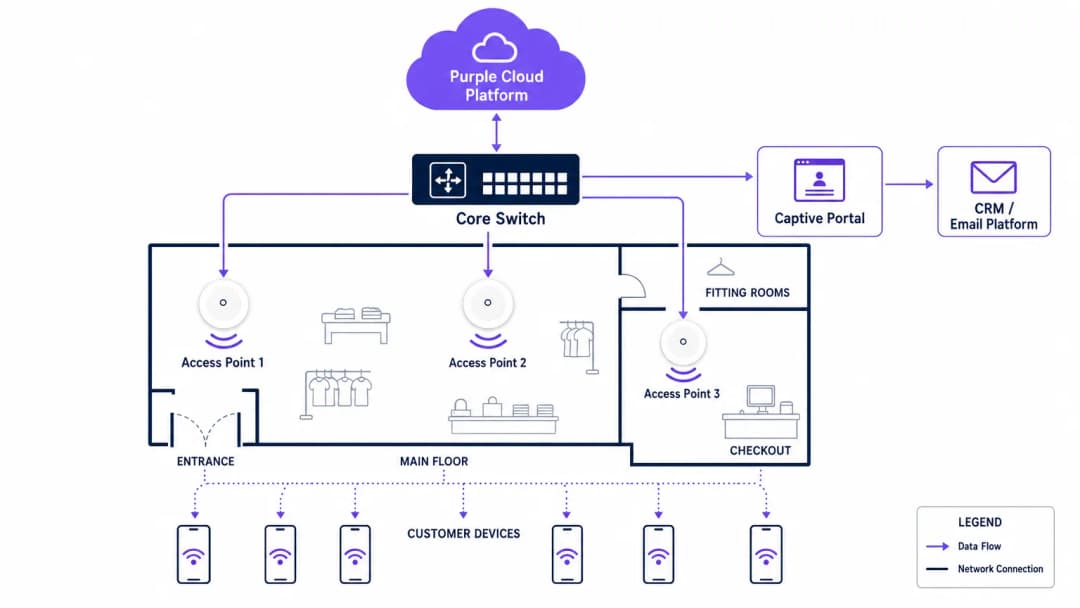
A robust retail WiFi deployment requires a structured, multi-tiered architecture to ensure reliability, security, and data extraction capabilities. The infrastructure must support high client density while maintaining strict isolation between guest traffic and corporate or Point-of-Sale (POS) systems.
The Radio Access Layer
The foundation of any modern retail deployment is the radio access layer, which must be built on the IEEE 802.11ax standard, commercially known as WiFi 6. For any new deployment in retail stores with WiFi, WiFi 6 is the mandatory baseline. Its primary advantage in retail environments is not merely peak throughput, but its ability to handle high client density efficiently through Orthogonal Frequency-Division Multiple Access (OFDMA) and Basic Service Set (BSS) Colouring.
OFDMA allows a single wireless channel to be divided into smaller sub-channels, enabling an access point to communicate with multiple client devices simultaneously. In a busy retail environment, such as a department store during a peak trading period, this prevents the network degradation that plagued older WiFi 5 deployments. BSS Colouring mitigates co-channel interference, which is particularly critical in multi-tenant retail parks where adjacent networks often overlap.
Network Infrastructure and Switching
Access points must connect back to a resilient wired infrastructure. Core and edge switches should provide adequate Power over Ethernet (PoE+) to support modern access points, alongside sufficient uplink capacity. A standard mid-sized retail store requires at least a 1-Gigabit uplink from edge to core, while high-density environments or flagship stores should aggregate at 10-Gigabit speeds.
The external internet circuit is frequently a neglected bottleneck. Venue operators should prioritise dedicated, symmetrical connections. As detailed in our guide on What Is a Leased Line? Dedicated Business Internet, a dedicated circuit provides the Service Level Agreements (SLAs) necessary to guarantee uptime for both guest services and critical retail operations.
Authentication and the Captive Portal
The captive portal is the critical interface where technical infrastructure meets commercial strategy. When a user connects to the guest network, they are intercepted and redirected to a branded portal requiring authentication. This is the mechanism for capturing first-party data.
Authentication methods typically include email, SMS, or social login, though email remains the most robust for long-term CRM integration. The portal must operate over HTTPS to secure user credentials in transit. Furthermore, the authentication process must integrate seamlessly with a WiFi Analytics backend to correlate the device's MAC address with the authenticated user profile, enabling subsequent behavioural tracking.
Security and Compliance
Security in a retail WiFi environment is twofold: protecting the corporate network and protecting the guest.
- Network Segmentation: Guest traffic must be logically isolated from corporate and POS traffic using Virtual Local Area Networks (VLANs). This is a mandatory requirement for Payment Card Industry Data Security Standard (PCI DSS) compliance. Mixing guest and payment traffic on the same subnet will result in an immediate audit failure.
- Encryption Standards: While open networks with captive portals remain common, the industry is shifting towards WPA3 encryption. WPA3-SAE (Simultaneous Authentication of Equals) provides forward secrecy, protecting past sessions even if a password is compromised. For enterprise devices, 802.1X authentication should be strictly enforced.
- Data Privacy (GDPR): The collection of first-party data via the captive portal must comply with regional privacy regulations, such as the GDPR in Europe. Consent must be explicitly given, specific, and unbundled from general terms and conditions. The WiFi platform provider must act as a compliant data processor.
Got questions about your specific setup?
Our team works with venue operators, IT managers, and network engineers across 80,000 venues. Book a 20-minute call and we will show you how others like you solved it.
Implementation Guide
Deploying a commercial-grade WiFi network requires a systematic approach to ensure both technical performance and business alignment.
Step 1: Requirements Gathering and Stakeholder Alignment
IT must not operate in a silo. Before selecting hardware, IT architects must align with marketing and operations directors to define the commercial objectives. Determine the required data capture fields for the captive portal, the integration points with existing CRM systems, and the specific analytics required (e.g., dwell time, zone flow).
Step 2: RF Site Survey and Predictive Modelling
A professional Radio Frequency (RF) site survey is non-negotiable. Relying on floor plans to estimate access point placement often results in coverage gaps in critical areas like fitting rooms or checkout queues.
Engineers should use predictive modelling software, followed by an active on-site survey, to account for attenuation caused by shelving, inventory, and architectural features. A general rule of thumb is one access point per 150-200 square metres, but high-density zones require specific capacity planning rather than just coverage planning.
Step 3: Infrastructure Deployment and Configuration
During physical installation, ensure all cabling meets Cat6a standards to support future multi-gigabit access points. Configure the network controllers to enforce client isolation on the guest VLAN, preventing peer-to-peer communication between connected devices. Implement Quality of Service (QoS) policies to throttle guest bandwidth, ensuring that critical retail operations (such as inventory scanners and POS terminals) receive priority.
Step 4: Captive Portal and CRM Integration
Design the captive portal to reflect the brand's identity while minimising friction. Keep data capture fields to a minimum - typically name and email address - to maximise conversion rates. Integrate the portal with the brand's CRM or marketing automation platform via API. This ensures that when a customer authenticates, their profile is immediately updated or created in the central database, triggering automated welcome workflows or loyalty program integrations.
Step 5: Analytics Calibration and Review
Once the network is live, calibrate the analytics platform to define specific physical zones within the store (e.g., 'Menswear', 'Entrance', 'Checkout'). Establish a monthly review cadence where IT and marketing teams analyse footfall trends, dwell times, and network performance metrics to refine both the network configuration and the store layout.

Best Practices
To maximise the ROI of retail WiFi, adhere to the following industry best practices:
- Prioritise First-Party Data: With the deprecation of third-party cookies, in-store WiFi is one of the most reliable sources of first-party data. Ensure your captive portal strategy is optimised for consent-driven data capture.
- Implement Profile-Based Authentication: Moving towards seamless, secure authentication methods, such as Passpoint (Hotspot 2.0), allows users to connect automatically across different venues without repeatedly navigating captive portals, significantly improving the user experience and data continuity.
- Leverage Location Analytics: Use the presence data generated by connected devices to understand customer flow. As seen in Retail environments, analysing which aisles receive the most traffic can inform merchandising and staffing decisions.
- Ensure Vendor Neutrality: Choose an analytics and captive portal overlay, like Purple, that is hardware-agnostic. This prevents vendor lock-in at the infrastructure layer and allows for standardised analytics across a mixed-hardware estate.
Troubleshooting & Risk Mitigation
Even well-designed networks encounter issues. Understanding common failure modes is essential for maintaining service continuity.
| Failure Mode | Symptom | Root Cause & Mitigation |
|---|---|---|
| Captive Portal Failure | Users connect to the SSID but receive no internet access and no login prompt. | Cause: DNS redirection failure or SSL certificate errors on the portal controller. Mitigation: Ensure the Walled Garden configuration allows DNS resolution and access to the portal's IP/hostname before authentication. Verify SSL certificates are valid and trusted. |
| High-Density Degradation | Slow throughput and frequent disconnects during peak trading hours. | Cause: Co-channel interference or insufficient AP capacity (too many clients per radio). Mitigation: Implement dynamic channel assignment. Upgrade to WiFi 6 access points. Reduce transmit power to shrink cell sizes and encourage roaming to less congested APs. |
| Rogue Access Points | Unauthorised networks appearing with similar SSIDs (Evil Twin attacks). | Cause: Malicious actors attempting to intercept guest credentials. Mitigation: Enable Wireless Intrusion Prevention Systems (WIPS) on the network controller to detect and suppress rogue APs automatically. |
| VLAN Leakage | Guest devices can ping corporate IP addresses. | Cause: Misconfigured switch ports or missing Access Control Lists (ACLs) on the core router. Mitigation: Conduct regular penetration testing. Strictly enforce client isolation and verify ACLs block all RFC 1918 private address space from the guest VLAN. |
ROI & Business Impact
The ultimate measure of a retail WiFi deployment is its impact on the bottom line. IT leaders must articulate this value to the wider business.
- Increased Dwell Time: Reliable WiFi encourages customers to spend more time in-store, which directly correlates with increased basket size.
- Marketing Attribution: By tracking device MAC addresses, retailers can measure the offline impact of online campaigns. If a customer receives a promotional email and visits the store three days later, the WiFi network provides the attribution data.
- Loyalty Acquisition: The captive portal is a high-conversion acquisition channel for loyalty programs. Offering high-speed access in exchange for loyalty registration rapidly scales the program's user base.
- Operational Efficiency: Footfall analytics enable dynamic staffing models, ensuring adequate coverage during peak periods and reducing wage costs during quiet times.
By treating in-store WiFi as a strategic asset rather than a sunk cost, retail enterprises can build a network that not only connects devices but fundamentally drives sales, loyalty, and operational intelligence.
Key Definitions
Captive Portal
A web page that a user of a public access network is obliged to view and interact with before access is granted. It is the primary mechanism for authentication, terms of service acceptance, and data capture.
IT teams deploy captive portals to secure the network and ensure legal compliance, while marketing teams use them to acquire customer data and drive loyalty program sign-ups.
MAC Address (Media Access Control)
A unique identifier assigned to a network interface controller (NIC) for use as a network address in communications within a network segment.
In retail WiFi analytics, the MAC address is used to anonymously track device movement across the store, providing data on dwell times and repeat visits, even if the user hasn't authenticated.
WiFi 6 (802.11ax)
The sixth generation of the WiFi standard, designed specifically to improve performance in high-density environments through technologies like OFDMA and BSS Colouring.
When upgrading retail infrastructure, IT managers specify WiFi 6 to ensure the network can handle hundreds of simultaneous shoppers without degrading performance.
VLAN (Virtual Local Area Network)
A logical subnetwork that groups a collection of devices from different physical LANs. It allows network administrators to partition a single switched network to match the functional and security requirements of their systems.
VLANs are critical in retail to separate the untrusted guest WiFi traffic from the highly sensitive Point-of-Sale (POS) traffic, ensuring PCI DSS compliance.
First-Party Data
Information a company collects directly from its customers and owns entirely, such as email addresses, purchase history, and WiFi session data.
With the decline of third-party tracking cookies, retail marketers rely heavily on the guest WiFi network to capture first-party data for targeted campaigns.
Walled Garden
A network configuration that allows unauthenticated users access to a limited set of specific websites or IP addresses, while blocking all other internet access.
IT teams configure walled gardens so users can access the captive portal login page and necessary authentication services (like social media APIs) before they are fully authorised on the network.
Dwell Time
The length of time a customer spends in a specific area of a store, measured by tracking their device's connection or probe requests to the WiFi access points.
Operations directors use dwell time analytics to evaluate the effectiveness of store layouts, window displays, and promotional endcaps.
PCI DSS (Payment Card Industry Data Security Standard)
An information security standard for organizations that handle branded credit cards from the major card schemes.
IT architects must design the retail network to ensure guest WiFi access does not compromise the security of the payment infrastructure, avoiding severe financial penalties.
Worked Examples
A national retail chain with 50 locations is experiencing low marketing opt-in rates (under 5%) on their current guest WiFi network, which uses a generic, unbranded splash page. The CTO needs to increase data capture to support a new omnichannel loyalty initiative.
The IT team deploys a centralised, hardware-agnostic captive portal solution across all 50 locations. They replace the generic splash page with a branded, responsive portal that clearly articulates the value exchange: 'Log in for free high-speed WiFi and an immediate 10% discount code'. The portal is configured to capture only Name and Email, reducing friction. Crucially, the platform is integrated via API with the retailer's CRM. When a user authenticates, their details are pushed to the CRM, triggering an automated email containing the discount code. The network is also configured to remember the device's MAC address, allowing seamless authentication on subsequent visits to any of the 50 locations.
A large department store is suffering from severe network congestion on weekends. Customers complain that the guest WiFi is unusable, and the store manager reports that POS terminals (which share the physical network infrastructure) are occasionally dropping connections.
The network architect conducts an RF spectrum analysis and identifies severe co-channel interference and AP saturation. The remediation plan involves three steps: 1) Upgrading the highest-density zones (food court, main entrance) to WiFi 6 access points to leverage OFDMA. 2) Implementing strict QoS policies on the core router, guaranteeing bandwidth for the POS VLAN and throttling guest VLAN traffic to 5 Mbps per client. 3) Enabling dynamic channel assignment and reducing the transmit power of the access points to shrink the cell sizes, encouraging client devices to roam more efficiently and reducing overlap.
Practice Questions
Q1. Your retail client wants to implement a guest WiFi network to capture customer emails. They plan to use their existing flat network architecture, connecting the new guest access points directly to the same switch that handles the POS terminals, without VLAN segmentation. What is the primary risk of this approach?
Hint: Consider the security standards required for processing payments.
View model answer
The primary risk is a severe violation of PCI DSS compliance. A flat network allows untrusted guest devices to potentially communicate with or intercept traffic from the POS terminals. The network must be segmented using VLANs to isolate the cardholder data environment from the guest network.
Q2. A venue operator notices that while footfall in the store is high, the capture rate on the captive portal is below 2%. The portal currently asks for First Name, Last Name, Email, Phone Number, Date of Birth, and Postcode. How should the IT and Marketing teams resolve this?
Hint: Consider the friction involved in the authentication process.
View model answer
The low capture rate is due to excessive friction in the authentication process. The teams should redesign the captive portal to request only the minimum necessary information - typically just Name and Email, or offer a social login option. Progressive profiling can be used later to gather more details once the initial relationship is established.
Q3. A newly deployed WiFi 6 network in a busy shopping centre is experiencing poor performance. The IT manager notes that all access points are transmitting at maximum power on the 2.4GHz band. What configuration change is required?
Hint: Think about how RF signals interact in dense environments.
View model answer
The access points are likely causing severe co-channel interference because their cell sizes are too large and overlapping. The IT manager should reduce the transmit power on the access points, particularly on the 2.4GHz band, to shrink the cell sizes. They should also ensure dynamic channel assignment is enabled and encourage clients to steer towards the 5GHz band where possible.
Continue reading in this series
What is a Probe Request? Understanding How Devices Discover Networks
This technical reference guide provides a deep-dive into IEEE 802.11 probe requests, active versus passive scanning, and the impact of MAC randomization on venue analytics. It delivers actionable implementation strategies for network architects to optimize high-density deployments, mitigate probe storms, and ensure accurate, CCPA/CPRA-compliant data collection using authenticated identity layers.
Zoo and Theme Park WiFi: High-Footfall Venue Connectivity Guide
This guide provides IT leaders and network architects with a comprehensive framework for deploying high-performance WiFi across zoos and theme parks. It covers outdoor RF planning, captive portal deployment, family-safe content filtering, and strategies for turning connectivity into actionable operational analytics.
Retail WiFi: From Traffic Analytics to Personalised In-Store Experiences
This technical reference guide details the architectural shift from legacy guest WiFi to intelligent edge platforms in retail environments. It provides actionable guidance for IT leaders on deploying identity-driven networks, integrating analytics with CRM systems, and driving measurable ROI through personalised in-store experiences. From RF design and captive portal optimisation to clienteling integration and GDPR compliance, this guide covers the full end-to-end deployment lifecycle.
Got questions about your specific setup?
Our team works with venue operators, IT managers, and network engineers across 80,000 venues. Book a 20-minute call and we will show you how others like you solved it.