
मेरा Guest WiFi कनेक्ट क्यों नहीं हो रहा है? Captive Portal समस्याओं का समाधान
यह आधिकारिक तकनीकी संदर्भ मार्गदर्शिका Captive Portal डिटेक्शन के अंतर्निहित तंत्र को समझाती है और उन छह प्राथमिक विफलता मोड (failure modes) का विवरण देती है जो guest WiFi को कनेक्ट होने से रोकते हैं। यह IT प्रबंधकों और नेटवर्क आर्किटेक्ट्स को HTTP रीडायरेक्ट समस्याओं, DNS संघर्षों और MAC रैंडमाइजेशन चुनौतियों को हल करने के लिए एक व्यावहारिक समस्या निवारण (troubleshooting) ढांचा प्रदान करती है।
इस गाइड को सुनें
पॉडकास्ट ट्रांसक्रिप्ट देखें
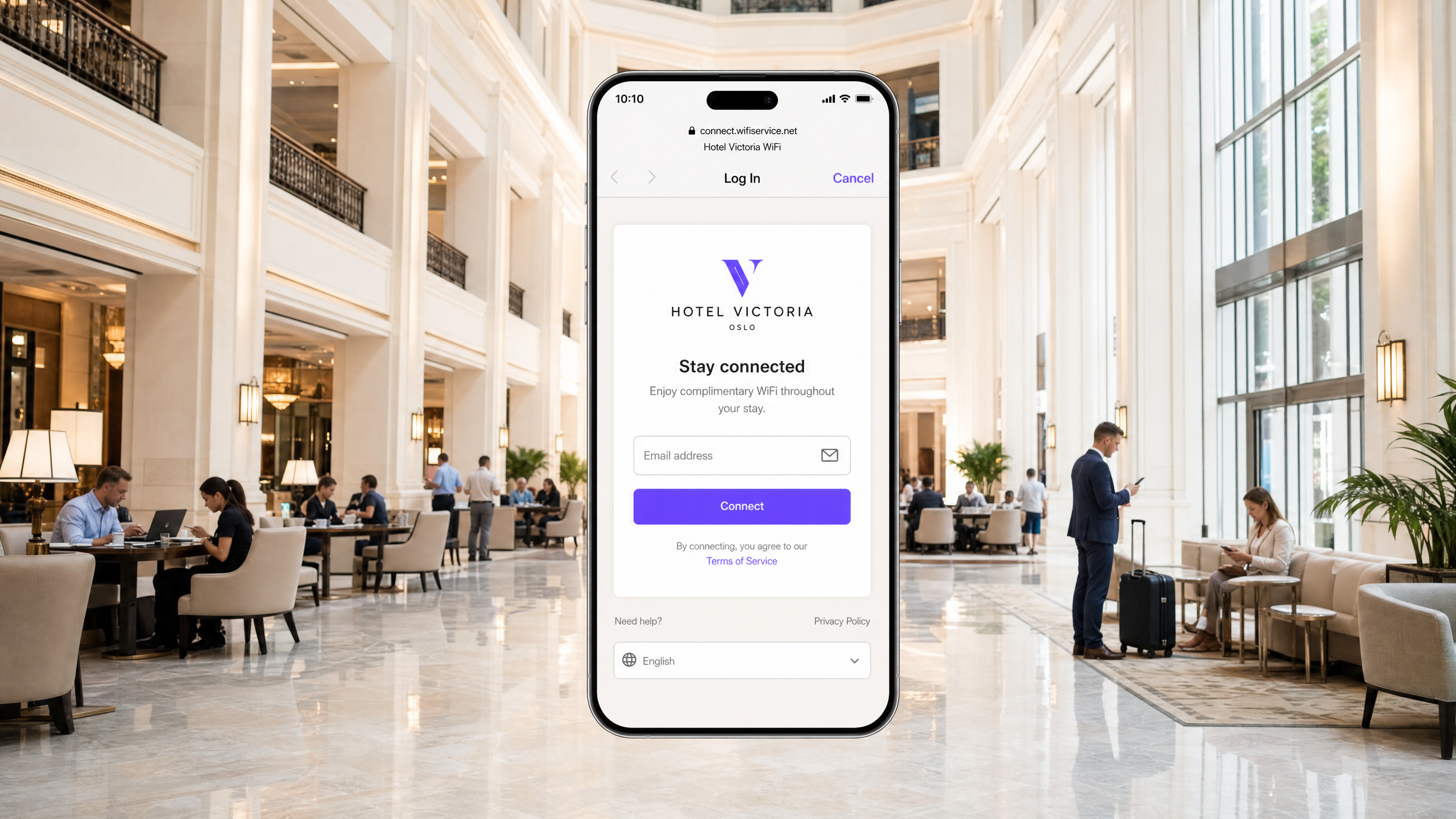
कार्यकारी सारांश
आधुनिक उद्यम स्थलों (enterprise venues) के लिए, guest वायरलेस नेटवर्क अब केवल एक साधारण सुविधा नहीं रह गए हैं; वे ग्राहक जुड़ाव, परिचालन खुफिया (operational intelligence) और ब्रांड पोजिशनिंग के लिए एक महत्वपूर्ण संपर्क बिंदु का प्रतिनिधित्व करते हैं। हालांकि, इन नेटवर्कों का व्यावसायिक मूल्य पूरी तरह से प्रारंभिक कनेक्शन अनुभव की विश्वसनीयता पर निर्भर करता है। जब कोई अतिथि किसी नेटवर्क से कनेक्ट होता है और Captive Portal लॉगिन पेज दिखाई देने में विफल रहता है, तो स्थल को तुरंत फ्रंट-ऑफ-हाउस घर्षण (friction) में वृद्धि, सहायता टिकटों में उछाल और डेटा कैप्चर के अवसरों के नुकसान का सामना करना पड़ता है।
इन विफलताओं के मूल में सुरक्षित वेब मानकों और नेटवर्क-स्तरीय इंटरसेप्शन तकनीकों के बीच एक मौलिक तनाव है जो ऐतिहासिक रूप से Captive Portal द्वारा उपयोग की जाती रही हैं। आधुनिक वेब ब्राउज़र और ऑपरेटिंग सिस्टम उपयोगकर्ताओं को मैन-इन-द-मिडल (man-in-the-middle) हमलों से बचाने के लिए अनधिकृत ट्रैफ़िक रीडायरेक्शन का पता लगाने और उसे ब्लॉक करने के लिए डिज़ाइन किए गए हैं। सटीक HTTP और DNS रीडायरेक्शन अनुक्रमों, HSTS जैसे सुरक्षित प्रोटोकॉल के प्रभाव और आधुनिक मोबाइल उपकरणों की गोपनीयता सुविधाओं को समझकर, IT टीमें मजबूत वायरलेस एक्सेस समाधान तैयार कर सकती हैं। यह मार्गदर्शिका "guest wifi not connecting captive portal" विफलता की स्थिति के पीछे के मूल कारणों का निदान और समाधान करने के लिए निश्चित ढांचा प्रदान करती है।
संपूर्ण तकनीकी ब्रीफिंग सुनें:
तकनीकी गहन विश्लेषण: Captive Portal डिटेक्शन वास्तव में कैसे काम करता है
Captive Portal की समस्या का निवारण करने के लिए, आपको पहले यह समझना होगा कि Captive Portal वास्तव में नेटवर्क स्तर पर क्या करता है। अधिकांश लोग इसे केवल एक लॉगिन पेज के रूप में सोचते हैं। यह वास्तव में एक नेटवर्क-स्तरीय ट्रैफ़िक इंटरसेप्शन तंत्र है।
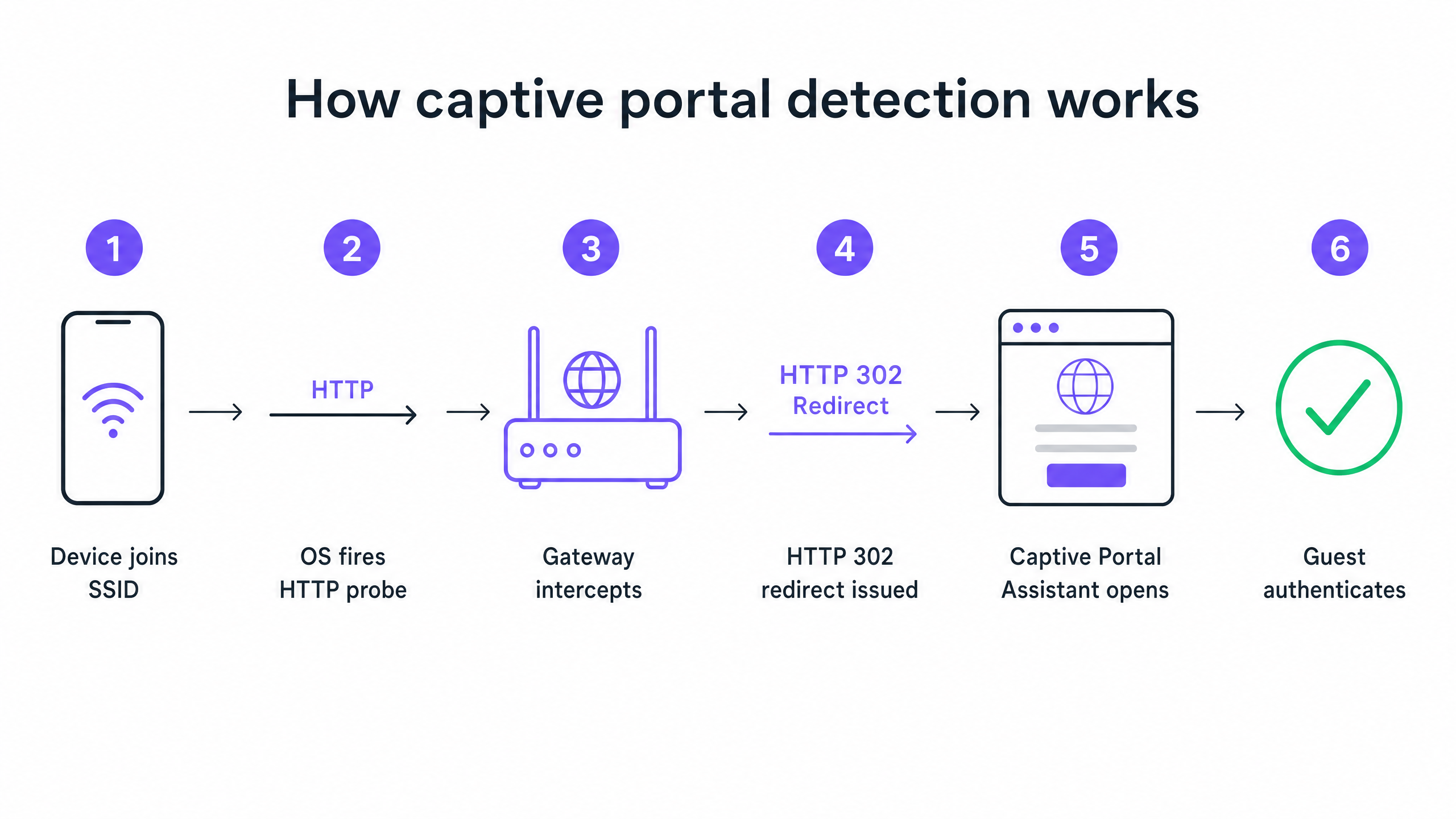
जब कोई डिवाइस आपके guest SSID से जुड़ता है और DHCP के माध्यम से एक IP पता प्राप्त करता है, तो ऑपरेटिंग सिस्टम उपयोगकर्ता द्वारा ब्राउज़र खोलने की प्रतीक्षा नहीं करता है। पृष्ठभूमि में, एक सिस्टम सेवा तुरंत विक्रेता-नियंत्रित जांच URL (probe URL) पर एक अनएन्क्रिप्टेड HTTP GET अनुरोध भेजती है। Apple डिवाइस captive.apple.com पर क्वेरी करते हैं। Android डिवाइस connectivitycheck.gstatic.com पर क्वेरी करते हैं। Windows डिवाइस msftconnecttest.com पर क्वेरी करते हैं।
यदि नेटवर्क के पास खुली इंटरनेट पहुंच है, तो ये जांच (probes) अपनी अपेक्षित प्रतिक्रियाएं लौटाते हैं, और ऑपरेटिंग सिस्टम यह निष्कर्ष निकालता है कि सब कुछ ठीक है। लेकिन एक guest नेटवर्क पर, आपका वायरलेस गेटवे या कंट्रोलर उस HTTP जांच को इंटरनेट तक पहुंचने से पहले ही रोक (intercept) लेता है। अपेक्षित प्रतिक्रिया के बजाय, गेटवे आपके Captive Portal स्प्लैश पेज की ओर इशारा करते हुए एक HTTP 302 रीडायरेक्ट लौटाता है। ऑपरेटिंग सिस्टम अप्रत्याशित रीडायरेक्ट का पता लगाता है, महसूस करता है कि यह एक Captive Portal के पीछे है, और लॉगिन पेज प्रदर्शित करने के लिए एक सैंडबॉक्स्ड ब्राउज़र विंडो खोलता है।
छह प्राथमिक विफलता मोड
जब कोई अतिथि रिपोर्ट करता है कि WiFi कनेक्ट नहीं हो रहा है, तो विफलता लगभग हमेशा इस अनुक्रम को बाधित करने वाले छह मूल कारणों में से एक से उत्पन्न होती है।
1. DHCP पूल की समाप्ति (DHCP Pool Exhaustion) यह उच्च-घनत्व (high-density) वाले आयोजनों में एक मूक हत्यारा है। यदि आप एक मानक /24 सबनेट पर 2,000 सहभागियों के साथ एक सम्मेलन चलाते हैं, तो आपके पास 254 उपयोग करने योग्य IP पते होते हैं। यदि आपका DHCP लीज समय डिफ़ॉल्ट 24 घंटे पर सेट है, तो आप दरवाजे खुलने के कुछ ही मिनटों के भीतर उस पूल को समाप्त कर देंगे। इसके बाद का प्रत्येक कनेक्शन प्रयास Captive Portal अनुक्रम शुरू होने से पहले ही विफल हो जाता है।
2. DNS इंटरसेप्शन विफलता (DNS Interception Failure) Captive Portal रीडायरेक्ट गेटवे द्वारा HTTP जांच को रोकने पर निर्भर करता है। लेकिन जांच के लिए पहले एक DNS लुकअप की आवश्यकता होती है। यदि आपका DNS कॉन्फ़िगरेशन पूर्व-प्रमाणित (pre-authenticated) क्लाइंट्स को बाहरी डोमेन नामों को हल (resolve) करने की अनुमति नहीं देता है, तो जांच कभी शुरू नहीं होती है।
3. अपूर्ण वॉल्ड गार्डन (Incomplete Walled Garden) वॉल्ड गार्डन (walled garden) यह परिभाषित करता है कि अप्रमाणित अतिथि किन बाहरी डोमेन तक पहुँच सकते हैं। यदि आपका पोर्टल स्प्लैश पेज किसी ऐसे CDN से एसेट लोड करता है जो वॉल्ड गार्डन में नहीं है, तो पेज एक खाली स्क्रीन के रूप में रेंडर होता है। यदि आप Google, Apple, या Facebook के माध्यम से सोशल लॉगिन की पेशकश करते हैं, तो उन प्रदाताओं द्वारा उपयोग किए जाने वाले प्रत्येक OAuth डोमेन को श्वेतसूची (whitelist) में डाला जाना चाहिए। सोशल पहचान प्रदाता नियमित रूप से अपने CDN IP श्रेणियों को अपडेट करते हैं। छह महीने पहले पूरी तरह से काम करने वाला वॉल्ड गार्डन आज चुपचाप खराब हो सकता है।
4. HSTS द्वारा रीडायरेक्ट को ब्लॉक करना HTTP Strict Transport Security (HSTS) एक ब्राउज़र सुरक्षा नीति है जो केवल HTTPS पर विशिष्ट डोमेन के कनेक्शन को बाध्य करती है। यदि कोई अतिथि HSTS-प्रीलोडेड डोमेन से संपर्क करने का प्रयास करता है, और आपका गेटवे पोर्टल पर रीडायरेक्ट करने के लिए उस HTTPS अनुरोध को रोकने का प्रयास करता है, तो ब्राउज़र एक प्रमाणपत्र बेमेल (certificate mismatch) का पता लगाता है। यह एक गैर-बायपास करने योग्य सुरक्षा चेतावनी प्रस्तुत करता है और रीडायरेक्ट को पूरी तरह से ब्लॉक कर देता है। सही समाधान यह है कि कभी भी HTTPS इंटरसेप्शन का प्रयास न करें। आपके गेटवे को केवल अनएन्क्रिप्टेड HTTP कैनरी जांच (canary probes) को रीडायरेक्ट करना चाहिए।
5. Guest डिवाइस पर सक्रिय VPN एक VPN डिवाइस से सभी ट्रैफ़िक को एन्क्रिप्ट करता है और आपके गेटवे तक पहुँचने से पहले इसे एक बाहरी टनल के माध्यम से रूट करता है। आपका गेटवे कभी भी HTTP जांच को नहीं देख पाता है। Captive Portal डिटेक्शन अनुक्रम कभी ट्रिगर नहीं होता है।
6. MAC एड्रेस रैंडमाइजेशन आधुनिक iOS और Android डिवाइस गोपनीयता सुविधा के रूप में डिफ़ॉल्ट रूप से रैंडमाइज्ड MAC पतों का उपयोग करते हैं। चूंकि Captive Portal सत्र की स्थिति (session state) को MAC पते द्वारा ट्रैक किया जाता है, इसलिए एक अतिथि जिसने एक घंटे पहले प्रमाणित किया था, उसे अपने डिवाइस का MAC बदलने के बाद फिर से लॉगिन पेज प्रस्तुत किया जा सकता है।
कार्यान्वयन मार्गदर्शिका: विश्वसनीयता के लिए आर्किटेक्चर तैयार करना
एक अच्छी तरह से कॉन्फ़िगर किए गए Captive Portal परिनियोजन (deployment) के लिए आपके Guest WiFi बुनियादी ढांचे में सावधानीपूर्वक समन्वय की आवश्यकता होती है।
चरण 1: DHCP आर्किटेक्चर को अनुकूलित करें
किसी भी ऐसे स्थल के लिए जो इससे अधिक की उम्मीद कर रहा है 200 समवर्ती डिवाइस, एकल /24 सबनेट से दूर हटें। /22 या उससे बड़े का उपयोग करें, और लीज समय को अपने वेन्यू ड्वेल प्रोफाइल से मेल खाने के लिए सेट करें। एक होटल लीज को 8 घंटे पर सेट करता है। एक स्टेडियम लीज को 3 घंटे पर सेट करता है। एक शॉपिंग सेंटर लीज को 90 मिनट पर सेट करता है। एक कॉन्फ्रेंस सेंटर लीज को 30 मिनट पर सेट करता है।
चरण 2: वॉल्ड गार्डन प्रबंधन को स्वचालित करें
प्रत्येक बड़े इवेंट से पहले अपने वॉल्ड गार्डन को सत्यापित करें। Purple के प्लेटफॉर्म पर, हम अपनी क्लाउड-प्रबंधित सेवा के हिस्से के रूप में इन वॉल्ड गार्डन प्रविष्टियों को स्वचालित रूप से बनाए रखते हैं और अपडेट करते हैं, जिससे आपकी टीम से मैन्युअल रखरखाव का बोझ हट जाता है। हम Cisco Meraki, HPE Aruba, Ruckus, Juniper Mist, Ubiquiti UniFi, Cambium, Extreme और Fortinet के साथ एकीकरण का समर्थन करते हैं।
चरण 3: RFC 8910 (DHCP Option 114) लागू करें
HSTS संघर्षों के लिए दीर्घकालिक मानक-आधारित समाधान RFC 8910 है, जो DHCP Option 114 को परिभाषित करता है। यह विकल्प आपके DHCP सर्वर को सीधे क्लाइंट डिवाइस पर Captive Portal URL का विज्ञापन करने की अनुमति देता है, जिससे HTTP रीडायरेक्शन की आवश्यकता पूरी तरह से समाप्त हो जाती है। iOS 14 और Android 11 और उससे ऊपर के संस्करण मूल रूप से इसका समर्थन करते हैं।
सर्वोत्तम प्रथाएं
लौटने वाले आगंतुकों के लिए प्रोफाइल-आधारित प्रमाणीकरण तैनात करें Captive Portals एक परिपक्व तकनीक हैं, लेकिन इनमें अंतर्निहित घर्षण होता है। Passpoint और 802.1X पर निर्मित OpenRoaming, लौटने वाले मेहमानों को बिना लॉगिन पेज देखे स्वचालित रूप से और सुरक्षित रूप से कनेक्ट करने की अनुमति देता है। Purple हमारी Connect योजना के तहत OpenRoaming के लिए एक मुफ्त पहचान प्रदाता के रूप में कार्य करता है। Premier Inn और Manchester Airports Group जैसे वेन्यू बार-बार आने वाले आगंतुकों के लिए पुनः प्रमाणीकरण के घर्षण को समाप्त करने के लिए इसे पहले से ही तैनात कर रहे हैं, जबकि पूर्ण GDPR अनुपालन और प्रथम-पक्ष डेटा कैप्चर को बनाए रख रहे हैं।
कभी भी प्रमाणित डिवाइस से परीक्षण न करें एक गलती जो कई IT टीमों को फंसाती है: ऐसे डिवाइस से पोर्टल का परीक्षण करना जो पहले प्रमाणित हो चुका है। आपका डिवाइस सत्र अभी भी सक्रिय है, इसलिए आप पोर्टल को पूरी तरह से बायपास कर देते हैं और निष्कर्ष निकालते हैं कि सब कुछ काम कर रहा है। हमेशा एक नए, अप्रमाणित डिवाइस से परीक्षण करें।
संबंधित मार्गदर्शन पढ़ें अपने नेटवर्क को सुरक्षित करने के बारे में अधिक पढ़ने के लिए, हमारा What Is Secure WiFi: Essential Guide for Business 2026 और हमारा Bandwidth Management: A Practical Guide for 2026 देखें।
समस्या निवारण और जोखिम न्यूनीकरण
जब कोई मेहमान कनेक्शन की समस्या की रिपोर्ट करता है, तो आपके फ्रंट-ऑफ-हाउस स्टाफ को एक त्वरित नैदानिक ढांचे की आवश्यकता होती है।
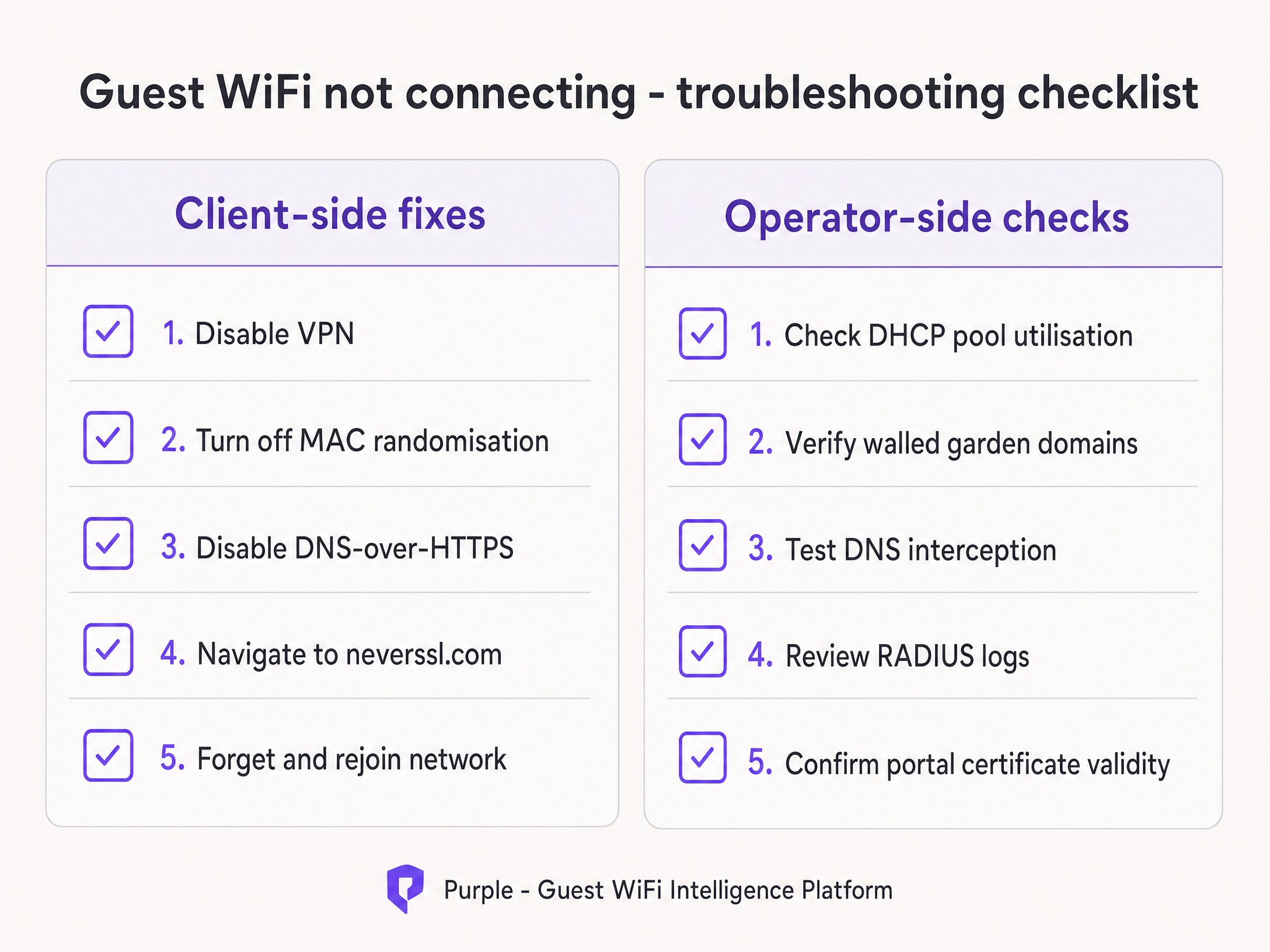
अपने कर्मचारियों को पहले क्लाइंट-साइड सुधारों को आजमाने का निर्देश दें:
- मेहमान से किसी भी सक्रिय VPN को अक्षम करने के लिए कहें।
- मेहमान को अपने विशिष्ट SSID के लिए MAC रैंडमाइजेशन (निजी पता) बंद करने का निर्देश दें।
- मेहमान से एक मानक ब्राउज़र खोलने और
http://neverssl.comपर जाने के लिए कहें। चूंकि यह साइट कभी भी SSL का उपयोग न करने के लिए डिज़ाइन की गई है, इसलिए गेटवे आसानी से अनुरोध को रोक सकता है और रीडायरेक्ट को ट्रिगर कर सकता है। - यदि सब कुछ विफल हो जाता है, तो मेहमान से नेटवर्क को भूल जाने और फिर से जुड़ने के लिए कहें।
यदि समस्या कई मेहमानों में बनी रहती है, तो ऑपरेटर-साइड जांच पर आगे बढ़ें। तुरंत DHCP पूल उपयोग की समीक्षा करें, Access-Reject संदेशों के लिए RADIUS लॉग सत्यापित करें, और DNS इंटरसेप्शन का परीक्षण करें।
ROI और व्यावसायिक प्रभाव
एक विश्वसनीय Captive Portal का व्यावसायिक प्रभाव IT मेट्रिक्स से कहीं अधिक है। कनेक्शन विफलताओं को समाप्त करके, वेन्यू सीधे अपने मार्केटिंग डेटाबेस की विकास दर को बढ़ाते हैं।
Harrods पर विचार करें, जिसने अपने WiFi Analytics और Captive Portal प्रवाह को अनुकूलित करके 57 गुना मार्केटिंग ROI प्राप्त किया। या AGS Airports, जिसने निर्बाध श्रेणीबद्ध बैंडविड्थ प्रबंधन के माध्यम से 842% ROI प्रदान किया। एक विश्वसनीय कनेक्शन अनुभव आधुनिक फीडबैक संग्रह डेटा एकत्र करने के लिए मूलभूत आवश्यकता है, जिसका विवरण हमारे Modern Feedback Collection: A Playbook for Venues 2026 गाइड में दिया गया है।
प्रत्येक विफल Captive Portal लोड एक खोया हुआ ग्राहक प्रोफ़ाइल है। इस गाइड में उल्लिखित आर्किटेक्चरल मानकों को लागू करके, IT लीडर अपने वायरलेस इंफ्रास्ट्रक्चर को लागत केंद्र से एक विश्वसनीय, अनुपालन वाले राजस्व जनरेटर में बदल देते हैं।
मुख्य परिभाषाएं
Captive Portal
A network-level interception mechanism that forces an unauthenticated user to view and interact with a specific web page before being granted access to the public internet.
When IT teams deploy guest networks, the captive portal is the primary tool for enforcing terms of service and capturing first-party marketing data.
Walled Garden
A pre-authentication access control list (ACL) that defines which external IP addresses or domain names an unauthenticated device is permitted to access.
Crucial for allowing devices to load the captive portal splash page assets and communicate with social identity providers before the user has fully authenticated.
HSTS (HTTP Strict Transport Security)
A web security policy mechanism that helps to protect websites against man-in-the-middle attacks such as protocol downgrade attacks and cookie hijacking.
HSTS is the primary reason why intercepting HTTPS traffic to display a captive portal results in severe browser security warnings rather than a successful redirect.
RFC 8910 (DHCP Option 114)
An IETF standard that allows a DHCP server to directly advertise the URL of the captive portal to the client device during the initial IP address assignment.
This standard eliminates the need for HTTP redirection entirely, solving the HSTS conflict and providing a cleaner connection experience.
MAC Address Randomisation
A privacy feature in modern mobile operating systems that generates a new, random MAC address for each wireless network the device joins, or periodically rotates the address.
This feature breaks traditional captive portal session persistence, forcing returning guests to log in repeatedly unless the venue upgrades to profile-based authentication like OpenRoaming.
OpenRoaming
A global roaming federation built on Passpoint and 802.1X that allows users to connect to public WiFi networks automatically and securely without interacting with a captive portal.
Purple acts as a free identity provider for OpenRoaming under the Connect plan, allowing venues to eliminate re-authentication friction.
HTTP 302 Redirect
An HTTP response status code indicating that the requested resource resides temporarily under a different URI.
This is the specific mechanism the wireless gateway uses to redirect the device's HTTP canary probe to the captive portal splash page.
Canary Probe
An automated, unencrypted HTTP request sent by an operating system immediately after connecting to a network to test for internet connectivity.
Apple uses captive.apple.com; Android uses connectivitycheck.gstatic.com. Intercepting these probes is the foundation of captive portal detection.
हल किए गए उदाहरण
A 2,500-capacity conference centre in London is hosting a major technology summit. Within 45 minutes of the keynote beginning, attendees report that the 'guest wifi not connecting captive portal' issue is widespread. The SSID is visible, but devices either fail to obtain an IP address or receive an IP but see no login screen. The network is configured with a single /23 subnet and 12-hour DHCP leases.
- Identify DHCP Exhaustion: A /23 subnet provides 1,022 usable IP addresses. With 2,500 attendees, the pool is undersized. The 12-hour lease means addresses are not returned to the pool when attendees leave the building for lunch.
- Expand the Subnet: Reconfigure the guest VLAN to use a /21 subnet, providing 4,094 usable IP addresses, comfortably exceeding the venue capacity.
- Reduce Lease Time: Change the DHCP lease time from 12 hours to 30 minutes. This ensures that IP addresses from devices that disconnect (e.g., when an attendee leaves) are quickly reclaimed.
- Clear Leases: Clear the existing DHCP bindings to force active devices to renew under the new parameters.
A retail chain rolls out a new captive portal featuring social login via Google and Facebook. During testing, the IT team finds that the portal splash page loads correctly, but when a user taps 'Log in with Google', the page times out and fails to connect. Standard email registration works perfectly.
- Diagnose Walled Garden Failure: The timeout indicates that the unauthenticated client device cannot reach the Google OAuth servers to complete the authentication handshake.
- Audit Walled Garden Entries: Review the pre-authentication access control list on the wireless controller (e.g., Cisco Meraki or HPE Aruba).
- Add Required Domains: Add the specific Google and Facebook authentication domains (e.g., accounts.google.com) to the walled garden. Crucially, add wildcard entries for the CDNs that serve the login page assets (e.g., *.gstatic.com).
- Implement Automated Updates: Because these providers change their IP ranges frequently, configure the controller to use wildcard domain snooping rather than static IP whitelisting.
अभ्यास प्रश्न
Q1. A retail venue reports that their captive portal works perfectly for guests using standard email registration, but guests attempting to use the 'Log in with Facebook' option experience a blank white screen after tapping the button. What is the most likely architectural cause?
संकेत: Consider what network resources the unauthenticated device needs to reach to render the Facebook login prompt.
मॉडल उत्तर देखें
The venue has an incomplete walled garden. The wireless gateway is blocking the unauthenticated device from reaching Facebook's OAuth domains or CDN infrastructure. The IT team must update the pre-authentication access control list to include all required wildcard domains for Facebook authentication.
Q2. You are designing the guest WiFi architecture for a major football stadium. The venue holds 60,000 fans, and matches last approximately 3 hours. The current configuration uses a /16 subnet and 24-hour DHCP lease times. During the first match, thousands of fans report they cannot connect. What changes should you implement?
संकेत: Calculate the total available IP addresses in the subnet versus the venue capacity, and evaluate the lifecycle of those addresses.
मॉडल उत्तर देखें
The network is experiencing DHCP pool exhaustion. A /16 subnet provides 65,534 usable IP addresses, which is theoretically enough for 60,000 fans. However, with a 24-hour lease time, any device that connects briefly (e.g., staff, vendors, or fans walking past) consumes an IP address that will not be released until the next day. The solution is to reduce the DHCP lease time to 3 hours to match the venue's dwell profile, ensuring IP addresses are recycled efficiently during the event.
Q3. A hotel guest complains that the captive portal login page does not appear automatically on their laptop. When the front desk staff checks the guest's device, they notice a corporate VPN client is running. Why does the VPN prevent the portal from loading?
संकेत: Consider how a VPN routes traffic and how the gateway intercepts the captive portal probe.
मॉडल उत्तर देखें
The VPN encrypts all traffic from the laptop and attempts to route it through a secure tunnel to the corporate server. Because the traffic is encrypted, the local wireless gateway cannot inspect it, cannot identify the unencrypted HTTP canary probe, and therefore cannot issue the HTTP 302 redirect required to trigger the captive portal. The guest must disable the VPN, authenticate via the portal, and then re-enable the VPN.
इस श्रृंखला में आगे पढ़ें
स्वचालित WiFi प्रमाणपत्र नामांकन के लिए SCEP को कैसे लागू करें
यह मार्गदर्शिका बताती है कि एंटरप्राइज़ स्थानों पर स्वचालित WiFi प्रमाणपत्र नामांकन के लिए SCEP (Simple Certificate Enrollment Protocol) को कैसे लागू किया जाए। इसमें PKI डिज़ाइन और MDM एकीकरण से लेकर अनिवार्य तीन-चरणीय परिनियोजन अनुक्रम तक - संपूर्ण आर्किटेक्चरल ब्लूप्रिंट शामिल है - और IT प्रबंधकों और नेटवर्क आर्किटेक्ट्स को दिखाता है कि कैसे साझा क्रेडेंशियल्स को समाप्त किया जाए, प्रमाणपत्र जीवनचक्र प्रबंधन को स्वचालित किया जाए, और बड़े पैमाने पर PCI DSS और GDPR आवश्यकताओं को पूरा किया जाए।
GDPR और Guest WiFi: वेन्यू मार्केटर्स और IT के लिए अनुपालन गाइड
यह गाइड IT प्रबंधकों और वेन्यू ऑपरेटरों को यह सुनिश्चित करने के लिए एक व्यावहारिक ढांचा प्रदान करती है कि Guest WiFi सेवाएं पूरी तरह से GDPR अनुपालन वाली हों। इसमें तकनीकी आर्किटेक्चर, सहमति तंत्र, डेटा प्रतिधारण, और अनुपालन को एक सुरक्षित फर्स्ट-पार्टी डेटा एसेट में कैसे बदला जाए, शामिल है।
Guest WiFi कैप्टिव पोर्टलों के साथ WeChat प्रमाणीकरण को एकीकृत करना
यह गाइड बताती है कि एंटरप्राइज़ Guest WiFi कैप्टिव पोर्टलों में WeChat OAuth 2.0 प्रमाणीकरण को कैसे एकीकृत किया जाए। इसमें डुअल-प्लेटफ़ॉर्म पंजीकरण आवश्यकताओं, फर्स्ट-पार्टी डेटा कैप्चर के लिए स्कोप चयन, RADIUS Change of Authorization के माध्यम से नेटवर्क प्रवर्तन, और GDPR व चीन के PIPL के अनुपालन को कवर किया गया है। आतिथ्य, खुदरा और आयोजनों में स्थल ऑपरेटरों को बड़े पैमाने पर WeChat लॉगिन Guest WiFi को तैनात करने के लिए ठोस कार्यान्वयन कदम, वास्तविक दुनिया के केस स्टडीज और सुरक्षा सुदृढ़ीकरण मार्गदर्शन मिलेंगे।