

Come Costruire un Sondaggio Clienti Utilizzando la Tua Piattaforma WiFi
Questa guida fornisce a responsabili IT, architetti di rete e direttori delle operazioni di sede passaggi pratici per implementare sondaggi clienti post-visita tramite reti WiFi aziendali. Copre l'intera architettura tecnica — dall'autenticazione tramite captive portal e le soglie di dwell time alla selezione delle metriche del sondaggio (NPS vs CSAT) e all'integrazione CRM basata su API. L'implementazione di sondaggi tramite una piattaforma WiFi trasforma l'infrastruttura di rete esistente in un motore di intelligence clienti in tempo reale, offrendo tassi di risposta da tre a cinque volte superiori rispetto alle tradizionali campagne email post-visita.
🎧 Ascolta questa guida
Visualizza trascrizione
Riepilogo Esecutivo
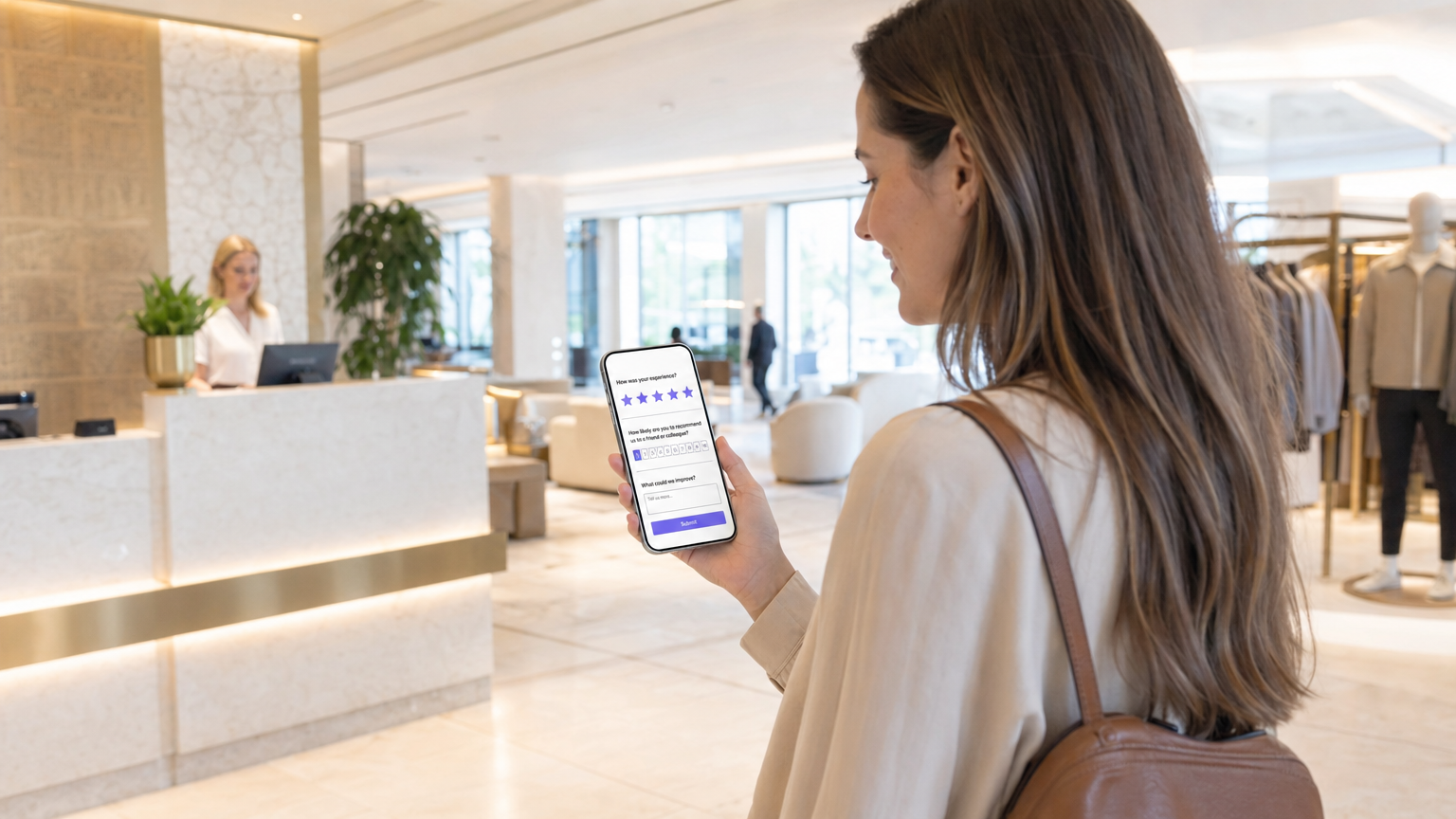
Per le sedi aziendali — dagli ambienti Retail alle proprietà Hospitality — la rete WiFi per gli ospiti è una delle risorse di dati più sottoutilizzate nello stack tecnologico. Mentre i meccanismi di feedback tradizionali si basano sull'inserimento manuale dei dati o su campagne email "batch-and-blast", l'integrazione di sondaggi sulla soddisfazione del cliente direttamente nell'esperienza WiFi consente un feedback contestuale e ad alta conversione su larga scala. Questa guida descrive come progettare un sistema di sondaggi attivato dal WiFi utilizzando le soluzioni Guest WiFi e WiFi Analytics di Purple. Trattiamo le meccaniche di implementazione, gli algoritmi di temporizzazione per i trigger post-visita, le differenze tecniche tra le implementazioni NPS e CSAT e le integrazioni API necessarie per convogliare i dati di risposta nel tuo CRM o piattaforma di analisi. Il risultato è un ciclo di feedback automatizzato, conforme e direttamente collegato al percorso fisico dell'ospite.
Approfondimento Tecnico
Costruire un sistema di sondaggi robusto su una rete WiFi pubblica o aziendale richiede più di un captive portal. Richiede un'architettura sofisticata che rispetti la privacy degli utenti, aderisca ai framework di consenso GDPR e CCPA e garantisca un'elevata produttività senza degradare l'esperienza di rete primaria.
Architettura e Flusso di Dati
Quando un ospite si connette alla rete, il sistema registra la sessione e autentica l'utente tramite un captive portal, spesso utilizzando un modello di provider di identità senza attriti come OpenRoaming. Il componente critico è il motore di analisi che monitora il dwell time in tempo reale. Una volta raggiunta la soglia di dwell time e l'utente si disconnette o lascia l'area georeferenziata, un webhook o una chiamata API attiva il meccanismo di consegna del sondaggio — tipicamente SMS o email.
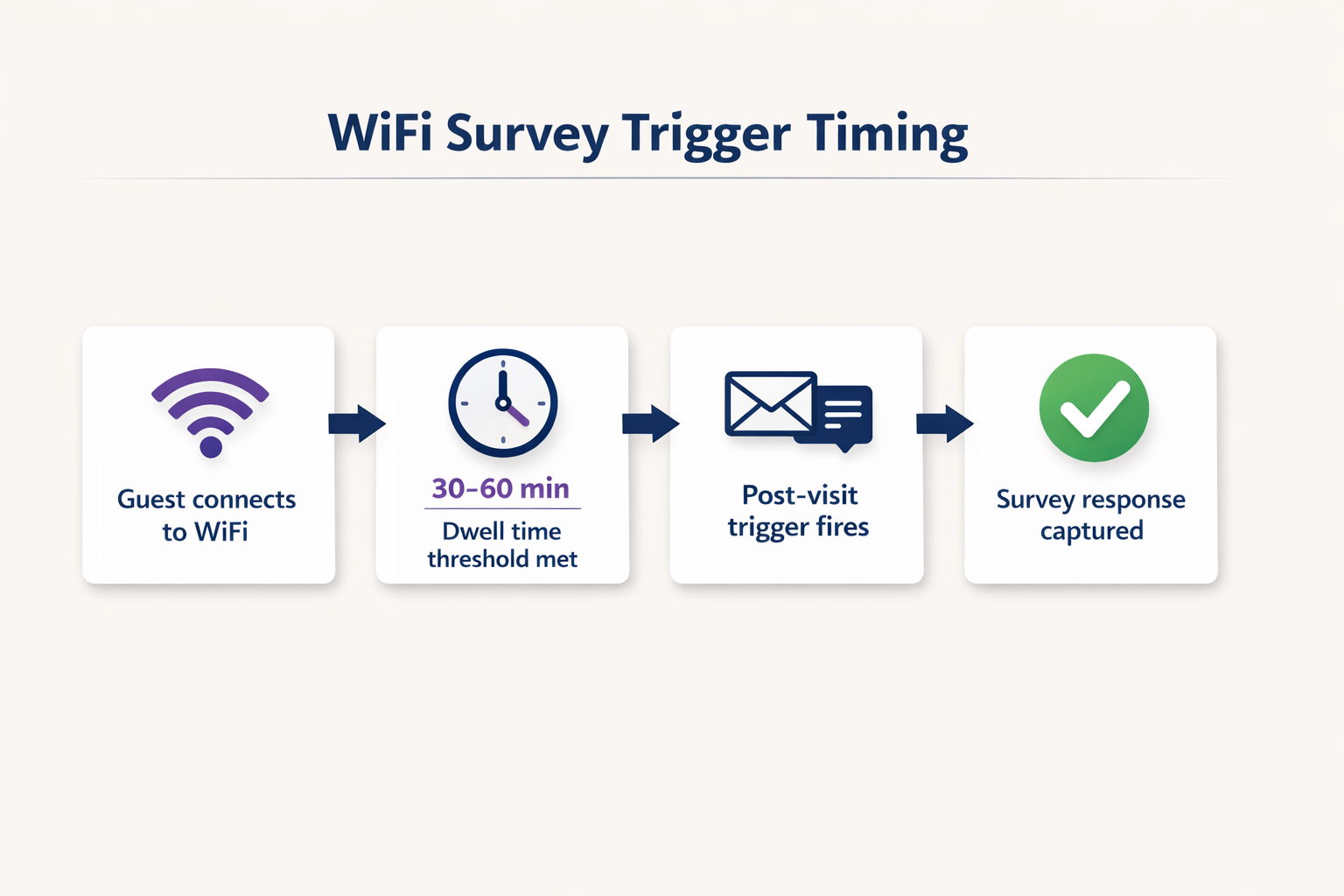
Questa architettura richiede una solida integrazione tra gli Access Point (AP), il controller di rete e la piattaforma di analisi cloud. Per maggiori informazioni sui modelli di infrastruttura sottostanti, consulta la nostra guida su Architettura dell'Internet of Things: Una Guida Completa . Il flusso di dati può essere riassunto come segue: il livello AP cattura la sessione; il livello di analisi la arricchisce con dati di dwell time e di zona; il livello di integrazione attiva il webhook; e il livello CRM riceve ed elabora la risposta al sondaggio.
Selezione della Metrica del Sondaggio: NPS vs CSAT vs CES
La scelta della metrica del sondaggio è una decisione strategica, non tecnica — ma ha implicazioni dirette su come si configura il trigger e su come si archiviano e analizzano i dati di risposta.
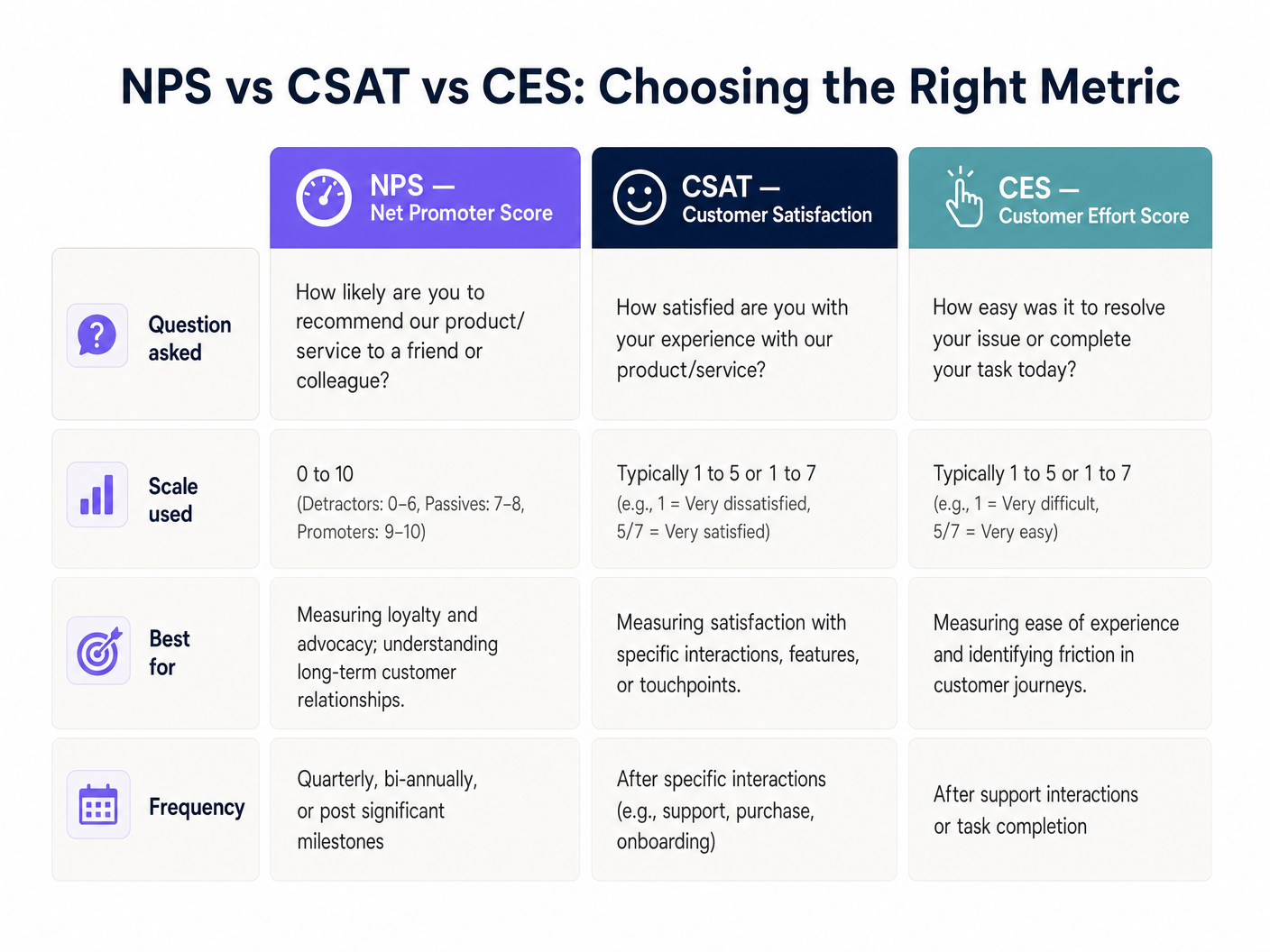
Il Net Promoter Score (NPS) pone una singola domanda su una scala da zero a dieci ed è più adatto per misurare la fedeltà complessiva al brand. La Customer Satisfaction (CSAT) utilizza una scala da uno a cinque o da uno a sette ed è ideale per misurare la soddisfazione rispetto a un'interazione o un punto di contatto specifico. Il Customer Effort Score (CES) misura quanto sia stato facile per il cliente raggiungere il proprio obiettivo, il che è particolarmente rilevante in ambienti Healthcare o Transport dove l'attrito nel percorso di servizio è una preoccupazione operativa primaria.
Sicurezza e Conformità
La raccolta dei dati deve aderire rigorosamente agli standard GDPR, CCPA e, ove applicabile, PCI DSS. La randomizzazione del MAC nei moderni sistemi operativi mobili — una funzionalità standard in iOS 14 e Android 10 in poi — richiede tecniche avanzate di risoluzione dell'identità. Il sistema deve collegare la sessione a un'email o un numero di telefono verificato acquisito durante il login iniziale al captive portal, piuttosto che basarsi sull'indirizzo MAC hardware. Per un trattamento dettagliato dei protocolli di sicurezza dei dati in questo contesto, consulta Come Proteggere i Dati dei Clienti Raccolti tramite WiFi .
Guida all'Implementazione
L'implementazione di un sistema di sondaggi attivato dal WiFi comporta cinque passaggi concreti.
Passaggio 1 — Configurare il Captive Portal. Impostare la pagina iniziale di benvenuto per acquisire le informazioni di contatto necessarie (email o numero di telefono) in cambio dell'accesso WiFi gratuito. I termini e le condizioni devono dichiarare esplicitamente che questi dati possono essere utilizzati per scopi di feedback. Questa è la base legale dell'intero sistema.
Passaggio 2 — Definire le Soglie di Dwell Time. Non ogni connessione giustifica un sondaggio. Un utente che passa davanti a una sede potrebbe connettersi per due minuti. Impostare un dwell time minimo appropriato al tipo di sede: 15 minuti per un ristorante a servizio rapido, da 30 a 45 minuti per un negozio al dettaglio, 2 ore per un hotel e 45 minuti per uno stadio o un centro congressi.
Passaggio 3 — Progettare il Sondaggio. Mantenerlo a una singola domanda principale. Una domanda NPS seguita da un campo di testo libero opzionale produce costantemente i tassi di completamento più elevati. Evitare sondaggi a più pagine per i trigger WiFi post-visita; la finestra di contesto è breve e l'attenzione dell'utente è limitata.
Passaggio 4 — Configurare il Meccanismo di Attivazione. Impostare la piattaforma di analisi per attivare un evento quando la sessione dell'utente termina. Questo evento dovrebbe attivare un'email o un SMS automatizzato contenente il link del sondaggio entro una o due ore dalla partenza. Ritardi superiori a due ore comportano un calo misurabile dei tassi di risposta.
Passaggio 5 — Integrare con il CRM. Utilizzare le API RESTful per convogliare le risposte del sondaggio didirettamente nel tuo CRM (es. Salesforce, HubSpot) o piattaforma di analisi. Configura flussi di lavoro automatizzati: se viene ricevuto un punteggio detrattore (NPS da 0 a 6), attiva un avviso immediato al responsabile di turno per il recupero del servizio in tempo reale.
Migliori Pratiche
La tempistica è la variabile più importante nell'implementazione dei sondaggi WiFi. L'invio del sondaggio entro una o due ore dalla partenza dell'ospite dalla struttura produce costantemente tassi di risposta tra il 15 e il 30 percento. Attendere 24 ore riduce questo valore a meno del 5 percento nella maggior parte delle categorie di strutture.
La segmentazione spaziale è un fattore di differenziazione significativo per le strutture con layout complessi. Se la tua infrastruttura lo supporta, utilizza la mappatura delle zone degli Access Point — o più granularmente, Indoor Positioning System: UWB, BLE, & WiFi Guida — per personalizzare il sondaggio all'area specifica visitata dall'ospite. Un ospite dell'hotel che ha trascorso tre ore nella spa dovrebbe ricevere un sondaggio diverso da uno che ha utilizzato solo la business lounge.
L'ottimizzazione mobile è irrinunciabile. Oltre l'85 percento di questi sondaggi verrà completato su uno smartphone entro pochi minuti dalla ricezione della notifica. L'interfaccia utente del sondaggio deve essere completamente reattiva, caricarsi in meno di due secondi e richiedere non più di due tocchi per completare la domanda principale.
Per un contesto più ampio di implementazione WiFi aziendale, incluso come l'infrastruttura del sondaggio si inserisce in una strategia più ampia di strutture connesse, vedi Wi Fi in Auto: La Guida Completa per le Aziende 2026 .
Risoluzione dei Problemi e Mitigazione del Rischio
Bassi Tassi di Risposta sono più comunemente causati da sondaggi inviati troppo tardi o che richiedono troppe interazioni per essere completati. Diagnostica controllando il delta temporale medio tra la fine della sessione e la consegna del sondaggio. Se supera le due ore, riconfigura il trigger. Verifica inoltre che la prima domanda sia incorporata direttamente nel corpo dell'email anziché richiedere all'utente di cliccare per accedere a una pagina separata.
Problemi di Randomizzazione MAC si manifestano come visitatori di ritorno trattati come nuovi ospiti, interrompendo l'analisi longitudinale. La soluzione è architetturale: assicurati che il tuo captive portal si basi su identificatori autenticati dall'utente (email o telefono) come chiave primaria, non sull'indirizzo MAC del dispositivo. Questa è una modifica di configurazione nella piattaforma di analisi, non una correzione a livello di rete.
Errori del Filtro Spam uccideranno silenziosamente il tuo tasso di risposta. Assicurati che il tuo dominio di invio abbia record SPF, DKIM e DMARC validi. Usa un sottodominio dedicato per le email dei sondaggi (es. surveys.yourdomain.com) per isolare la reputazione della tua infrastruttura di invio transazionale dal tuo dominio di marketing principale.
Lacune nel Consenso e nella Conformità rappresentano la modalità di fallimento a più alto rischio. Se i termini del captive portal non coprono esplicitamente l'uso dei dati di contatto per scopi di feedback, stai operando al di fuori dei requisiti di base legale dell'Articolo 6 del GDPR. Conduci un audit trimestrale del linguaggio di consenso del tuo captive portal rispetto al tuo registro dei trattamenti dei dati.
ROI e Impatto sul Business
Il caso aziendale per i sondaggi attivati dal WiFi è semplice. Le strutture che adottano questo approccio riportano costantemente tassi di risposta da tre a cinque volte superiori rispetto alle tradizionali campagne email post-visita, principalmente perché il sondaggio arriva mentre l'esperienza è ancora fresca ed emotivamente rilevante.
Il driver di ROI più significativo, tuttavia, è il recupero del servizio in tempo reale. Integrando le risposte del sondaggio con un CRM tramite API, un punteggio detrattore può attivare un avviso immediato al personale di sala entro pochi secondi dall'invio. Negli ambienti dell'ospitalità, questo permette al team di intervenire prima che l'ospite effettui il check-out, convertendo una potenziale recensione a una stella in un reclamo risolto. Il costo di tale intervento è trascurabile rispetto al valore a vita di un ospite fidelizzato o al costo reputazionale di una recensione pubblica negativa.
Per gli operatori multi-sito — catene di vendita al dettaglio, gruppi alberghieri, gestori di stadi — i dati aggregati forniscono una capacità di benchmarking che è genuinamente difficile da replicare tramite qualsiasi altro canale. Puoi confrontare l'NPS per località, per giorno della settimana, per zona e per segmento demografico, il tutto arricchito con i dati di permanenza e di affluenza che la piattaforma di analisi WiFi già acquisisce. Questo trasforma il sondaggio da un semplice strumento di feedback in una risorsa di intelligence strategica.
Termini chiave e definizioni
Captive Portal
A web page that a user of a public-access network is obliged to view and interact with before network access is granted. It serves as the primary identity and consent collection point.
This is the architectural foundation of the entire survey system. Without a functioning captive portal that captures a verified email or phone number and explicit consent, no post-visit survey can be legally or technically delivered.
Dwell Time
The total duration a specific device remains connected to or within range of the WiFi network, measured from first association to final disconnection.
Used as the primary filtering metric to ensure surveys are only sent to patrons who spent enough time at the venue to have a meaningful experience. Configuring this threshold correctly is the most important operational decision in the deployment.
MAC Randomization
A privacy feature in modern operating systems (iOS 14+, Android 10+) where the device broadcasts a randomized MAC address when probing for or connecting to networks, rather than the hardware-assigned address.
IT teams must account for this by relying on authenticated user data (email or phone number captured at the portal) rather than hardware addresses to track return visits and build longitudinal profiles.
Webhook
An HTTP callback that sends real-time data from one application to another when a specific event occurs, without requiring the receiving application to poll for updates.
Used to instantly transmit the session-ended event from the WiFi analytics platform to the survey delivery system, enabling the sub-two-hour trigger timing that maximises response rates.
NPS (Net Promoter Score)
A customer loyalty metric based on a single question: 'How likely are you to recommend us to a friend or colleague?' scored on a zero-to-ten scale. Respondents are classified as Detractors (0-6), Passives (7-8), or Promoters (9-10). NPS = % Promoters minus % Detractors.
The most widely adopted brand-level satisfaction metric. Used by venue operators to track loyalty trends over time and benchmark against industry averages.
CSAT (Customer Satisfaction Score)
A metric measuring how satisfied a customer is with a specific product, service, or interaction, typically scored on a one-to-five or one-to-seven scale.
Deployed when operations directors need granular feedback on a specific facility or touchpoint, such as a newly renovated hotel restaurant or a stadium concourse.
OpenRoaming
A roaming federation standard that enables automatic and secure WiFi authentication across different operator networks without requiring the user to manually connect or enter credentials.
Reduces friction for the user connecting to the network, increasing the volume of authenticated sessions available for survey targeting while maintaining a secure, standards-compliant connection.
Service Recovery
The set of actions a service provider takes in response to a service failure to return the customer to a state of satisfaction and prevent churn.
The primary ROI driver for real-time WiFi surveys. An API integration that alerts staff immediately when a low score is submitted allows the team to intervene before the guest leaves, converting a potential negative review into a resolved complaint.
Geofencing
The use of GPS, WiFi signal strength, or Bluetooth beacons to define a virtual perimeter around a physical location, triggering actions when a device enters or exits that boundary.
Used in WiFi survey deployments to detect when a guest has physically left the venue, triggering the post-visit survey webhook without relying solely on network disconnection events.
Casi di studio
A 200-room hotel wants to measure guest satisfaction specifically for their new on-site restaurant, but they do not want to survey guests who only used the rooms and did not visit the restaurant.
The IT team configures the WiFi analytics platform to segment users based on Access Point (AP) location. They define a 'Restaurant Zone' comprising the four APs covering the dining area. A trigger rule is created: if a device connects to any AP in the Restaurant Zone for a continuous dwell time of more than 45 minutes, it becomes eligible for a CSAT survey. The trigger fires 30 minutes after the device disconnects from the Restaurant Zone, sending a five-question CSAT survey via email. The survey asks: overall satisfaction with the meal (1-5), food quality (1-5), service speed (1-5), staff friendliness (1-5), and an optional open-text field. Responses are piped via API into the hotel's Salesforce CRM, where a workflow alerts the F&B manager if any score falls below 3.
A large retail chain with 150 stores is experiencing a high bounce rate on their captive portal — only 12% of connecting devices are completing authentication — meaning they are not capturing the contact information needed to send post-visit surveys.
The network architect audits the captive portal flow and identifies that the registration form requires five fields: full name, email, phone number, postcode, and date of birth. The redesign reduces this to two mandatory fields (email address and checkbox consent) and adds a social login option via Google or Apple ID. The captive portal is also redesigned to load within 1.5 seconds on a 4G connection, addressing a secondary drop-off cause. Post-deployment, the authentication completion rate increases from 12% to 47% within 30 days, expanding the eligible survey population by approximately 4x without any changes to the network infrastructure.
Analisi degli scenari
Q1. A retail client wants to send a survey to every single person whose phone pings their WiFi network, including passersby on the pavement outside the store. As the solutions architect, what is your recommendation and why?
💡 Suggerimento:Consider the difference between a network probe and an authenticated session, and the legal basis required under GDPR to send a marketing communication.
Mostra l'approccio consigliato
Advise strongly against this approach on both legal and data quality grounds. First, a device probing the network has not authenticated through the captive portal, meaning no contact information has been captured and no consent has been obtained. Sending a survey to a device that has merely probed the network is technically impossible without additional tracking infrastructure, and any attempt to do so without explicit consent would breach GDPR Article 6. Second, surveying passersby who never entered the store would pollute the dataset with irrelevant responses. The correct approach is to implement a captive portal with a minimum dwell time threshold of at least 15 minutes, ensuring only actual shoppers who have authenticated and opted in are included in the survey pool.
Q2. Your deployment at a 5,000-capacity conference centre is successfully capturing authenticated emails, but the survey response rate is consistently below 1.5%. The current configuration sends the survey 24 hours after the event ends. How do you diagnose and resolve this?
💡 Suggerimento:Consider both the timing of the trigger and the format of the survey delivery itself.
Mostra l'approccio consigliato
The primary issue is timing. A 24-hour delay means the emotional context of the conference experience has largely faded, and the survey competes with the respondent's return-to-work inbox. Reconfigure the webhook trigger to fire within one to two hours of the network detecting session end. Additionally, audit the survey delivery format: if the email requires the recipient to click through to a separate page before seeing the first question, add friction that kills conversion. Embed the NPS zero-to-ten scale directly in the email body as clickable numbers, so the respondent can answer with a single tap without leaving their email client. These two changes — trigger timing and embedded question format — typically increase response rates from below 2% to between 15 and 25%.
Q3. A stadium IT director wants to use the WiFi survey data to trigger real-time alerts to cleaning staff if a specific concourse area receives negative feedback about facilities. How would you architect this end-to-end?
💡 Suggerimento:Think about spatial resolution at the AP zone level, the survey question design, and the API integration layer between the survey platform and the facilities management system.
Mostra l'approccio consigliato
The architecture requires three layers working in concert. First, configure the WiFi analytics platform to segment users by AP zone, defining distinct zones for each concourse section. Set a dwell time threshold of 20 minutes for the concourse zones to filter out transit traffic. Second, design the survey to include a zone-specific CSAT question: 'How would you rate the facilities in your area today?' on a one-to-five scale. The survey metadata must include the zone identifier from the session data. Third, integrate the survey platform's response API with the stadium's facilities management software (e.g., ServiceMax or a custom ticketing system). Configure a rule: if a CSAT score of 1 or 2 is received from a specific concourse zone, generate an automated webhook alert to the cleaning team's mobile devices, including the zone name and timestamp. This creates a closed-loop system where negative feedback triggers an operational response within minutes, before the majority of the crowd has left the venue.




