

Como Construir uma Pesquisa de Satisfação do Cliente Usando Sua Plataforma WiFi
Este guia oferece a líderes de TI, arquitetos de rede e diretores de operações de locais passos práticos para implementar pesquisas de satisfação do cliente pós-visita através de redes WiFi corporativas. Ele abrange a arquitetura técnica completa — desde a autenticação do captive portal e limites de tempo de permanência até a seleção de métricas de pesquisa (NPS vs CSAT) e integração de CRM via API. A implementação de pesquisas através de uma plataforma WiFi transforma a infraestrutura de rede existente em um motor de inteligência do cliente em tempo real, proporcionando taxas de resposta três a cinco vezes maiores do que as campanhas tradicionais de e-mail pós-visita.
🎧 Ouça este Guia
Ver Transcrição
Resumo Executivo
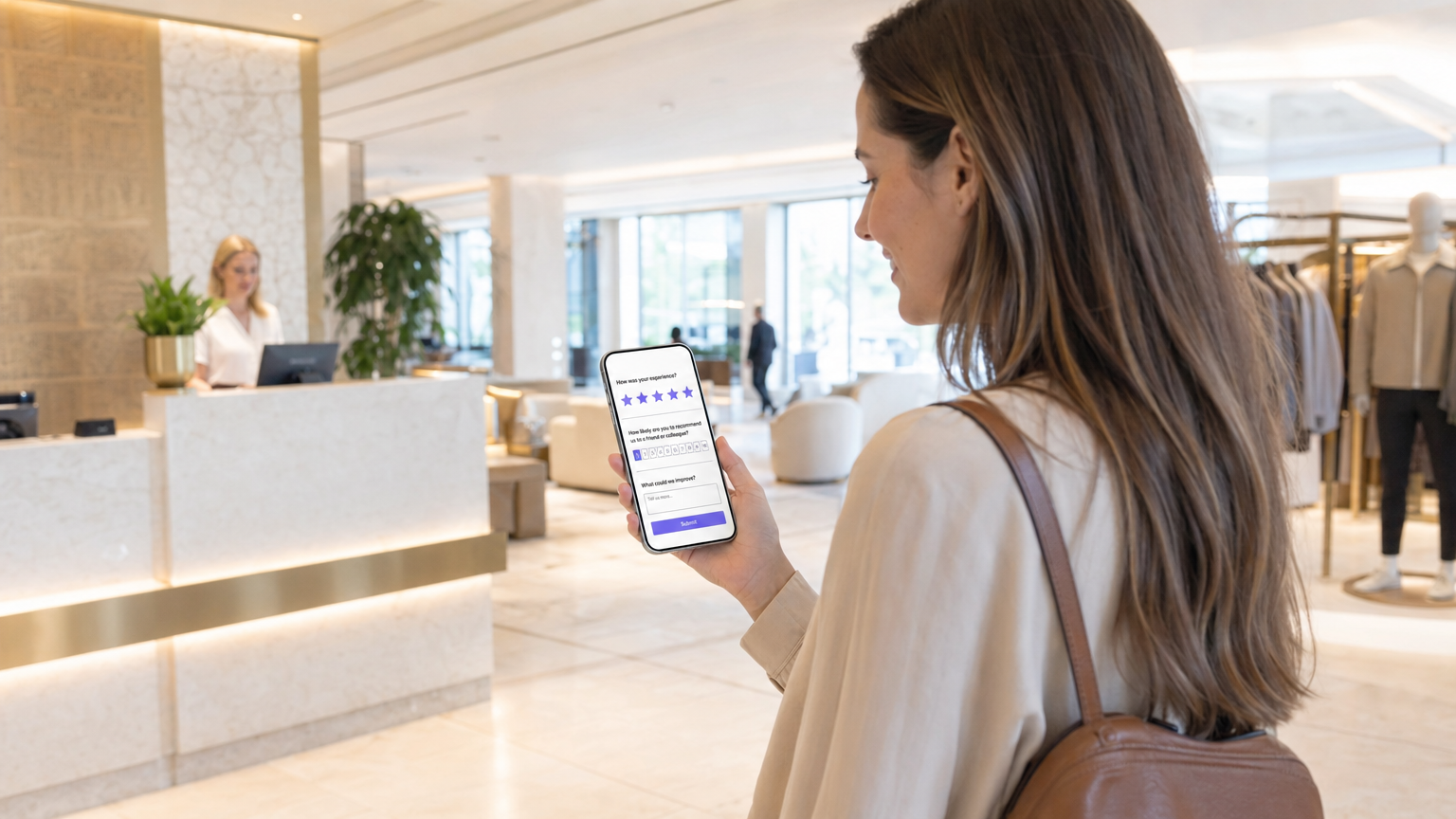
Para locais corporativos — desde ambientes de Varejo até propriedades de Hotelaria — a rede WiFi para convidados é um dos ativos de dados mais subutilizados na pilha tecnológica. Enquanto os mecanismos de feedback tradicionais dependem de entrada manual de dados ou campanhas de e-mail em massa, a integração de pesquisas de satisfação do cliente diretamente na experiência WiFi permite feedback contextual e de alta conversão em escala. Este guia detalha como arquitetar um sistema de pesquisa acionado por WiFi usando as soluções Guest WiFi e WiFi Analytics da Purple. Abordamos a mecânica de implantação, algoritmos de temporização para gatilhos pós-visita, as diferenças técnicas entre as implementações de NPS e CSAT, e as integrações de API necessárias para enviar dados de resposta para seu CRM ou plataforma de análise. O resultado é um ciclo de feedback automatizado, em conformidade e diretamente ligado à jornada física do convidado.
Análise Técnica Detalhada
Construir um sistema de pesquisa robusto sobre uma rede WiFi pública ou corporativa exige mais do que um captive portal. Ele exige uma arquitetura sofisticada que respeite a privacidade do usuário, adira aos frameworks de consentimento GDPR e CCPA, e garanta alta taxa de transferência sem degradar a experiência da rede principal.
Arquitetura e Fluxo de Dados
Quando um convidado se conecta à rede, o sistema registra a sessão e autentica o usuário através de um captive portal, frequentemente usando um modelo de provedor de identidade sem atrito, como o OpenRoaming. O componente crítico é o motor de análise que monitora o tempo de permanência em tempo real. Uma vez que o limite de tempo de permanência é atingido e o usuário se desconecta ou sai da área geocercada, um webhook ou chamada de API aciona o mecanismo de entrega da pesquisa — tipicamente SMS ou e-mail.
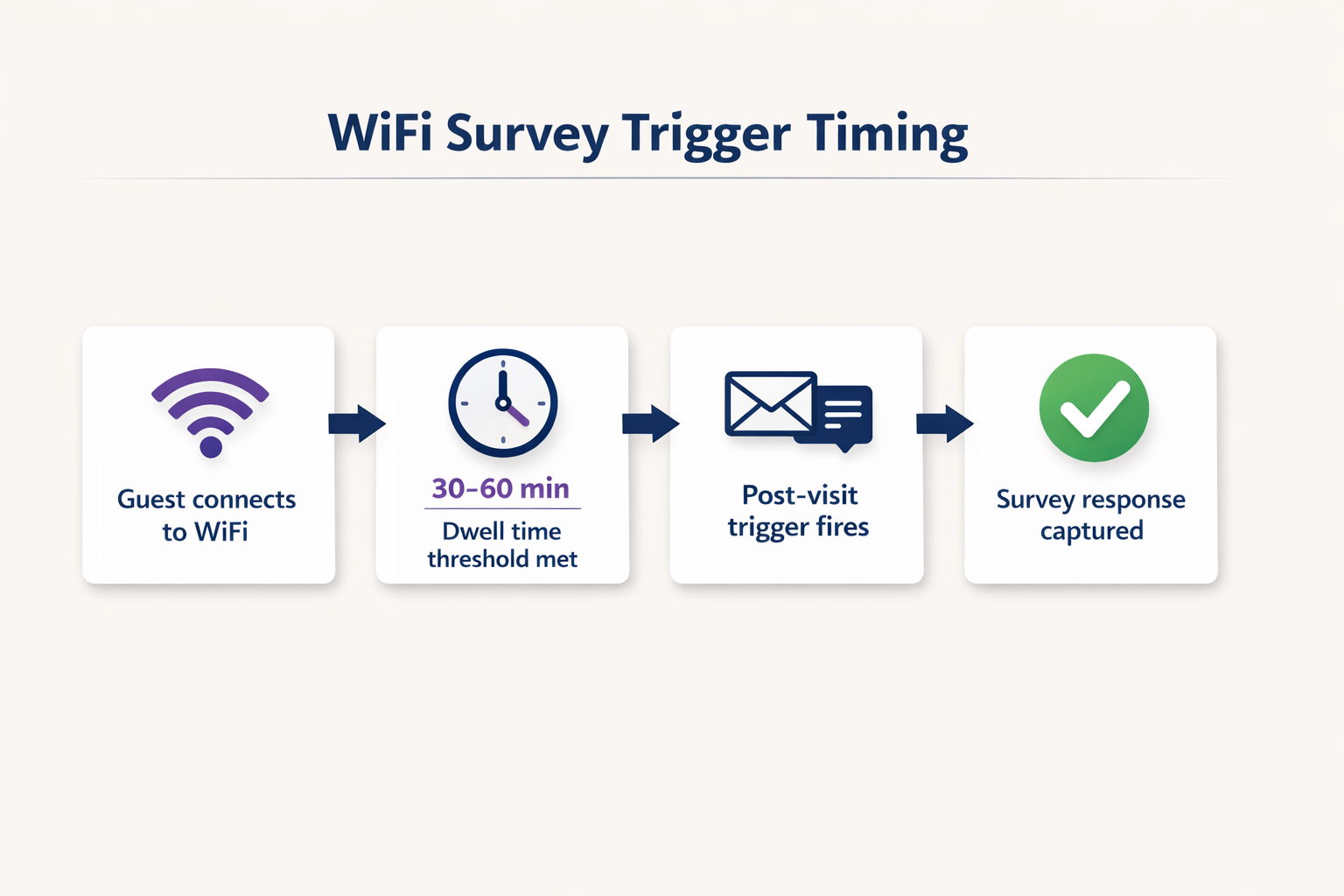
Esta arquitetura requer integração robusta entre os Access Points (APs), o controlador de rede e a plataforma de análise em nuvem. Para mais informações sobre os padrões de infraestrutura subjacentes, consulte nosso guia sobre Arquitetura da Internet das Coisas: Um Guia Completo . O fluxo de dados pode ser resumido da seguinte forma: a camada AP captura a sessão; a camada de análise a enriquece com dados de tempo de permanência e zona; a camada de integração dispara o webhook; e a camada CRM recebe e age sobre a resposta da pesquisa.
Seleção de Métricas de Pesquisa: NPS vs CSAT vs CES
A escolha da métrica da pesquisa é uma decisão estratégica, não técnica — mas tem implicações diretas sobre como você configura o gatilho e como armazena e analisa os dados de resposta.
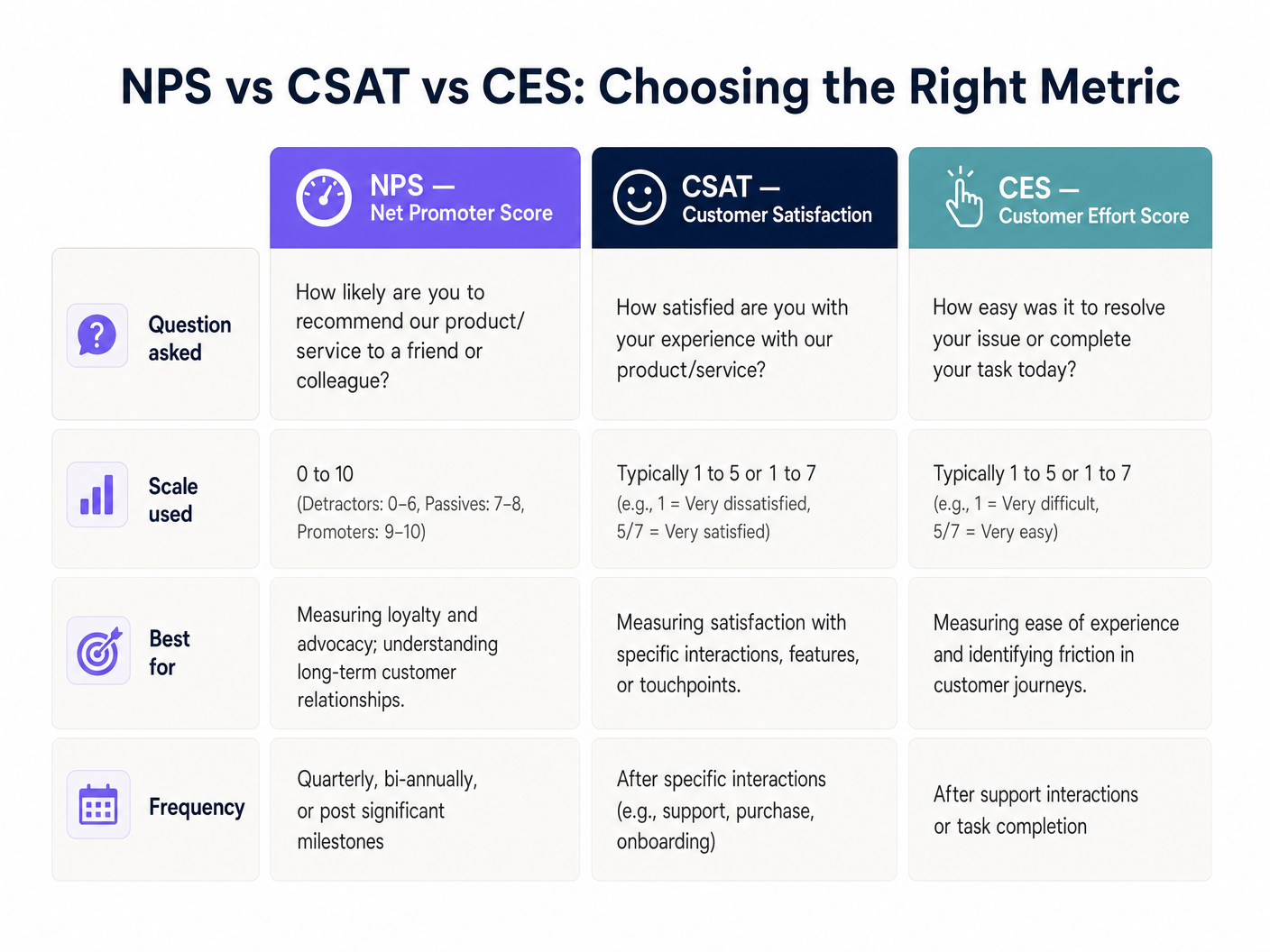
O Net Promoter Score (NPS) faz uma única pergunta em uma escala de zero a dez e é mais adequado para medir a lealdade geral à marca. O Customer Satisfaction (CSAT) usa uma escala de um a cinco ou de um a sete e é ideal para medir a satisfação com uma interação ou ponto de contato específico. O Customer Effort Score (CES) mede a facilidade com que o cliente conseguiu atingir seu objetivo, o que é particularmente relevante em ambientes de Saúde ou Transporte onde o atrito na jornada de serviço é uma preocupação operacional primária.
Segurança e Conformidade
A coleta de dados deve aderir estritamente aos padrões GDPR, CCPA e, quando aplicável, PCI DSS. A randomização de MAC em sistemas operacionais móveis modernos — um recurso padrão no iOS 14 e Android 10 em diante — requer técnicas avançadas de resolução de identidade. O sistema deve vincular a sessão a um e-mail ou número de telefone verificado, capturado durante o login inicial do captive portal, em vez de depender do endereço MAC do hardware. Para um tratamento detalhado dos protocolos de segurança de dados neste contexto, consulte Como Proteger Dados do Cliente Coletados via WiFi .
Guia de Implementação
A implantação de um sistema de pesquisa acionado por WiFi envolve cinco etapas de implementação concretas.
Passo 1 — Configure o Captive Portal. Configure a página inicial de splash para capturar as informações de contato necessárias (e-mail ou número de telefone) em troca de acesso WiFi gratuito. Os termos e condições devem declarar explicitamente que esses dados podem ser usados para fins de feedback. Esta é a base legal de todo o sistema.
Passo 2 — Defina Limites de Tempo de Permanência. Nem toda conexão justifica uma pesquisa. Um usuário passando por um local pode se conectar por dois minutos. Defina um tempo de permanência mínimo apropriado para o tipo de local: 15 minutos para um restaurante de serviço rápido, 30 a 45 minutos para uma loja de varejo, 2 horas para um hotel e 45 minutos para um estádio ou centro de conferências.
Passo 3 — Projete a Pesquisa. Mantenha-a com uma única pergunta principal. Uma pergunta de NPS seguida por um campo de texto aberto opcional consistentemente produz as maiores taxas de conclusão. Evite pesquisas de várias páginas para gatilhos WiFi pós-visita; a janela de contexto é curta e a atenção do usuário é limitada.
Passo 4 — Configure o Mecanismo de Gatilho. Configure a plataforma de análise para disparar um evento quando a sessão do usuário terminar. Este evento deve acionar um e-mail ou SMS automatizado contendo o link da pesquisa dentro de uma a duas horas após a partida. Atrasos superiores a duas horas resultam em uma queda mensurável nas taxas de resposta.
Passo 5 — Integre com o CRM. Use APIs RESTful para enviar as respostas da pesquisa didiretamente no seu CRM (por exemplo, Salesforce, HubSpot) ou plataforma de análise. Configure fluxos de trabalho automatizados: se uma pontuação de detrator (NPS 0 a 6) for recebida, acione um alerta imediato para o gerente de plantão para recuperação de serviço em tempo real.
Melhores Práticas
O tempo é a variável mais importante na implantação de pesquisas de WiFi. Enviar a pesquisa dentro de uma a duas horas após a saída do hóspede do local produz consistentemente taxas de resposta entre 15 e 30 por cento. Esperar 24 horas reduz isso para menos de 5 por cento na maioria das categorias de locais.
A segmentação espacial é um diferencial significativo para locais com layouts complexos. Se sua infraestrutura suportar, use o mapeamento de zona de Access Point — ou, de forma mais granular, Indoor Positioning System: UWB, BLE, & WiFi Guide — para adaptar a pesquisa à área específica que o hóspede visitou. Um hóspede de hotel que passou três horas no spa deve receber uma pesquisa diferente daquele que apenas usou o business lounge.
A otimização para dispositivos móveis é inegociável. Mais de 85 por cento dessas pesquisas serão concluídas em um smartphone minutos após o recebimento da notificação. A UI da pesquisa deve ser totalmente responsiva, carregar em menos de dois segundos e exigir no máximo dois toques para completar a pergunta principal.
Para um contexto mais amplo de implantação de WiFi empresarial, incluindo como a infraestrutura de pesquisa se encaixa em uma estratégia de local conectado maior, consulte Wi Fi in Auto: The Complete 2026 Enterprise Guide .
Solução de Problemas e Mitigação de Riscos
Baixas Taxas de Resposta são mais comumente causadas por pesquisas enviadas muito tarde ou que exigem muitas interações para serem concluídas. Diagnostique verificando a diferença média de tempo entre o fim da sessão e a entrega da pesquisa. Se exceder duas horas, reconfigure o gatilho. Verifique também se a primeira pergunta está incorporada diretamente no corpo do e-mail, em vez de exigir que o usuário clique para uma página separada.
Problemas de Randomização de MAC se manifestam como visitantes recorrentes sendo tratados como novos hóspedes, quebrando a análise longitudinal. A solução é arquitetônica: garanta que seu captive portal dependa de identificadores autenticados pelo usuário (e-mail ou telefone) como chave primária, e não do endereço MAC do dispositivo. Esta é uma alteração de configuração na plataforma de análise, não uma correção em nível de rede.
Falhas no Filtro de Spam anularão silenciosamente sua taxa de resposta. Certifique-se de que seu domínio de envio tenha registros SPF, DKIM e DMARC válidos. Use um subdomínio dedicado para e-mails de pesquisa (por exemplo, surveys.yourdomain.com) para isolar a reputação de sua infraestrutura de envio transacional de seu domínio de marketing principal.
Lacunas de Consentimento e Conformidade representam o modo de falha de maior risco. Se os termos do captive portal não cobrirem explicitamente o uso de dados de contato para fins de feedback, você estará operando fora dos requisitos de base legal do GDPR Artigo 6. Realize uma auditoria trimestral da linguagem de consentimento do seu captive portal em relação ao seu registro de processamento de dados.
ROI e Impacto nos Negócios
O caso de negócios para pesquisas acionadas por WiFi é direto. Locais que implementam essa abordagem consistentemente relatam taxas de resposta três a cinco vezes maiores do que as campanhas de e-mail pós-visita tradicionais, principalmente porque a pesquisa chega enquanto a experiência ainda está fresca e emocionalmente relevante.
O impulsionador de ROI mais significativo, no entanto, é a recuperação de serviço em tempo real. Ao integrar as respostas da pesquisa com um CRM via API, uma pontuação de detrator pode acionar um alerta imediato para a equipe de atendimento em segundos após o envio. Em ambientes de hospitalidade, isso permite que a equipe intervenha antes que o hóspede faça o check-out, convertendo uma potencial avaliação de uma estrela em uma reclamação resolvida. O custo dessa intervenção é insignificante em comparação com o valor vitalício de um hóspede retido ou o custo reputacional de uma avaliação pública negativa.
Para operadores multi-locais — redes de varejo, grupos hoteleiros, operadores de estádios — os dados agregados fornecem uma capacidade de benchmarking que é genuinamente difícil de replicar por meio de qualquer outro canal. Você pode comparar o NPS por local, por dia da semana, por zona e por segmento demográfico, tudo enriquecido com os dados de tempo de permanência e fluxo de pessoas que a plataforma de análise de WiFi já captura. Isso transforma a pesquisa de uma simples ferramenta de feedback em um ativo de inteligência estratégica.
Termos-Chave e Definições
Captive Portal
A web page that a user of a public-access network is obliged to view and interact with before network access is granted. It serves as the primary identity and consent collection point.
This is the architectural foundation of the entire survey system. Without a functioning captive portal that captures a verified email or phone number and explicit consent, no post-visit survey can be legally or technically delivered.
Dwell Time
The total duration a specific device remains connected to or within range of the WiFi network, measured from first association to final disconnection.
Used as the primary filtering metric to ensure surveys are only sent to patrons who spent enough time at the venue to have a meaningful experience. Configuring this threshold correctly is the most important operational decision in the deployment.
MAC Randomization
A privacy feature in modern operating systems (iOS 14+, Android 10+) where the device broadcasts a randomized MAC address when probing for or connecting to networks, rather than the hardware-assigned address.
IT teams must account for this by relying on authenticated user data (email or phone number captured at the portal) rather than hardware addresses to track return visits and build longitudinal profiles.
Webhook
An HTTP callback that sends real-time data from one application to another when a specific event occurs, without requiring the receiving application to poll for updates.
Used to instantly transmit the session-ended event from the WiFi analytics platform to the survey delivery system, enabling the sub-two-hour trigger timing that maximises response rates.
NPS (Net Promoter Score)
A customer loyalty metric based on a single question: 'How likely are you to recommend us to a friend or colleague?' scored on a zero-to-ten scale. Respondents are classified as Detractors (0-6), Passives (7-8), or Promoters (9-10). NPS = % Promoters minus % Detractors.
The most widely adopted brand-level satisfaction metric. Used by venue operators to track loyalty trends over time and benchmark against industry averages.
CSAT (Customer Satisfaction Score)
A metric measuring how satisfied a customer is with a specific product, service, or interaction, typically scored on a one-to-five or one-to-seven scale.
Deployed when operations directors need granular feedback on a specific facility or touchpoint, such as a newly renovated hotel restaurant or a stadium concourse.
OpenRoaming
A roaming federation standard that enables automatic and secure WiFi authentication across different operator networks without requiring the user to manually connect or enter credentials.
Reduces friction for the user connecting to the network, increasing the volume of authenticated sessions available for survey targeting while maintaining a secure, standards-compliant connection.
Service Recovery
The set of actions a service provider takes in response to a service failure to return the customer to a state of satisfaction and prevent churn.
The primary ROI driver for real-time WiFi surveys. An API integration that alerts staff immediately when a low score is submitted allows the team to intervene before the guest leaves, converting a potential negative review into a resolved complaint.
Geofencing
The use of GPS, WiFi signal strength, or Bluetooth beacons to define a virtual perimeter around a physical location, triggering actions when a device enters or exits that boundary.
Used in WiFi survey deployments to detect when a guest has physically left the venue, triggering the post-visit survey webhook without relying solely on network disconnection events.
Estudos de Caso
A 200-room hotel wants to measure guest satisfaction specifically for their new on-site restaurant, but they do not want to survey guests who only used the rooms and did not visit the restaurant.
The IT team configures the WiFi analytics platform to segment users based on Access Point (AP) location. They define a 'Restaurant Zone' comprising the four APs covering the dining area. A trigger rule is created: if a device connects to any AP in the Restaurant Zone for a continuous dwell time of more than 45 minutes, it becomes eligible for a CSAT survey. The trigger fires 30 minutes after the device disconnects from the Restaurant Zone, sending a five-question CSAT survey via email. The survey asks: overall satisfaction with the meal (1-5), food quality (1-5), service speed (1-5), staff friendliness (1-5), and an optional open-text field. Responses are piped via API into the hotel's Salesforce CRM, where a workflow alerts the F&B manager if any score falls below 3.
A large retail chain with 150 stores is experiencing a high bounce rate on their captive portal — only 12% of connecting devices are completing authentication — meaning they are not capturing the contact information needed to send post-visit surveys.
The network architect audits the captive portal flow and identifies that the registration form requires five fields: full name, email, phone number, postcode, and date of birth. The redesign reduces this to two mandatory fields (email address and checkbox consent) and adds a social login option via Google or Apple ID. The captive portal is also redesigned to load within 1.5 seconds on a 4G connection, addressing a secondary drop-off cause. Post-deployment, the authentication completion rate increases from 12% to 47% within 30 days, expanding the eligible survey population by approximately 4x without any changes to the network infrastructure.
Análise de Cenário
Q1. A retail client wants to send a survey to every single person whose phone pings their WiFi network, including passersby on the pavement outside the store. As the solutions architect, what is your recommendation and why?
💡 Dica:Consider the difference between a network probe and an authenticated session, and the legal basis required under GDPR to send a marketing communication.
Mostrar Abordagem Recomendada
Advise strongly against this approach on both legal and data quality grounds. First, a device probing the network has not authenticated through the captive portal, meaning no contact information has been captured and no consent has been obtained. Sending a survey to a device that has merely probed the network is technically impossible without additional tracking infrastructure, and any attempt to do so without explicit consent would breach GDPR Article 6. Second, surveying passersby who never entered the store would pollute the dataset with irrelevant responses. The correct approach is to implement a captive portal with a minimum dwell time threshold of at least 15 minutes, ensuring only actual shoppers who have authenticated and opted in are included in the survey pool.
Q2. Your deployment at a 5,000-capacity conference centre is successfully capturing authenticated emails, but the survey response rate is consistently below 1.5%. The current configuration sends the survey 24 hours after the event ends. How do you diagnose and resolve this?
💡 Dica:Consider both the timing of the trigger and the format of the survey delivery itself.
Mostrar Abordagem Recomendada
The primary issue is timing. A 24-hour delay means the emotional context of the conference experience has largely faded, and the survey competes with the respondent's return-to-work inbox. Reconfigure the webhook trigger to fire within one to two hours of the network detecting session end. Additionally, audit the survey delivery format: if the email requires the recipient to click through to a separate page before seeing the first question, add friction that kills conversion. Embed the NPS zero-to-ten scale directly in the email body as clickable numbers, so the respondent can answer with a single tap without leaving their email client. These two changes — trigger timing and embedded question format — typically increase response rates from below 2% to between 15 and 25%.
Q3. A stadium IT director wants to use the WiFi survey data to trigger real-time alerts to cleaning staff if a specific concourse area receives negative feedback about facilities. How would you architect this end-to-end?
💡 Dica:Think about spatial resolution at the AP zone level, the survey question design, and the API integration layer between the survey platform and the facilities management system.
Mostrar Abordagem Recomendada
The architecture requires three layers working in concert. First, configure the WiFi analytics platform to segment users by AP zone, defining distinct zones for each concourse section. Set a dwell time threshold of 20 minutes for the concourse zones to filter out transit traffic. Second, design the survey to include a zone-specific CSAT question: 'How would you rate the facilities in your area today?' on a one-to-five scale. The survey metadata must include the zone identifier from the session data. Third, integrate the survey platform's response API with the stadium's facilities management software (e.g., ServiceMax or a custom ticketing system). Configure a rule: if a CSAT score of 1 or 2 is received from a specific concourse zone, generate an automated webhook alert to the cleaning team's mobile devices, including the zone name and timestamp. This creates a closed-loop system where negative feedback triggers an operational response within minutes, before the majority of the crowd has left the venue.




