
Come revocare l'accesso WiFi quando un dipendente lascia l'azienda
Questa guida mostra ai team IT e di gestione delle sedi come rimuovere l'accesso WiFi del personale quando un dipendente lascia l'azienda, senza interrompere il lavoro degli altri collaboratori. Confronta la tecnologia 802.1X basata su certificati, l'iPSK specifico per l'identità e il deprovisioning guidato da SCIM, fornendo poi un runbook per il giorno stesso, un metodo di test e un modello di tracciabilità dei controlli.
Video overview
Ascolta questa guida
Visualizza trascrizione del podcast
Parte della nostra serie principale: Guida alla sicurezza del WiFi aziendale →
Sintesi Esecutiva
Quando un dipendente lascia un'organizzazione, revocare il suo accesso fisico è semplice. Tuttavia, revocare l'accesso WiFi spesso non lo è affatto. Se la tua rete si affida a una password WPA2 condivisa, il dipendente uscente lascia l'organizzazione in possesso di queste credenziali. L'unico modo per bloccare il suo accesso è cambiare la password per l'intera rete. Questo interrompe le attività operative e richiede aggiornamenti manuali su tutti i dispositivi, rappresentando una seria vulnerabilità di sicurezza e portando a fallimenti di conformità con standard come PCI-DSS e ISO 27001.
Questa guida mostra come evitare le password condivise e implementare la revoca del WiFi per singolo utente. Esploriamo tre modelli collaudati: 802.1X EAP-TLS con revoca dei certificati, Identity Pre-Shared Key (iPSK) con eliminazione della chiave specifica per l'identità e de-provisioning basato su SCIM. Collegando l'accesso alla rete direttamente al tuo fornitore di identità - come Microsoft Entra ID, Okta o Google Workspace - puoi automatizzare la revoca non appena un account viene disattivato. Questo genera esattamente la traccia di controllo che i revisori si aspettano.
Ascolta il nostro podcast di briefing tecnico su questo argomento:
Approfondimento Tecnico
Il problema delle password condivise
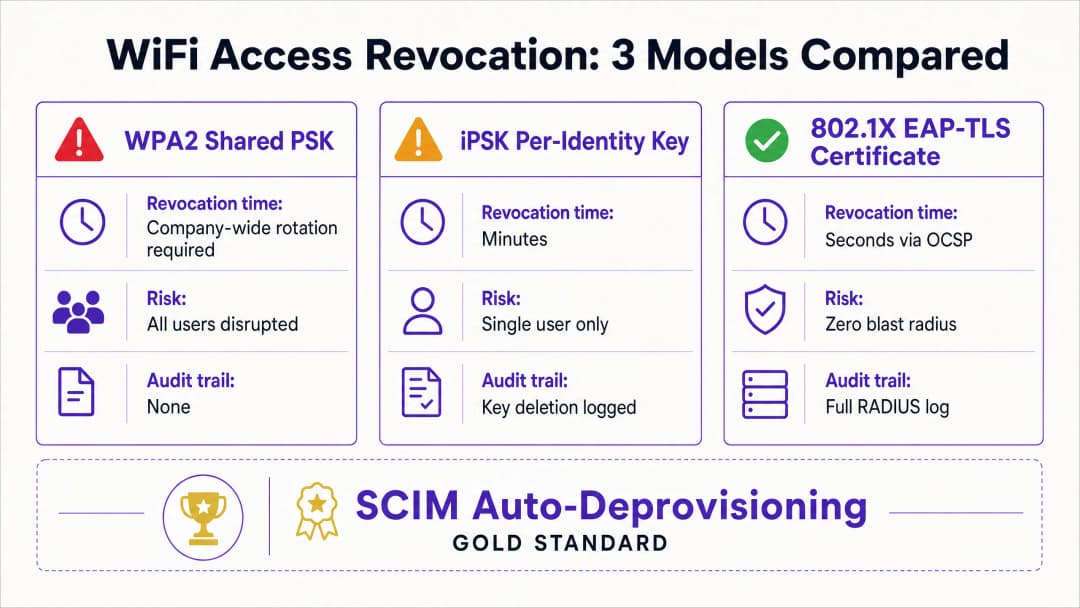
Una password WPA2-Personal condivisa è priva di contesto d'identità. La rete non è in grado di distinguere tra un dipendente attuale e uno precedente. Di conseguenza, la revoca dell'accesso richiede la modifica della password a livello aziendale. Ciò crea un rischio per la sicurezza nel periodo compreso tra la partenza del dipendente e l'esecuzione del cambio password.
Modello 1: Revoca del certificato 802.1X EAP-TLS
Lo standard aziendale per la sicurezza WiFi è l'802.1X con EAP-TLS. In questo modello, ogni dispositivo riceve un certificato digitale unico da un'Autorità di Certificazione (CA). Quando un dispositivo si connette, il server RADIUS verifica crittograficamente il certificato.
Per revocare l'accesso, si revoca il certificato all'interno della CA. Il server RADIUS verifica lo stato di revoca in tempo reale tramite l'Online Certificate Status Protocol (OCSP). Se il risponditore OCSP restituisce uno stato "Revocato", il server RADIUS invia un messaggio di Access-Reject. Per le sessioni attive, il server emette una Change of Authorisation (CoA) per disconnettere immediatamente il dispositivo. Questo processo limita la revoca a un singolo utente, senza impattare sul resto della rete.
Modello 2: Eliminazione della chiave specifica per l'identità iPSK
Per gli ambienti con tipi di dispositivi misti, inclusi gli hardware headless che non supportano i certificati 802.1X, l'Identity Pre-Shared Key (iPSK) rappresenta la soluzione più idonea. L'iPSK assegna una password unica a ogni singolo utente o dispositivo sullo stesso SSID.
Il server RADIUS associa ogni chiave unica a una specifica identità. Quando un dipendente lascia l'azienda, il reparto IT si limita a eliminare la sua chiave specifica dal database RADIUS. L'impatto è quindi limitato esclusivamente a quel singolo utente. Questo approccio offre la sicurezza individuale di una rete aziendale unita alla semplicità di una chiave pre-condivisa.
Modello 3: De-provisioning SCIM automatizzato
Il System for Cross-domain Identity Management (SCIM) è uno standard aperto che automatizza lo scambio di dati sull'identità degli utenti. Lo SCIM funge da ponte tra il provider di identità e i sistemi a valle, come la piattaforma di gestione WiFi.
Quando le Risorse Umane disattivano un dipendente in uscita in Microsoft Entra ID, Okta o Google Workspace, lo SCIM invia un evento di de-provisioning a Purple. Purple revoca immediatamente le credenziali WiFi dell'utente alla successiva autenticazione - indipendentemente dal fatto che si tratti di un certificato o di un iPSK. In questo modo si crea un sistema a circuito chiuso in cui le modifiche al ciclo di vita dell'identità applicano automaticamente le policy di accesso alla rete.
Hai domande sulla tua configurazione specifica?
Il nostro team collabora con gestori di sedi, responsabili IT e ingegneri di rete in 80.000 sedi. Prenota una chiamata di 20 minuti e ti mostreremo come altri professionisti come te hanno risolto il problema.
Guida all'Implementazione
L'implementazione della revoca per singolo utente richiede l'allineamento tra il provider di identità, il server RADIUS e l'hardware WiFi. Purple si integra con l'hardware di Cisco Meraki, HPE Aruba, Ruckus, Juniper Mist, Ubiquiti UniFi, Cambium, Extreme e Fortinet.
Step 1: Stabilire l'identità come unica fonte di verità
Assicurati che il tuo provider di identità sia l'unica fonte di verità per lo stato dell'utente. Tutti i processi di onboarding e offboarding devono iniziare e terminare all'interno di Microsoft Entra ID, Okta o Google Workspace.
Step 2: Scegliere il protocollo di autenticazione corretto
Se disponi di una soluzione di Mobile Device Management (MDM) matura in grado di distribuire certificati a tutti i dispositivi aziendali, scegli 802.1X EAP-TLS. Se hai bisogno di supportare una varietà di dispositivi non gestiti, terminali point-of-sale o hardware IoT, scegli iPSK.
Step 3: Configurare l'integrazione SCIM
Configura una connessione SCIM tra il tuo provider di identità e Purple. Mappa l'attributo relativo allo stato dell'utente in modo che uno stato "disabilitato" nella directory attivi un evento di revoca in Purple.
Step 4: Regolare i timer RADIUS
Se utilizzi EAP-TLS, configura di conseguenza il Time-To-Live (TTL) della cache OCSP del tuo server RADIUS. Un TTL breve (ad esempio, 15 minuti) aumenta la sicurezza riducendo la finestra temporale in cui un certificato revocato rimane valido, ma aumenta il carico sulla CA.
Best Practice
In conformità con gli standard di settore, le organizzazioni dovrebbero controllare rigorosamente l'accesso alla rete. Implementa queste misure per garantire un elevato livello di sicurezza:
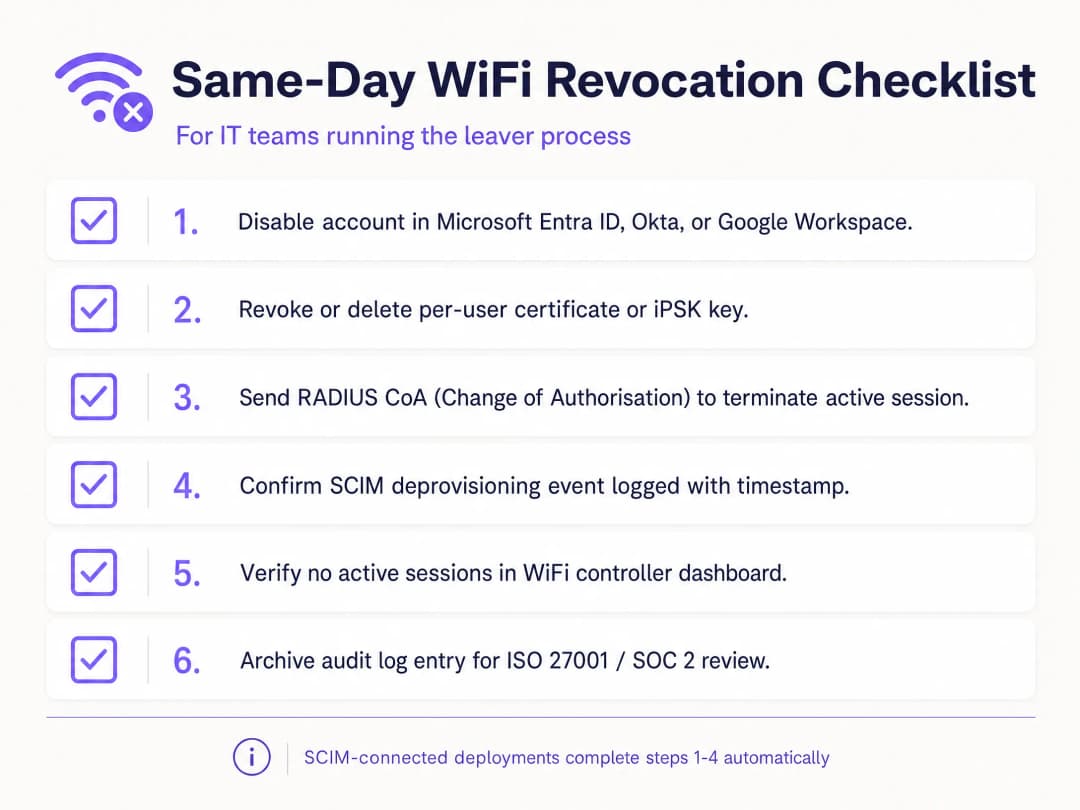
- Automatizza con SCIM: La revoca manuale è soggetta a errori umani. Automatizza questo processo collegando la tua piattaforma WiFi direttamente al tuo provider di identità.
- Implementa RADIUS CoA: Sebbene la revoca delle credenziali impedisca nuove connessioni, essa non interrompe le sessioni attive. Assicurati che il tuo sistema invii un comando di Change of Authorisation per disconnettere immediatamente il dispositivo.
- Separare il traffico guest e dipendenti: Non collegare mai i dispositivi dei dipendenti a una rete guest WiFi. Utilizza VLAN e SSID separati per mantenere la segregazione.
- Registri di audit: Mantieni log immutabili di tutti gli eventi di de-provisioning. Gli auditor ISO 27001 richiedono la prova che l'accesso sia stato revocato immediatamente al momento della cessazione del rapporto di lavoro.
Risoluzione dei problemi e mitigazione dei rischi
Il punto di vulnerabilità più comune nella revoca del WiFi è un processo frammentato. Se il reparto IT disattiva l'account nella directory ma non aggiorna il database RADIUS autonomo, il dipendente in uscita continuerà ad avere accesso. Un'integrazione SCIM elimina completamente questo rischio.
Un altro rischio è il caching dei certificati. Se un server RADIUS memorizza nella cache una risposta OCSP positiva per 24 ore, un dispositivo revocato può continuare ad autenticarsi fino alla scadenza della cache. Regola le impostazioni della cache OCSP per bilanciare in modo ottimale le prestazioni e i requisiti di sicurezza. Per i dispositivi condivisi, come i tablet dei punti vendita utilizzati da più lavoratori su turni, non collegare l'autenticazione del dispositivo all'identità di un singolo dipendente. Utilizza account di servizio o certificati specifici per il dispositivo per evitare che l'hardware critico vada offline quando un individuo lascia l'azienda.
ROI e Benefici Aziendali
La transizione alla revoca del WiFi per singolo utente offre un valore aziendale misurabile. Elimina le ore di supporto IT dedicate a coordinare i cambi di password a livello aziendale. Inoltre, riduce al minimo il rischio di violazioni dei dati causate da ex dipendenti, proteggendo l'organizzazione da sanzioni normative e danni alla reputazione.
In più, fornisce la chiara traccia di controllo necessaria per superare agevolmente gli audit ISO 27001 e SOC 2. Automatizzando il processo di gestione degli accessi per assunzioni, trasferimenti e dimissioni, i team IT possono concentrarsi su iniziative strategiche anziché perdere tempo nella gestione manuale delle credenziali. Per ulteriori dettagli sulla sicurezza della tua rete, consulta la nostra guida Enterprise WiFi Security: A Complete Guide for 2026.
Definizioni chiave
IEEE 802.1X
Un framework di controllo dell'accesso alla rete che utilizza un dispositivo, un autenticatore di rete e un servizio di autenticazione back-end per decidere se l'accesso alla rete è consentito.
Utilizzarlo quando il WiFi del personale deve autenticare singole persone o dispositivi gestiti anziché affidarsi a una passphrase condivisa.
EAP-TLS
Un metodo Extensible Authentication Protocol che utilizza certificati TLS per l'autenticazione reciproca e ricava il materiale di cifratura durante lo scambio di autenticazione.
Utilizzarlo per i dispositivi gestiti quando il ciclo di vita del certificato e la convalida RADIUS possono supportare la revoca individuale.
RADIUS
Un protocollo e modello di servizio comunemente utilizzato per trasmettere decisioni di autenticazione, autorizzazione e tracciamento tra le apparecchiature di rete e un servizio di autenticazione.
È il punto decisionale di back-end che occorre comprendere quando si testano implementazioni 802.1X e alcune installazioni iPSK.
Revoca del certificato
La rimozione anticipata dell'autorità di un certificato per l'autenticazione prima della data di scadenza pianificata.
È importante quando il certificato di un utente in uscita deve fallire alla successiva autenticazione WiFi anziché rimanere valido fino alla scadenza.
iPSK
Identity pre-shared key. Una chiave WiFi distinta assegnata a una singola persona, dispositivo o gruppo responsabile su un SSID condiviso.
Fornisce un modello pratico di rimozione mirata quando EAP-TLS non è adatto per un dispositivo.
SCIM
System for Cross-domain Identity Management. Uno standard basato su HTTP per il provisioning e la gestione dei dati di identità tra sistemi.
Collega un evento di disattivazione dell'account nell'identity provider a una modifica dello stato di accesso al WiFi.
Provider di identità
Il sistema che gestisce gli account e autentica o attesta l'identità del personale, dei collaboratori esterni e di altre figure aziendali.
Dovrebbe essere la fonte autorevole dell'evento di disattivazione nel processo di assunzione, trasferimento e cessazione del personale.
Sessione attiva
Un dispositivo che ha già eseguito l'autenticazione e dispone attualmente di accesso alla rete.
Decidi se la tua politica sul rischio richiede un'azione di disconnessione separata dopo la revoca delle credenziali.
WPA3 Enterprise
La branca enterprise della sicurezza WPA3, che utilizza protocolli di sicurezza moderni e richiede Protected Management Frames per le reti WiFi CERTIFIED WPA3.
Migliora la sicurezza del WiFi, ma l'offboarding individuale richiede comunque un modello di credenziali legato all'identità.
VLAN
Un segmento di rete logico che separa il traffico al Layer 2 o Layer 3 in base alla progettazione della rete.
È fondamentale quando l'identità WiFi di un dipendente è mappata su un ruolo di rete specifico per personale, collaboratori o altro.
Esempi pratici
Un hotel da 200 camere ha un unico SSID per il WiFi del personale, condiviso tra reception, pulizie e manutenzione. Un dipendente in uscita conosce la passphrase WPA2 condivisa e l'hotel non può interrompere le attività delle camere occupate con una rotazione non pianificata.
Creare un record di eccezione per la passphrase condivisa, quindi migrare i dispositivi gestiti della reception a 802.1X con EAP-TLS ed emettere iPSK univoci per i dispositivi che non possono utilizzare i certificati. Per il dipendente in uscita immediata, ruotare la passphrase condivisa poiché rimane un segreto comune. Per ogni uscita successiva, disabilitare l'identità, rimuovere il certificato o l'iPSK, testare una nuova connessione e conservare la catena degli eventi. Il risultato operativo misurato consiste in una rimozione mirata delle credenziali, un test negato e un record di controllo attribuibile per ogni evento di offboarding.
Un rivenditore nazionale gestisce il WiFi del personale in negozi, centri di distribuzione e in un'operazione temporanea in uno stadio. Le risorse umane disabilitano gli account in Microsoft Entra ID, ma i team dei negozi attualmente aprono ticket di rete separati per i dipendenti in uscita.
Mappare l'identità permanente di Entra ID sul record di accesso WiFi e utilizzare SCIM per inviare lo stato disabilitato al servizio di accesso. Mantenere la disattivazione dell'identity provider come trigger autorizzato. Definire un percorso di eccezione per la sincronizzazione non riuscita, nominare un responsabile operativo ed eseguire un test controllato di disabilitazione e autenticazione in un gruppo di negozi prima del rollout. Il risultato misurabile è un singolo evento di identità che produce una modifica dello stato del WiFi e un tentativo di nuova autenticazione negato e registrato, sostituendo il ticket locale come percorso standard.
Un centro congressi deve rimuovere l'accesso WiFi del personale a un fornitore esterno dopo un evento del fine settimana, lasciando connessi il personale permanente e i dispositivi della struttura per l'apertura del lunedì.
Assegnare al fornitore esterno un iPSK collegato a un record di identità specifico per i fornitori esterni, non a una password generica del team dell'evento. Al termine dell'incarico, eliminare solo quell'iPSK, decidere se terminare la sessione attiva, quindi testare una nuova connessione con la chiave rimossa. Conservare insieme la richiesta di offboarding autorizzata, l'eliminazione della chiave e il test fallito. Il risultato è nessun cambio di credenziali per il personale permanente e nessuna riconfigurazione dei loro dispositivi.
Continua a leggere questa serie
La conformità per il WiFi senza password: HIPAA, PCI, ISO 27001
Sarai in grado di decidere se il passaggio delle reti del personale da una password condivisa a 802.1X con EAP-TLS colmi le lacune di audit ai sensi di PCI-DSS 4.0, HIPAA e ISO 27001:2022. Saprai quali controlli soddisfa, quali no e quali prove raccogliere prima del lavoro sul campo.
WiFi BYOD sicuro: onboarding con certificati Passpoint vs xPSK (iPSK)
Una guida tecnica completa per i team IT su come proteggere i dispositivi non gestiti di dipendenti e studenti (BYOD) utilizzando certificati Passpoint EAP-TLS zero-touch rispetto a soluzioni xPSK specifiche del fornitore (iPSK/easyPSK, DPSK, PPSK, MPSK).
WPA2 Personal vs Enterprise: qual è la differenza e quale dovresti usare?
Questa guida di riferimento tecnica fornisce un confronto completo dei protocolli di sicurezza WPA2 Personal e WPA2 Enterprise all'interno di ambienti WiFi aziendali. Descrive le differenze architetturali, le metodologie di implementazione e le implicazioni di sicurezza di ciascuno standard per aiutare i network architect e i responsabili IT a prendere decisioni di implementazione informate.
Hai domande sulla tua configurazione specifica?
Il nostro team collabora con gestori di sedi, responsabili IT e ingegneri di rete in 80.000 sedi. Prenota una chiamata di 20 minuti e ti mostreremo come altri professionisti come te hanno risolto il problema.