
Timeout delle Sessioni WiFi Ospiti: Bilanciare UX e Sicurezza
Questa guida fornisce un framework pratico per la configurazione dei timeout delle sessioni WiFi ospiti, bilanciando un'esperienza utente fluida con una sicurezza robusta. Copre i timeout di inattività, i timeout assoluti, le strategie di riautenticazione e gli scenari di implementazione specifici per settore per i responsabili IT e delle operazioni delle sedi.
Ascolta questa guida
Visualizza trascrizione del podcast
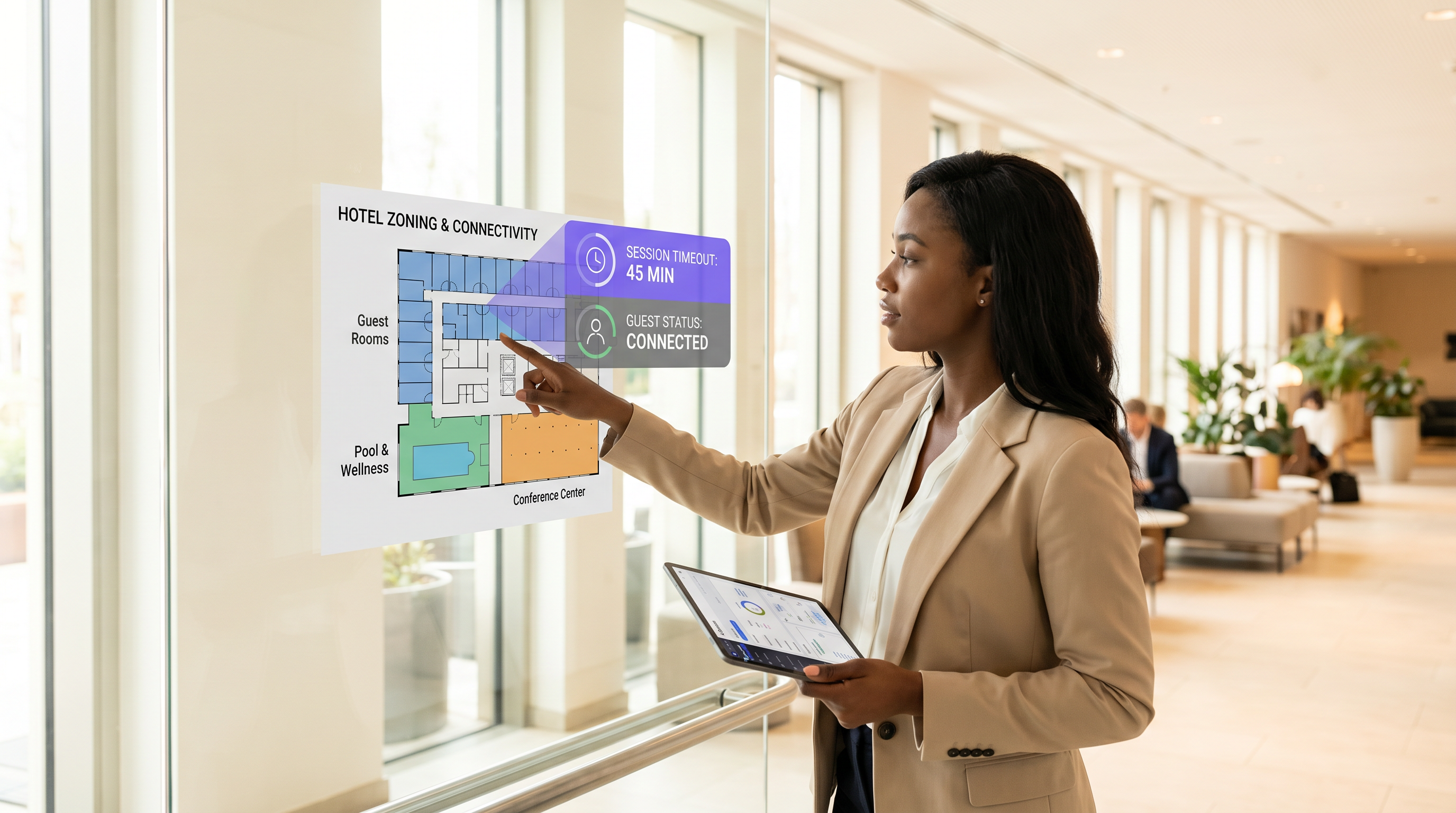
Riepilogo Esecutivo
Per le sedi moderne, la rete WiFi ospiti è un punto di contatto critico per l'esperienza del cliente e l'analisi operativa. Tuttavia, impostare i timeout di sessione corretti diventa spesso un braccio di ferro tra i team di sicurezza IT e i responsabili dell'esperienza degli ospiti. Se i timeout sono troppo brevi, gli utenti si trovano di fronte a frustranti e ripetitivi login al Captive Portal. Se sono troppo lunghi, la rete soffre di esaurimento del pool IP, dati analitici obsoleti e maggiori rischi per la sicurezza da dispositivi non autenticati.
Questa guida fornisce un framework pratico per la configurazione dei timeout delle sessioni Guest WiFi . Esploriamo i ruoli distinti dei timer di inattività, dei timer assoluti e delle politiche di riautenticazione, fornendo raccomandazioni attuabili per gli ambienti Hospitality , Retail e del settore pubblico. Allineando le strategie di timeout con il comportamento degli utenti e i requisiti di sicurezza, gli architetti di rete possono garantire una connettività senza interruzioni mantenendo una robusta conformità e accurate WiFi Analytics .
Approfondimento Tecnico: La Meccanica dei Timeout di Sessione
Un "timeout di sessione" non è una singola impostazione, ma una combinazione di timer distinti che operano a diversi livelli dello stack di rete. Comprendere questa meccanica è cruciale per un'implementazione efficace.
1. Timeout di Inattività (Inactivity Timer)
Il timeout di inattività monitora la trasmissione attiva dei dati. Se un dispositivo client non invia o riceve dati per una durata specificata, il controller di rete termina la sessione.
- Scopo: Recupera gli indirizzi IP (lease DHCP) e la memoria AP allocata ai dispositivi che hanno lasciato la sede senza disconnettersi formalmente.
- Sfida: Gli smartphone moderni spesso vanno in modalità sleep per risparmiare batteria, interrompendo la trasmissione dei dati. Timeout di inattività aggressivi (ad esempio, 5 minuti) disconnetteranno i dispositivi inattivi, costringendo gli utenti a riautenticarsi quando riattivano i loro telefoni.
- Raccomandazione: Impostare i timeout di inattività tra 30 e 60 minuti per ambienti tipici.
2. Timeout Assoluto (Hard Timer)
Il timeout assoluto determina la durata massima totale di una sessione, indipendentemente dall'attività. Una volta scaduto questo timer, la sessione viene terminata forzatamente e l'utente deve riautenticarsi.
- Scopo: Applica limiti di utilizzo giornalieri, assicura che gli utenti accettino Termini e Condizioni aggiornati e forza una rivalutazione periodica della sicurezza.
- Sfida: Interrompe le sessioni attive, il che può interrompere chiamate VoIP o download di grandi dimensioni se non comunicato chiaramente.
- Raccomandazione: Allineare il timeout assoluto con il tempo di permanenza tipico della sede (ad esempio, 12 ore per un ospedale, 2 ore per una caffetteria).
3. Captive Portal e Riautenticazione
Quando una sessione scade, l'utente viene reindirizzato al Captive Portal. Le implementazioni moderne spesso utilizzano il MAC authentication bypass (MAB) o il roaming senza interruzioni per ricordare i dispositivi per un periodo impostato (ad esempio, 30 giorni). In queste configurazioni, una sessione scaduta potrebbe non richiedere un login manuale; il sistema riautentica silenziosamente l'indirizzo MAC riconosciuto, a condizione che il dispositivo non lo abbia randomizzato.
Per topologie di rete avanzate, l'integrazione con strumenti come Sensors e la garanzia di una robusta infrastruttura di backend — come la corretta RADIUS Server High Availability: Active-Active vs Active-Passive — è essenziale per gestire i picchi di autenticazione senza perdere utenti legittimi.
Guida all'Implementazione: Strategie Specifiche per Settore
Non esiste una configurazione di timeout unica per tutti. La strategia deve riflettere gli obiettivi operativi della sede e il comportamento degli ospiti.
Scenario A: Il Negozio Retail ad Alto Ricambio
Nel Retail , l'obiettivo è acquisire analisi accurate del traffico pedonale e fornire marketing mirato, prevenendo al contempo il bighellonare.
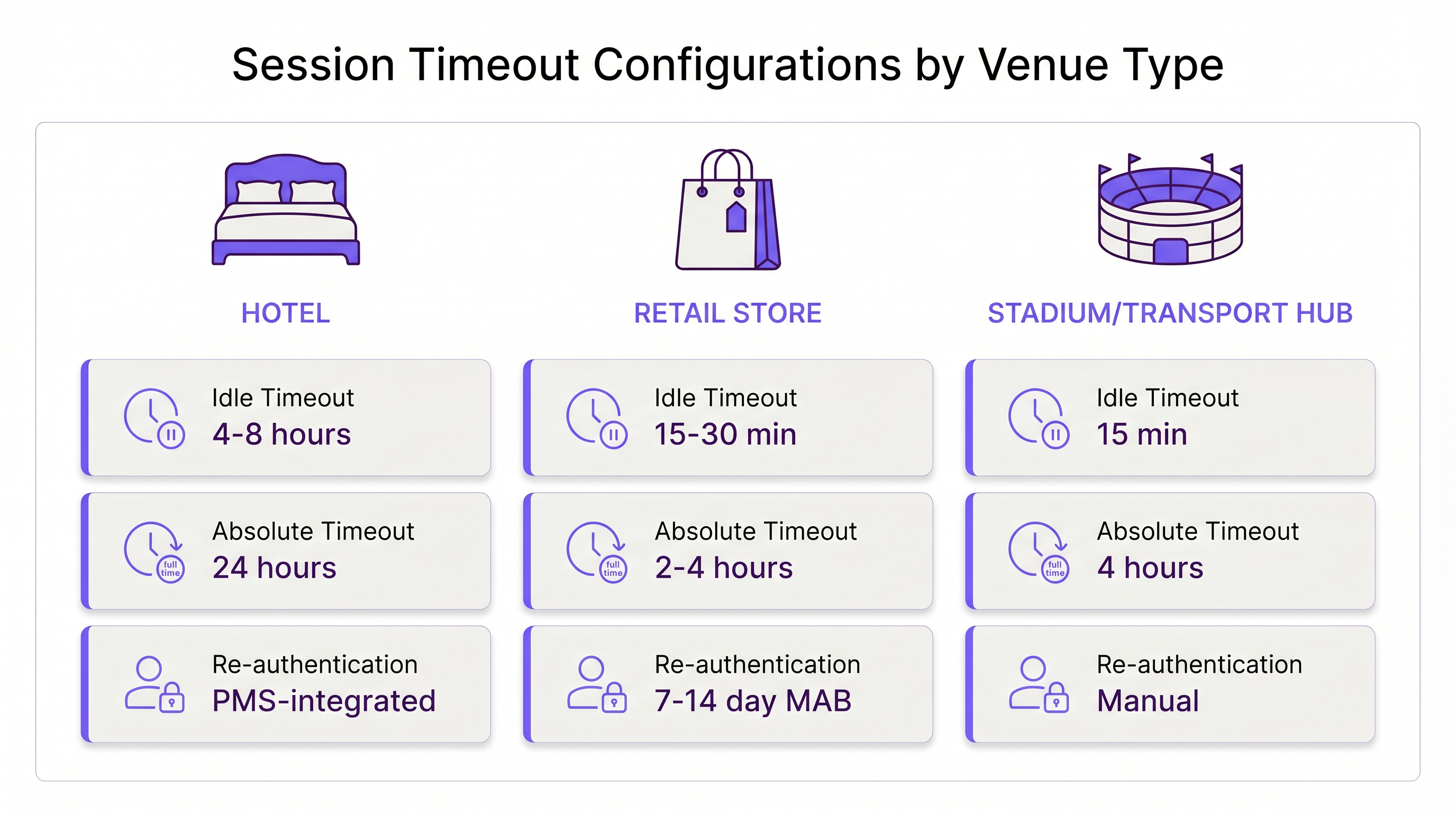
- Idle Timeout: 15–30 minuti. I clienti si muovono rapidamente. Se un dispositivo è silenzioso per 30 minuti, l'utente ha probabilmente lasciato il negozio.
- Absolute Timeout: 2–4 ore. Questo copre il viaggio di shopping tipico più lungo.
- Re-authentication: Riautenticazione MAC silenziosa per 7–14 giorni per tracciare i clienti di ritorno senza attriti.
Scenario B: L'Ambiente Hospitality Aziendale
Nell' Hospitality , gli ospiti si aspettano un'esperienza WiFi "casalinga". Forzare un login ogni 4 ore è inaccettabile e si tradurrà in reclami alla reception.
- Idle Timeout: 4–8 ore. Gli ospiti lasciano i dispositivi nelle loro stanze mentre sono in piscina; questi dispositivi dovrebbero rimanere connessi.
- Absolute Timeout: 24 ore o legato alla data di checkout (ad esempio, tramite integrazione PMS).
- Re-authentication: Roaming senza interruzioni in tutta la proprietà per la durata del soggiorno.
Scenario C: L'Hub di Trasporto Affollato
Negli hub di Transport come gli aeroporti, i tempi di permanenza sono altamente variabili e l'esaurimento degli indirizzi IP è un rischio grave a causa dell'enorme volume di dispositivi transitori.
- Idle Timeout: 15 minuti. Un recupero aggressivo è necessario per mantenere disponibile il pool DHCP.
- Absolute Timeout: 4 ore (il tipico scalo massimo prima di un volo).
- Re-authentication: Riautenticazione manuale richiesta dopo il timeout assoluto per gestire gli utenti che consumano molta larghezza di banda.
Migliori Pratiche per Bilanciare UX e Sicurezza
- Allineare i Lease DHCP con i Timeout di Sessione: Una comune errata configurazione è impostare un timeout di sessione di 2 ore ma un lease DHCP di 8 ore. Questo esaurisce il pool IP. Il tempo di lease DHCP dovrebbe corrispondere strettamente o superare leggermente il timeout di sessione assoluto.
- Considerare la Randomizzazione MAC: iOS e Android utilizzano indirizzi MAC privati per impostazione predefinita. Se la tua rete si basa fortemente sulla riautenticazione basata su MAC, istruisci gli utenti sulla splash page a disabilitare la randomizzazione MAC per l'SSID della sede se desiderano un'esperienza multi-giorno senza interruzioni.
- Sfruttare gli Analytics: Utilizza WiFi "Analytics per monitorare la durata delle sessioni. Se il 90% dei tuoi utenti lascia naturalmente entro 45 minuti, impostare un timeout assoluto di 12 ore è un rischio inutile.
- Implementare WPA3-Open (OWE): Per una maggiore sicurezza sulle reti guest aperte, implementa l'Opportunistic Wireless Encryption (OWE). Fornisce una crittografia individualizzata per ogni sessione, mitigando il rischio di sniffing passivo, indipendentemente dalla durata del timeout.
Risoluzione dei problemi e mitigazione dei rischi
- Sintomo: Reclami costanti di riautenticazione.
- Causa: Il timeout di inattività è troppo breve, disconnettendo gli smartphone inattivi.
- Soluzione: Aumentare il timeout di inattività ad almeno 30 minuti.
- Sintomo: Esaurimento del pool IP (gli utenti non riescono a connettersi).
- Causa: Le sessioni fantasma occupano gli IP perché il timeout di inattività è disabilitato o troppo lungo.
- Soluzione: Implementare un timeout di inattività rigoroso di 15-30 minuti e ridurre i tempi di lease DHCP.
- Sintomo: Dati Analytics obsoleti.
- Causa: I dispositivi rimangono "connessi" molto tempo dopo che l'utente ha lasciato la sede a causa di lunghi timer di inattività.
- Soluzione: Regolare il timer di inattività in modo che corrisponda all'orario di uscita fisica dalla sede.
ROI e impatto sul business
L'ottimizzazione dei timeout di sessione influisce direttamente sui profitti. Una configurazione ben ottimizzata riduce i ticket dell'helpdesk relativi a problemi di connettività fino al 40%. Inoltre, dati di sessione accurati alimentano direttamente le piattaforme di Wayfinding e marketing. Se i timeout sono configurati correttamente, i team di marketing ricevono metriche precise sul tempo di permanenza, consentendo campagne con tassi di conversione più elevati.
Man mano che le aziende modernizzano la loro infrastruttura—magari realizzando I principali vantaggi di SD WAN per le aziende moderne —standardizzare queste politiche di timeout in tutte le sedi diventa un fattore chiave di efficienza operativa e di un'esperienza guest coerente.
Definizioni chiave
Idle Timeout
The duration a network connection is maintained while no data is being transmitted by the client device.
Crucial for reclaiming network resources from devices that have physically left the venue without disconnecting.
Absolute Timeout
The hard limit on how long a session can last from the moment of authentication, regardless of activity.
Used to enforce daily usage limits and mandate periodic re-acceptance of Terms & Conditions.
Captive Portal
A web page that a user of a public access network is obliged to view and interact with before access is granted.
The primary interface for guest WiFi authentication, branding, and data capture.
MAC Authentication Bypass (MAB)
A process where the network authenticates a device using its MAC address against a database, bypassing the need for a manual captive portal login.
Essential for creating seamless 'return visitor' experiences in retail and hospitality.
DHCP Lease Time
The amount of time a network device retains an assigned IP address before it must request a renewal.
Must be carefully aligned with session timeouts to prevent IP pool exhaustion in high-density venues.
MAC Randomization
A privacy feature in modern mobile OSs that generates a fake MAC address for each WiFi network the device connects to.
Complicates MAB and analytics, requiring venues to adjust their tracking and re-authentication strategies.
Opportunistic Wireless Encryption (OWE)
A WiFi Alliance standard that provides individualized encryption for devices on open, unpassworded networks.
Improves the security posture of guest WiFi without requiring users to enter a pre-shared key.
Dwell Time
The average amount of time a guest or customer spends physically present within the venue.
The foundational metric used to determine appropriate absolute and idle timeout configurations.
Esempi pratici
A 200-room hotel is experiencing high volumes of helpdesk calls because guests have to log back into the WiFi every time they return from the pool. The current setup has an idle timeout of 30 minutes and an absolute timeout of 8 hours.
- Increase the idle timeout to 8 hours. Devices left in rooms or sleeping in bags by the pool will not be prematurely disconnected.
- Change the absolute timeout to 24 hours, or ideally, integrate the WiFi controller with the Property Management System (PMS) to set the absolute timeout to the exact time of the guest's checkout.
- Enable MAC-based seamless re-authentication for 7 days so returning guests bypass the captive portal entirely.
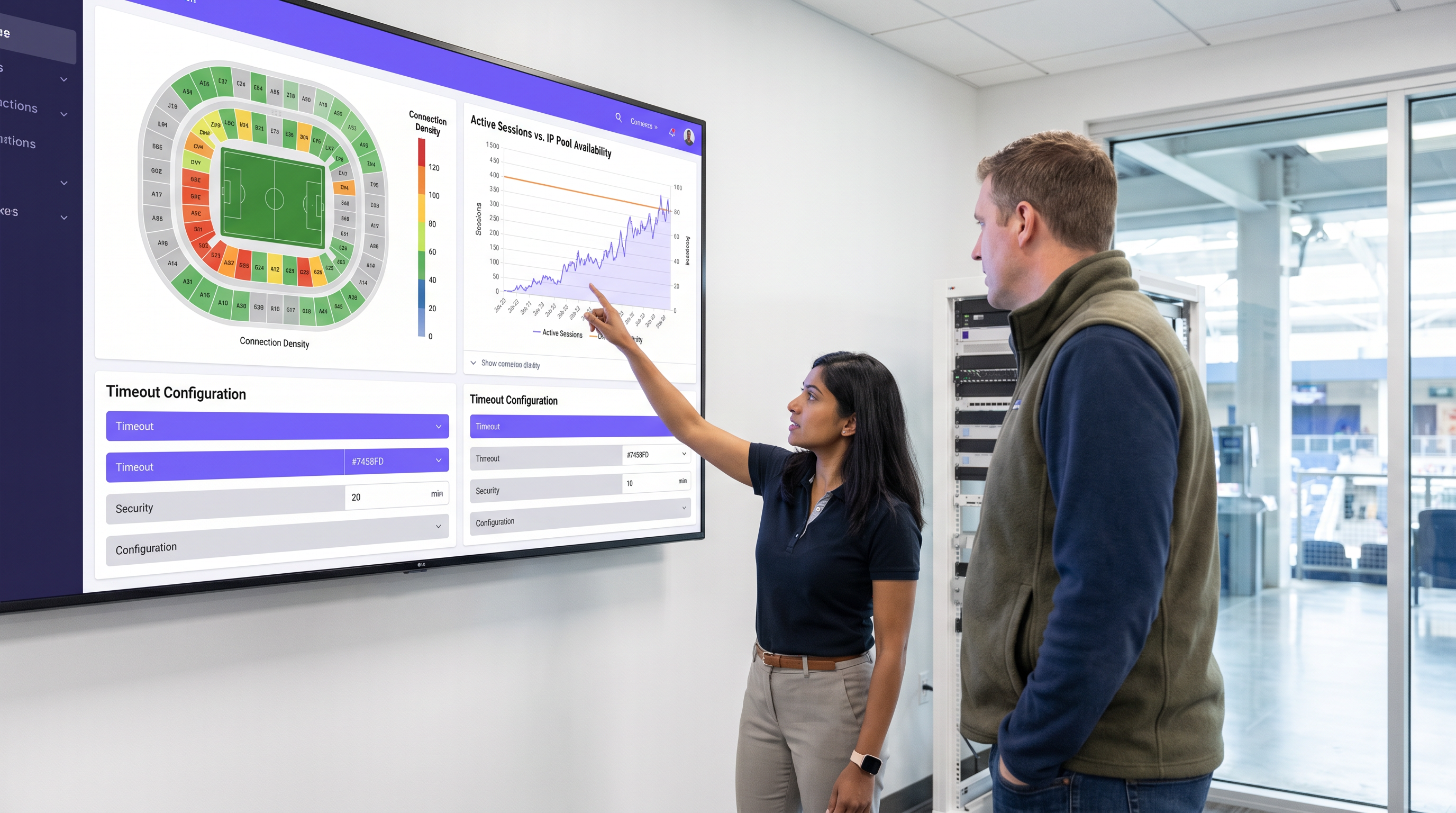
A large sports stadium (capacity 50,000) is running out of IP addresses during the first quarter of games. Users report full WiFi signal but cannot connect to the internet. Current settings: Idle timeout 4 hours, Absolute timeout 12 hours.
- Drastically reduce the idle timeout to 15 minutes. This immediately reclaims IPs from fans who have walked out of range or turned off WiFi.
- Reduce the DHCP lease time to 20 minutes to align with the new idle timeout.
- Reduce the absolute timeout to 5 hours (the maximum duration of a game plus egress time).
Domande di esercitazione
Q1. A hospital IT director wants to ensure that visitors in the waiting room don't have to log in multiple times, but also needs to ensure that devices belonging to discharged patients are removed from the network promptly to free up IPs. The average wait time is 3 hours, and the average patient stay is 2 days.
Suggerimento: Differentiate between the transient waiting room users and the long-term admitted patients. Can you apply one policy to both?
Visualizza risposta modello
The hospital should deploy two separate Guest SSIDs or utilize role-based access control via the captive portal. For the 'Visitor' tier, set an absolute timeout of 4 hours and an idle timeout of 30 minutes. For the 'Patient' tier (perhaps authenticated via an admission code), set an absolute timeout of 48 hours and an idle timeout of 8 hours. This balances the high turnover of the waiting room with the UX needs of admitted patients.
Q2. Your retail client complains that their returning customer analytics are dropping significantly, even though footfall remains steady. They currently have a 30-day MAB re-authentication policy.
Suggerimento: Think about recent changes in mobile operating system privacy features.
Visualizza risposta modello
The drop in analytics is likely due to MAC randomization (Private Wi-Fi Addresses) in iOS and Android. Because devices rotate their MAC addresses, the 30-day MAB policy fails to recognize returning devices, treating them as new visitors. The solution is to update the captive portal splash page to instruct users to disable Private Addresses for the store's network to receive loyalty benefits, or shift analytics reliance toward application-level tracking rather than purely Layer 2 MAC data.
Q3. A conference center hosts events ranging from 1-day seminars to 5-day conventions. The network team currently uses a static 24-hour absolute timeout for all events, leading to complaints during multi-day conventions.
Suggerimento: How can the timeout policy become dynamic rather than static?
Visualizza risposta modello
The network team should integrate the WiFi authentication backend (RADIUS) with the venue's event management system, or utilize dynamic vouchers. Instead of a static 24-hour timeout, the captive portal should issue session lengths based on the specific event code entered by the attendee. A 1-day seminar code grants a 12-hour absolute timeout, while a 5-day convention code grants a 120-hour absolute timeout, eliminating mid-event disconnects.
Continua a leggere questa serie
Il Futuro della Sicurezza Wi-Fi: NAC basato su AI e Rilevamento delle Minacce
Questa guida autorevole esplora l'evoluzione della sicurezza Wi-Fi aziendale, dal WPA2 tradizionale al Network Access Control (NAC) basato su AI e al rilevamento delle minacce. Progettata per i leader IT, fornisce strategie di implementazione attuabili per la messa in sicurezza di ambienti ad alta densità come negozi al dettaglio, strutture ricettive e stadi, utilizzando le reti basate sull'identità di Purple.
Gestire la sicurezza dei dispositivi IoT con NAC e MPSK
Questa guida tecnica illustra come le aziende possano proteggere i dispositivi IoT headless utilizzando l'architettura Multiple Pre-Shared Key (MPSK) e il Network Access Control (NAC). Fornisce passaggi di implementazione pratici per ottenere la micro-segmentazione, contenere i raggi di esplosione della sicurezza e mantenere la conformità senza sacrificare la scalabilità.
RadSec: Come RADIUS su TLS migliora la sicurezza dell'autenticazione WiFi
Questo riferimento tecnico autorevole spiega come RadSec (RFC 6614) protegge l'autenticazione WiFi aziendale incapsulando il traffico RADIUS tradizionale nella crittografia TLS. Progettato per manager IT e architetti di rete, copre architettura, strategie di implementazione e passaggi pratici per mitigare i rischi del traffico RADIUS UDP non crittografato attraverso reti aziendali e guest.