
Tempos Limite de Sessão do WiFi para Convidados: Equilibrando UX e Segurança
Este guia oferece uma estrutura prática para configurar os tempos limite de sessão do WiFi para convidados, equilibrando uma experiência de usuário fluida com segurança robusta. Ele aborda tempos limite de inatividade, tempos limite absolutos, estratégias de reautenticação e cenários de implantação específicos do setor para líderes de TI e operações de locais.
Ouça este guia
Ver transcrição do podcast
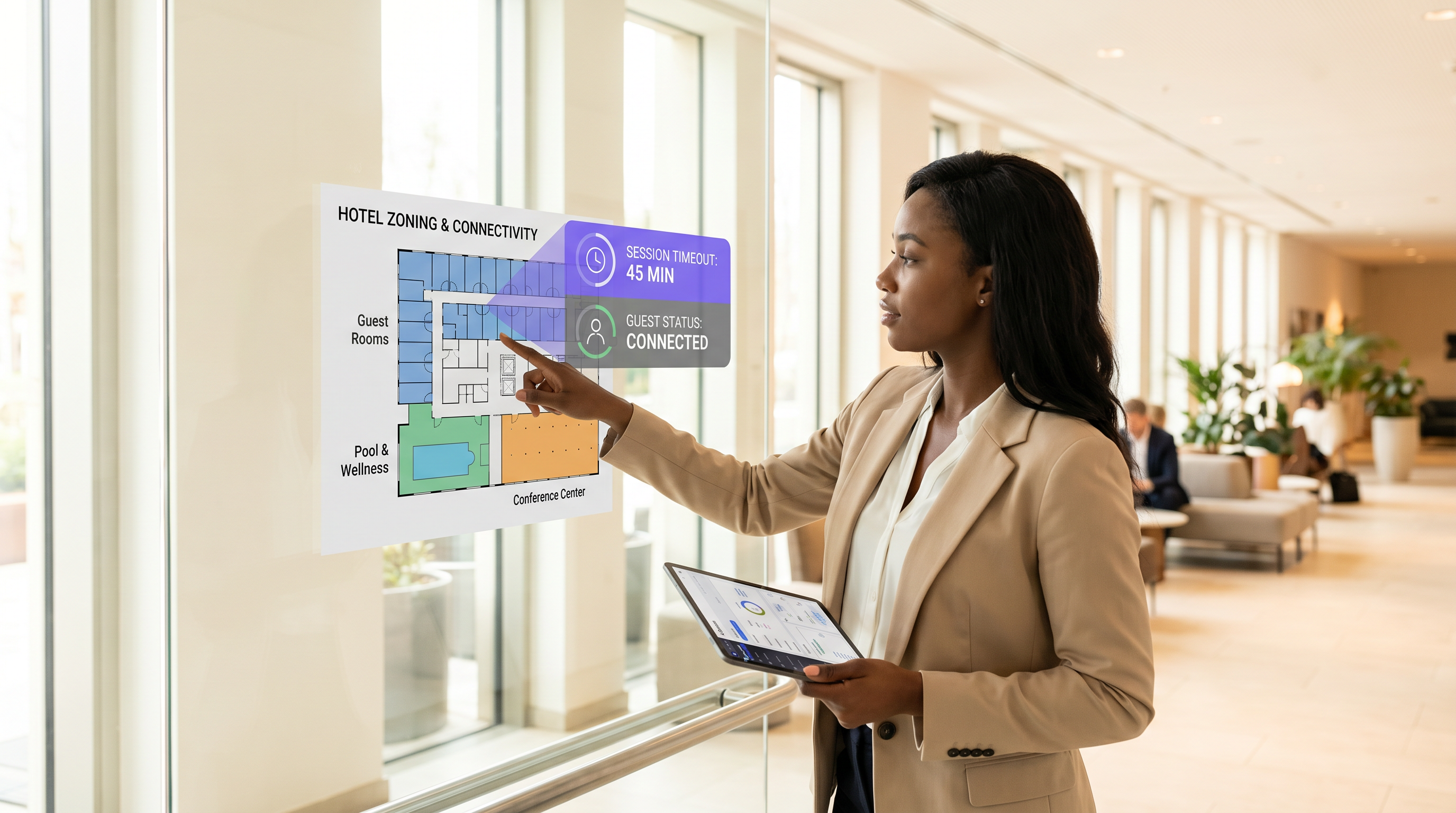
Resumo Executivo
Para locais modernos, a rede WiFi para convidados é um ponto de contato crítico para a experiência do cliente e análises operacionais. No entanto, definir os tempos limite de sessão corretos muitas vezes se torna um cabo de guerra entre as equipes de segurança de TI e os gerentes de experiência do convidado. Se os tempos limite forem muito curtos, os usuários enfrentam logins frustrantes e repetitivos no Captive Portal. Se forem muito longos, a rede sofre com o esgotamento do pool de IPs, dados de análise desatualizados e riscos de segurança aumentados de dispositivos não autenticados.
Este guia oferece uma estrutura prática para configurar os tempos limite de sessão do Guest WiFi . Exploramos os papéis distintos dos temporizadores de inatividade, temporizadores absolutos e políticas de reautenticação, fornecendo recomendações acionáveis para ambientes de Hospitalidade , Varejo e setor público. Ao alinhar as estratégias de tempo limite com o comportamento do usuário e os mandatos de segurança, os arquitetos de rede podem garantir conectividade perfeita, mantendo conformidade robusta e WiFi Analytics precisos.
Análise Técnica Aprofundada: A Mecânica dos Tempos Limite de Sessão
Um "tempo limite de sessão" não é uma única configuração, mas uma combinação de temporizadores distintos operando em diferentes camadas da pilha de rede. Compreender essa mecânica é crucial para uma implantação eficaz.
1. Tempo Limite de Inatividade (Temporizador de Inatividade)
O tempo limite de inatividade monitora a transmissão ativa de dados. Se um dispositivo cliente não envia ou recebe dados por uma duração especificada, o controlador de rede encerra a sessão.
- Propósito: Recupera endereços IP (leases DHCP) e memória de AP alocados a dispositivos que deixaram o local sem se desconectar formalmente.
- Desafio: Smartphones modernos frequentemente entram em modo de suspensão para economizar bateria, interrompendo a transmissão de dados. Tempos limite de inatividade agressivos (por exemplo, 5 minutos) desconectarão dispositivos em suspensão, forçando os usuários a se reautenticarem ao ativar seus telefones.
- Recomendação: Defina tempos limite de inatividade entre 30 e 60 minutos para ambientes típicos.
2. Tempo Limite Absoluto (Temporizador Rígido)
O tempo limite absoluto dita a duração total máxima de uma sessão, independentemente da atividade. Assim que este temporizador expira, a sessão é encerrada à força, e o usuário deve se reautenticar.
- Propósito: Impõe limites de uso diário, garante que os usuários aceitem Termos e Condições atualizados e força uma revalidação de segurança periódica.
- Desafio: Interrompe sessões ativas, o que pode atrapalhar chamadas VoIP ou grandes downloads se não for comunicado claramente.
- Recomendação: Alinhe o tempo limite absoluto com o tempo de permanência típico do local (por exemplo, 12 horas para um hospital, 2 horas para uma cafeteria).
3. Captive Portal e Reautenticação
Quando uma sessão expira, o usuário é redirecionado para o Captive Portal. Implantações modernas frequentemente usam bypass de autenticação MAC (MAB) ou roaming contínuo para lembrar dispositivos por um período definido (por exemplo, 30 dias). Nessas configurações, uma sessão expirada pode não exigir um login manual; o sistema reautentica silenciosamente o endereço MAC reconhecido, desde que o dispositivo não o tenha randomizado.
Para topologias de rede avançadas, integrar com ferramentas como Sensors e garantir uma infraestrutura de backend robusta — como a adequada RADIUS সার্ভার হাই অ্যাভেইলেবিলিটি: Active-Active বনাম Active-Passive — é essencial para lidar com picos de autenticação sem derrubar usuários legítimos.
Guia de Implementação: Estratégias Específicas do Setor
Não existe uma configuração de tempo limite única para todos. A estratégia deve refletir os objetivos operacionais do local e o comportamento do convidado.
Cenário A: A Loja de Varejo de Alta Rotatividade
No Varejo , o objetivo é capturar análises precisas de fluxo de pessoas e entregar marketing direcionado, evitando a permanência excessiva.
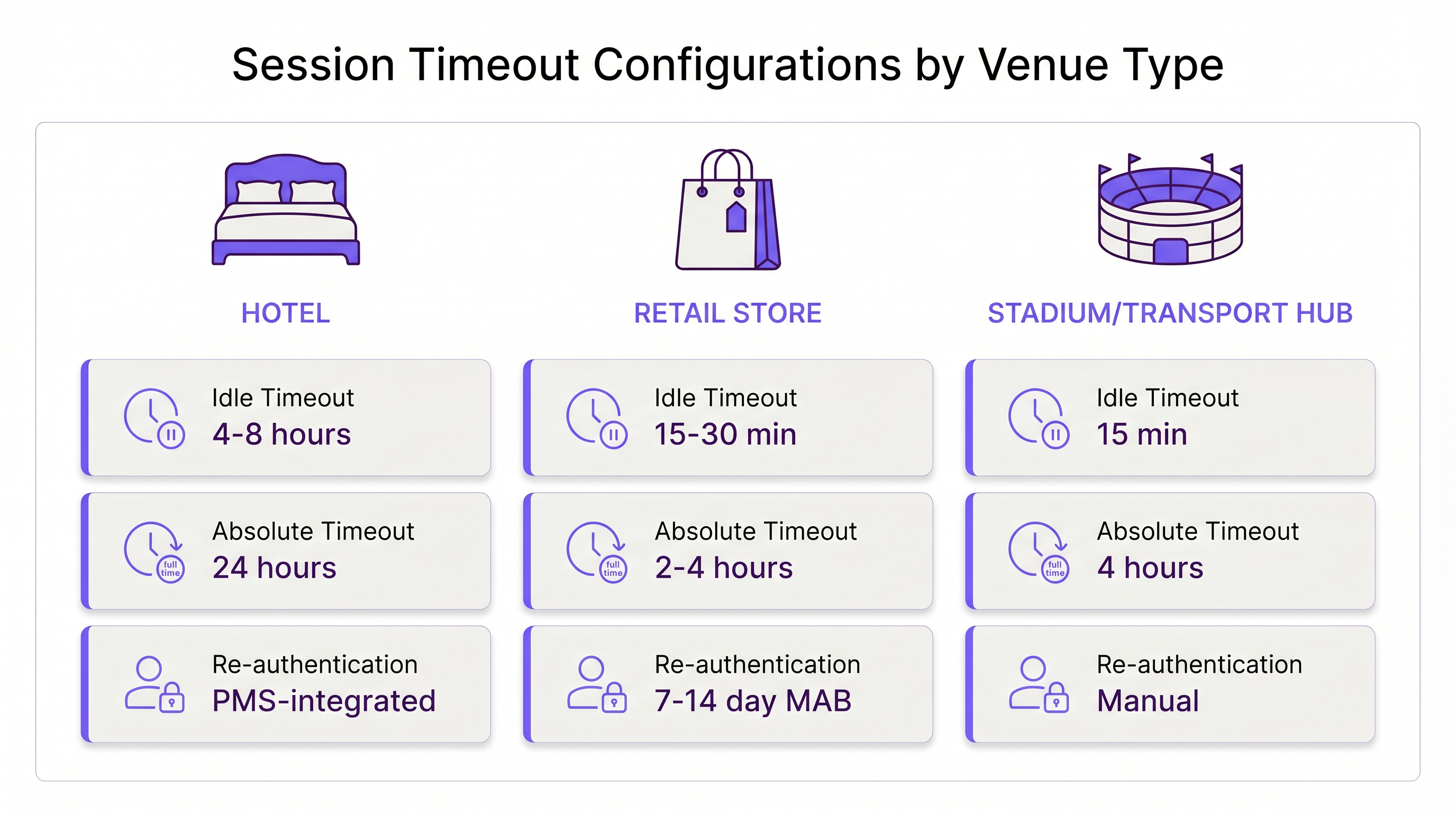
- Tempo Limite de Inatividade: 15–30 minutos. Os compradores se movem rapidamente. Se um dispositivo ficar inativo por 30 minutos, o usuário provavelmente deixou a loja.
- Tempo Limite Absoluto: 2–4 horas. Isso cobre a viagem de compras típica mais longa.
- Reautenticação: Reautenticação MAC silenciosa por 7–14 dias para rastrear clientes que retornam sem atrito.
Cenário B: O Ambiente de Hospitalidade Empresarial
Na Hospitalidade , os hóspedes esperam uma experiência WiFi "caseira". Forçar um login a cada 4 horas é inaceitável e resultará em reclamações na recepção.
- Tempo Limite de Inatividade: 4–8 horas. Os hóspedes deixam dispositivos em seus quartos enquanto estão na piscina; esses dispositivos devem permanecer conectados.
- Tempo Limite Absoluto: 24 horas ou vinculado à data de checkout (por exemplo, via integração PMS).
- Reautenticação: Roaming contínuo em toda a propriedade durante a estadia.
Cenário C: O Centro de Transporte Movimentado
Em centros de Transporte como aeroportos, os tempos de permanência são altamente variáveis, e o esgotamento de endereços IP é um risco grave devido ao volume massivo de dispositivos transitórios.
- Tempo Limite de Inatividade: 15 minutos. A recuperação agressiva é necessária para manter o pool DHCP disponível.
- Tempo Limite Absoluto: 4 horas (o tempo máximo típico de escala antes de um voo).
- Reautenticação: Reautenticação manual necessária após o tempo limite absoluto para gerenciar o uso excessivo de largura de banda.
Melhores Práticas para Equilibrar UX e Segurança
- Alinhe os Leases DHCP com os Tempos Limite de Sessão: Uma configuração incorreta comum é definir um tempo limite de sessão de 2 horas, mas um lease DHCP de 8 horas. Isso esgota o pool de IPs. Seu tempo de lease DHCP deve corresponder ou exceder ligeiramente seu tempo limite de sessão absoluto.
- Considere a Randomização de MAC: iOS e Android usam endereços MAC privados por padrão. Se sua rede depende muito da reautenticação baseada em MAC, eduque os usuários na página inicial para desabilitar a randomização de MAC para o SSID do local, caso desejem uma experiência contínua por vários dias.
- Aproveite as Análises: Use WiFi Analytics para monitorar a duração das sessões. Se 90% dos seus usuários saem naturalmente em 45 minutos, definir um tempo limite absoluto de 12 horas é um risco desnecessário.
- Implementar WPA3-Open (OWE): Para segurança aprimorada em redes de convidados abertas, implemente a Criptografia Sem Fio Oportunista (OWE). Ela fornece criptografia individualizada para cada sessão, mitigando o risco de sniffing passivo, independentemente da duração do tempo limite.
Solução de Problemas e Mitigação de Riscos
- Sintoma: Reclamações Constantes de Reautenticação.
- Causa: O tempo limite de inatividade é muito curto, desconectando smartphones em modo de espera.
- Correção: Aumente o tempo limite de inatividade para pelo menos 30 minutos.
- Sintoma: Esgotamento do Pool de IPs (Usuários não conseguem conectar).
- Causa: Sessões fantasmas estão retendo IPs porque o tempo limite de inatividade está desativado ou é muito longo.
- Correção: Implemente um tempo limite de inatividade rigoroso de 15-30 minutos e reduza os tempos de concessão DHCP.
- Sintoma: Dados de Analytics Desatualizados.
- Causa: Dispositivos permanecem "conectados" muito depois de o usuário ter saído do local devido a longos temporizadores de inatividade.
- Correção: Ajuste o temporizador de inatividade para corresponder ao tempo de saída física do local.
ROI e Impacto nos Negócios
Otimizar os tempos limite de sessão impacta diretamente o resultado final. Uma configuração bem ajustada reduz os tickets de suporte relacionados a problemas de conectividade em até 40%. Além disso, dados de sessão precisos alimentam diretamente as plataformas de Wayfinding e marketing. Se os tempos limite forem configurados corretamente, as equipes de marketing recebem métricas precisas de tempo de permanência, permitindo campanhas com maior taxa de conversão.
À medida que as empresas modernizam sua infraestrutura—talvez percebendo Os Principais Benefícios do SD WAN para Empresas Modernas —padronizar essas políticas de tempo limite em todas as filiais torna-se um fator chave para a eficiência operacional e uma experiência consistente para o convidado.
Definições principais
Idle Timeout
The duration a network connection is maintained while no data is being transmitted by the client device.
Crucial for reclaiming network resources from devices that have physically left the venue without disconnecting.
Absolute Timeout
The hard limit on how long a session can last from the moment of authentication, regardless of activity.
Used to enforce daily usage limits and mandate periodic re-acceptance of Terms & Conditions.
Captive Portal
A web page that a user of a public access network is obliged to view and interact with before access is granted.
The primary interface for guest WiFi authentication, branding, and data capture.
MAC Authentication Bypass (MAB)
A process where the network authenticates a device using its MAC address against a database, bypassing the need for a manual captive portal login.
Essential for creating seamless 'return visitor' experiences in retail and hospitality.
DHCP Lease Time
The amount of time a network device retains an assigned IP address before it must request a renewal.
Must be carefully aligned with session timeouts to prevent IP pool exhaustion in high-density venues.
MAC Randomization
A privacy feature in modern mobile OSs that generates a fake MAC address for each WiFi network the device connects to.
Complicates MAB and analytics, requiring venues to adjust their tracking and re-authentication strategies.
Opportunistic Wireless Encryption (OWE)
A WiFi Alliance standard that provides individualized encryption for devices on open, unpassworded networks.
Improves the security posture of guest WiFi without requiring users to enter a pre-shared key.
Dwell Time
The average amount of time a guest or customer spends physically present within the venue.
The foundational metric used to determine appropriate absolute and idle timeout configurations.
Exemplos práticos
A 200-room hotel is experiencing high volumes of helpdesk calls because guests have to log back into the WiFi every time they return from the pool. The current setup has an idle timeout of 30 minutes and an absolute timeout of 8 hours.
- Increase the idle timeout to 8 hours. Devices left in rooms or sleeping in bags by the pool will not be prematurely disconnected.
- Change the absolute timeout to 24 hours, or ideally, integrate the WiFi controller with the Property Management System (PMS) to set the absolute timeout to the exact time of the guest's checkout.
- Enable MAC-based seamless re-authentication for 7 days so returning guests bypass the captive portal entirely.
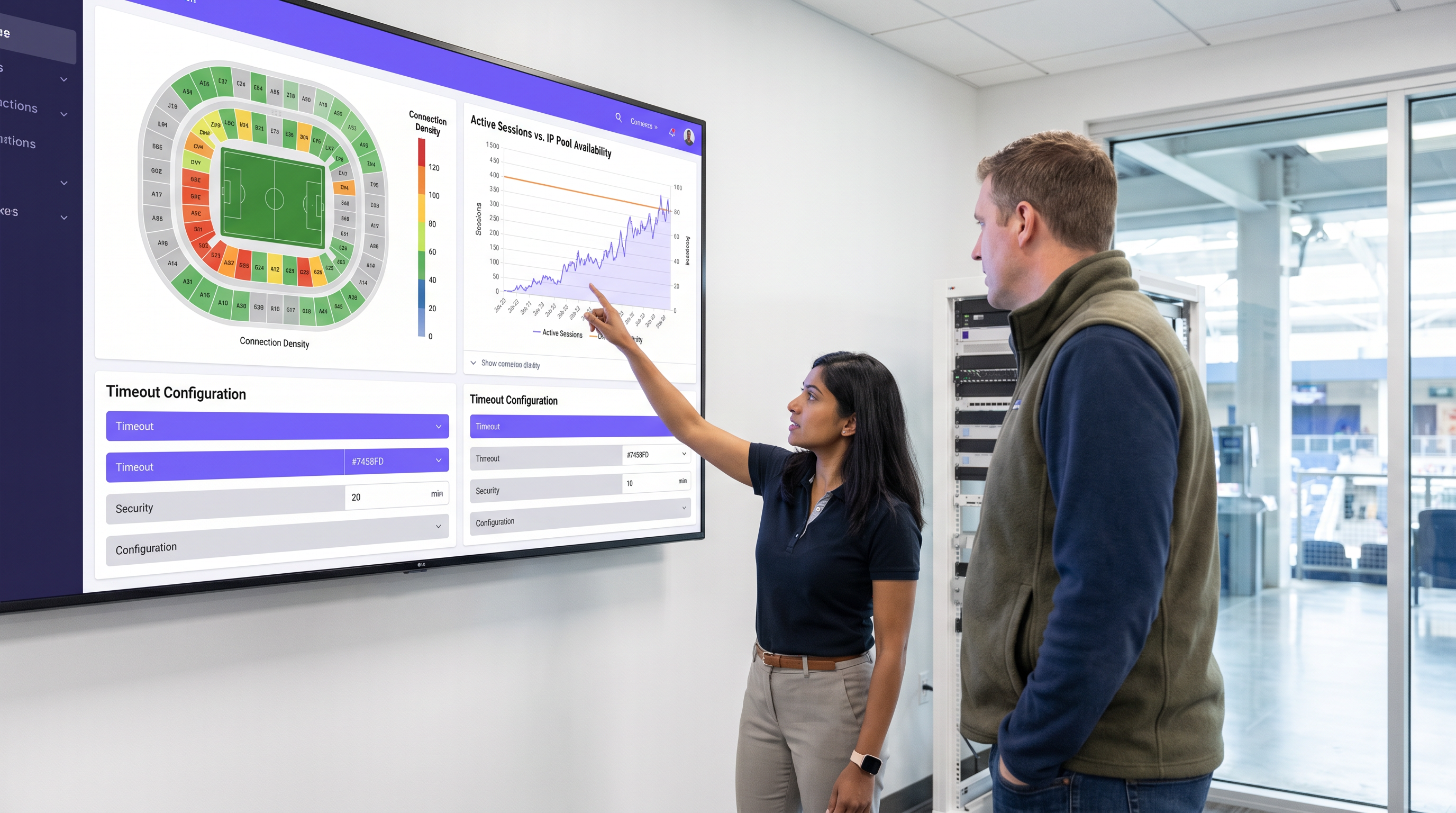
A large sports stadium (capacity 50,000) is running out of IP addresses during the first quarter of games. Users report full WiFi signal but cannot connect to the internet. Current settings: Idle timeout 4 hours, Absolute timeout 12 hours.
- Drastically reduce the idle timeout to 15 minutes. This immediately reclaims IPs from fans who have walked out of range or turned off WiFi.
- Reduce the DHCP lease time to 20 minutes to align with the new idle timeout.
- Reduce the absolute timeout to 5 hours (the maximum duration of a game plus egress time).
Questões práticas
Q1. A hospital IT director wants to ensure that visitors in the waiting room don't have to log in multiple times, but also needs to ensure that devices belonging to discharged patients are removed from the network promptly to free up IPs. The average wait time is 3 hours, and the average patient stay is 2 days.
Dica: Differentiate between the transient waiting room users and the long-term admitted patients. Can you apply one policy to both?
Ver resposta modelo
The hospital should deploy two separate Guest SSIDs or utilize role-based access control via the captive portal. For the 'Visitor' tier, set an absolute timeout of 4 hours and an idle timeout of 30 minutes. For the 'Patient' tier (perhaps authenticated via an admission code), set an absolute timeout of 48 hours and an idle timeout of 8 hours. This balances the high turnover of the waiting room with the UX needs of admitted patients.
Q2. Your retail client complains that their returning customer analytics are dropping significantly, even though footfall remains steady. They currently have a 30-day MAB re-authentication policy.
Dica: Think about recent changes in mobile operating system privacy features.
Ver resposta modelo
The drop in analytics is likely due to MAC randomization (Private Wi-Fi Addresses) in iOS and Android. Because devices rotate their MAC addresses, the 30-day MAB policy fails to recognize returning devices, treating them as new visitors. The solution is to update the captive portal splash page to instruct users to disable Private Addresses for the store's network to receive loyalty benefits, or shift analytics reliance toward application-level tracking rather than purely Layer 2 MAC data.
Q3. A conference center hosts events ranging from 1-day seminars to 5-day conventions. The network team currently uses a static 24-hour absolute timeout for all events, leading to complaints during multi-day conventions.
Dica: How can the timeout policy become dynamic rather than static?
Ver resposta modelo
The network team should integrate the WiFi authentication backend (RADIUS) with the venue's event management system, or utilize dynamic vouchers. Instead of a static 24-hour timeout, the captive portal should issue session lengths based on the specific event code entered by the attendee. A 1-day seminar code grants a 12-hour absolute timeout, while a 5-day convention code grants a 120-hour absolute timeout, eliminating mid-event disconnects.
Continue a ler esta série
O Futuro da Segurança Wi-Fi: NAC Orientado por IA e Detecção de Ameaças
Este guia abrangente explora a evolução da segurança Wi-Fi empresarial, desde o WPA2 legado até o Network Access Control (NAC) orientado por IA e a detecção de ameaças. Projetado para líderes de TI, ele oferece estratégias de implantação acionáveis para proteger ambientes de alta densidade, como varejo, hotelaria e estádios, usando as redes baseadas em identidade da Purple.
Gerenciando a Segurança de Dispositivos IoT com NAC e MPSK
Este guia técnico detalha como ambientes corporativos podem proteger dispositivos IoT sem interface de usuário (headless) usando a arquitetura Multiple Pre-Shared Key (MPSK) e Network Access Control (NAC). Ele fornece etapas de implementação acionáveis para alcançar micro-segmentação, conter raios de explosão de segurança e manter a conformidade sem sacrificar a escalabilidade.
RadSec: Como o RADIUS sobre TLS Melhora a Segurança da Autenticação WiFi
Esta referência técnica autoritária explica como o RadSec (RFC 6614) protege a autenticação WiFi empresarial ao encapsular o tráfego RADIUS tradicional em criptografia TLS. Projetado para gerentes de TI e arquitetos de rede, ele aborda arquitetura, estratégias de implantação e etapas práticas para mitigar os riscos do tráfego RADIUS UDP não criptografado em redes corporativas e de convidados.