

Wi-Fi 6E vs Wi-Fi 7: Dovresti saltare il 6E e passare direttamente al 7?
Una guida decisionale completa per direttori IT e architetti di rete che valutano un aggiornamento hardware wireless nel 2026. Fornisce un confronto tecnico tra Wi-Fi 6E e Wi-Fi 7, una matrice di prezzi dei fornitori attuale e raccomandazioni di implementazione attuabili per luoghi ad alta densità nei settori dell'ospitalità, della vendita al dettaglio e pubblico — aiutando i team a determinare se il sovrapprezzo del Wi-Fi 7 sia giustificato per le loro specifiche esigenze operative.
🎧 Ascolta questa guida
Visualizza trascrizione
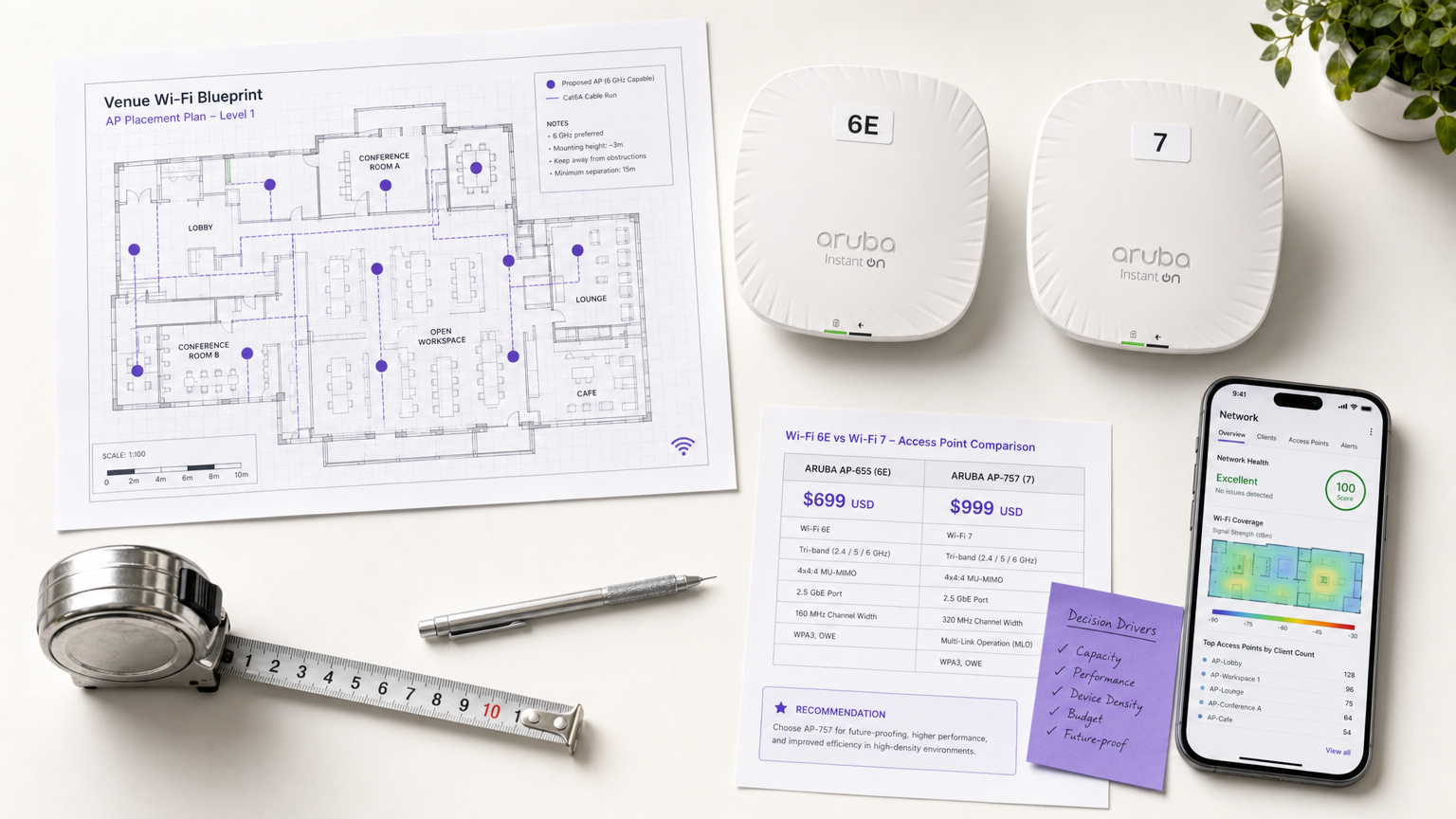
Riepilogo Esecutivo
La transizione dal Wi-Fi 6E al Wi-Fi 7 (IEEE 802.11be) rappresenta un cambiamento fondamentale nel modo in cui le reti wireless aziendali gestiscono densità, latenza e throughput. Per i direttori IT e gli architetti di rete che pianificano un aggiornamento hardware nel 2026, la decisione non è più un semplice calcolo della larghezza di banda — è una valutazione strategica della spesa in conto capitale rispetto alle esigenze operative di luoghi ad alta densità. Mentre il Wi-Fi 6E ha introdotto la banda a 6 GHz, il Wi-Fi 7 la sfrutta appieno con canali da 320 MHz, modulazione 4K QAM e Multi-Link Operation (MLO).
Questa guida fornisce un'analisi neutrale dei fornitori del panorama aziendale attuale, valutando se il sovrapprezzo del 30–50% per gli access point Wi-Fi 7 sia giustificato per i carichi di lavoro tipici dei luoghi nei settori Ospitalità , Vendita al Dettaglio e negli ambienti del settore pubblico. Esaminando la disponibilità hardware attuale, le matrici dei prezzi e le tempistiche di penetrazione dei client, i leader IT possono prendere decisioni di spesa in conto capitale basate sui dati che allineano le capacità dell'infrastruttura con i requisiti aziendali nei prossimi 3–5 anni.
Approfondimento Tecnico: Wi-Fi 6E vs Wi-Fi 7
Le differenze architetturali tra Wi-Fi 6E e Wi-Fi 7 vanno ben oltre il throughput teorico di picco. Mentre il Wi-Fi 6E (IEEE 802.11ax) è stato un passo evolutivo che ha aperto lo spettro a 6 GHz, il Wi-Fi 7 (IEEE 802.11be) è una riprogettazione rivoluzionaria focalizzata sulla latenza deterministica e sul throughput estremamente elevato (EHT).
| Specifiche | Wi-Fi 6E (802.11ax) | Wi-Fi 7 (802.11be) |
|---|---|---|
| Throughput Teorico Max | 9.6 Gbps | 46 Gbps |
| Larghezza Canale Max | 160 MHz | 320 MHz |
| Modulazione | 1024-QAM | 4096-QAM (4K QAM) |
| Multi-Link Operation (MLO) | No | Sì |
| Preamble Puncturing | Base | Avanzato |
| Bande di Frequenza | 2.4 / 5 / 6 GHz | 2.4 / 5 / 6 GHz |
| Backhaul Consigliato | 2.5 GbE | 10 GbE |
| Requisiti di Alimentazione | PoE+ (802.3at) | PoE++ (802.3bt) |
Il Paradigma dello Spettro e della Larghezza di Canale
Il Wi-Fi 6E ha introdotto l'accesso alla banda a 6 GHz, alleviando la congestione negli spazi tradizionali a 2.4 GHz e 5 GHz. Tuttavia, era limitato a una larghezza di canale massima di 160 MHz. Il Wi-Fi 7 raddoppia questa capacità, supportando canali da 320 MHz esclusivamente nella banda a 6 GHz. Questa espansione è fondamentale per i luoghi che supportano applicazioni ad alta larghezza di banda come la realtà aumentata o l'analisi in tempo reale. I canali più ampi consentono velocità di trasmissione dati significativamente più elevate, raddoppiando di fatto il limite di capacità per i dispositivi client compatibili.
Multi-Link Operation (MLO): Il Cambiamento Rivoluzionario
L'avanzamento architetturale più significativo nel Wi-Fi 7 è la Multi-Link Operation (MLO). Nelle generazioni precedenti, incluso il Wi-Fi 6E, un dispositivo client poteva connettersi a un access point su una singola banda in un dato momento. MLO altera fondamentalmente questo vincolo consentendo ai dispositivi di trasmettere e ricevere dati simultaneamente su più bande e canali.
Questa capacità offre due vantaggi critici per le implementazioni aziendali. In primo luogo, migliora drasticamente il throughput aggregato combinando la capacità di più bande. In secondo luogo, e più importante per le operazioni dei luoghi, riduce significativamente la latenza e migliora l'affidabilità. Bilanciando il carico del traffico su tutte le bande disponibili, MLO mitiga l'impatto delle interferenze transitorie su qualsiasi singola frequenza, garantendo prestazioni deterministiche per applicazioni sensibili alla latenza come la voce su IP (VoIP) e le transazioni point-of-sale (POS) in tempo reale. Questo è il motivo principale per considerare il Wi-Fi 7 per ambienti ad alta densità e operativamente critici.
Modulazione, Puncturing ed Efficienza
Il Wi-Fi 7 aggiorna lo schema di modulazione da 1024-QAM a 4096-QAM (4K QAM), consentendo a ogni simbolo di trasportare 12 bit di dati invece di 10 — un aumento del 20% nell'efficienza di trasmissione. Sebbene ciò richieda un elevato rapporto segnale/rumore (SNR) tipicamente riscontrabile vicino all'access point, aumenta significativamente le prestazioni in ambienti ad alta densità dove i client sono raggruppati vicino all'infrastruttura, come sale conferenze o posti a sedere negli stadi.
Inoltre, il Wi-Fi 7 introduce un preamble puncturing migliorato. Nel Wi-Fi 6E, se una porzione di un canale ampio subiva interferenze, l'intero canale poteva essere degradato. Il puncturing avanzato del Wi-Fi 7 consente all'access point di ritagliare il sottocanale specifico interessato dall'interferenza, continuando a utilizzare lo spettro pulito rimanente. Questa resilienza è vitale in ambienti RF complessi tipici di grandi luoghi pubblici.
Guida all'Implementazione: Dimensionare la Decisione di Capex per il 2026
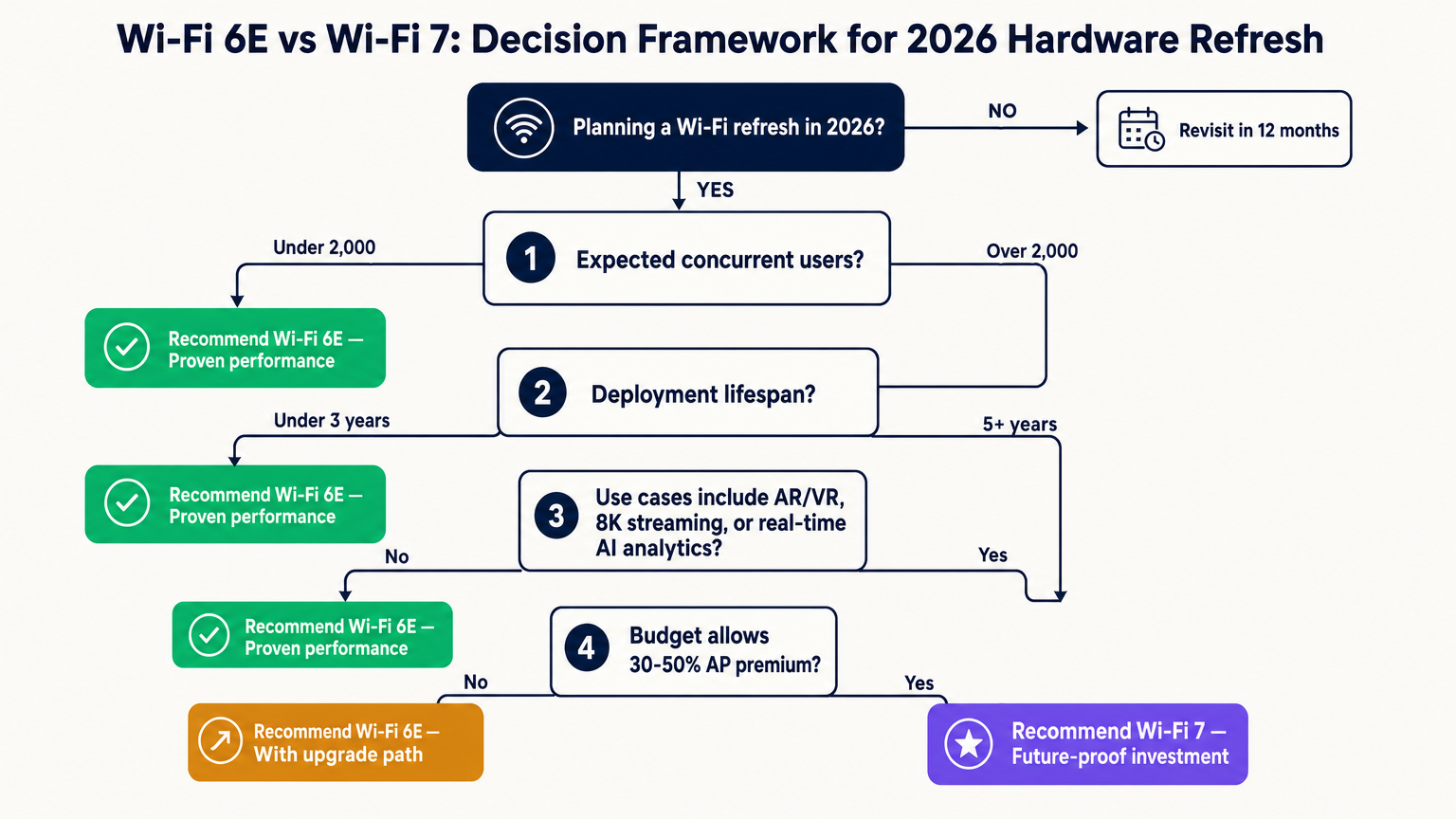
Per i direttori IT che valutano un aggiornamento hardware nel 2026, la decisione tra Wi-Fi 6E e Wi-Fi 7 dipende dall'equilibrio tra la spesa in conto capitale immediata e i requisiti operativi a lungo termine. Il sovrapprezzo di mercato per gli access point Wi-Fi 7 di livello enterprise varia attualmente dal 30% al 50% rispetto ai modelli Wi-Fi 6E comparabili, sebbene IDC riporti un calo del 38% anno su anno nei prezzi degli AP Wi-Fi 7, indicando che il mercato sta maturando rapidamente.
Panoramica dei Fornitori e dei Prezzi
Ad aprile 2026, i principali fornitori enterprise hanno rilasciato i loro access point Wi-Fi 7 di punta. La tabella seguente fornisce una panoramica del mercato attuale per i team IT che conducono valutazioni dei fornitori.
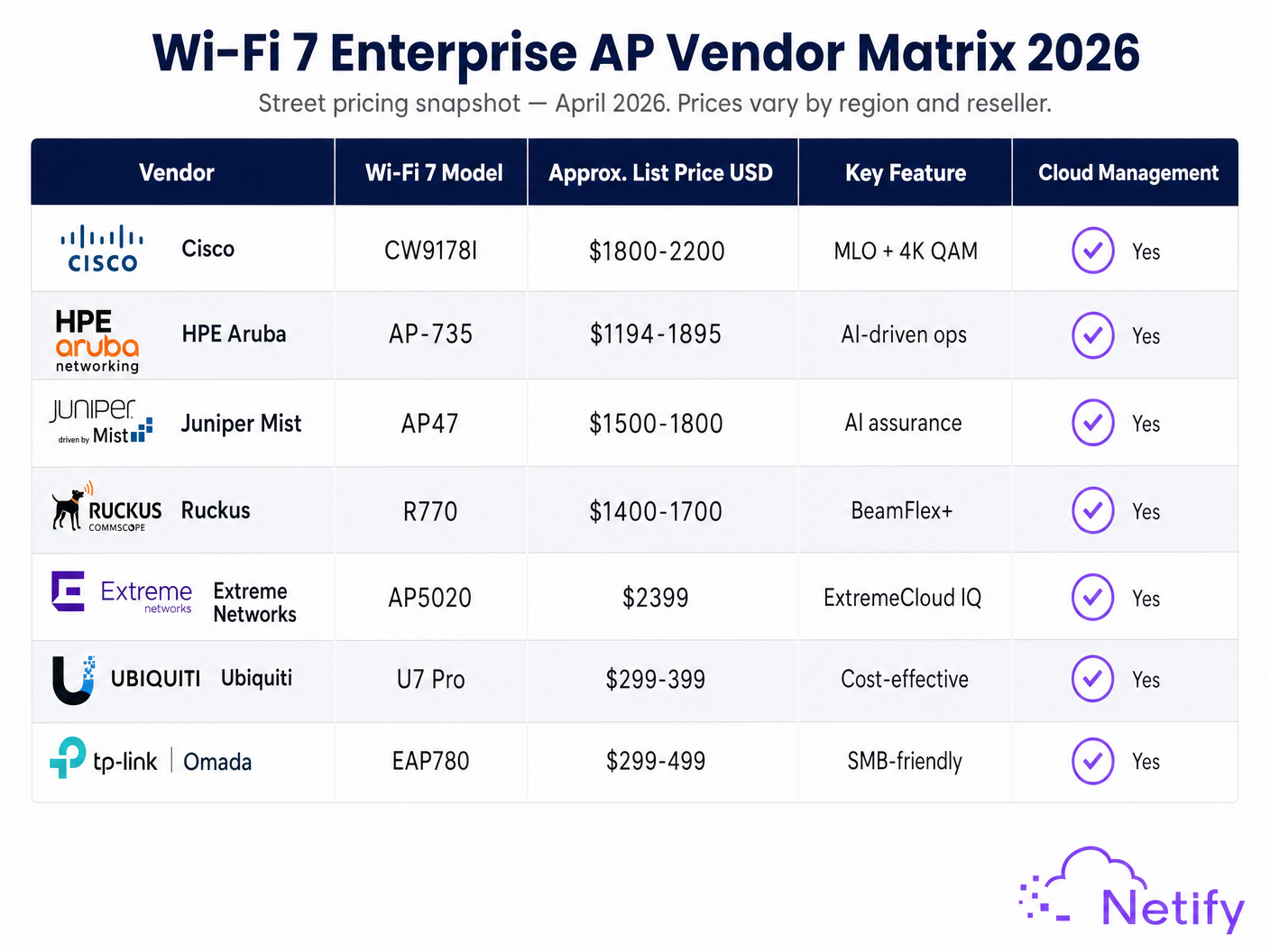
| Fornitore | Modello Wi-Fi 7 | Prezzo di Mercato Appross. (USD) | Elemento Differenziante Chiave |
|---|---|---|---|
| Cisco | CW9178I | $1,800–$2,200 | MLO + 4K QAM, integrazione Catalyst |
| HPE Aruba | AP-735 | $1,194–$1,895 | Operazioni basate su AI, cloud Central |
| Juniper Mist | AP47 | $1,500–$1,800 | AI assurance, Mist AI |
| Ruckus | R770 | $1,400–$1,700 | BeamFlex+ adaptive antenna |
| Extreme Networks | AP5020 | ~$2,399 | ExtremeCloud IQ |
| Ubiquiti | U7 Pro | $299–$399 | Cost-effective, UniFi ecosystem |
Panoramica prezzi — Aprile 2026. I prezzi al dettaglio variano in base a regione, rivenditore e volume. Verificare sempre i prezzi attuali del distributore.
Nel budget per una distribuzione Wi-Fi 7, le organizzazioni devono anche considerare gli aggiornamenti necessari all'infrastruttura cablata. Le capacità di throughput estreme del Wi-Fi 7 richiedono un backhaul multi-gigabit. Mentre le distribuzioni Wi-Fi 6E spesso operano comodamente su porte switch da 2,5 GbE, per realizzare appieno il potenziale di un access point Wi-Fi 7 4x4:4 sono necessari uplink da 10 GbE e budget di alimentazione PoE++ (802.3bt). Questo costo di aggiornamento dell'infrastruttura cablata deve essere considerato nel confronto del costo totale di proprietà.
Tempistica di penetrazione dei dispositivi client
Gli aggiornamenti dell'infrastruttura devono allinearsi alle capacità dei client. Nel 2026, la penetrazione dei client Wi-Fi 7 negli ambienti aziendali si attesta tra il 15% e il 20%, trainata dagli ultimi smartphone di punta (Samsung Galaxy S24 Ultra, iPhone 16 series) e dai laptop di fascia alta. Si prevede che questa penetrazione raggiungerà il 40-50% entro il 2028. Per le sedi che danno priorità ai servizi Guest WiFi , la retrocompatibilità del Wi-Fi 7 garantisce che i dispositivi legacy continueranno a funzionare, ma il pieno ritorno sull'investimento si concretizzerà progressivamente man mano che il mix di client si modernizzerà.
Best practice per le implementazioni in sede
L'implementazione di un'infrastruttura wireless di nuova generazione richiede un approccio sfumato, adattato alle specifiche esigenze operative della sede. La natura hardware-agnostic di piattaforme come Purple garantisce che le organizzazioni possano estrarre il massimo valore dai loro investimenti di rete, indipendentemente dal fornitore di access point sottostante.
Ambienti ad alta densità: Stadi e Spazi Eventi
Per le sedi che superano i 5.000 utenti simultanei, l'argomento per saltare il Wi-Fi 6E e passare direttamente al Wi-Fi 7 è convincente. La combinazione di canali a 320 MHz e 4K QAM fornisce la capacità necessaria per gestire dense concentrazioni di client. Inoltre, MLO garantisce che le operazioni critiche della sede — come il ticketing mobile e le applicazioni di gestione della folla — mantengano una bassa latenza anche durante i picchi di utilizzo. Nella progettazione di questi ambienti, i team IT dovrebbero dare priorità agli access point con gestione RF avanzata e capacità di antenna direzionale. La Internet of Things Architecture: A Complete Guide fornisce un contesto aggiuntivo su come la densità dei dispositivi IoT complichi questi requisiti.
Ospitalità e Centri Congressi
Nel settore Hospitality , i requisiti variano significativamente in base al tipo di proprietà. Per un hotel standard di 200 camere, una rete Wi-Fi 6E ben progettata fornirà capacità sufficiente per lo streaming degli ospiti e le attività operative standard ben oltre il 2028. Tuttavia, i grandi hotel per convegni e i centri congressi dedicati dovrebbero valutare il Wi-Fi 7. La latenza deterministica fornita da MLO è cruciale per supportare centinaia di videoconferenze simultanee e presentazioni interattive. Per le proprietà in cui il Guest WiFi è un servizio generatore di entrate, la capacità migliorata del Wi-Fi 7 supporta anche funzionalità più sofisticate di acquisizione dati e personalizzazione, come esplorato nella nostra guida su AI in Guest WiFi: Personalisation, Engagement, and the GenAI Roadmap .
Retail e Settore Pubblico
Per gli ambienti Retail , il Wi-Fi 6E rimane spesso la soluzione più conveniente per supportare sistemi POS standard, gestione dell'inventario e WiFi Analytics di base. Tuttavia, i negozi di punta che implementano tecnologie esperienziali avanzate — come la visualizzazione di prodotti in AR o l'analisi spaziale in tempo reale — trarranno vantaggio dall'aumento del throughput e dell'efficienza del Wi-Fi 7. Nelle implementazioni del settore pubblico, come edifici municipali o hub di Transport , il ciclo di vita esteso dell'investimento (spesso 7-10 anni) rende l'aspetto di "future-proofing" del Wi-Fi 7 altamente attraente, nonostante il premio di capex iniziale. I requisiti di precisione delle tecnologie Indoor Positioning System: UWB, BLE, & WiFi Guide beneficiano anche del minor livello di latenza fornito dal Wi-Fi 7.
Risoluzione dei problemi e mitigazione dei rischi
L'aggiornamento a un nuovo standard wireless introduce rischi specifici che devono essere gestiti durante la fase di implementazione.
Il divario di copertura a 6 GHz
Un errore comune nella transizione al Wi-Fi 6E o al Wi-Fi 7 è sottovalutare le caratteristiche di propagazione della banda a 6 GHz. Le frequenze più alte si attenuano più rapidamente attraverso gli ostacoli fisici. Una sostituzione uno a uno degli access point legacy a 5 GHz probabilmente comporterà lacune di copertura a 6 GHz. Gli architetti di rete devono condurre indagini predittive e attive complete, modellate specificamente per lo spettro a 6 GHz, spesso richiedendo un aumento del 15-20% della densità totale degli access point per ottenere una copertura ubiqua.
Colli di bottiglia di alimentazione e backhaul
L'implementazione di access point Wi-Fi 7 su infrastrutture di switching legacy può limitare gravemente le prestazioni. Se gli switch 10 GbE PoE++ non rientrano nel budget attuale, le organizzazioni devono assicurarsi che gli access point scelti possano operare in modalità degradata su PoE+ standard (802.3at) fino all'aggiornamento della rete cablata. Questo approccio a fasi è fattibile ma deve essere esplicitamente pianificato e comunicato agli stakeholder per gestire le aspettative di performance.
Integrazione di sicurezza e conformità
Sia Wi-Fi 6E che Wi-Fi 7 richiedono la sicurezza WPA3, ma l'integrazionel'integrazione di questi nuovi standard con i sistemi di autenticazione aziendali esistenti (IEEE 802.1X) richiede un'attenta pianificazione. Le organizzazioni che utilizzano l'autenticazione basata su profili o servizi come OpenRoaming devono assicurarsi che i loro provider di identità e l'infrastruttura RADIUS siano pienamente compatibili con il nuovo hardware. Il ruolo di Purple come livello di gestione delle identità hardware-agnostic semplifica questa integrazione, fornendo un'esperienza di autenticazione e acquisizione dati coerente, indipendente dal fornitore dell'access point fisico. Ciò è particolarmente rilevante per la conformità PCI DSS 4.0 e GDPR, dove il livello di autenticazione e gestione dei dati deve essere dimostrabilmente sicuro indipendentemente dallo standard wireless sottostante.
ROI & Business Impact
La misura ultima di un aggiornamento dell'infrastruttura wireless è il suo impatto sulle operazioni aziendali e sull'esperienza utente. Nel valutare il ROI di Wi-Fi 7 rispetto a Wi-Fi 6E, i leader IT dovrebbero guardare oltre le metriche di throughput grezzo e considerare le capacità operative che ogni standard abilita.
Il successo dovrebbe essere misurato dai miglioramenti nell'efficienza operativa e dall'abilitazione di nuovi servizi che generano entrate. La latenza ridotta di Wi-Fi 7 può migliorare direttamente l'affidabilità dei veicoli a guida automatica (AGV) nei magazzini al dettaglio o aumentare la precisione dei servizi di localizzazione in tempo reale. Per gli operatori di sedi, una rete robusta e ad alta capacità costituisce la base per strategie avanzate di coinvolgimento degli ospiti. L'acquisizione di dati di prima parte e la fornitura di esperienze personalizzate su larga scala richiedono una rete in grado di gestire flussi di dati complessi e in tempo reale senza compromettere l'esperienza di connettività principale.
Il calcolo del costo totale di proprietà dovrebbe comprendere non solo l'hardware dell'access point, ma l'intero stack dell'infrastruttura: switch, cablaggio, costi di rilevamento del sito e la piattaforma di gestione continua. Le organizzazioni che allineano il loro ciclo di aggiornamento hardware con gli obiettivi strategici dell'azienda — piuttosto che semplicemente inseguire l'ultimo standard — otterranno costantemente il ROI più elevato dai loro investimenti in infrastrutture wireless.
Termini chiave e definizioni
Multi-Link Operation (MLO)
A Wi-Fi 7 feature allowing devices to transmit and receive data simultaneously across multiple frequency bands (2.4, 5, and 6 GHz), aggregating bandwidth and improving reliability through load-balancing.
Critical for IT teams managing latency-sensitive applications like VoIP, real-time analytics, or POS transactions. MLO is the primary architectural differentiator between Wi-Fi 6E and Wi-Fi 7 for enterprise deployments.
4K QAM (4096-QAM)
An advanced modulation scheme in Wi-Fi 7 that encodes 12 bits of data per symbol, compared to 10 bits in Wi-Fi 6E's 1024-QAM, resulting in approximately 20% higher spectral efficiency.
Provides significant throughput gains in high-density areas where clients maintain a strong signal-to-noise ratio close to the access point, such as conference rooms or stadium seating bowls.
320 MHz Channels
Ultra-wide data channels available exclusively in the 6 GHz band under the Wi-Fi 7 standard, doubling the maximum channel width of Wi-Fi 6E (160 MHz) and significantly increasing peak throughput.
Essential for supporting extremely high-bandwidth applications like AR/VR or uncompressed 8K video streaming. In dense deployments, channel planning must balance width against reuse to avoid co-channel interference.
Preamble Puncturing
A technique allowing an access point to use a wide channel even if a portion of it is experiencing interference, by 'puncturing out' the noisy sub-channel while utilising the remaining clean spectrum.
Improves network resilience and spectral efficiency in complex, noisy RF environments typical of large public venues, stadiums, and dense urban deployments. Wi-Fi 7 offers an enhanced version of this capability.
Deterministic Latency
The ability of a network to guarantee data delivery within a specific, predictable timeframe, minimising jitter and packet delays regardless of network load.
A primary operational benefit of Wi-Fi 7's MLO. Critical for venue operations relying on real-time data flows, such as automated warehouse robotics, live event production systems, or contactless payment processing.
PoE++ (802.3bt)
Power over Ethernet standard capable of delivering up to 60W (Type 3) or 90W (Type 4) of power per port, enabling high-performance access points to operate all radios simultaneously.
Required by most enterprise Wi-Fi 7 access points to operate at full capacity. Standard PoE+ (802.3at, 30W) is often insufficient, meaning switch infrastructure upgrades must be budgeted alongside AP replacements.
WPA3-Enterprise
The mandatory security protocol for Wi-Fi 6E and Wi-Fi 7 networks, providing robust 192-bit encryption and mutual authentication via IEEE 802.1X and a RADIUS server.
Ensures compliance with stringent data security standards including PCI DSS 4.0 and GDPR. Both Wi-Fi 6E and Wi-Fi 7 mandate WPA3, but IT teams must verify RADIUS infrastructure compatibility during any hardware refresh.
OpenRoaming
A Wi-Fi federation standard allowing seamless, secure device onboarding across participating networks using profile-based authentication, eliminating manual login portals for enrolled users.
Enhances the user experience in public venues and transport hubs. Platforms like Purple provide the identity management layer to facilitate OpenRoaming across any hardware vendor, independent of the underlying Wi-Fi standard.
Casi di studio
A 400-room convention hotel is planning a complete network overhaul in Q3 2026. The property includes a 10,000 sq ft main ballroom and 15 smaller breakout rooms. The current infrastructure is Wi-Fi 5 (802.11ac) and the deployment must last 6 years. The IT Director has a strict capex budget but needs to support dense conference traffic of up to 3,000 simultaneous users in the ballroom.
Deploy a hybrid architecture. Utilise Wi-Fi 7 access points (e.g., HPE Aruba AP-735 or Cisco CW9178I) exclusively in the main ballroom and high-density breakout rooms where MLO and 4K QAM will directly benefit dense delegate populations. For the guest room corridors and standard amenities, deploy cost-effective Wi-Fi 6E access points. Ensure the core and distribution switches serving the conference areas are upgraded to support 10 GbE and PoE++ to prevent backhaul bottlenecks. Conduct a dedicated 6 GHz predictive site survey for the ballroom, expecting approximately 20% more APs than a legacy 5 GHz design would suggest. Implement WPA3-Enterprise with IEEE 802.1X for the corporate SSID and a captive portal solution for guest access.
A national retail chain is refreshing the network infrastructure across 50 mid-sized stores (approximately 15,000 sq ft each). The primary use cases are standard POS operations, employee inventory tablets, and basic guest Wi-Fi. The business plans to pilot AR-based product visualisation in 3 flagship locations next year. The IT team is debating a uniform Wi-Fi 7 rollout across all 50 stores.
Standardise on Wi-Fi 6E for the 47 standard locations. The 160 MHz channels and 6 GHz spectrum access provide more than enough capacity for standard retail operations and guest access, offering significant cost savings over Wi-Fi 7. For the 3 flagship locations, deploy Wi-Fi 7 infrastructure to support the high-bandwidth, low-latency requirements of the upcoming AR pilot. Ensure the flagship stores have 10 GbE switch infrastructure in place before the Wi-Fi 7 deployment. Implement a unified management platform that can handle both 6E and 7 APs to simplify operations. Leverage WiFi Analytics across all locations to capture footfall and dwell time data for marketing purposes.
Analisi degli scenari
Q1. A municipal government is upgrading the public Wi-Fi in a busy transport hub. The deployment must last 7 years. The current switch infrastructure supports 2.5 GbE and PoE+ (802.3at). The IT team is debating between high-end Wi-Fi 6E and entry-level Wi-Fi 7 access points. What is the primary constraint they must address before committing to Wi-Fi 7?
💡 Suggerimento:Consider the power and data throughput requirements of Wi-Fi 7 access points relative to the existing wired infrastructure.
Mostra l'approccio consigliato
The primary constraint is the existing switch infrastructure. Wi-Fi 7 access points typically require PoE++ (802.3bt) to power all radios simultaneously and benefit from 10 GbE uplinks to avoid backhaul bottlenecks. Deploying Wi-Fi 7 on the current 2.5 GbE/PoE+ switches will likely force the APs into a degraded mode, negating the benefits of the investment. The team must either allocate budget to upgrade the edge switches alongside the APs, or accept that Wi-Fi 6E is the optimal choice for their current wired constraints. Given the 7-year lifespan, a phased approach — deploying Wi-Fi 7 APs now but upgrading switches within 12 months — is a viable compromise.
Q2. A stadium IT director is planning a network refresh for a 60,000-seat venue. They are evaluating Wi-Fi 6E versus Wi-Fi 7. Which specific Wi-Fi 7 feature provides the most compelling operational advantage for this high-density environment, and why?
💡 Suggerimento:Focus on the feature that improves reliability and latency by utilising multiple frequency bands simultaneously, rather than simply increasing peak throughput.
Mostra l'approccio consigliato
Multi-Link Operation (MLO) is the most compelling feature for a stadium environment. In a dense venue with significant RF noise and transient interference from 60,000 devices, MLO allows client devices to transmit and receive across multiple bands simultaneously. This load-balancing significantly reduces latency and ensures deterministic performance for critical venue operations like mobile ticketing, contactless payments, and point-of-sale transactions — even during peak utilisation. The reliability improvement from MLO is operationally more significant than the raw throughput increase, as it prevents the service degradation that can occur when a single band becomes congested.
Q3. When transitioning a retail chain from legacy 5 GHz Wi-Fi 5 access points to a new 6 GHz-capable standard (either 6E or 7), what critical design adjustment must the network architect make regarding access point placement, and what is the typical impact on AP count?
💡 Suggerimento:Consider the physical propagation characteristics of higher frequency RF signals and how they interact with typical retail store construction materials.
Mostra l'approccio consigliato
The architect must increase the density of access points. The 6 GHz band used by both Wi-Fi 6E and Wi-Fi 7 attenuates more rapidly through physical obstacles — walls, shelving units, and structural elements — compared to 5 GHz. A one-to-one replacement of the legacy APs in the same locations will result in 6 GHz coverage gaps. A new predictive site survey modelled specifically for 6 GHz propagation is mandatory, and IT teams should budget for a 15–20% increase in the total number of access points to achieve seamless coverage equivalent to the legacy 5 GHz design.




