

Wi-Fi 6E vs Wi-Fi 7: Should You Skip 6E and Go Straight to 7?
A comprehensive decision guide for IT directors and network architects evaluating a 2026 wireless hardware refresh. It provides a technical comparison of Wi-Fi 6E and Wi-Fi 7, a current vendor pricing matrix, and actionable deployment recommendations for high-density venues across hospitality, retail, and public sectors — helping teams determine whether the Wi-Fi 7 premium is justified for their specific operational requirements.
🎧 Listen to this Guide
View Transcript
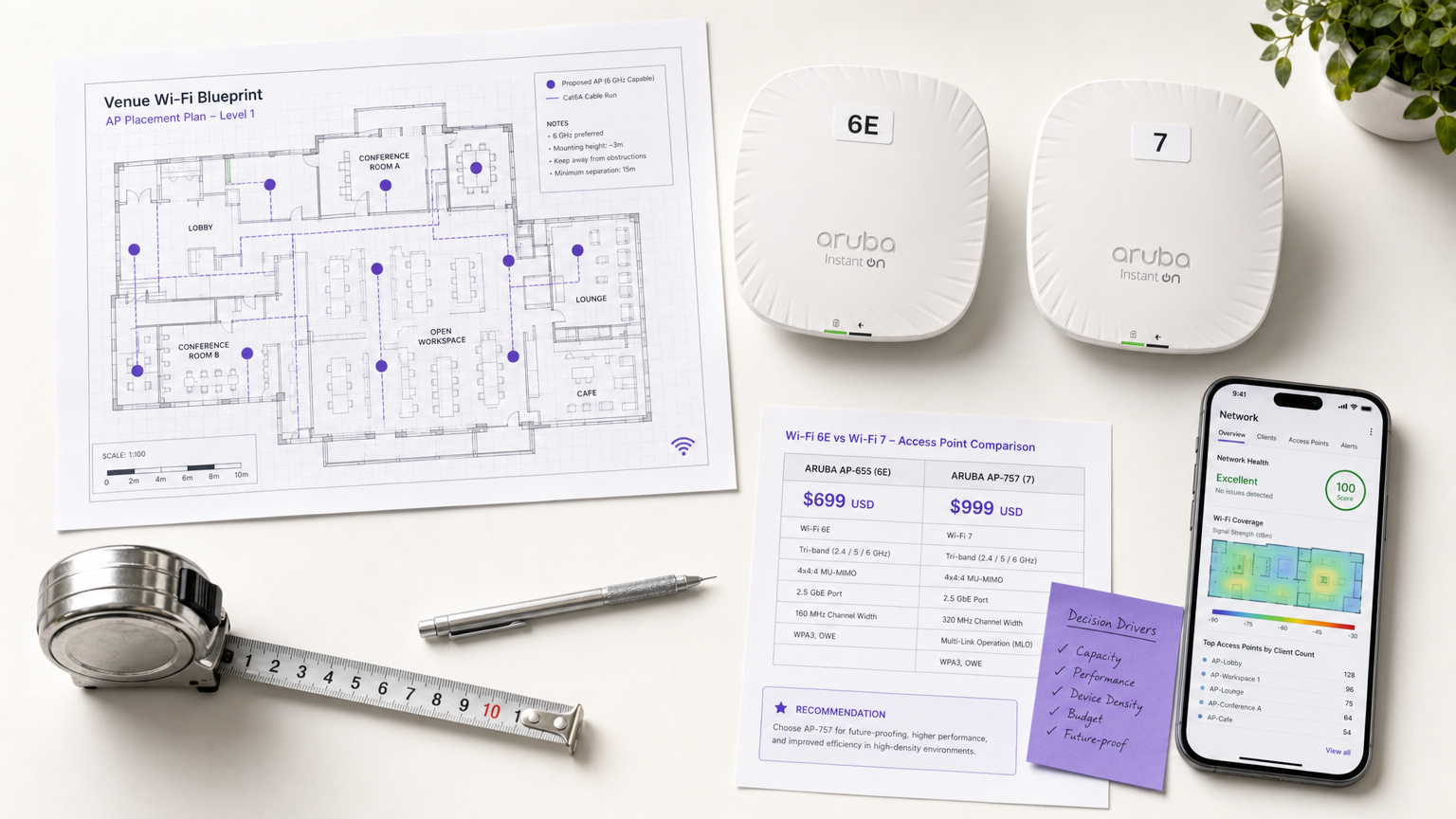
Executive Summary
The transition from Wi-Fi 6E to Wi-Fi 7 (IEEE 802.11be) represents a fundamental shift in how enterprise wireless networks handle density, latency, and throughput. For IT directors and network architects planning a 2026 hardware refresh, the decision is no longer a simple bandwidth calculation — it is a strategic evaluation of capital expenditure against the operational demands of high-density venues. While Wi-Fi 6E introduced the 6 GHz band, Wi-Fi 7 exploits it fully with 320 MHz channels, 4K QAM modulation, and Multi-Link Operation (MLO).
This guide provides a vendor-neutral analysis of the current enterprise landscape, evaluating whether the 30–50% price premium for Wi-Fi 7 access points is justified for typical venue workloads across Hospitality , Retail , and public-sector environments. By examining current hardware availability, pricing matrices, and client penetration timelines, IT leaders can make data-driven capex decisions that align infrastructure capabilities with business requirements over the next 3–5 years.
Technical Deep-Dive: Wi-Fi 6E vs Wi-Fi 7
The architectural differences between Wi-Fi 6E and Wi-Fi 7 extend far beyond peak theoretical throughput. While Wi-Fi 6E (IEEE 802.11ax) was an evolutionary step that opened the 6 GHz spectrum, Wi-Fi 7 (IEEE 802.11be) is a revolutionary redesign focused on deterministic latency and extreme high throughput (EHT).
| Specification | Wi-Fi 6E (802.11ax) | Wi-Fi 7 (802.11be) |
|---|---|---|
| Max Theoretical Throughput | 9.6 Gbps | 46 Gbps |
| Max Channel Width | 160 MHz | 320 MHz |
| Modulation | 1024-QAM | 4096-QAM (4K QAM) |
| Multi-Link Operation (MLO) | No | Yes |
| Preamble Puncturing | Basic | Enhanced |
| Frequency Bands | 2.4 / 5 / 6 GHz | 2.4 / 5 / 6 GHz |
| Recommended Backhaul | 2.5 GbE | 10 GbE |
| Power Requirement | PoE+ (802.3at) | PoE++ (802.3bt) |
The Spectrum and Channel Width Paradigm
Wi-Fi 6E introduced access to the 6 GHz band, alleviating congestion in the traditional 2.4 GHz and 5 GHz spaces. However, it was limited to a maximum channel width of 160 MHz. Wi-Fi 7 doubles this capacity, supporting 320 MHz channels exclusively in the 6 GHz band. This expansion is critical for venues supporting high-bandwidth applications such as augmented reality or real-time analytics. The wider channels allow for significantly higher data rates, effectively doubling the capacity ceiling for compatible client devices.
Multi-Link Operation (MLO): The Game Changer
The most significant architectural advancement in Wi-Fi 7 is Multi-Link Operation (MLO). In previous generations, including Wi-Fi 6E, a client device could only connect to an access point on a single band at any given time. MLO fundamentally alters this constraint by allowing devices to transmit and receive data simultaneously across multiple bands and channels.
This capability delivers two critical advantages for enterprise deployments. First, it drastically improves aggregate throughput by combining the capacity of multiple bands. Second, and more importantly for venue operations, it significantly reduces latency and improves reliability. By load-balancing traffic across available bands, MLO mitigates the impact of transient interference on any single frequency, ensuring deterministic performance for latency-sensitive applications like voice over IP (VoIP) and real-time point-of-sale (POS) transactions. This is the primary reason to consider Wi-Fi 7 for high-density, operationally critical environments.
Modulation, Puncturing, and Efficiency
Wi-Fi 7 upgrades the modulation scheme from 1024-QAM to 4096-QAM (4K QAM), allowing each symbol to carry 12 bits of data instead of 10 — a 20% increase in transmission efficiency. While this requires a high signal-to-noise ratio (SNR) typically found close to the access point, it significantly boosts performance in high-density environments where clients are clustered near the infrastructure, such as conference rooms or stadium seating.
Furthermore, Wi-Fi 7 introduces enhanced preamble puncturing. In Wi-Fi 6E, if a portion of a wide channel experienced interference, the entire channel might be downgraded. Wi-Fi 7's advanced puncturing allows the access point to carve out the specific sub-channel affected by interference while continuing to utilise the remaining clean spectrum. This resilience is vital in complex RF environments typical of large public venues.
Implementation Guide: Sizing the 2026 Capex Decision
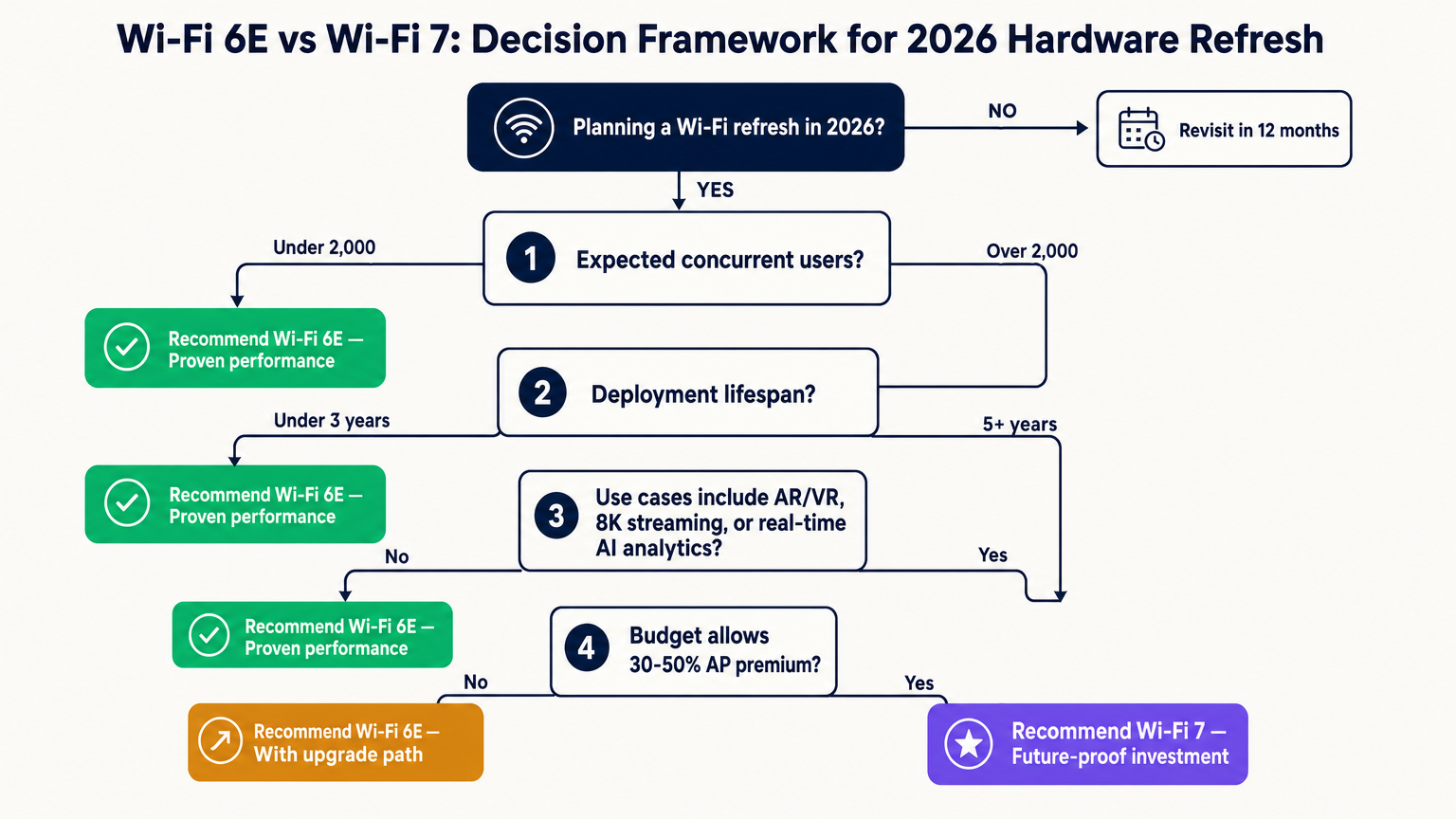
For IT directors evaluating a hardware refresh in 2026, the decision between Wi-Fi 6E and Wi-Fi 7 hinges on balancing immediate capital expenditure against long-term operational requirements. The street price premium for enterprise-grade Wi-Fi 7 access points currently ranges from 30% to 50% over comparable Wi-Fi 6E models, though IDC reports a 38% year-over-year drop in Wi-Fi 7 AP pricing, indicating the market is rapidly maturing.
Vendor Landscape and Pricing Snapshot
As of April 2026, major enterprise vendors have released their flagship Wi-Fi 7 access points. The table below provides a current market snapshot for IT teams conducting vendor evaluations.
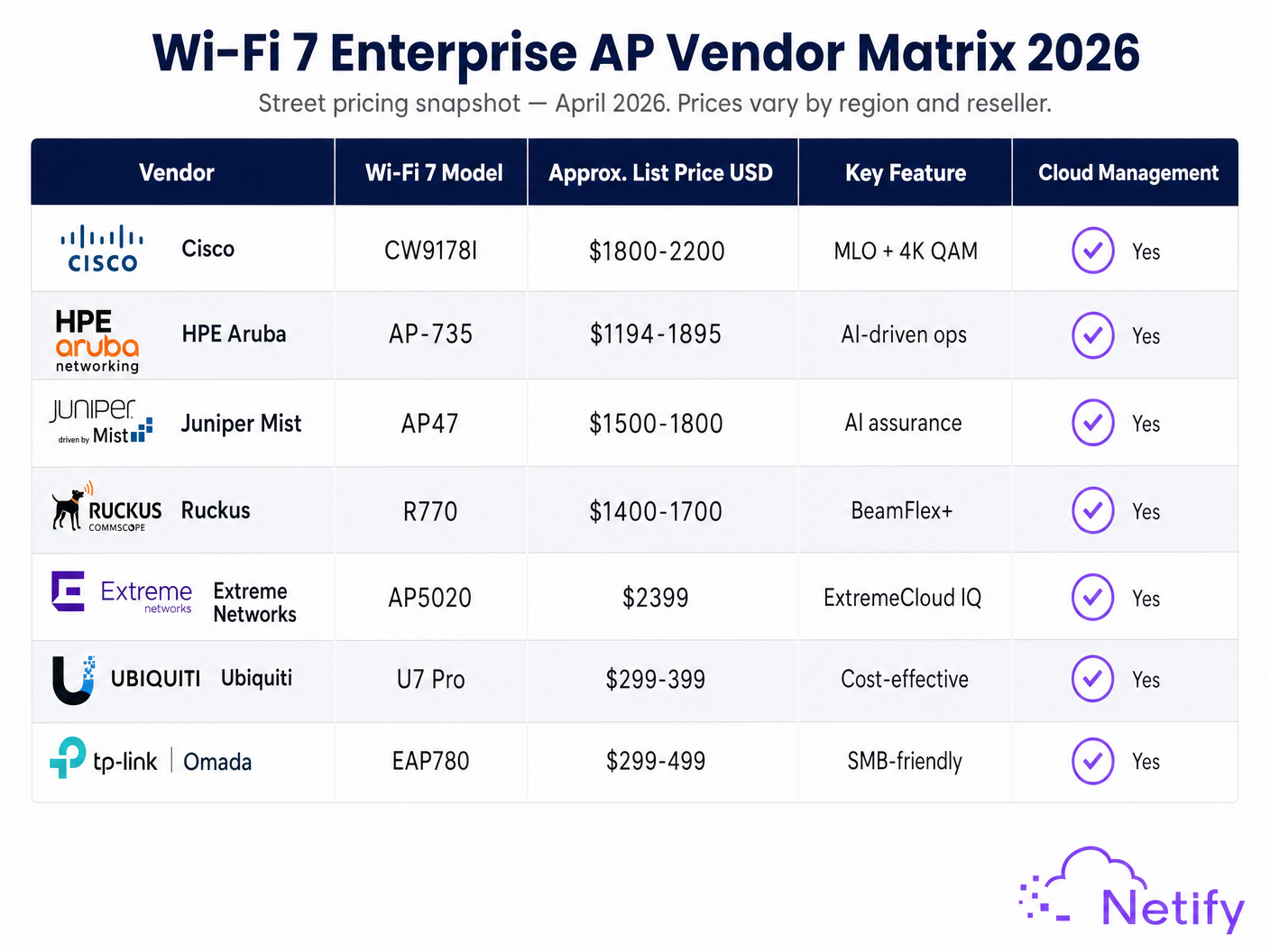
| Vendor | Wi-Fi 7 Model | Approx. Street Price (USD) | Key Differentiator |
|---|---|---|---|
| Cisco | CW9178I | $1,800–$2,200 | MLO + 4K QAM, Catalyst integration |
| HPE Aruba | AP-735 | $1,194–$1,895 | AI-driven ops, Central cloud |
| Juniper Mist | AP47 | $1,500–$1,800 | AI assurance, Mist AI |
| Ruckus | R770 | $1,400–$1,700 | BeamFlex+ adaptive antenna |
| Extreme Networks | AP5020 | ~$2,399 | ExtremeCloud IQ |
| Ubiquiti | U7 Pro | $299–$399 | Cost-effective, UniFi ecosystem |
Pricing snapshot — April 2026. Street prices vary by region, reseller, and volume. Always validate against current distributor pricing.
When budgeting for a Wi-Fi 7 deployment, organisations must also account for necessary upgrades to the wired infrastructure. The extreme throughput capabilities of Wi-Fi 7 necessitate multi-gigabit backhaul. While Wi-Fi 6E deployments often operate comfortably on 2.5 GbE switch ports, fully realising the potential of a 4x4:4 Wi-Fi 7 access point requires 10 GbE uplinks and PoE++ (802.3bt) power budgets. This wired infrastructure upgrade cost must be factored into the total cost of ownership comparison.
Client Device Penetration Timeline
Infrastructure upgrades must align with client capabilities. In 2026, Wi-Fi 7 client penetration in enterprise environments sits between 15% and 20%, driven by the latest flagship smartphones (Samsung Galaxy S24 Ultra, iPhone 16 series) and high-end laptops. This penetration is forecast to reach 40–50% by 2028. For venues prioritising Guest WiFi services, the backward compatibility of Wi-Fi 7 ensures that legacy devices will still function, but the full return on investment will materialise progressively as the client mix modernises.
Best Practices for Venue Deployments
Deploying next-generation wireless infrastructure requires a nuanced approach tailored to the specific operational demands of the venue. The hardware-agnostic nature of platforms like Purple ensures that organisations can extract maximum value from their network investments regardless of the underlying access point vendor.
High-Density Environments: Stadiums and Event Spaces
For venues exceeding 5,000 concurrent users, the argument for skipping Wi-Fi 6E and moving directly to Wi-Fi 7 is compelling. The combination of 320 MHz channels and 4K QAM provides the necessary capacity to handle dense client concentrations. Furthermore, MLO ensures that critical venue operations — such as mobile ticketing and crowd management applications — maintain low latency even during peak utilisation. When designing for these environments, IT teams should prioritise access points with advanced RF management and directional antenna capabilities. The Internet of Things Architecture: A Complete Guide provides additional context on how IoT device density compounds these requirements.
Hospitality and Conference Centres
In the Hospitality sector, requirements vary significantly by property type. For a standard 200-room hotel, a well-designed Wi-Fi 6E network will provide sufficient capacity for guest streaming and standard operational tasks well into 2028. However, large convention hotels and dedicated conference centres should evaluate Wi-Fi 7. The deterministic latency provided by MLO is crucial for supporting hundreds of simultaneous video conferences and interactive presentations. For properties where Guest WiFi is a revenue-generating service, the enhanced capacity of Wi-Fi 7 also supports more sophisticated data capture and personalisation capabilities, as explored in our guide on AI in Guest WiFi: Personalisation, Engagement, and the GenAI Roadmap .
Retail and Public Sector
For Retail environments, Wi-Fi 6E often remains the most cost-effective solution for supporting standard POS systems, inventory management, and basic WiFi Analytics . However, flagship stores implementing advanced experiential technologies — such as AR product visualisation or real-time spatial analytics — will benefit from the increased throughput and efficiency of Wi-Fi 7. In public-sector deployments, such as municipal buildings or Transport hubs, the extended lifecycle of the investment (often 7–10 years) makes the future-proofing aspect of Wi-Fi 7 highly attractive, despite the initial capex premium. The precision requirements of Indoor Positioning System: UWB, BLE, & WiFi Guide technologies also benefit from the lower latency floor that Wi-Fi 7 provides.
Troubleshooting & Risk Mitigation
Upgrading to a new wireless standard introduces specific risks that must be managed during the deployment phase.
The 6 GHz Coverage Gap
A common pitfall when transitioning to either Wi-Fi 6E or Wi-Fi 7 is underestimating the propagation characteristics of the 6 GHz band. Higher frequencies attenuate more rapidly through physical obstacles. A one-to-one replacement of legacy 5 GHz access points will likely result in 6 GHz coverage gaps. Network architects must conduct comprehensive predictive and active site surveys specifically modelled for the 6 GHz spectrum, often requiring a 15–20% increase in total access point density to achieve ubiquitous coverage.
Power and Backhaul Bottlenecks
Deploying Wi-Fi 7 access points on legacy switching infrastructure can severely bottleneck performance. If 10 GbE PoE++ switches are not within the current budget, organisations must ensure their chosen access points can operate in a degraded mode on standard PoE+ (802.3at) until the wired network is upgraded. This phased approach is viable but must be explicitly planned and communicated to stakeholders to manage performance expectations.
Security and Compliance Integration
Both Wi-Fi 6E and Wi-Fi 7 mandate WPA3 security, but integrating these new standards with existing enterprise authentication systems (IEEE 802.1X) requires careful planning. Organisations utilising profile-based authentication or services like OpenRoaming must ensure their identity providers and RADIUS infrastructure are fully compatible with the new hardware. Purple's role as a hardware-agnostic identity management layer simplifies this integration, providing a consistent authentication and data capture experience independent of the physical access point vendor. This is particularly relevant for PCI DSS 4.0 and GDPR compliance, where the authentication and data handling layer must be demonstrably secure regardless of the underlying wireless standard.
ROI & Business Impact
The ultimate measure of a wireless infrastructure upgrade is its impact on business operations and user experience. When evaluating the ROI of Wi-Fi 7 versus Wi-Fi 6E, IT leaders should look beyond raw throughput metrics and consider the operational capabilities each standard enables.
Success should be measured by improvements in operational efficiency and the enablement of new revenue-generating services. The reduced latency of Wi-Fi 7 can directly improve the reliability of automated guided vehicles (AGVs) in retail warehouses or enhance the precision of real-time location services. For venue operators, a robust, high-capacity network forms the foundation for advanced guest engagement strategies. Capturing first-party data and delivering personalised experiences at scale requires a network capable of handling complex, real-time data flows without compromising the core connectivity experience.
The total cost of ownership calculation should encompass not just the access point hardware, but the full infrastructure stack: switches, cabling, site survey costs, and the ongoing management platform. Organisations that align their hardware refresh cycle with the strategic goals of the business — rather than simply chasing the latest standard — will consistently achieve the strongest ROI from their wireless infrastructure investments.
Key Terms & Definitions
Multi-Link Operation (MLO)
A Wi-Fi 7 feature allowing devices to transmit and receive data simultaneously across multiple frequency bands (2.4, 5, and 6 GHz), aggregating bandwidth and improving reliability through load-balancing.
Critical for IT teams managing latency-sensitive applications like VoIP, real-time analytics, or POS transactions. MLO is the primary architectural differentiator between Wi-Fi 6E and Wi-Fi 7 for enterprise deployments.
4K QAM (4096-QAM)
An advanced modulation scheme in Wi-Fi 7 that encodes 12 bits of data per symbol, compared to 10 bits in Wi-Fi 6E's 1024-QAM, resulting in approximately 20% higher spectral efficiency.
Provides significant throughput gains in high-density areas where clients maintain a strong signal-to-noise ratio close to the access point, such as conference rooms or stadium seating bowls.
320 MHz Channels
Ultra-wide data channels available exclusively in the 6 GHz band under the Wi-Fi 7 standard, doubling the maximum channel width of Wi-Fi 6E (160 MHz) and significantly increasing peak throughput.
Essential for supporting extremely high-bandwidth applications like AR/VR or uncompressed 8K video streaming. In dense deployments, channel planning must balance width against reuse to avoid co-channel interference.
Preamble Puncturing
A technique allowing an access point to use a wide channel even if a portion of it is experiencing interference, by 'puncturing out' the noisy sub-channel while utilising the remaining clean spectrum.
Improves network resilience and spectral efficiency in complex, noisy RF environments typical of large public venues, stadiums, and dense urban deployments. Wi-Fi 7 offers an enhanced version of this capability.
Deterministic Latency
The ability of a network to guarantee data delivery within a specific, predictable timeframe, minimising jitter and packet delays regardless of network load.
A primary operational benefit of Wi-Fi 7's MLO. Critical for venue operations relying on real-time data flows, such as automated warehouse robotics, live event production systems, or contactless payment processing.
PoE++ (802.3bt)
Power over Ethernet standard capable of delivering up to 60W (Type 3) or 90W (Type 4) of power per port, enabling high-performance access points to operate all radios simultaneously.
Required by most enterprise Wi-Fi 7 access points to operate at full capacity. Standard PoE+ (802.3at, 30W) is often insufficient, meaning switch infrastructure upgrades must be budgeted alongside AP replacements.
WPA3-Enterprise
The mandatory security protocol for Wi-Fi 6E and Wi-Fi 7 networks, providing robust 192-bit encryption and mutual authentication via IEEE 802.1X and a RADIUS server.
Ensures compliance with stringent data security standards including PCI DSS 4.0 and GDPR. Both Wi-Fi 6E and Wi-Fi 7 mandate WPA3, but IT teams must verify RADIUS infrastructure compatibility during any hardware refresh.
OpenRoaming
A Wi-Fi federation standard allowing seamless, secure device onboarding across participating networks using profile-based authentication, eliminating manual login portals for enrolled users.
Enhances the user experience in public venues and transport hubs. Platforms like Purple provide the identity management layer to facilitate OpenRoaming across any hardware vendor, independent of the underlying Wi-Fi standard.
Case Studies
A 400-room convention hotel is planning a complete network overhaul in Q3 2026. The property includes a 10,000 sq ft main ballroom and 15 smaller breakout rooms. The current infrastructure is Wi-Fi 5 (802.11ac) and the deployment must last 6 years. The IT Director has a strict capex budget but needs to support dense conference traffic of up to 3,000 simultaneous users in the ballroom.
Deploy a hybrid architecture. Utilise Wi-Fi 7 access points (e.g., HPE Aruba AP-735 or Cisco CW9178I) exclusively in the main ballroom and high-density breakout rooms where MLO and 4K QAM will directly benefit dense delegate populations. For the guest room corridors and standard amenities, deploy cost-effective Wi-Fi 6E access points. Ensure the core and distribution switches serving the conference areas are upgraded to support 10 GbE and PoE++ to prevent backhaul bottlenecks. Conduct a dedicated 6 GHz predictive site survey for the ballroom, expecting approximately 20% more APs than a legacy 5 GHz design would suggest. Implement WPA3-Enterprise with IEEE 802.1X for the corporate SSID and a captive portal solution for guest access.
A national retail chain is refreshing the network infrastructure across 50 mid-sized stores (approximately 15,000 sq ft each). The primary use cases are standard POS operations, employee inventory tablets, and basic guest Wi-Fi. The business plans to pilot AR-based product visualisation in 3 flagship locations next year. The IT team is debating a uniform Wi-Fi 7 rollout across all 50 stores.
Standardise on Wi-Fi 6E for the 47 standard locations. The 160 MHz channels and 6 GHz spectrum access provide more than enough capacity for standard retail operations and guest access, offering significant cost savings over Wi-Fi 7. For the 3 flagship locations, deploy Wi-Fi 7 infrastructure to support the high-bandwidth, low-latency requirements of the upcoming AR pilot. Ensure the flagship stores have 10 GbE switch infrastructure in place before the Wi-Fi 7 deployment. Implement a unified management platform that can handle both 6E and 7 APs to simplify operations. Leverage WiFi Analytics across all locations to capture footfall and dwell time data for marketing purposes.
Scenario Analysis
Q1. A municipal government is upgrading the public Wi-Fi in a busy transport hub. The deployment must last 7 years. The current switch infrastructure supports 2.5 GbE and PoE+ (802.3at). The IT team is debating between high-end Wi-Fi 6E and entry-level Wi-Fi 7 access points. What is the primary constraint they must address before committing to Wi-Fi 7?
💡 Hint:Consider the power and data throughput requirements of Wi-Fi 7 access points relative to the existing wired infrastructure.
Show Recommended Approach
The primary constraint is the existing switch infrastructure. Wi-Fi 7 access points typically require PoE++ (802.3bt) to power all radios simultaneously and benefit from 10 GbE uplinks to avoid backhaul bottlenecks. Deploying Wi-Fi 7 on the current 2.5 GbE/PoE+ switches will likely force the APs into a degraded mode, negating the benefits of the investment. The team must either allocate budget to upgrade the edge switches alongside the APs, or accept that Wi-Fi 6E is the optimal choice for their current wired constraints. Given the 7-year lifespan, a phased approach — deploying Wi-Fi 7 APs now but upgrading switches within 12 months — is a viable compromise.
Q2. A stadium IT director is planning a network refresh for a 60,000-seat venue. They are evaluating Wi-Fi 6E versus Wi-Fi 7. Which specific Wi-Fi 7 feature provides the most compelling operational advantage for this high-density environment, and why?
💡 Hint:Focus on the feature that improves reliability and latency by utilising multiple frequency bands simultaneously, rather than simply increasing peak throughput.
Show Recommended Approach
Multi-Link Operation (MLO) is the most compelling feature for a stadium environment. In a dense venue with significant RF noise and transient interference from 60,000 devices, MLO allows client devices to transmit and receive across multiple bands simultaneously. This load-balancing significantly reduces latency and ensures deterministic performance for critical venue operations like mobile ticketing, contactless payments, and point-of-sale transactions — even during peak utilisation. The reliability improvement from MLO is operationally more significant than the raw throughput increase, as it prevents the service degradation that can occur when a single band becomes congested.
Q3. When transitioning a retail chain from legacy 5 GHz Wi-Fi 5 access points to a new 6 GHz-capable standard (either 6E or 7), what critical design adjustment must the network architect make regarding access point placement, and what is the typical impact on AP count?
💡 Hint:Consider the physical propagation characteristics of higher frequency RF signals and how they interact with typical retail store construction materials.
Show Recommended Approach
The architect must increase the density of access points. The 6 GHz band used by both Wi-Fi 6E and Wi-Fi 7 attenuates more rapidly through physical obstacles — walls, shelving units, and structural elements — compared to 5 GHz. A one-to-one replacement of the legacy APs in the same locations will result in 6 GHz coverage gaps. A new predictive site survey modelled specifically for 6 GHz propagation is mandatory, and IT teams should budget for a 15–20% increase in the total number of access points to achieve seamless coverage equivalent to the legacy 5 GHz design.




