
Entendendo o Cisco SUDI: Identidade de Dispositivo Baseada em Hardware no Controle de Acesso à Rede
Este guia detalha a arquitetura técnica do Cisco SUDI, explicando como a identidade ancorada em hardware protege o controle de acesso à rede. Ele fornece etapas práticas de implementação para líderes de TI implantarem a autenticação 802.1X EAP-TLS e automatizarem o Zero Touch Provisioning em locais corporativos.
Video overview
Ouça este guia
Ver transcrição do podcast
Parte da nossa série principal: Guia de Segurança de WiFi Corporativo →

Resumo Executivo
A autenticação baseada em hardware protege a base física das redes corporativas. O Cisco Secure Unique Device Identifier (SUDI) fornece uma identidade imutável e criptograficamente verificável para dispositivos de infraestrutura, incorporada diretamente em um chip resistente a violações durante a fabricação. Para líderes de TI que gerenciam implantações em larga escala nos setores de hospitalidade, varejo e público, o SUDI elimina o risco de hardware não autorizado e permite o provisionamento automático de toque zero (Zero Touch Provisioning).
Este guia detalha a arquitetura técnica do Cisco SUDI, sua integração com o Network Access Control (NAC) IEEE 802.1X e as etapas operacionais necessárias para implantar e manter a identidade baseada em hardware em escala. Você aprenderá como fazer a transição de um bypass de endereço MAC frágil para uma autenticação EAP-TLS robusta, gerenciar o ciclo de vida do certificado SUDI-2099 e alinhar a segurança da infraestrutura com plataformas de gerenciamento de identidade de usuários como a Purple.
Detalhamento Técnico
A Arquitetura da Identidade Baseada em Hardware
O Cisco Secure Unique Device Identifier (SUDI) é um certificado X.509v3 que fornece uma identidade permanente para dispositivos de rede. Ao contrário dos certificados de software que as equipes de TI geram e implantam, a Cisco injeta o certificado SUDI e seu par de chaves associado no dispositivo durante o processo de fabricação.
O certificado é armazenado de forma segura no módulo Trust Anchor (TAm), um chip proprietário e resistente a violações. O TAm gera a chave privada internamente, garantindo que ela nunca possa ser exportada ou clonada. Esta raiz de confiança baseada em hardware garante que, se um dispositivo for autenticado com sucesso usando seu SUDI, ele é um produto Cisco original.
O SUDI implementa o padrão IEEE 802.1AR para Identificadores de Dispositivo Seguros (Secure Device Identifiers). Sob este padrão, o certificado fornecido pelo fabricante é conhecido como Identificador de Dispositivo Inicial (IDevID). As organizações podem complementar o IDevID com um Identificador de Dispositivo Localmente Significativo (LDevID) emitido por sua própria Infraestrutura de Chaves Públicas (PKI) corporativa.

Integração com Network Access Control
Em um ambiente corporativo, o SUDI integra-se com sistemas de Network Access Control (NAC) principalmente por meio da autenticação baseada em porta IEEE 802.1X. Quando um ponto de acesso ou switch Cisco se conecta à rede, ele age como um solicitante (supplicant) e apresenta seu certificado SUDI a um servidor RADIUS, como o Cisco Identity Services Engine (ISE).O processo de autenticação usa o Extensible Authentication Protocol com Transport Layer Security (EAP-TLS). O servidor RADIUS valida o certificado SUDI em relação à Infraestrutura de Chaves Públicas da Cisco. Uma vez validado, o servidor RADIUS autoriza o dispositivo e o atribui à VLAN correta com base na política de acesso à rede.
Essa abordagem substitui o MAC Address Bypass (MAB), um método legado que depende de endereços MAC facilmente falsificáveis. O MAB oferece garantia criptográfica zero de identidade do dispositivo, deixando as redes vulneráveis a pontos de acesso não autorizados.
Impressão Digital de Hardware e Detecção de Violação
O módulo Trust Anchor oferece mais do que apenas armazenamento seguro. Ele protege ativamente o dispositivo contra violações físicas durante o trânsito ou a implantação.
Durante a fabricação, a Cisco registra uma assinatura criptográfica dos componentes de hardware críticos, como CPUs e ASICs. Essa assinatura é armazenada permanentemente no TAm. Quando o dispositivo inicializa, o firmware UEFI calcula uma nova assinatura do hardware observado e a compara com a assinatura mestre no TAm. Se as assinaturas não coincidirem, o dispositivo interrompe o processo de inicialização. Esse mecanismo garante que o hardware implantado em um hotel ou loja de varejo não tenha sido comprometido entre a fábrica e o local de instalação.
Tem dúvidas sobre a sua configuração específica?
A nossa equipa trabalha com operadores de espaços, gestores de TI e engenheiros de rede em 80.000 locais. Agende uma chamada de 20 minutos e mostraremos como outros profissionais na sua situação o resolveram.
Guia de Implementação
A implantação da autenticação baseada em SUDI requer coordenação entre a sua infraestrutura de comutação, o seu servidor RADIUS e a sua plataforma de gerenciamento de rede. Siga estas etapas para implementar a identidade de hardware.
Etapa 1: Configurar a Confiança do RADIUS
Seu servidor RADIUS deve confiar na Autoridade de Certificação da Cisco que emitiu o SUDI.
- Baixe os certificados Cisco Root CA e ACT2 SUDI CA do portal de PKI da Cisco.
- Importe esses certificados para o repositório de certificados confiáveis do seu servidor RADIUS (por exemplo, Cisco ISE).
- Configure o servidor RADIUS para usar esses certificados para autenticação EAP-TLS.
Etapa 2: Definir Políticas 802.1X
Crie políticas de autenticação específicas para dispositivos de infraestrutura, separadas das políticas de autenticação de usuários.
- Crie um conjunto de políticas no Cisco ISE que corresponda aos atributos do certificado SUDI (por exemplo, correspondendo o Subject Alternative Name aos PIDs esperados do dispositivo).
- Atribua as autenticações bem-sucedidas à VLAN de gerenciamento de infraestrutura.
- Configure uma VLAN de quarentena para dispositivos que falharem na autenticação SUDI. Não configure um fallback para MAB para portas de infraestrutura.
Etapa 3: Habilitar o Zero Touch Provisioning
Use o SUDI para automatizar a integração de dispositivos.
- Configure seu sistema de gerenciamento de rede (como o Cisco Catalyst Center) para atuar como o servidor ZTP.
- Quando um novo dispositivo se conecta, ele apresenta seu certificado SUDI.
- O sistema de gerenciamento verifica o certificado, confirma o número de série do dispositivo em relação ao banco de dados de inventário e envia a configuração inicial.
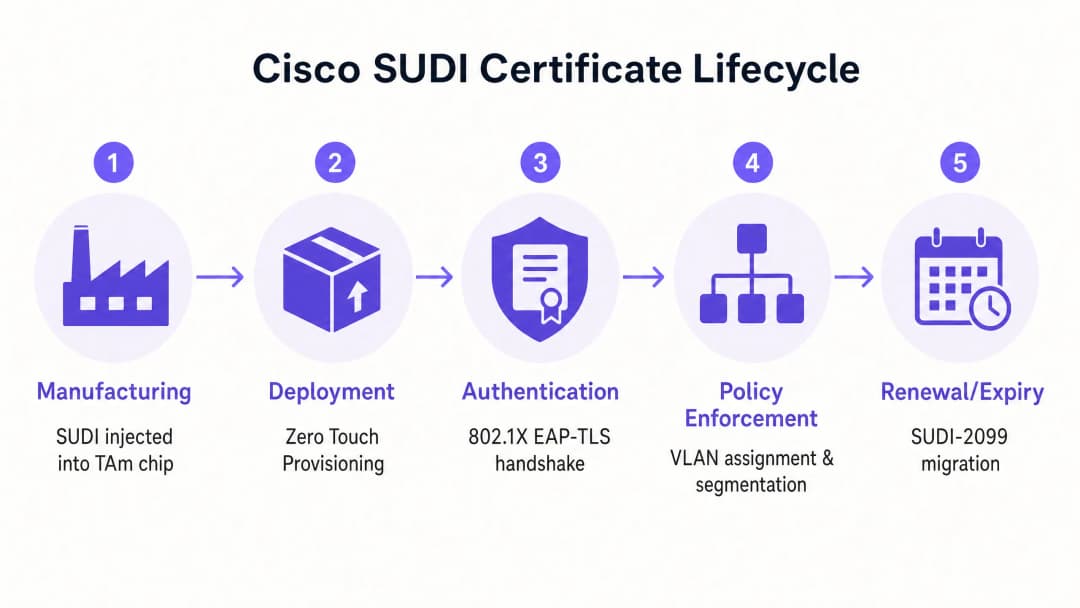
Passo 4: Gerenciar a Migração SUDI-2099
Os certificados SUDI emitidos antes de maio de 2019 expiram 10 anos após a data de fabricação ou em 14 de maio de 2029, o que ocorrer primeiro. Quando um SUDI expira, os recursos que dependem dele, incluindo HTTPS, SSH e Zero Touch Provisioning, falharão.
A Cisco introduziu os certificados SUDI-2099, que permanecem válidos até dezembro de 2099. Para garantir a continuidade:
- Realize uma auditoria em seu inventário usando o comando
show crypto pki certificateem dispositivos IOS-XE. Verifique aend datedo trustpointCISCO_IDEVID_SUDI. - Atualize o hardware afetado para as versões de software recomendadas. Por exemplo, os switches Catalyst 9200 exigem o IOS-XE 17.12.2 ou posterior para lidar corretamente com a data de expiração de 2099.
Boas Práticas
Para maximizar os benefícios de segurança da identidade baseada em hardware, siga estes princípios neutros de fornecedor.
- Forçar EAP-TLS Estrito: Exija EAP-TLS para todos os dispositivos de infraestrutura. Não permita métodos EAP mais fracos, como PEAP, para autenticação de dispositivos.
- Isolar a Identidade da Infraestrutura da Identidade do Usuário: O SUDI autentica o hardware, não o usuário. Use uma plataforma dedicada para gerenciar a identidade humana. Por exemplo, use o Purple para lidar com autenticação de convidados, captura de consentimento e coleta de dados primários, enquanto conta com o SUDI para proteger o hardware Cisco Meraki ou HPE Aruba subjacente.
- Automatizar o Monitoramento de Certificados: Implemente ferramentas de monitoramento para acompanhar as datas de expiração de certificados em todo o seu parque de dispositivos. O monitoramento proativo evita falhas repentinas de autenticação.
- Implementar Micro-segmentação: Use a identidade verificada pelo SUDI para atribuir dispositivos a VLANs estritamente controladas. Um ponto de acesso deve ter apenas alcançabilidade de rede para seu controlador e sistemas de gerenciamento, nada mais.
Resolução de Problemas e Mitigação de Riscos
Ao implantar a autenticação baseada em SUDI, prepare-se para estes modos de falha comuns.
| Modo de Falha | Causa Raiz | Estratégia de Mitigação |
|---|---|---|
| Falha na Autenticação EAP-TLS | O servidor RADIUS não possui os certificados CA raiz ou intermediários corretos da Cisco. | Verifique se a cadeia de confiança completa da Cisco está instalada no repositório confiável do servidor RADIUS. |
| Dispositivo Recusa a Inicializar | A assinatura de hardware calculada na inicialização não corresponde à assinatura mestre no TAm. | Trate o dispositivo como comprometido. Devolva o hardware ao fornecedor por meio do processo de RMA. |
| Falha no Acesso de Gerenciamento | O certificado SUDI expirou, quebrando a autenticação de certificado HTTPS e SSH. | Atualize o firmware do dispositivo para uma versão que suporte SUDI-2099, ou implante um LDevID usando a PKI de sua empresa. |
| Dispositivo não autorizado obtém acesso | A porta do switch está configurada para retornar ao MAC Address Bypass (MAB) se o 802.1X falhar. | Remova as configurações de retorno de MAB das portas de infraestrutura. Imponha uma política rigorosa de 802.1X. |
ROI e Impacto nos Negócios
A implementação da identidade de dispositivo baseada em hardware gera valor comercial mensurável em três áreas.
1. Redução de Custos de Provisionamento O Zero Touch Provisioning protegido pelo SUDI elimina a preparação manual. Em vez de um engenheiro gastar 45 minutos pré-configurando um ponto de acesso antes de enviá-lo para uma loja física, o dispositivo é enviado diretamente do distribuidor. Ele se autentica de forma segura ao ser conectado e baixa sua configuração automaticamente. Para uma implantação de varejo em 500 locais, isso economiza aproximadamente 375 horas de engenharia.
2. Eliminação do Risco de Dispositivos não Autorizados Ao descontinuar o MAC Address Bypass em favor da identidade criptográfica de hardware, você elimina o risco de um invasor conectar um dispositivo não autorizado a uma porta de infraestrutura. Isso apoia diretamente a conformidade com os requisitos do PCI-DSS e ISO 27001 para controle de acesso à rede.
3. Limites de Identidade Claros A implantação do SUDI estabelece um limite de arquitetura limpo. A camada de hardware se autentica criptograficamente, permitindo que você concentre seus recursos na camada de identidade do usuário. Ao integrar uma plataforma como o Purple para gerenciar o Guest WiFi e o WiFi Analytics, você faz isso sobre uma base de infraestrutura verificável e segura.
Definições principais
SUDI (Secure Unique Device Identifier)
Um certificado X.509v3 e uma chave privada associada incorporados em um dispositivo Cisco durante a fabricação para fornecer uma identidade de hardware imutável.
Utilizado por equipes de TI para verificar criptograficamente se um dispositivo que se conecta à rede é um produto Cisco genuíno.
TAm (Trust Anchor module)
Um chip de hardware proprietário e resistente a adulterações que armazena de forma segura o certificado SUDI, gera chaves criptográficas e gerencia a identificação por impressão digital do hardware.
Fornece a raiz de confiança de hardware. Se o TAm for comprometido, o dispositivo falhará ao inicializar ou autenticar.
IDevID (Initial Device Identifier)
O identificador de dispositivo seguro instalado pelo fabricante definido pelo padrão IEEE 802.1AR. O Cisco SUDI é uma implementação de um IDevID.
Fornece a identidade fundamental para um dispositivo antes de ele ser integrado ao ambiente PKI próprio de uma organização.
LDevID (Locally Significant Device Identifier)
Um certificado de dispositivo emitido pela própria infraestrutura de chave pública (PKI) corporativa de uma organização, complementando o IDevID do fabricante.
Utilizado quando as equipes de TI exigem que os dispositivos se autentiquem usando certificados emitidos por sua CA corporativa interna, em vez da CA do fabricante.
IEEE 802.1X
O padrão IEEE para controle de acesso à rede baseado em porta, fornecendo um mecanismo de autenticação para dispositivos que desejam se conectar a uma LAN ou WLAN.
O protocolo principal utilizado para aplicar a segurança de rede, garantindo que apenas dispositivos e usuários autorizados possam enviar tráfego através de uma porta de switch.
EAP-TLS (Extensible Authentication Protocol-Transport Layer Security)
Um protocolo de autenticação altamente seguro que exige que tanto o cliente quanto o servidor de autenticação comprovem suas identidades usando certificados digitais.
O método específico usado no 802.1X para validar o certificado SUDI entre o dispositivo de rede e o servidor RADIUS.
Zero Touch Provisioning (ZTP)
Um processo automatizado que permite que dispositivos de rede sejam provisionados e configurados automaticamente, sem a necessidade de intervenção manual.
O SUDI protege o ZTP garantindo que o sistema de gerenciamento envie configurações apenas para hardware verificado e original.
MAC Address Bypass (MAB)
Um método de autenticação legado onde um switch usa o endereço MAC do dispositivo de conexão como sua credencial de identidade.
Um método de fallback inseguro que deve ser eliminado e substituído pela autenticação 802.1X baseada em SUDI.
Exemplos práticos
Um hotel de 400 quartos está atualizando sua infraestrutura de rede e precisa implantar 250 novos pontos de acesso Cisco Catalyst. A equipe de TI deseja evitar a configuração manual de cada dispositivo antes da instalação, garantindo ao mesmo tempo que nenhum dispositivo não autorizado possa ingressar na VLAN de gerenciamento.
- A equipe de TI configura o Cisco ISE com a Cisco Root CA para confiar nos certificados SUDI.
- Eles criam uma política 802.1X no ISE que atribui os dispositivos que apresentam um SUDI válido a uma VLAN de provisionamento restrita.
- Os pontos de acesso são enviados diretamente para o hotel e conectados aos switches PoE.
- Cada AP inicializa, apresenta seu SUDI via EAP-TLS e é autenticado pelo ISE.
- O sistema de gerenciamento (Catalyst Centre) verifica o número de série, provisiona o AP e o ISE altera a porta para a VLAN de gerenciamento de produção.
Uma rede nacional de varejo com 1.200 lojas descobre que seus switches antigos usam MAC Address Bypass (MAB) para autenticar pontos de acesso. Eles precisam migrar para um padrão seguro sem causar interrupções nas lojas.
- A equipe de rede realiza uma auditoria no inventário de switches para confirmar se todos os dispositivos suportam 802.1X e SUDI.
- Eles implantam os certificados Cisco CA em sua infraestrutura RADIUS.
- Eles configuram as portas dos switches em 'modo de monitoramento' (autenticação aberta), permitindo que os dispositivos tentem o 802.1X EAP-TLS usando SUDI, recorrendo ao MAB em caso de falha, mas registrando os resultados em log.
- Após verificar nos logs do RADIUS que todos os APs legítimos estão se autenticando com sucesso via SUDI, eles alteram as portas para 'modo fechado', aplicando o 802.1X de forma estrita e desativando o MAB.
Questões práticas
Q1. Você está implantando 50 novos switches Cisco Catalyst em um ambiente de estádio. A política de segurança exige autenticação 802.1X rigorosa para todos os dispositivos de infraestrutura. Durante os testes, os switches falham ao autenticar no servidor Cisco ISE. Qual é a causa mais provável?
Dica: Considere a cadeia de confiança necessária para a autenticação EAP-TLS.
Ver resposta modelo
O servidor Cisco ISE não possui os certificados Cisco Root CA ou ACT2 SUDI CA em seu repositório de certificados confiáveis. Sem eles, o ISE não consegue validar o certificado SUDI apresentado pelos switches. Você deve baixar os certificados do portal Cisco PKI e importá-los para o ISE.
Q2. Um engenheiro de rede sugere configurar as portas dos switches para tentar a autenticação 802.1X primeiro, mas recorrer ao MAC Address Bypass (MAB) caso o dispositivo não possua um certificado válido. Por que você deve rejeitar essa proposta para portas de infraestrutura?
Dica: Avalie o nível de segurança do mecanismo de fallback.
Ver resposta modelo
O fallback para MAB compromete todo o modelo de segurança. Um invasor pode simplesmente conectar um dispositivo não autorizado, aguardar o tempo limite do 802.1X e clonar o endereço MAC de um access point legítimo para obter acesso à VLAN de infraestrutura. As portas de infraestrutura devem impor 802.1X rigoroso com SUDI, e os dispositivos não compatíveis devem ser colocados em uma VLAN de quarentena restrita.
Q3. Você está auditando uma rede de switches Catalyst 9200 implantados em 2018. Ao executar o comando 'show crypto pki certificate', você nota que o trustpoint CISCO_IDEVID_SUDI expira em maio de 2029. Que ação você deve tomar para evitar futuras interrupções?
Dica: Revise os requisitos de migração do SUDI-2099 para hardware legado.
Ver resposta modelo
Você deve atualizar o software IOS-XE nos switches Catalyst 9200 para a versão 17.12.2 ou posterior. Esta atualização garante que o hardware ofereça suporte adequado à extensão de certificado SUDI-2099, estendendo a identidade válida do dispositivo até dezembro de 2099 e evitando falhas de autenticação em serviços como HTTPS e ZTP.
Continue a ler esta série
Conformidade com a CIPA: checklist de conformidade para operadores de locais
Você será capaz de decidir se a CIPA se aplica ao seu WiFi, depois segmentar redes, rotear o DNS através do Purple Shield e fechar rotas de desvio. Você também saberá quais evidências guardar para a certificação do Formulário 486 ou Formulário 479. O checklist atribui cada requisito a um responsável, para que sua certificação do próximo ano de financiamento não tenha nenhuma pendência.
Falhas de conexão no modo de transição WPA3: um checklist de implantação para Cisco Meraki, HPE Aruba e Ruckus
Use este checklist para diagnosticar por que os dispositivos falham em um SSID de modo de transição WPA3 SAE e corrija o problema no Cisco Meraki, HPE Aruba ou Ruckus. Você associará códigos de status 802.11 às causas, isolará problemas de PMF, 802.11r e 6GHz, e decidirá quando migrar para um SSID exclusivo WPA3.
Melhor filtragem de DNS: um guia completo para empresas
Este guia de referência técnica explica como a filtragem de DNS corporativa protege redes públicas bloqueando domínios maliciosos na camada de resolução - antes mesmo que uma conexão seja estabelecida. Ele oferece aos diretores de TI, arquitetos de rede e equipes de operações de locais a arquitetura de implantação, a configuração do firewall e o contexto de conformidade necessários para proteger o WiFi de convidados em ambientes de hotelaria, varejo e setor público. O Purple Shield bloqueia malware, botnets e conteúdo inadequado no nível de DNS em mais de 80.000 locais ativos.
Tem dúvidas sobre a sua configuração específica?
A nossa equipa trabalha com operadores de espaços, gestores de TI e engenheiros de rede em 80.000 locais. Agende uma chamada de 20 minutos e mostraremos como outros profissionais na sua situação o resolveram.