Staff WiFi Captive Portal: Onboarding and Authenticating Employees
A comprehensive technical reference for IT leaders on designing and deploying staff WiFi captive portals. This guide covers EAP-TLS authentication, BYOD onboarding, VLAN segmentation, and bandwidth management to enhance operational efficiency and mitigate security risks.
Listen to this guide
View podcast transcript
- Executive Summary
- Listen to this guide
- Technical Deep-Dive
- The Self-Service Onboarding Flow
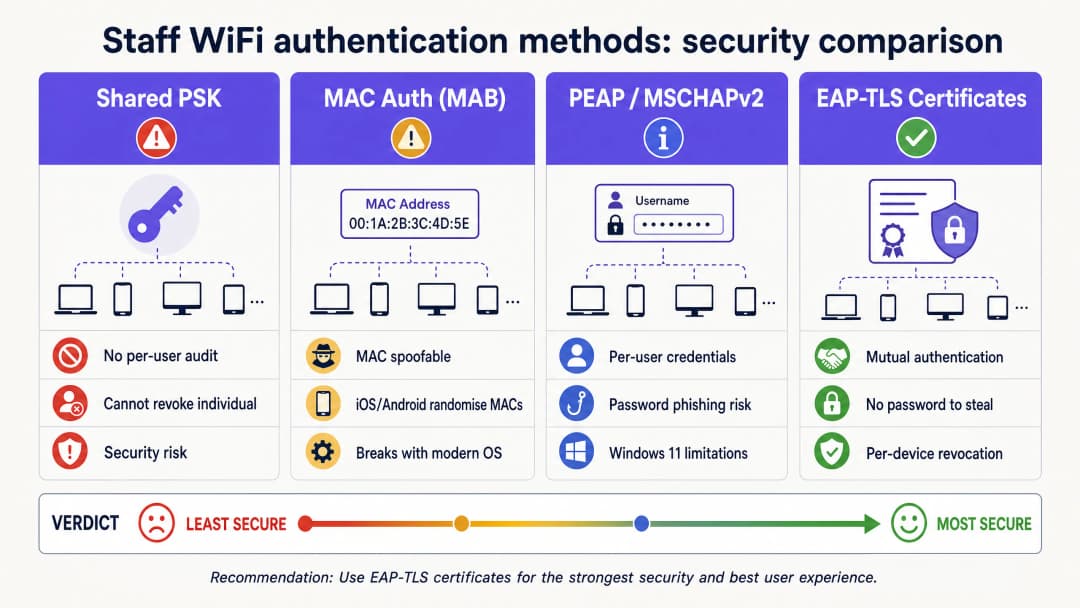
- Why Shared PSKs Fail for Staff Networks
- Implementation Guide
- Step 1: Define Access Policies and Segmentation
- Step 2: Configure the RADIUS Server and IdP Integration
- Step 3: Design the Onboarding Portal and Enforce AUP
- Best Practices
- Implement Short-Lived Certificates
- Utilise Passpoint (Hotspot 2.0)
- Bandwidth Management with Purple Shield
- Troubleshooting & Risk Mitigation
- The Walled Garden Configuration
- Android Fragmentation
- ROI & Business Impact

Executive Summary
For IT managers and network architects in hospitality, retail, and large public venues, managing network access for employee devices presents a significant security and operational challenge. Relying on shared pre-shared keys (PSKs) is fundamentally insecure and operationally burdensome, creating a scenario where former employees and unmanaged devices retain indefinite network access. This guide outlines a practical, secure approach to staff WiFi onboarding using a captive portal flow integrated with your identity provider. By leveraging this architecture, you can securely onboard unmanaged BYOD devices onto an 802.1X network, enforce acceptable use policies, and maintain compliance without the friction of full mobile device management (MDM) enrolment. For venues already utilising Guest WiFi and WiFi Analytics , extending secure onboarding to staff devices provides a unified, robust network management strategy.
Listen to this guide
Technical Deep-Dive
The foundation of secure staff onboarding is the transition from legacy authentication methods to EAP-TLS (Extensible Authentication Protocol-Transport Layer Security). EAP-TLS is the industry standard for secure WiFi authentication, relying on digital certificates rather than passwords. The challenge with staff networks, particularly BYOD environments, is distributing these certificates to unmanaged devices.
The Self-Service Onboarding Flow
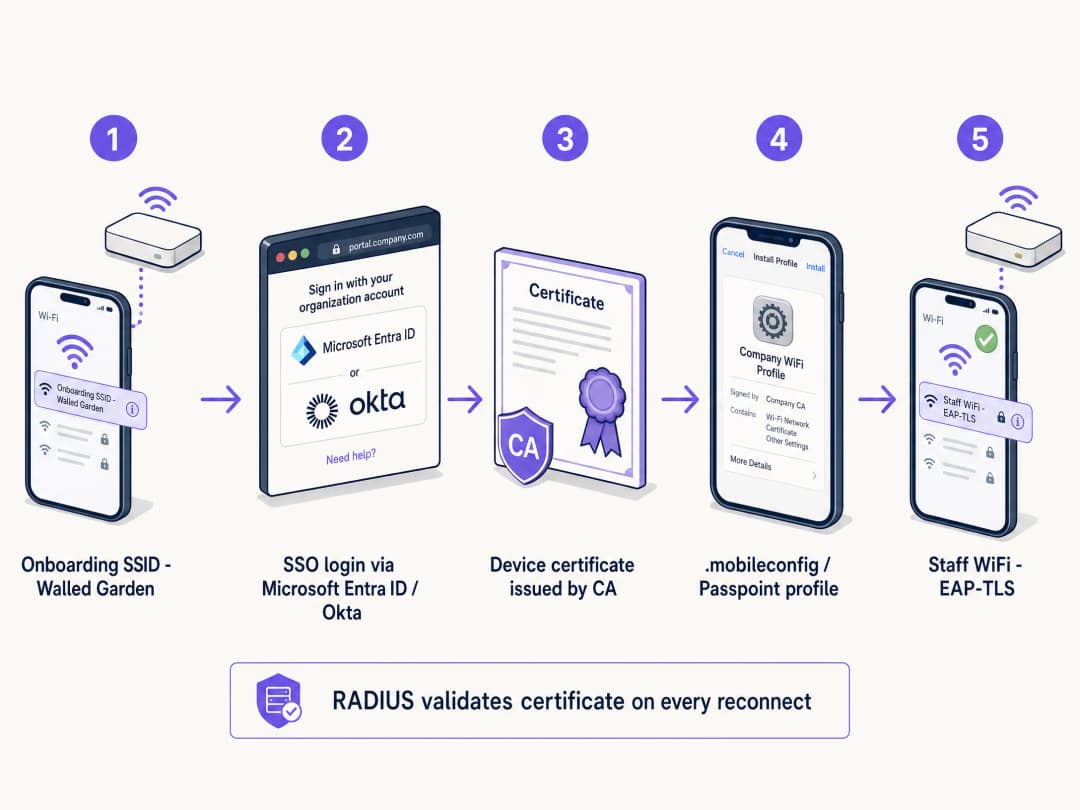
To achieve this, venues implement a self-service onboarding portal. The process follows a structured path to ensure secure certificate delivery:
- Initial Connection: The user connects their personal device to a dedicated, open provisioning SSID. This network acts as a walled garden, restricting access to everything except the onboarding portal and the identity provider (IdP).
- Authentication: The user is redirected to a captive portal where they authenticate using their corporate credentials. This involves SAML or SCIM integration with an IdP like Microsoft Entra ID, Okta, or Google Workspace.
- Certificate Generation: Upon successful authentication, the system generates a unique, device-specific client certificate.
- Profile Installation: A configuration profile is pushed to the device. This profile contains the client certificate, the root CA certificate, and the network configuration settings for the secure 802.1X SSID.
- Secure Connection: The device automatically disconnects from the provisioning SSID and connects to the secure corporate SSID using the newly installed certificate for EAP-TLS authentication.

Why Shared PSKs Fail for Staff Networks
Historically, venues relied on Pre-Shared Keys (PSKs) for staff access. This method is fundamentally flawed in modern enterprise environments. PSKs, once shared, are compromised. They provide no individual accountability and require a network-wide password change if a device is lost or an employee leaves. In a 200-room hotel with 80 staff members, a shared password has likely been shared with roughly 80 people, their partners, and at least three former employees. That is not a secure network; it is an open door.

Implementation Guide
Deploying a secure staff WiFi captive portal requires careful planning and execution. Follow these steps for a successful rollout in a hotel, retail, or stadium environment.
Step 1: Define Access Policies and Segmentation
Before configuring the technical infrastructure, clearly define what staff devices should be allowed to access. BYOD devices are unmanaged; you do not control their OS updates, antivirus status, or installed applications. Therefore, they must be treated as untrusted devices.
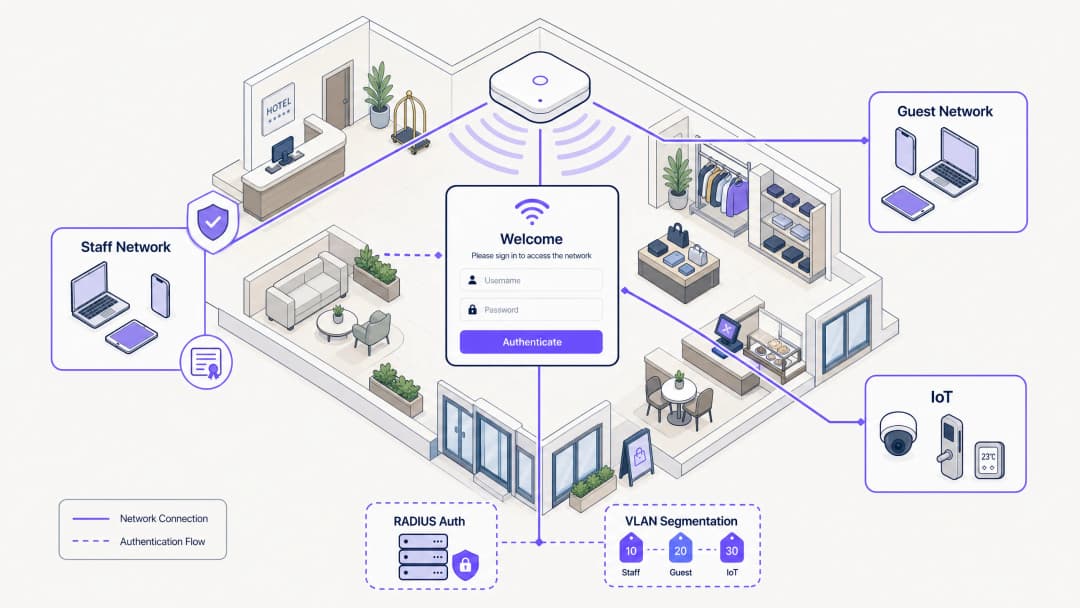
Place staff devices on a dedicated VLAN. This VLAN should provide internet access and restricted access only to the specific internal applications required for the employee's role, such as the retail point-of-sale web interface or the hospitality housekeeping app. Never place BYOD devices on the same VLAN as corporate servers or managed devices. For further reading on securing back-of-house networks, see our guide on Staff WiFi Policies for Retail: Securing Back-of-House Networks or the Portuguese version Políticas de WiFi para Colaboradores no Retalho: Proteger as Redes Back-of-House .
Step 2: Configure the RADIUS Server and IdP Integration
Your RADIUS server is the core of the 802.1X authentication process. It must be configured to support EAP-TLS and integrated with your Identity Provider.
Connect your RADIUS server to your IdP via SAML or LDAP. This ensures that only active employees can authenticate and receive a certificate. When an employee is disabled in Microsoft Entra ID or Okta, the RADIUS server stops accepting their credentials or their certificate on the next connection attempt. Establish an internal CA or utilise a cloud-based managed PKI to issue the client certificates. The RADIUS server must trust this CA.
Step 3: Design the Onboarding Portal and Enforce AUP
The onboarding portal is the user's first interaction with the system. It must be intuitive and clearly branded. Provide step-by-step instructions on the portal screen. Users need to know exactly what to click and what to expect.
The captive portal is the natural enforcement point for Acceptable Use Policy (AUP) acceptance. Before an employee gains access to the staff network, the portal presents the policy and requires an explicit acknowledgement. This creates a timestamped, auditable record of policy acceptance, which is critical for GDPR and PCI DSS compliance.
Best Practices
To ensure a secure and manageable deployment, adhere to these industry best practices.
Implement Short-Lived Certificates
Because BYOD devices are unmanaged, the risk of a compromised device remaining on the network is higher. Mitigate this risk by issuing short-lived certificates. Instead of a certificate valid for three years, issue certificates valid for 90 days. When the certificate expires, the user must re-authenticate through the onboarding portal. This naturally prunes stale devices from the network and ensures that only active employees maintain access.
Utilise Passpoint (Hotspot 2.0)
For a seamless onboarding experience, especially on Android devices, leverage Passpoint. Passpoint allows devices to automatically discover and authenticate to the secure network without requiring the user to manually select the SSID or interact with a captive portal after the initial setup. This significantly reduces friction and improves the user experience.
Bandwidth Management with Purple Shield
In high-density staff environments, bandwidth contention on the staff network is a real operational problem. Purple Shield operates at the DNS level, blocking ad payloads, tracking scripts, and malware domains before they reach the device. The practical effect is up to a 40% reduction in total downloaded data across the network. For staff devices, that means faster page loads, lower device battery consumption, and more available bandwidth for operational traffic.
Troubleshooting & Risk Mitigation
Even with a well-designed system, issues can arise. Understanding common failure modes is critical for rapid resolution.
The Walled Garden Configuration
The provisioning SSID must be strictly controlled. If the walled garden is too open, users may simply stay connected to the provisioning network to access the internet, bypassing the secure onboarding process entirely. Ensure the provisioning SSID only allows access to the onboarding portal, the IdP authentication endpoints, and the necessary certificate download servers. All other traffic must be blocked.
Android Fragmentation
Apple iOS devices handle configuration profiles consistently. Android, however, is highly fragmented. Different manufacturers and OS versions handle WiFi profiles and certificate installation differently. To mitigate this, ensure your onboarding solution provides clear, OS-specific instructions and leverage Passpoint where possible.
ROI & Business Impact
Implementing a secure staff WiFi captive portal delivers significant return on investment through improved security, reduced IT overhead, and enhanced employee productivity.
By empowering users to self-onboard, IT helpdesks see a dramatic reduction in tickets related to WiFi passwords and connection issues. Moving from PSKs to EAP-TLS significantly reduces the risk of unauthorised network access and data breaches. This is critical for maintaining compliance with standards like PCI DSS and GDPR. Employees can quickly and securely connect their personal devices to access the tools they need, improving overall efficiency and satisfaction across Retail , Healthcare , Hospitality , and Transport sectors.
Key Definitions
Captive Portal
A web page that a user of a public-access or corporate network is obliged to view and interact with before access is granted.
Used in staff networks as the gateway for identity verification, AUP acceptance, and certificate provisioning.
EAP-TLS
Extensible Authentication Protocol-Transport Layer Security. An 802.1X authentication method that uses digital certificates on both the client and server.
The most secure WiFi authentication method, eliminating the need for passwords and preventing credential theft.
RADIUS
Remote Authentication Dial-In User Service. A networking protocol that provides centralised authentication, authorisation, and accounting management.
The core server that validates device certificates against the identity provider before granting network access.
VLAN Segmentation
The practice of dividing a physical network into multiple logical networks to isolate traffic.
Essential for keeping untrusted BYOD staff devices separated from sensitive corporate servers and POS systems.
Passpoint (Hotspot 2.0)
An industry standard that enables seamless and secure WiFi onboarding and roaming without requiring manual SSID selection or captive portal interaction after initial setup.
Improves the user experience for staff onboarding, particularly on Android devices.
Walled Garden
A restricted network environment that controls user access to specific web content and services.
Used on the provisioning SSID to ensure staff can only access the onboarding portal and IdP, preventing them from bypassing the security setup.
SCIM
System for Cross-domain Identity Management. An open standard for automating the exchange of user identity information between identity domains.
Enables automatic deprovisioning of network access when an employee leaves the company and is disabled in the IdP.
iPSK
Identity Pre-Shared Key. A security feature that assigns a unique WiFi password to every individual user or device.
Used as an alternative to 802.1X for headless devices or contractors who cannot install a certificate.
Worked Examples
A 200-room hotel needs to provide WiFi access to 80 housekeeping and maintenance staff who use their personal smartphones to access the cloud-based property management system (PMS). The hotel currently uses a single WPA2 password that hasn't been changed in three years. How should the IT manager secure this network without purchasing MDM software for personal devices?
- Create a new open provisioning SSID (e.g., 'Hotel-Staff-Onboard') with a strict walled garden allowing access only to the captive portal and Microsoft Entra ID.
- Configure a captive portal to require SSO login via Entra ID and display the staff Acceptable Use Policy.
- Upon successful login and AUP acceptance, generate a 90-day device-specific EAP-TLS certificate.
- Push the configuration profile to the staff member's phone to automatically connect to the secure 802.1X SSID (e.g., 'Hotel-Staff-Secure').
- Configure the RADIUS server to assign connected devices to a dedicated BYOD VLAN that only routes to the internet and the cloud PMS, blocking access to the corporate server VLAN.
A large retail chain experiences severe point-of-sale (POS) connectivity issues during Black Friday sales because staff members are streaming video on their personal phones connected to the staff network during breaks. How can the network architect resolve this without banning personal devices?
- Implement Purple Shield on the staff network to block ad payloads and tracking scripts at the DNS level, instantly reclaiming up to 40% of wasted bandwidth.
- Implement Quality of Service (QoS) policies on the wireless controller to prioritise POS and inventory application traffic over general web browsing and video streaming.
- Apply rate limiting to the BYOD VLAN to cap the maximum bandwidth available to any single personal device.
Practice Questions
Q1. A stadium operations director wants to issue a single WiFi password to all 500 match-day event staff to make it 'easier for them to get online quickly'. What is the primary security risk of this approach, and what is the recommended alternative?
Hint: Consider what happens when a match-day staff member does not return for the next event.
View model answer
The primary risk is the inability to revoke access for individuals. When a staff member leaves, they retain the password, granting them indefinite access to the operational network. The recommended alternative is a captive portal onboarding flow that issues device-specific EAP-TLS certificates tied to their identity, allowing IT to revoke access per device or automatically upon termination.
Q2. Your RADIUS server logs show that several Android devices are failing to complete the certificate installation process after authenticating on the captive portal. What is the most likely cause, and how can it be mitigated?
Hint: Consider the differences in how mobile operating systems handle configuration profiles.
View model answer
The most likely cause is Android OS fragmentation, as different manufacturers handle certificate installation differently. This can be mitigated by providing clear, OS-specific instructions on the captive portal, utilising a dedicated onboarding app, or leveraging Passpoint (Hotspot 2.0) for a more seamless and standardised onboarding experience.
Q3. A hospital IT team is designing a staff BYOD network. They plan to place the BYOD devices on the same VLAN as the hospital's electronic health record (EHR) servers to ensure staff can access patient data quickly. Is this a secure design? Why or why not?
Hint: Consider the trust level of unmanaged BYOD devices.
View model answer
No, this is not a secure design. BYOD devices are unmanaged, meaning the IT team does not control their security posture, OS updates, or installed applications. They must be treated as untrusted. Placing them on the same VLAN as sensitive EHR servers creates a significant lateral movement risk. The BYOD devices should be placed on a dedicated, segmented VLAN with strict firewall rules limiting access only to the necessary web interfaces, never direct server access.
Continue reading in this series
Why Your Captive Portal Isn't Loading on iPhone
An authoritative technical reference guide explaining why captive portals fail to load on iOS devices. It dives deep into Apple's Captive Network Assistant (CNA) daemon detection logic, identifies key iOS-specific interference factors like iCloud Private Relay and Private MAC addresses, and outlines comprehensive mitigation strategies for network engineers and venue operators.
Custom Captive Portal: HTML and CSS Guide
This authoritative technical reference guide outlines the development standards, CSS architecture, and network-level constraints required to design and code a custom captive portal landing page. It provides frontend developers and network architects with actionable strategies to navigate Apple CNA and Android webview environments, ensuring pixel-perfect, compliant, and highly performant guest WiFi experiences.
Captive Portal vs Splash Page
This authoritative guide breaks down the critical distinction between captive portals and splash pages in guest WiFi networks. It clarifies how the underlying network interception mechanism works in tandem with the visual guest interface, helping IT leaders and venue operators make informed architectural and procurement decisions.