
如何在 Starlink 上设置 Captive Portal:偏远地区与海上场所指南
本指南详细介绍了如何绕过原生 Starlink 硬件,并使用企业级路由设备集成云端托管的 Captive Portal。您将学习如何克服 CGNAT 限制、强制执行 VLAN 隔离、管理卫星带宽限制并确保合规性。
收听本指南
查看播客转录
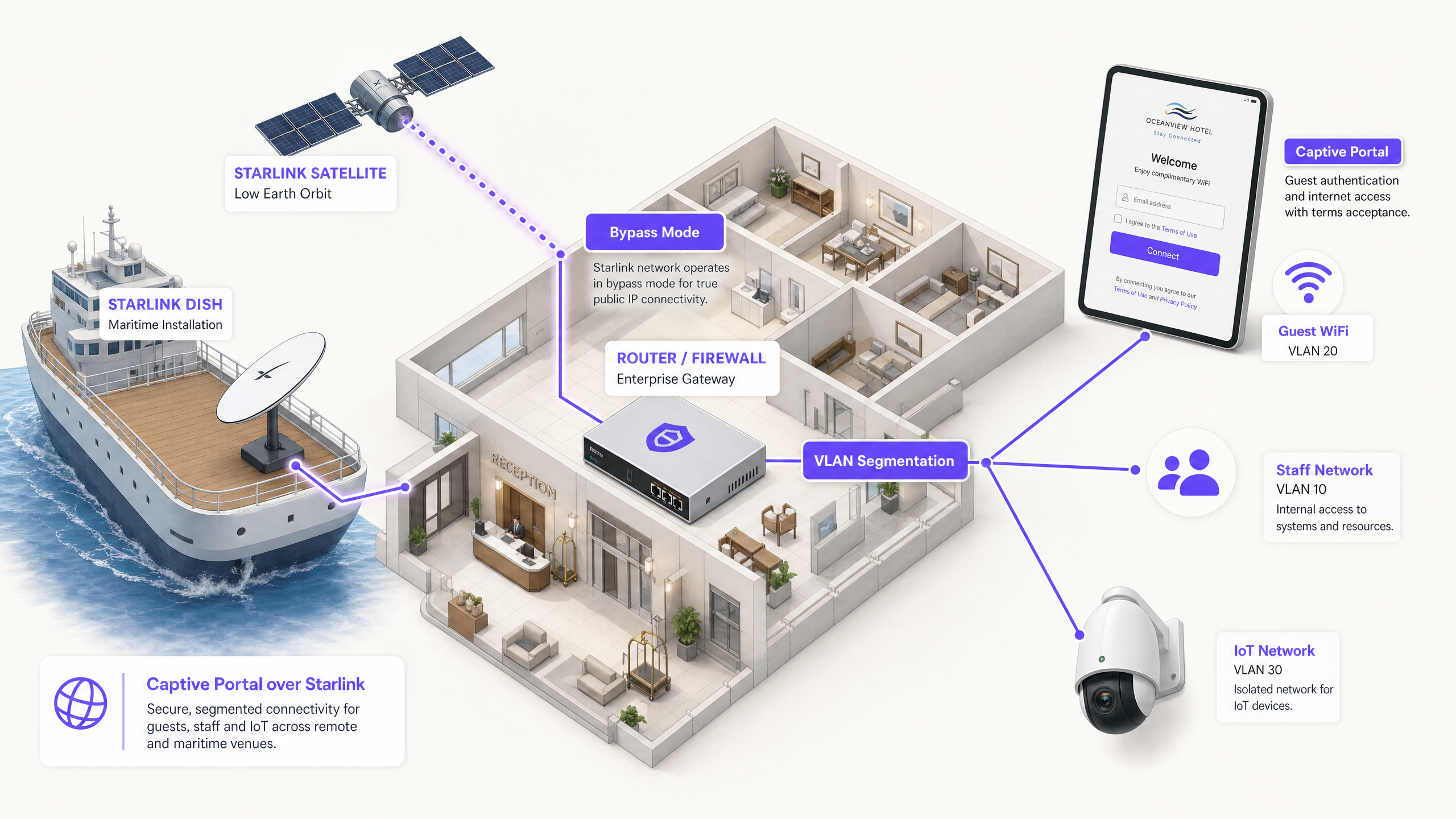
执行摘要
Starlink 为光纤无法到达的地区提供 220 Mbps 的连接,从根本上改变了偏远地区和海上场所的网络格局。然而,对于面向公众的环境,仅有原始连接是远远不够的。当您为访客、乘客或船员部署 Starlink 时,必须实施身份验证、访问控制、符合 GDPR 的同意管理以及带宽管理。原生的 Starlink 路由器不提供这些功能。
本指南详细介绍了如何绕过原生 Starlink 硬件,并使用企业级路由设备集成云端托管的 Captive Portal。您将学习如何克服运营商级 NAT (CGNAT) 限制、强制执行 VLAN 隔离、管理卫星带宽限制并确保合规性。
通过部署此架构,场所运营商可以将无管理的互联网管道转化为安全、隔离的网络,从而捕获第一方数据并保护核心业务基础设施。
技术深度解析
CGNAT 限制
在 Starlink 上部署 Captive Portal 的主要技术障碍是运营商级 NAT (CGNAT)。标准的 Starlink 接收器连接到一个处理 DHCP 和 NAT 的专用路由器。默认情况下,分配给您设备的 WAN IP 地址属于 100.64.0.0/10 范围。由于这不是公网 IP 地址,您的路由器无法接收来自互联网的入站连接。
标准的 Captive Portal 架构通常假设云端门户可以反向访问您的网络,以对用户进行身份验证或更新访问控制列表。在 CGNAT 环境下,入站连接会失败。
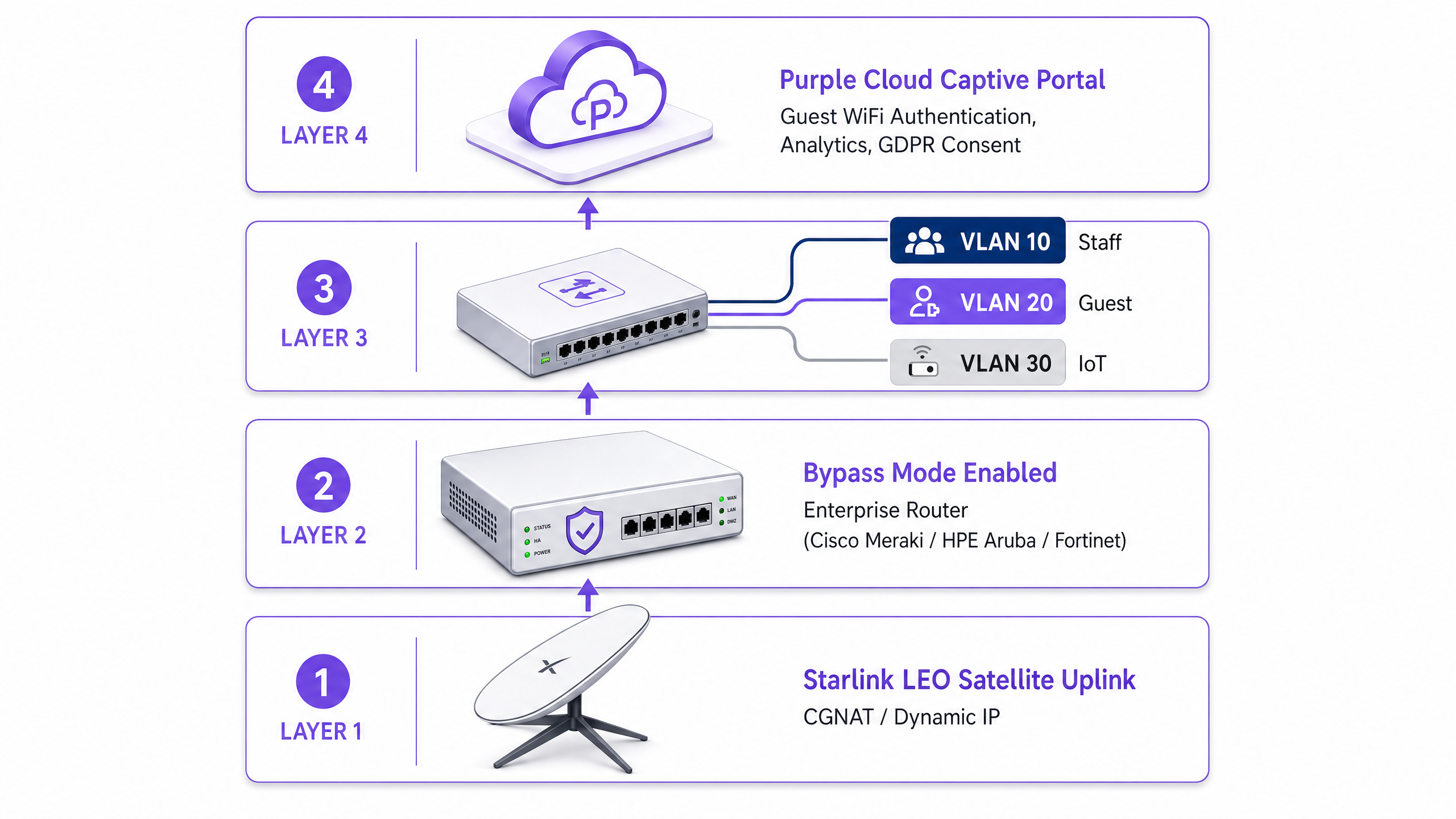
要解决此问题,您必须将 Starlink 接收器配置为旁路模式(Bypass Mode,通常称为桥接模式)。在旁路模式下,Starlink 路由器的功能将被禁用,接收器直接将 CGNAT 地址传递给企业路由器的 WAN 端口。然后,您的企业路由器将完全接管路由层。
反向隧道架构
在企业路由器处理流量的情况下,CGNAT 入站限制依然存在。解决方案是采用反向隧道架构。您的路由器建立与云端门户的出站连接并保持持久连接。所有身份验证流量都通过这条已建立的隧道传输。云端基础设施永远不需要发起入站连接。
Purple 的云端覆盖架构原生支持此功能。您无需手动配置 VPN 隧道。如果您的部署需要静态 IP 以用于传统本地 RADIUS 服务器或严格的 IP 白名单,Starlink 商业和海上计划提供静态 IP 作为付费增值服务。
带宽限制与流量整形
卫星带宽是一种共享且受限的资源。单个用户播放 4K 视频可能会持续消耗 25 Mbps 的带宽。在拥有 50 名乘客并共享 220 Mbps Starlink 连接的船只上,一个用户就可能消耗总容量的 11%。
您必须在 Captive Portal 和路由器层级通过积极的流量整形来解决此问题:
- 单设备限制: 限制单个访客设备的下载速度为 5 Mbps,上传速度为 2 Mbps。
- 公平使用政策: 实施每日数据额度限制(例如,每 24 小时 2GB)。
- 应用控制: 优先处理网页浏览和即时通讯协议,降低视频流媒体和点对点文件共享的优先级。
- 分层接入: 提供基础连接的免费层和用于流媒体的付费高级层,将 WiFi 基础设施从成本中心转化为收入来源。
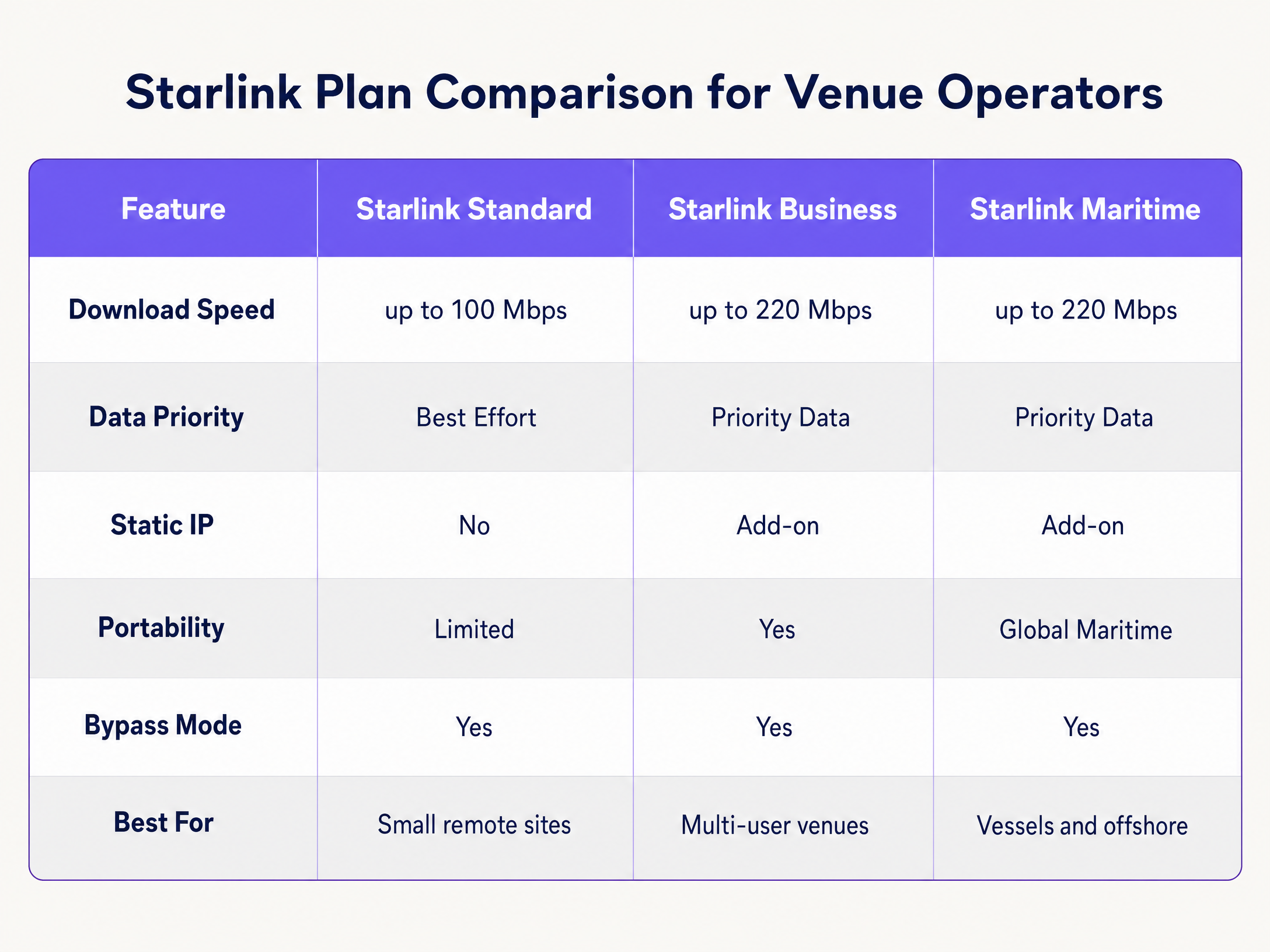
实施指南
请按照以下步骤,使用企业级硬件在 Starlink 上部署安全的 Captive Portal。
步骤 1:启用旁路模式 (Bypass Mode)
- 安装 Starlink 硬件并使用原生路由器验证连接性。
- 打开 Starlink 移动应用程序并导航至 Settings(设置)。
- 选择 Bypass Starlink WiFi router(旁路 Starlink WiFi 路由器)并确认。
- 将 Starlink 以太网适配器连接到企业路由器(Cisco Meraki、HPE Aruba、Ruckus、Juniper Mist、Ubiquiti UniFi、Cambium、Extreme 或 Fortinet)的 WAN 端口。
注意:如果 Starlink 接收器恢复出厂设置,旁路模式 (Bypass Mode) 将自动禁用。请在您的站点运行手册中记录此内容,并在路由器的 WAN 接口上配置监控告警。
步骤 2:配置 VLAN 隔离
您必须将访客流量与核心业务系统隔离。在核心交换机和接入点上配置至少三个 VLAN:
- VLAN 10 (Staff): 承载 POS 系统、后台办公应用和管理流量。
- VLAN 20 (Guest): 仅限互联网访问的分段,重定向到 Captive Portal。
- VLAN 30 (IoT): 用于摄像头、智能温控器和楼宇管理系统的隔离网络。
配置防火墙规则以阻止所有 VLAN 间路由。VLAN 20 上的访客设备绝不能 ping 通 VLAN 10 上的 POS 终端。这种隔离是 PCI DSS 合规性的严格要求。
步骤 3:部署云端 Captive Portal
- 配置您的接入点以在 VLAN 20 上广播 Guest SSID。
- 将身份验证方法设置为外部 RADIUS 或使用厂商的 API 集成。
- 将身份验证服务器指向 Purple 的云端基础设施。
- 配置围墙花园(白名单),以在身份验证完成前允许访问 Purple 的域名。
- 在 Purple 门户中设计展示页面(Splash Page),确保 品牌形象与您的场所保持一致,且服务条款清晰可见。
第 4 步:测试用户流程
在 iOS 和 Android 设备上测试身份验证流程。Apple 的 Captive Network Assistant (CNA) 和 Android 的网络探测机制表现不同。请验证展示页面是否在 10 秒内加载完成,以及设备在身份验证后是否立即获得互联网访问权限。
最佳实践
- HTTPS 拦截: 确保您的路由器正确处理 HTTPS 拦截。现代设备默认使用 HTTPS。如果路由器无法干净地重定向 HTTPS 请求,访客在到达门户页面之前将会遇到证书错误。
- 会话保持(Session Keepalive): Starlink 的近地轨道(LEO)星座提供 20 到 40 毫秒的延迟,但在卫星切换期间会出现短暂的峰值。将您的 Captive Portal 会话保持间隔设置为 60 秒或更短,以防止过早断开连接。
- 离线缓存: 配置您的路由器在本地缓存活动会话。如果 Starlink 连接暂时中断,已通过身份验证的访客在连接恢复时将保持在线状态,而无需重新登录。
故障排除与风险缓解
| 故障模式 | 根本原因 | 缓解措施 |
|---|---|---|
| Captive Portal 无法加载 | Walled garden 配置错误 | 验证是否已将所有必需的 Purple 域名和 CDN 端点添加到路由器的预身份验证白名单中。 |
| 双重 NAT 错误 | 旁路模式(Bypass Mode)已禁用 | 检查 Starlink 应用程序以确认旁路模式已启用。电涌或手动重置可能会使天线恢复为默认设置。 |
| 访客网速慢 | 未限制带宽 | 强制执行单设备带宽限制(例如 5 Mbps),并在防火墙处阻止 BitTorrent 等高带宽应用。 |
| 安全审计失败 | 启用了 VLAN 间路由 | 审计防火墙规则,确保来自访客 VLAN 的流量无法路由到员工或管理 VLAN。 |
投资回报率(ROI)与业务影响
在 Starlink 上部署托管式 Captive Portal,可将原始的互联网连接转化为可衡量的业务资产。
对于一艘运行 Starlink Maritime(带宽为 220 Mbps)的 120 舱室邮轮来说,原始访问无法带来商业回报。通过部署 Cisco Meraki 接入点和 Purple 的 Captive Portal,运营商可以为普通乘客强制执行每日 2GB 的免费额度,同时追加销售 10GB 的高级套餐。由此产生的 WiFi 收入可以覆盖每月 250 美元以上的 Starlink 订阅成本。此外,该门户还能收集完全合规的第一方电子邮件数据,从而扩大运营商未来航程的直接营销名单。
在偏远酒店环境中,部署具有严格带宽策略的门户可将访客对 WiFi 速度慢的投诉减少高达 60%,因为这可以防止重度用户独占卫星链路。
关键定义
Bypass Mode
A configuration setting that disables the native Starlink router's DHCP and NAT functions, passing the WAN IP directly to a third-party enterprise router.
Required when integrating enterprise networking equipment with a Starlink dish to avoid double NAT and routing conflicts.
CGNAT (Carrier Grade NAT)
A method used by ISPs to share a single public IP address among multiple customers. The customer's router receives a private IP address (typically 100.64.0.0/10).
Starlink uses CGNAT by default, which prevents inbound connections from the internet and requires reverse tunnel architectures for cloud management.
VLAN (Virtual Local Area Network)
A logical subnetwork that groups a collection of devices from different physical LANs.
Used to isolate guest WiFi traffic from staff and IoT networks, ensuring security and compliance.
Captive Portal
A web page that a user of a public access network is obliged to view and interact with before access is granted.
Used to enforce terms of service, collect marketing data, and authenticate users on guest WiFi networks.
Walled Garden
A limited environment that controls the user's access to web content and services before they have fully authenticated.
Required to allow guest devices to reach the cloud captive portal and authentication servers before they are granted full internet access.
RADIUS
A networking protocol that provides centralized Authentication, Authorization, and Accounting management for users who connect and use a network service.
The underlying protocol used by enterprise access points to communicate with the cloud captive portal to verify user credentials.
Traffic Shaping
The manipulation and prioritization of network traffic to reduce the impact of heavy users or latency-sensitive applications.
Essential on Starlink networks to prioritize web browsing over high-bandwidth activities like video streaming.
First-Party Data
Information a company collects directly from its customers and owns.
Captured via the captive portal login process (e.g., email addresses) and used for direct marketing and loyalty campaigns.
应用实例
A 120-cabin cruise vessel running Starlink Maritime at 220 Mbps needs to provide passenger WiFi without degrading ship operations. They require a mechanism to monetise the connection and collect marketing data.
The operator deploys Cisco Meraki access points throughout the vessel with three strict VLANs: crew, passenger, and ship systems. Purple's captive portal handles passenger authentication via email or a cabin number lookup integrated with the PMS. Each passenger receives a 2GB daily allowance. Premium tier passengers can purchase a 10GB allocation. The portal collects first-party email data for post-voyage marketing.
A remote Highland hotel with no fibre infrastructure runs Starlink Business at 150 Mbps. Guests frequently complain about slow speeds during the evening, and the hotel has no visibility into who is using the network.
The hotel deploys HPE Aruba access points across the main building and outbuildings. They configure the Starlink dish in Bypass Mode and connect it to an Aruba gateway. Guests authenticate via email on Purple's portal. The hotel enforces a strict 5 Mbps per-device bandwidth cap and uses Purple's analytics to monitor peak usage times.
练习题
Q1. A remote mining camp has deployed Starlink Business. They have connected a Cisco Meraki MX firewall to the Starlink router. Guests can connect to the WiFi, but the captive portal page times out and fails to load. What is the most likely cause?
提示:Consider how the Starlink hardware handles routing by default and what the Meraki firewall requires to manage traffic effectively.
查看标准答案
The Starlink dish has not been placed in Bypass Mode. As a result, the network is suffering from double NAT (the Starlink router and the Meraki firewall are both attempting to perform Network Address Translation). The administrator must use the Starlink app to enable Bypass Mode, allowing the Meraki firewall to receive the CGNAT IP directly and manage the routing and captive portal interception.
Q2. You are deploying a captive portal for a hotel using Starlink. You have configured Bypass Mode and VLAN segmentation. During testing, you notice that Apple devices prompt the user to log in immediately, but some Android devices show a certificate error when the user tries to browse to a secure website before authenticating. How do you resolve this?
提示:Think about how modern browsers handle initial connection requests and what the router must do to intercept them cleanly.
查看标准答案
The enterprise router is not configured to handle HTTPS interception correctly for the captive portal redirect. Modern browsers default to HTTPS. When the user attempts to visit an HTTPS site before authenticating, the router intercepts the traffic and presents its own certificate, which the browser rejects as invalid. You must ensure the router's captive portal settings are configured to use a valid SSL certificate for the redirect, or rely on the OS-level network probes (like Apple's CNA) which use HTTP endpoints to trigger the portal automatically.
Q3. A maritime operator complains that their Starlink Maritime connection (220 Mbps) becomes unusable every evening. They currently provide an open, password-free guest network. What three specific configurations should you implement on the enterprise router and captive portal to resolve this?
提示:Focus on controlling how much data individual users can consume and prioritising critical traffic types.
查看标准答案
- Implement a captive portal requiring authentication to track and manage individual users. 2. Enforce per-device bandwidth caps (e.g., 5 Mbps down / 2 Mbps up) to prevent a single user from monopolising the connection. 3. Apply traffic shaping rules at the firewall to prioritise web browsing and messaging protocols while throttling or blocking high-bandwidth applications like video streaming and P2P file sharing.
继续阅读本系列
酒店访客 WiFi 管理:整合 PMS、门户与品牌标准
本技术指南详细介绍了如何构建企业级酒店 WiFi 网络,重点关注 VLAN 划分、用于自动化会话管理的 PMS 整合,以及用于符合 GDPR 合规要求的数据捕获的 captive portal 优化。
Captive Portal 最佳实践:高转化率与合规性设计
本技术指南为 IT 经理、网络架构师和场所运营总监提供了部署 Captive Portal 的完整蓝图,旨在平衡网络安全与高用户转化率。内容涵盖了从 VLAN 划分、RADIUS 认证到符合 GDPR 的同意设计以及认证方式选择的完整架构。结合 Purple 在 2024 年覆盖 80,000 多个场所、4.4 亿次登录的运营经验,每项建议均基于真实的部署数据。
如何优化 Captive Portal 以实现最大网络安全与用户转化
本指南为企业场所优化 Captive Portal 提供了完整的技术蓝图,涵盖网络分段架构、身份验证方式选择、符合 GDPR 的合规同意设计以及转化率优化。本书面向酒店、连锁零售、体育场馆和公共部门机构的 IT 经理、网络架构师和 CTO,帮助他们在网络安全与第一方数据获取之间取得平衡。Purple 在全球 80,000 多个场所运营 Captive Portal 基础设施,并在 2024 年处理了 4.4 亿次登录,本指南中的框架正是这些运营经验的结晶。