
安全访客 WiFi 架构终极指南
本指南为酒店、零售连锁店、体育场馆和公共部门机构的 IT 经理、网络架构师及 CTO 提供部署安全企业级访客 WiFi 的完整技术蓝图。内容涵盖网络细分、WPA3-OWE 加密和身份感知访问控制这三大核心架构支柱,以及 PCI-DSS 和 GDPR 合规性要求、实际案例研究和分步部署指南。
收听本指南
查看播客转录
📚 核心系列的一部分:Guest WiFi Guide →

执行摘要
在现代企业中,宾客 WiFi 不再仅仅是提供方便;它已成为关键的业务接触点和重要的网络边缘安全表面。对于酒店、零售连锁店、体育场馆和公共场所的 IT 经理、网络架构师以及 CTO 而言,宾客网络代表了一种独特的架构悖论:它们必须对不受管理的、可能存在安全隐患的设备高度开放,同时又必须与安全的 corporate 资源完全隔离。
设计不良的宾客网络可能会成为横向移动、恶意软件传播和中间人 (MITM) 攻击的直接载体,从而可能使支付系统或企业数据库面临风险。全球运营还要求严格遵守合规性框架,包括支付卡行业数据安全标准 (PCI-DSS) 和通用数据保护条例 (GDPR)。
本技术参考指南概述了实施安全、高性能且合规的 Guest WiFi 基础设施所需的架构蓝图、协议标准和部署最佳实践。通过从传统开放 SSID 过渡到利用机会性无线加密 (OWE)、强大的网络接入控制 (NAC) 和集中式 Captive Portals 的现代策略驱动型架构,企业在通过诸如 WiFi Analytics 等平台解锁强大的第一方数据分析的同时,还能降低安全风险。
技术深潜:核心架构支柱
安全的宾客 WiFi 架构建立在三个不可逾越的技术支柱之上:严格的网络分段、现代空中加密和身份感知准入控制。
1. 网络分段与第 2/3 层隔离
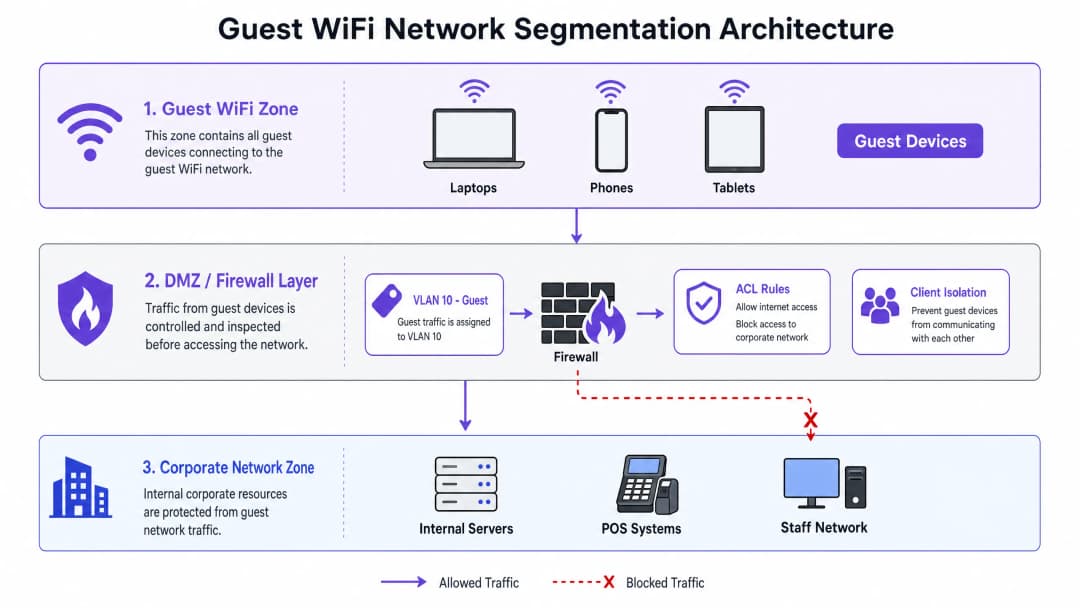
宾客网络的基础安全规则是,宾客流量必须始终被视为不可信并进行隔离。这是通过在 OSI 模型的第 2 层(数据链路层)和第 3 层(网络层)运行的多层分段策略来实现的。
虚拟局域网 (VLAN) 是主要的分段机制。宾客流量必须在接入点 (AP) 级别映射到专用的、不可路由的 VLAN(例如 VLAN 10)。该 VLAN 必须与企业、员工和 IoT VLAN 完全隔离。VLAN 边界确保了即使宾客设备受到安全威胁,该威胁也会被限制在宾客网段内。
在 Layer 3 网关(通常是状态防火墙或 Layer 3 核心交换机)上,必须执行严格的入站和出站访问控制列表 (ACL)。关键规则是“仅限互联网”的 ACL:必须明确阻断所有来自访客 VLAN 且目的地为 RFC 1918 私有 IP 地址范围(10.0.0.0/8、172.16.0.0/12、192.168.0.0/16)的出站流量。访客流量仅允许到达公共 DNS 服务器和公共互联网。
必须在无线控制器或 AP 级别启用客户端隔离(也称为对等阻断)。这可以防止同一 SSID 上的无线客户端相互通信,从而降低访客设备之间恶意软件横向传播和本地数据包嗅探的风险。
承载访客 VLAN 的交换机上的 Layer 2 加固应包括:
| 安全功能 | 功能 | 缓解的威胁 |
|---|---|---|
| DHCP 监听 | 过滤不受信任的 DHCP 消息 | 恶意 DHCP 服务器攻击 |
| 动态 ARP 检测 (DAI) | 根据 DHCP 绑定验证 ARP 数据包 | ARP 欺骗 / MITM 攻击 |
| IP 源保护 | 将客户端 MAC 绑定到分配的 IP | IP 地址欺骗 |
| 端口安全 | 限制每个交换机端口的 MAC 地址数量 | MAC 泛洪攻击 |
2. 空中加密:向 WPA3-OWE 的转变
在过去,访客网络通常保持开放(无加密)以消除用户摩擦。然而,未加密的 SSID 会使所有用户流量暴露在被动窃听之下 - 任何在射频范围内的、带有数据包分析器的人都可以捕获每个 HTTP 请求、DNS 查询和未加密的会话。
WPA3 机会性无线加密 (OWE) 解决了这一挑战,该协议在 RFC 8110 下进行了标准化,并被 Wi-Fi 联盟认证为 “Enhanced Open”。OWE 在 802.11 关联过程中执行 Diffie-Hellman 密钥交换,从而为每个客户端会话建立唯一的成对瞬态密钥 (PTK)。这提供了:
- 个性化数据加密: 完全防止被动的空中窃听。
- 零摩擦接入: 用户连接不需要预共享密钥 (PSK) 或密码。
- 前向安全性: 每个会话使用唯一的密钥;攻破一个会话不会使其他会话暴露。
对于不支持 WPA3 的传统设备,OWE 过渡模式可以在同一个逻辑网络上同时运行一个传统的开放 SSID 和一个 OWE SSID。支持 WPA3 的设备会自动关联到加密的 OWE SSID,而传统设备则回退到开放 SSID。建议将过渡到纯 OWE 作为长期目标状态。
如需深入了解 WPA3 标准和部署注意事项的技术探索,请参阅 如何使用云 RADIUS 实现 802.1X 身份验证 指南。
3. 身份感知访问控制和 Captive Portal
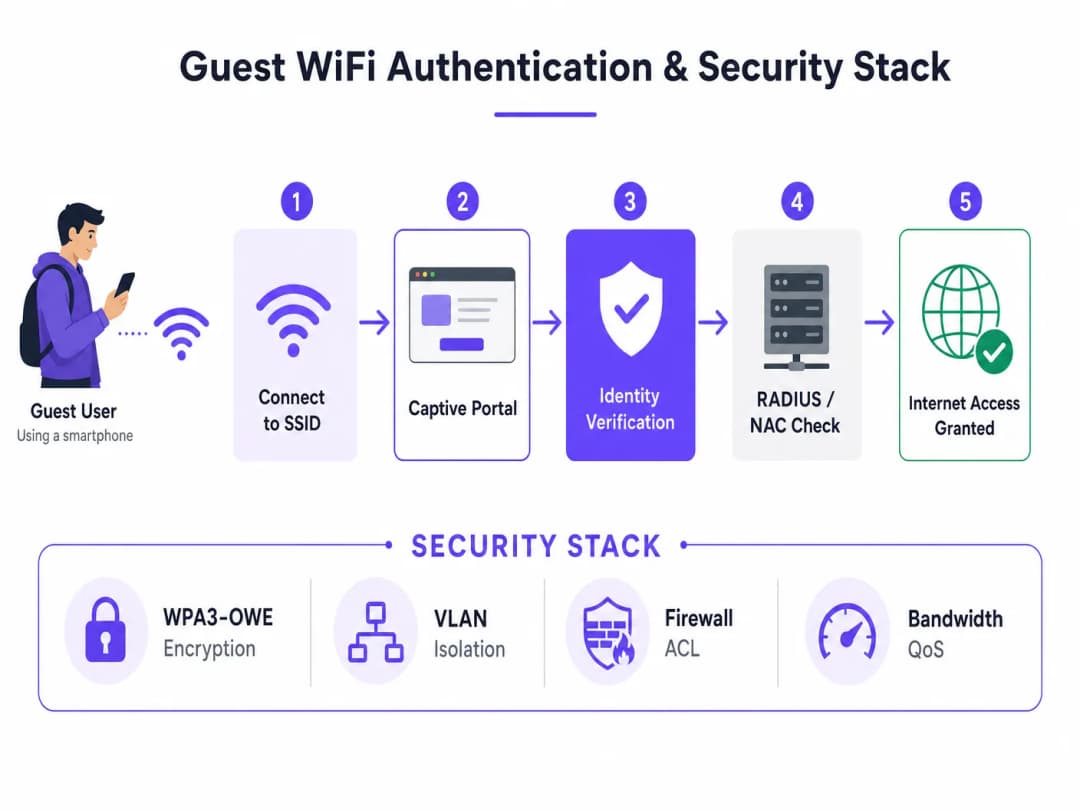
虽然 OWE 对无线介质进行了加密,但它并不验证用户身份。安全的访客架构需要一个身份绑定层,该层通过与 网络访问控制 (NAC) 解决方案或基于云的访客 WiFi 平台集成的企业级 Captive Portal 来提供。
Captive Portal 作为 策略执行点 (PEP),执行以下功能:
- 身份关联: 通过短信一次性密码(OTP)、电子邮件验证、社交媒体登录或企业单点登录(SSO)将设备的 MAC 地址与经验证的身份进行绑定。
- 合理使用政策 (AUP) 执行: 要求用户在获得互联网访问权限之前同意法律条款。
- GDPR 同意收集: 捕获用于数据处理和营销传播的明确、知情的同意。
- 会话管理: 执行会话超时、带宽限制(QoS)和重新认证间隔。
Captive Portal 必须通过带有公开受信任 TLS 证书的 HTTPS 提供。在现代设备上,自签名或内部颁发的证书将触发浏览器安全警告,从而降低用户体验并削弱信任度。
实施指南:逐步部署蓝图
部署安全的访客 WiFi 网络需要跨接入点(AP)、无线局域网控制器(WLC)、核心交换机、防火墙和云 RADIUS 服务器协调配置。
第 1 步:配置访客 VLAN 和 DHCP 作用域
在您的核心交换机或防火墙上,为访客流量划分一个专用的 VLAN 和子网。合理放大子网规模,以应对现代移动设备(iOS 14+、Android 10+)上的 MAC 地址随机化。对于一家拥有 200 间客房的酒店,/22 子网(1,022 个可用地址)是一个合理的最低标准。配置较短的 DHCP 租约时间(2 到 4 小时),以防止 IP 地址耗尽。
第 2 步:实施防火墙 ACL
在您的边界安全网关上配置有状态防火墙规则,以限制访客 VLAN。下表定义了核心规则集:
| 源 | 目的地 | 协议/端口 | 动作 | 描述 |
|---|---|---|---|---|
| Guest_Subnet | 10.0.0.0/8, 172.16.0.0/12, 192.168.0.0/16 | 任意 | 拒绝 | 阻止所有私有 IP 地址范围 (RFC 1918) |
| Guest_Subnet | Corporate_Subnets | 任意 | 拒绝 | 显式阻止访问内部资源 |
| Guest_Subnet | Captive_Portal_IP | TCP 443 | 允许 | 允许重定向到认证门户 |
| Guest_Subnet | 任意 (DNS) | UDP/TCP 53 | 允许 | 允许在认证前进行 DNS 解析 |
| Guest_Subnet | 任意 (WAN) | TCP 80, 443 | 允许 | 允许认证后进行网页浏览 |
| Guest_Subnet | 任意 | 任意 | 拒绝 | 默认拒绝所有其他流量 |
第 3 步:在无线控制器上配置 SSID
在您的企业级无线平台(Cisco Catalyst、Aruba、Juniper Mist 或类似平台)上,配置具有以下参数的访客 SSID:
- **安全类型:**WPA3-OWE(或适用于旧版客户端兼容性的 OWE 过渡模式)
- **VLAN 映射:**将 SSID 直接映射到访客 VLAN
- **L2 功能:**启用客户端隔离 / 点对点阻止
- **Captive Portal 集成:**配置指向您的云 NAC 或访客 WiFi 平台的 RADIUS CoA(授权变更)
第 4 步:部署和配置 Captive Portal
将您的云端 captive portal 与 RADIUS 服务器集成。确保该门户:
- 使用公开信任的 TLS 证书(Let's Encrypt 或商业 CA)
- 通过电子邮件、短信一次性密码(OTP)或社交登录收集身份信息
- 呈现符合 GDPR 的同意复选框(营销选项默认不勾选)
- 将 MAC 地址、IP 地址、已验证的身份和会话时间戳记录到集中式 syslog 服务器中
对于 零售 或 酒店住宿 环境中的多站点部署,云端管理的 captive portal 可确保在所有位置一致地执行策略,而无需对每个站点进行单独配置。
第 5 步:启用第 2 层安全强化和 WIDS/WIPS
在承载访客 VLAN 的所有交换机上,启用 DHCP 窥探(DHCP Snooping)、动态 ARP 检测和 IP 源保护(IP Source Guard)。在无线控制器上,启用无线入侵检测/防御系统(WIDS/WIPS),以检测流氓接入点和双面恶魔(Evil Twin)攻击并发出警报。
真实案例研究
案例研究 1:大广场酒店及度假村(酒店住宿)
**面临挑战:**一家拥有 15 家酒店的豪华度假村集团需要更换其传统的、未加密的访客 WiFi。现有系统允许访客看到彼此的设备,这违反了隐私期望,且缺乏与物业管理系统(PMS)的集成,导致因无法捕获访客数据而错失增收机会。
**解决方案:**大广场酒店部署了安全的访客 WiFi 架构,将访客流量映射到 Cisco 无线 AP 上的隔离 VLAN 中。实施了 WPA3-OWE 以进行空中加密,并将 Purple 的 Guest WiFi 平台与他们的 Oracle Opera PMS 集成。访客使用房间号和姓氏进行身份验证,并实时与 PMS 进行验证。餐厅散客则在单独的 VLAN 上使用独立的 SSID,并通过电子邮件进行身份验证。
取得成效:
- 100% 加密所有访客无线会话,消除了被动窃听风险
- 通过 captive portal 捕获的访客电子邮件率提高了 35%
- 通过自动化同意日志记录和数据删除工作流,完全符合 GDPR 规范
- 通过 POS 网络的完整 VLAN 隔离,实现无缝的 PCI-DSS 合规性
案例研究 2:大都会体育馆 - 高密度体育场部署
**挑战:**一个容纳 20,000 人的体育和娱乐场馆在活动期间遭遇了严重的网络拥塞。安全团队发现了在活动期间运行的多个恶意接入点,且缺乏网络隔离对场馆的售票和 POS 系统构成了风险。
**解决方案:**IT 团队部署了具有动态 VLAN 汇聚的高密度 WiFi 6 网络,利用 MAC 地址哈希将 15,000 个并发访客用户分配到八个 VLAN(VLAN 101 到 108)中。在所有访客 SSID 上启用了客户端隔离。配置了 WIDS/WIPS 以自动检测恶意 AP 并发出警报。云管理 Captive Portal 强制执行了可接受使用策略,并应用了每客户端 1.5 Mbps 的带宽上限。连接日志被流式传输到集中式 SIEM 进行安全监控。
成果:
- 部署后 12 个月内报告的安全事件为零
- 成功管理了 15,000 个并发用户的峰值吞吐量
- 在活动期间,恶意 AP 检测警报在数分钟内触发并解决
- 通过 WiFi Analytics 生成的访客洞察实现了精准的特许经营营销,使场馆内消费增加了 12%
标准、合规性与最佳实践
合规性必须设计在逻辑拓扑中,而不是事后才添加。以下标准直接适用于企业级访客 WiFi 部署。
PCI DSS v4.0 - 要求 1.2
如果您的场馆处理信用卡付款 - 零售 POS、酒店前台、特许摊位 - 您的网络必须符合 PCI DSS 要求 1.2,该要求强制网络安全控制措施将入站和出站流量限制为仅属必要的流量。访客 WiFi 网络必须与持卡人数据环境 (CDE) 完全隔离。这种隔离必须通过年度渗透测试进行验证,而不能仅仅基于防火墙规则配置来推定。
GDPR - 第 5、6 和 17 条
在 GDPR 框架下,处理访客 WiFi 数据的合法依据通常是同意(第 6(1)(a) 条)。这要求同意必须是自由给予、具体、知情且明确的。实际上,这意味着:
- Captive Portal 上的营销选择加入复选框默认必须为未勾选状态
- 隐私声明必须清晰解释收集了哪些数据、如何使用以及保留多长时间
- 访客必须能够通过清晰、自动化的机制行使其被遗忘权(第 17 条)
IEEE 802.11 和 WiFi Alliance 标准
| 标准 | 关联性 |
|---|---|
| IEEE 802.11ax (WiFi 6) | 高密度性能;用于减少干扰的 BSS 着色技术 |
| WPA3 / OWE (RFC 8110) | 现代访客网络加密的强制性要求 |
| IEEE 802.1X | 员工网络的企业级认证;通常不用于访客接入 |
对于员工网络和访客网络共存的环境,关于 如何使用云 RADIUS 实施 802.1X 身份验证 的指南为该架构的员工网络端提供了详细的配置指导。
故障排除与风险缓解
问题 1:Captive Portal 重定向失败
症状: 访客连接到 SSID,但 Captive Portal 页面无法加载。
根本原因与缓解措施:
- 身份验证前的 DNS 拦截: 网关必须在用户进行身份验证之前允许向公共解析服务器进行 DNS 查询(UDP/TCP 53)。如果没有 DNS,设备将无法解析门户主机名。
- HTTPS 重定向拦截: 现代浏览器对已知域名强制执行 HTTPS 严格传输安全(HSTS)。Captive Portal 重定向必须拦截 HTTP(端口 80)流量,而不是 HTTPS。确保网关配置为拦截 HTTP 并重定向到门户 URL。
- 不受信任的 TLS 证书: 门户必须使用由全球信任的 CA 签名的证书。运行 iOS 或 Android 的设备会阻止连接到使用自签名证书的门户。
问题 2:由于 MAC 地址随机化导致 IP 地址耗尽
症状: 尽管活动用户数量较少,但访客 VLAN DHCP 地址池仍已耗尽。
根本原因: iOS 14+ 和 Android 10+ 默认随机化 MAC 地址。每次重新连接都可能会呈现一个新的 MAC 地址,从而消耗一个新的 DHCP 租约。
缓解措施: 将 DHCP 租约时间缩短至 2 到 4 小时。扩大访客子网(中等密度场所至少为 /22)。针对高密度环境实施动态 VLAN 池。
问题 3:带宽滥用与网络饱和
症状: 访客网络性能在高峰期下降,影响所有用户。
缓解措施: 实施每个客户端的 QoS 带宽限制(例如,2 Mbps 下载 / 512 Kbps 上传)。在网关上使用应用层过滤来拦截 P2P 种子下载。配置每个 SSID 的总带宽上限,以保护整体互联网上行链路。
问题 4:流氓接入点攻击
症状: 访客反馈被重定向到异常的登录页面,或者安全监控检测到重复的 SSID。
缓解措施: 在无线控制器上启用 WIDS/WIPS。针对与您的访客网络名称相匹配的 SSID 配置自动警报。在物理安全难以实施的 交通运输 和 医疗保健 环境中,应考虑使用 WIPS 遏制(自动取消客户端与流氓 AP 的身份验证)。
投资回报率(ROI)与业务影响
实施安全、企业级的访客 WiFi 架构不仅是一个成本中心,它还能带来可衡量的财务和运营回报。
风险缓解价值
现在,企业数据泄露的平均成本已超过440万美元。通过实施严格的 VLAN 细分并阻止横向移动,企业可以确保即使访客设备受到威胁,威胁也完全被控制在访客 VLAN 内。公司网络、POS系统和敏感数据依然安全。
第一方数据与营收增长
当与云分析平台集成时,安全的访客网络将成为强大的营收发电机。 零售 、 酒店住宿 和 交通运输 行业的企业正在利用访客 WiFi 数据来:
- 了解访客的人口统计数据、停留时间和回访率
- 根据实时位置和访问历史向访客发送个性化优惠信息
- 利用来自 WiFi Analytics 的实时客流热力图来优化人员配置和场所布局
规避合规成本
GDPR 罚款最高可达全球年营业额的4%。不遵守 PCI DSS 可能会导致每月5,000至100,000美元的罚款。通过自动化同意管理和完全的 CDE 隔离,合理构建的访客网络可以直接降低这些财务风险。
对于在教育环境中管理 WiFi 的机构,安全访客架构的原理同样适用 - 请参阅 学校 WiFi:2026年管理员与 IT 指南 以获取特定行业的指南。
参考文献
- IETF. RFC 8110: Opportunistic Wireless Encryption. https://datatracker.ietf.org/doc/html/rfc8110
- PCI Security Standards Council. PCI DSS v4.0. https://www.pcisecuritystandards.org/
- European Parliament. GDPR — Regulation (EU) 2016/679. https://gdpr-info.eu/
关键定义
机会性无线加密 (OWE)
一种 WiFi 标准(RFC 8110,Wi-Fi Alliance "Enhanced Open"),通过在关联过程中使用 Diffie-Hellman 密钥交换,在客户端和接入点之间提供个性化的数据加密,而无需密码或预共享密钥。
在部署 WPA3 访客网络以替代传统未加密的开放 SSID 时会遇到。这是访客网络空中安全的主要现代标准。
网络分段
将计算机网络拆分为更小、隔离的子网 (VLAN) 的架构实践,通过限制安全事件的波及范围来提高安全性、性能和可管理性。
用于将访客 WiFi 流量与企业数据、支付系统和员工网络完全隔离的主要防御机制。
客户端隔离
无线接入点或控制器上的一种设置,用于阻止连接到相同 SSID 的无线客户端在第 2 层直接相互通信。
对于访客网络至关重要,可阻止恶意的横向移动,并防止恶意用户扫描或攻击同一无线网络上其他访客的设备。
DHCP 监听
网络交换机上的一项第 2 层安全功能,充当不受信任的主机与受信任的 DHCP 服务器之间的防火墙,过滤不受信任的 DHCP 消息,并构建有效 MAC 到 IP 到端口映射的绑定表。
在企业级交换机上启用,以防止针对访客 VLAN 的流氓 DHCP 服务器攻击,这种攻击可能会将用户流量重定向到攻击者控制的网关。
Captive Portal
在向新连接的 WiFi 用户授予更广泛的网络访问权限之前向其显示的网页,用于身份验证、身份绑定、接受合理使用政策以及收集 GDPR 同意书。
作为访客网络的主要身份网关和法律政策执行点。必须通过带有公开信任的 TLS 证书的 HTTPS 提供服务。
Network Access Control (NAC)
一种在授予网络访问权限之前强制执行策略、检查设备状态并管理身份验证和授权的安全解决方案,通常与 RADIUS 服务器和身份提供商集成。
用于企业访客网络中,将 Captive Portal 与后端身份提供商集成,执行会话策略,并提供动态 VLAN 分配。
Cardholder Data Environment (CDE)
在 PCI DSS 规范下,存储、处理或传输持卡人数据或敏感身份验证数据的个人、流程和技术,包括 POS 终端、支付服务器和相关的网络段。
访客 WiFi 网络必须与 CDE 完全隔离,以保持 PCI DSS 合规性。这种隔离必须通过年度渗透测试进行验证。
Dynamic VLAN Assignment
一种技术,其中 RADIUS 服务器或 NAC 解决方案根据连接客户端的凭据、设备类型或其 MAC 地址的哈希值动态地将客户端分配到特定的 VLAN,而不是使用静态的端口到 VLAN 映射。
用于高密度访客网络中,将数千名用户分配到多个较小的 VLAN 中,以防止 IP 地址耗尽并减少广播域大小。
WIDS/WIPS (Wireless Intrusion Detection/Prevention System)
一种监控射频频谱以发现未经授权的无线活动的系统,包括流氓接入点、双面恶魔攻击、解除身份验证泛洪和其他无线层威胁。
部署在企业级无线控制器上,用于检测并发出警告 (WIDS) 或主动遏制 (WIPS) 公共场所中的流氓接入点和无线攻击。
应用实例
一家拥有 200 间客房的豪华酒店希望部署一个安全的访客 WiFi 网络,该网络与他们的物业管理系统(PMS)集成,以便使用客房号和姓氏对宾客进行身份验证。他们还设有向非酒店宾客开放的餐厅和水疗中心,这些访客应通过电子邮件进行身份验证。该酒店为其接待处和 POS 系统运行符合 PCI 标准的网络。应如何构建该网络架构?
网络架构师设计了一个双 SSID 架构,映射到云管理无线控制器上的独立 VLAN。SSID 1(“Hotel-Guest”)配置为 WPA3-OWE 过渡模式并映射到 VLAN 10。它使用通过 API 与酒店 Oracle Opera PMS 集成的 Captive Portal - 当宾客连接时,Portal 会在授予访问权限之前实时对照 PMS 数据库验证其客房号和姓氏。SSID 2(“Restaurant-Guest”)映射到 VLAN 11,并使用需要电子邮件验证的 Captive Portal。核心交换机在 VLAN 10 和 11 上配置了第 3 层 ACL,阻止流向 VLAN 50(员工/接待处)和 VLAN 60(POS CDE)的所有流量。两个 SSID 上均启用了客户端隔离。在承载 VLAN 10 和 11 的所有交换机上启用了 DHCP Snooping 和动态 ARP 检测。网关防火墙将每位用户的访客下载带宽限制为 3 Mbps。集中式日志记录将 MAC 地址、IP、已验证的身份和会话时间戳捕获到云端 syslog 服务器,以满足 GDPR 合规性要求。
一家拥有 50 家门店的多站点零售连锁店希望实施安全的访客 WiFi 网络。他们希望收集访客电子邮件用于营销活动,跟踪门店客流量,并确保门店 POS 系统和安全摄像头得到完全保护。每家门店都有一个单一的宽带连接和一个本地防火墙/路由器。应如何大规模部署?
在每个零售网点部署云管理安全网关和企业级接入点。配置专用访客 SSID(“Store-WiFi”)并将其映射到 VLAN 20。本地防火墙为 VLAN 20 配置了仅限互联网的 ACL,明确阻止流向 VLAN 10(POS/后勤办公室)和 VLAN 30(IP 摄像头)的所有流量。为访客 SSID 配置了基于云的 Captive Portal,需要通过符合 GDPR 的同意复选框进行电子邮件选择加入。AP 配置了客户端隔离和恶意 AP 检测(WIPS)。配置了集中式日志记录,将连接日志(MAC 地址、IP、时间戳、电子邮件)发送到安全的云端 syslog 服务器。云管理平台将一致的 VLAN 和 ACL 配置推送到所有 50 个网点,从而消除了按站点进行的繁琐手动配置。每个客户端的带宽限制为 2 Mbps,以保护共享的宽带连接。
一家承办多达 10,000 名并发用户活动的大型公共部门会议中心,需要一个高度安全、高密度的访客 WiFi 网络。他们要求对所有访客流量进行空中加密,要求用户同意“可接受使用策略”,并且网络能够动态扩展以防止在高峰时段 IP 地址耗尽。应该推荐什么架构?
网络架构师部署了高密度 Wi-Fi 6 无线网络。访客 SSID 配置了 WPA3-OWE,以提供个体的空中加密,而无需共享密钥。为防止 IP 地址耗尽,实施了动态 VLAN 池化:访客客户端根据其 MAC 地址的哈希值分布在八个 VLAN (VLAN 101 到 108) 中,每个 VLAN 具有 /22 子网,每个 VLAN 提供 1,022 个可用地址 - 总容量超过 8,000 个并发 IP 租约。DHCP 租约时间设置为 1 小时。Captive Portal 托管在云端 NAC 平台上,该平台强制执行“可接受使用策略”,并在持续连接 8 小时后重定向用户。在所有 VLAN 上启用了客户端隔离。每个客户端的带宽限制为 1.5 Mbps。启用了 WIDS/WIPS,并针对恶意 AP 检测提供自动警报。
练习题
Q1. 一家酒店的 IT 经理报告称,有几位客人抱怨他们无法访问访客 WiFi。经调查,您发现即使酒店目前只有 50 名客人,访客 VLAN 的 DHCP 池也已完全耗尽。该 DHCP 作用域是一个 /24 子网,租期为 24 小时。最可能的原因是什么?应该进行哪些架构调整?
提示:考虑现代移动操作系统对 MAC 地址的影响,以及 DHCP 租期与 IP 地址消耗之间的关系。
查看标准答案
最可能的原因是 MAC 地址随机化。iOS 14+ 和 Android 10+ 默认会随机化 MAC 地址,这意味着每当客人的设备重新连接(或操作系统轮换其 MAC)时,对于 DHCP 服务器来说,它都会显示为一个全新的设备并消耗一个新的 IP 地址。在 24 小时的租期下,被耗尽的地址无法足够快地被回收。推荐的解决方法是:(1) 将 DHCP 租期缩短至 2 到 4 小时,以便更快速地回收已断开连接的设备的地址。(2) 将子网从 /24(254 个地址)扩大到至少 /22(1,022 个地址),以提供足够的缓冲空间。(3) 对于高密度环境,实施动态 VLAN 池,将客户端分配到多个 VLAN 中,每个 VLAN 都有自己的 DHCP 作用域。
Q2. 在 PCI DSS 审计期间,评估员标记了宾客 WiFi 网络,因为连接到宾客 SSID 的设备可以成功 ping 通 POS VLAN 的网关 IP 地址(例如 10.50.0.1),即使它无法 ping 通 POS 终端本身。IT 团队认为这是可以接受的,因为 POS 设备受到了保护。这是否是一个有效的合规性发现?需要进行什么更改?
提示:PCI DSS 要求 1.2 要求网络安全控制措施将入站和出站流量限制在仅为必要的流量。考虑 CDE 的网关 IP 是否在范围内。
查看标准答案
是的,这是一个有效且重大的合规性发现。能够 ping 通 CDE 网关 IP 表明宾客 VLAN 具有对 POS VLAN 接口的 Layer 3 路由访问权限,这违反了 PCI DSS 要求 1.2。即使 POS 终端受到单独保护,网关 IP 的暴露也会为针对 POS 网络网关的拒绝服务攻击带来风险隐患,并且可能导致网关设备本身的漏洞被利用。所需的修复方法是在防火墙或核心交换机上添加一条明确的 ACL 规则,阻止来自宾客 VLAN 且目的地为任何内部 VLAN 接口 IP(包括网关地址)的所有流量。宾客 VLAN 应该仅被允许路由到其自身的网关 IP 和公共 WAN 目的地。
Q3. 一位体育场网络架构师正在规划一个在活动期间可容纳 15,000 名并发用户的宾客 WiFi 部署。他们希望所有用户会话都能通过无线进行加密,而无需用户输入密码。应该部署哪种加密标准?在部署计划中必须解决的关键客户端兼容性注意事项是什么?
提示:在 WPA3 标准系列中寻找一种无需共享密码即可对开放网络进行加密的技术,并考虑公共场所中遗留设备的安装基数。
查看标准答案
架构师应部署 WPA3 机会性无线加密 (OWE),也称为 Wi-Fi Certified Enhanced Open。OWE 在关联过程中使用 Diffie-Hellman 密钥交换,提供个性化的无线加密而无需密码。关键的客户端兼容性注意事项是遗留设备(运行 2019 年之前操作系统的旧款智能手机和笔记本电脑)不支持 WPA3-OWE。在设备群多样化且不受控制的公共场所,这是一个重大的实际限制。缓解措施是在 OWE 过渡模式下配置无线控制器,该模式在同一网络名称下广播遗留的开放 SSID 和 OWE SSID。支持 WPA3 的设备会自动连接到加密的 OWE SSID,而遗留设备则会回退到开放 SSID。长期目标状态是随着遗留设备普及率的下降,转为纯 OWE 模式。
继续阅读本系列
企业访客 WiFi 部署指南:安全、分段与速度
本企业技术指南为 IT 经理和网络架构师部署安全、隔离的访客 WiFi 提供可操作的指导。内容涵盖 VLAN 架构、WPA3 加密、802.1X 身份验证、PCI DSS 和 GDPR 合规性,以及如何集成 Purple 的硬件无关 Captive Portal 层。
如何设置访客 WiFi:企业网络分段指南
本指南详细介绍了构建安全、分段的企业 WiFi 网络所需的技术架构、认证标准和部署方法。您将学习如何实施三 SSID 模型、部署 802.1X 进行员工认证、配置符合 GDPR 规范的访客接入 Captive Portal,以及缩小 PCI-DSS 评估范围。
如何在访客 WiFi 上实施时间与带宽限制
一份关于在企业访客 WiFi 网络上实施时间和带宽限制的权威技术参考指南。本指南提供可操作的架构蓝图、与厂商无关的配置以及真实案例研究,帮助 IT 领导者平衡网络性能、安全合规性与访客体验。