跳至主要内容

Managing BYOD (Bring Your Own Device) Security on Staff Networks

面向企业 IT 经理和网络架构师的权威技术参考指南,旨在保障员工网络上的 BYOD(自带设备)访问安全。本指南概述了在人流量大的场所中减少数据泄露并保持合规性所需的精确网络架构、认证协议和 MDM 集成工作流。

📖 9 分钟阅读📝 2,016 🔧 2 应用实例3 练习题📚 8 关键定义

收听本指南

查看播客转录
Managing BYOD Security on Staff Networks — Podcast Script Approximate duration: 10 minutes | UK English voice | Senior consultant briefing tone [INTRO — 0:00 to 1:00] Welcome to the Purple Technical Briefing Series. I'm your host, and today we're tackling one of the most persistent and consequential challenges facing enterprise IT teams in 2026: managing BYOD security on staff networks. Whether you're the network architect for a 400-room hotel chain, the IT director of a multi-site retail operation, or the head of infrastructure for a stadium or conference centre, the same problem lands on your desk. Your staff want to use their personal iPhones and Android devices to access work systems. Your board wants to cut hardware costs. And your security team is watching the clock, knowing that every unmanaged personal device on your network is a potential entry point for a breach. The good news is that this is a solved problem — architecturally. The challenge is implementation discipline. So today, we're going to cut through the theory and get into the practical architecture, the deployment pitfalls, and the compliance implications that will shape your decisions this quarter. [TECHNICAL DEEP-DIVE — 1:00 to 6:00] Let's start with the fundamental shift in mindset. The single biggest mistake organisations make with BYOD is treating it as a policy problem rather than an architecture problem. You can write the most comprehensive Acceptable Use Policy in the world, but if your network is flat and your staff WiFi is still running on a shared WPA2 pre-shared key, you have a security exposure that no policy document will fix. The non-negotiable technical baseline is IEEE 802.1X — port-based Network Access Control. This standard ensures that no device can pass traffic on your network until it has been explicitly authenticated. The authenticator — your wireless access point or switch — acts as a gatekeeper, blocking all traffic except the authentication handshake until the RADIUS server gives the green light. If you're not familiar with how to implement this, Purple has a detailed guide on implementing 802.1X with Cloud RADIUS that's worth reading alongside this briefing. Now, 802.1X is the framework. The security actually lives in the EAP method you choose. Most legacy deployments use PEAP — Protected EAP — with a username and password. It works, but it has a critical weakness: if an attacker sets up a rogue access point with the same SSID, they can capture credentials. For a BYOD deployment in a high-footfall venue like a hotel or retail store, that's a real risk. The gold standard is EAP-TLS — Transport Layer Security. Instead of a password, the device presents a client-side certificate. The RADIUS server validates that certificate against your Certificate Authority. There are no credentials to steal. No man-in-the-middle attack is possible because the certificate is unique to that device and tied to your PKI. If the device is lost or the employee leaves, you revoke the certificate, and the WiFi access terminates immediately — automatically. The obvious question is: how do you get certificates onto personal devices you don't own? That's where Mobile Device Management comes in. MDM platforms like Microsoft Intune, Jamf, or VMware Workspace ONE act as your compliance enforcement layer. You define a policy: the device must run a minimum OS version, must have a screen lock enabled, must not be jailbroken or rooted. If the device passes those checks, the MDM pushes the WiFi configuration profile and the certificate via SCEP — the Simple Certificate Enrollment Protocol. The whole process is automated. The user installs the MDM profile once, and from that point forward, certificate renewal happens silently in the background. Now let's talk about the network itself, because authentication is only half the battle. A flat network — where every device, whether it's a managed corporate laptop, a personal iPhone, or a guest's tablet, sits on the same subnet — is an architectural disaster. If one device is compromised, an attacker has lateral movement access to everything on that subnet. In a hotel, that could mean moving from a staff member's personal phone to the property management system. In retail, it could mean pivoting from a personal device to the point-of-sale network. The architecture you need is a Three-Zone model. Zone one is your Corporate VLAN — VLAN 10 in most deployments. This is for managed, company-owned devices. They get full access to internal resources. Zone two is your BYOD VLAN — VLAN 20. This is for employee-owned personal devices that have been enrolled in MDM and have a valid certificate. They get internet access and tightly controlled, explicitly permitted access to specific internal applications — your email platform, your scheduling system, your HR portal — via a reverse proxy or application-layer gateway. They cannot browse the corporate file server. They cannot reach the POS network. Zone three is your Guest VLAN — VLAN 30. Internet access only. Client isolation enabled, so devices cannot communicate with each other. This is where your guest WiFi lives. Your firewall must deny all inter-VLAN routing by default. Any permitted traffic between zones must be explicitly defined in your firewall policy. This is the principle of least privilege applied at the network layer. One more critical point on the network side: WPA3-Enterprise. If you're still running WPA2, you need a migration plan. WPA3-Enterprise mandates Protected Management Frames, which defeats deauthentication attacks — a technique attackers use to knock devices off the network and force them to reconnect to a rogue AP. WPA3 also uses stronger cryptographic suites. For any new access point deployment or refresh cycle, WPA3-Enterprise should be your baseline. [IMPLEMENTATION RECOMMENDATIONS AND PITFALLS — 6:00 to 8:00] Let's talk about the deployment pitfalls, because this is where projects stall or fail. The first and most common pitfall is the onboarding experience. If enrolling a personal device in MDM and connecting to the secure BYOD SSID requires more than five minutes and a helpdesk call, your adoption rate will be terrible. You'll end up with staff either not connecting at all, or finding workarounds — shadow IT, personal hotspots, or worse, connecting to the guest network with access to sensitive apps. The solution is a provisioning SSID. Broadcast a separate, open or lightly secured SSID specifically for onboarding. When a new staff member connects, they're redirected to a captive portal — this is where a platform like Purple's Guest WiFi solution can serve as that initial touchpoint — guiding them through the MDM profile installation. Once the profile is installed and the certificate is issued, the device automatically disconnects from the provisioning SSID and connects to the secure 802.1X BYOD SSID. The user sees it as a seamless, one-time setup. The second major pitfall is MAC address randomisation. Modern iOS devices from iOS 14 onwards, and Android devices from Android 10 onwards, randomise their MAC addresses by default. If your network access control, captive portal bypass, or device identification logic relies on MAC addresses, it will break. Devices will appear as new, unknown devices on every connection. The fix is straightforward: rely on the 802.1X certificate identity, not the MAC address. Your RADIUS policy should be driven by the certificate's Common Name or Subject Alternative Name, not the MAC. The third pitfall is certificate lifecycle management. Certificates expire. If you haven't automated renewal via SCEP, you will face a wave of staff locked out of the network when certificates expire en masse. Configure your MDM to trigger certificate renewal at least 30 days before expiry. This is a zero-helpdesk-ticket scenario if configured correctly, and a major incident if it isn't. From a compliance perspective, two frameworks dominate in the venues we work with. PCI DSS 4.0 requires strict network segmentation between cardholder data environments and all other networks. If your BYOD devices are on the same VLAN as your payment systems, you are out of scope for PCI DSS and you have a significant audit finding. The Three-Zone Architecture directly addresses this. GDPR requires that personal data processed on staff devices is subject to appropriate technical controls. MDM enrollment, with its ability to remotely wipe corporate data containers, is a key technical control for GDPR compliance. [RAPID-FIRE Q&A — 8:00 to 9:00] Let's hit some quick questions we hear regularly from CTOs and IT directors. Question: Do we need a dedicated NAC solution, or can we do this with just RADIUS and MDM? Answer: For most venues, a cloud RADIUS service integrated with your MDM and your existing wireless LAN controller is sufficient. Dedicated NAC appliances like Cisco ISE or Aruba ClearPass add significant capability — particularly around device posture assessment and automated remediation — but they also add cost and complexity. Start with cloud RADIUS and MDM. Add a full NAC platform when your environment scales beyond a few hundred concurrent BYOD devices or when your compliance requirements demand it. Question: What about contractors and temporary staff? Answer: Contractors are a specific challenge. You don't want to enroll their personal devices in your MDM — that's an overreach. The right approach is a time-limited certificate issued via a lightweight onboarding portal, scoped to a restricted BYOD VLAN with minimal application access. Set the certificate validity to match the contract duration and configure automatic expiry. Question: How do we handle the public sector, where personal device use policies are more restricted? Answer: In public-sector environments, particularly healthcare and local government, the risk appetite for BYOD is lower. The architecture is the same, but the MDM compliance policies are stricter — mandatory encryption, mandatory remote wipe capability, and often a requirement for a containerised work profile that fully separates personal and corporate data. The network segmentation model is identical. [SUMMARY AND NEXT STEPS — 9:00 to 10:00] To wrap up, here are the five things you should take away from this briefing. First: kill the shared pre-shared key on your staff WiFi. It is not a security control. It is a liability. Second: implement 802.1X with EAP-TLS as your authentication baseline. Certificates, not passwords. Third: enforce device compliance via MDM before issuing any certificate. The MDM is your gatekeeper. Fourth: segment your network ruthlessly. Corporate, BYOD, and Guest VLANs, with a firewall denying all inter-VLAN traffic by default. Fifth: automate the onboarding experience and the certificate lifecycle. If it requires a helpdesk call, it will fail at scale. For the full technical breakdown — including step-by-step configuration guidance, architecture diagrams, and real-world case studies from hospitality and retail deployments — read the complete guide on the Purple website. And if you're evaluating how your current WiFi infrastructure supports both staff BYOD security and guest WiFi analytics, the Purple platform is worth a conversation. Thanks for listening. Stay secure. [END]

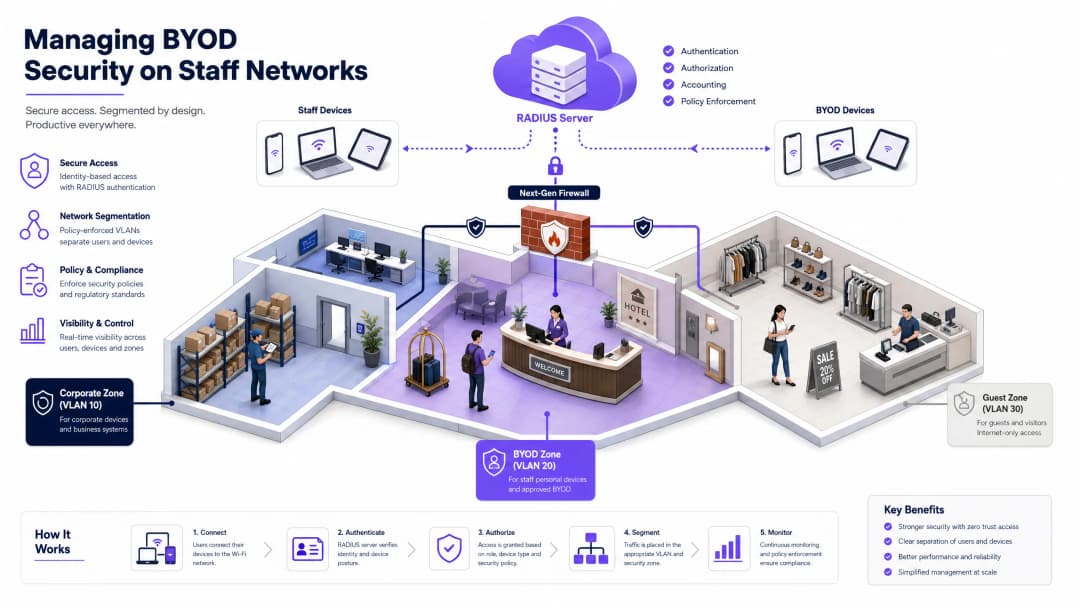
header_image.png

执行摘要

随着企业网络边界的不断消融,管理员工网络上的 BYOD(自带设备) 安全已从一种运营便利转变为至关重要的安全命令 [1]。对于在酒店、多站点零售连锁、医疗机构和交通枢纽等高人流量场所运营的网络架构师、IT 经理和首席技术官 (CTO) 而言,核心挑战在于平衡用户便利性与强大的企业数据保护 [2]。

本参考指南提供了一个高度实用且不限厂商的蓝图,用于保障员工网络上的 BYOD 访问安全。我们避开了理论上的抽象概念,详细介绍了 IEEE 802.1X 认证、通过 移动设备管理 (MDM) 进行客户端证书分发以及严格的 网络分段 的具体部署。通过停用不安全的预共享密钥 (PSK) 并实施零信任架构,企业可以降低横向威胁移动的风险,防止代价高昂的数据泄露,并满足 PCI DSS 4.0GDPR 等严格的合规性框架要求 [3]。


收听技术简报播客

在深入研究详细架构之前,您可以收听我们时长 10 分钟的全面技术音频简报。该播客采用高级系统顾问向客户简报的形式,介绍了具体的实施步骤、常见的部署陷阱和合规框架。


技术深挖:架构与标准

保障 BYOD 环境的安全需要完全摒弃基于边界的安全模型,转而采用以身份为中心的 零信任网络访问 (ZTNA) [4]。网络必须假设每个尝试连接的个人设备都可能已被入侵。

802.1X 认证框架

IEEE 802.1X 标准是保障企业边缘安全的不可逾越的基线。它提供基于端口的网络访问控制 (NAC),确保在身份验证服务器(RADIUS 服务器)验证其身份之前,终端(申请者)无法通过认证者(无线接入点或交换机)传输任何网络层流量 [5]。

阶段 帧类型 / 操作 描述
初始化 EAPOL-Start 客户端设备(申请者)发出准备连接网络的信号。
身份请求 EAP-Request/Identity 接入点(认证者)请求连接设备的身份。
身份响应 EAP-Response/Identity 客户端响应其身份,该身份将被转发到 RADIUS 服务器。
TLS 握手 EAP-TLS 协商 客户端和 RADIUS 服务器建立安全的 TLS 隧道并相互验证证书。
授权 RADIUS Access-Accept RADIUS 服务器批准访问,推送动态 VLAN 和 dACL 属性。

可扩展身份验证协议 (EAP) 方法的选择决定了部署的强度:

  • PEAP (Protected EAP): 将基于密码的身份验证(如 MS-CHAPv2)封装在 TLS 隧道中。虽然 PEAP 很常见,但如果客户端申请者配置不当,它仍然容易受到通过恶意接入点进行凭据收集的攻击 [6]。
  • EAP-TLS (Transport Layer Security): 企业 BYOD 的黄金标准。它采用基于双向证书的身份验证,完全消除了对密码的依赖和凭据窃取途径。RADIUS 服务器验证唯一的客户端证书,而客户端验证 RADIUS 服务器的证书 [5]。

网络分段与 VLAN 架构

扁平网络是极易受到攻击的网络。如果感染了恶意软件的个人设备连接到扁平的员工网络,攻击者可以轻松进行横向移动,从而危及高价值目标,例如酒店业的物业管理系统 (PMS)、零售业的销售点 (POS) 系统或医疗保健领域的电子健康记录 (EHR) 数据库 [7]。

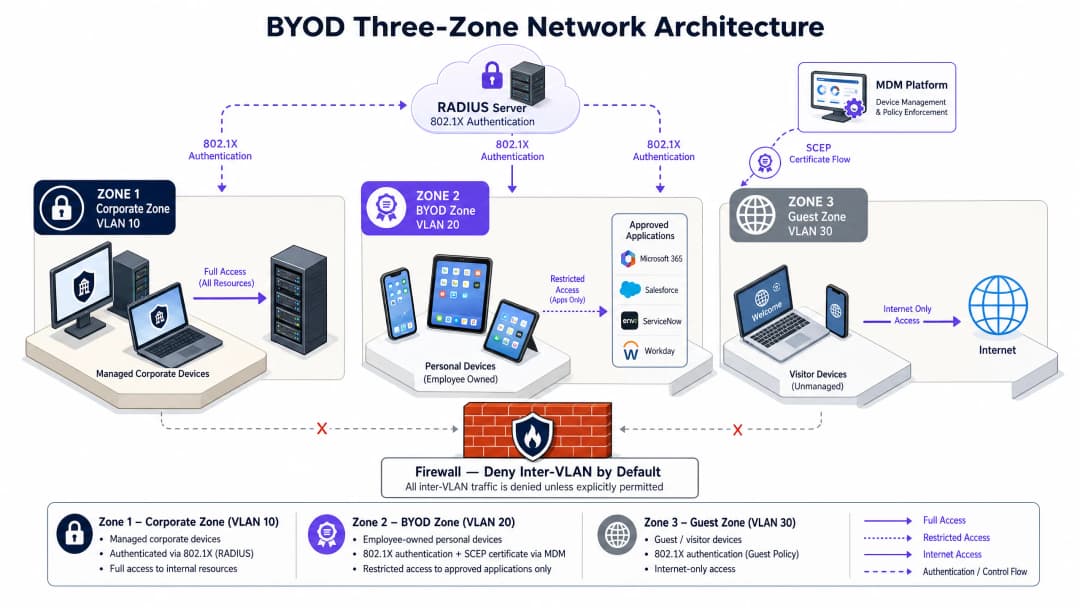
我们要求在防火墙级别强制执行严格的三区网络架构

byod_architecture_overview.png

  1. 企业区 (VLAN 10): 专用于完全托管的公司自有设备。该区域具有通往内部企业数据库、活动目录和本地业务系统的路由访问权限。
  2. BYOD 区 (VLAN 20): 专用于员工自有的个人设备。该区域中的设备被授予出站互联网访问权限,并通过应用层网关或反向代理受到严格限制、明确允许访问特定的内部应用程序(例如电子邮件、排班门户、HR 系统)。
  3. 访客区 (VLAN 30): 专为访客和客户设计。该区域仅具有出站互联网访问权限。必须在无线控制器级别启用客户端隔离,以防止连接设备之间进行任何点对点通信。

要了解有关优化访客网络基础设施的更多信息,请参阅我们的核心产品: Guest WiFiWiFi Analytics

移动设备管理 (MDM) 与 PKI 集成

在您不拥有的设备上强制执行安全策略需要与 MDM 或统一终端管理 (UEM) 平台(例如 Microsoft Intune、Jamf)进行集成 [8]。MDM 充当看门人,在颁发网络证书之前验证设备状态。

自动化的证书生命周期依赖于简单证书注册协议 (SCEP)

  • 准入评估: MDM 验证个人设备是否满足基线安全要求(例如,最低操作系统版本、启用的屏幕锁定、磁盘加密、未越狱/Root)。
  • 证书颁发: 一旦合规,MDM 将通过 SCEP 向您的私有证书颁发机构 (CA) 请求客户端证书,并将其与安全的 802.1X WiFi 配置文件一起直接推送到设备。
  • 持续合规性: 如果用户停用了密码或对设备进行了 Root,MDM 会将该设备标记为不合规,撤销证书,并且 RADIUS 服务器会立即终止网络访问。

要深入了解这些集成,请参阅我们的指南: 如何使用 Cloud RADIUS 实现 802.1X 认证


实施指南:逐步部署

从传统的预共享密钥 (PSK) 网络过渡到 802.1X EAP-TLS 架构,需要您的无线局域网控制器 (WLC)、身份提供商 (IdP) 和 MDM 平台之间进行紧密协同。

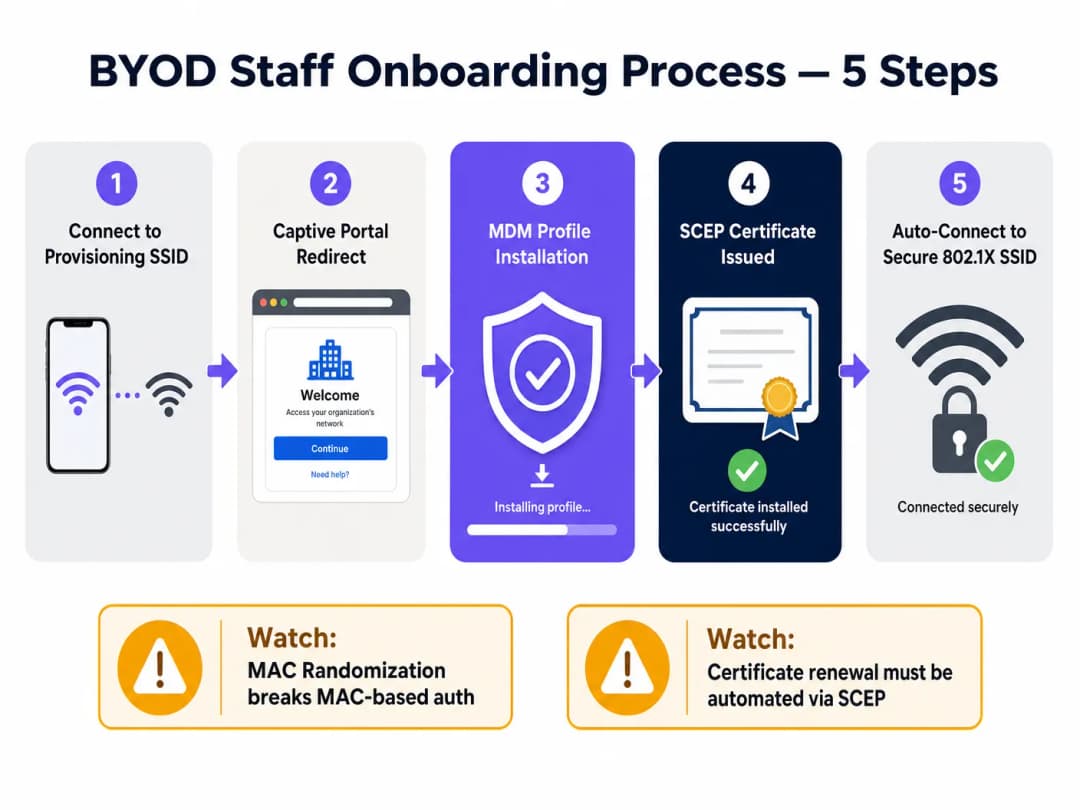
byod_onboarding_flow.png

步骤 1:无线和交换机基础设施配置

在核心交换机和边缘接入点上配置三个不同的 VLAN。确保在核心防火墙上默认拒绝 VLAN 间路由。

在您的无线控制器上,使用以下设置配置安全的 BYOD SSID:

  • 安全类型: WPA3-Enterprise(或用于兼容传统设备的 WPA2/WPA3-Enterprise 过渡模式)。
  • 802.11w 受保护的管理帧 (PMF): 设置为必需(WPA3 下的强制要求),以阻止去认证攻击 [9]。
  • RADIUS 服务器: 指向您的主 RADIUS 服务器和备 RADIUS 服务器。

步骤 2:PKI 和 SCEP 服务器设置

建立私有证书颁发机构 (CA) 或与云 PKI 服务集成。配置 SCEP 网关以处理来自 MDM 的自动证书签名请求。客户端设备必须信任该 CA 证书,这在 MDM 配置文件安装期间会自动处理。

步骤 3:MDM WiFi 和证书配置文件分发

在您的 MDM 控制台中,创建两个配置文件:

  1. 受信任的证书配置文件: 将根 CA 和中间 CA 证书推送到设备。
  2. SCEP 证书配置文件: 定义 SCEP 网关 URL、密钥大小(最小 RSA 2048 位)和主题名称格式(例如 CN={{UserPrincipalName}})。
  3. WiFi 配置文件: 配置设备使用 WPA3-Enterprise、EAP-TLS 连接到 BYOD SSID,并引用 SCEP 证书配置文件进行身份验证。

步骤 4:入网流程编排

为防止服务台出现瓶颈,请使用双 SSID 流程自动执行入网体验:

  • 入网 SSID: 广播一个带有 Captive Portal 的开放且限速的 SSID。
  • 门户重定向: 当员工连接时,将其重定向到入网门户。在这里,像 Purple 的 Guest WiFi 这样的平台可以作为初始接触点,通过您的身份提供商(例如 Entra ID)对员工进行身份验证,并引导他们下载 MDM 配置文件。
  • 自动过渡: 安装 MDM 配置文件后,设备会自动拉取 SCEP 证书,断开与入网 SSID 的连接,并安全地连接到 802.1X BYOD SSID。

对于多站点部署,特别是在多厂商环境中,利用像 OpenRoaming 这样的标准化框架可以显著简化此流程。在 Connect 许可下,Purple 可作为 OpenRoaming 的免费身份提供商,允许员工在不同地点之间无缝且安全地漫游 [10]。


故障排除与风险规避

在部署企业级 BYOD 时,IT 团队必须预测并规避几种常见的技术和运营故障模式。

1. MAC 地址随机化

现代移动操作系统(iOS 14+、Android 10+)默认在每次连接 SSID 时随机化其硬件 MAC 地址,以保护用户隐私 [11]。

  • 问题所在: 如果您的网络准入控制、带宽限制或会话超时依赖于 MAC 地址,设备将不断显示为新的终端,从而破坏您的策略。
  • 规避措施: 消除所有基于 MAC 的准入控制。完全依赖 802.1X 证书的通用名称 (CN) 或 RADIUS 服务器返回的用户身份属性来进行会话跟踪和策略执行。

2. 证书过期和更新失败

如果客户端证书过期,员工将被突然阻断在网络之外,导致服务台工单激增。

  • 问题所在: 大规模的手动证书更新是不可持续的。
  • 规避措施: 配置您的 MDM SCEP 配置文件,在证书剩余寿命达到 20% 时(例如,对于 1 年期证书,在过期前 30 天)启动自动证书更新。确保您的 RADIUS 服务器配置为发送会话超时属性,以便在配置新证书后强制进行重新身份验证。

3. 服务台瓶颈

复杂的入网流程会导致采用率低下和高昂的支持成本。

  • 问题所在: 用户在证书安装步骤中遇到困难。
  • 规避措施: 维护一个自助服务入网门户,提供清晰、直观且针对特定平台的指南。确保入网 SSID 受到严格的速率限制,且限于访问 MDM 和 CA URL,以激励用户完成注册过程。

投资回报率 (ROI) 与业务影响

实施安全、自动化的 BYOD 架构可为企业场所运营商带来可衡量的财务和运营回报。

成本效益分析

类别 传统托管设备模式 自动化 BYOD 模式 业务影响
硬件资本 资本支出 (CapEx) 高(每台员工设备 300 - 500 英镑) 零(员工使用个人设备) 直接节省资本支出。对于拥有 200 名员工的场所,这可节省高达 100,000 英镑的采购成本 [12]。
运营支出 (OpEx) 高(手动设备配置、物理维修) 低(自动化 MDM 注册和自我服务) 降低 IT 开销和设备生命周期管理成本高达 60% [12]。
服务台工单量 中(密码重置、连接问题) 极低(自愈式证书更新) 通过 SCEP 自动管理证书生命周期可将与 WiFi 相关的服务台工单减少 45%
安全风险状况 中(易受通过 PSK/PEAP 窃取凭据的影响) 极低(零信任、基于证书) 降低横向移动数据泄露的风险,避免潜在的监管罚款和声誉损失。

监管合规与风险缓解

在高度受监管的行业中,运行安全的 BYOD 环境对于保持合规性至关重要:

  • PCI DSS 4.0 合规性: 多站点零售连锁店和酒店必须将其持卡人数据环境 (CDE) 与员工个人设备隔离。实施三区 VLAN 架构可确保 BYOD 设备完全不属于 PCI 审计范围,从而降低审计复杂性和合规成本 [13]。有关零售部署的更多信息,请参阅 零售 WiFi 解决方案
  • GDPR 与数据隐私: 根据 GDPR,组织必须保护个人数据免受未经授权的访问。通过强制执行 MDM 注册,IT 团队保留了从丢失或被盗的个人设备中远程擦除企业数据容器的能力,而无需访问员工的个人文件,从而兼顾了安全性和用户隐私 [14]。有关医疗部署,请参阅 医疗 WiFi 解决方案

参考文献

  1. Fortinet, 《自带设备 (BYOD):含义与优势》, Cyber Glossary. https://www.fortinet.com/resources/cyberglossary/byod
  2. IBM, 《什么是自带设备 (BYOD)?》, IBM Think. https://www.ibm.com/think/topics/byod
  3. Venn, 《BYOD 安全:趋势、风险和十大最佳实践》, Venn Learn. https://www.venn.com/learn/byod/byod-security-best-practices/
  4. Microsoft, 《在微软实施零信任安全模型》, Inside Track. https://www.microsoft.com/insidetrack/blog/implementing-a-zero-trust-security-model-at-microsoft/
  5. Cloudi-Fi, 《什么是 802.1X 协议:安全网络准入控制完整指南》, Cloudi-Fi Blog. https://www.cloudi-fi.com/blog/802-1x
  6. Portnox, 《用于安全网络准入的 802.1X 认证》, Portnox Solutions. https://www.portnox.com/solutions/8021x-authentication/
  7. UK Netcom, 《如何保护和隔离企业 Wi-Fi》, UK Netcom Blog. https://uknetcom.co.uk/how-to-secure-segment-enterprise-wi-fi-in-2025/
  8. Portnox, 《用于零信任访问的 SCEP 证书注册》, Portnox Solutions. https://www.portnox.com/solutions/scep/
  9. Cloudi-Fi, 《WPA2/3-Enterprise:使用 802.1X 认证的安全 Wi-Fi》, Cloudi-Fi Blog. https://www.cloudi-fi.com/blog/wpa2-enterprise-802-1x
  10. Purple, 《BYOD WiFi 安全:如何安全地允许个人设备接入您的网络》, Purple Guides. https://www.purple.ai/en-us/guides/byod-wifi-security-how-to-safely-allow-personal-devices-onto-your-network
  11. Extreme Networks, 《6 GHz Wi-Fi 世界中的无线安全》, Extreme Networks Blog. https://www.extremenetworks.com/resources/blogs/wireless-security-in-a-6-ghz-wi-fi-6e-world
  12. Venn, 《BYOD 投资回报率计算器与成本节省》, Venn Resources. https://www.venn.com/roi-calculator/
  13. PCI Security Standards Council, 《PCI DSS 范围界定和网络分段指南》, PCI SSC Documents. https://www.pcisecuritystandards.org/documents/Guidance-PCI-DSS-Scoping-and-Segmentation_v1.pdf
  14. UK Information Commissioner's Office, 《英国 GDPR 下的数据安全指南》, ICO Guidance. https://ico.org.uk/for-organisations/uk-gdpr-guidance-and-resources/security/a-guide-to-data-security/

关键定义

IEEE 802.1X

An IEEE standard for port-based Network Access Control (PNAC) that provides an authentication framework for devices connecting to a wired or wireless network.

It acts as the first line of defense, blocking all network traffic from an endpoint until its identity has been verified by a RADIUS server.

EAP-TLS

Extensible Authentication Protocol-Transport Layer Security. An authentication method that uses digital certificates for mutual authentication between the client and the network.

It is the gold standard for enterprise WiFi, eliminating password-based credential theft and man-in-the-middle attacks.

RADIUS

Remote Authentication Dial-In User Service. A networking protocol that provides centralized Authentication, Authorization, and Accounting (AAA) management for users who connect and use a network service.

The RADIUS server validates the credentials (or certificates) presented by the supplicant and pushes policy attributes (like VLAN tags) to the authenticator.

SCEP

Simple Certificate Enrollment Protocol. An IP-based protocol that automates the certificate enrollment and distribution process for large numbers of devices.

In a BYOD environment, SCEP allows the MDM to automatically request and install client certificates on staff devices without manual IT intervention.

Client Isolation

A security feature configured on wireless access points that prevents wireless clients from communicating directly with each other.

Essential on Guest and BYOD networks to block lateral movement of malware and peer-to-peer scanning attacks.

WPA3-Enterprise

The latest Wi-Fi Alliance security standard for enterprise networks, introducing stronger cryptographic suites and mandatory Protected Management Frames (PMF).

It replaces WPA2-Enterprise, protecting against deauthentication and decryption attacks in high-density corporate environments.

MAC Randomization

A privacy feature in modern operating systems (iOS 14+, Android 10+) where the device rotates its hardware MAC address when scanning or connecting to different networks.

This breaks traditional MAC-based authentication and device tracking, forcing IT teams to rely on certificate-based identities instead.

Protected Management Frames (PMF)

A security feature (defined in IEEE 802.11w) that encrypts wireless management frames, preventing attackers from forging frames to disconnect clients.

Mandatory under WPA3, PMF stops deauthentication and spoofing attacks dead in their tracks.

应用实例

A 350-room luxury hotel chain needs to enable housekeeping and maintenance staff to use their personal smartphones for the hotel's digital service application (HMS) while maintaining strict PCI DSS 4.0 compliance for its PMS and payment networks.

We deployed a Three-Zone Network Architecture. The hotel's PMS and credit card terminals were isolated on a firewalled VLAN 10 (Corporate/CDE). Staff personal devices were enrolled in the corporate MDM (Microsoft Intune) via a captive onboarding portal. Upon compliance verification, the MDM issued a client certificate via SCEP and pushed the WPA3-Enterprise 802.1X configuration. Staff connected to VLAN 20 (BYOD), which was restricted via firewall policies to only allow outbound HTTPS traffic to the HMS application's cloud endpoint. All lateral traffic to VLAN 10 was blocked. Guest WiFi was completely segregated on VLAN 30 with client isolation active.

考官评语: This design successfully isolates the Cardholder Data Environment (CDE), removing the staff BYOD devices from the scope of PCI DSS audits. By utilizing EAP-TLS with SCEP, the hotel eliminated the operational nightmare of managing passwords for transient staff, while the MDM integration ensured that lost or compromised devices could be instantly revoked.

A multi-site retail brand with 120 stores wants to implement a BYOD policy for store associates to access inventory and scheduling systems on their personal tablets, but is concerned about MAC randomization breaking device-tracking policies and rogue AP attacks.

To address rogue AP risks, we transitioned all stores to WPA3-Enterprise, which mandates Protected Management Frames (PMF), preventing deauthentication attacks. To mitigate MAC randomization issues, we configured the RADIUS server (Cloud RADIUS) to ignore hardware MAC addresses for access control. Instead, the authentication policy was tied directly to the Common Name (CN) of the SCEP-issued client certificates. Store associates enrolled their tablets via an onboarding SSID, which automatically pushed the certificate and secure SSID profile. The BYOD VLAN was restricted to inventory and scheduling endpoints only.

考官评语: Relying on certificates rather than MAC addresses is the only sustainable way to handle modern mobile devices. WPA3-Enterprise provides the cryptographic assurance needed in high-footfall retail environments where rogue APs are a constant threat. The automated enrollment minimized store-level IT support, which is critical for multi-site retail operations with no on-site IT staff.

练习题

Q1. A stadium venue operations director wants to deploy a BYOD network for 150 event-day staff. The director suggests using a WPA2-Personal SSID with a strong pre-shared key (PSK) changed every month to save on licensing costs. How should you advise them?

提示:Consider the operational overhead of monthly password changes, the risk of credential leakage among 150 temporary staff, and modern security standards.

查看标准答案

You should strongly advise against using WPA2-Personal with a shared PSK. First, a shared key is highly vulnerable to leakage; with 150 temporary staff, the key will inevitably be shared or exposed, compromising the entire network. Second, changing the key monthly creates massive operational overhead and connection issues on event days. Third, WPA2-Personal lacks Protected Management Frames, leaving the network open to deauthentication attacks. Instead, recommend WPA3-Enterprise with certificate-based 802.1X authentication. By utilizing a cloud RADIUS service and a lightweight onboarding portal, they can automate certificate distribution and instantly revoke access for off-boarded staff, eliminating licensing overhead and securing the stadium's operational perimeter.

Q2. During a network audit of a retail chain, you discover that staff personal devices on the BYOD WiFi are assigned to the same subnet as the store's Point-of-Sale (POS) controllers. The IT manager argues that because staff devices require AD credentials to log in, the network is secure. Is this compliant, and what are the risks?

提示:Analyze this against PCI DSS 4.0 scoping requirements and the risk of lateral movement of malware.

查看标准答案

This setup is highly insecure and violates PCI DSS 4.0 compliance. Under PCI DSS, any network segment that shares a subnet with the Cardholder Data Environment (CDE) is considered in-scope for audit. By placing BYOD devices on the same subnet as POS controllers, the entire BYOD environment becomes subject to full PCI audit controls, dramatically increasing compliance costs. Furthermore, Active Directory credentials only protect authentication, not network-layer traffic. If an employee's personal device is infected with malware, the malware can scan, sniff, and attempt to exploit vulnerabilities on the POS controllers directly via the flat subnet. The solution is to implement the Three-Zone Architecture, placing BYOD devices on a dedicated VLAN 20 and using firewall rules to completely block all traffic to the POS VLAN 10.

Q3. A healthcare provider is deploying BYOD for nurses to access Electronic Health Records (EHR) on their personal tablets. The network architect plans to use MAC-address filtering on the WLC as the primary security check for connecting to the BYOD SSID. What technical issue will this cause, and how should it be resolved?

提示:Think about how modern mobile operating systems handle MAC addresses on wireless networks.

查看标准答案

This deployment will fail due to MAC Address Randomization, which is enabled by default on iOS 14+ and Android 10+ devices. These operating systems rotate the device's MAC address periodically or per-SSID to protect user privacy. Consequently, a registered tablet's MAC address will change, causing the WLC to reject the connection and locking the nurse out of the EHR system. Furthermore, MAC addresses are easily spoofed, making them a weak security control. The resolution is to abandon MAC-address filtering entirely. Implement 802.1X authentication using EAP-TLS. The security check should be driven by a client-side certificate issued via SCEP after the MDM verifies the tablet's compliance. The network policy will then be bound to the certificate's Common Name (CN), which remains stable regardless of MAC address rotation.

继续阅读本系列

WPA3-Enterprise 对比 WPA2-Enterprise:升级您的员工 WiFi

本权威技术参考指南概述了将员工无线网络从 WPA2-Enterprise 升级到 WPA3-Enterprise 的架构差异、安全增强功能和迁移策略。本指南专为高级 IT 决策者和网络架构师设计,提供可操作的部署蓝图、酒店和零售行业的真实案例研究,以及全面的风险缓解框架,以确保无缝过渡,同时保持对 PCI DSS v4.0 和 GDPR Article 32 的合规性。

阅读指南 →

Designing Secure Staff WiFi Networks Separated from Guest Traffic

一份面向网络架构师和 IT 领导者的权威技术参考指南,旨在设计安全、高性能的员工 WiFi 网络。本指南详细介绍了如何使用 VLAN、802.1X 身份验证和 WPA3-Enterprise 将业务流量与公共访客网络进行逻辑和物理隔离,以满足合规性要求(PCI DSS、GDPR)并消除横向移动安全风险。

阅读指南 →

企业在网络中防范非法接入点

本技术参考指南详细介绍了使用无线入侵防御系统(WIPS)和无线入侵检测系统(WIDS)在企业网络中防范非法接入点的架构、部署和操作程序。它为IT安全管理员提供了可操作的框架,用于在复杂的物理环境中(包括酒店、零售、医疗和公共部门场所)检测、分类和消除未经授权的AP。本指南涵盖了威胁分类、自动遏制机制、合规影响(PCI DSS、GDPR、HIPAA)以及可衡量的业务成果。

阅读指南 →