
Enterprise network capacity planner & architecture tool
Model access point density, backhaul bandwidth requirements, and zero-trust VLAN segmentation across your physical venue to ensure reliable wireless performance.
RF & spectrum design guidelines for Corporate HQ & hybrid office:
RF Deployment Blueprint: Prioritise dual 5 GHz / 6 GHz (WiFi 6E/7) radios in collaboration spaces and conference rooms. Use 802.1X certificate authentication via Microsoft Intune or Jamf to eliminate shared passwords.
Channel & Spectrum Allocation: 20 MHz on 2.4 GHz, 40 MHz on 5 GHz (UNII-1 through UNII-3 with DFS), 80 MHz on 6 GHz.
Need help designing your enterprise wireless network?
Purple works with existing Cisco, Aruba, Ruckus, Extreme, and Juniper Mist wireless networks with zero hardware replacements.
To do network design properly, you have to start by tying technology directly to real-world business goals. It's not about chasing the latest hardware; it's about building an infrastructure that solves specific problems and delivers measurable results for your venue. This means you must figure out the why before you even think about the what and how.
Designing a Network Starts with Business Goals
Long before a single access point is mounted or a cable is run, a successful network project kicks off with one crucial question: what business objectives does this network need to achieve?
If you only think about a network in terms of connectivity, you're setting yourself up for a costly, underperforming asset. The most reliable and future-proof networks are always the ones built on a solid foundation of clear, well-documented business requirements.
For a large hotel, for instance, the main goal might be to bump up guest loyalty scores by 20%. The network design, therefore, has to deliver seamless, high-performance streaming, smooth check-in processes, and maybe even personalised welcome messages through a mobile app - all running on dependable WiFi.
On the other hand, a multi-brand retail centre might want to drive more footfall into its quieter zones. In this case, the network needs to support location analytics, giving marketers the data to understand shopper journeys and push targeted promotions to draw them into certain stores.
Uncovering the Real Requirements
Gathering these requirements means stepping outside the IT department. You need to talk to key stakeholders right across the organisation to get a complete picture of what they need and expect.
- Operations Managers: What critical systems rely on the network being up? Think about point-of-sale (POS) terminals, stock-taking scanners, or security cameras.
- Marketing Teams: How can the network help with customer engagement? They might want data for personalised campaigns or a way to gather guest feedback.
- Guest Services: What are the most common complaints about the current network? Slow speeds, complicated login pages, and dead zones are usually top of the list.
This process isn't just about adding new features; it's also about taking a hard look at your current setup. A thorough audit often uncovers hidden dependencies and single points of failure that you'll need to sort out in the new design. It also gives you a performance baseline to measure your success against later.
The single biggest point of failure in network projects is a disconnect between IT capabilities and business expectations. Building a detailed requirements document, signed off by all stakeholders, is your insurance policy against costly redesigns.
Mapping User Personas to Network Needs
Once you've got your business goals sorted, the next job is to identify every single type of user and device that will connect to the network. This goes way beyond just "guests" and "staff". You need to create detailed user personas to really understand their specific demands.
Think about a modern hospital environment:
- Surgeons: They'll need ultra-low latency for robotic surgery systems and instant access to high-resolution medical images.
- Visiting Patients: They need simple, secure access for entertainment and keeping in touch, completely separate from any clinical systems.
- Medical IoT Devices: Things like infusion pumps and heart monitors require their own dedicated, highly secure network segment with predictable performance.
- Administrative Staff: They need rock-solid access to cloud-based electronic health records (EHR) and internal comms tools.
Each of these personas has a unique profile for things like bandwidth, latency, security, and how they log in. Documenting all this helps you design a segmented, multi-layered network that can handle everyone safely and efficiently.
By linking these technical specs back to your initial business goals, you create a direct line between what you're spending and the financial return you can expect. This crucial step also helps you plan for the future, making sure the network you build today is ready for whatever comes next. To see how these considerations translate into financial benefits, you can calculate the potential return on investment for your specific venue.
Planning for Capacity and Seamless Coverage
Alright, you've defined your business goals. Now for the fun part: translating those objectives into a physical and technical blueprint. This is where we move from the 'why' of your network design to the 'how many' and 'where'. It's all about crunching the numbers on capacity and meticulously planning for perfect coverage across your entire venue.
Getting this foundation right is non-negotiable. It’s what ensures your network can actually handle the real-world demands from day one, not just look good on paper. The process below shows how a successful project flows from those high-level goals into the nitty-gritty of auditing what you have and understanding who will be using the network.
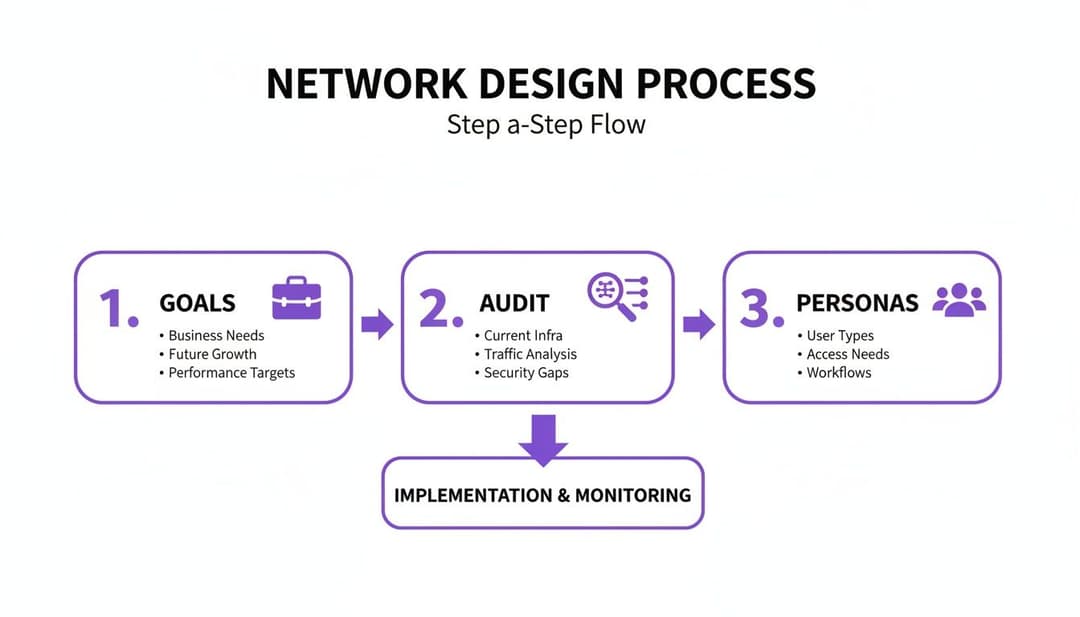
As you can see, before a single piece of hardware is even considered, you need a deep understanding of your goals, your current setup, and your users. Nail this, and you're on the right track.
Running Predictive RF Site Surveys
Please, don't guess where to put your Access Points (APs). The professional standard is a predictive RF (Radio Frequency) site survey. This involves using specialised software where you upload your venue’s floor plans. From there, you model the RF environment by defining wall materials, ceiling heights, and potential troublemakers like lifts or microwaves.
This virtual model lets you strategically place digital APs and see the resulting WiFi coverage, signal strength (RSSI), and signal-to-noise ratio (SNR) before you've spent a penny on hardware. It’s a lifesaver for spotting potential dead zones and areas of channel interference before they become a real headache for your users.
For instance, a hotel floor plan would mean modelling thick concrete walls between rooms. A modern, open-plan office, on the other hand, is all glass and steel. Each material messes with radio waves differently, and a predictive survey accounts for all of it.
Estimating Device Density and Bandwidth
Here’s a classic mistake I see all the time: planning for coverage but completely forgetting about capacity. It’s one thing to have a signal everywhere, but it's another thing entirely for that signal to hold up when hundreds of devices try to connect at once.
To get this right, you need to break your venue down into different capacity zones and get a solid estimate of the device density and application needs for each one.
- High-Density Zones: Picture a hotel conference hall or a stadium bowl. You could have hundreds of people packed in, each with a phone and a laptop, all trying to stream video or hit up social media. Your AP count will be high here, and they'll be configured for pure capacity, not just raw coverage distance.
- Medium-Density Zones: Think of a restaurant, a retail shopping area, or a bustling office floor. Device numbers are still high, but they’re more spread out.
- Low-Density Zones: Corridors, stockrooms, and quiet hotel guest floors fall into this bracket. Here, the goal is simply reliable coverage, which you can achieve with fewer, more strategically placed APs.
When you're thinking about bandwidth, don't just count devices. Think about what they'll be doing. A couple of users streaming 4K video can eat up more bandwidth than a dozen people just checking emails. Always, always design for peak usage, not the average.
This checklist helps break down the thought process for different areas of your venue.
Network Capacity Planning Checklist
Remember, these are just starting points. Your own analysis will give you the specific numbers you need to build a robust network.
How Full-Fibre Changes Everything
Your internal network plan is only as good as the internet connection feeding it. Here in the UK, the business broadband landscape has been completely transformed. Recent analysis shows a whopping 63% of SMEs can now get full-fibre broadband, and nationwide gigabit-capable coverage has hit 83% of premises. Having that kind of high-speed, reliable internet is a game-changer for network design.
This shift means more organisations can confidently adopt a cloud-first architecture. If you're working with cloud infrastructure, getting your head around specific platforms like those covered in the Microsoft Azure Networking Solutions guide is vital. With a rock-solid, gigabit-speed internet pipe, you can rely on cloud-managed network solutions and SaaS applications, which drastically simplifies your on-site kit.
To get a rough idea of your hardware needs, our handy Access Point calculator tool is a great place to start your planning.
Architecting for Zero-Trust and Scalable Access
Once you have a physical blueprint taking shape, your attention needs to turn to the architecture that will secure and manage every single connection. The old model of network security - a hard, crunchy shell with a soft, trusted interior - is completely obsolete. In today's environment, you have to assume threats can come from anywhere. That means every connection attempt must be verified, regardless of where it's coming from. This is the heart of a Zero-Trust security model.
When you design a network with this mindset, you leave behind the idea of a single, flat network where one breach could compromise everything. Instead, you build a system of secure, isolated zones and make sure users and devices only get access to the specific resources they absolutely need.

Creating Secure Lanes with VLANs
Your most fundamental tool for getting this right is network segmentation using Virtual Local Area Networks, or VLANs. The easiest way to think of VLANs is as separate, digital motorways built on the same physical road network. Traffic in one lane is completely invisible to and isolated from traffic in another.
This lets you carve out dedicated networks for different user groups and device types, which dramatically limits the potential blast radius of any security incident. A well-segmented network for a retail venue might look something like this:
- Guest VLAN: For public WiFi access. This needs to be completely walled off from all internal systems.
- Corporate VLAN: For staff laptops and mobiles, giving them access to company resources but not your operational tech.
- Operational VLAN: A highly restricted network for business-critical systems like point-of-sale terminals, payment gateways, and stock management devices.
- IoT VLAN: For all your "smart" devices like CCTV cameras, digital signage, or HVAC sensors, which often have little-to-no built-in security.
If a guest's device happens to be compromised, the VLAN ensures that threat is contained. It has no path to cross over and infect your payment terminals or access sensitive corporate data. This kind of segmentation is a non-negotiable first step in building a secure and scalable network.
Moving Beyond Shared Passwords
Segmentation is critical, but it's only half the story. The next piece of the puzzle is modernising how users and devices prove who they are. Static, shared passwords for WiFi are a security nightmare and an operational headache. They get shared around, they're rarely changed, and they are a prime target for attackers.
For guest access, the future is passwordless. Technologies like OpenRoaming and Passpoint, which are integral to platforms like Purple, offer a far more secure and seamless experience. Once a guest authenticates for the very first time - maybe through a simple, one-off email verification - their device gets a secure profile.
From that point on, their device will automatically and securely connect whenever they are in range of your network, or any of the 80,000+ other OpenRoaming-enabled venues worldwide. The connection is encrypted from the very first packet, wiping out the risks that come with open, unencrypted public WiFi.
This doesn't just boost security; it also gets rid of the friction from clunky captive portals and forgotten passwords, which massively improves the guest experience. For a deeper dive on this, it’s worth exploring how to implement an entirely secure WiFi system.
Identity-Based Access for Corporate Users
For your internal staff, Zero Trust means tying network access directly to their digital identity. This is where integrating with an Identity Provider (IdP) like Microsoft Entra ID (formerly Azure AD), Google Workspace, or Okta becomes a game-changer.
Instead of managing separate WiFi credentials, you can use your existing company directory to issue device-specific certificates. When an employee tries to connect, the network checks the validity of their certificate against your IdP.
This approach brings some huge benefits:
- Frictionless Onboarding: New employees get network access automatically as soon as they're added to the directory.
- Instant Revocation: If an employee leaves, just disabling their account in the IdP instantly revokes their network access. No more scrambling to change shared passwords across the company.
- Superior Security: Certificate-based authentication is far stronger than passwords and protects against a whole host of common attacks.
Securing Your IoT and Legacy Devices
So what about all those devices that can't handle modern authentication, like older printers, IoT sensors, or specialised operational hardware? Leaving them on an insecure network is a major risk, but they're often essential for business operations.
This is where solutions like Isolated PSK (iPSK) come in. iPSK lets you assign a unique pre-shared key to each individual device or a small group of them. Each key is then tied to its own micro-segment, which means devices using one key can't see or interact with devices using another, even if they're on the same VLAN.
This approach makes sure that even your "dumb" devices are secured and contained, closing a common but often overlooked security gap. By combining robust segmentation with modern, identity-based authentication for every type of user and device, you can build a network that is both incredibly secure and straightforward to manage.
From Cost Centre to Business Asset
So far, we've walked through the practical steps of designing the physical network and locking down its security. Now, it's time for the exciting part: turning your network from a simple utility into a powerful business intelligence engine.
A modern network does far more than just connect people to the internet. This is where your investment starts actively proving its own worth. The key is to integrate your WiFi authentication platform with the business and marketing tools you rely on every day.

Turning Anonymous Connections into Customer Insights
Every single time a guest logs onto your WiFi, a potentially valuable interaction occurs. By itself, a connection log is just an anonymous blip on a server - not particularly useful. But when you use a platform like Purple for authentication, that login becomes a chance to gather rich, permission-based, first-party data.
The process is surprisingly straightforward. As a guest connects - maybe through a quick social media login or a one-time email form - the system captures those details. These are then automatically pushed into your Customer Relationship Management (CRM) system, like Salesforce or HubSpot, or your marketing automation platform.
What was once an anonymous device MAC address is suddenly transformed into a rich customer profile, complete with contact details, visit history, and even demographic data. This is how you start building genuine, data-driven relationships with your visitors.
This simple integration turns your network into a primary source of first-party data. With the phasing out of third-party cookies, this is becoming absolutely critical. You own this data, giving you direct insight into who your customers are and how they actually behave inside your venue.
From Data to Actionable Decisions
Gathering the data is only the first step. The real magic happens when you use it to understand behaviour and drive meaningful business actions. A properly integrated network provides the tools to analyse footfall, dwell times, and visit frequency across your entire estate.
Think about these real-world scenarios:
- A Shopping Centre: WiFi analytics reveal that a particular wing has significantly lower footfall. Management can then work with tenants in that zone to run targeted promotions, sending push notifications to shoppers' phones as they pass by, or even use long-term trends to adjust the tenant mix.
- A Hotel Chain: A guest who has stayed before connects to the WiFi in the lobby. The network instantly recognises them, checks their profile in the CRM, and quietly alerts the front desk. That guest can then be greeted by name and offered a complimentary drink as a thank you for their loyalty - a small touch that makes a huge impact.
- A Stadium: During a match, analytics show long queues forming at certain food and beverage stands. Operations can immediately redirect staff to ease the bottleneck or push a "beat the queue" offer for a nearby, less busy concession. This not only improves the fan experience but also captures sales that might have been lost.
In every case, the network isn't just a passive utility. It's actively delivering the business intelligence needed to make smarter, faster decisions.
Proving Your Network ROI
For too long, WiFi has been seen as a necessary evil - a line item on the budget that just has to be paid. When you design a network with business integration baked in from the start, that whole narrative flips. You can draw a straight line from your network investment to tangible business outcomes.
- Enhanced Loyalty: Does sending a personalised "welcome back" offer to repeat visitors increase their average spend? Now you can measure it.
- Increased Footfall: Did that targeted digital campaign to draw people into a quieter part of your venue actually work? Your network analytics will give you the answer.
- Operational Efficiency: Did redirecting staff based on real-time crowd data reduce wait times and improve satisfaction scores? You can track the impact directly.
By linking network activity to sales data, loyalty programme sign-ups, and customer feedback, you build an undeniable case for the network's value. This allows you to demonstrate a clear ROI, justifying the initial spend and securing the budget for future upgrades. The ultimate goal is a network that doesn't just work - it works for your business.
Validating, Deploying, and Managing Your Network
Bringing your network design to life isn't the finish line; it’s the start of a new, crucial phase. The journey from a predictive model on a screen to a high-performing, real-world network demands meticulous validation, a strategic rollout, and a commitment to ongoing operational excellence. This is where you confirm your assumptions and make sure the network actually delivers on its promises.
The first order of business after the physical installation is to validate performance. Your predictive surveys gave you a brilliant starting point, but now you need to measure what's really happening on the ground.
Post-Installation Validation and Testing
Validation isn't just about checking for a signal; it's about confirming that the network meets the specific capacity and performance metrics you defined right at the start. This involves a couple of key survey types.
Passive Surveys: A technician will walk the site with a specialised tool (like an Ekahau Sidekick) to listen to all the RF energy in the environment. This measures real signal strength (RSSI), signal-to-noise ratio (SNR), and any channel interference from your new APs and neighbouring networks. The aim is to compare this real-world data directly against your predictive model's heatmaps.
Active Surveys: This goes a step further. The survey tool actively connects to your network to measure what a user would actually experience - things like throughput (upload/download speeds), latency, and packet loss. This is the ultimate test, confirming that a device in a specific location can hit the performance you planned for.
If you find discrepancies - maybe an unexpected dead spot in a corner office or slower-than-expected speeds in a high-density area - now is the time to make minor adjustments. This could be as simple as repositioning an AP or tweaking its power levels.
Executing a Phased Rollout
Once you've validated a section of the network, resist the urge to switch everyone over at once. A "big bang" deployment is a recipe for chaos. A phased rollout is a much safer, more professional approach that minimises disruption to the business.
Start with a pilot zone - perhaps a single floor or a less critical area of your venue. Let a small group of users onto the new network and gather direct feedback. This controlled test run lets you catch any unforeseen issues, from device-specific driver problems to quirks in your authentication flow, before they affect the entire organisation.
By rolling out your network in manageable stages - from pilot zones to full deployment - you de-risk the entire project. This controlled approach ensures that any issues are small and contained, preventing a single problem from causing widespread operational disruption.
After a successful pilot, you can move forward with a scheduled migration, going building-by-building or department-by-department until the whole venue is live on the new infrastructure.
Ongoing Management and Proactive Monitoring
A well-designed network shouldn't require constant firefighting. Modern cloud network management platforms from vendors like Meraki, Mist, and UniFi give you the tools you need for proactive operational excellence. The goal is to shift away from a reactive "break-fix" model and instead focus on spotting and resolving issues before users even notice them.
A few Key Performance Indicators (KPIs) to keep an eye on include:
- Client Health: Track metrics like failed connection attempts, roaming success rates, and average signal strength per client. A high failure rate could point to a misconfigured authentication policy or a coverage gap.
- Application Performance: Monitor the latency and throughput for business-critical applications. If your cloud-based POS system suddenly sees high latency, you can investigate before it starts hitting transactions.
- Security Events: Keep a close watch on alerts for rogue APs, failed authentication attempts, and other potential security threats.
This proactive stance is powerfully supported by the UK’s incredible broadband infrastructure. By Q3 2025, Ultrafast broadband will cover 90% of UK premises, and with 84-86% of sites already hitting gigabit capability, businesses have the high-speed backbone needed for reliable cloud management. This allows network teams using platforms like Purple to deploy sophisticated iPSK and SSO solutions in weeks, not months, creating a real strategic advantage. To learn more about how this digital shift is unfolding, you can explore the latest findings on UK gigabit broadband adoption.
Your network is a living system. Managing it effectively ensures it continues to deliver value long after the ribbon-cutting.
Frequently Asked Questions About Network Design
Even with the most detailed plan, you're bound to run into questions and a few hurdles. It's just a normal part of any major IT project. When it comes to designing a network, we see the same challenges and questions pop up time and time again. Here are the answers to some of the most common ones we hear from administrators and venue operators.
What Is the Biggest Mistake to Avoid When You Design a Network?
The single biggest mistake we see is underestimating capacity needs and failing to plan for future growth. So many designs get hung up on coverage - making sure a signal is available everywhere - but they completely neglect the network's ability to handle lots of users and devices at once.
This oversight is a recipe for disaster. It leads to sluggish performance, dropped connections, and a genuinely poor user experience, especially during peak hours. A network might seem perfectly fine with ten people connected, but it can become completely unusable with a hundred. Always, always design for peak user density and the apps they'll be using, not just the average. Build in a buffer for more devices and more bandwidth-hungry apps down the line.
A forward-thinking capacity plan saves you a world of cost and disruption later on. It’s far cheaper to get it right the first time than to try and fix an under-provisioned network under pressure.
How Do I Secure a Public Guest WiFi Network?
Securing public WiFi today goes way beyond a simple shared password. The modern standard relies on robust segmentation and identity-based authentication.
First things first, use VLANs. This creates a completely separate, walled-off network for guests, isolating all their traffic from your internal corporate or operational systems. It's a non-negotiable security baseline.
Next, it's time to ditch insecure shared passwords and clunky captive portals. A secure, modern solution like Purple uses technologies like OpenRoaming and Passpoint. This approach allows guests to authenticate seamlessly using credentials they already have (like their mobile plan or email account). Their connection is encrypted from the very first packet, which completely eliminates the risks that come with open, unencrypted public networks and gives your visitors a much safer and smoother experience.
Can I Integrate My Network with Other Business Systems like a CRM?
Absolutely, and you definitely should. Modern WiFi authentication platforms are built specifically for this kind of integration. By using a solution like Purple, you can connect your network directly to your CRM (think Salesforce or HubSpot) and your marketing automation tools.
When a guest authenticates on your WiFi, the platform captures valuable, permission-based first-party data like their name, email, and how often they visit. This data can then be automatically pushed into your CRM to enrich your customer profiles. From there, you can power highly personalised marketing campaigns, loyalty rewards, and much more targeted communication.
This integration turns your WiFi network from a simple internet utility into a powerful tool for gathering data and driving business intelligence.
Once your network is validated and deployed, effective ongoing management is crucial. For comprehensive guidance, explore these IT Asset Management best practices to optimise your network infrastructure and lifecycle.
Ready to transform your network from a cost centre into a business asset? Purple provides a secure, identity-based networking platform that replaces outdated passwords with seamless, passwordless access for guests and staff. Learn more about Purple and book a demo today.