
Best DNS filtering: a comprehensive guide for businesses
This technical reference guide explains how enterprise DNS filtering secures public networks by blocking malicious domains at the resolution layer - before a connection is ever established. It gives IT directors, network architects, and venue operations teams the deployment architecture, firewall configuration, and compliance context they need to protect Guest WiFi across hospitality, retail, and public-sector environments. Purple Shield blocks malware, botnets, and inappropriate content at the DNS level across 80,000+ live venues.
Video overview
Listen to this guide
View podcast transcript
Part of our core series: Enterprise WiFi Security Guide →
Enterprise DNS Filtering Sizing & Security Policy Advisor
Model real-world DNS query throughput, QPS spikes, malicious domain blocking rates, and CIPA compliance posture for guest and enterprise WiFi fleets with Purple Shield.
DNS Query Sizing & Edge Threat Mitigation Breakdown
Monthly WAN Bandwidth Savings
By sinkholing malware, malicious advertisements, and unauthorized streaming domains at the UDP resolution phase, the network prevents full TCP handshakes and payload downloads.
IT Administration Hours Saved
Managed threat intelligence feeds, no manual blocklist maintenance, and audit exports take repetitive resolver and firewall work off the service desk. The figure tracks the volume actually blocked, and is capped at 120 hours a month.
| Metric / Parameter | Current Model | Industry Benchmark | Status |
|---|---|---|---|
| Active Endpoint Concurrency | 3,825 devices | Peak concurrency 75%–90% | Sized |
| Resolver Response Latency | 12 ms | Target < 20 ms | Optimal |
| Total Monthly Queries Processed | 252,450,000 queries | High-density venue scale | Protected |
| DoH / DoT Bypass Containment | Active (Port 853 + ACL) | RFC 8484 / RFC 7858 block | Enforced |
Executive summary
For IT leaders managing large-scale public networks, securing the browsing environment is an operational mandate, not a nice-to-have. Guest WiFi in hospitality, retail, and public venues is an inherently untrusted environment. Without robust controls, it becomes a vector for malware distribution, botnet activity, and access to inappropriate content that damages brand reputation and creates compliance exposure.
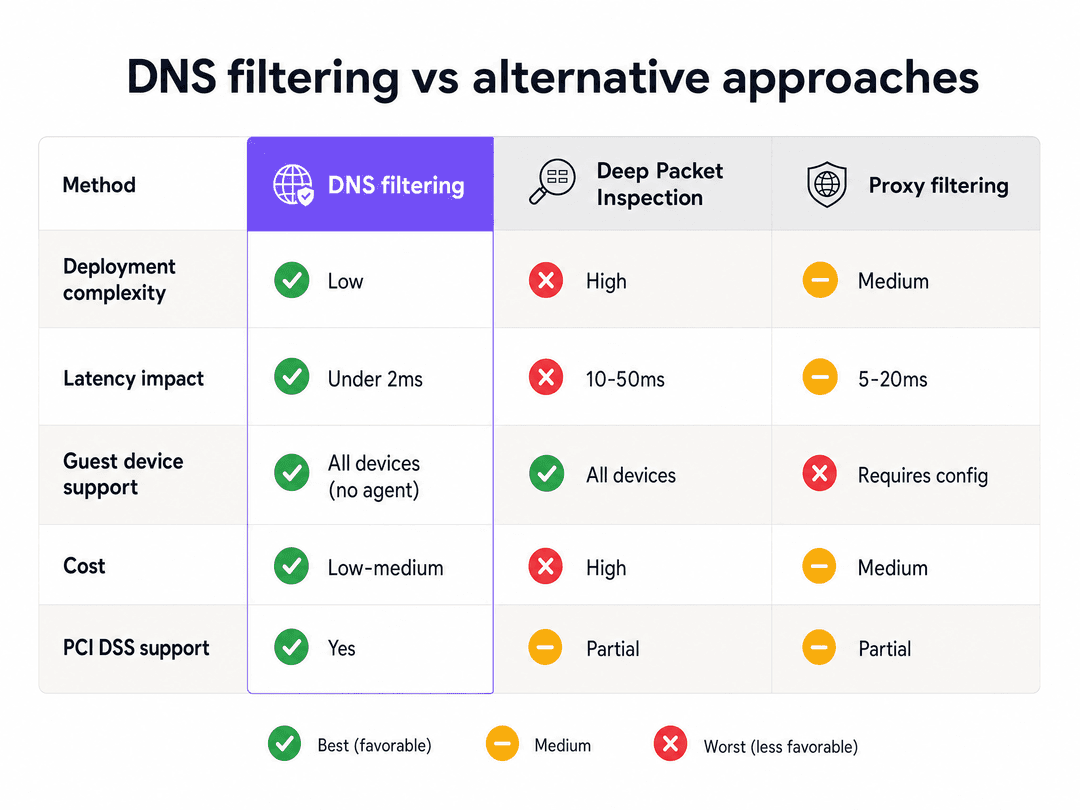
DNS filtering is the most efficient mechanism to enforce content policy and block threats at the network edge. Unlike resource-intensive Deep Packet Inspection (DPI), DNS filtering intercepts the domain resolution request before any payload is exchanged. It evaluates a lightweight UDP packet against real-time threat intelligence and returns either a valid IP address or a sinkhole, adding under two milliseconds of latency. This makes it the only practical content control method for high-density environments serving thousands of concurrent unmanaged devices.
This guide covers the technical architecture required to deploy DNS filtering across distributed enterprise venues, including VLAN segmentation, port 53 enforcement, captive portal integration, and DNS over HTTPS (DoH) evasion prevention. It also addresses compliance with PCI-DSS and GDPR, and explains how Purple Shield integrates into existing hardware stacks from Cisco Meraki, HPE Aruba, Ruckus, Juniper Mist, Ubiquiti UniFi, Cambium, Extreme Networks, and Fortinet without requiring hardware replacement.
Technical deep-dive: how DNS filtering operates
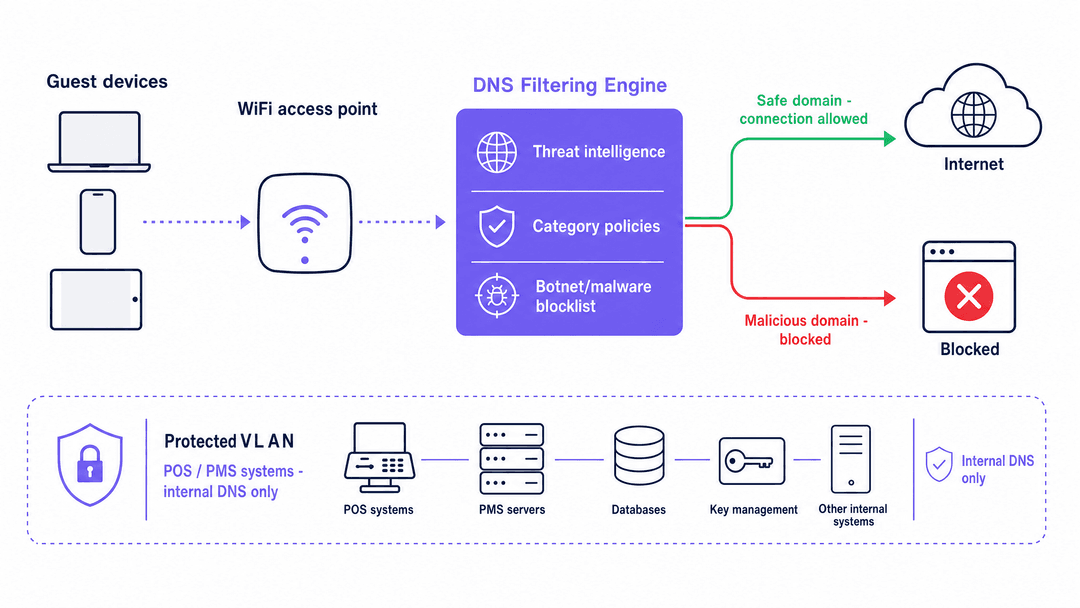
The Domain Name System (DNS) translates human-readable domains into machine-readable IP addresses. Every internet connection begins with a DNS resolution request. In a standard network, devices query a default resolver assigned by the ISP. In a secure architecture, the DHCP server assigns a policy-enforced DNS resolver to devices on the guest VLAN.
When a device queries this secure resolver, the filtering engine evaluates the domain against multiple data sources simultaneously: real-time threat intelligence feeds, category blocklists (adult content, gambling, piracy), and botnet command-and-control domain registries. The decision happens in milliseconds.
If the domain is safe, the engine returns the correct IP address and the connection proceeds normally. If the domain is flagged as malicious or violates your acceptable use policy, the engine either returns a non-routable IP address (sinkholing) or redirects the user to a branded block page. The key point: this intervention happens before any data payload is exchanged between the device and the destination server.
Performance and scale advantages
DNS filtering is architecturally superior to DPI for high-density public environments. DPI requires network hardware to inspect the payload of every packet. In a venue with 50,000 concurrent users - a stadium, conference centre, or large retail estate - DPI introduces significant latency and requires expensive, purpose-built hardware at every inspection point.
DNS filtering operates at the beginning of the connection lifecycle. It evaluates a single lightweight UDP packet. Once resolution completes, data transfers directly between the client and the destination server. The filtering engine never processes the data payload. Latency impact is consistently under two milliseconds, regardless of concurrent user count.
Because DNS filtering operates before connection establishment, it is protocol-agnostic. It blocks connections whether the application uses HTTP, HTTPS, FTP, or a custom port. This is a significant advantage over URL-based filtering, which only inspects HTTP/HTTPS traffic.
The 10-day threat detection advantage
Legacy DNS security relies on reactive blacklisting: a domain is identified as malicious, reported to a central authority, added to a database, and eventually distributed to your filter - a process that can take days. Modern malware campaigns exploit this lag. Attackers register fresh domains, execute a campaign within a 24-hour window, and abandon the domain before it reaches any standard blocklist.
Purple Shield uses AI-driven threat detection to analyse domain registration patterns, IP reputation, and cryptographic signatures in real time. This approach identifies and blocks emerging zero-day threats up to 10 days faster than traditional reactive providers (Purple internal data, 2026). In an environment where a single malicious link on a guest device can lead to ransomware, that detection window is operationally significant.
Got questions about your specific setup?
Our team works with venue operators, IT managers, and network engineers across 80,000 venues. Book a 20-minute call and we will show you how others like you solved it.
Implementation guide: architecture and deployment
Deploying DNS filtering correctly requires precise network configuration at three layers: DHCP, firewall, and captive portal.
Step 1: VLAN segmentation
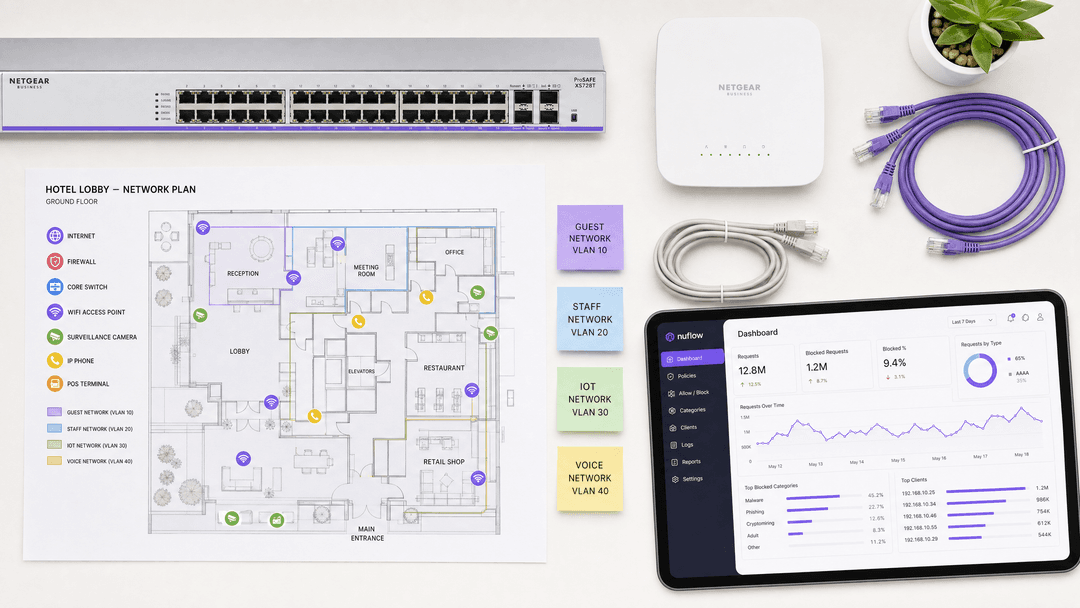
Segment your network so that guest traffic is isolated from operational systems. Place guest devices on a dedicated VLAN (for example, VLAN 20) and keep POS terminals, property management systems, and staff devices on separate VLANs with internal DNS resolvers. This ensures that your DNS filtering policy applies exclusively to untrusted guest traffic and does not disrupt operational systems.
This segmentation also satisfies PCI DSS Requirement 1.3, which mandates that cardholder data environments are isolated from untrusted networks. Guest WiFi must never share a VLAN with payment infrastructure.
Step 2: DHCP scope configuration
Configure the DHCP scope for the guest VLAN to assign the IP addresses of your cloud DNS filtering service as the primary and secondary DNS servers. This ensures every device that joins the guest network receives the correct resolver automatically.
Step 3: Port 53 enforcement at the firewall
DHCP assignment alone is insufficient. A user can override the DHCP-provided DNS settings by manually configuring their device to use a public resolver such as Google (8.8.8.8) or Cloudflare (1.1.1.1). Malware often hardcodes DNS settings to bypass network controls entirely.
You must implement a firewall rule that drops all outbound traffic on port 53 (both UDP and TCP) from the guest VLAN to any IP address other than your designated filtering servers. This converts the DNS filter from an advisory control into an enforced one.
Step 4: DNS over HTTPS (DoH) mitigation
Modern browsers and applications increasingly use DoH, which encrypts DNS queries inside standard HTTPS traffic on port 443. This bypasses port 53 interception entirely. To maintain coverage, configure your firewall to block the known IP address ranges of major DoH providers. This forces client devices to fall back to standard unencrypted DNS, which your filtering engine can inspect. NIST SP 800-81r3 (published March 2026) specifically addresses DoH as an enterprise DNS security consideration.
Step 5: Captive Portal walled garden configuration
If you operate a Captive Portal for guest authentication, you must configure a Walled Garden before applying any blocking policy. The Walled Garden is a list of domains that devices can access before they have authenticated. It must include all domains required for the Captive Portal to function: your portal's own domain, any identity providers (Microsoft Entra ID, Okta, Google Workspace), and any social login OAuth endpoints.
If these domains are blocked before authentication, users cannot complete the login flow. The result is a broken onboarding experience and frustrated guests. Configure the Walled Garden first, then apply your content filtering policy to authenticated sessions only.
For more on SSID architecture and how Guest WiFi, Staff WiFi, and IoT networks should be structured, see Three SSIDs to rule them all: guest, Passpoint, and IoT WiFi.
Best practices: policy design and ongoing management
Category-based blocking
Organise your DNS filtering policy around content categories rather than individual domain blocklists. Categories typically include: malware and phishing, botnet command-and-control, adult content, gambling, illegal streaming, and peer-to-peer file sharing. Category-based policies are easier to maintain and automatically capture new domains as threat intelligence updates.
Threat intelligence update frequency
Select a DNS filtering provider that updates threat intelligence in real time or near-real time. Static blocklists updated daily are insufficient against modern fast-flux malware campaigns. Purple Shield updates its threat intelligence continuously, reflecting the same AI-driven detection that provides the 10-day advantage over reactive providers.
Hardware-agnostic deployment
Purple Shield operates as a cloud overlay, meaning it integrates with your existing access point infrastructure without hardware replacement. It is compatible with Cisco Meraki, HPE Aruba, Ruckus, Juniper Mist, Ubiquiti UniFi, Cambium, Extreme, and Fortinet. The filtering policy is applied at the DNS layer, so the access point hardware only needs to forward DNS queries to the correct resolver.
Analytics and reporting
DNS filtering generates detailed query logs that provide visibility into network behaviour. Use these logs to identify trends: a spike in blocked phishing attempts from a specific access point may indicate a targeted attack. Regular review of blocked category reports also supports compliance audits, demonstrating to PCI DSS assessors and GDPR auditors that you have active controls in place.
Purple's WiFi Analytics platform integrates with Shield to provide unified visibility across security events and network performance.
Troubleshooting and risk mitigation
Filter bypass via custom DNS
Symptom: Users report accessing content that should be blocked. Firewall logs show DNS queries to 8.8.8.8 or 1.1.1.1 from the guest VLAN.
Cause: Port 53 is not blocked at the firewall. Users are overriding DHCP-assigned DNS settings.
Fix: Implement a firewall rule dropping all outbound UDP/TCP port 53 traffic from the guest VLAN to any IP other than your filtering engine.
Captive portal authentication failure
Symptom: Guests cannot complete the login flow. The captive portal page fails to load or social login buttons do not respond.
Cause: The DNS filter is blocking identity provider domains before authentication. Microsoft Entra ID, Google Workspace, or your portal's own domain is on a blocked category list.
Fix: Audit your Walled Garden configuration. Add all required authentication domains to the pre-authentication allowlist. Test the full login flow in a staging environment before deploying policy changes.
DoH bypass
Symptom: DNS filter logs show low query volume despite high network utilisation. Some devices appear to bypass filtering entirely.
Cause: Browsers or applications are using DoH, routing encrypted DNS queries over port 443 to external resolvers.
Fix: Block the known IP ranges of major DoH providers at the firewall. Verify coverage by monitoring for HTTPS connections to known DoH resolver IPs.
Operational VLAN disruption
Symptom: POS terminals or property management systems lose connectivity after DNS filter deployment.
Cause: The DNS filtering policy has been applied to the wrong VLAN, or DHCP is assigning the cloud DNS resolver to operational devices.
Fix: Verify VLAN tagging on all switch ports and access points. Confirm that operational device VLANs are configured to use internal DNS resolvers only.
ROI and business impact
DNS filtering delivers measurable returns across three dimensions.
Bandwidth reclamation: Blocking illegal streaming, peer-to-peer sharing, and automated botnet traffic reclaims significant bandwidth. In a hotel environment, this can reduce guest VLAN utilisation by 20-40%, improving performance for legitimate users without requiring circuit upgrades.
Compliance cost reduction: Demonstrating active DNS-level controls reduces the scope and cost of PCI DSS assessments. It also provides documented evidence for GDPR Article 32 (technical measures to ensure data security) and supports Cyber Essentials certification requirements for malware protection.
Brand and liability protection: Enforcing family-friendly browsing policies in retail and hospitality environments prevents public display of inappropriate content. In venues serving children - shopping centres, family hotels, stadiums - this is both a brand requirement and a legal consideration in many jurisdictions.
For sector-specific deployment guidance, see our industry pages for Hospitality, Retail, Healthcare, and Transport.
Key Definitions
DNS filtering
A security technique that intercepts domain resolution requests and evaluates them against threat intelligence feeds and content policies before allowing or blocking a connection.
The primary content control method for unmanaged guest devices on public networks. No endpoint agent required.
Sinkholing
Returning a non-routable IP address (such as 0.0.0.0) in response to a DNS query for a malicious domain, preventing the device from establishing a connection.
Used to silently block botnet command-and-control traffic without alerting the malware that it has been detected.
Walled Garden
A restricted pre-authentication network environment that allows access to a specific set of approved domains before a user completes the captive portal login flow.
Must include all identity provider domains (Microsoft Entra ID, Google Workspace, Okta) and captive portal assets to prevent authentication failures.
DNS over HTTPS (DoH)
A protocol that encrypts DNS queries inside standard HTTPS traffic on port 443, hiding the destination domain from network-level inspection.
Increasingly used by default in modern browsers. Requires firewall-level blocking of DoH provider IP ranges to maintain DNS filtering coverage.
VLAN segmentation
Dividing a single physical network into multiple isolated logical networks using 802.1Q tagging.
Critical for isolating guest traffic from operational systems. PCI DSS Requirement 1.3 mandates that cardholder data environments are separated from untrusted networks including guest WiFi.
Captive portal
A web page that devices must interact with before gaining full network access, used for authentication, terms of service acceptance, and first-party data capture.
Requires careful Walled Garden configuration to function correctly alongside DNS filtering.
Deep Packet Inspection (DPI)
A network filtering method that examines the full payload of packets at an inspection point, enabling content-aware filtering but introducing significant processing overhead.
Impractical for high-density guest networks due to latency and hardware cost. DNS filtering is the preferred alternative for unmanaged device environments.
Threat intelligence feed
A continuously updated database of known malicious IP addresses, domains, and URL patterns, used to power real-time DNS filtering decisions.
The quality and update frequency of the threat intelligence feed determines how quickly a DNS filter responds to new zero-day threats.
Zero-day domain
A newly registered domain used in a malware or phishing campaign before it appears on any standard blocklist.
Modern attack campaigns use disposable domains that are active for less than 24 hours. AI-driven threat detection identifies these domains by analysing registration patterns rather than waiting for reports.
Worked Examples
A 400-room hotel chain is deploying Guest WiFi across 12 properties. They use Microsoft Entra ID for captive portal authentication and their property management system (PMS) runs on the same physical switch infrastructure. After enabling DNS filtering, guests at three properties report they cannot complete the login flow. What is the root cause and how should the team resolve it?
The root cause is an incomplete Walled Garden configuration. The DNS filter is blocking Microsoft Entra ID authentication domains before guests authenticate, creating a catch-22 where guests cannot load the login page. Resolution steps: 1. In the DNS filtering dashboard, create a pre-authentication policy that explicitly allowlists all Microsoft Entra ID domains, including login.microsoftonline.com, login.live.com, and any tenant-specific domains. 2. Verify that the captive portal's own domain and any CDN assets it loads are also allowlisted. 3. Confirm that the PMS VLAN (VLAN 10) is configured to use internal DNS resolvers, not the cloud filtering engine. 4. Apply the restrictive content blocking policy only to post-authentication sessions on the guest VLAN (VLAN 20). 5. Test the full login flow at each affected property before closing the incident.
A large retail chain operates 200 stores, each with a guest WiFi network. Their IT security team deploys a cloud DNS filter and updates the DHCP scope on all guest VLANs. Two weeks later, a penetration test reveals that 18% of guest devices are successfully resolving known malicious domains. The DNS filter logs show no blocked queries from these devices. What is the architectural flaw and what is the fix?
The flaw is that port 53 is not blocked at the firewall. The 18% of devices are bypassing the DHCP-assigned DNS servers by using hardcoded resolvers (8.8.8.8, 1.1.1.1) or by using DNS over HTTPS. Since their DNS queries never reach the filtering engine, no blocked queries appear in the logs. Fix: 1. Implement a firewall rule on the guest VLAN gateway that drops all outbound UDP and TCP traffic on port 53 to any IP other than the approved filtering engine IPs. 2. Identify and block the IP ranges of major DoH providers (Cloudflare, Google, NextDNS) at the firewall to prevent encrypted bypass. 3. Re-run the penetration test to confirm coverage. 4. Monitor firewall drop logs for port 53 traffic to verify the rule is active.
Practice Questions
Q1. A retail chain deploys a cloud DNS filter across 150 stores. They update the DHCP scope on all guest VLANs to assign the filtering engine IPs. A week later, store managers report that customers can still access blocked content categories. The DNS filter dashboard shows very low query volume from these stores. What is the most likely cause and what is the fix?
Hint: Consider how a device can resolve DNS without using the server assigned by DHCP.
View model answer
The most likely cause is that outbound port 53 is not blocked at the firewall. Devices are overriding the DHCP-assigned DNS servers with hardcoded public resolvers. The low query volume in the dashboard confirms that queries are not reaching the filtering engine. The fix is to implement a firewall rule dropping all outbound UDP and TCP traffic on port 53 from the guest VLAN to any IP other than the approved filtering engine IPs. Additionally, block known DoH provider IP ranges to prevent encrypted DNS bypass.
Q2. A conference centre is deploying DNS filtering for the first time. They use Google Workspace for attendee authentication on their captive portal. During testing, attendees cannot complete the login flow - the Google sign-in page fails to load. What configuration step was missed and how should it be corrected?
Hint: Authentication happens before the device has full internet access. What domains must be reachable before authentication completes?
View model answer
The Walled Garden was not configured before the DNS filtering policy was applied. The DNS filter is blocking Google Workspace authentication domains (accounts.google.com, oauth2.googleapis.com) before attendees can authenticate. The fix is to add all required Google Workspace OAuth and authentication domains to the pre-authentication allowlist in the DNS filtering policy. The captive portal's own domain and any CDN assets must also be allowlisted. Apply the restrictive content policy only to post-authentication sessions.
Q3. A stadium IT team is evaluating DNS filtering versus Deep Packet Inspection for their 60,000-capacity venue. The network team is concerned about latency during peak events. Which approach is more appropriate and why?
Hint: Consider the processing overhead of each method at the scale of 60,000 concurrent users.
View model answer
DNS filtering is the appropriate choice. It operates at the resolution layer, evaluating a single lightweight UDP packet before any connection is established, adding under two milliseconds of latency regardless of concurrent user count. DPI requires inspecting the full payload of every packet, which at 60,000 concurrent users would introduce significant latency and require prohibitively expensive hardware at every inspection point. DNS filtering is also protocol-agnostic, blocking connections over any port, whereas DPI is typically limited to HTTP and HTTPS traffic.
Q4. An IT director at a hotel group wants to confirm that their DNS filtering deployment meets PCI DSS requirements. Their payment terminals are on VLAN 10 and guest WiFi is on VLAN 20. The DNS filter is applied to VLAN 20 only. What additional evidence should they document for their PCI DSS assessor?
Hint: PCI DSS Requirement 1.3 covers network access controls between trusted and untrusted networks.
View model answer
The IT director should document: 1. Firewall rules confirming that VLAN 10 (cardholder data environment) cannot be accessed from VLAN 20 (guest network), satisfying PCI DSS Requirement 1.3. 2. DHCP configuration showing that VLAN 10 devices use internal DNS resolvers, not the cloud filtering engine. 3. Firewall rules blocking outbound port 53 from VLAN 20 to non-approved IPs, demonstrating enforced DNS filtering. 4. DNS filter policy documentation showing active malware and botnet blocking categories on VLAN 20. 5. DNS filter logs showing blocked query events, demonstrating that the control is active and monitored.
Frequently asked questions
How does enterprise DNS filtering protect guest and corporate WiFi networks?
Enterprise DNS filtering secures networks at the resolution layer before an HTTP or TCP connection is established. When a user or background application requests an IP address for a domain, the recursive resolver evaluates the query against real-time threat intelligence. Malicious domains associated with malware, ransomware command-and-control (C2), or phishing are instantly sinkholed, protecting unmanaged guest devices and corporate assets with negligible latency.
How does DNS filtering prevent DNS-over-HTTPS (DoH) and DNS-over-TLS (DoT) security bypasses?
Modern mobile devices and browsers often default to encrypted DoH or DoT, which bypasses local network DNS forwarders. Enterprise venues counter this by blocking outbound TCP port 853 (DoT) and enforcing Layer 7 firewall rules or Access Control Lists (ACLs) that drop traffic to known public DoH resolver IPs (such as Cloudflare 1.1.1.1 and Google 8.8.8.8), forcing client devices to use the venue protective DNS resolver.
What is the difference between recursive DNS resolution and Anycast protective DNS filtering?
Standard recursive DNS queries travel through multi-tier root and authoritative nameservers without security evaluation, exposing networks to poisoned cache entries and malicious destinations. Anycast protective DNS routes queries to globally distributed Anycast data center nodes that cross-reference domains against real-time threat feeds, returning cached results in under 15ms while neutralizing cyber threats and policy violations at the edge.
How does DNS filtering enforce CIPA (Children's Internet Protection Act) compliance across venues?
Under CIPA and educational safe-browsing mandates, venues providing public access must block visual depictions of obscenity, child sexual abuse material (CSAM), and harmful content. Protective DNS enforces these requirements network-wide without installing device certificates or endpoint software, categorizing billions of domains and enforcing Google and YouTube SafeSearch restrictions across all connected devices.
Can DNS filtering reduce venue internet bandwidth consumption and firewall compute load?
Yes. By blocking malicious payload downloads, high-bandwidth streaming domains, and intrusive ad-tracking networks at the initial DNS lookup phase, the network prevents large TCP payload transfers before they start. Venues deploying protective DNS typically observe a 6% to 12% reduction in overall WAN traffic and substantially reduced deep-packet inspection (DPI) processing load on edge firewalls.
How does Purple Shield integrate with existing enterprise routers, access points, and captive portals?
Purple Shield operates independently of access point hardware, integrating directly via DHCP nameserver assignment or DNS forwarders on Cisco Meraki, HPE Aruba, Fortinet, Ruckus, and Ubiquiti systems. For guest WiFi, it pairs with Purple Captive Portals to enforce strict pre-authentication walled gardens, allowing authentication traffic while shielding the venue from unauthorized outbound browsing.
Continue reading in this series
CIPA compliance: compliance checklist for venue operators
You will be able to decide whether CIPA binds your WiFi, then segment networks, route DNS through Purple Shield and close bypass routes. You will also know what evidence to keep for Form 486 or Form 479 certification. The checklist assigns every requirement an owner, so your next funding year certification has nothing missing.
WPA3 transition mode connection failures: a deployment checklist for Cisco Meraki, HPE Aruba and Ruckus
Use this checklist to diagnose why devices fail on a WPA3 SAE transition mode SSID and fix it on Cisco Meraki, HPE Aruba or Ruckus. You will match 802.11 status codes to causes, isolate PMF, 802.11r and 6GHz issues, and decide when to move to a WPA3-only SSID.
The Enterprise Guide to SCEP: Deploying Simple Certificate Enrollment Protocol for Automated Campus WiFi Security
This technical reference guide provides a definitive architectural blueprint and step-by-step implementation strategy for enterprise WiFi certificate deployment using SCEP. It covers the critical differences between SCEP and PKCS, the exact deployment sequence required for success, and real-world risk mitigation strategies for IT leaders.
Got questions about your specific setup?
Our team works with venue operators, IT managers, and network engineers across 80,000 venues. Book a 20-minute call and we will show you how others like you solved it.