

How to Utilise First-Party Data in Marketing Campaigns
This authoritative guide details how enterprise IT and marketing teams can transform their guest WiFi infrastructure into a powerful first-party data engine. It covers technical architecture for data capture, GDPR-compliant consent management, segmentation strategies, and real-world activation across email, SMS, social advertising, and programmatic display. Venue operators and IT teams will find concrete implementation guidance, worked examples from hospitality and retail, and measurable ROI frameworks.
🎧 Listen to this Guide
View Transcript
Executive Summary
For enterprise venues — hotels, retail chains, stadiums, and conference centres — the guest WiFi network is no longer just a cost centre or a baseline amenity. As third-party cookies deprecate and privacy regulations tighten, physical venues possess a unique and underutilised advantage: the ability to capture highly accurate, consented first-party data directly from visitors at the point of connection.
This guide outlines how IT managers and CTOs can architect their wireless infrastructure to serve as a compliant data acquisition engine for marketing teams. By deploying a robust captive portal integrated with CRM and marketing automation platforms, venues can seamlessly collect demographic and behavioural data at scale. We will explore the technical deployment of data capture mechanisms, the integration of Guest WiFi analytics, and the execution of targeted marketing campaigns across email, SMS, and social advertising, ultimately driving measurable ROI and enhanced customer experiences. Purple's platform currently serves over 80,000 venues and nearly two million daily users, providing the integration layer that connects network infrastructure to marketing activation.
Technical Deep-Dive: The Data Acquisition Architecture
The foundation of first-party data collection in a physical venue relies on the interaction between the user's mobile device, the wireless access point (AP), and the captive portal infrastructure. Understanding this architecture is essential before any marketing activation can take place.
The Captive Portal and Authentication
When a user connects to an open SSID, the network controller redirects their initial HTTP request to a captive portal. This splash page is the critical point of value exchange: the venue provides high-speed internet access, and the user provides their data and consent. To maximise data quality and user experience, the authentication process must be both frictionless and technically robust.
Modern deployments leverage three primary authentication methods. Social OAuth allows users to authenticate via Facebook, Google, or Apple, providing rich demographic data instantly and reducing form abandonment. Form-based authentication requests specific fields such as email address, phone number, and postal code, giving the venue direct control over the data captured. Seamless Authentication via Passpoint (Hotspot 2.0), utilising the IEEE 802.11u standard, allows automatic, secure connections for returning users, bypassing the captive portal entirely after the initial setup — a critical capability for high-throughput environments such as transport hubs and stadiums, as explored in Wi Fi in Auto: The Complete 2026 Enterprise Guide .
Overcoming MAC Randomisation
Historically, venues tracked users via their device's Media Access Control (MAC) address. However, modern operating systems — iOS 14 and above, Android 10 and above — implement MAC randomisation, generating a unique, temporary MAC address for each SSID. This fundamentally breaks device-centric tracking and is one of the most common causes of data quality degradation in legacy deployments.
To build a persistent user profile, the architecture must rely on the authenticated session rather than the hardware identifier. Once a user authenticates via the captive portal, their session data — including the randomised MAC — is tied to their CRM profile within the WiFi Analytics platform. Subsequent visits using the same authentication method will link back to the unified profile, preserving longitudinal behavioural data.
Data Flow and Integration Architecture
The captured data must flow seamlessly from the network edge to the marketing stack. This is achieved via REST APIs or secure Webhooks, enabling real-time data synchronisation rather than batch exports.
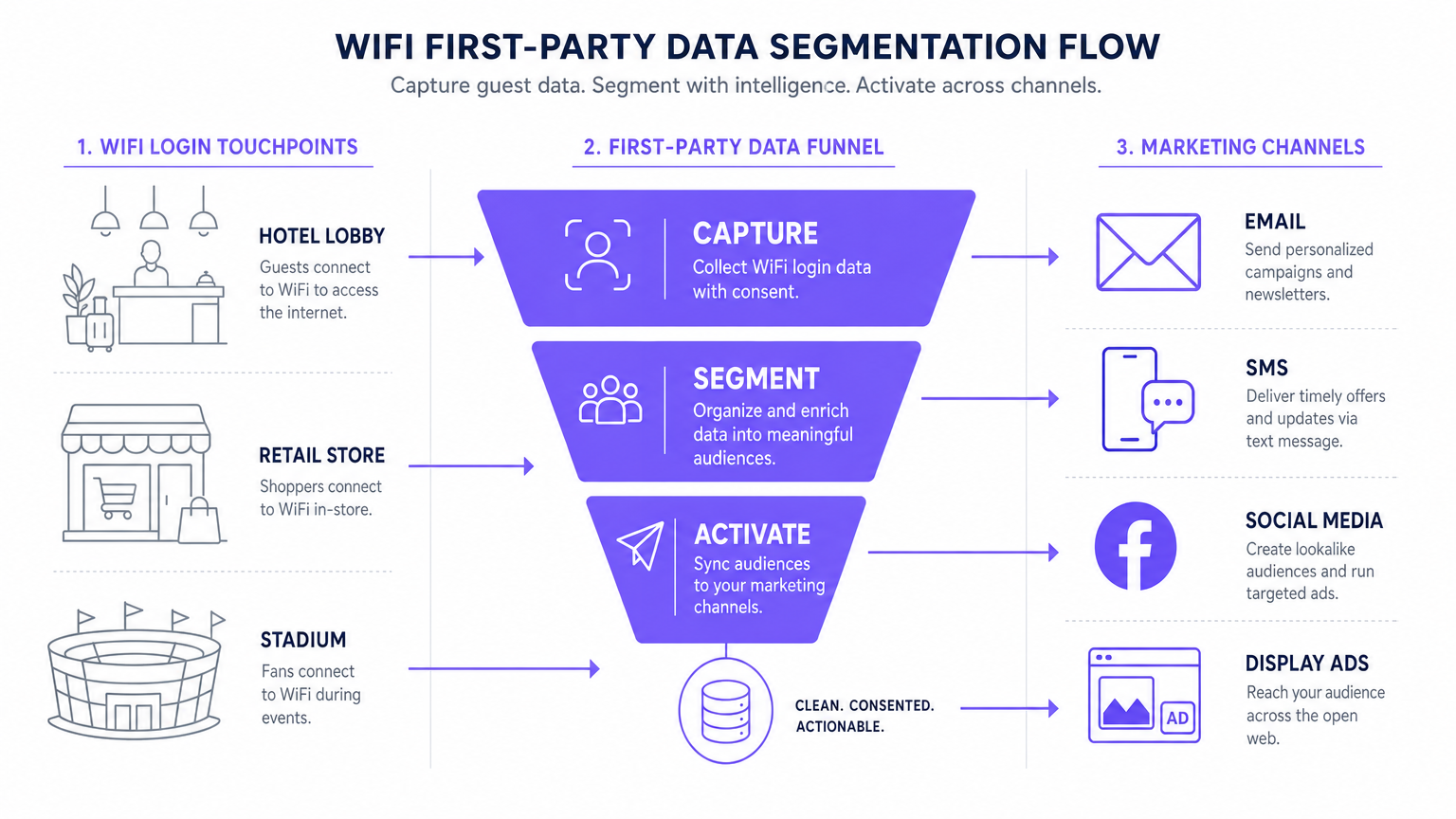
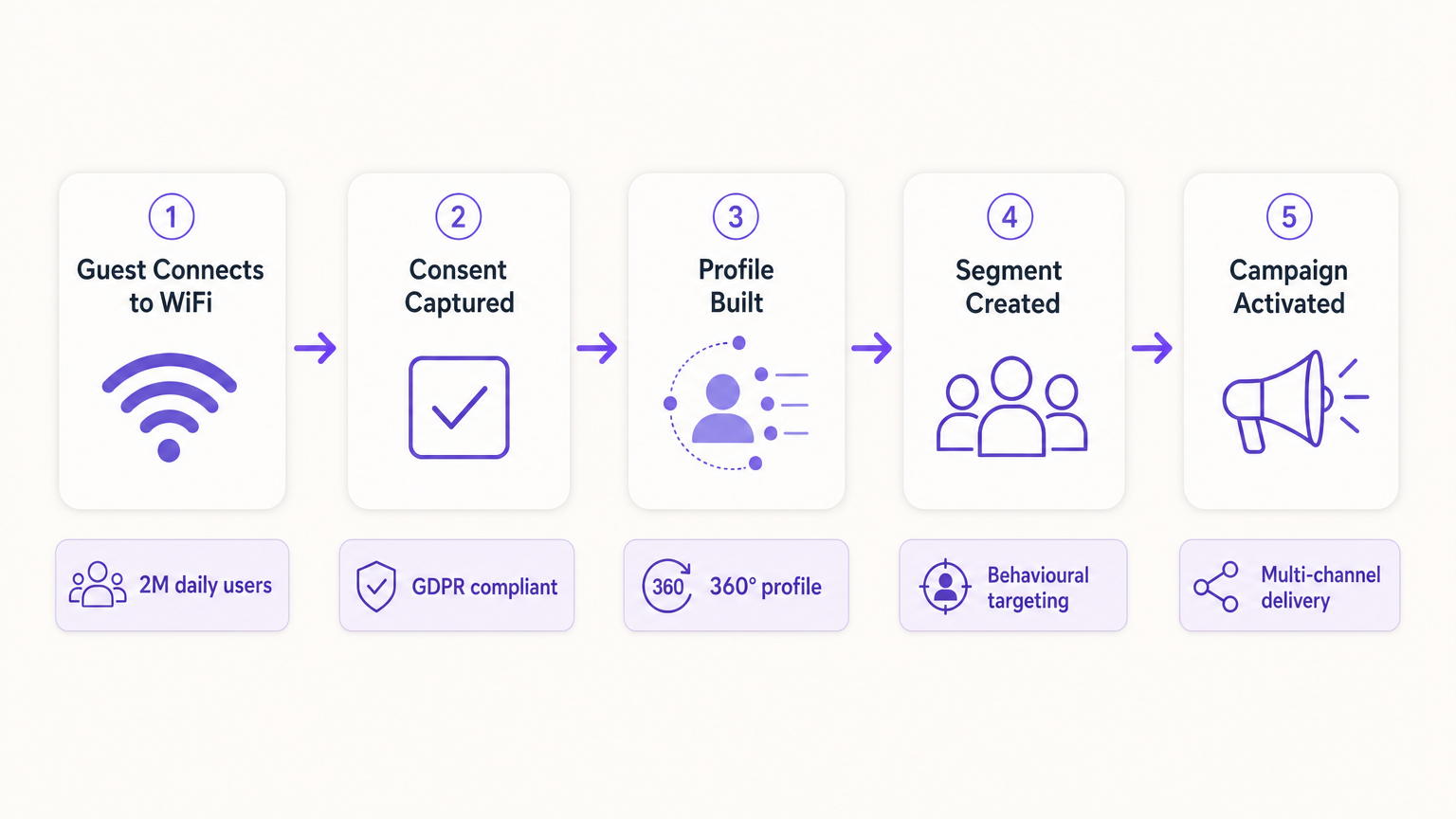
The standard data flow follows five stages: Capture (data collected at the captive portal), Normalise (the analytics platform deduplicates and merges profiles), Sync (Webhooks push real-time updates to the CRM), Segment (marketing teams define audience cohorts based on behavioural and demographic criteria), and Activate (campaigns are triggered across email, SMS, and programmatic channels).
Implementation Guide: Activating the Data
Collecting the data is only the first step. The true commercial value lies in activation. The following section details how to deploy first-party WiFi data across the four primary marketing channels.
1. Email Marketing and Drip Campaigns
Email remains a highly effective channel for both hospitality and retail environments. Triggered welcome emails, configured via Webhook to fire immediately upon a user's first login, are ideal for delivering promised incentives such as discount codes or loyalty points. Post-visit survey emails, automated 24 hours after a user disconnects from the network, drive review generation and NPS measurement. Re-engagement campaigns targeting users who have not connected in over 90 days are effective for driving repeat visits, particularly in hospitality contexts where seasonal promotions are relevant.
2. SMS and Location-Based Triggers
For immediate, high-intent engagement, SMS is unparalleled. This channel requires capturing explicit opt-in for SMS marketing during the authentication process — a separate, unticked checkbox from the email marketing consent. Using location analytics — such as those described in Indoor Positioning System: UWB, BLE, & WiFi Guide — the platform can trigger an SMS when a user dwells in a specific zone for a defined period, creating contextually relevant micro-moment marketing.
3. Social Advertising and Custom Audiences
First-party data is invaluable for programmatic display and social advertising, particularly as third-party tracking diminishes. Lookalike Audiences are created by exporting highly engaged WiFi user segments — for example, users who visit the venue more than twice a month — to Facebook Ads Manager or Google Ads as a seed Custom Audience. The platform then identifies new users with similar demographic and behavioural profiles. Retargeting serves targeted display ads to users who have recently visited the venue, reinforcing brand awareness across the open web.
4. Programmatic Display
By syncing first-party audience segments with a Demand-Side Platform (DSP), venues can serve targeted display ads to known visitors across premium publisher inventory. This is particularly effective for transport and healthcare venues where visit frequency and intent signals are strong.
For foundational data collection strategies, refer to How to Collect First-Party Data Through WiFi .
Best Practices for Compliance and User Experience
Privacy and Consent (GDPR and CCPA)
Compliance is non-negotiable and must be architected into the deployment from day one, not retrofitted. The captive portal must adhere to strict data protection regulations. Unbundled consent is mandatory: the checkbox for marketing communications must be entirely separate from the acceptance of the Terms and Conditions. Granular opt-ins should offer separate checkboxes for email and SMS marketing. A clear privacy policy link must be prominently displayed, detailing exactly how the data will be used, stored, and shared. Data must be encrypted in transit using TLS 1.2 or above, and at rest using AES-256 encryption, complying with PCI DSS where transactions are involved.
Optimising the Captive Portal for Conversion
The splash page must load within three seconds. Any longer, and abandonment rates spike significantly, resulting in lost data acquisition opportunities. The portal must be fully mobile-responsive and designed with a clear, compelling value proposition. Progressive profiling is the recommended approach: request only the email address on the first visit, and enrich the profile with additional fields — birthday, postcode, preferences — on subsequent visits. This approach consistently produces opt-in rates of 60 to 80 percent in well-configured deployments.
Troubleshooting and Risk Mitigation
| Failure Mode | Symptom | Mitigation Strategy |
|---|---|---|
| Captive Portal Not Displaying | Users connect to SSID but are not redirected to the portal. | Verify DNS configuration and Walled Garden settings. Ensure the portal IP and URL are reachable before authentication is complete. |
| Low Opt-In Rates | High connection volume but low marketing consent capture. | Review the value proposition clarity. Simplify the form. Ensure the marketing opt-in is prominent but not deceptive. Test the portal load time. |
| Data Sync Failures | Profiles updated in Purple but not reflected in the CRM. | Monitor Webhook delivery logs. Verify API keys and rate limits on the destination platform. Implement retry logic for failed deliveries. |
| MAC Randomisation Degrading Data | Spike in 'new' visitors; returning visitor metrics collapse. | Shift to identity-centric tracking. Implement Passpoint for seamless re-authentication. Encourage app-based authentication for persistent identity. |
| Walled Garden Misconfiguration | Social OAuth login fails; users cannot complete authentication. | Whitelist all required authentication endpoints (e.g., accounts.google.com, graph.facebook.com) in the Walled Garden configuration on the wireless LAN controller. |
ROI and Business Impact
Implementing a first-party data strategy via WiFi transforms the network from an IT expense into a measurable marketing asset with quantifiable returns.
Cost Per Acquisition (CPA): The cost of acquiring a new, consented email subscriber via a captive portal is typically a fraction of the equivalent cost via paid social or search advertising. The infrastructure is already deployed; the incremental cost is the platform licence and portal configuration.
Campaign Attribution: By tracking when a user receives an email offer and subsequently logs into the venue WiFi, marketing teams can definitively prove offline attribution for digital campaigns — a capability that is increasingly valuable as digital attribution models become less reliable.
Increased Customer Lifetime Value (CLV): Personalised engagement driven by accurate first-party data directly correlates with increased visit frequency and higher spend per visit. A hotel that can identify a returning corporate guest and proactively offer a relevant upgrade is delivering a materially better experience than one that treats every guest as anonymous.
For complex IoT and data architecture considerations, see Internet of Things Architecture: A Complete Guide .
Key Terms & Definitions
Captive Portal
A web page that a user of a public-access network is obliged to view and interact with before internet access is granted. It serves as the primary interface for data capture and consent collection.
This is the critical point of value exchange between the venue and the guest. Its design, load speed, and form structure directly determine the quality and volume of first-party data captured.
MAC Randomisation
A privacy feature in modern operating systems (iOS 14+, Android 10+) that generates a temporary, unique MAC address for each wireless network the device connects to, preventing persistent device-level tracking.
This is the most common cause of data quality degradation in legacy WiFi analytics deployments. It necessitates a shift from device-centric to identity-centric tracking architectures.
First-Party Data
Information that an organisation collects directly from its own customers or users, with their explicit consent, through its own channels and touchpoints.
This is the most valuable and compliant data source for marketing, particularly as third-party cookies are phased out across major browsers and advertising platforms.
Webhook
An HTTP-based callback mechanism that sends a structured data payload to a pre-configured endpoint when a specific event occurs in the source system.
Used to push real-time data from the WiFi analytics platform to a CRM or marketing automation tool immediately after a user authenticates, enabling real-time campaign triggers.
Walled Garden
A network configuration that restricts unauthenticated users to a limited set of pre-approved domains and IP addresses, preventing full internet access until authentication is complete.
Correct Walled Garden configuration is essential for allowing the captive portal to load and for enabling social OAuth logins (e.g., whitelisting Facebook and Google authentication endpoints) before the user has completed the login process.
Passpoint (Hotspot 2.0)
An industry standard based on IEEE 802.11u that enables automatic, secure WiFi connections without requiring manual portal interaction after the initial device provisioning.
Improves user experience for returning visitors and ensures consistent, persistent identity-based connections, facilitating seamless data capture and profile enrichment across multiple visits.
Lookalike Audience
A targeting segment created by advertising platforms (such as Facebook Ads or Google Ads) that identifies new users who share similar characteristics with an existing Custom Audience seed list.
Allows venues to leverage their high-quality offline visitor data — captured via WiFi — to find new, highly qualified prospects online, bridging the gap between physical and digital marketing.
Progressive Profiling
A data collection strategy that gathers customer information incrementally across multiple interactions, rather than requesting all data fields in a single form submission.
Increases captive portal conversion rates by reducing friction on the initial login, while still building a comprehensive, enriched customer profile over subsequent visits.
Dwell Time
The duration for which a device remains associated with a WiFi access point or within a defined location zone, used as a proxy for physical presence and engagement.
A critical signal for location-based marketing triggers. A user dwelling in a specific retail zone for more than ten minutes is a high-intent prospect for a contextually relevant offer.
Case Studies
A 200-room luxury hotel wants to increase bookings for its on-site spa. They currently offer free WiFi but do not capture any guest data beyond the room booking system. How should the IT and Marketing teams collaborate to deploy a first-party data solution?
Phase 1 — IT Deployment: The IT team configures the wireless LAN controller to redirect all unauthenticated guest traffic on the 'Hotel_Guest_WiFi' SSID to the Purple captive portal. The Walled Garden is configured to allow access to the portal's CDN and the OAuth endpoints for social login providers.
Phase 2 — Portal Design: Marketing designs a branded splash page with a clear value proposition: 'Complimentary high-speed WiFi — connect in seconds.' The authentication form requests Name and Email, with a separate, unticked checkbox for marketing consent. A link to the privacy policy is displayed prominently.
Phase 3 — Integration: IT configures a secure Webhook to push new authenticated profiles to the hotel's CRM (e.g., Salesforce). A custom field 'WiFi_Opt_In' is mapped to the marketing consent flag.
Phase 4 — Campaign Execution: Marketing configures an automated trigger in the CRM. If a guest authenticates and their profile indicates they have not previously visited the spa (cross-referenced with the booking system), an automated email is sent two hours after check-in offering a 15% discount on spa treatments, valid for the duration of their stay.
Phase 5 — Measurement: Track the email open rate, click-through rate, and spa booking conversion rate. Compare spa revenue per guest for WiFi-opted-in guests versus non-opted-in guests to quantify ROI.
A national retail chain with 50 locations wants to build a Lookalike Audience for Facebook Ads based on their most frequent in-store shoppers, without relying on third-party pixel data.
Step 1 — Baseline Capture: Confirm that the captive portal at all 50 locations is capturing email addresses and marketing consent. Ensure the portal is configured consistently across all sites using a centralised management platform.
Step 2 — Segment Definition: Within the Purple analytics platform, create a segment defined as 'Users who have authenticated at any location more than three times in the last 60 days.' This cohort represents the brand's most loyal physical shoppers.
Step 3 — Secure Export: Export this segment as a hashed (SHA-256) email list. Hashing ensures the raw email addresses are never transmitted to the advertising platform, maintaining GDPR compliance.
Step 4 — Custom Audience Upload: Upload the hashed list to Facebook Ads Manager as a Custom Audience. Facebook matches the hashes against its own user database.
Step 5 — Lookalike Generation: Generate a 1% Lookalike Audience based on this Custom Audience. This targets new Facebook users who share similar characteristics — demographics, interests, and online behaviours — with the brand's most loyal physical shoppers.
Step 6 — Campaign Deployment: Run a prospecting campaign targeting the Lookalike Audience with a new customer acquisition offer.
Scenario Analysis
Q1. Your venue is experiencing a 40% drop-off rate at the captive portal. Users are connecting to the SSID but not completing the authentication process. What are the two most likely technical causes and how would you diagnose and resolve each?
💡 Hint:Consider both the network configuration layer and the user experience layer independently.
Show Recommended Approach
Cause 1 — Slow Portal Load Time: The splash page is taking too long to render on mobile devices. Diagnosis: Use browser developer tools to measure Time to First Byte (TTFB) and total page load time from a mobile device on the guest network. Resolution: Compress all images, remove non-essential JavaScript, and serve the portal from a CDN. Target sub-3-second load time.
Cause 2 — Walled Garden Misconfiguration: The portal is loading but social OAuth authentication is failing because the authentication provider endpoints are not whitelisted in the Walled Garden. Diagnosis: Attempt a social login and inspect the network requests in developer tools for blocked connections. Resolution: Add the required OAuth endpoints (e.g., accounts.google.com, graph.facebook.com, appleid.apple.com) to the Walled Garden whitelist on the wireless LAN controller.
Q2. A marketing director wants to send an SMS offer to users exactly 15 minutes after they enter the flagship retail store. How would you architect this solution using the existing WiFi infrastructure, and what compliance considerations apply?
💡 Hint:Think about how presence is detected, how the event is communicated to the marketing platform, and what consent is required.
Show Recommended Approach
Architecture: 1) Ensure the captive portal explicitly captures mobile phone numbers with a separate, unticked SMS marketing opt-in checkbox. 2) Configure the WiFi analytics platform to track dwell time based on device association with the store's access points. 3) Set up a Webhook triggered by the event 'Dwell Time > 15 minutes AND SMS_Opt_In = True.' 4) The Webhook payload — containing the user's phone number and the store identifier — is sent to the SMS platform (e.g., Twilio), which dispatches the pre-configured offer.
Compliance: The SMS opt-in must be explicit and separate from the WiFi terms of service. The message must include a clear opt-out mechanism (e.g., 'Reply STOP to unsubscribe'). Under GDPR, the user must have been informed at the point of consent that their location within the store would be used to trigger marketing messages.
Q3. Following an iOS update rollout across your user base, your analytics platform shows a 60% spike in 'new' visitors while 'returning' visitor metrics have collapsed. Physical footfall counters show no change in actual visitor numbers. What has happened, and what is the long-term architectural response?
💡 Hint:Consider recent privacy features introduced by mobile operating systems and their impact on device-level tracking.
Show Recommended Approach
Diagnosis: This is caused by MAC randomisation. The iOS update has enabled per-network MAC randomisation, meaning each device presents a new, temporary MAC address on each visit. The analytics platform is interpreting each new MAC as a new visitor, breaking device-centric tracking.
Immediate Response: Communicate to the marketing team that historical 'returning visitor' metrics are temporarily unreliable and should not be used for campaign decisions until the identity-centric architecture is in place.
Long-Term Architecture: 1) Ensure all returning users are prompted to re-authenticate via the captive portal. When they log in with their existing email or social account, the new randomised MAC is linked to their existing CRM profile, restoring longitudinal data. 2) Deploy Passpoint profiles to authenticated users' devices. Passpoint uses certificate-based authentication that is not affected by MAC randomisation, ensuring seamless, persistent identity on future visits. 3) Encourage users to download the venue's app, which provides a persistent, app-level identity that is also immune to MAC randomisation.




