

Wie man Erstanbieterdaten in Marketingkampagnen nutzt
Dieser maßgebliche Leitfaden beschreibt, wie IT- und Marketingteams von Unternehmen ihre Gast-WiFi-Infrastruktur in eine leistungsstarke Erstanbieterdaten-Engine verwandeln können. Er behandelt die technische Architektur für die Datenerfassung, GDPR-konformes Einwilligungsmanagement, Segmentierungsstrategien und die praktische Aktivierung über E-Mail, SMS, soziale Werbung und programmatische Anzeigen. Betreiber von Veranstaltungsorten und IT-Teams finden konkrete Implementierungsanleitungen, Praxisbeispiele aus dem Gastgewerbe und Einzelhandel sowie messbare ROI-Frameworks.
🎧 Diesen Leitfaden anhören
Transkript anzeigen
Zusammenfassung für die Geschäftsleitung
Für Unternehmensstandorte – Hotels, Einzelhandelsketten, Stadien und Konferenzzentren – ist das Gast-WiFi-Netzwerk nicht länger nur ein Kostenfaktor oder eine grundlegende Annehmlichkeit. Da Drittanbieter-Cookies abgeschafft werden und Datenschutzbestimmungen strenger werden, verfügen physische Veranstaltungsorte über einen einzigartigen und ungenutzten Vorteil: die Möglichkeit, hochpräzise, einwilligungsbasierte Erstanbieterdaten direkt von Besuchern am Verbindungspunkt zu erfassen.
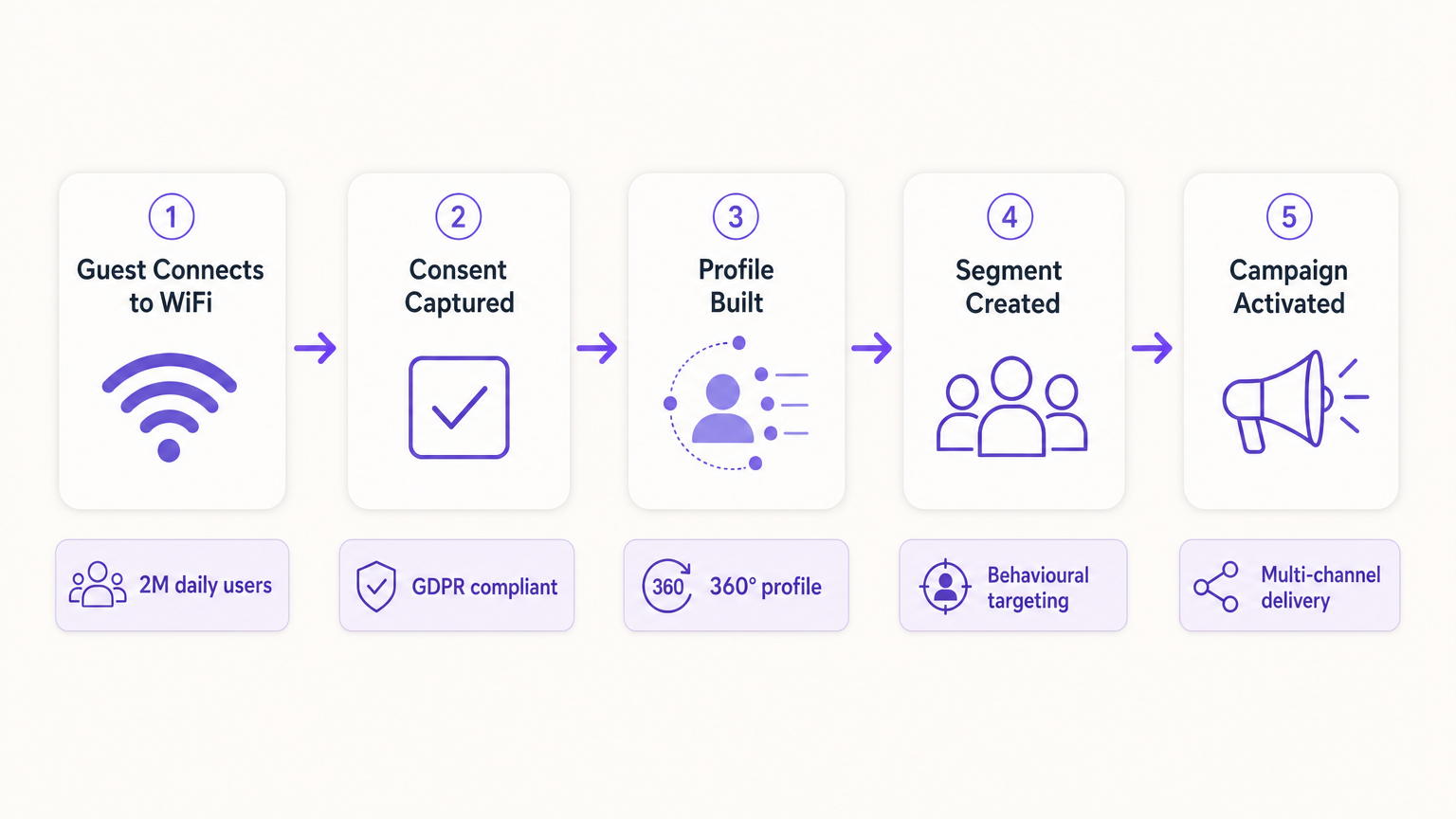
Dieser Leitfaden beschreibt, wie IT-Manager und CTOs ihre drahtlose Infrastruktur so gestalten können, dass sie als konforme Datenerfassungs-Engine für Marketingteams dient. Durch den Einsatz eines robusten Captive Portal, das in CRM- und Marketing-Automatisierungsplattformen integriert ist, können Veranstaltungsorte demografische und verhaltensbezogene Daten nahtlos und in großem Umfang erfassen. Wir werden die technische Implementierung von Datenerfassungsmechanismen, die Integration von Guest WiFi Analysen und die Durchführung gezielter Marketingkampagnen über E-Mail, SMS und soziale Werbung untersuchen, um letztendlich einen messbaren ROI und verbesserte Kundenerlebnisse zu erzielen. Die Plattform von Purple bedient derzeit über 80.000 Veranstaltungsorte und fast zwei Millionen tägliche Nutzer und bietet die Integrationsschicht, die die Netzwerkinfrastruktur mit der Marketingaktivierung verbindet.
Technischer Einblick: Die Datenakquisitionsarchitektur
Die Grundlage der Erstanbieterdatenerfassung an einem physischen Veranstaltungsort beruht auf der Interaktion zwischen dem mobilen Gerät des Benutzers, dem drahtlosen Zugangspunkt (AP) und der Captive Portal Infrastruktur. Das Verständnis dieser Architektur ist unerlässlich, bevor eine Marketingaktivierung stattfinden kann.
Das Captive Portal und die Authentifizierung
Wenn ein Benutzer sich mit einer offenen SSID verbindet, leitet der Netzwerk-Controller seine anfängliche HTTP-Anfrage an ein Captive Portal um. Diese Splash-Seite ist der entscheidende Punkt des Wertetauschs: Der Veranstaltungsort bietet Hochgeschwindigkeits-Internetzugang, und der Benutzer stellt seine Daten und Einwilligung bereit. Um die Datenqualität und das Benutzererlebnis zu maximieren, muss der Authentifizierungsprozess sowohl reibungslos als auch technisch robust sein.
Moderne Implementierungen nutzen drei primäre Authentifizierungsmethoden. Social OAuth ermöglicht es Benutzern, sich über Facebook, Google oder Apple zu authentifizieren, liefert sofort umfassende demografische Daten und reduziert den Formularabbruch. Formularbasierte Authentifizierung fordert spezifische Felder wie E-Mail-Adresse, Telefonnummer und Postleitzahl an, wodurch der Veranstaltungsort direkte Kontrolle über die erfassten Daten erhält. Nahtlose Authentifizierung über Passpoint (Hotspot 2.0), die den IEEE 802.11u-Standard nutzt, ermöglicht automatische, sichere Verbindungen für wiederkehrende Benutzer, indem das Captive Portal nach der Ersteinrichtung vollständig umgangen wird – eine entscheidende Funktion für Umgebungen mit hohem Durchsatz wie Verkehrsknotenpunkte und Stadien, wie in Wi Fi in Auto: The Complete 2026 Enterprise Guide erläutert.
Überwindung der MAC-Randomisierung
Historisch verfolgten Veranstaltungsorte Benutzer über die Media Access Control (MAC)-Adresse ihres Geräts. Moderne Betriebssysteme – iOS 14 und höher, Android 10 und höher – implementieren jedoch die MAC-Randomisierung, wodurch für jede SSID eine eindeutige, temporäre MAC-Adresse generiert wird. Dies unterbricht grundlegend die gerätezentrierte Nachverfolgung und ist eine der häufigsten Ursachen für die Verschlechterung der Datenqualität in älteren Implementierungen.
Um ein persistentes Benutzerprofil zu erstellen, muss die Architektur auf der authentifizierten Sitzung und nicht auf dem Hardware-Identifikator basieren. Sobald sich ein Benutzer über das Captive Portal authentifiziert, werden seine Sitzungsdaten – einschließlich der randomisierten MAC – mit seinem CRM-Profil innerhalb der WiFi Analytics Plattform verknüpft. Nachfolgende Besuche mit derselben Authentifizierungsmethode werden mit dem vereinheitlichten Profil verknüpft, wodurch longitudinale Verhaltensdaten erhalten bleiben.
Datenfluss- und Integrationsarchitektur
Die erfassten Daten müssen nahtlos vom Netzwerkrand zum Marketing-Stack fließen. Dies wird über REST APIs oder sichere Webhooks erreicht, die eine Echtzeit-Datensynchronisation anstelle von Batch-Exporten ermöglichen.
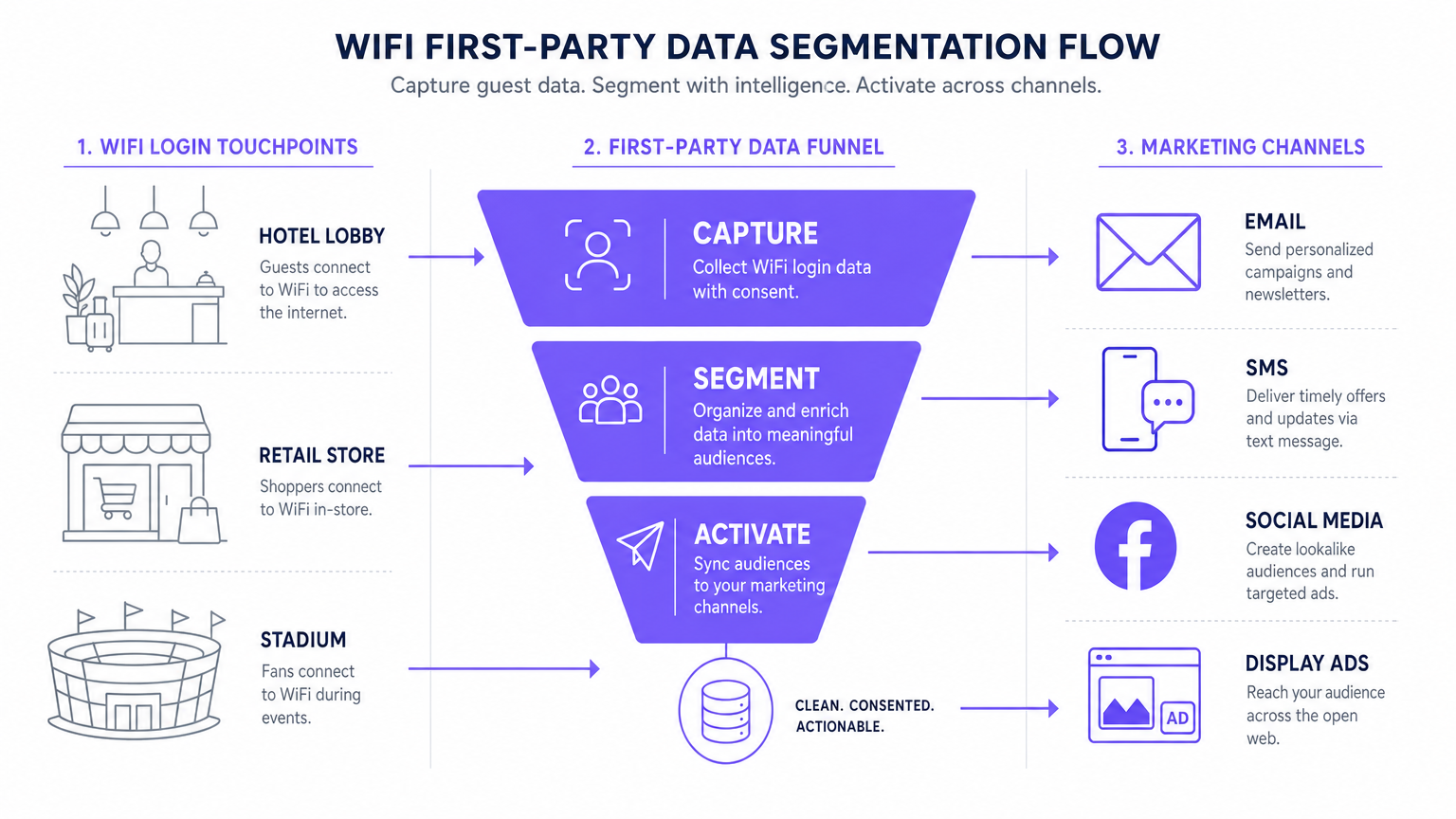
Der Standard-Datenfluss umfasst fünf Phasen: Erfassung (Daten, die am Captive Portal gesammelt werden), Normalisierung (die Analyseplattform dedupliziert und führt Profile zusammen), Synchronisierung (Webhooks übertragen Echtzeit-Updates an das CRM), Segmentierung (Marketingteams definieren Zielgruppenkohorten basierend auf Verhaltens- und demografischen Kriterien) und Aktivierung (Kampagnen werden über E-Mail, SMS und programmatische Kanäle ausgelöst).
Implementierungsleitfaden: Daten aktivieren
Das Sammeln der Daten ist nur der erste Schritt. Der wahre kommerzielle Wert liegt in der Aktivierung. Der folgende Abschnitt beschreibt, wie Erstanbieter-WiFi-Daten über die vier primären Marketingkanäle eingesetzt werden können.
1. E-Mail-Marketing und Drip-Kampagnen
E-Mail bleibt ein äußerst effektiver Kanal sowohl für das Gastgewerbe als auch für Einzelhandels umgebungen. Ausgelöste Willkommens-E-Mails, die per Webhook so konfiguriert sind, dass sie sofort nach dem ersten Login eines Benutzers versendet werden, eignen sich ideal zur Bereitstellung versprochener Anreize wie Rabattcodes oder Treuepunkte. Umfrage-E-Mails nach dem Besuch, die 24 Stunden nach der Trennung eines Benutzers vom Netzwerk automatisiert versendet werden, fördern die Generierung von Bewertungen und die NPS-Messung. Re-Engagement-Kampagnen, die auf Benutzer abzielen, die sich seit über 90 Tagen nicht verbunden haben, sind effektiv, um wiederholte Besuche zu fördern, insbesondere in Hospitalität -Kontexten, in denen saisonale Werbeaktionen relevant sind.
2. SMS und standortbasierte Auslöser
Für sofortiges Engagement mit hoher Absicht ist SMS unübertroffen. Dieser Kanal erfordert die Erfassung einer expliziten SMS-Marketing-Einwilligung während des Authentifizierungsprozesses – ein separates, nicht angekreuztes Kästchen, das vom E-Mail-Marketing-Einverständnis getrennt ist. Mithilfe von Standortanalysen – wie sie im Leitfaden für Indoor-Positionierungssysteme: UWB, BLE & WiFi beschrieben sind – kann die Plattform eine SMS auslösen, wenn sich ein Nutzer für einen bestimmten Zeitraum in einer bestimmten Zone aufhält, wodurch kontextrelevantes Micro-Moment-Marketing entsteht.
3. Social Advertising und Custom Audiences
Erstpartei-Daten sind für programmatische Display- und Social Advertising-Kampagnen von unschätzbarem Wert, insbesondere da das Tracking durch Dritte abnimmt. Lookalike Audiences werden erstellt, indem hoch engagierte WiFi-Nutzersegmente – zum Beispiel Nutzer, die den Veranstaltungsort mehr als zweimal im Monat besuchen – als Seed Custom Audience in den Facebook Ads Manager oder Google Ads exportiert werden. Die Plattform identifiziert dann neue Nutzer mit ähnlichen demografischen und verhaltensbezogenen Profilen. Retargeting schaltet gezielte Display-Anzeigen an Nutzer, die den Veranstaltungsort kürzlich besucht haben, und stärkt so die Markenbekanntheit im gesamten offenen Web.
4. Programmatische Display-Werbung
Durch die Synchronisierung von Erstpartei-Zielgruppensegmenten mit einer Demand-Side Platform (DSP) können Veranstaltungsorte gezielte Display-Anzeigen an bekannte Besucher über Premium-Publisher-Inventar ausspielen. Dies ist besonders effektiv für Transport - und Gesundheits -Einrichtungen, bei denen die Besuchsfrequenz und Absichtssignale stark sind.
Für grundlegende Strategien zur Datenerfassung siehe Wie man Erstpartei-Daten über WiFi sammelt .
Best Practices für Compliance und Benutzererfahrung
Datenschutz und Einwilligung (GDPR und CCPA)
Compliance ist nicht verhandelbar und muss von Anfang an in die Implementierung integriert werden, nicht nachträglich angepasst. Das Captive Portal muss strenge Datenschutzbestimmungen einhalten. Eine entbündelte Einwilligung ist zwingend erforderlich: Das Kontrollkästchen für Marketingkommunikation muss vollständig getrennt von der Annahme der Allgemeinen Geschäftsbedingungen sein. Granulare Opt-ins sollten separate Kontrollkästchen für E-Mail- und SMS-Marketing anbieten. Ein Link zu einer klaren Datenschutzerklärung muss prominent angezeigt werden, der genau beschreibt, wie die Daten verwendet, gespeichert und weitergegeben werden. Daten müssen während der Übertragung mit TLS 1.2 oder höher und im Ruhezustand mit AES-256-Verschlüsselung verschlüsselt werden, wobei PCI DSS einzuhalten ist, wenn Transaktionen beteiligt sind.
Optimierung des Captive Portals für die Konversion
Die Splash-Seite muss innerhalb von drei Sekunden geladen werden. Dauert es länger, steigen die Abbruchraten erheblich an, was zu verlorenen Möglichkeiten der Datenerfassung führt. Das Portal muss vollständig mobil-responsiv sein und mit einem klaren, überzeugenden Wertversprechen gestaltet werden. Progressives Profiling ist der empfohlene Ansatz: Fordern Sie beim ersten Besuch nur die E-Mail-Adresse an und reichern Sie das Profil bei späteren Besuchen mit zusätzlichen Feldern – Geburtstag, Postleitzahl, Präferenzen – an. Dieser Ansatz führt in gut konfigurierten Implementierungen durchweg zu Opt-in-Raten von 60 bis 80 Prozent.
Fehlerbehebung und Risikominderung
| Fehlermodus | Symptom | Minderungsstrategie |
|---|---|---|
| Captive Portal wird nicht angezeigt | Benutzer verbinden sich mit der SSID, werden aber nicht zum Portal weitergeleitet. | Überprüfen Sie die DNS-Konfiguration und die Walled Garden-Einstellungen. Stellen Sie sicher, dass die Portal-IP und -URL vor Abschluss der Authentifizierung erreichbar sind. |
| Niedrige Opt-in-Raten | Hohes Verbindungsvolumen, aber geringe Erfassung der Marketing-Einwilligung. | Überprüfen Sie die Klarheit des Wertversprechens. Vereinfachen Sie das Formular. Stellen Sie sicher, dass das Marketing-Opt-in prominent, aber nicht irreführend ist. Testen Sie die Ladezeit des Portals. |
| Datensynchronisierungsfehler | Profile, die in Purple aktualisiert wurden, werden nicht im CRM widergespiegelt. | Überwachen Sie die Webhook-Zustellungsprotokolle. Überprüfen Sie API-Schlüssel und Ratenbegrenzungen auf der Zielplattform. Implementieren Sie eine Wiederholungslogik für fehlgeschlagene Zustellungen. |
| MAC-Randomisierung beeinträchtigt Daten | Anstieg neuer Besucher; Metriken für wiederkehrende Besucher brechen ein. | Umstellung auf identitätszentriertes Tracking. Implementieren Sie Passpoint für eine nahtlose Re-Authentifizierung. Fördern Sie die App-basierte Authentifizierung für eine persistente Identität. |
| Fehlkonfiguration des Walled Garden | Social OAuth-Login schlägt fehl; Benutzer können die Authentifizierung nicht abschließen. | Whitelisten Sie alle erforderlichen Authentifizierungsendpunkte (z.B. accounts.google.com, graph.facebook.com) in der Walled Garden-Konfiguration auf dem Wireless LAN Controller. |
ROI und Geschäftsauswirkungen
Die Implementierung einer Erstpartei-Datenstrategie über WiFi verwandelt das Netzwerk von einer IT-Ausgabe in ein messbares Marketing-Asset mit quantifizierbaren Erträgen.
Cost Per Acquisition (CPA): Die Kosten für die Gewinnung eines neuen, eingewilligten E-Mail-Abonnenten über ein Captive Portal sind typischerweise ein Bruchteil der entsprechenden Kosten über bezahlte soziale Medien oder Suchmaschinenwerbung. Die Infrastruktur ist bereits implementiert; die zusätzlichen Kosten sind die Plattformlizenz und die Portalkonfiguration.
Kampagnenattribution: Durch die Verfolgung, wann ein Nutzer ein E-Mail-Angebot erhält und sich anschließend im Veranstaltungsort-WiFi anmeldet, können Marketingteams die Offline-Attribution für digitale Kampagnen eindeutig nachweisen – eine Fähigkeit, die immer wertvoller wird, da digitale Attributionsmodelle unzuverlässiger werden.
Erhöhter Customer Lifetime Value (CLV): Personalisiertes Engagement, das durch präzise Erstpartei-Daten gesteuert wird, korreliert direkt mit einer erhöhten Besuchsfrequenz und höheren Ausgaben pro Besuch. Ein Hotel, das einen wiederkehrenden Geschäftsgast identifizieren und proaktiv ein relevantes Upgrade anbieten kann, bietet ein wesentlich besseres Erlebnis als eines, das jeden Gast als anonym behandelt.
Für komplexe IoT- und Datenarchitektur-Überlegungen siehe Internet of Things Architektur: Ein vollständiger Leitfaden .
Schlüsselbegriffe & Definitionen
Captive Portal
A web page that a user of a public-access network is obliged to view and interact with before internet access is granted. It serves as the primary interface for data capture and consent collection.
This is the critical point of value exchange between the venue and the guest. Its design, load speed, and form structure directly determine the quality and volume of first-party data captured.
MAC Randomisation
A privacy feature in modern operating systems (iOS 14+, Android 10+) that generates a temporary, unique MAC address for each wireless network the device connects to, preventing persistent device-level tracking.
This is the most common cause of data quality degradation in legacy WiFi analytics deployments. It necessitates a shift from device-centric to identity-centric tracking architectures.
First-Party Data
Information that an organisation collects directly from its own customers or users, with their explicit consent, through its own channels and touchpoints.
This is the most valuable and compliant data source for marketing, particularly as third-party cookies are phased out across major browsers and advertising platforms.
Webhook
An HTTP-based callback mechanism that sends a structured data payload to a pre-configured endpoint when a specific event occurs in the source system.
Used to push real-time data from the WiFi analytics platform to a CRM or marketing automation tool immediately after a user authenticates, enabling real-time campaign triggers.
Walled Garden
A network configuration that restricts unauthenticated users to a limited set of pre-approved domains and IP addresses, preventing full internet access until authentication is complete.
Correct Walled Garden configuration is essential for allowing the captive portal to load and for enabling social OAuth logins (e.g., whitelisting Facebook and Google authentication endpoints) before the user has completed the login process.
Passpoint (Hotspot 2.0)
An industry standard based on IEEE 802.11u that enables automatic, secure WiFi connections without requiring manual portal interaction after the initial device provisioning.
Improves user experience for returning visitors and ensures consistent, persistent identity-based connections, facilitating seamless data capture and profile enrichment across multiple visits.
Lookalike Audience
A targeting segment created by advertising platforms (such as Facebook Ads or Google Ads) that identifies new users who share similar characteristics with an existing Custom Audience seed list.
Allows venues to leverage their high-quality offline visitor data — captured via WiFi — to find new, highly qualified prospects online, bridging the gap between physical and digital marketing.
Progressive Profiling
A data collection strategy that gathers customer information incrementally across multiple interactions, rather than requesting all data fields in a single form submission.
Increases captive portal conversion rates by reducing friction on the initial login, while still building a comprehensive, enriched customer profile over subsequent visits.
Dwell Time
The duration for which a device remains associated with a WiFi access point or within a defined location zone, used as a proxy for physical presence and engagement.
A critical signal for location-based marketing triggers. A user dwelling in a specific retail zone for more than ten minutes is a high-intent prospect for a contextually relevant offer.
Fallstudien
A 200-room luxury hotel wants to increase bookings for its on-site spa. They currently offer free WiFi but do not capture any guest data beyond the room booking system. How should the IT and Marketing teams collaborate to deploy a first-party data solution?
Phase 1 — IT Deployment: The IT team configures the wireless LAN controller to redirect all unauthenticated guest traffic on the 'Hotel_Guest_WiFi' SSID to the Purple captive portal. The Walled Garden is configured to allow access to the portal's CDN and the OAuth endpoints for social login providers.
Phase 2 — Portal Design: Marketing designs a branded splash page with a clear value proposition: 'Complimentary high-speed WiFi — connect in seconds.' The authentication form requests Name and Email, with a separate, unticked checkbox for marketing consent. A link to the privacy policy is displayed prominently.
Phase 3 — Integration: IT configures a secure Webhook to push new authenticated profiles to the hotel's CRM (e.g., Salesforce). A custom field 'WiFi_Opt_In' is mapped to the marketing consent flag.
Phase 4 — Campaign Execution: Marketing configures an automated trigger in the CRM. If a guest authenticates and their profile indicates they have not previously visited the spa (cross-referenced with the booking system), an automated email is sent two hours after check-in offering a 15% discount on spa treatments, valid for the duration of their stay.
Phase 5 — Measurement: Track the email open rate, click-through rate, and spa booking conversion rate. Compare spa revenue per guest for WiFi-opted-in guests versus non-opted-in guests to quantify ROI.
A national retail chain with 50 locations wants to build a Lookalike Audience for Facebook Ads based on their most frequent in-store shoppers, without relying on third-party pixel data.
Step 1 — Baseline Capture: Confirm that the captive portal at all 50 locations is capturing email addresses and marketing consent. Ensure the portal is configured consistently across all sites using a centralised management platform.
Step 2 — Segment Definition: Within the Purple analytics platform, create a segment defined as 'Users who have authenticated at any location more than three times in the last 60 days.' This cohort represents the brand's most loyal physical shoppers.
Step 3 — Secure Export: Export this segment as a hashed (SHA-256) email list. Hashing ensures the raw email addresses are never transmitted to the advertising platform, maintaining GDPR compliance.
Step 4 — Custom Audience Upload: Upload the hashed list to Facebook Ads Manager as a Custom Audience. Facebook matches the hashes against its own user database.
Step 5 — Lookalike Generation: Generate a 1% Lookalike Audience based on this Custom Audience. This targets new Facebook users who share similar characteristics — demographics, interests, and online behaviours — with the brand's most loyal physical shoppers.
Step 6 — Campaign Deployment: Run a prospecting campaign targeting the Lookalike Audience with a new customer acquisition offer.
Szenarioanalyse
Q1. Your venue is experiencing a 40% drop-off rate at the captive portal. Users are connecting to the SSID but not completing the authentication process. What are the two most likely technical causes and how would you diagnose and resolve each?
💡 Hinweis:Consider both the network configuration layer and the user experience layer independently.
Empfohlenen Ansatz anzeigen
Cause 1 — Slow Portal Load Time: The splash page is taking too long to render on mobile devices. Diagnosis: Use browser developer tools to measure Time to First Byte (TTFB) and total page load time from a mobile device on the guest network. Resolution: Compress all images, remove non-essential JavaScript, and serve the portal from a CDN. Target sub-3-second load time.
Cause 2 — Walled Garden Misconfiguration: The portal is loading but social OAuth authentication is failing because the authentication provider endpoints are not whitelisted in the Walled Garden. Diagnosis: Attempt a social login and inspect the network requests in developer tools for blocked connections. Resolution: Add the required OAuth endpoints (e.g., accounts.google.com, graph.facebook.com, appleid.apple.com) to the Walled Garden whitelist on the wireless LAN controller.
Q2. A marketing director wants to send an SMS offer to users exactly 15 minutes after they enter the flagship retail store. How would you architect this solution using the existing WiFi infrastructure, and what compliance considerations apply?
💡 Hinweis:Think about how presence is detected, how the event is communicated to the marketing platform, and what consent is required.
Empfohlenen Ansatz anzeigen
Architecture: 1) Ensure the captive portal explicitly captures mobile phone numbers with a separate, unticked SMS marketing opt-in checkbox. 2) Configure the WiFi analytics platform to track dwell time based on device association with the store's access points. 3) Set up a Webhook triggered by the event 'Dwell Time > 15 minutes AND SMS_Opt_In = True.' 4) The Webhook payload — containing the user's phone number and the store identifier — is sent to the SMS platform (e.g., Twilio), which dispatches the pre-configured offer.
Compliance: The SMS opt-in must be explicit and separate from the WiFi terms of service. The message must include a clear opt-out mechanism (e.g., 'Reply STOP to unsubscribe'). Under GDPR, the user must have been informed at the point of consent that their location within the store would be used to trigger marketing messages.
Q3. Following an iOS update rollout across your user base, your analytics platform shows a 60% spike in 'new' visitors while 'returning' visitor metrics have collapsed. Physical footfall counters show no change in actual visitor numbers. What has happened, and what is the long-term architectural response?
💡 Hinweis:Consider recent privacy features introduced by mobile operating systems and their impact on device-level tracking.
Empfohlenen Ansatz anzeigen
Diagnosis: This is caused by MAC randomisation. The iOS update has enabled per-network MAC randomisation, meaning each device presents a new, temporary MAC address on each visit. The analytics platform is interpreting each new MAC as a new visitor, breaking device-centric tracking.
Immediate Response: Communicate to the marketing team that historical 'returning visitor' metrics are temporarily unreliable and should not be used for campaign decisions until the identity-centric architecture is in place.
Long-Term Architecture: 1) Ensure all returning users are prompted to re-authenticate via the captive portal. When they log in with their existing email or social account, the new randomised MAC is linked to their existing CRM profile, restoring longitudinal data. 2) Deploy Passpoint profiles to authenticated users' devices. Passpoint uses certificate-based authentication that is not affected by MAC randomisation, ensuring seamless, persistent identity on future visits. 3) Encourage users to download the venue's app, which provides a persistent, app-level identity that is also immune to MAC randomisation.




