

Come utilizzare i dati di prima parte nelle campagne di marketing
This authoritative guide details how enterprise IT and marketing teams can transform their guest WiFi infrastructure into a powerful first-party data engine. It covers technical architecture for data capture, GDPR-compliant consent management, segmentation strategies, and real-world activation across email, SMS, social advertising, and programmatic display. Venue operators and IT teams will find concrete implementation guidance, worked examples from hospitality and retail, and measurable ROI frameworks.
🎧 Ascolta questa guida
Visualizza trascrizione
Executive Summary
Per le strutture enterprise — hotel, catene di vendita al dettaglio, stadi e centri congressi — la rete WiFi per gli ospiti non è più solo un centro di costo o un servizio di base. Con l'eliminazione dei cookie di terza parte e l'inasprimento delle normative sulla privacy, le strutture fisiche possiedono un vantaggio unico e sottoutilizzato: la capacità di acquisire dati di prima parte altamente accurati e con il consenso esplicito direttamente dai visitatori al momento della connessione.
Questa guida illustra come i responsabili IT e i CTO possono progettare la propria infrastruttura wireless affinché funga da motore di acquisizione dati conforme per i team di marketing. Implementando un Captive Portal solido e integrato con le piattaforme CRM e di marketing automation, le strutture possono raccogliere senza problemi dati demografici e comportamentali su larga scala. Esploreremo l'implementazione tecnica dei meccanismi di acquisizione dei dati, l'integrazione delle analitiche del Guest WiFi e l'esecuzione di campagne di marketing mirate tramite e-mail, SMS e social advertising, generando in definitiva un ROI misurabile e un'esperienza cliente migliorata. La piattaforma di Purple serve attualmente oltre 80.000 strutture e quasi due milioni di utenti giornalieri, fornendo il livello di integrazione che collega l'infrastruttura di rete all'attivazione del marketing.
Approfondimento tecnico: l'architettura di acquisizione dei dati
Le fondamenta della raccolta di dati di prima parte in una struttura fisica si basano sull'interazione tra il dispositivo mobile dell'utente, l'access point (AP) wireless e l'infrastruttura del Captive Portal. Comprendere questa architettura è essenziale prima che possa aver luogo qualsiasi attivazione di marketing.
Il Captive Portal e l'autenticazione
Quando un utente si connette a un SSID aperto, il controller di rete reindirizza la sua richiesta HTTP iniziale a un Captive Portal. Questa splash page rappresenta il punto critico dello scambio di valore: la struttura fornisce un accesso a Internet ad alta velocità e l'utente fornisce i propri dati e il proprio consenso. Per massimizzare la qualità dei dati e l'esperienza utente, il processo di autenticazione deve essere fluido e tecnicamente solido.
Le implementazioni moderne sfruttano tre metodi di autenticazione principali. Il Social OAuth consente agli utenti di autenticarsi tramite Facebook, Google o Apple, fornendo istantaneamente dati demografici ricchi e riducendo l'abbandono dei moduli. L'autenticazione basata su moduli richiede campi specifici come indirizzo e-mail, numero di telefono e codice postale, offrendo alla struttura il controllo diretto sui dati acquisiti. L'autenticazione Seamless tramite Passpoint (Hotspot 2.0), che utilizza lo standard IEEE 802.11u, consente connessioni automatiche e sicure per gli utenti di ritorno, bypassando completamente il Captive Portal dopo la configurazione iniziale: una funzionalità fondamentale per ambienti ad alta affluenza come snodi di trasporto e stadi, come esplorato in Wi-Fi in Auto: la guida enterprise completa per il 2026 .
Superare la randomizzazione del MAC
Storicamente, le strutture tracciavano gli utenti tramite l'indirizzo Media Access Control (MAC) del loro dispositivo. Tuttavia, i moderni sistemi operativi — iOS 14 e successivi, Android 10 e successivi — implementano la randomizzazione del MAC, generando un indirizzo MAC univoco e temporaneo per ogni SSID. Ciò interrompe fondamentalmente il tracciamento incentrato sul dispositivo ed è una delle cause più comuni di degrado della qualità dei dati nelle implementazioni legacy.
Per creare un profilo utente persistente, l'architettura deve basarsi sulla sessione autenticata anziché sull'identificatore hardware. Una volta che un utente si autentica tramite il Captive Portal, i dati della sua sessione, incluso il MAC randomizzato, vengono collegati al suo profilo CRM all'interno della piattaforma di WiFi Analytics . Le visite successive che utilizzano lo stesso metodo di autenticazione si ricollegheranno al profilo unificato, preservando i dati comportamentali longitudinali.
Flusso dei dati e architettura di integrazione
I dati acquisiti devono fluire senza interruzioni dall'edge di rete allo stack di marketing. Ciò si ottiene tramite API REST o Webhook sicuri, consentendo la sincronizzazione dei dati in tempo reale anziché esportazioni in batch.
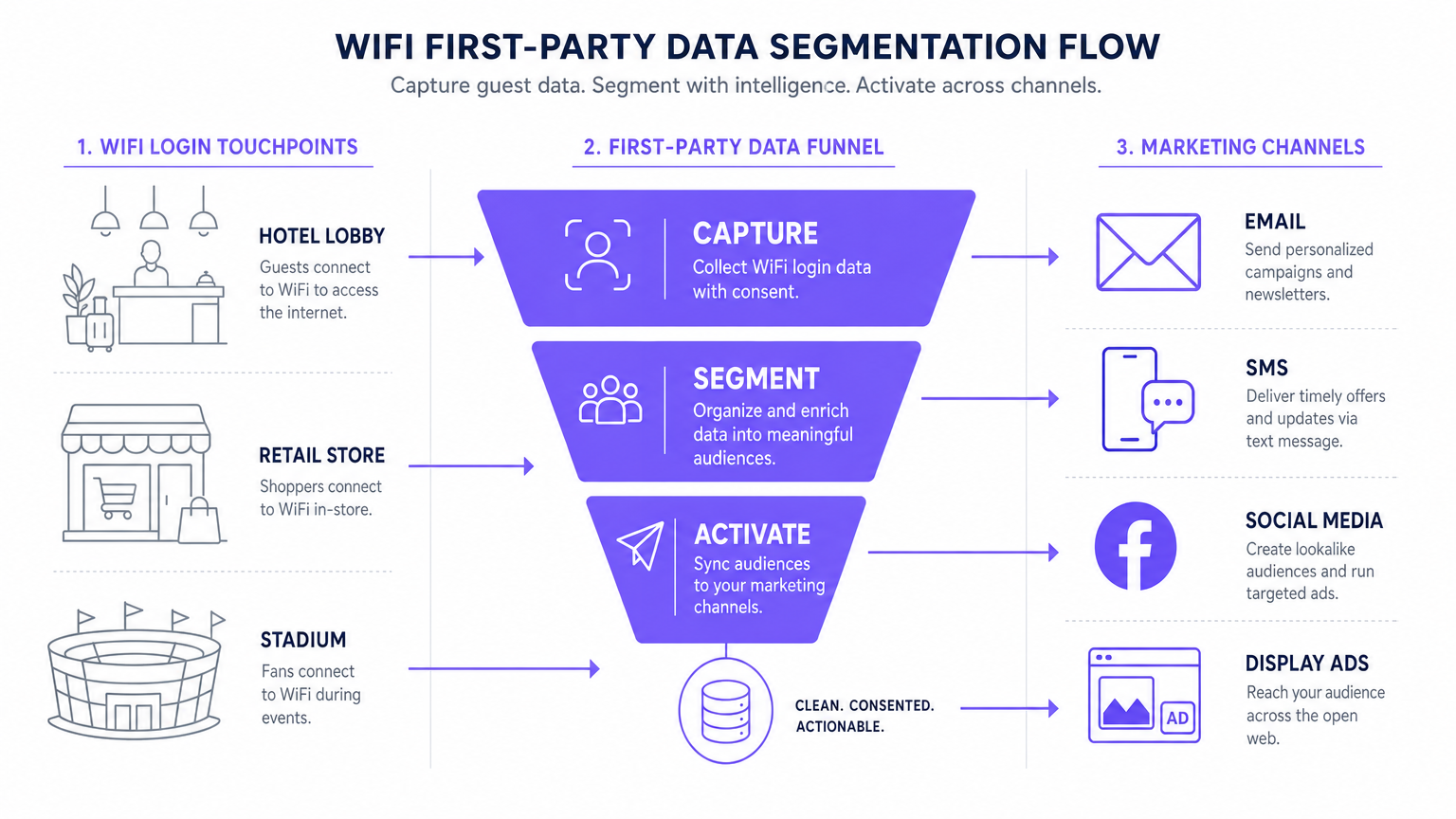
Il flusso di dati standard segue cinque fasi: Acquisizione (dati raccolti nel Captive Portal), Normalizzazione (la piattaforma di analytics deduplica e unisce i profili), Sincronizzazione (i Webhook inviano aggiornamenti in tempo reale al CRM), Segmentazione (i team di marketing definiscono le coorti di pubblico in base a criteri comportamentali e demografici) e Attivazione (le campagne vengono attivate tramite e-mail, SMS e canali programmatici).
Guida all'implementazione: attivazione dei dati
La raccolta dei dati è solo il primo passo. Il vero valore commerciale risiede nell'attivazione. La sezione seguente illustra in dettaglio come implementare i dati WiFi di prima parte nei quattro principali canali di marketing.
1. E-mail marketing e campagne drip
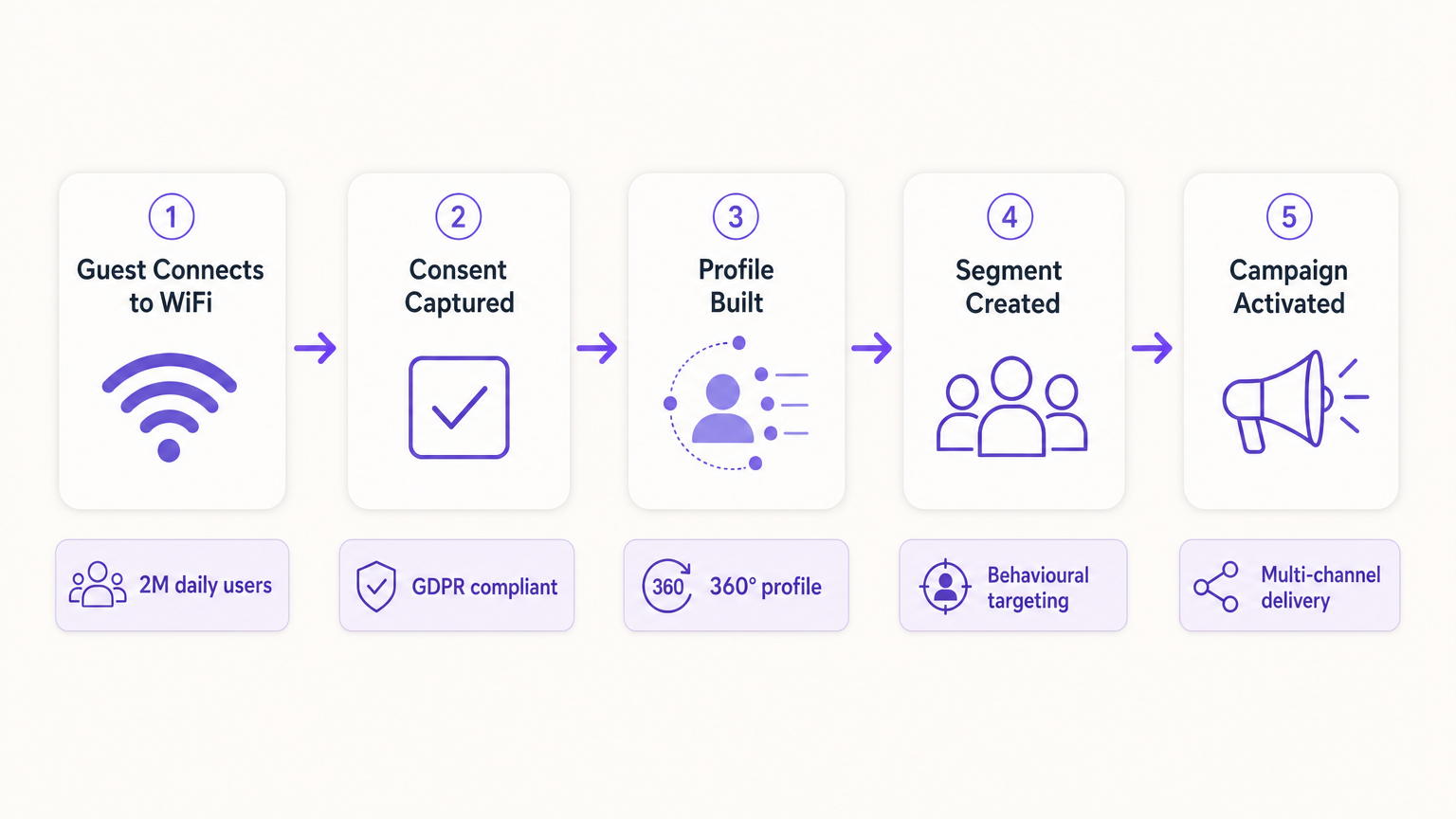
L'e-mail rimane un canale altamente efficace sia per gli ambienti dell'ospitalità che per il retail . Le e-mail di benvenuto automatiche, configurate tramite Webhook per essere inviate immediatamente al primo accesso di un utente, sono ideali per fornire gli incentivi promessi come codici sconto o punti fedeltà. Le e-mail di sondaggio post-visita, automatizzate 24 ore dopo la disconnessione di un utente dalla rete, favoriscono la generazione di recensioni e la misurazione dell'NPS. Le campagne di re-engagement rivolte agli utenti che non si connettono da oltre 90 giorni sono efficaci per stimolare visite ripetute, in particolare nei contesti dell' ospitalità in cui le promozioni stagionali sono rilevanti.
2. SMS e trigger basati sulla posizione
Per un coinvolgimento immediato e ad alto intento, gli SMS non hanno eguali. Questo canale richiede l'acquisizione di un opt-in esplicito per il marketing via SMS durante il processo di autenticazione: una casella di controllo separata e non spuntata rispetto al consenso per l'e-mail marketing. Utilizzando le analitiche di localizzazione — come quelle descritte in Indoor Positioning System: guida a UWB, BLE e WiFi — la piattaforma può attivare un SMS quando un utente sosta in una zona specifica per un periodo definito, creando un marketing di micro-momenti contestualmente rilevante.
3. Social advertising e segmenti di pubblico personalizzati
I dati di prima parte sono inestimabili per il programmatic display e il social advertising, in particolare con la diminuzione del tracciamento di terze parti. I Pubblici simili (Lookalike Audiences) vengono creati esportando segmenti di utenti WiFi altamente coinvolti — ad esempio, utenti che visitano la struttura più di due volte al mese — in Facebook Ads Manager o Google Ads come Pubblico personalizzato di base. La piattaforma identifica quindi nuovi utenti con profili demografici e comportamentali simili. Il Retargeting mostra annunci display mirati agli utenti che hanno visitato di recente la struttura, rafforzando la brand awareness su tutto l'open web.
4. Programmatic Display
Sincronizzando i segmenti di pubblico di prima parte con una Demand-Side Platform (DSP), le strutture possono mostrare annunci display mirati ai visitatori noti sull'inventory di publisher premium. Ciò è particolarmente efficace per le strutture dei settori trasporti e sanità , dove la frequenza delle visite e i segnali di intento sono forti.
Per le strategie fondamentali di raccolta dei dati, consulta Come raccogliere dati di prima parte tramite il WiFi .
Best practice per la conformità e l'esperienza utente
Privacy e consenso (GDPR e CCPA)
La conformità non è negoziabile e deve essere integrata nell'implementazione fin dal primo giorno, non aggiunta a posteriori. Il Captive Portal deve aderire a rigorose normative sulla protezione dei dati. Il consenso disaggregato è obbligatorio: la casella di controllo per le comunicazioni di marketing deve essere completamente separata dall'accettazione dei Termini e Condizioni. Gli opt-in granulari dovrebbero offrire caselle di controllo separate per l'e-mail e l'SMS marketing. Un link a una chiara informativa sulla privacy deve essere visualizzato in modo ben visibile, specificando esattamente come i dati verranno utilizzati, archiviati e condivisi. I dati devono essere crittografati in transito utilizzando TLS 1.2 o versioni successive e a riposo utilizzando la crittografia AES-256, in conformità con il PCI DSS laddove siano coinvolte transazioni.
Ottimizzare il Captive Portal per la conversione
La splash page deve caricarsi entro tre secondi. Tempi più lunghi fanno aumentare significativamente i tassi di abbandono, con conseguente perdita di opportunità di acquisizione dati. Il portale deve essere completamente mobile-responsive e progettato con una proposta di valore chiara e convincente. La profilazione progressiva è l'approccio consigliato: richiedere solo l'indirizzo e-mail alla prima visita e arricchire il profilo con campi aggiuntivi — data di nascita, codice postale, preferenze — nelle visite successive. Questo approccio produce costantemente tassi di opt-in compresi tra il 60 e l'80 percento in implementazioni ben configurate.
Risoluzione dei problemi e mitigazione dei rischi
| Modalità di guasto | Sintomo | Strategia di mitigazione |
|---|---|---|
| Il Captive Portal non viene visualizzato | Gli utenti si connettono all'SSID ma non vengono reindirizzati al portale. | Verificare la configurazione DNS e le impostazioni del Walled Garden. Assicurarsi che l'IP e l'URL del portale siano raggiungibili prima del completamento dell'autenticazione. |
| Bassi tassi di opt-in | Elevato volume di connessioni ma scarsa acquisizione del consenso al marketing. | Rivedere la chiarezza della proposta di valore. Semplificare il modulo. Assicurarsi che l'opt-in per il marketing sia ben visibile ma non ingannevole. Testare il tempo di caricamento del portale. |
| Errori di sincronizzazione dei dati | Profili aggiornati in Purple ma non riflessi nel CRM. | Monitorare i log di consegna dei Webhook. Verificare le chiavi API e i limiti di frequenza (rate limit) sulla piattaforma di destinazione. Implementare una logica di riprova per le consegne non riuscite. |
| La randomizzazione del MAC degrada i dati | Picco di "nuovi" visitatori; crollo delle metriche dei visitatori di ritorno. | Passare a un tracciamento incentrato sull'identità. Implementare Passpoint per una riautenticazione fluida. Incoraggiare l'autenticazione basata su app per un'identità persistente. |
| Configurazione errata del Walled Garden | Il login tramite Social OAuth non va a buon fine; gli utenti non riescono a completare l'autenticazione. | Inserire in whitelist tutti gli endpoint di autenticazione richiesti (es. accounts.google.com, graph.facebook.com) nella configurazione del Walled Garden sul controller LAN wireless. |
ROI e impatto sul business
L'implementazione di una strategia di dati di prima parte tramite WiFi trasforma la rete da una spesa IT a un asset di marketing misurabile con rendimenti quantificabili.
Costo per acquisizione (CPA): il costo per acquisire un nuovo iscritto via e-mail con consenso tramite un Captive Portal è in genere una frazione del costo equivalente tramite social a pagamento o search advertising. L'infrastruttura è già implementata; il costo incrementale è costituito dalla licenza della piattaforma e dalla configurazione del portale.
Attribuzione delle campagne: tracciando quando un utente riceve un'offerta via e-mail e successivamente accede al WiFi della struttura, i team di marketing possono dimostrare in modo definitivo l'attribuzione offline per le campagne digitali: una capacità sempre più preziosa man mano che i modelli di attribuzione digitale diventano meno affidabili.
Aumento del Customer Lifetime Value (CLV): il coinvolgimento personalizzato guidato da dati di prima parte accurati è direttamente correlato a una maggiore frequenza delle visite e a una spesa più elevata per visita. Un hotel in grado di identificare un ospite aziendale di ritorno e di offrire in modo proattivo un upgrade pertinente offre un'esperienza materialmente migliore rispetto a uno che tratta ogni ospite come anonimo.
Per considerazioni complesse sull'IoT e sull'architettura dei dati, consulta Architettura dell'Internet of Things: una guida completa .
Termini chiave e definizioni
Captive Portal
A web page that a user of a public-access network is obliged to view and interact with before internet access is granted. It serves as the primary interface for data capture and consent collection.
This is the critical point of value exchange between the venue and the guest. Its design, load speed, and form structure directly determine the quality and volume of first-party data captured.
MAC Randomisation
A privacy feature in modern operating systems (iOS 14+, Android 10+) that generates a temporary, unique MAC address for each wireless network the device connects to, preventing persistent device-level tracking.
This is the most common cause of data quality degradation in legacy WiFi analytics deployments. It necessitates a shift from device-centric to identity-centric tracking architectures.
First-Party Data
Information that an organisation collects directly from its own customers or users, with their explicit consent, through its own channels and touchpoints.
This is the most valuable and compliant data source for marketing, particularly as third-party cookies are phased out across major browsers and advertising platforms.
Webhook
An HTTP-based callback mechanism that sends a structured data payload to a pre-configured endpoint when a specific event occurs in the source system.
Used to push real-time data from the WiFi analytics platform to a CRM or marketing automation tool immediately after a user authenticates, enabling real-time campaign triggers.
Walled Garden
A network configuration that restricts unauthenticated users to a limited set of pre-approved domains and IP addresses, preventing full internet access until authentication is complete.
Correct Walled Garden configuration is essential for allowing the captive portal to load and for enabling social OAuth logins (e.g., whitelisting Facebook and Google authentication endpoints) before the user has completed the login process.
Passpoint (Hotspot 2.0)
An industry standard based on IEEE 802.11u that enables automatic, secure WiFi connections without requiring manual portal interaction after the initial device provisioning.
Improves user experience for returning visitors and ensures consistent, persistent identity-based connections, facilitating seamless data capture and profile enrichment across multiple visits.
Lookalike Audience
A targeting segment created by advertising platforms (such as Facebook Ads or Google Ads) that identifies new users who share similar characteristics with an existing Custom Audience seed list.
Allows venues to leverage their high-quality offline visitor data — captured via WiFi — to find new, highly qualified prospects online, bridging the gap between physical and digital marketing.
Progressive Profiling
A data collection strategy that gathers customer information incrementally across multiple interactions, rather than requesting all data fields in a single form submission.
Increases captive portal conversion rates by reducing friction on the initial login, while still building a comprehensive, enriched customer profile over subsequent visits.
Dwell Time
The duration for which a device remains associated with a WiFi access point or within a defined location zone, used as a proxy for physical presence and engagement.
A critical signal for location-based marketing triggers. A user dwelling in a specific retail zone for more than ten minutes is a high-intent prospect for a contextually relevant offer.
Casi di studio
A 200-room luxury hotel wants to increase bookings for its on-site spa. They currently offer free WiFi but do not capture any guest data beyond the room booking system. How should the IT and Marketing teams collaborate to deploy a first-party data solution?
Phase 1 — IT Deployment: The IT team configures the wireless LAN controller to redirect all unauthenticated guest traffic on the 'Hotel_Guest_WiFi' SSID to the Purple captive portal. The Walled Garden is configured to allow access to the portal's CDN and the OAuth endpoints for social login providers.
Phase 2 — Portal Design: Marketing designs a branded splash page with a clear value proposition: 'Complimentary high-speed WiFi — connect in seconds.' The authentication form requests Name and Email, with a separate, unticked checkbox for marketing consent. A link to the privacy policy is displayed prominently.
Phase 3 — Integration: IT configures a secure Webhook to push new authenticated profiles to the hotel's CRM (e.g., Salesforce). A custom field 'WiFi_Opt_In' is mapped to the marketing consent flag.
Phase 4 — Campaign Execution: Marketing configures an automated trigger in the CRM. If a guest authenticates and their profile indicates they have not previously visited the spa (cross-referenced with the booking system), an automated email is sent two hours after check-in offering a 15% discount on spa treatments, valid for the duration of their stay.
Phase 5 — Measurement: Track the email open rate, click-through rate, and spa booking conversion rate. Compare spa revenue per guest for WiFi-opted-in guests versus non-opted-in guests to quantify ROI.
A national retail chain with 50 locations wants to build a Lookalike Audience for Facebook Ads based on their most frequent in-store shoppers, without relying on third-party pixel data.
Step 1 — Baseline Capture: Confirm that the captive portal at all 50 locations is capturing email addresses and marketing consent. Ensure the portal is configured consistently across all sites using a centralised management platform.
Step 2 — Segment Definition: Within the Purple analytics platform, create a segment defined as 'Users who have authenticated at any location more than three times in the last 60 days.' This cohort represents the brand's most loyal physical shoppers.
Step 3 — Secure Export: Export this segment as a hashed (SHA-256) email list. Hashing ensures the raw email addresses are never transmitted to the advertising platform, maintaining GDPR compliance.
Step 4 — Custom Audience Upload: Upload the hashed list to Facebook Ads Manager as a Custom Audience. Facebook matches the hashes against its own user database.
Step 5 — Lookalike Generation: Generate a 1% Lookalike Audience based on this Custom Audience. This targets new Facebook users who share similar characteristics — demographics, interests, and online behaviours — with the brand's most loyal physical shoppers.
Step 6 — Campaign Deployment: Run a prospecting campaign targeting the Lookalike Audience with a new customer acquisition offer.
Analisi degli scenari
Q1. Your venue is experiencing a 40% drop-off rate at the captive portal. Users are connecting to the SSID but not completing the authentication process. What are the two most likely technical causes and how would you diagnose and resolve each?
💡 Suggerimento:Consider both the network configuration layer and the user experience layer independently.
Mostra l'approccio consigliato
Cause 1 — Slow Portal Load Time: The splash page is taking too long to render on mobile devices. Diagnosis: Use browser developer tools to measure Time to First Byte (TTFB) and total page load time from a mobile device on the guest network. Resolution: Compress all images, remove non-essential JavaScript, and serve the portal from a CDN. Target sub-3-second load time.
Cause 2 — Walled Garden Misconfiguration: The portal is loading but social OAuth authentication is failing because the authentication provider endpoints are not whitelisted in the Walled Garden. Diagnosis: Attempt a social login and inspect the network requests in developer tools for blocked connections. Resolution: Add the required OAuth endpoints (e.g., accounts.google.com, graph.facebook.com, appleid.apple.com) to the Walled Garden whitelist on the wireless LAN controller.
Q2. A marketing director wants to send an SMS offer to users exactly 15 minutes after they enter the flagship retail store. How would you architect this solution using the existing WiFi infrastructure, and what compliance considerations apply?
💡 Suggerimento:Think about how presence is detected, how the event is communicated to the marketing platform, and what consent is required.
Mostra l'approccio consigliato
Architecture: 1) Ensure the captive portal explicitly captures mobile phone numbers with a separate, unticked SMS marketing opt-in checkbox. 2) Configure the WiFi analytics platform to track dwell time based on device association with the store's access points. 3) Set up a Webhook triggered by the event 'Dwell Time > 15 minutes AND SMS_Opt_In = True.' 4) The Webhook payload — containing the user's phone number and the store identifier — is sent to the SMS platform (e.g., Twilio), which dispatches the pre-configured offer.
Compliance: The SMS opt-in must be explicit and separate from the WiFi terms of service. The message must include a clear opt-out mechanism (e.g., 'Reply STOP to unsubscribe'). Under GDPR, the user must have been informed at the point of consent that their location within the store would be used to trigger marketing messages.
Q3. Following an iOS update rollout across your user base, your analytics platform shows a 60% spike in 'new' visitors while 'returning' visitor metrics have collapsed. Physical footfall counters show no change in actual visitor numbers. What has happened, and what is the long-term architectural response?
💡 Suggerimento:Consider recent privacy features introduced by mobile operating systems and their impact on device-level tracking.
Mostra l'approccio consigliato
Diagnosis: This is caused by MAC randomisation. The iOS update has enabled per-network MAC randomisation, meaning each device presents a new, temporary MAC address on each visit. The analytics platform is interpreting each new MAC as a new visitor, breaking device-centric tracking.
Immediate Response: Communicate to the marketing team that historical 'returning visitor' metrics are temporarily unreliable and should not be used for campaign decisions until the identity-centric architecture is in place.
Long-Term Architecture: 1) Ensure all returning users are prompted to re-authenticate via the captive portal. When they log in with their existing email or social account, the new randomised MAC is linked to their existing CRM profile, restoring longitudinal data. 2) Deploy Passpoint profiles to authenticated users' devices. Passpoint uses certificate-based authentication that is not affected by MAC randomisation, ensuring seamless, persistent identity on future visits. 3) Encourage users to download the venue's app, which provides a persistent, app-level identity that is also immune to MAC randomisation.




