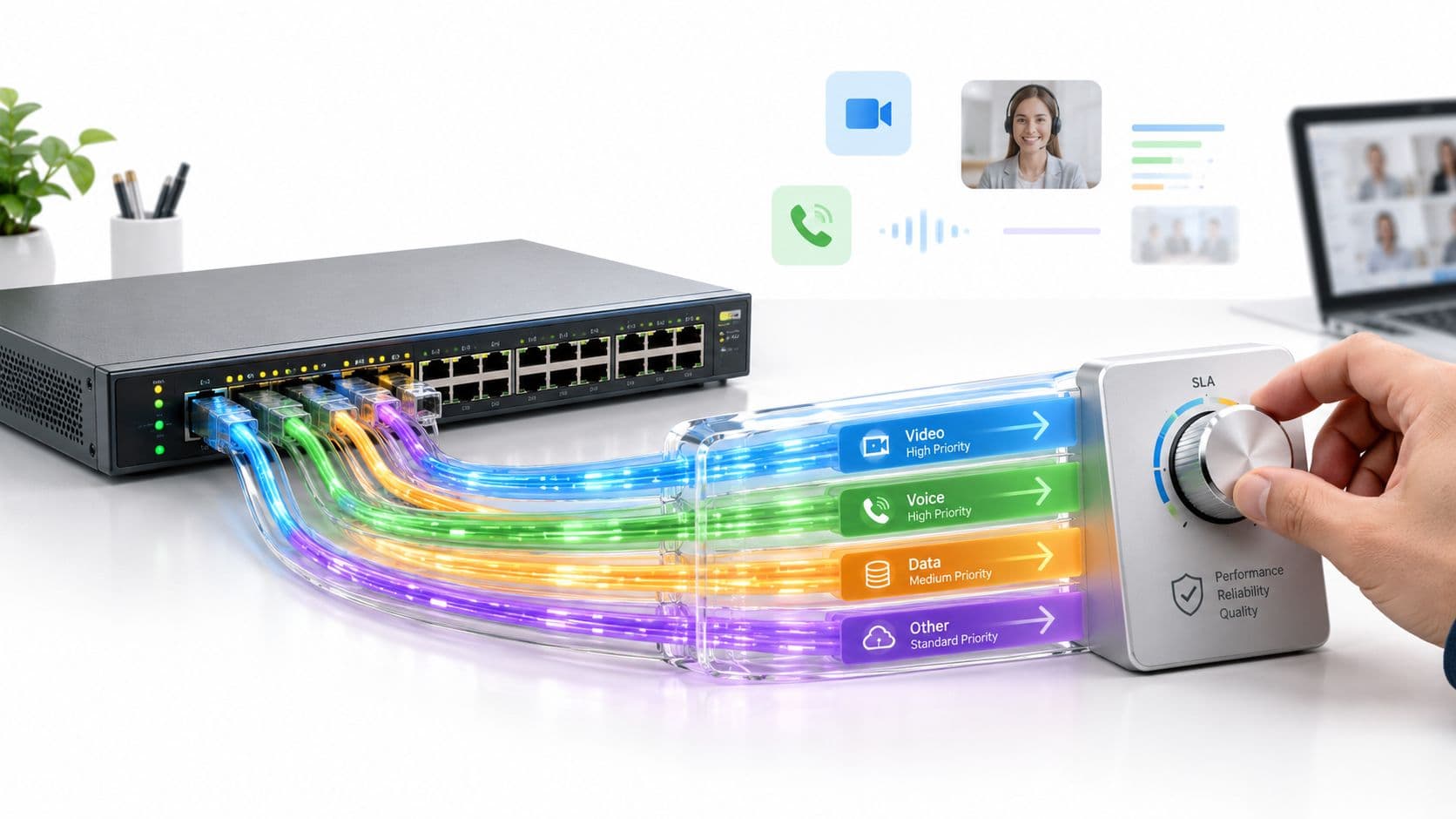
WiFi Onboarding Friction & Abandonment Advisor
Model connection drop-off rates, data minimization compliance, and front-desk troubleshooting hours across captive portals, Passpoint, and 802.1X.
Guests arrive tired after travel. Requesting room numbers, surname, and email daily creates front-desk queues and high abandonment.
Requires name, email, phone, room number, and multiple consent checkboxes. High user abandonment and frequent typos leading to dirty CRM data.
⚠️ Warning: Asking >3 fields triggers the 35% abandonment threshold and breaches GDPR data minimization principles.
Forces repeat guests and hotel residents to re-authenticate every morning.
Instant walled-garden response ensures mobile browsers trigger the captive popup reliably.
Eliminate captive portal friction and boost guest conversion
Purple delivers seamless, secure WiFi onboarding with Passpoint, Hotspot 2.0, enterprise SSO, and high-converting lightweight portals across existing hardware.
A guest joins the hotel network, waits for the splash page, retypes a room number, requests another one-time code, and then gives up. At reception, the line grows while the guest asks for help with something that should have taken seconds. In a retail setting, the same failure can interrupt checkout. In an office, it can leave a new hire waiting for access while an administrator works through a manual ticket.
That's the visible face of WiFi friction. The less visible problem is that every extra step changes behavior. People reuse credentials, share passwords, bypass portals, connect to untrusted hotspots, or ask staff to weaken a policy so the network becomes usable. The practical question isn't just how to reduce friction in a captive portal. It's how to make the right identity available at the right point, then grant only the access that identity needs.
Where WiFi Friction Comes From
A guest connects to the access point, receives a DHCP address, follows a captive-portal redirect, and waits for the identity service to respond. If the browser misses the redirect, the RADIUS exchange times out, or the identity provider adds another round trip, the user experiences the entire dependency chain as "the WiFi is broken". The same pattern affects staff and tenants when certificates, federation, or directory checks fail behind an otherwise healthy wireless network.
A hotel guest may enter a room number, request an OTP, mistype it, and start again. The front desk then becomes the fallback authentication system. US research places online shopping cart abandonment at around 74%, with recovery rates below 5%, according to Leeds Beckett University's Retail Institute analysis of checkout abandonment. The comparison is limited, but the threshold logic is relevant at the portal. Each required field or OTP round trip adds another failure point, pushing a measurable share of users to abandon the connection rather than retry.
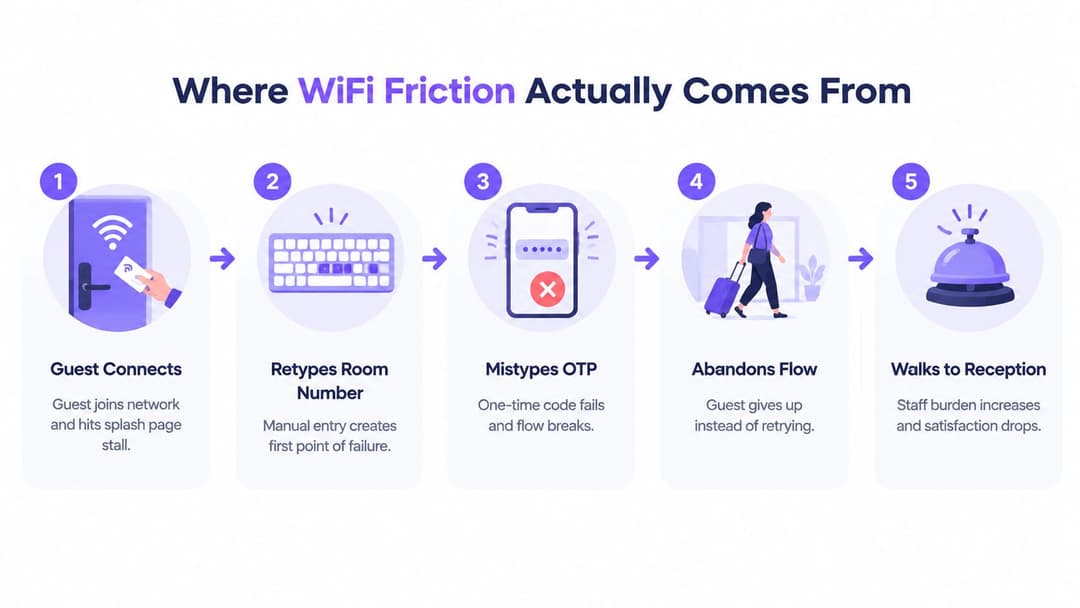
The technical chain behind a simple complaint
Shared passwords appear easy because they remove an identity decision. They also create one common secret that spreads through signage, messages, staff conversations, and personal notes. As user density rises, operators must handle password rotation, support calls, unknown devices, and the wider exposure caused by a leaked credential.
Passwordless onboarding shifts that work from the person to the device. Passpoint can provision a profile so the operating system discovers and joins the correct service without repeated portal interaction. EAP-TLS can authenticate a managed staff device with a certificate. Federated identity can let a returning user present an existing credential instead of completing another local form. These methods reduce portal effort, but they require reliable identity services, certificate lifecycle management, and clear recovery procedures.
Practical rule: If a user must repeatedly prove something the network already knows, the identity design is probably creating the friction.
Friction also drives security workarounds. Guests may use MAC randomization to avoid a remembered session, staff may write shared passwords on a whiteboard, and tenants may install personal routers when the managed service feels unreliable. Those choices reduce visibility and weaken policy enforcement. A portal redesign can improve wording, but it cannot repair a RADIUS timeout, an unreliable identity-provider path, or a network that asks every device to repeat the same human interaction. Treat WiFi access as an identity and zero-trust control, then reduce the number of times people have to carry that control manually.
Mapping Pain Points Across Guest and Staff Networks
Guest and staff networks often share switching, wireless coverage, internet breakout, and authentication infrastructure, but they represent different identities and different consequences when access fails. Guests need quick, understandable service access. Staff need dependable authorization that follows their role, device, and employment status.
A guest may tolerate a short fallback form for a single visit, but won't understand why a cell phone number, email address, room number, marketing preference, and several notices are all mandatory. A staff member may accept stronger assurance, but not a certificate renewal that fails during a shift or an MFA prompt that expires while moving between departments. In both cases, the shared technical spine is identity-provider availability, RADIUS resilience, policy segmentation, and predictable roaming.
The best design starts by separating the questions. Who is this? What device are they using? Which service should they reach? How long should access last? What happens when their identity changes or the authentication service is unavailable?
| Dimension | Guest Network | Staff Network |
|---|---|---|
| Primary identity | Visitor, room occupant, customer, or event attendee | Employee, contractor, role, or department |
| Preferred onboarding | Passpoint, OpenRoaming, QR or a short federated flow | EAP-TLS, MDM profile, SSO, and directory-backed policy |
| Common failure | Portal redirect, OTP delay, repeated form fields, or consent confusion | Certificate renewal, directory mismatch, MFA timeout, or stale access |
| Security priority | Isolation from other guests and low-data access | Least privilege, device trust, rapid revocation, and auditability |
| Fallback | Time-limited portal or assisted access | Controlled temporary access, not a shared permanent password |
Operators planning guest access can use a practical guest WiFi implementation guide to map the customer journey, but the network team still needs to test the infrastructure underneath it. A fast page doesn't help if the client can't discover the portal, the RADIUS server is slow, or DHCP scopes are exhausted.
The shared infrastructure needs separate policy
Guest convenience must never grant staff-like reachability. Create distinct roles for visitors, employees, contractors, tenants, clinical devices, and IoT equipment. Apply those roles after authentication, not merely by assigning everyone to the same SSID and trusting the user to behave.
OpenRoaming and Passpoint can remove repeated portal work, but they don't replace authorization. A federated identity can prove who or what is connecting. The policy engine must still decide which destinations, services, and network segments that identity can use.
Passwordless Authentication Methods Worth Knowing
Passwordless WiFi is an identity and policy decision, not a captive-portal adjustment. Choose the method by device capability, user lifecycle, required assurance, and the access a compromised identity could expose. A practical overview of passwordless WiFi methods helps frame the options, but production design still needs clear roles, fallback paths, and ownership.
Passpoint, also known as Hotspot 2.0, allows compatible devices to discover and join a provider's network through an installed profile. It suits repeat guests, loyalty members, and managed devices because the operating system handles network selection and authentication. The trade-off is enrollment and compatibility. If the profile cannot reach or support the device, provide a short, controlled fallback rather than sending the user through repeated portal forms.
OpenRoaming adds federation between participating networks and identity providers. Users can authenticate through an existing participating identity instead of registering at each venue. That fits transportation, hospitality, campuses, and multi-site organizations, provided operators confirm federation coverage, policy boundaries, privacy expectations, and who handles support when a connection fails.
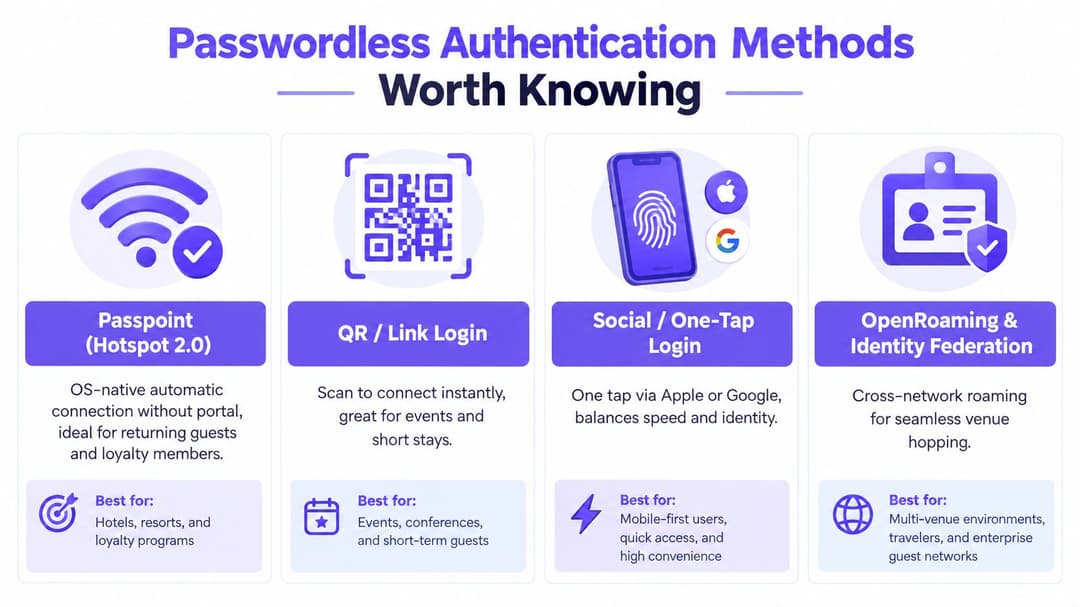
Match the method to the device
For staff and IoT, EAP-TLS is usually the strongest practical pattern. A certificate identifies the device or user without a shared password, while SCEP or EST can automate issuance and renewal. MDM can deliver profiles to corporate cell phones, laptops, tablets, and specialist equipment, reducing help desk enrollment work. Certificate expiry, renewal failures, and directory mismatches still require monitoring.
SSO-driven onboarding uses SAML or OAuth with services such as Microsoft Entra ID, Okta, or Google Workspace. It works well where identities are already centrally managed, including contractor and staff BYOD access. Map directory groups to explicit network roles. Offboarding must revoke access promptly, rather than leaving an orphaned credential active.
For devices that cannot support EAP-TLS, iPSK or private PSK provides a more controlled alternative. Assign a separate key to each user, room, tenant, or device, then revoke that key without replacing the network-wide secret. It remains a secret-based method, so its assurance and auditability are lower than certificate authentication.
Passkeys and FIDO2 strengthen high-trust portal journeys and contractor access by removing password entry and resisting phishing. The NCSC's passkey guidance supports gradual migration: inventory login journeys, prioritize high-volume services, enable coexistence, monitor fallback and support demand, then retire passwords for capable groups.
US acceptance is already meaningful. The NCSC annual review reports that biometrics are used by at least 39% of people in the UK, 44% consider them the most secure way to verify identity online, and 37% prefer them as a login method. Those figures indicate a receptive audience, while deployment still needs accessible alternatives for unsupported devices and users who cannot or will not use biometrics.
Tailoring Friction Reduction by Industry
There's no universal “easy login”. A hotel guest, a retail assistant, a clinician, and a resident in a multi-family building need different access lifecycles. Treating them as one population either adds unnecessary steps or removes controls that the environment requires.
| Environment | Priority | Fallback and constraint |
|---|---|---|
| Hospitality | Use Passpoint or OpenRoaming for returning visitors, with a short flow for new devices | Keep a controlled portal fallback and make marketing consent optional and separate |
| Retail | Give staff certificate or SSO-based access, while keeping customer access low-data | Don't interrupt payment or checkout journeys with unnecessary collection |
| Healthcare | Match identity, device, role, and location before granting access | Use managed certificates, short sessions, strong segmentation, and privacy controls |
| Multi-family properties | Issue tenant-specific identities and integrate property or tenant directories | Avoid shared PSKs across organizations and preserve tenant isolation |
Hospitality and retail need speed with boundaries
In hospitality, repeat visitors are the obvious audience for automatic onboarding. A returning device shouldn't be asked to re-enter details that the service can verify through a roaming identity or stored profile. New or incompatible devices still need a short fallback, but the fallback should ask only for what authorizes the connection.
Retail has two separate journeys. Staff need access that follows employment and role changes. Customers need connectivity that doesn't disrupt shopping, payment, or pickup. A staff certificate can remove password handling, while a guest flow can use QR or federated login without forcing a marketing decision at the doorway.
Healthcare and multi-family sites need stronger identity separation
Healthcare teams should never equate fewer clicks with weaker clinical controls. A managed tablet can authenticate through a device certificate, receive a role-based policy, and lose access automatically when management status or directory membership changes. Clinical, visitor, employee, contractor, and IoT traffic should remain separate even when users share physical coverage.
Multi-family properties face a different risk. A shared PSK creates uncertainty about which organization is responsible for access and makes revocation disruptive. Tenant directories, unique identities, and per-tenant policy reduce that ambiguity. Before rollout, validate device support, accessibility, roaming agreements, retention limits, consent language, and the escalation path for failures.
A Phased Deployment Plan That Holds Up
Start with an access-flow audit, not a product purchase. Follow each journey from wireless association through captive-portal discovery, identity-provider authentication, RADIUS policy, DHCP, segmentation, and offboarding. Record who owns the device, how long access should last, which systems must be reachable, and where support staff currently intervene.
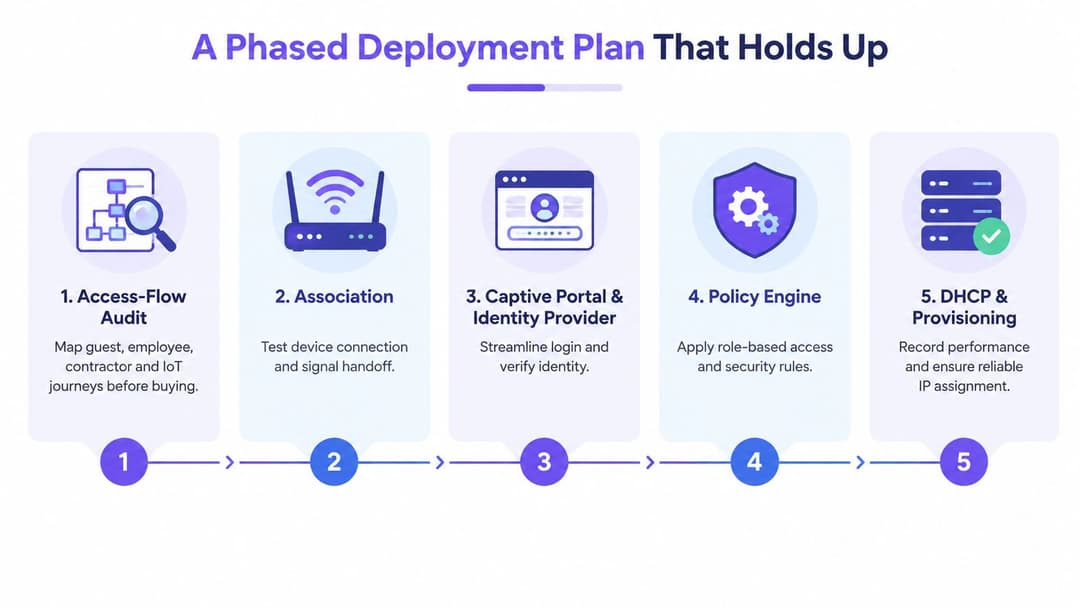
Audit the flow before changing the flow
Capture a baseline for time to network, successful completion, support tickets per connection, repeat access without credentials, and fallback usage. Include guest, employee, contractor, and IoT journeys. If you don't know the current failure pattern, a new onboarding method can move the problem somewhere else while appearing successful.
A useful audit asks:
- Association: Does the device join reliably across access points and during movement?
- Discovery: Does the operating system open the portal when a portal is still required?
- Identity: Can the provider authenticate users during normal and degraded conditions?
- Authorization: Do directory groups produce the intended network roles?
- Provisioning: Does DHCP remain reliable under the expected device mix?
- Offboarding: Does a role or directory change remove access without manual cleanup?
Pilot with coexistence, not a hard cutover
Choose a limited site, cohort, SSID, or device class. Test Passpoint, OpenRoaming, SSO, or managed-device certificates with a secure fallback for unsupported clients. Deliberately test certificate renewal, identity-provider downtime, portal discovery, roaming, device handoff, and recovery after a failed enrollment.
Integrate with Entra ID, Okta, Google Workspace, RADIUS, or a cloud authentication service only after role mappings and offboarding behavior are documented. A staged staff WiFi lifecycle approach helps frame access as a process from provisioning through revocation, rather than as a one-time password replacement.
Roll out by cohort or site, monitor authentication and authorization events, and keep a rollback path for every phase. Compare pilot results with the baseline, fix the broken steps, update support procedures, and expand only when the operational team can handle the fallback volume.
The Case for Collecting Less at the Login Step
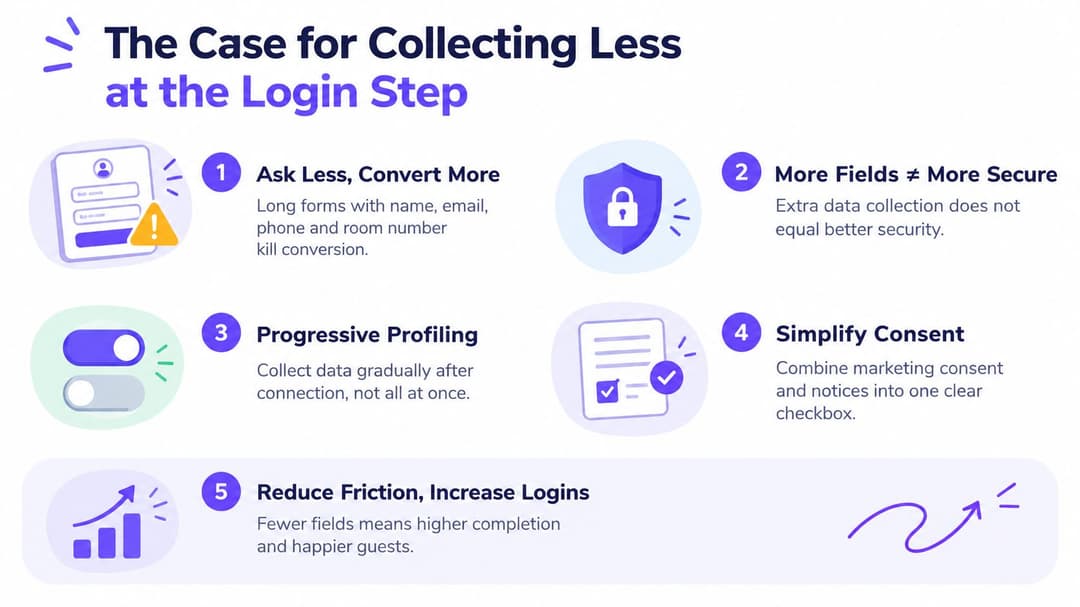
A portal that asks for a name, email address, cell phone number, room number, marketing consent, and several notices isn't automatically more secure. It may create more fields to mistype, more duplicate identities, more stale records, and a larger privacy footprint.
US consumer research reports that 35% of people would abandon a purchase when asked to repeat information they'd already provided, as summarized in UK research on technology friction and business costs. WiFi operators should apply the same discipline to access. Ask first what identity is needed to authorize the connection, then collect only the data required to deliver it.
Separate access from enrichment
A certificate, roaming identity, device profile, or federated SSO assertion can establish trust without exposing a complete contact profile to every downstream system. If a unique identifier is needed, use a privacy-preserving token where possible. Defer optional profile enrichment until after access works and the user understands the value.
Marketing consent should be optional, separate, clear, and unchecked by default where required. US-facing guest WiFi guidance explains that users should be able to access WiFi without agreeing to marketing, with clear retention rules and separate consent. That principle matters in practice because collecting less at the doorway can reduce both abandonment and the number of personal-data copies that need protection.
For visitors planning a complicated journey, practical resources such as this guide to smooth Gatwick airport navigation show why clarity matters before arrival. The same principle applies to connectivity. Tell users what they need, avoid surprising fields, and don't make a network login feel like an unrelated data-registration exercise.
Measuring Success and Avoiding Common Mistakes
A friction-reduction project needs measures that connect user experience with network operations. Total connected clients is a vanity measure. It can rise while authentication failures, abandoned sessions, and help-desk workload worsen.
Track the first useful response from the splash portal, the proportion of devices that associate successfully within the chosen time window, and repeat support tickets for the same access issue. Pair those measures with abandoned authentications, help desk demand per session, RADIUS failure logs, DHCP errors, and fallback usage. These signals show whether identity-based access is working in practice, rather than merely counting connections.
| KPI or Mistake | What to Track / What Goes Wrong | Target or Fix |
|---|---|---|
| Portal response | Delay before the first useful portal response | Measure from client request to usable page, not server-side page generation alone |
| Successful association | Devices that connect and receive usable service within the defined window | Segment by device type, site, SSID, and authentication method |
| Reopened tickets | Repeat incidents for the same user or device | Review the original failure path and improve support documentation |
| Total connected clients | Counts connections without showing completion or quality | Replace with completion, failure, and support measures |
| No baseline | Pilot results lack a credible comparison | Capture the existing journey before deployment |
| MAC-based fallback | Remembered access can fail or reintroduce weak assumptions | Prefer explicit identity and controlled compatibility paths |
| Device entropy | Client variation can break roaming or profile delivery without visible errors | Test representative operating systems and managed-device states |
The NCSC's annual review guidance provides useful context for moving away from passwords, but the migration still needs operational evidence. Do not force a hard cutover while unsupported devices remain in service. Monitor fallback rates, support tickets, and services that still depend on older cryptographic or authentication methods.
Before expanding, confirm identity-provider responsiveness, validate legacy DHCP scopes, and survey old PSK SSIDs. A passwordless tier should not sit beside an unmanaged shared-password path indefinitely. The same discipline of connecting operational signals to decisions, rather than reporting activity for its own sake, applies across industries, as explored in this guide to analytics for restaurant owners.
Use the results to decide where friction has fallen. The strongest outcome is a network where the right identity authenticates automatically, access matches the user's role, revocation works, and the fallback path does not become the main path.
Purple provides identity-based WiFi access for guests, staff, and multi-tenant environments through options including OpenRoaming, Passpoint, SSO, certificates, and iPSK for legacy devices. Review the deployment model and authentication options on Purple, then map one high-volume access journey and identify the first friction point worth removing.