Friday evening, the old WiFi controller is overloaded again. A hotel reception desk is resetting access points between check-ins, a retail store is losing payment connectivity, a hospital ward is reporting unreliable clinical mobility, or residents in a managed building are waiting in line outside a leasing office because the tenant portal has stopped authenticating. The migration program has already slipped, and every "temporary" workaround now sits inside the production environment.
That situation is the starting point for legacy system migration. The problem isn't that hardware or software is old. The problem is that an organization has built an operating model around fragile infrastructure, undocumented dependencies, manual administration, expired support, and identity services nobody wants to switch off. This playbook treats WiFi, identity, and multi-tenant network services as migration targets in their own right, not as plumbing to be dealt with after the application move.
Why Legacy Migration Deserves a Real Plan
A failing network stack rarely fails in isolation. A hotel WiFi outage can affect room access, property - management integrations, loyalty sign-in, and guest recovery workflows. A retailer may lose connectivity between registers, payment services, inventory systems, and customer WiFi. In healthcare, the dependency chain can include directory services, RADIUS, certificates, nurse - call integrations, clinical devices, and mobile applications. In a multi-family property, a shared authentication service may support tenants, contractors, building staff, cameras, elevators, and communal facilities.
The business case is therefore operational, not cosmetic. Count the incidents, failed authentications, manual resets, outage minutes, emergency engineering hours, obsolete licenses, and scarce spare parts. Then identify what those failures prevent. A migration can reduce administrative overhead, improve supportability, expose coverage and authentication problems more clearly, simplify onboarding, and give security teams a cleaner basis for access reviews.
Practical rule: If the business can't explain who owns an identity source, who approves a policy change, and who can authorize rollback, it isn't ready for cutover.
The UK public sector provides a useful warning about postponement. A 2025 UK parliamentary answer on legacy systems estimated that legacy systems represented 28% of systems in central government departments in 2024, up from 26% in 2023. The same evidence recorded that 60% of government digital services had migrated to cloud, yet that progress had taken 13 years, with 28% of the estate still legacy. Majority cloud adoption did not remove the hard core of old dependencies.
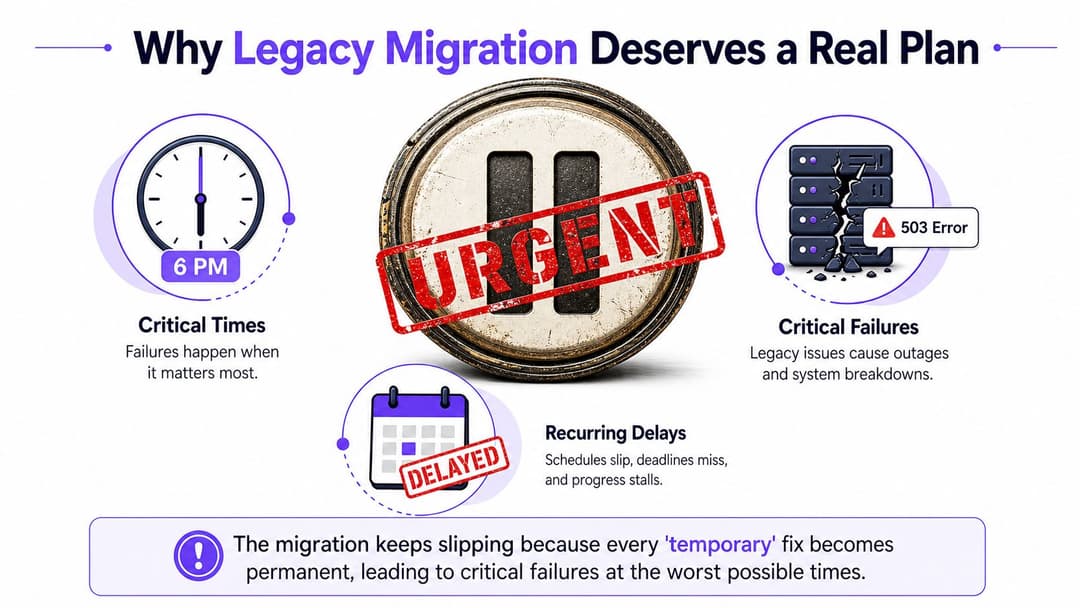
A like - for - like replacement often preserves the same weaknesses behind newer logos. If the old platform relies on shared accounts, manual VLAN changes, brittle RADIUS routing, or a single management endpoint, moving it to new hardware only makes the failure harder to recognize. Build the plan around ownership, dependency evidence, migration waves, identity trust, parallel operation, and rollback. The outcome isn't a hardware refresh. It's the retirement of a failing operating model without stranding guests, clinicians, employees, or residents.
Assessing the Property Portfolio Before You Move a Single Workload
Start with an inventory, not a supplier presentation. Build a verified register covering every controller, access point, switch, firewall, captive portal, directory, certificate authority, RADIUS server, VLAN, SSID, and management console. Record the location, owner, tenant or business unit, model, firmware, support position, observed traffic, authentication method, configuration source, and known dependency.
The word verified matters. A spreadsheet assembled from procurement records will miss unmanaged access points, abandoned integrations, temporary SSIDs, and devices installed by local teams. Compare configuration exports with observed traffic, monitoring data, service tickets, and interviews with the people who support each site.
Map people, devices, and trust relationships
Treat identity as its own inventory. Separate staff, contractors, guests, patients, students, residents, IoT devices, and service accounts. For each group, document the source of truth, joiner and leaver process, credential lifetime, certificate ownership, approval path, and emergency access method.
Then test representative workflows rather than generic connectivity. A hotel needs check-in, room access, guest WiFi, and property management handoffs. A retailer needs point of sale connectivity, loyalty sign-in, handheld devices, and store failover. A hospital needs clinical mobility, connected equipment, staff authentication, and ward-level resilience. A residential community needs tenant onboarding, shared amenities, visitor access, and isolation between occupants.
Make migration decisions from evidence
Classify each asset or workflow by business criticality, data sensitivity, compatibility risk, and urgency. Flag unsupported protocols, certificate expiration, single points of failure, undocumented firewall rules, hard-coded service accounts, and data quality gaps. Assign an accountable owner and define the evidence required to pass each wave.
| Asset or Workflow | Evidence to Collect | Risk Rating | Migration Wave |
|---|---|---|---|
| RADIUS and directory path | Authentication logs, source-of-truth mapping, failover configuration, service owner | High if shared across sites | Early foundation wave |
| Captive portal and guest identity | Redirect flows, voucher or profile records, consent records, CRM and PMS dependencies | High in guest-facing environments | Pilot by site or tenant |
| Clinical or operational SSIDs | Device register, authentication method, clinical workflow tests, support window | Critical where service continuity matters | Controlled, site-specific wave |
| Multi-tenant services | Tenant separation rules, iPSK or equivalent configuration, SSO flows, support ownership | High where isolation is contractual | Tenant cohort waves |
| Access points and controllers | Firmware, support status, join history, configuration backup, physical location | Medium to high depending on coverage | Align with validated service waves |
A vendor can help discover assets, but no tool can repair an incomplete ownership map. The register should become the program's decision record. If an item has no owner, no dependency evidence, or no rollback path, it doesn't belong in a go-live wave.
Choosing the Right Migration Approach
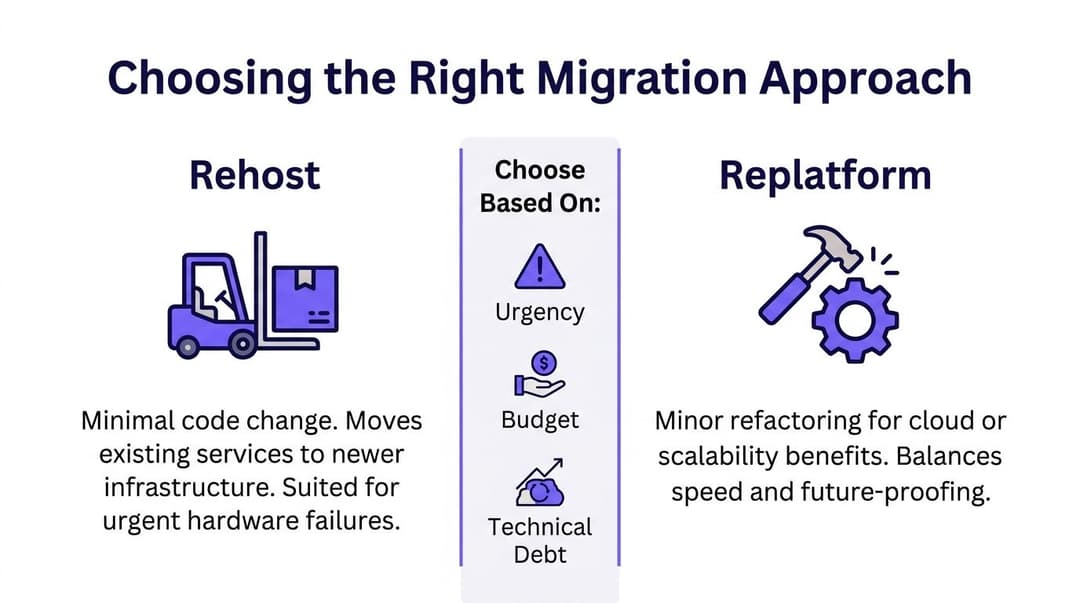
Choose the approach that matches the constraint. Fashion is a poor migration method, especially when the network carries identity and frontline operations.
Rehost moves an existing service onto newer infrastructure with minimal change. Use it for an urgent hardware or hypervisor exit, a stable RADIUS deployment, or a platform that still behaves predictably but has reached an operational boundary. It is fast, but it carries forward manual processes, licensing assumptions, configuration defects, and technical debt.
Replatform changes the runtime while preserving the service's core behavior. A captive portal might move to managed containers, or a directory integration might move to a supported service layer. This is the sensible middle route when the business logic is sound but the operating platform is expensive or difficult to maintain.
Refactor changes the internal design. That may mean replacing static network rules with policy services, exposing APIs, or separating identity decisions from portal presentation. Refactoring creates a better foundation, but it demands clearer product decisions and more testing than a lift and shift.
Strangler migration runs old and new services together while routing one site, tenant, SSID, or workflow at a time. For WiFi and identity estates, this is usually the safest default because the team can validate coexistence, compare policy outcomes, and return a defined cohort to the old plane.
| Approach | Best Fit | Main Benefit | Main Risk |
|---|---|---|---|
| Rehost | Urgent infrastructure exit | Minimal service change | Preserves design weaknesses |
| Replatform | Stable integrations with costly runtime | Better supportability without a rewrite | Compatibility work remains |
| Refactor | Policy, API, and orchestration redesign | Stronger long-term operating model | Higher delivery and testing demand |
| Strangler | Shared identity and multi-site networks | Small cohorts and rapid fallback | Coexistence must be engineered |
A practical program may rehost a stable RADIUS platform, replatform the guest portal, and refactor policy enforcement. Record the chosen method, rejected alternatives, coexistence period, owner, and exit condition for every workload. Organizations evaluating managed professional services can also review Purple's professional services offering alongside their internal delivery model.
Avoid a big-bang cutover unless the environment is simple, synchronization is proven, and the rollback window is tolerable. In a multi-family property or student housing community, "all at once" usually means "all support calls at once."
Migrating Data and Identity Without Breaking Trust
Identity is the spine of the migration. If it fails, the access points may be healthy and the switches may be forwarding traffic, but the service is still unavailable to the person who needs it.
Begin by mapping every authentication source. Include RADIUS servers, captive portals, property-management integrations, Active Directory forests, Entra ID connections, Google Workspace, Okta, shared service accounts, device certificates, and local emergency accounts. Decide which sources will survive, which will be synchronized temporarily, and which must be retired before the new service can become authoritative.
Build coexistence deliberately
Run directory synchronization in stages. Match identities using stable attributes, resolve duplicates before enabling access, and define how disabled or departed users propagate to the new service. Don't use the migration as an excuse to create a second uncontrolled identity directory. Every temporary account needs an owner, an expiration condition, and an audit trail.
Certificates require the same discipline. Inventory the certificate authorities, templates, issuing systems, renewal ownership, trust chains, and device populations using EAP-TLS or 802.1X. Rotate certificates in a controlled sequence, beginning with a representative cohort. Keep the old trust path available until the new chain has passed authentication and revocation checks across every relevant device class.
“A credential migration is a service migration. Treat password resets, certificate renewal, and account disablement as customer-impacting changes.”
Guest identity needs a separate workstream. Preserve the relationship between profiles, consent, vouchers, loyalty records, and returning users where the business depends on it. Test registration, returning access, forgotten details, expiry, opt-out, and support-assisted recovery. Guests shouldn't discover that the migration succeeded only because their previous access disappeared.
Sequence access, not just equipment
Move identity services before broad SSID and VLAN changes. Then migrate a defined SSID, site, tenant, or workflow while monitoring authentication and traffic behavior. In healthcare, keep clinical and connected device paths separate from general staff access. In residential environments, preserve tenant isolation while changing the service that provisions it. In hospitality, verify the property management handoff before opening the new guest flow to every room.
Use the Purple data and security overview as one reference point when assessing identity, security, and data handling requirements. The tool choice matters less than the acceptance evidence. Before traffic follows the new identity plane, prove successful authentication, correct authorization, certificate trust, directory disablement, portal completion, VLAN assignment, and recovery after service interruption.
Testing, Cutover, and Rollback That Actually Works
Build the cutover plan backward from rollback. Most weak plans describe how the new service will be enabled, then add a vague instruction to “revert if required”. That isn't a rollback plan. A real rollback names the trigger, decision-maker, technical action, communication owner, and time limit.
Use a parallel run as a test instrument
Run the legacy and new identity and network planes together for a defined window. Use shadow RADIUS requests where the architecture permits, mirrored captive-portal journeys, configuration comparison, and synthetic guest-login probes. Test successful and failed authentication, expired certificates, disabled accounts, roaming, VLAN assignment, DNS dependency, firewall behavior, and loss of a directory or RADIUS endpoint.
Test by business cohort. One hotel wing, one retail site, one ward-approved device group, or one residential building is more useful than a laboratory test that excludes real integrations. Keep an evidence pack containing timestamps, test identities, device types, policy outcomes, defects, and approvals.
Write the runbook minute by minute
The cutover sequence should include:
- Freeze changes: Stop unrelated network, directory, certificate, and portal changes.
- Snapshot state: Export configurations, record policy versions, preserve identity mappings, and confirm restoration files are usable.
- Migrate the cohort: Switch the defined site, tenant, SSID, or workflow, not an ambiguous “environment.”
- Observe behavior: Watch authentication, redirects, access-point joins, support contacts, application transactions, and tenant isolation.
- Expand or reverse: Continue only after the named owner confirms exit criteria. If a trigger fires, execute the rehearsed rollback.
The plan notes identify examples such as an authentication failure rate above 1.5%, captive-portal redirect loops, and access-point join failures above an agreed threshold. Use those examples only if your baseline supports them, and set the final trigger with service owners before the change window. The point is not to choose a universal number. The point is to remove arguments from the incident room.
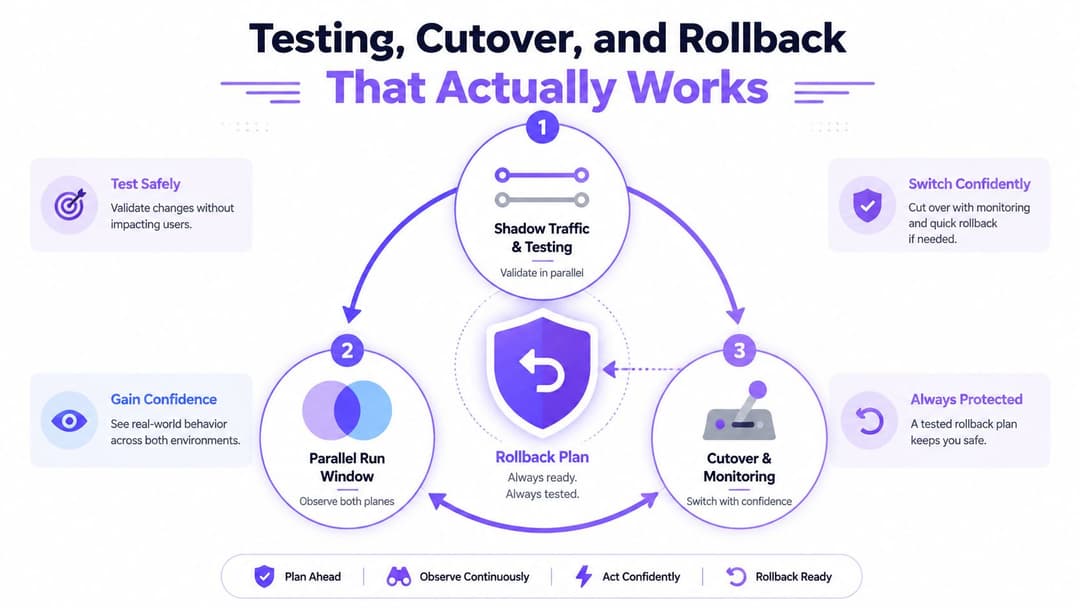
Rehearse rollback with the same people who will run production. A fallback that exists only in a document will fail when certificates, caches, routes, and human decisions interact under pressure.
Cost, Timeline, and Compliance Reality Check
A vendor's optimistic delivery estimate is not a board-ready budget. Build the model around discovery, remediation, integrations, testing, internal staff time, support coverage, licensing, communications, training, downtime exposure, and contingency. Include the network layer as delivery work: WiFi design, identity services, captive portals, certificates, routing, tenant isolation, and site-by-site cutover support. A migration is not cheap if the old platform remains operational indefinitely.
The US public sector provides a clear warning about deferred work. The Government Accountability Office (GAO) records show that legacy technology makes up a massive portion of federal agency systems. Across government departments, legacy levels range from 10% to 70%, with critical services built on systems dating back to the 1970s. These figures are not a private sector price list. They show why dependency discovery and remediation belong in the delivery budget, not in an overhead line that gets cut.
A UK public-sector analysis of legacy IT costs reported legacy IT costing 4-7% of annual public-sector spending in lost productivity. Treat that figure as a prompt to measure operational waste in your organization, including manual identity work, repeated support calls, failed guest access, and network service workarounds. Do not present it as a guaranteed migration saving.
| Vertical | Indicative Cost Range | Typical Duration | Key Compliance Drivers |
|---|---|---|---|
| Hospitality | Scope from site count, guest identity, PMS integration, WiFi design, and support coverage | Sequence around occupancy and events | Payment security, privacy, access records, supplier assurance |
| Retail | Scope from store variation, POS dependencies, loyalty identity, WiFi and trading windows | Pilot outside peak trading, then roll out by cohort | PCI DSS, privacy, endpoint controls, auditability |
| Healthcare | Scope from clinical workflows, device validation, wireless resilience, and change governance | Longer planning and validation windows | Patient safety, HIPAA, medical-device assurance, continuity |
| Student Housing and Multi-Family | Scope from tenant isolation, onboarding, shared facilities, and building systems | Building or portfolio waves | Privacy, contractual isolation, access governance, supplier controls |
For guest networks, assess consent, retention, access records, identity handling, and tenant separation before committing to a design. Use the Purple guest WiFi compliance check tool to review that posture and identify gaps that need funding.
The ONS offers another hard lesson. Reporting on the ONS legacy migration said budget constraints slowed its move away from legacy systems, despite progress towards replacing 80% of legacy services. The same source reported 90% of organizations had Microsoft Windows technical debt, 60% had many unsupported Windows servers or desktops, and 51% reported downtime linked to technical debt. End - of - life pressure does not remove the need for continuity planning.
Map the program against PCI DSS 4.0, ISO 27001, SOC 2 Type II, NIS2 where it applies, and sector-specific obligations. Compliance will expose weak assumptions, so price the controls, evidence, testing, and operating ownership before the change window.
Post-Migration Monitoring and Continuous Decommission
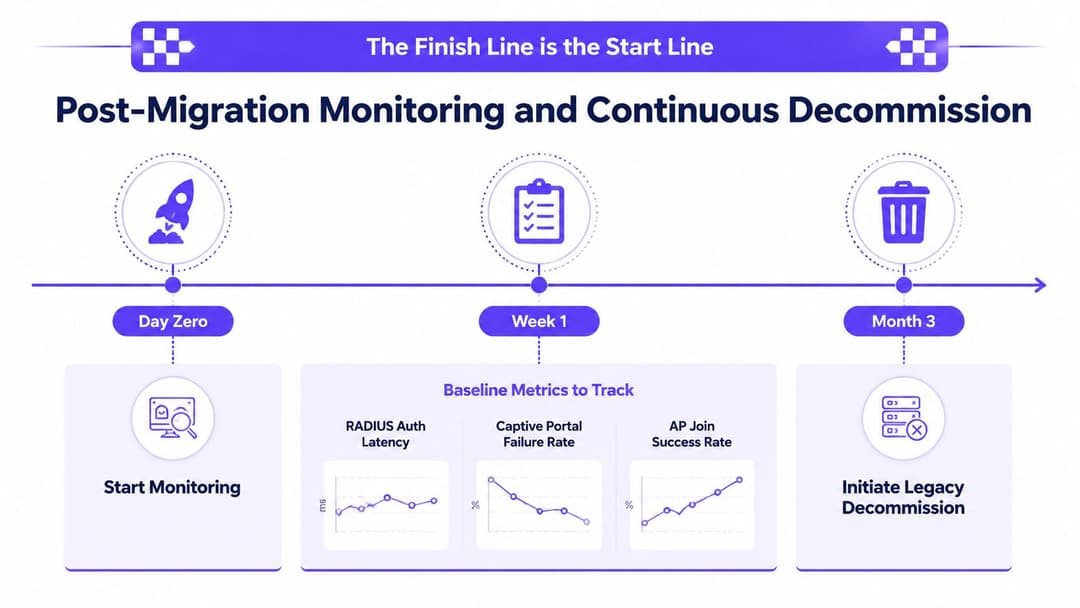
Go-live is the beginning of accountability. Once the new service carries production traffic, the team needs a baseline that proves whether the migration optimized operations or moved the same faults into a different console.
Track RADIUS authentication latency, captive-portal failure rate, access-point join success, certificate renewal lead time, policy mismatches, support contacts, and tenant-level service objectives where multi-tenant isolation matters. Give every signal a named owner, an escalation route, and a review cadence. A dashboard without an accountable operator is decoration.
Run a stability curve
Use a 30-day, 60-day, and 90-day review rhythm. The first review should catch configuration drift, missing alerts, recurring authentication failures, and support workarounds. The second should test whether the service is operating without the migration team's intervention. The third should decide whether the legacy platform is ready for retirement.
Don't declare success because the new platform has been live for a quiet weekend. Compare behavior across business cycles, tenant groups, device classes, and operational events. Hospitality needs occupancy variation, retail needs trading conditions, healthcare needs approved clinical workflows, and residential estates need tenant onboarding and communal access.
Decommission in controlled stages
Retire the legacy service only after the exit criteria pass and the business owner signs off. Then remove it methodically:
- Administrative closure: Stop changes, close support routes, archive approved configurations, and update ownership records.
- Trust revocation: Revoke obsolete certificates, disable old service accounts, remove unused directory synchronization, and eliminate residual access paths.
- Network retirement: Remove legacy VPN tunnels, policies, integrations, and management dependencies, then reclaim address space and licenses.
- Knowledge handover: Store the final architecture, decision log, test evidence, incident history, and operating procedures where the support team can find them.
A government analysis of legacy estate complexity described legacy systems as old, vulnerable, unsupportable, and a constraint on transformation. That source has already established the scale of the problem. Your job after migration is to ensure the old estate doesn't remain as an unowned security boundary.
Purple offers cloud-based WiFi authentication and identity-based networking for guests, staff, and multi-tenant environments, with integrations for directory services and network platforms. Visit Purple to assess whether its identity, guest access, analytics, and migration capabilities fit your legacy system migration plan.