
Hotel Guest WiFi Architecture: PMS Integration, Captive Portals, and Bandwidth Control
This guide provides a comprehensive framework for architecting enterprise-grade hotel WiFi networks. It details the technical requirements for VLAN segmentation, PMS integration via FIAS, captive portal design, and per-client bandwidth control to ensure security, compliance, and optimal performance.
Listen to this guide
View podcast transcript
Part of our core series: Captive Portal Guide →
Executive Summary
Hotel WiFi architecture is no longer just about coverage; it is about secure segmentation, seamless authentication, and converting a utility cost into a strategic data asset. For IT managers and network architects deploying infrastructure across Hospitality venues, treating guest, staff, and building systems as a single flat network is a critical failure point. This guide details the technical requirements for enterprise-grade hotel WiFi, focusing on three core pillars: integrating the captive portal with your Property Management System (PMS) via FIAS for seamless guest validation, deploying robust VLAN segmentation to meet PCI DSS requirements, and enforcing per-room bandwidth controls to ensure consistent performance. By aligning your hardware strategy - whether deploying Cisco Meraki, HPE Aruba, or Juniper Mist - with intelligent Guest WiFi authentication, you secure your environment while capturing the high-quality first-party data necessary to drive loyalty and revenue.
Listen to the Briefing
Technical Deep-Dive: Architecture and Segmentation
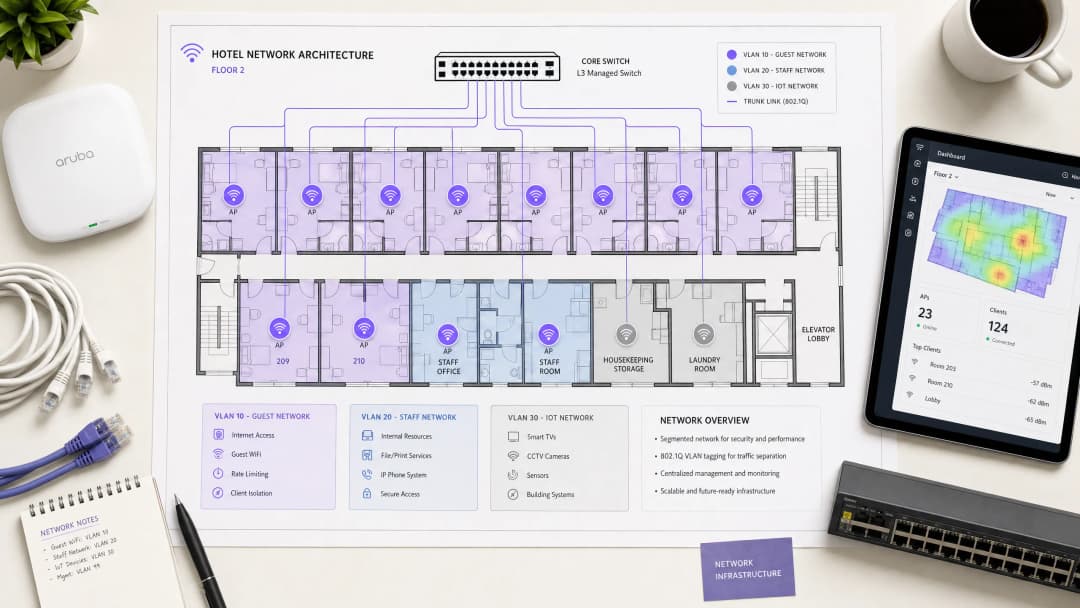
A hospitality network must simultaneously serve guests, staff, and operational technology without compromising the security or performance of any single group. The foundational requirement is logical separation using Virtual Local Area Networks (VLANs) governed by the IEEE 802.1Q standard.
You must isolate traffic at the switch level. Guest WiFi requires its own VLAN, firewalled entirely from internal resources. Staff access should operate on a separate VLAN, secured by 802.1X authentication against a RADIUS server (integrating with identity providers like Microsoft Entra ID or Okta). A third VLAN must isolate IoT devices - smart thermostats, door locks, and CCTV. Finally, any point-of-sale systems must sit on an isolated VLAN to maintain PCI DSS compliance. This segmentation eliminates the lateral movement attack vector, ensuring a compromised guest device cannot probe your property management systems.
Wireless Layer and Access Point Placement
For the radio frequency (RF) layer, WiFi 6 (IEEE 802.11ax) is the baseline standard for new deployments. It introduces Orthogonal Frequency Division Multiple Access (OFDMA), which allows a single access point to serve multiple clients simultaneously. This provides roughly four times the throughput capacity of WiFi 5 and significantly reduces latency in high-density environments.
The physical placement of access points (APs) dictates performance. The traditional model of deploying APs in corridors forces signals to penetrate thick fire doors and bathroom plumbing before reaching the guest. You must deploy an in-room AP model - one AP per room, or one AP per two rooms at minimum. Every AP requires a wired Cat 6A connection back to a PoE switch; mesh backhaul is unsuitable for enterprise hospitality environments.
Property Management System (PMS) Integration
The PMS is the central source of truth for hotel operations. Integrating your WiFi authentication layer with the PMS transforms the guest experience and radically improves data quality.
Authentication via FIAS
When a guest connects to the network, they are redirected to a captive portal. Instead of relying on a generic password or an unverified email form, PMS integration allows the guest to authenticate using their surname and room number. The captive portal platform queries the PMS in real time - typically using the Fidelio Interface Application Specification (FIAS) protocol - to validate the credentials against active reservations. This API validation occurs in under 500 milliseconds.

Session Management and Data Quality
This integration automates session lifecycles. When a guest checks out, the PMS triggers an event that revokes WiFi access immediately. If a guest extends their stay, the network session extends automatically.
More importantly, PMS integration solves the data quality problem. Standard email capture forms often yield error rates of 30%. By validating against the PMS, you capture a verified guest record linked to specific stay data. Purple has processed 440 million logins in 2024, and our data shows that PMS-integrated captive portals achieve validation rates of 70% to 80%. This consented, first-party data flows directly into your CRM, enabling targeted WiFi Analytics and post-stay marketing.
Got questions about your specific setup?
Our team works with venue operators, IT managers, and network engineers across 80,000 venues. Book a 20-minute call and we will show you how others like you solved it.
Captive Portal Design and Security
The captive portal is your primary mechanism for data capture and compliance. It operates by assigning a restricted IP address to the guest device and using a DNS intercept to redirect HTTP traffic to the splash page. Once the guest authenticates and accepts the terms, the RADIUS server authorises the MAC address, and full internet access is granted.
GDPR and Unbundled Consent
Your captive portal must present explicit, granular consent options. Consent to use the network cannot be bundled with consent for marketing communications. Purple's platform handles this natively, tying verifiable consent records to individual user profiles.
Encryption and Client Isolation
You must enable client isolation on the guest SSID. This prevents peer-to-peer communication, stopping one guest device from scanning or accessing another. For encryption, WPA3 is the standard. While WPA3-Enterprise secures the staff network, guest networks should utilise Opportunistic Wireless Encryption (OWE) where supported, providing individualised encryption for open networks without requiring a shared password. For further details on secure access, review our guide on EAP Method WiFi: A Guide to Secure Network Access.
Bandwidth Control and QoS
Bandwidth management is the final pillar of a stable architecture. The primary cause of guest complaints is an under-provisioned internet uplink.
Provisioning the Uplink
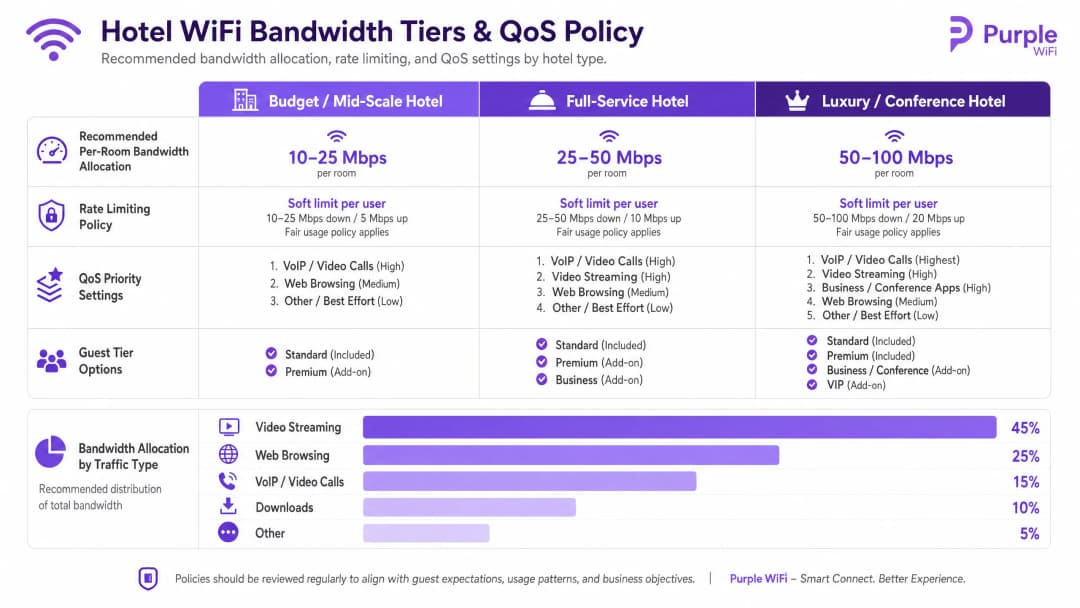
You must provision bandwidth based on peak concurrent demand, not average usage. The recommended allocations are:
- Budget / Mid-Scale: 10-25 Mbps per room
- Full-Service: 25-50 Mbps per room
- Luxury / Conference: 50-100 Mbps per room
For a 200-room property at 80% occupancy, allocating 25 Mbps per room requires a minimum committed uplink of 4 Gbps. A dedicated leased line is mandatory.
Rate Limiting and QoS Policy
To prevent a single user from saturating the uplink, you must enforce per-client rate limiting at the controller level. Whether you deploy Cisco Meraki, HPE Aruba, or Ubiquiti UniFi, configure a hard cap on both downstream and upstream traffic per device.
Above rate limiting sits Quality of Service (QoS). Using the WMM (WiFi Multimedia) standard, you must prioritise traffic into four queues. VoIP and video calls require high priority, ensuring that a guest's Microsoft Teams call is not degraded by another guest downloading a large file on the best-effort queue.
Implementation Guide
Follow this sequence for a successful deployment:
- Conduct an RF Site Survey: Walk the property with a spectrum analyser to identify interference sources before planning AP placement.
- Design the VLAN Architecture: Document your Guest, Staff, IoT, and POS VLANs. Configure explicit default-deny firewall rules between them.
- Size the Uplink: Calculate peak demand based on the 25 Mbps per room baseline and procure a dedicated leased line.
- Deploy the Captive Portal: Integrate the portal with your PMS. Test the authentication flow, consent capture, and session revocation across iOS, Android, and Windows devices.
- Monitor and Adjust: Post-deployment, monitor AP association counts and uplink utilisation to identify dead zones or bandwidth bottlenecks.
Troubleshooting & Risk Mitigation
The most frequent failure modes in hotel WiFi deployments stem from poor planning rather than hardware failure.
- The "Slow WiFi" Complaint: This is rarely an RF issue. First, check your internet uplink utilisation. If the circuit is saturated, no amount of AP tuning will fix the problem. Second, check client distribution across APs; if one AP has 40 clients and an adjacent AP has 5, your band steering configuration requires adjustment.
- The "Data Silo" Pitfall: Deploying a captive portal without a downstream integration wastes the investment. The data captured at login must flow automatically into your marketing automation tools to drive Retail or hospitality loyalty programmes.
- The Flat Network Risk: Failing to segment the wired network undermines wireless security. If a guest plugs a laptop into an exposed Ethernet port in a conference room and accesses the staff VLAN, your architecture has failed. Ensure switch ports in public areas are assigned to the guest VLAN or disabled entirely.
ROI & Business Impact
Enterprise WiFi requires significant capital expenditure, but it delivers measurable returns when architected correctly. The ROI is realised through three channels:
- Operational Efficiency: PMS integration eliminates manual voucher generation and front-desk troubleshooting, returning hours of staff time per week.
- First-Party Data Acquisition: An authenticated captive portal builds a database of verified guest profiles. This data powers direct-booking campaigns, reducing reliance on Online Travel Agencies (OTAs) and their associated commission fees.
- Guest Satisfaction: Reliable, high-speed WiFi is a primary driver of positive reviews. A segmented, properly provisioned network eliminates the friction that leads to negative feedback, directly impacting the property's reputation and average daily rate.
Key Definitions
VLAN (Virtual Local Area Network)
A logical subnetwork that groups a collection of devices on the same physical infrastructure, isolating their broadcast traffic from other VLANs.
Essential for separating guest traffic from internal hotel systems and ensuring PCI DSS compliance.
Captive Portal
A web page that intercepts network traffic and requires users to authenticate or agree to terms before granting full internet access.
The primary touchpoint for guest authentication, GDPR consent, and first-party data capture.
FIAS (Fidelio Interface Application Specification)
A universal protocol used by property management systems (like Oracle Opera) to communicate in real-time with third-party systems.
Used by the captive portal to validate a guest's room number and surname against active PMS records.
WPA3-Enterprise
The highest level of WiFi security, requiring individual users or devices to authenticate using unique credentials via a RADIUS server (802.1X).
The mandatory standard for securing staff networks and corporate devices within the hotel.
Client Isolation
A wireless controller feature that prevents devices connected to the same SSID from communicating directly with each other.
Must be enabled on all guest networks to prevent peer-to-peer attacks and protect guest privacy.
Rate Limiting
The practice of restricting the maximum bandwidth (upload and download speed) available to an individual client device.
Crucial for preventing a single guest downloading large files from degrading the network experience for everyone else.
QoS (Quality of Service) / WMM
Network mechanisms that prioritise certain types of traffic (like voice or video) over less time-sensitive traffic (like file downloads).
Ensures that guest VoIP calls or staff communication tools function reliably even when the network is under heavy load.
OFDMA
Orthogonal Frequency Division Multiple Access; a WiFi 6 feature that allows an access point to serve multiple clients simultaneously by dividing channels into smaller sub-channels.
Dramatically improves performance and reduces latency in high-density areas like hotel conference rooms and lobbies.
Worked Examples
A 150-room full-service hotel is experiencing frequent guest complaints about slow WiFi during the evening peak (19:00 - 22:00). The property currently has a 1 Gbps broadband connection and uses a single flat network with a shared WPA2 password.
- Upgrade the internet uplink to a dedicated leased line providing at least 3.75 Gbps (150 rooms * 25 Mbps). 2. Implement VLAN segmentation, moving guests to an isolated VLAN 10. 3. Deploy a captive portal integrated with the hotel's Oracle Opera PMS via FIAS, allowing guests to authenticate with room number and surname. 4. Enforce per-client rate limiting of 25 Mbps down / 10 Mbps up at the wireless controller to prevent individual devices from saturating the uplink.
A luxury resort needs to deploy secure WiFi for staff tablets used for housekeeping and maintenance, while ensuring guest devices cannot access the property management systems.
Create a dedicated Staff VLAN (VLAN 20) separate from the Guest VLAN (VLAN 10). Configure the Staff SSID to use WPA3-Enterprise, authenticating the tablets against the corporate RADIUS server using 802.1X. Apply strict inter-VLAN routing rules at the firewall: default-deny all traffic between VLAN 10 and VLAN 20, and only permit VLAN 20 to reach the specific IP addresses and ports required for the housekeeping application.
Practice Questions
Q1. A hotel operations director wants to implement a single, open WiFi network for both guests and the new smart TVs in the guest rooms to 'keep things simple'. As the network architect, how do you respond?
Hint: Consider the implications of lateral movement and broadcast domain size.
View model answer
Advise against this approach. Guest devices and IoT devices (smart TVs) must be segmented onto separate VLANs. Placing them on the same open network exposes the TVs to direct access from guest devices, creating a significant security vulnerability. Furthermore, it increases the broadcast domain, which can degrade overall network performance. The TVs should be on an isolated IoT VLAN (e.g., VLAN 30) with strict firewall rules.
Q2. During a site survey for a new 300-room property, the cabling contractor suggests saving costs by placing one access point in the corridor for every four rooms. Why is this problematic?
Hint: Think about RF attenuation and physical obstacles in a hotel environment.
View model answer
Corridor placement is a flawed design for hotels. The RF signal must penetrate heavy fire doors, mirrored wardrobes, and tiled bathrooms to reach the guest device in the room, resulting in severe signal attenuation and poor performance. The correct design is an in-room AP model - one AP per room, or at minimum one per two rooms - to guarantee direct line-of-sight or minimal obstruction coverage.
Q3. The marketing team wants to automatically subscribe every guest who logs into the WiFi to the hotel's weekly promotional newsletter. How should the captive portal be configured to handle this?
Hint: Consider GDPR requirements regarding consent bundling.
View model answer
The captive portal must be configured with explicit, unbundled consent options. Under GDPR, consent to access the WiFi network cannot be conditional upon consenting to marketing communications. The splash page must provide a separate, unchecked opt-in box for the newsletter. Purple's platform enforces this separation natively, ensuring compliance while capturing verifiable consent records.
Continue reading in this series
Ubiquiti UniFi guest portal not redirecting: causes and fixes
This guide isolates a UniFi guest portal redirect failure by following the guest state, redirect, pre-authorization route and controller authorization in sequence. It gives venue IT teams a sourced method to address guest-network versus Hotspot confusion, external portal hand-offs, current UniFi OS account requirements and DNS isolation testing.
Cisco Meraki splash page not working: a troubleshooting flowchart
This practical day-two guide isolates where a Cisco Meraki splash flow has failed: client authorization, HTTP redirect initiation, walled-garden reachability or RADIUS sign-on. It gives venue IT teams a controlled evidence path, so they can restore Guest WiFi without making broad changes to a live estate.
Enterprise Guest WiFi Setup Guide: VLAN Segmentation, Security, and Captive Portals
This technical guide shows IT teams how to set up Guest WiFi as a controlled internet-access service, using VLAN segmentation, firewall policy, and a captive portal. It also explains how Purple's registration forms and onboarding controls support a proportionate visitor experience without weakening the boundary around staff, payment, and operational systems.
Got questions about your specific setup?
Our team works with venue operators, IT managers, and network engineers across 80,000 venues. Book a 20-minute call and we will show you how others like you solved it.