
How to revoke WiFi access when an employee leaves
This guide shows IT and venue operations teams how to remove Staff WiFi access when an employee leaves without disrupting the rest of the workforce. It compares certificate-based 802.1X, identity-specific iPSK and SCIM-driven deprovisioning, then provides a same-day runbook, test method and audit evidence model.
Video overview
Listen to this guide
View podcast transcript
Part of our core series: Enterprise WiFi Security Guide →
Executive Summary
When an employee leaves an organization, revoking their physical access is straightforward. However, revoking WiFi access is often not as simple. If your network relies on a shared WPA2 password, the departing employee leaves the organization in possession of these credentials. The only way to block their access is to change the password for the entire network. This disrupts operations and requires manual updates across all devices. This represents a serious security vulnerability and leads to compliance failures with standards such as PCI-DSS and ISO 27001.
This guide demonstrates how to avoid shared passwords and implement per-user WiFi revocation. We explore three proven models: 802.1X EAP-TLS with certificate revocation, Identity Pre-Shared Key (iPSK) with identity-specific key deletion, and SCIM-driven de-provisioning. By linking network access directly to your identity provider - such as Microsoft Entra ID, Okta, or Google Workspace - you can automate revocation as soon as an account is deactivated. This creates the exact audit trail that auditors expect.
Listen to our technical briefing podcast on this topic:
Technical Deep Dive
The Problem with Shared Passwords
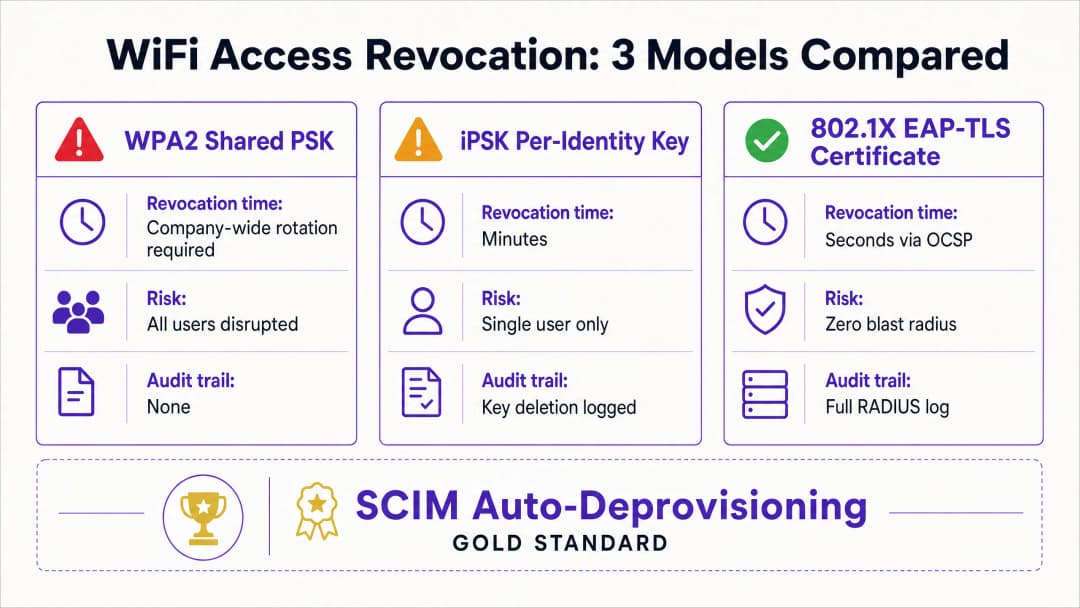
A shared WPA2-Personal password lacks identity context. The network cannot distinguish between a current and a former employee. Consequently, revoking access requires a company-wide password change. This creates a security risk during the period between the employee's departure and the execution of the password change.
Model 1: 802.1X EAP-TLS Certificate Revocation
The enterprise standard for WiFi security is 802.1X with EAP-TLS. In this model, each device receives a unique digital certificate from a Certificate Authority (CA). When a device connects, the RADIUS server cryptographically verifies the certificate.
To revoke access, you revoke the certificate within the CA. The RADIUS server checks the revocation status in real time via the Online Certificate Status Protocol (OCSP). If the OCSP responder returns a "Revoked" status, the RADIUS server sends an Access-Reject message. For active sessions, the server issues a Change of Authorization (CoA) to disconnect the device immediately. This process limits revocation to a single user, without impacting the rest of the network.
Model 2: iPSK Identity-Specific Key Deletion
For environments with mixed device types, including headless hardware that does not support 802.1X certificates, Identity Pre-Shared Key (iPSK) is the most suitable solution. iPSK assigns a unique password to each individual user or device on the same SSID.
The RADIUS server maps each unique key to a specific identity. When an employee leaves the company, IT simply deletes their specific key from the RADIUS database. The impact is therefore restricted solely to that single user. This approach delivers the individual security of an enterprise network combined with the simplicity of a pre-shared key.
Model 3: Automated SCIM De-provisioning
System for Cross-domain Identity Management (SCIM) is an open standard that automates the exchange of user identity data. SCIM acts as a bridge between your identity provider and downstream systems, such as your WiFi management platform.
When HR deactivates a departing employee in Microsoft Entra ID, Okta, or Google Workspace, SCIM sends a de-provisioning event to Purple. Purple immediately revokes the user's WiFi credentials at the next authentication - regardless of whether it is a certificate or an iPSK. This creates a closed-loop system where identity lifecycle changes automatically enforce network access policies.
Got questions about your specific setup?
Our team works with venue operators, IT managers, and network engineers across 80,000 venues. Book a 20-minute call and we will show you how others like you solved it.
Implementation Guide
Implementing per-user revocation requires alignment between your identity provider, the RADIUS server, and the WiFi hardware. Purple integrates with hardware from Cisco Meraki, HPE Aruba, Ruckus, Juniper Mist, Ubiquiti UniFi, Cambium, Extreme, and Fortinet.
Step 1: Establish Identity as the Single Source of Truth
Ensure that your identity provider is the single source of truth for user status. All onboarding and offboarding processes must begin and end within Microsoft Entra ID, Okta, or Google Workspace.
Step 2: Choose the Right Authentication Protocol
If you have a mature Mobile Device Management (MDM) solution capable of distributing certificates to all corporate devices, choose 802.1X EAP-TLS. If you need to support a variety of unmanaged devices, point of sale terminals, or IoT hardware, choose iPSK.
Step 3: Configure SCIM Integration
Configure a SCIM connection between your identity provider and Purple. Map the user status attribute so that a "disabled" status in the directory triggers a revocation event in Purple.
Step 4: Adjust RADIUS Timers
If you are using EAP-TLS, configure the Time-To-Live (TTL) of your RADIUS server's OCSP cache accordingly. A short TTL (e.g., 15 minutes) increases security by narrowing the window during which a revoked certificate remains valid, but increases the load on the CA.
Best Practices
In accordance with industry standards, organizations should strictly control network access. Implement these measures to ensure a high level of security:
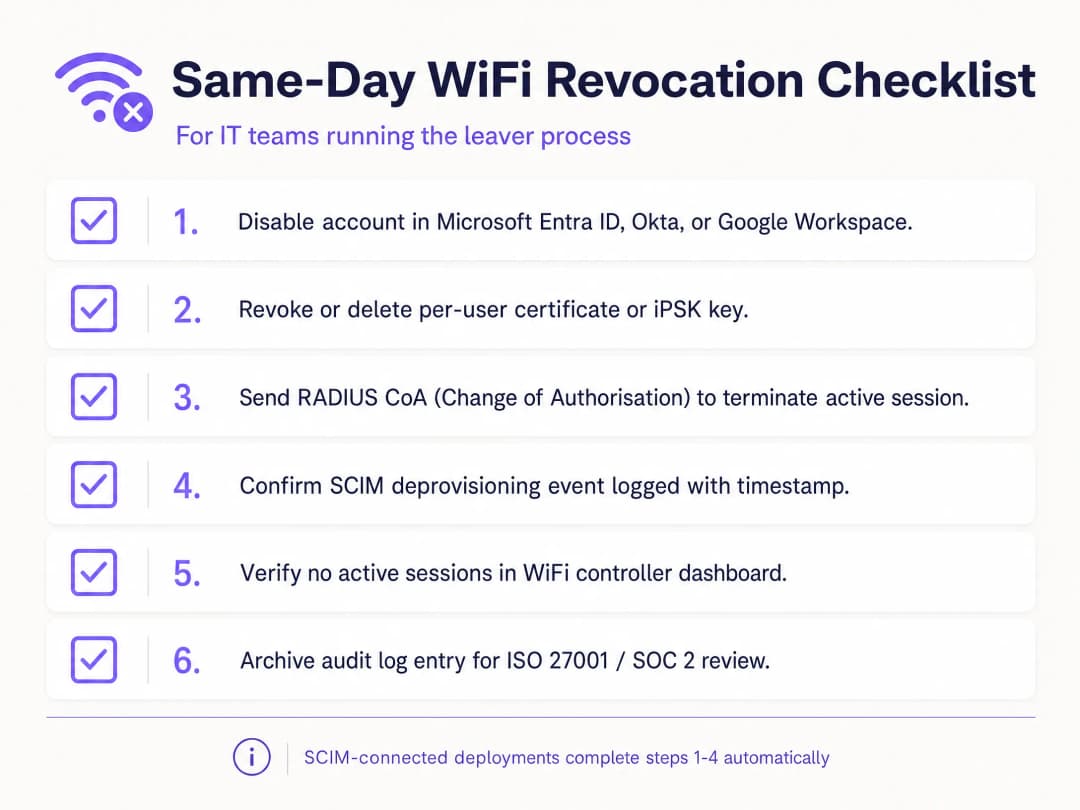
- Automate with SCIM: Manual revocation is prone to human error. Automate this process by linking your WiFi platform directly to your identity provider.
- Implement RADIUS CoA: While revoking credentials prevents new connections, it does not terminate active sessions. Ensure your system sends a Change of Authorization command to disconnect the device immediately.
- Separate guest and employee traffic: Never connect employee devices to a guest WiFi network. Use separate VLANs and SSIDs to maintain segregation.
- Audit logs: Maintain immutable logs of all de-provisioning events. ISO 27001 auditors require proof that access was revoked immediately upon termination of employment.
Troubleshooting and Risk Mitigation
The most common failure point in WiFi revocation is a fragmented process. If IT deactivates the account in the directory but fails to update the standalone RADIUS database, the departing employee retains access. A SCIM integration completely eliminates this risk.
Another risk is certificate caching. If a RADIUS server caches a positive OCSP response for 24 hours, a revoked device can continue to authenticate until the cache expires. Adjust your OCSP cache settings to optimally balance performance and security requirements. For shared devices, such as retail tablets used by multiple shift workers, do not link device authentication to the identity of a single employee. Use service accounts or device-specific certificates to prevent critical hardware from going offline when an individual leaves the company.
ROI and Business Benefits
Transitioning to per-user WiFi revocation delivers measurable business value. It eliminates the IT support hours spent coordinating company-wide password changes. Furthermore, it minimizes the risk of data breaches caused by former employees, protecting the organization from regulatory fines and reputational damage.
Additionally, it provides the clear audit trail required to seamlessly pass ISO 27001 and SOC 2 audits. By automating the joiner-mover-leaver process, IT teams can focus on strategic initiatives rather than wasting time on manual credential management. For further details on securing your network, refer to our guide Enterprise WiFi Security: A Complete Guide for 2026.
Key Definitions
IEEE 802.1X
A network access-control framework that uses a device, network authenticator and back-end authentication service to decide whether network access is allowed.
Use it when Staff WiFi needs to authenticate individuals or managed devices instead of trusting a shared passphrase.
EAP-TLS
An Extensible Authentication Protocol method that uses TLS certificates for mutual authentication and derives keying material during the authentication exchange.
Use it for managed devices when certificate lifecycle and RADIUS validation can support individual revocation.
RADIUS
A protocol and service model commonly used to carry authentication, authorization and accounting decisions between network equipment and an authentication service.
It is the back-end decision point you must understand when testing 802.1X and some iPSK deployments.
Certificate revocation
The early removal of a certificate's authority to authenticate before its scheduled expiration date.
It matters when a leaver's certificate must fail at the next WiFi authentication rather than remain valid until expiration.
iPSK
Identity pre-shared key. A distinct WiFi key assigned to one person, device or accountable group on a shared SSID.
It provides a practical targeted-removal model when EAP-TLS is not suitable for a device.
SCIM
System for Cross-domain Identity Management. An HTTP-based standard for provisioning and managing identity data between systems.
It connects an account-disable event in the identity provider to a WiFi access-status change.
Identity provider
The system that maintains accounts and authenticates or asserts the identity of staff, contractors, and other workforce identities.
It should be the authoritative source of the disable event in your joiner-mover-leaver process.
Active session
A device that has already authenticated and currently has network access.
Decide whether your risk policy requires a separate disconnect action after the credential is revoked.
WPA3 Enterprise
The enterprise branch of WPA3 security, which uses modern security protocols and requires Protected Management Frames for WiFi CERTIFIED WPA3 networks.
It improves WiFi security, but individual offboarding still requires an identity-bound credential model.
VLAN
A logical network segment that separates traffic at Layer 2 or Layer 3 according to network design.
It matters when an employee's WiFi identity is mapped to a staff, contractor, or other network role.
Worked Examples
A 200-room hotel has one Staff WiFi SSID shared by front desk, housekeeping and maintenance. A leaver knows the shared WPA2 passphrase, and the hotel cannot disrupt occupied-room operations with an unplanned rotation.
Create an exception record for the shared passphrase, then migrate managed front-desk devices to 802.1X with EAP-TLS and issue uniquely owned iPSKs for devices that cannot use certificates. For the immediate leaver, rotate the shared passphrase because it remains a common secret. For each subsequent leaver, disable the identity, remove the certificate or iPSK, test a fresh join and retain the event chain. The measured operating result is one targeted credential removal, one denied test and one attributable audit record per offboarding event.
A national retailer runs Staff WiFi across stores, distribution locations and a stadium pop-up operation. HR disables accounts in Microsoft Entra ID, but store teams currently open separate network tickets for leavers.
Map the Entra ID durable identity to the WiFi access record and use SCIM to send the disabled status into the access service. Keep the identity-provider disablement as the authorized trigger. Define an exception path for failed synchronization, name an operational owner and run a controlled disable-and-authenticate test in one store group before rollout. The measurable outcome is a single identity event that produces a WiFi status change and a recorded denied fresh authentication, replacing a local ticket as the normal path.
A conference center needs to remove a contractor's Staff WiFi access after a weekend event while leaving permanent staff and venue devices connected for the Monday opening.
Issue the contractor an iPSK that is tied to a contractor identity record, not a generic event-team password. At the end of the engagement, delete only that iPSK, decide whether to terminate the live session, then test a new join with the removed key. Keep the authorized offboarding request, key deletion and failed test together. The result is no credential change for permanent staff and no reconfiguration of their devices.
Continue reading in this series
The compliance case for passwordless WiFi: HIPAA, PCI, ISO 27001
You will be able to decide whether moving staff networks from a shared password to 802.1X with EAP-TLS closes your audit gaps under PCI DSS 4.0, HIPAA and ISO 27001:2022. You will know which controls it satisfies, which it does not, and what evidence to assemble before fieldwork.
Secure BYOD WiFi: Passpoint certificate onboarding vs xPSK (iPSK)
A comprehensive technical guide for IT teams on securing unmanaged employee and student devices (BYOD) using zero-touch Passpoint EAP-TLS certificates vs vendor-specific xPSK (iPSK/easyPSK, DPSK, PPSK, MPSK).
WPA2 Personal vs Enterprise: what is the difference and which should you use?
This technical reference guide provides a comprehensive comparison of WPA2 Personal and WPA2 Enterprise security protocols within enterprise WiFi environments. It outlines the architectural differences, deployment methodologies, and security implications of each standard to help network architects and IT leaders make informed deployment decisions.
Got questions about your specific setup?
Our team works with venue operators, IT managers, and network engineers across 80,000 venues. Book a 20-minute call and we will show you how others like you solved it.