
Micro-Segmentation Best Practices for Shared WiFi Networks
This technical reference guide provides actionable strategies for implementing micro-segmentation on shared WiFi infrastructure. It details how IT managers and network architects can securely isolate guest, IoT, and staff traffic to mitigate risk, ensure compliance, and optimize network performance.
Video overview
Listen to this guide
View podcast transcript
📚 Part of our core series: Multi-Tenant WiFi Guide →
Executive Summary
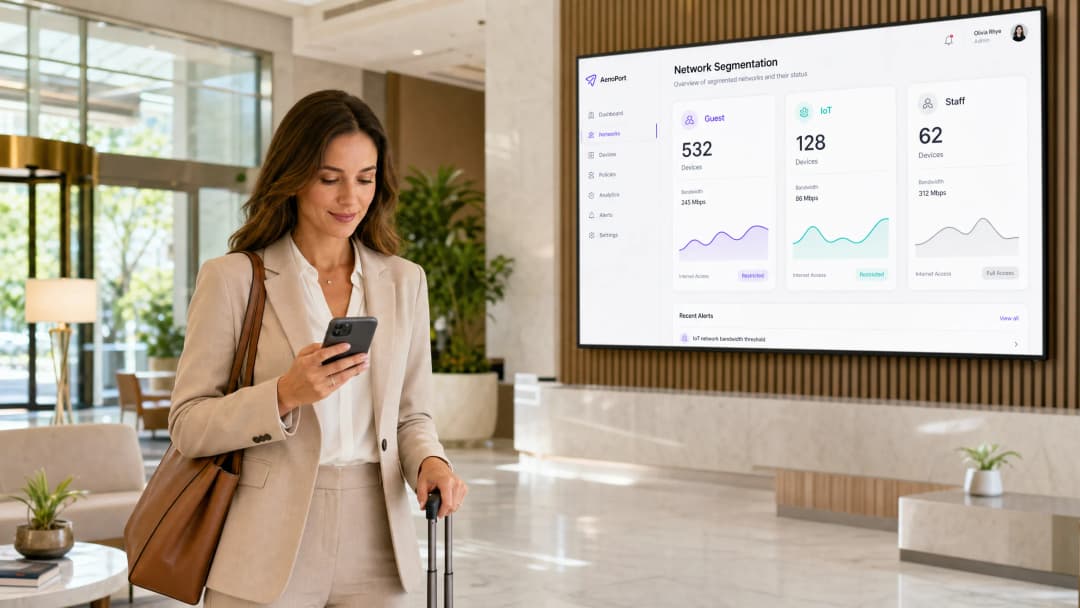
Operating shared WLAN infrastructure without granular micro-segmentation is a major security liability for the modern venue. As the perimeter dissolves, the internal network becomes the primary attack surface. This guide details the architectural principles and deployment methodology required to enforce zero-trust isolation between guest traffic, IoT device fleets and corporate endpoints on a unified physical access layer.
For CTOs and network architects working in hospitality , retail , healthcare and transportation , the mandate is clear: traditional VLANs alone are no longer enough. By implementing dynamic, policy-driven micro-segmentation using IEEE 802.1X and RADIUS, organizations can drastically reduce their PCI-DSS and CCPA/CPRA compliance scope while mitigating the risk of lateral movement from compromised embedded devices.
Listen to the technical briefing podcast for an audio summary:
Technical Deep-Dive
Micro-segmentation on a shared WLAN requires moving beyond static SSID-to-VLAN mappings. It demands dynamic, identity-driven policy enforcement at the edge.
The Authentication Layer: IEEE 802.1X and WPA3
The foundation of effective segmentation is robust authentication. Relying solely on pre-shared keys (PSKs) across multiple SSIDs creates an illusion of separation. True micro-segmentation leverages IEEE 802.1X to authenticate devices or users against a RADIUS back-end, dynamically assigning clients to the appropriate VLAN and applying specific access control lists (ACLs) based on identity.
For modern deployments, WPA3 is indispensable. Guest networks should use WPA3-Personal with Simultaneous Authentication of Equals (SAE) to prevent offline dictionary attacks, while corporate segments must enforce WPA3-Enterprise (in 192-bit mode where hardware allows).
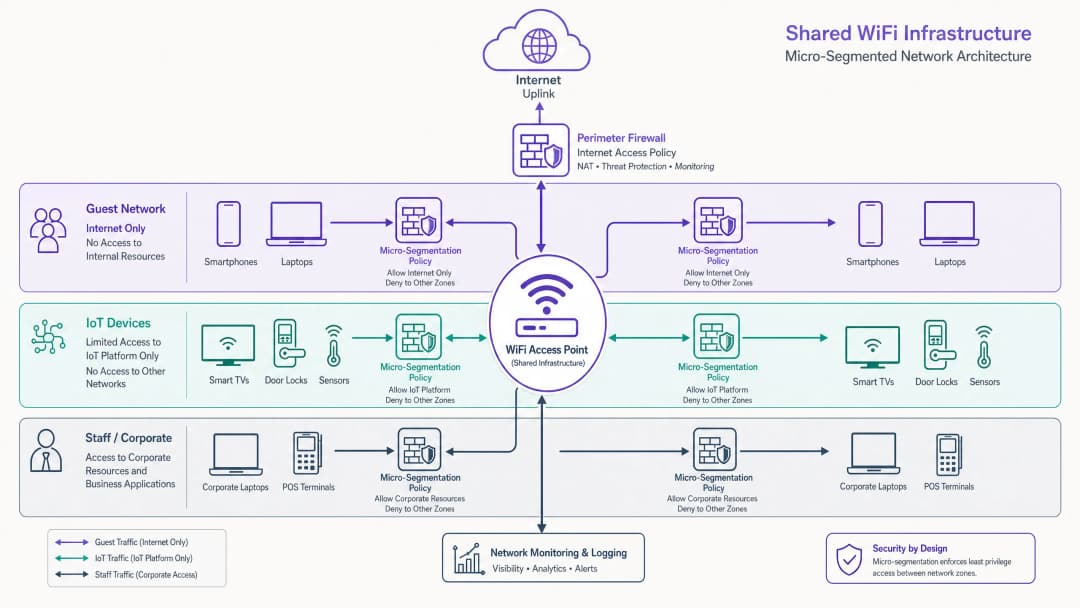
The Three Core Segments
Guest traffic (untrusted): Guests are the highest-volume, lowest-trust segment. They typically authenticate via a captive portal ( Guest WiFi ) using email, SMS or social login. The critical control here is client isolation (Layer 2 isolation) to prevent peer-to-peer communication between guest devices. Traffic must be strictly limited to internet-only, with DNS filtering applied to block malicious domains. For implementation details, see our guide: What Is DNS Filtering? How to Block Harmful Content on Guest WiFi .
IoT devices (semi-trusted, high risk): IoT devices - from smart TVs to HVAC sensors - are notorious for poor security hygiene. They must sit in an isolated segment with egress-only policies. IoT devices should only be able to communicate with their specific management platforms. Implementing enterprise-grade BLE Low Energy tracking or sensor networks requires this strict isolation to prevent lateral movement.
Staff and corporate (trusted): This segment handles sensitive data, including POS transactions and HR systems. Access must require certificate-based mutual authentication (EAP-TLS). Corporate devices should be enrolled via MDM to ensure seamless, secure connectivity.
Got questions about your specific setup?
Our team works with venue operators, IT managers, and network engineers across 80,000 venues. Book a 20-minute call and we will show you how others like you solved it.
Implementation Guide
Deploying micro-segmentation across a distributed venue environment demands a phased, methodical approach.
Phase One: Network Discovery and Audit
You cannot segment what you cannot see. Begin with a comprehensive audit of all connected devices, mapping them to their required levels of network access. Use traffic monitoring (NetFlow/sFlow) to baseline normal communication patterns.
Phase Two: Policy Definition
Define your segmentation matrix. Map each device class to a specific VLAN and define the inter-VLAN routing rules. The default policy must be deny-all, with explicit allow exceptions only where absolutely necessary.
Phase Three: Infrastructure Configuration
Configure your RADIUS server to return the correct vendor-specific attributes (VSAs) for dynamic VLAN assignment. Ensure your access points and upstream switches are correctly configured to tag and trunk these VLANs.
Phase Four: Phased Rollout
Do not attempt a "big bang" migration. Start by isolating the IoT device fleet - this delivers the highest immediate security return with minimal user disruption. Tackle the guest segment next, and finally migrate corporate devices onto the secure 802.1X segment.
Best Practices
- Enforce client isolation: Always enable client isolation on guest SSIDs to prevent lateral attacks between untrusted devices.
- Leverage dynamic VLAN assignment: Move away from static SSID mappings. Use RADIUS to assign VLANs based on user role or device profiling.
- Implement DNS filtering: Apply segment-specific DNS filtering policies to block malware communication and enforce acceptable use policies.
- Optimize for your environment: Tailor your RF design and segmentation strategy to your specific venue type. Read further in Office WiFi: Optimizing Your Modern Office WiFi Network and understand the implications of WiFi Frequencies: A 2026 Guide to WiFi Frequencies .
- Leverage analytics: Use WiFi Analytics to monitor segment utilization and identify anomalous behavior.

Troubleshooting and Risk Mitigation
The most common failure mode in micro-segmentation deployments is misconfigured inter-VLAN routing. If firewall rules inadvertently permit traffic between the IoT and corporate segments, the segmentation is compromised.
Common pitfalls:
- Management interface exposure: Leaving AP or switch management interfaces reachable from the guest or IoT segments. Management traffic must sit on a dedicated, tightly restricted out-of-band VLAN.
- RADIUS failures: A misconfigured RADIUS server dropping 802.1X authentications will cause widespread connectivity failures for corporate devices. Implement redundant RADIUS infrastructure.
- Asymmetric routing: Ensure return traffic paths are correctly defined in firewall policies to prevent dropped connections.
ROI and Business Impact
Implementing robust micro-segmentation delivers measurable business value:
- Reduced compliance scope: By cryptographically isolating POS terminals and payment systems, you can dramatically reduce the scope and cost of PCI DSS audits.
- Risk mitigation: Containing a potential breach within a single segment (for example, a compromised digital signage player) prevents catastrophic lateral movement into core corporate systems.
- Operational efficiency: Dynamic VLAN assignment reduces the administrative overhead of manually configuring switch ports and managing multiple static SSIDs.
Key Definitions
Micro-Segmentation
The practice of dividing a network into granular, isolated zones to enforce strict security policies and contain potential breaches.
Essential for venue operators running diverse device types (Guest, IoT, Staff) on a single physical network infrastructure.
IEEE 802.1X
A standard for port-based network access control that provides an authentication mechanism to devices wishing to attach to a LAN or WLAN.
The engine for dynamic VLAN assignment and robust corporate device onboarding.
Dynamic VLAN Assignment
The process where a RADIUS server instructs the access point or switch which VLAN a client should be placed in upon successful authentication.
Allows a single SSID to securely serve multiple user roles without static configuration.
Client Isolation
A wireless network feature that prevents connected clients from communicating directly with each other.
A mandatory configuration for any guest WiFi network to prevent peer-to-peer attacks and ensure privacy.
MAC Authentication Bypass (MAB)
A technique used to authenticate devices that do not support 802.1X by using their MAC address as the credential.
Commonly used to onboard headless IoT devices like smart TVs or sensors onto a segmented network.
EAP-TLS
Extensible Authentication Protocol-Transport Layer Security; a highly secure authentication method requiring client and server certificates.
The gold standard for authenticating corporate devices and POS systems to prevent credential theft.
WPA3-Enterprise
The latest WiFi security standard for enterprise networks, offering stronger encryption and robust authentication.
Should be mandated for all new deployments to protect sensitive corporate and staff traffic.
Quality of Service (QoS)
Technologies that manage data traffic to reduce packet loss, latency, and jitter on the network.
Used in conjunction with segmentation to ensure critical applications (like POS) are prioritized over guest or IoT traffic.
Worked Examples
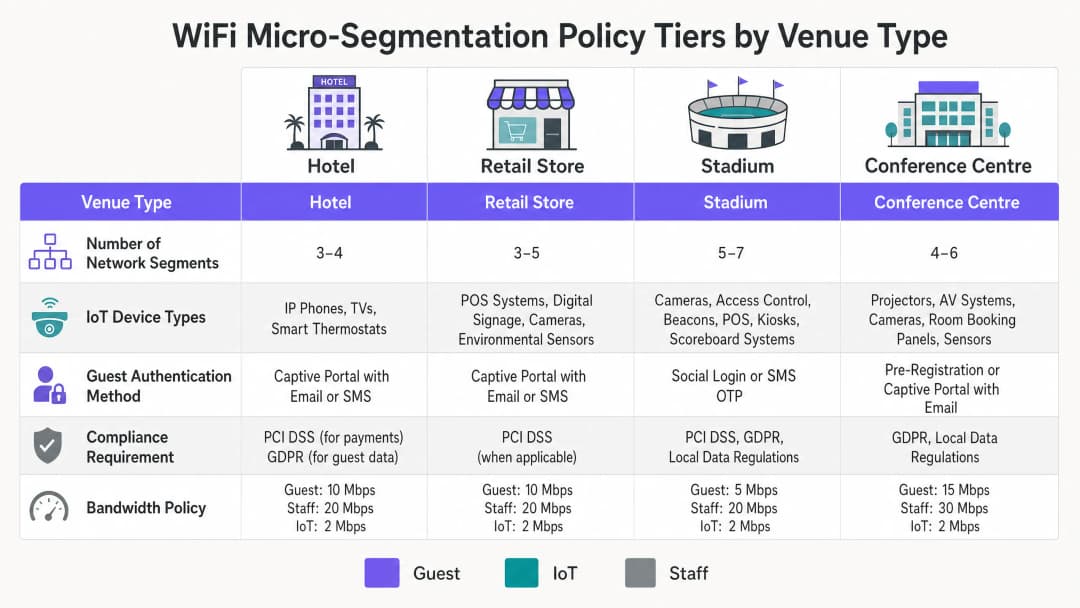
A 200-room hotel needs to deploy new smart TVs in every guest room, upgrade their POS systems in the restaurant, and provide high-speed guest WiFi, all on the existing physical network infrastructure. How should they architect the segmentation?
- Implement three distinct VLANs: Guest (VLAN 10), IoT (VLAN 20), and Corporate/POS (VLAN 30).
- Configure the APs to broadcast two SSIDs: 'Hotel_Guest' (Open with Captive Portal, mapped to VLAN 10) and 'Hotel_Secure' (802.1X).
- Enable Client Isolation on the 'Hotel_Guest' SSID.
- Use MAC-based RADIUS authentication (MAB) for the Smart TVs to dynamically assign them to VLAN 20.
- Use EAP-TLS certificate authentication for the POS terminals to assign them to VLAN 30.
- Configure the perimeter firewall to deny all inter-VLAN traffic, permitting VLAN 10 and 20 internet-only access, and restricting VLAN 30 to the corporate VPN tunnel.
A large retail chain is experiencing network congestion and suspects their digital signage media players (IoT) are saturating the uplink, impacting the performance of their mobile POS tablets.
- Audit the current network configuration to confirm if digital signage and POS tablets share the same segment.
- Implement micro-segmentation by moving the digital signage players to a dedicated IoT VLAN.
- Apply Quality of Service (QoS) policies at the access switch or AP level: rate-limit the IoT VLAN to 5 Mbps per device, and prioritize traffic from the POS VLAN.
- Ensure the IoT VLAN has a strict egress-only firewall policy to the specific content delivery network (CDN) used by the signage vendor.
Practice Questions
Q1. You are deploying a new WiFi network for a large conference center. The venue requires a public guest network, a dedicated network for AV equipment (projectors, digital signage), and a secure network for venue staff. You have been instructed to minimize the number of broadcasted SSIDs. How do you architect the wireless access layer?
Hint: Consider how different device types authenticate and how RADIUS can dynamically assign VLANs.
View model answer
Broadcast two SSIDs. SSID 1 ('Conference_Guest'): Open network with a captive portal for guest access, mapped to a Guest VLAN with client isolation and internet-only firewall rules. SSID 2 ('Conference_Secure'): 802.1X enabled. Venue staff authenticate via EAP-TLS (certificates) and are dynamically assigned to the Staff VLAN. AV equipment authenticates via MAC Authentication Bypass (MAB) against the RADIUS server and is dynamically assigned to the isolated AV/IoT VLAN.
Q2. During a security audit, a penetration tester successfully compromises a smart thermostat in the hotel lobby. From the thermostat, they are able to access the hotel's reservation database server. What architectural failure allowed this, and how should it be remediated?
Hint: Consider inter-VLAN routing policies and the principle of least privilege.
View model answer
The architectural failure is a lack of micro-segmentation and permissive inter-VLAN routing. The IoT device (thermostat) was either placed on the same VLAN as the corporate servers, or the firewall separating the VLANs allowed inbound traffic from the IoT segment to the corporate segment. Remediation: Move all thermostats to a dedicated IoT VLAN. Configure the perimeter firewall with a default-deny policy between VLANs. The IoT VLAN should only be permitted egress traffic to the specific cloud controller required for the thermostats, with no access to internal corporate resources.
Q3. A retail client complains that their guest WiFi is extremely slow during peak hours, and they notice that the POS systems are also experiencing latency. Both are running on the same physical access points. What is the most likely cause, and what are the recommended steps to resolve it?
Hint: Think about bandwidth contention and traffic prioritization.
View model answer
The likely cause is bandwidth contention on the shared uplink, with guest traffic saturating the connection and impacting critical POS traffic. Resolution: Implement Quality of Service (QoS) and rate-limiting. 1. Ensure POS and Guest traffic are on separate VLANs. 2. Apply a rate-limit policy to the Guest VLAN (e.g., 5 Mbps per client) to prevent any single guest from hogging bandwidth. 3. Configure QoS rules on the switch and firewall to prioritize traffic originating from the POS VLAN over the Guest VLAN.
Continue reading in this series
Apartment WiFi solutions: a comprehensive guide for businesses
This guide covers the architecture, deployment, and business case for apartment WiFi solutions in Build to Rent and multi-dwelling unit properties. It explains how Identity Pre-Shared Key (iPSK) technology creates secure, isolated network bubbles for each resident while supporting smart devices and IoT. Property developers, landlords, and BTR operators will find actionable deployment guidance, ROI data, and worked implementation scenarios.
Cox business managed WiFi: a comprehensive guide for businesses
This guide details how property developers and BTR operators can deploy scalable, secure networks using Cox Business managed WiFi. It covers network architecture, vendor-neutral hardware deployment, and the business impact of transitioning connectivity from an operational headache to reliable infrastructure.
Spectrum managed WiFi customer service: a comprehensive guide for businesses
This comprehensive guide details how build-to-rent operators and property developers can deploy spectrum managed WiFi to provide secure, isolated network experiences for residents. It covers the technical architecture of cloud RADIUS, VLAN isolation, and iPSK, alongside practical implementation strategies to reduce support overhead.
Got questions about your specific setup?
Our team works with venue operators, IT managers, and network engineers across 80,000 venues. Book a 20-minute call and we will show you how others like you solved it.