
Office WiFi Setup: How to Build a Reliable Wireless Network
This authoritative guide details the technical architecture and strategic deployment of enterprise-grade office WiFi. It covers capacity-based design, access point placement, secure user segmentation, and how to leverage network infrastructure for business intelligence.
Listen to this guide
View podcast transcript

Executive Summary
For modern enterprises, the wireless network is no longer merely an access medium; it is mission-critical infrastructure. Whether supporting a corporate headquarters, a high-density retail environment, or a sprawling hospitality complex, network architects face the same fundamental challenge: delivering seamless, secure, and high-capacity connectivity.
This guide outlines the technical requirements for designing and deploying a reliable office WiFi network. Moving beyond basic coverage, we address capacity-centric design, the necessity of robust wired backhaul, and the critical importance of network segmentation. We will explore how transitioning from legacy on-premises controllers to cloud-managed architectures enhances scalability, and how integrating platforms like Purple's Guest WiFi transforms a cost center into a source of actionable business intelligence and secure user management.
Technical Deep-Dive
Capacity vs. Coverage Design
Historically, wireless networks were designed for coverage—placing Access Points (APs) to ensure a signal reached every corner of the building. Today, the primary constraint is capacity. A standard open-plan office may see users carrying three to four connected devices (laptops, smartphones, smartwatches).
Modern network design requires planning for device density. This involves deploying Wi-Fi 6 (802.11ax) or Wi-Fi 6E APs to utilize the 5GHz and 6GHz bands effectively. To manage co-channel interference in high-density areas, engineers must carefully tune transmit power downwards and disable lower data rates, forcing clients to connect to closer APs rather than clinging to distant ones.
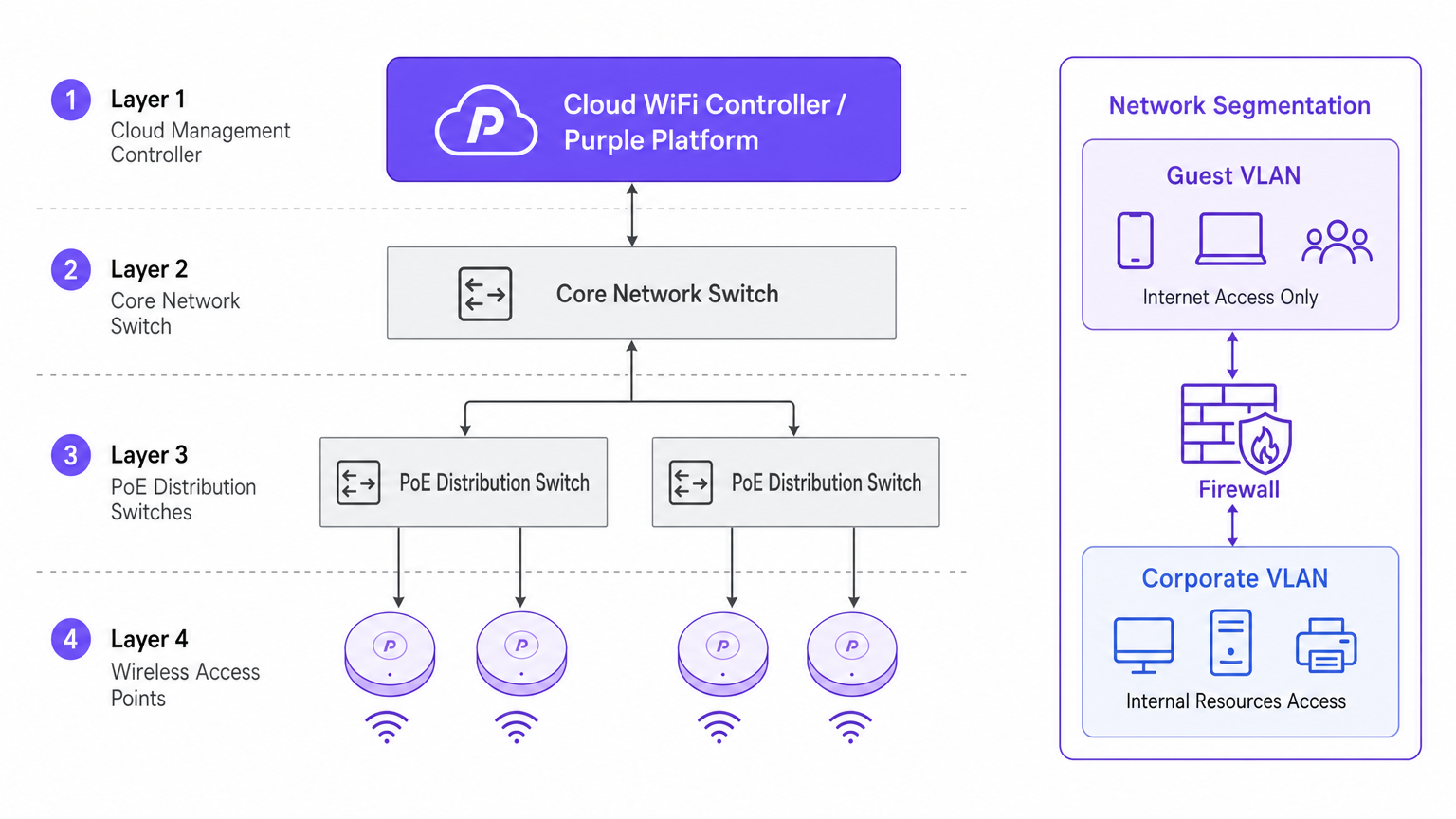
Architecture: Cloud Management vs. On-Premises
The architectural shift towards cloud-managed controllers is driven by scalability and visibility. Unlike traditional physical Wireless LAN Controllers (WLCs) that tunnel all traffic to a central point, cloud architectures distribute the data plane to the edge while centralizing the control plane. This ensures that if the WAN link to the cloud controller drops, local APs continue to switch traffic locally—a vital redundancy feature for enterprise deployments.
Security and Segmentation
Strict network segmentation is non-negotiable. Corporate assets must reside on a secure VLAN, authenticated via 802.1X against a RADIUS server or identity provider.
Conversely, guest and BYOD traffic must be isolated. This is where a captive portal solution becomes critical. By directing unmanaged devices to a separate Guest VLAN that routes directly to the internet, you mitigate lateral movement risks. In environments like healthcare , ensuring secure segmentation is vital for compliance; further details can be found in our guide on WiFi in Hospitals: A Guide to Secure Clinical Networks .
Implementation Guide
1. Active Site Survey
Do not rely solely on predictive modeling. While software tools are excellent for initial budgeting, they cannot account for undocumented structural anomalies (e.g., HVAC ducting or lead-lined walls). An active RF site survey measures actual signal propagation, interference, and attenuation, ensuring accurate AP placement.
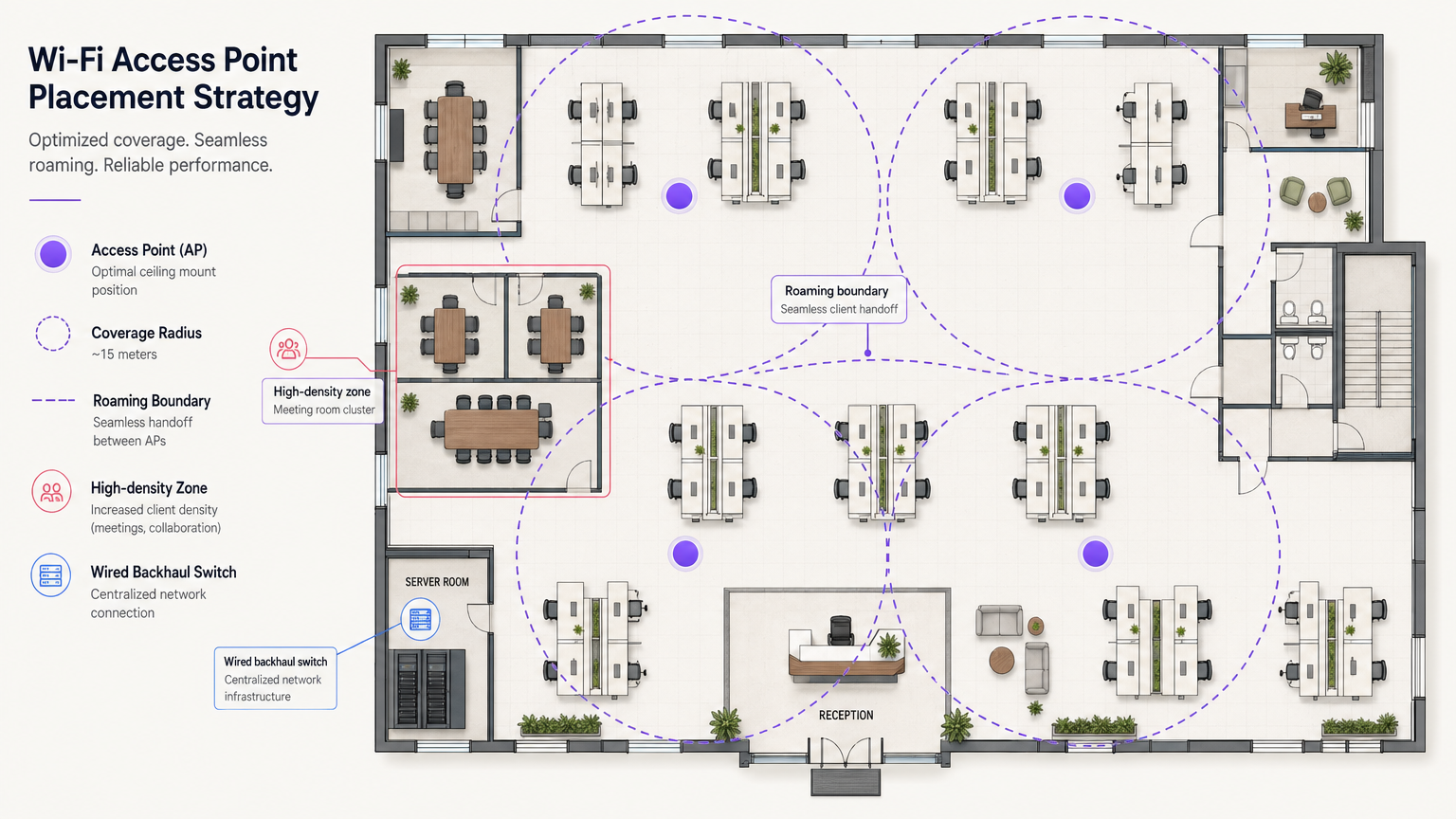
2. Access Point Placement
Avoid the "hallway deployment" anti-pattern. Placing APs in corridors forces signals to penetrate walls at oblique angles to reach users inside offices, causing significant signal degradation. APs must be placed in the rooms where users actually work. Furthermore, stagger AP placement across floors to minimize vertical co-channel interference.
3. Upgrading Wired Backhaul
Deploying high-performance Wi-Fi 6E APs is futile if the underlying wired infrastructure is a bottleneck. Ensure edge switches support Multi-Gigabit Ethernet (2.5Gbps or 5Gbps) and have sufficient Power over Ethernet (PoE++ / 802.3bt) budgets to power modern, radio-dense access points.
Best Practices
- Client Roaming Optimization: Devices, not APs, decide when to roam. Mitigate "sticky clients" by adjusting minimum basic rates and implementing standards like 802.11k/v/r to assist clients in making intelligent roaming decisions.
- IoT Network Strategy: Do not disable the 2.4GHz band entirely. Legacy and headless IoT devices still require it. Create a dedicated SSID for IoT on 2.4GHz and utilize Identity PSK (iPSK) to securely segment these devices without the complexity of 802.1X.
- Leverage OpenRoaming: For frictionless, secure guest access, consider implementing OpenRoaming. Purple provides identity provider services under the Connect license, allowing seamless onboarding for users.
Troubleshooting & Risk Mitigation
The Sticky Client Problem
Symptom: A user walks from the lobby to a meeting room, but their connection drops or slows to a crawl despite being directly under a new AP. Root Cause: The client device is holding onto the weak signal from the lobby AP. Mitigation: Reduce AP transmit power to shrink cell sizes, and disable legacy low data rates (e.g., 1, 2, 5.5, 11 Mbps). This forces the client to drop the weak connection and associate with the closer, stronger AP.
Co-Channel Interference (CCI)
Symptom: High channel utilization and poor throughput despite strong signal strength. Root Cause: Too many APs on the same channel "hearing" each other, forcing them to wait for clear airtime (CSMA/CA). Mitigation: Implement dynamic channel assignment, utilize the wider spectrum available in 5GHz and 6GHz, and physically space APs appropriately.
ROI & Business Impact
Investing in enterprise-grade WiFi infrastructure yields measurable returns beyond basic connectivity. By integrating WiFi Analytics , the network becomes a sensor. In a transport hub or retail space, this infrastructure provides actionable data on footfall, dwell times, and user behavior.
Furthermore, a reliable network reduces IT support tickets related to connectivity issues, lowering operational expenditure (OpEx). When deploying advanced features like location services, you can review our Indoor Positioning System: UWB, BLE, & WiFi Guide to understand how to monetize the physical space.
Key Definitions
802.1X
An IEEE standard for port-based network access control (PNAC). It provides an authentication mechanism to devices wishing to attach to a LAN or WLAN.
Used to secure corporate networks by ensuring only authenticated devices and users can access internal resources.
Co-Channel Interference (CCI)
Occurs when two or more access points operate on the same frequency channel and can 'hear' each other, causing them to share airtime and reduce overall throughput.
A critical issue in high-density deployments that must be mitigated through careful channel planning and transmit power tuning.
VLAN (Virtual Local Area Network)
A logical grouping of devices on the same physical network infrastructure, isolating traffic at Layer 2.
Essential for security, ensuring guest traffic cannot interact with corporate servers or payment systems.
Captive Portal
A web page that the user of a public-access network is obliged to view and interact with before access is granted.
Used by platforms like Purple to capture user data, enforce terms of service, and provide secure onboarding for guests.
Wired Backhaul
The physical wired network (switches, cabling) that connects wireless access points back to the core network and the internet.
A common bottleneck; high-speed Wi-Fi 6/6E APs require multi-gigabit wired backhaul to perform optimally.
PoE (Power over Ethernet)
A technology that allows network cables to carry electrical power to devices like access points and IP cameras.
Crucial for AP deployment; modern APs often require higher power standards (PoE+ or PoE++) to operate all radios.
Band Steering
A technique used by wireless networks to encourage dual-band capable clients to connect to the less congested 5GHz or 6GHz bands rather than 2.4GHz.
Improves overall network performance by clearing congestion on the legacy 2.4GHz spectrum.
OpenRoaming
A federation of networks allowing users to automatically and securely connect to participating Wi-Fi networks without manual authentication.
Provides a frictionless cellular-like experience for users while maintaining enterprise-grade security.
Worked Examples
A 200-room corporate hotel needs to upgrade its wireless network to support conference attendees and internal operations. The current network suffers from severe congestion during keynote speeches in the main hall.
- Redesign for Density: Shift from a coverage model to a high-density capacity model in the main hall. Deploy directional patch antennas rather than omnidirectional APs to create smaller, focused coverage cells.
- Spectrum Management: Disable 2.4GHz in the main hall entirely to force all client devices onto the cleaner 5GHz and 6GHz bands.
- Network Segmentation: Implement strict VLANs. Corporate operational devices use 802.1X. Guest traffic is routed through Purple's captive portal on an isolated VLAN, ensuring PCI DSS compliance for the hotel's payment terminals.
A public-sector organization is moving to a new multi-floor open-plan office and needs to support a BYOD policy alongside corporate-issued laptops.
- Authentication Strategy: Implement 802.1X with certificate-based authentication (EAP-TLS) for corporate laptops, ensuring they connect automatically to the secure internal VLAN.
- BYOD Onboarding: Utilize a captive portal for BYOD devices, requiring users to authenticate with their corporate credentials (e.g., via SAML integration with Azure AD) before being placed on a restricted internet-only VLAN.
- Infrastructure: Deploy Wi-Fi 6 APs in a staggered formation across floors to prevent vertical interference, backed by multi-gigabit PoE+ switches.
Practice Questions
Q1. You are deploying APs in a long, narrow corporate corridor flanked by private offices. Where should the APs be mounted to ensure optimal performance for the users inside the offices?
Hint: Consider the angle at which RF signals must penetrate the walls if APs are placed in the corridor.
View model answer
APs should be placed inside the offices themselves, not in the corridor. Placing them in the hallway forces the signal to penetrate walls at oblique angles, causing significant attenuation. Designing for capacity requires placing the APs where the users actually are.
Q2. A client complains that their laptop maintains a poor connection to an AP on the first floor even after they have moved to the boardroom on the second floor, which has its own AP. How do you resolve this?
Hint: The client device is making the roaming decision based on the signal it receives.
View model answer
This is a 'sticky client' issue. You must tune the RF environment to encourage roaming. This involves reducing the transmit power of the APs to shrink cell sizes and disabling legacy minimum basic rates (e.g., 1, 2, 5.5 Mbps). This forces the client to drop the weak connection sooner and associate with the closer, stronger AP in the boardroom.
Q3. Your organization needs to deploy hundreds of headless IoT devices (e.g., smart thermostats, sensors) that do not support 802.1X authentication. How do you secure them on the wireless network?
Hint: Consider how to uniquely identify devices without certificates while keeping them off the corporate VLAN.
View model answer
Create a dedicated SSID for IoT devices, typically on the 2.4GHz band. Implement Identity PSK (iPSK) or Multiple Pre-Shared Keys (MPSK) to assign a unique password to each device or device group. Tie these credentials to a specific, isolated IoT VLAN that has no access to the corporate network, restricting lateral movement.
Continue reading in this series
Uu PPSK pdf: comparing features and deployment models
This technical reference guide compares Private Pre-Shared Key (PPSK) WiFi architecture against traditional 802.1X and standard PSK deployments. It provides network architects and IT managers with vendor-neutral implementation strategies for multi-tenant residential, IoT, and BTR environments.
Uu PPSK pdf: comparing features and deployment models
This technical reference guide compares Private Pre-Shared Key (PPSK) WiFi architecture against traditional 802.1X and standard PSK deployments. It provides network architects and IT managers with vendor-neutral implementation strategies for multi-tenant residential, IoT, and BTR environments.
Uu PPSK 2023: comparing features and deployment models
This technical reference guide compares Unique per-User Private Pre-Shared Key (UU PPSK) WiFi architecture against traditional shared PSK and 802.1X deployments, with a specific focus on the 2023 landscape of vendor implementations and platform capabilities. It provides property developers, BTR operators, and MDU landlords with actionable deployment strategies, VLAN architecture guidance, and automated lifecycle management workflows. The guide covers three deployment models, real-world case studies, and the compliance implications of each authentication approach.