

Configuração de WiFi para Escritórios: Como Construir uma Rede Sem Fios Fiável
Este guia autorizado detalha a arquitetura técnica e a implementação estratégica de WiFi de nível empresarial para escritórios. Abrange o design baseado na capacidade, o posicionamento de pontos de acesso, a segmentação segura de utilizadores e como aproveitar a infraestrutura de rede para inteligência de negócios.
🎧 Ouça este Guia
Ver Transcrição

Resumo Executivo
Para as empresas modernas, a rede sem fios já não é meramente um meio de acesso; é uma infraestrutura de missão crítica. Quer esteja a suportar uma sede corporativa, um ambiente de retalho de alta densidade ou um complexo de hospitalidade em expansão, os arquitetos de rede enfrentam o mesmo desafio fundamental: fornecer conectividade contínua, segura e de alta capacidade.
Este guia descreve os requisitos técnicos para projetar e implementar uma rede WiFi de escritório fiável. Indo além da cobertura básica, abordamos o design centrado na capacidade, a necessidade de um backhaul com fios robusto e a importância crítica da segmentação da rede. Exploraremos como a transição de controladores legados no local para arquiteturas geridas na cloud melhora a escalabilidade, e como a integração de plataformas como o Guest WiFi da Purple transforma um centro de custos numa fonte de inteligência de negócios acionável e gestão segura de utilizadores.
Análise Técnica Detalhada
Design de Capacidade vs. Cobertura
Historicamente, as redes sem fios eram projetadas para cobertura — colocando Access Points (APs) para garantir que um sinal chegasse a todos os cantos do edifício. Hoje, a principal restrição é a capacidade. Um escritório padrão de plano aberto pode ter utilizadores a transportar três a quatro dispositivos conectados (portáteis, smartphones, smartwatches).
O design de rede moderno exige planeamento para a densidade de dispositivos. Isto envolve a implementação de APs Wi-Fi 6 (802.11ax) ou Wi-Fi 6E para utilizar as bandas de 5GHz e 6GHz de forma eficaz. Para gerir a interferência de co-canal em áreas de alta densidade, os engenheiros devem ajustar cuidadosamente a potência de transmissão para baixo e desativar taxas de dados mais baixas, forçando os clientes a conectar-se a APs mais próximos em vez de se agarrarem a APs distantes.
Arquitetura: Gestão na Cloud vs. No Local
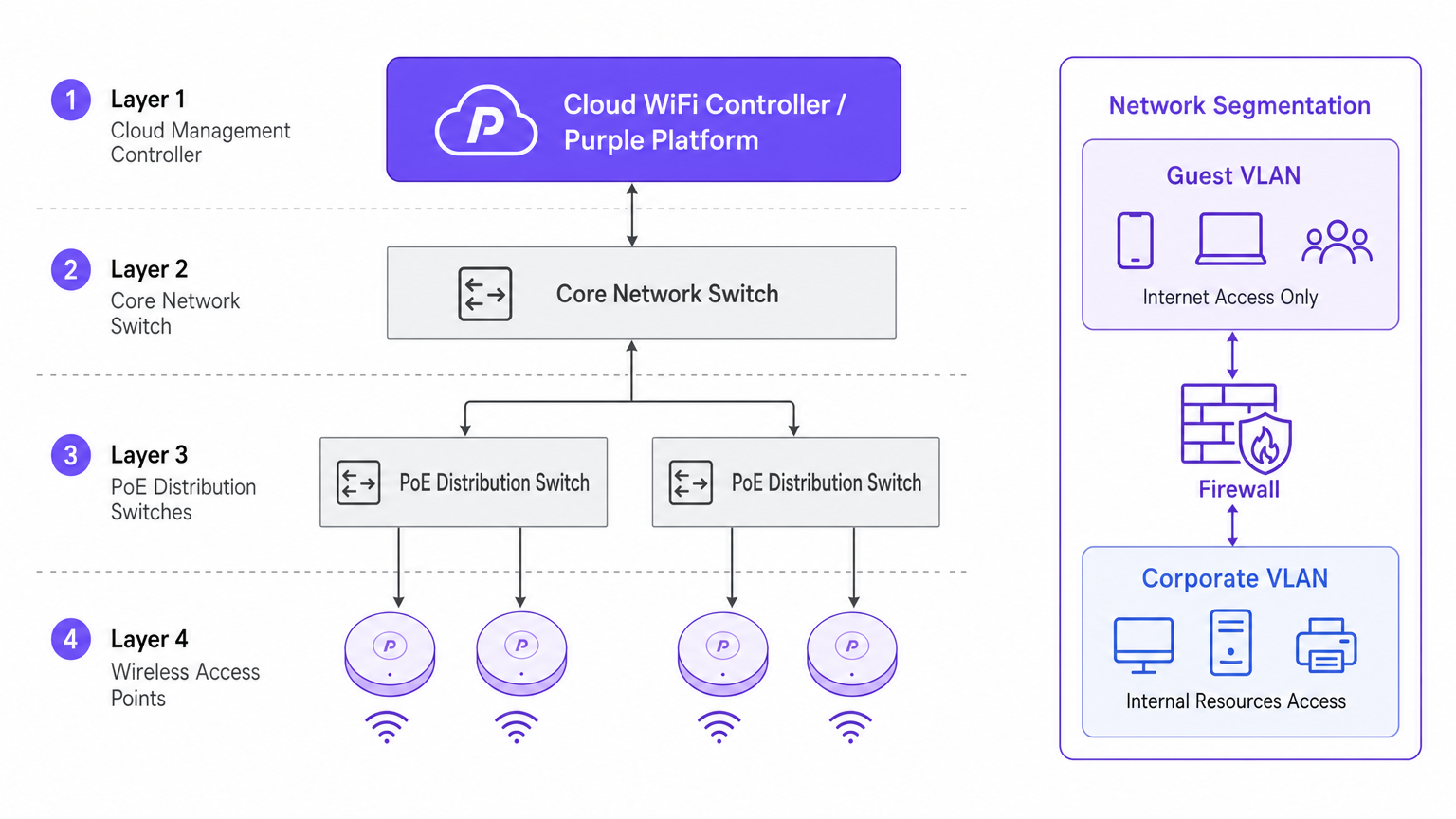
A mudança arquitetónica para controladores geridos na cloud é impulsionada pela escalabilidade e visibilidade. Ao contrário dos Wireless LAN Controllers (WLCs) físicos tradicionais que encaminham todo o tráfego para um ponto central, as arquiteturas da cloud distribuem o plano de dados para a extremidade enquanto centralizam o plano de controlo. Isto garante que, se o link WAN para o controlador da cloud cair, os APs locais continuam a comutar o tráfego localmente — uma característica de redundância vital para implementações empresariais.
Segurança e Segmentação
A segmentação rigorosa da rede é inegociável. Os ativos corporativos devem residir numa VLAN segura, autenticados via 802.1X contra um servidor RADIUS ou provedor de identidade.
Por outro lado, o tráfego de convidados e BYOD deve ser isolado. É aqui que uma solução de captive portal se torna crítica. Ao direcionar dispositivos não geridos para uma VLAN de Convidado separada que encaminha diretamente para a internet, mitiga os riscos de movimento lateral. Em ambientes como saúde , garantir uma segmentação segura é vital para a conformidade; mais detalhes podem ser encontrados no nosso guia sobre WiFi em Hospitais: Um Guia para Redes Clínicas Seguras .
Guia de Implementação
1. Levantamento Ativo do Local
Não confie apenas na modelagem preditiva. Embora as ferramentas de software sejam excelentes para o orçamento inicial, não podem ter em conta anomalias estruturais não documentadas (por exemplo, condutas de HVAC ou paredes revestidas a chumbo). Um levantamento ativo do local de RF mede a propagação real do sinal, interferência e atenuação, garantindo um posicionamento preciso do AP.
2. Posicionamento do Access Point
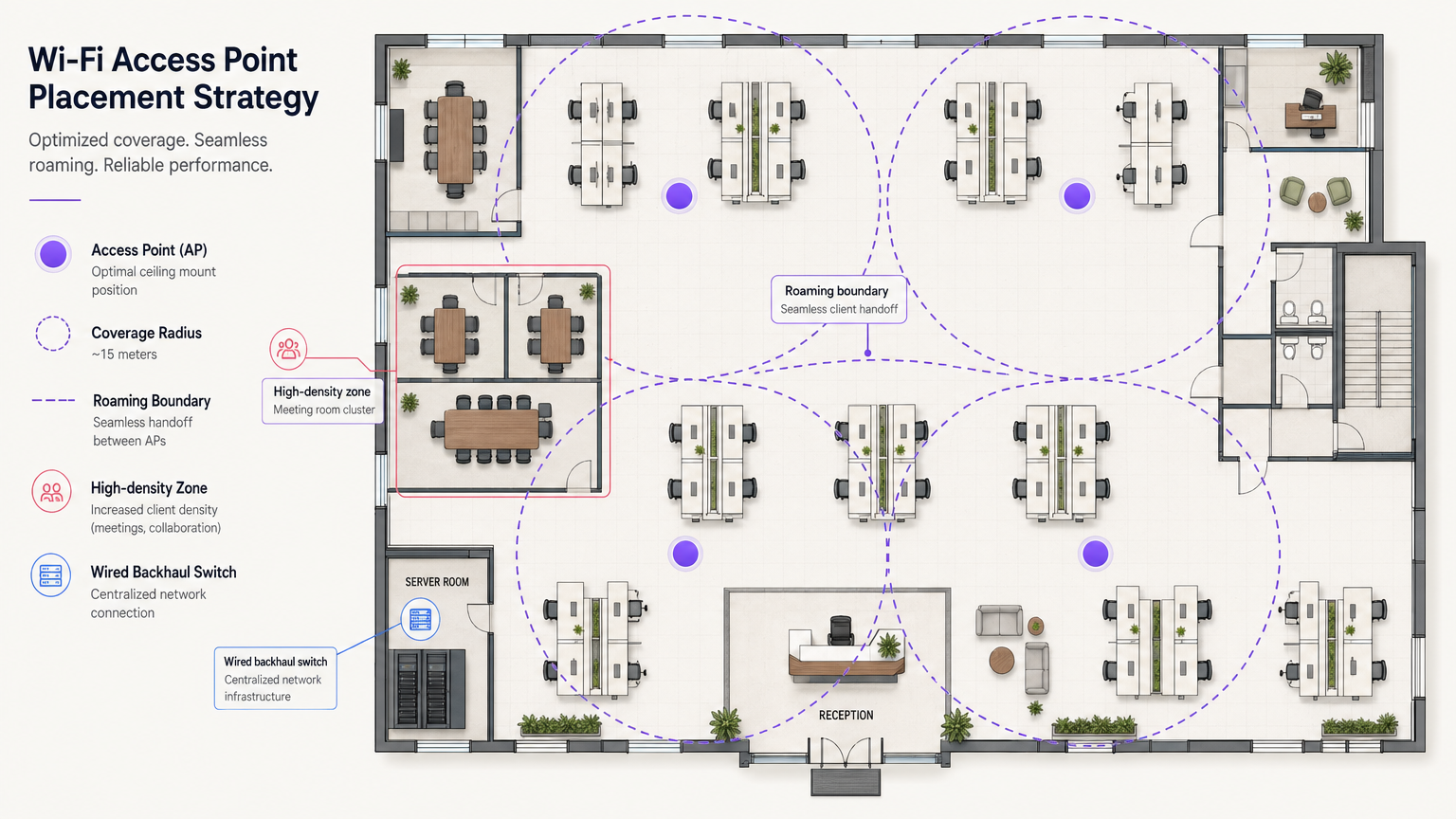
Evite o anti-padrão de "implementação em corredor". Colocar APs em corredores força os sinais a penetrar paredes em ângulos oblíquos para alcançar os utilizadores dentro dos escritórios, causando uma degradação significativa do sinal. Os APs devem ser colocados nas salas onde os utilizadores realmente trabalham. Além disso, escalone o posicionamento dos APs entre os andares para minimizar a interferência vertical de co-canal.
3. Atualização do Backhaul com Fios
A implementação de APs Wi-Fi 6E de alto desempenho é inútil se a infraestrutura com fios subjacente for um gargalo. Certifique-se de que os switches de extremidade suportam Multi-Gigabit Ethernet (2.5Gbps ou 5Gbps) e têm orçamentos de Power over Ethernet (PoE++ / 802.3bt) suficientes para alimentar pontos de acesso modernos e densos em rádio.
Melhores Práticas
- Otimização de Roaming de Clientes: Os dispositivos, não os APs, decidem quando fazer roaming. Mitigue os "clientes pegajosos" ajustando as taxas básicas mínimas e implementando padrões como 802.11k/v/r para ajudar os clientes a tomar decisões inteligentes de roaming.
- Estratégia de Rede IoT: Não desative a banda de 2.4GHz completamente. Dispositivos IoT legados e sem interface ainda a exigem. Crie um SSID dedicado para IoT em 2.4GHz e utilize Identity PSK (iPSK) para segmentar estes dispositivos de forma segura sem a complexidade do 802.1X.
- Aproveite o OpenRoaming: Para acesso de convidados seguro e sem atritos, considere implementar o OpenRoaming. A Purple fornece serviços de provedor de identidade sob a licença Connect, permitindo um onboarding contínuo para os utilizadores.
Resolução de Problemas e Mitigação de Riscos
O Problema do Cliente Pegajoso
Sintoma: Um utilizador caminha do lobby para uma sala de reuniões, mas a sua ligação cai ou fica extremamente lenta, apesar de estar diretamente sob um novo AP. Causa Raiz: O dispositivo cliente está a agarrar-se ao sinal fraco do AP do lobby. Mitigação: Reduza a potência de transmissão do AP para diminuir o tamanho das células e desative as taxas de dados baixas legadas (por exemplo, 1, 2, 5.5, 11 Mbps). Isto força o cliente a largar a ligação fraca e a associar-se ao AP mais próximo e mais forte.
Interferência de Co-Canal (CCI)
Sintoma: Alta utilização do canal e baixo throughput apesar da forte intensidade do sinal. Causa Raiz: Demasiados APs no mesmo canal a "ouvirem-se" uns aos outros, forçando-os a esperar por tempo de antena livre (CSMA/CA). Mitigação: Implementar atribuição dinâmica de canais, utilizar o espectro mais amplo disponível em 5GHz e 6GHz, e espaçar fisicamente os APs de forma adequada.
ROI e Impacto no Negócio
Investir em infraestrutura WiFi de nível empresarial gera retornos mensuráveis para além da conectividade básica. Ao integrar WiFi Analytics , a rede torna-se um sensor. Num centro de transportes ou espaço de retalho, esta infraestrutura fornece dados acionáveis sobre o fluxo de pessoas, tempos de permanência e comportamento do utilizador.
Além disso, uma rede fiável reduz os tickets de suporte de TI relacionados com problemas de conectividade, diminuindo as despesas operacionais (OpEx). Ao implementar funcionalidades avançadas como serviços de localização, pode consultar o nosso Sistema de Posicionamento Interior: UWB, BLE, e Guia WiFi para compreender como monetizar o espaço físico.
Termos-Chave e Definições
802.1X
An IEEE standard for port-based network access control (PNAC). It provides an authentication mechanism to devices wishing to attach to a LAN or WLAN.
Used to secure corporate networks by ensuring only authenticated devices and users can access internal resources.
Co-Channel Interference (CCI)
Occurs when two or more access points operate on the same frequency channel and can 'hear' each other, causing them to share airtime and reduce overall throughput.
A critical issue in high-density deployments that must be mitigated through careful channel planning and transmit power tuning.
VLAN (Virtual Local Area Network)
A logical grouping of devices on the same physical network infrastructure, isolating traffic at Layer 2.
Essential for security, ensuring guest traffic cannot interact with corporate servers or payment systems.
Captive Portal
A web page that the user of a public-access network is obliged to view and interact with before access is granted.
Used by platforms like Purple to capture user data, enforce terms of service, and provide secure onboarding for guests.
Wired Backhaul
The physical wired network (switches, cabling) that connects wireless access points back to the core network and the internet.
A common bottleneck; high-speed Wi-Fi 6/6E APs require multi-gigabit wired backhaul to perform optimally.
PoE (Power over Ethernet)
A technology that allows network cables to carry electrical power to devices like access points and IP cameras.
Crucial for AP deployment; modern APs often require higher power standards (PoE+ or PoE++) to operate all radios.
Band Steering
A technique used by wireless networks to encourage dual-band capable clients to connect to the less congested 5GHz or 6GHz bands rather than 2.4GHz.
Improves overall network performance by clearing congestion on the legacy 2.4GHz spectrum.
OpenRoaming
A federation of networks allowing users to automatically and securely connect to participating Wi-Fi networks without manual authentication.
Provides a frictionless cellular-like experience for users while maintaining enterprise-grade security.
Estudos de Caso
A 200-room corporate hotel needs to upgrade its wireless network to support conference attendees and internal operations. The current network suffers from severe congestion during keynote speeches in the main hall.
- Redesign for Density: Shift from a coverage model to a high-density capacity model in the main hall. Deploy directional patch antennas rather than omnidirectional APs to create smaller, focused coverage cells.
- Spectrum Management: Disable 2.4GHz in the main hall entirely to force all client devices onto the cleaner 5GHz and 6GHz bands.
- Network Segmentation: Implement strict VLANs. Corporate operational devices use 802.1X. Guest traffic is routed through Purple's captive portal on an isolated VLAN, ensuring PCI DSS compliance for the hotel's payment terminals.
A public-sector organization is moving to a new multi-floor open-plan office and needs to support a BYOD policy alongside corporate-issued laptops.
- Authentication Strategy: Implement 802.1X with certificate-based authentication (EAP-TLS) for corporate laptops, ensuring they connect automatically to the secure internal VLAN.
- BYOD Onboarding: Utilize a captive portal for BYOD devices, requiring users to authenticate with their corporate credentials (e.g., via SAML integration with Azure AD) before being placed on a restricted internet-only VLAN.
- Infrastructure: Deploy Wi-Fi 6 APs in a staggered formation across floors to prevent vertical interference, backed by multi-gigabit PoE+ switches.
Análise de Cenários
Q1. You are deploying APs in a long, narrow corporate corridor flanked by private offices. Where should the APs be mounted to ensure optimal performance for the users inside the offices?
💡 Dica:Consider the angle at which RF signals must penetrate the walls if APs are placed in the corridor.
Mostrar Abordagem Recomendada
APs should be placed inside the offices themselves, not in the corridor. Placing them in the hallway forces the signal to penetrate walls at oblique angles, causing significant attenuation. Designing for capacity requires placing the APs where the users actually are.
Q2. A client complains that their laptop maintains a poor connection to an AP on the first floor even after they have moved to the boardroom on the second floor, which has its own AP. How do you resolve this?
💡 Dica:The client device is making the roaming decision based on the signal it receives.
Mostrar Abordagem Recomendada
This is a 'sticky client' issue. You must tune the RF environment to encourage roaming. This involves reducing the transmit power of the APs to shrink cell sizes and disabling legacy minimum basic rates (e.g., 1, 2, 5.5 Mbps). This forces the client to drop the weak connection sooner and associate with the closer, stronger AP in the boardroom.
Q3. Your organization needs to deploy hundreds of headless IoT devices (e.g., smart thermostats, sensors) that do not support 802.1X authentication. How do you secure them on the wireless network?
💡 Dica:Consider how to uniquely identify devices without certificates while keeping them off the corporate VLAN.
Mostrar Abordagem Recomendada
Create a dedicated SSID for IoT devices, typically on the 2.4GHz band. Implement Identity PSK (iPSK) or Multiple Pre-Shared Keys (MPSK) to assign a unique password to each device or device group. Tie these credentials to a specific, isolated IoT VLAN that has no access to the corporate network, restricting lateral movement.




