

Configurazione WiFi per Ufficio: Come Costruire una Rete Wireless Affidabile
Questa guida autorevole descrive in dettaglio l'architettura tecnica e l'implementazione strategica del WiFi per ufficio di livello enterprise. Copre la progettazione basata sulla capacità, il posizionamento degli access point, la segmentazione sicura degli utenti e come sfruttare l'infrastruttura di rete per la business intelligence.
🎧 Ascolta questa guida
Visualizza trascrizione

Riepilogo Esecutivo
Per le aziende moderne, la rete wireless non è più solo un mezzo di accesso; è un'infrastruttura mission-critical. Sia che supporti una sede aziendale, un ambiente retail ad alta densità o un vasto complesso hospitality , gli architetti di rete affrontano la stessa sfida fondamentale: fornire connettività senza interruzioni, sicura e ad alta capacità.
Questa guida delinea i requisiti tecnici per la progettazione e l'implementazione di una rete WiFi per ufficio affidabile. Andando oltre la copertura di base, affrontiamo la progettazione incentrata sulla capacità, la necessità di un robusto backhaul cablato e l'importanza critica della segmentazione della rete. Esploreremo come il passaggio da controller on-premises legacy ad architetture gestite in cloud migliori la scalabilità e come l'integrazione di piattaforme come Guest WiFi di Purple trasformi un centro di costo in una fonte di business intelligence azionabile e gestione sicura degli utenti.
Approfondimento Tecnico
Progettazione basata su Capacità vs. Copertura
Storicamente, le reti wireless erano progettate per la copertura, posizionando gli Access Point (AP) per garantire che un segnale raggiungesse ogni angolo dell'edificio. Oggi, il vincolo principale è la capacità. Un ufficio open-space standard può vedere gli utenti portare tre o quattro dispositivi connessi (laptop, smartphone, smartwatch).
La progettazione di rete moderna richiede la pianificazione della densità dei dispositivi. Ciò implica l'implementazione di AP Wi-Fi 6 (802.11ax) o Wi-Fi 6E per utilizzare efficacemente le bande a 5GHz e 6GHz. Per gestire l'interferenza co-canale in aree ad alta densità, gli ingegneri devono regolare attentamente la potenza di trasmissione verso il basso e disabilitare le velocità di trasmissione dati inferiori, costringendo i client a connettersi ad AP più vicini anziché aggrapparsi a quelli distanti.
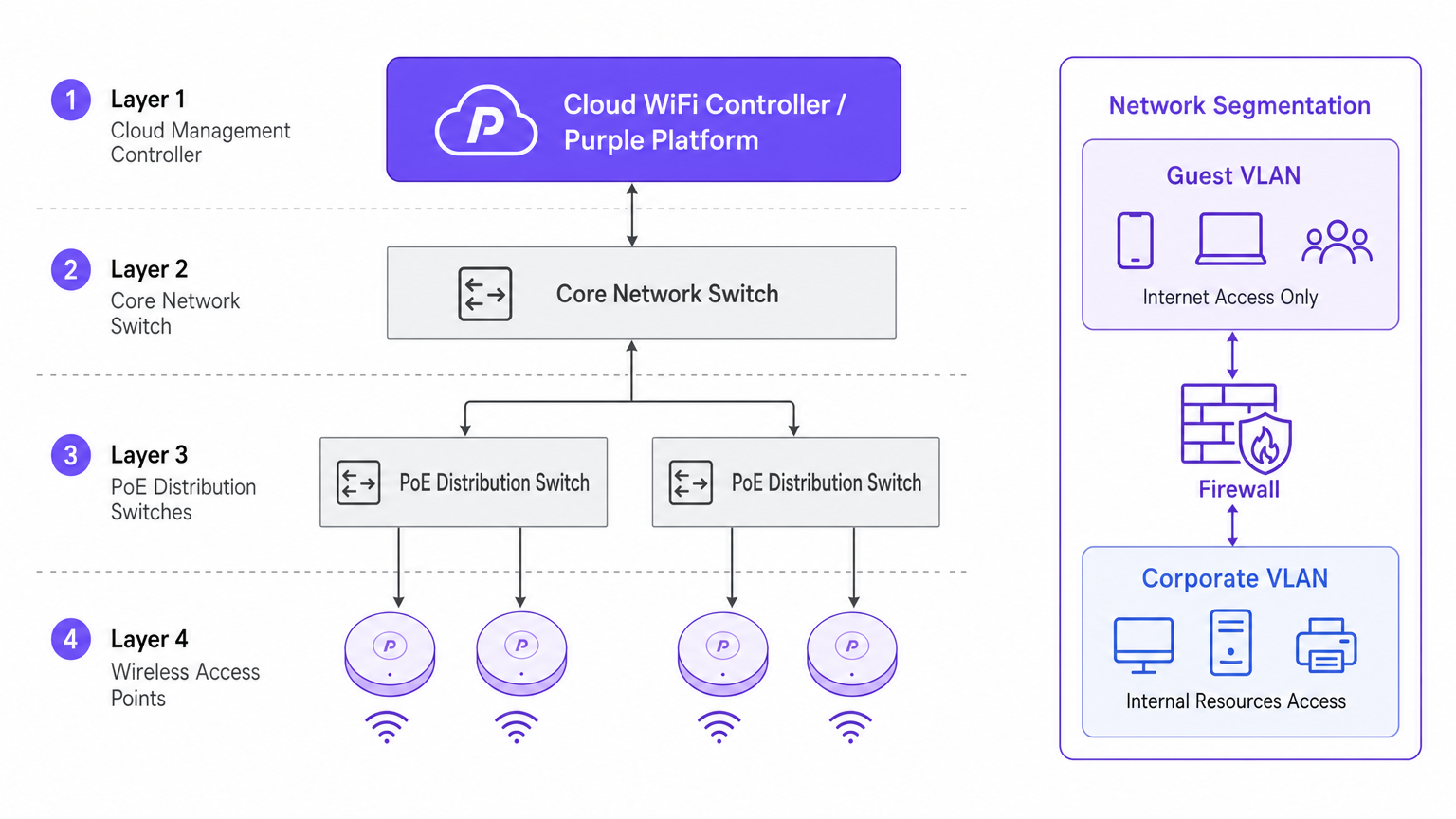
Architettura: Gestione Cloud vs. On-Premises
Il cambiamento architetturale verso i controller gestiti in cloud è guidato dalla scalabilità e dalla visibilità. A differenza dei tradizionali Wireless LAN Controller (WLC) fisici che incanalano tutto il traffico verso un punto centrale, le architetture cloud distribuiscono il piano dati all'edge centralizzando il piano di controllo. Ciò garantisce che se il collegamento WAN al controller cloud si interrompe, gli AP locali continuano a commutare il traffico localmente, una caratteristica di ridondanza vitale per le implementazioni aziendali.
Sicurezza e Segmentazione
Una rigorosa segmentazione della rete è non negoziabile. Le risorse aziendali devono risiedere su una VLAN sicura, autenticate tramite 802.1X contro un server RADIUS o un provider di identità.
Al contrario, il traffico guest e BYOD deve essere isolato. È qui che una soluzione di captive portal diventa critica. Dirigendo i dispositivi non gestiti a una VLAN Guest separata che instrada direttamente a internet, si mitigano i rischi di movimento laterale. In ambienti come il settore sanitario , garantire una segmentazione sicura è vitale per la conformità; ulteriori dettagli possono essere trovati nella nostra guida su WiFi negli Ospedali: Una Guida alle Reti Cliniche Sicure .
Guida all'Implementazione
1. Sopralluogo Attivo del Sito
Non affidarsi esclusivamente alla modellazione predittiva. Sebbene gli strumenti software siano eccellenti per la stesura del budget iniziale, non possono tenere conto di anomalie strutturali non documentate (ad esempio, condotti HVAC o pareti rivestite in piombo). Un sopralluogo RF attivo del sito misura la propagazione effettiva del segnale, l'interferenza e l'attenuazione, garantendo un posizionamento accurato degli AP.
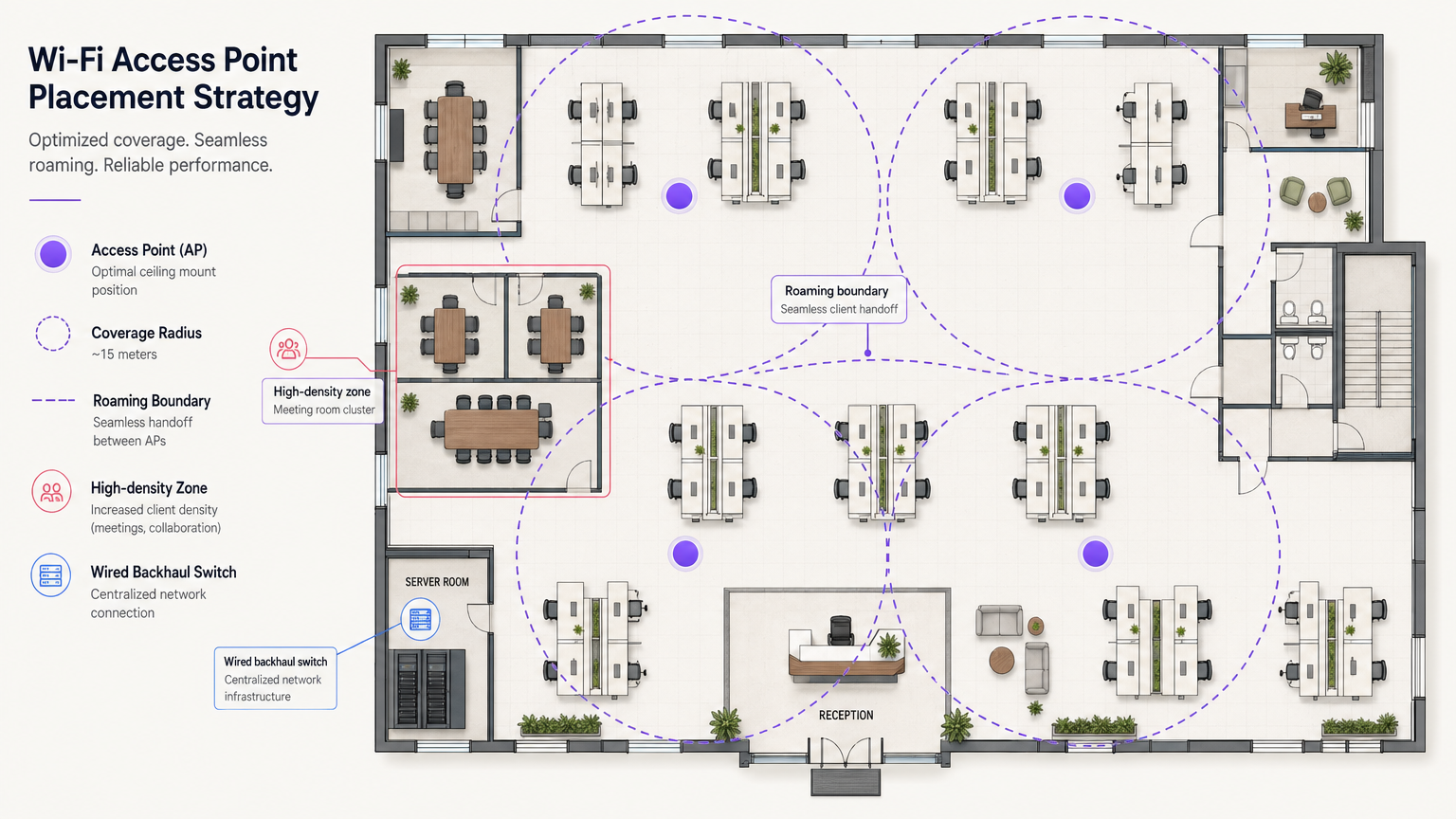
2. Posizionamento degli Access Point
Evitare l'anti-pattern del "posizionamento nei corridoi". Posizionare gli AP nei corridoi costringe i segnali a penetrare le pareti con angoli obliqui per raggiungere gli utenti all'interno degli uffici, causando un significativo degrado del segnale. Gli AP devono essere posizionati nelle stanze dove gli utenti lavorano effettivamente. Inoltre, sfalsare il posizionamento degli AP tra i piani per minimizzare l'interferenza co-canale verticale.
3. Aggiornamento del Backhaul Cablato
L'implementazione di AP Wi-Fi 6E ad alte prestazioni è inutile se l'infrastruttura cablata sottostante è un collo di bottiglia. Assicurarsi che gli switch edge supportino Multi-Gigabit Ethernet (2.5Gbps o 5Gbps) e abbiano budget Power over Ethernet (PoE++ / 802.3bt) sufficienti per alimentare access point moderni e ad alta densità radio.
Best Practice
- Ottimizzazione del Roaming Client: Sono i dispositivi, non gli AP, a decidere quando effettuare il roaming. Mitigare i "client appiccicosi" (sticky clients) regolando le velocità di base minime e implementando standard come 802.11k/v/r per aiutare i client a prendere decisioni di roaming intelligenti.
- Strategia di Rete IoT: Non disabilitare completamente la banda a 2.4GHz. I dispositivi IoT legacy e headless la richiedono ancora. Creare un SSID dedicato per IoT a 2.4GHz e utilizzare Identity PSK (iPSK) per segmentare in modo sicuro questi dispositivi senza la complessità di 802.1X.
- Sfruttare OpenRoaming: Per un accesso guest sicuro e senza attriti, considerare l'implementazione di OpenRoaming. Purple fornisce servizi di identity provider sotto la licenza Connect, consentendo un onboarding senza interruzioni per gli utenti.
Risoluzione dei Problemi e Mitigazione dei Rischi
Il Problema del Client Appiccicoso (Sticky Client)
Sintomo: Un utente si sposta dalla hall a una sala riunioni, ma la sua connessione si interrompe o rallenta drasticamente nonostante si trovi direttamente sotto un nuovo AP. Causa Radice: Il dispositivo client si aggrappa al segnale debole dell'AP della hall. Mitigazione: Ridurre la potenza di trasmissione dell'AP per ridurre le dimensioni delle celle e disabilitare le velocità di trasmissione dati basse legacy (ad esempio, 1, 2, 5.5, 11 Mbps). Ciò costringe il client a interrompere la connessione debole e ad associarsi all'AP più vicino e più forte.
Interferenza Co-Canale (CCI)
Sintomo: Elevato utilizzo del canale e throughput scarso nonostante la forte intensità del segnale. Causa Radice: Troppi AP sullo stesso canale si "sentono" a vicenda, costringendoli ad attendere tempo di trasmissione libero (CSMA/CA). Mitigazione: Implementare l'assegnazione dinamica dei canali, utilizzare lo spettro più ampio disponibile a 5GHz e 6GHz e distanziare fisicamente gli AP in modo appropriato.
ROI e Impatto sul Business
Investire in un'infrastruttura WiFi di livello enterprise produce ritorni misurabili che vanno oltre la connettività di base. Integrando WiFi Analytics , la rete diventa un sensore. In un hub di trasporto o in uno spazio commerciale, questa infrastruttura fornisce dati utili su affluenza, tempi di permanenza e comportamento degli utenti.
Inoltre, una rete affidabile riduce i ticket di supporto IT relativi a problemi di connettività, abbassando le spese operative (OpEx). Quando si implementano funzionalità avanzate come i servizi di localizzazione, è possibile consultare la nostra Guida al Sistema di Posizionamento Indoor: UWB, BLE, & WiFi per capire come monetizzare lo spazio fisico.
Termini chiave e definizioni
802.1X
An IEEE standard for port-based network access control (PNAC). It provides an authentication mechanism to devices wishing to attach to a LAN or WLAN.
Used to secure corporate networks by ensuring only authenticated devices and users can access internal resources.
Co-Channel Interference (CCI)
Occurs when two or more access points operate on the same frequency channel and can 'hear' each other, causing them to share airtime and reduce overall throughput.
A critical issue in high-density deployments that must be mitigated through careful channel planning and transmit power tuning.
VLAN (Virtual Local Area Network)
A logical grouping of devices on the same physical network infrastructure, isolating traffic at Layer 2.
Essential for security, ensuring guest traffic cannot interact with corporate servers or payment systems.
Captive Portal
A web page that the user of a public-access network is obliged to view and interact with before access is granted.
Used by platforms like Purple to capture user data, enforce terms of service, and provide secure onboarding for guests.
Wired Backhaul
The physical wired network (switches, cabling) that connects wireless access points back to the core network and the internet.
A common bottleneck; high-speed Wi-Fi 6/6E APs require multi-gigabit wired backhaul to perform optimally.
PoE (Power over Ethernet)
A technology that allows network cables to carry electrical power to devices like access points and IP cameras.
Crucial for AP deployment; modern APs often require higher power standards (PoE+ or PoE++) to operate all radios.
Band Steering
A technique used by wireless networks to encourage dual-band capable clients to connect to the less congested 5GHz or 6GHz bands rather than 2.4GHz.
Improves overall network performance by clearing congestion on the legacy 2.4GHz spectrum.
OpenRoaming
A federation of networks allowing users to automatically and securely connect to participating Wi-Fi networks without manual authentication.
Provides a frictionless cellular-like experience for users while maintaining enterprise-grade security.
Casi di studio
A 200-room corporate hotel needs to upgrade its wireless network to support conference attendees and internal operations. The current network suffers from severe congestion during keynote speeches in the main hall.
- Redesign for Density: Shift from a coverage model to a high-density capacity model in the main hall. Deploy directional patch antennas rather than omnidirectional APs to create smaller, focused coverage cells.
- Spectrum Management: Disable 2.4GHz in the main hall entirely to force all client devices onto the cleaner 5GHz and 6GHz bands.
- Network Segmentation: Implement strict VLANs. Corporate operational devices use 802.1X. Guest traffic is routed through Purple's captive portal on an isolated VLAN, ensuring PCI DSS compliance for the hotel's payment terminals.
A public-sector organization is moving to a new multi-floor open-plan office and needs to support a BYOD policy alongside corporate-issued laptops.
- Authentication Strategy: Implement 802.1X with certificate-based authentication (EAP-TLS) for corporate laptops, ensuring they connect automatically to the secure internal VLAN.
- BYOD Onboarding: Utilize a captive portal for BYOD devices, requiring users to authenticate with their corporate credentials (e.g., via SAML integration with Azure AD) before being placed on a restricted internet-only VLAN.
- Infrastructure: Deploy Wi-Fi 6 APs in a staggered formation across floors to prevent vertical interference, backed by multi-gigabit PoE+ switches.
Analisi degli scenari
Q1. You are deploying APs in a long, narrow corporate corridor flanked by private offices. Where should the APs be mounted to ensure optimal performance for the users inside the offices?
💡 Suggerimento:Consider the angle at which RF signals must penetrate the walls if APs are placed in the corridor.
Mostra l'approccio consigliato
APs should be placed inside the offices themselves, not in the corridor. Placing them in the hallway forces the signal to penetrate walls at oblique angles, causing significant attenuation. Designing for capacity requires placing the APs where the users actually are.
Q2. A client complains that their laptop maintains a poor connection to an AP on the first floor even after they have moved to the boardroom on the second floor, which has its own AP. How do you resolve this?
💡 Suggerimento:The client device is making the roaming decision based on the signal it receives.
Mostra l'approccio consigliato
This is a 'sticky client' issue. You must tune the RF environment to encourage roaming. This involves reducing the transmit power of the APs to shrink cell sizes and disabling legacy minimum basic rates (e.g., 1, 2, 5.5 Mbps). This forces the client to drop the weak connection sooner and associate with the closer, stronger AP in the boardroom.
Q3. Your organization needs to deploy hundreds of headless IoT devices (e.g., smart thermostats, sensors) that do not support 802.1X authentication. How do you secure them on the wireless network?
💡 Suggerimento:Consider how to uniquely identify devices without certificates while keeping them off the corporate VLAN.
Mostra l'approccio consigliato
Create a dedicated SSID for IoT devices, typically on the 2.4GHz band. Implement Identity PSK (iPSK) or Multiple Pre-Shared Keys (MPSK) to assign a unique password to each device or device group. Tie these credentials to a specific, isolated IoT VLAN that has no access to the corporate network, restricting lateral movement.




