

Büro-WiFi-Einrichtung: So bauen Sie ein zuverlässiges drahtloses Netzwerk auf
Dieser maßgebliche Leitfaden beschreibt die technische Architektur und den strategischen Einsatz von unternehmensgerechtem Büro-WiFi. Er behandelt kapazitätsbasiertes Design, die Platzierung von Access Points, sichere Benutzersegmentierung und wie Netzwerkinfrastruktur für Business Intelligence genutzt werden kann.
🎧 Diesen Leitfaden anhören
Transkript anzeigen

Zusammenfassung für Führungskräfte
Für moderne Unternehmen ist das drahtlose Netzwerk nicht mehr nur ein Zugangsmedium; es ist eine geschäftskritische Infrastruktur. Ob es sich um die Unterstützung einer Unternehmenszentrale, einer Einzelhandelsumgebung mit hoher Dichte oder eines weitläufigen Gastgewerbekomplexes handelt, Netzwerkarchitekten stehen vor der gleichen grundlegenden Herausforderung: nahtlose, sichere und hochkapazitive Konnektivität bereitzustellen.
Dieser Leitfaden skizziert die technischen Anforderungen für die Planung und Bereitstellung eines zuverlässigen Büro-WiFi-Netzwerks. Über die grundlegende Abdeckung hinaus behandeln wir kapazitätszentriertes Design, die Notwendigkeit einer robusten kabelgebundenen Backhaul-Verbindung und die entscheidende Bedeutung der Netzwerksegmentierung. Wir werden untersuchen, wie der Übergang von älteren lokalen Controllern zu Cloud-verwalteten Architekturen die Skalierbarkeit verbessert und wie die Integration von Plattformen wie Purple's Guest WiFi ein Kostenfaktor in eine Quelle für umsetzbare Business Intelligence und sichere Benutzerverwaltung verwandelt.
Technischer Einblick
Kapazitäts- vs. Abdeckungsdesign
Historisch wurden drahtlose Netzwerke auf Abdeckung ausgelegt – Access Points (APs) wurden so platziert, dass ein Signal jede Ecke des Gebäudes erreichte. Heute ist die primäre Einschränkung die Kapazität. In einem Standard-Großraumbüro können Benutzer drei bis vier verbundene Geräte (Laptops, Smartphones, Smartwatches) mit sich führen.
Modernes Netzwerkdesign erfordert die Planung der Gerätedichte. Dies beinhaltet den Einsatz von Wi-Fi 6 (802.11ax) oder Wi-Fi 6E APs, um die 5GHz- und 6GHz-Bänder effektiv zu nutzen. Um Gleichkanalinterferenzen in Bereichen mit hoher Dichte zu verwalten, müssen Ingenieure die Sendeleistung sorgfältig nach unten anpassen und niedrigere Datenraten deaktivieren, wodurch Clients gezwungen werden, sich mit näheren APs zu verbinden, anstatt an entfernten festzuhalten.
Architektur: Cloud-Management vs. On-Premises
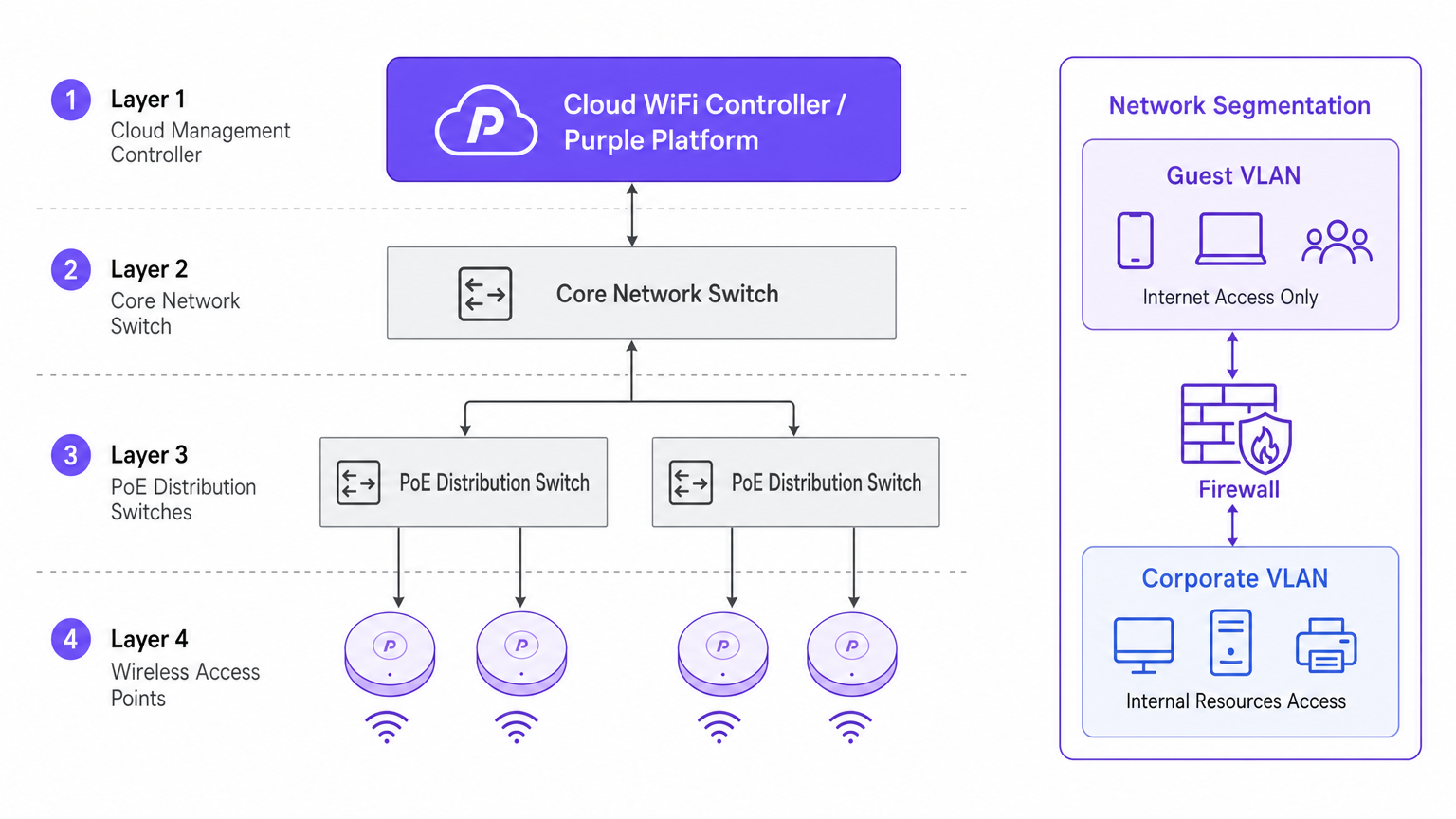
Der architektonische Wandel hin zu Cloud-verwalteten Controllern wird durch Skalierbarkeit und Transparenz vorangetrieben. Im Gegensatz zu traditionellen physischen Wireless LAN Controllern (WLCs), die den gesamten Datenverkehr zu einem zentralen Punkt tunneln, verteilen Cloud-Architekturen die Datenebene an den Rand, während die Steuerungsebene zentralisiert wird. Dies stellt sicher, dass, wenn die WAN-Verbindung zum Cloud-Controller unterbrochen wird, lokale APs den Datenverkehr weiterhin lokal vermitteln – eine wichtige Redundanzfunktion für Unternehmensbereitstellungen.
Sicherheit und Segmentierung
Eine strikte Netzwerksegmentierung ist nicht verhandelbar. Unternehmensressourcen müssen sich in einem sicheren VLAN befinden, authentifiziert über 802.1X gegen einen RADIUS-Server oder Identitätsanbieter.
Umgekehrt muss der Gast- und BYOD-Verkehr isoliert werden. Hier wird eine Captive Portal-Lösung entscheidend. Indem Sie nicht verwaltete Geräte an ein separates Guest VLAN leiten, das direkt ins Internet routet, mindern Sie Risiken der lateralen Bewegung. In Umgebungen wie dem Gesundheitswesen ist die Gewährleistung einer sicheren Segmentierung für die Compliance unerlässlich; weitere Details finden Sie in unserem Leitfaden zu WiFi in Krankenhäusern: Ein Leitfaden für sichere klinische Netzwerke .
Implementierungsleitfaden
1. Aktive Standortanalyse
Verlassen Sie sich nicht ausschließlich auf prädiktive Modellierung. Obwohl Software-Tools hervorragend für die anfängliche Budgetierung geeignet sind, können sie undokumentierte strukturelle Anomalien (z.B. HVAC-Kanäle oder bleiverkleidete Wände) nicht berücksichtigen. Eine aktive HF-Standortanalyse misst die tatsächliche Signalausbreitung, Interferenzen und Dämpfung und gewährleistet eine genaue AP-Platzierung.
2. Platzierung der Access Points
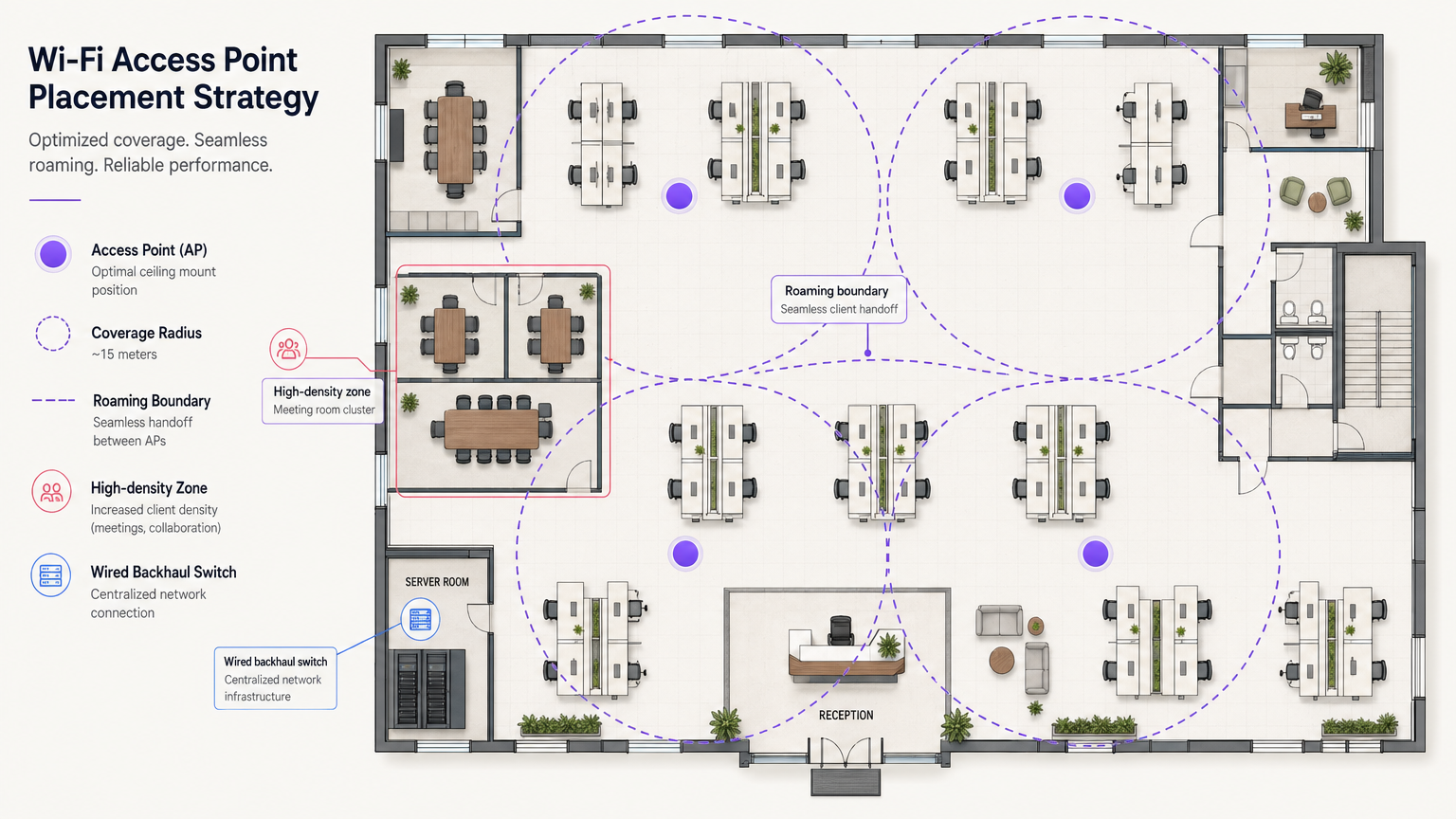
Vermeiden Sie das Anti-Muster der "Flur-Bereitstellung". Die Platzierung von APs in Korridoren zwingt Signale, Wände in schrägen Winkeln zu durchdringen, um Benutzer in Büros zu erreichen, was zu einer erheblichen Signalverschlechterung führt. APs müssen in den Räumen platziert werden, in denen Benutzer tatsächlich arbeiten. Stellen Sie außerdem die APs über die Etagen versetzt auf, um vertikale Gleichkanalinterferenzen zu minimieren.
3. Aufrüstung des kabelgebundenen Backhauls
Der Einsatz von Hochleistungs-Wi-Fi 6E APs ist nutzlos, wenn die zugrunde liegende kabelgebundene Infrastruktur einen Engpass darstellt. Stellen Sie sicher, dass Edge-Switches Multi-Gigabit Ethernet (2,5 Gbit/s oder 5 Gbit/s) unterstützen und über ausreichende Power over Ethernet (PoE++ / 802.3bt) Budgets verfügen, um moderne, funkdichte Access Points zu versorgen.
Best Practices
- Client-Roaming-Optimierung: Geräte, nicht APs, entscheiden, wann sie roamen. Mindern Sie "Sticky Clients", indem Sie die minimalen Basisraten anpassen und Standards wie 802.11k/v/r implementieren, um Clients bei intelligenten Roaming-Entscheidungen zu unterstützen.
- IoT-Netzwerkstrategie: Deaktivieren Sie das 2,4-GHz-Band nicht vollständig. Ältere und Headless-IoT-Geräte benötigen es immer noch. Erstellen Sie eine dedizierte SSID für IoT auf 2,4 GHz und nutzen Sie Identity PSK (iPSK), um diese Geräte sicher zu segmentieren, ohne die Komplexität von 802.1X.
- OpenRoaming nutzen: Für reibungslosen, sicheren Gastzugang sollten Sie die Implementierung von OpenRoaming in Betracht ziehen. Purple bietet Identitätsanbieterdienste unter der Connect-Lizenz an, die ein nahtloses Onboarding für Benutzer ermöglichen.
Fehlerbehebung & Risikominderung
Das Sticky-Client-Problem
Symptom: Ein Benutzer geht von der Lobby in einen Besprechungsraum, aber seine Verbindung bricht ab oder wird extrem langsam, obwohl er sich direkt unter einem neuen AP befindet. Grundursache: Das Client-Gerät hält an dem schwachen Signal des Lobby-APs fest. Abhilfe: Reduzieren Sie die Sendeleistung des APs, um die Zellengrößen zu verkleinern, und deaktivieren Sie ältere niedrige Datenraten (z.B. 1, 2, 5,5, 11 Mbit/s). Dies zwingt den Client, die schwache Verbindung zu trennen und sich mit dem näheren, stärkeren AP zu verbinden.
Gleichkanalinterferenz (CCI)
Symptom: Hohe Kanalnutzung und geringer Durchsatz trotz starker Signalstärke. Grundursache: Zu viele APs auf demselben Kanal "hören" sich gegenseitig, was sie zwingt, auf freie Sendezeit zu warten (CSMA/CA). Abhilfe: Implementieren Sie eine dynamische Kanalzuweisung, nutzen Sie das breitere Spektrum, das in 5GHz und 6GHz verfügbar ist, und positionieren Sie APs physisch angemessen.
ROI & Geschäftlicher Nutzen
Die Investition in eine unternehmensgerechte WiFi-Infrastruktur erzielt messbare Erträge, die über die grundlegende Konnektivität hinausgehen. Durch die Integration von WiFi Analytics wird das Netzwerk zu einem Sensor. In einem Verkehrsknotenpunkt oder Einzelhandelsbereich liefert diese Infrastruktur verwertbare Daten zu Besucherfrequenz, Verweildauer und Nutzerverhalten.
Darüber hinaus reduziert ein zuverlässiges Netzwerk IT-Support-Tickets im Zusammenhang mit Konnektivitätsproblemen, wodurch die Betriebsausgaben (OpEx) gesenkt werden. Beim Einsatz fortschrittlicher Funktionen wie Standortdienste können Sie unseren Leitfaden zum Indoor Positioning System: UWB, BLE & WiFi einsehen, um zu verstehen, wie der physische Raum monetarisiert werden kann.
Schlüsselbegriffe & Definitionen
802.1X
An IEEE standard for port-based network access control (PNAC). It provides an authentication mechanism to devices wishing to attach to a LAN or WLAN.
Used to secure corporate networks by ensuring only authenticated devices and users can access internal resources.
Co-Channel Interference (CCI)
Occurs when two or more access points operate on the same frequency channel and can 'hear' each other, causing them to share airtime and reduce overall throughput.
A critical issue in high-density deployments that must be mitigated through careful channel planning and transmit power tuning.
VLAN (Virtual Local Area Network)
A logical grouping of devices on the same physical network infrastructure, isolating traffic at Layer 2.
Essential for security, ensuring guest traffic cannot interact with corporate servers or payment systems.
Captive Portal
A web page that the user of a public-access network is obliged to view and interact with before access is granted.
Used by platforms like Purple to capture user data, enforce terms of service, and provide secure onboarding for guests.
Wired Backhaul
The physical wired network (switches, cabling) that connects wireless access points back to the core network and the internet.
A common bottleneck; high-speed Wi-Fi 6/6E APs require multi-gigabit wired backhaul to perform optimally.
PoE (Power over Ethernet)
A technology that allows network cables to carry electrical power to devices like access points and IP cameras.
Crucial for AP deployment; modern APs often require higher power standards (PoE+ or PoE++) to operate all radios.
Band Steering
A technique used by wireless networks to encourage dual-band capable clients to connect to the less congested 5GHz or 6GHz bands rather than 2.4GHz.
Improves overall network performance by clearing congestion on the legacy 2.4GHz spectrum.
OpenRoaming
A federation of networks allowing users to automatically and securely connect to participating Wi-Fi networks without manual authentication.
Provides a frictionless cellular-like experience for users while maintaining enterprise-grade security.
Fallstudien
A 200-room corporate hotel needs to upgrade its wireless network to support conference attendees and internal operations. The current network suffers from severe congestion during keynote speeches in the main hall.
- Redesign for Density: Shift from a coverage model to a high-density capacity model in the main hall. Deploy directional patch antennas rather than omnidirectional APs to create smaller, focused coverage cells.
- Spectrum Management: Disable 2.4GHz in the main hall entirely to force all client devices onto the cleaner 5GHz and 6GHz bands.
- Network Segmentation: Implement strict VLANs. Corporate operational devices use 802.1X. Guest traffic is routed through Purple's captive portal on an isolated VLAN, ensuring PCI DSS compliance for the hotel's payment terminals.
A public-sector organization is moving to a new multi-floor open-plan office and needs to support a BYOD policy alongside corporate-issued laptops.
- Authentication Strategy: Implement 802.1X with certificate-based authentication (EAP-TLS) for corporate laptops, ensuring they connect automatically to the secure internal VLAN.
- BYOD Onboarding: Utilize a captive portal for BYOD devices, requiring users to authenticate with their corporate credentials (e.g., via SAML integration with Azure AD) before being placed on a restricted internet-only VLAN.
- Infrastructure: Deploy Wi-Fi 6 APs in a staggered formation across floors to prevent vertical interference, backed by multi-gigabit PoE+ switches.
Szenarioanalyse
Q1. You are deploying APs in a long, narrow corporate corridor flanked by private offices. Where should the APs be mounted to ensure optimal performance for the users inside the offices?
💡 Hinweis:Consider the angle at which RF signals must penetrate the walls if APs are placed in the corridor.
Empfohlenen Ansatz anzeigen
APs should be placed inside the offices themselves, not in the corridor. Placing them in the hallway forces the signal to penetrate walls at oblique angles, causing significant attenuation. Designing for capacity requires placing the APs where the users actually are.
Q2. A client complains that their laptop maintains a poor connection to an AP on the first floor even after they have moved to the boardroom on the second floor, which has its own AP. How do you resolve this?
💡 Hinweis:The client device is making the roaming decision based on the signal it receives.
Empfohlenen Ansatz anzeigen
This is a 'sticky client' issue. You must tune the RF environment to encourage roaming. This involves reducing the transmit power of the APs to shrink cell sizes and disabling legacy minimum basic rates (e.g., 1, 2, 5.5 Mbps). This forces the client to drop the weak connection sooner and associate with the closer, stronger AP in the boardroom.
Q3. Your organization needs to deploy hundreds of headless IoT devices (e.g., smart thermostats, sensors) that do not support 802.1X authentication. How do you secure them on the wireless network?
💡 Hinweis:Consider how to uniquely identify devices without certificates while keeping them off the corporate VLAN.
Empfohlenen Ansatz anzeigen
Create a dedicated SSID for IoT devices, typically on the 2.4GHz band. Implement Identity PSK (iPSK) or Multiple Pre-Shared Keys (MPSK) to assign a unique password to each device or device group. Tie these credentials to a specific, isolated IoT VLAN that has no access to the corporate network, restricting lateral movement.




