

ऑफिस WiFi सेटअप: एक विश्वसनीय वायरलेस नेटवर्क कैसे बनाएं
This authoritative guide details the technical architecture and strategic deployment of enterprise-grade office WiFi. It covers capacity-based design, access point placement, secure user segmentation, and how to leverage network infrastructure for business intelligence.
🎧 इस गाइड को सुनें
ट्रांसक्रिप्ट देखें
कार्यकारी सारांश
आधुनिक उद्यमों के लिए, वायरलेस नेटवर्क अब केवल एक एक्सेस माध्यम नहीं रह गया है; यह मिशन-क्रिटिकल इंफ्रास्ट्रक्चर है। चाहे कॉर्पोरेट मुख्यालय हो, उच्च-घनत्व वाला रिटेल वातावरण हो, या एक विशाल हॉस्पिटैलिटी कॉम्प्लेक्स हो, नेटवर्क आर्किटेक्ट्स को एक ही बुनियादी चुनौती का सामना करना पड़ता है: निर्बाध, सुरक्षित और उच्च-क्षमता वाली कनेक्टिविटी प्रदान करना।
यह गाइड एक विश्वसनीय ऑफिस WiFi नेटवर्क को डिज़ाइन और तैनात करने के लिए तकनीकी आवश्यकताओं की रूपरेखा तैयार करती है। बुनियादी कवरेज से आगे बढ़ते हुए, हम क्षमता-केंद्रित डिज़ाइन, मजबूत वायर्ड बैकहॉल की आवश्यकता और नेटवर्क सेगमेंटेशन के महत्वपूर्ण महत्व को संबोधित करते हैं। हम यह पता लगाएंगे कि कैसे लेगेसी ऑन-प्रिमाइसेस कंट्रोलर्स से क्लाउड-प्रबंधित आर्किटेक्चर में जाने से स्केलेबिलिटी बढ़ती है, और कैसे Purple के गेस्ट WiFi जैसे प्लेटफॉर्म को एकीकृत करने से एक लागत केंद्र (cost center) कार्रवाई योग्य बिजनेस इंटेलिजेंस और सुरक्षित उपयोगकर्ता प्रबंधन के स्रोत में बदल जाता है।
तकनीकी डीप-डाइव
क्षमता बनाम कवरेज डिज़ाइन
ऐतिहासिक रूप से, वायरलेस नेटवर्क कवरेज के लिए डिज़ाइन किए गए थे—एक्सेस पॉइंट्स (APs) को यह सुनिश्चित करने के लिए रखा जाता था कि सिग्नल इमारत के हर कोने तक पहुंचे। आज, प्राथमिक बाधा क्षमता है। एक मानक ओपन-प्लान ऑफिस में उपयोगकर्ता तीन से चार कनेक्टेड डिवाइस (लैपटॉप, स्मार्टफोन, स्मार्टवॉच) ले जा सकते हैं।
आधुनिक नेटवर्क डिज़ाइन में डिवाइस घनत्व के लिए योजना बनाने की आवश्यकता होती है। इसमें 5GHz और 6GHz बैंड का प्रभावी ढंग से उपयोग करने के लिए Wi-Fi 6 (802.11ax) या Wi-Fi 6E APs को तैनात करना शामिल है। उच्च-घनत्व वाले क्षेत्रों में को-चैनल इंटरफेरेंस को प्रबंधित करने के लिए, इंजीनियरों को ट्रांसमिट पावर को सावधानीपूर्वक कम करना चाहिए और कम डेटा दरों को अक्षम करना चाहिए, जिससे क्लाइंट दूर के APs से चिपके रहने के बजाय करीब के APs से कनेक्ट होने के लिए मजबूर हों।
आर्किटेक्चर: क्लाउड मैनेजमेंट बनाम ऑन-प्रिमाइसेस
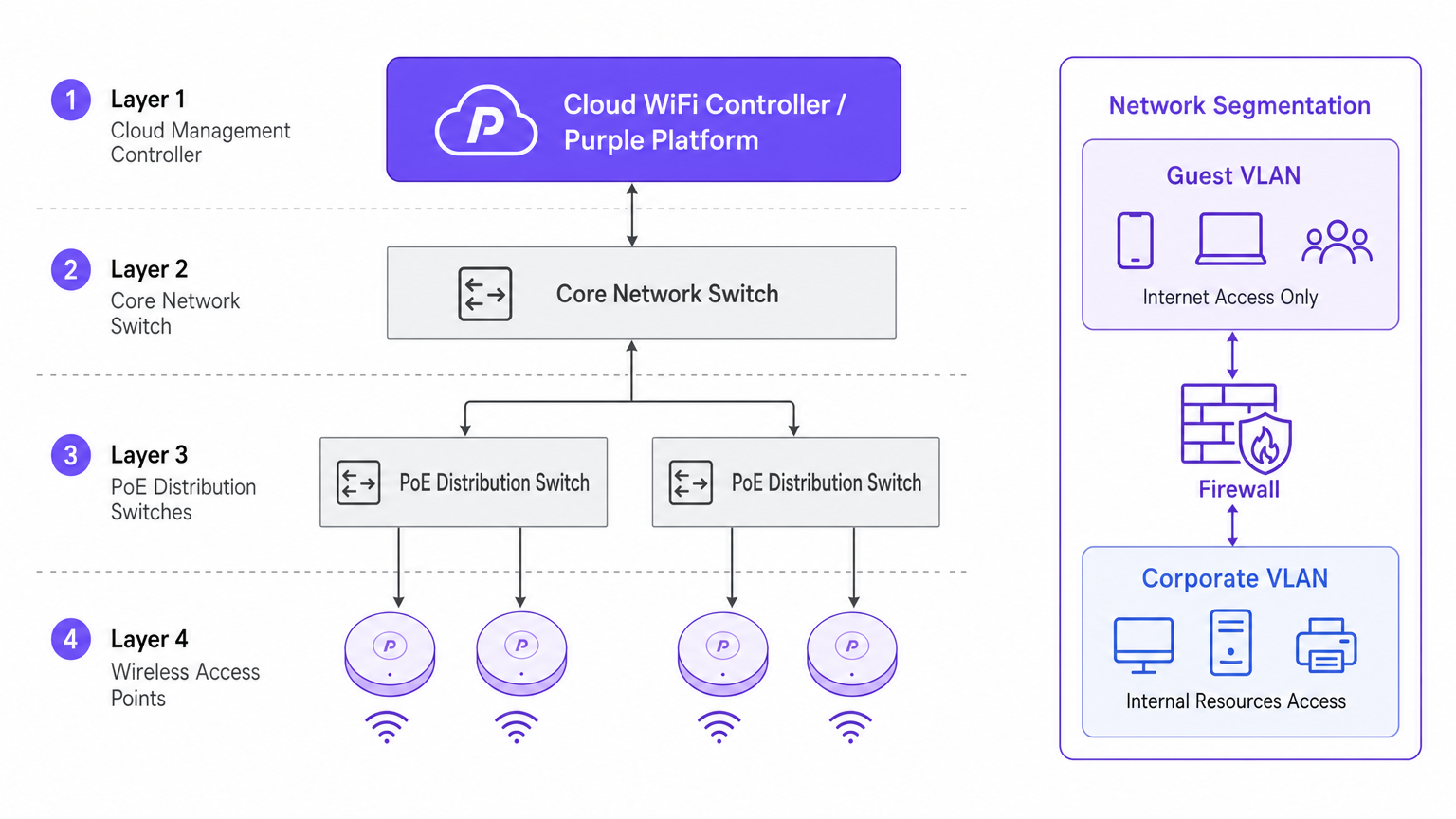
क्लाउड-प्रबंधित कंट्रोलर्स की ओर आर्किटेक्चरल बदलाव स्केलेबिलिटी और विजिबिलिटी द्वारा संचालित है। पारंपरिक भौतिक वायरलेस लैन कंट्रोलर्स (WLCs) के विपरीत, जो सभी ट्रैफ़िक को एक केंद्रीय बिंदु पर टनल करते हैं, क्लाउड आर्किटेक्चर कंट्रोल प्लेन को केंद्रीकृत करते हुए डेटा प्लेन को एज (edge) पर वितरित करते हैं। यह सुनिश्चित करता है कि यदि क्लाउड कंट्रोलर का WAN लिंक टूट जाता है, तो स्थानीय APs स्थानीय रूप से ट्रैफ़िक स्विच करना जारी रखते हैं—जो एंटरप्राइज़ परिनियोजन के लिए एक महत्वपूर्ण रिडंडेंसी सुविधा है।
सुरक्षा और सेगमेंटेशन
सख्त नेटवर्क सेगमेंटेशन पर कोई समझौता नहीं किया जा सकता। कॉर्पोरेट संपत्तियों को एक सुरक्षित VLAN पर होना चाहिए, जिसे RADIUS सर्वर या आइडेंटिटी प्रोवाइडर के खिलाफ 802.1X के माध्यम से प्रमाणित किया गया हो।
इसके विपरीत, गेस्ट और BYOD ट्रैफ़िक को अलग किया जाना चाहिए। यहीं पर एक Captive Portal समाधान महत्वपूर्ण हो जाता है। अप्रबंधित उपकरणों को एक अलग गेस्ट VLAN पर निर्देशित करके जो सीधे इंटरनेट पर रूट होता है, आप लेटरल मूवमेंट के जोखिमों को कम करते हैं। हेल्थकेयर जैसे वातावरण में, अनुपालन के लिए सुरक्षित सेगमेंटेशन सुनिश्चित करना महत्वपूर्ण है; अधिक जानकारी अस्पतालों में WiFi: सुरक्षित क्लिनिकल नेटवर्क के लिए एक गाइड पर हमारी गाइड में पाई जा सकती है।
कार्यान्वयन गाइड
1. एक्टिव साइट सर्वे
केवल प्रेडिक्टिव मॉडलिंग पर निर्भर न रहें। हालांकि सॉफ्टवेयर टूल शुरुआती बजटिंग के लिए उत्कृष्ट हैं, लेकिन वे गैर-दस्तावेजी संरचनात्मक विसंगतियों (जैसे, HVAC डक्टिंग या लेड-लाइन्ड दीवारों) का हिसाब नहीं लगा सकते हैं। एक एक्टिव RF साइट सर्वे वास्तविक सिग्नल प्रसार, इंटरफेरेंस और एटेन्यूएशन को मापता है, जिससे सटीक AP प्लेसमेंट सुनिश्चित होता है।
2. एक्सेस पॉइंट प्लेसमेंट
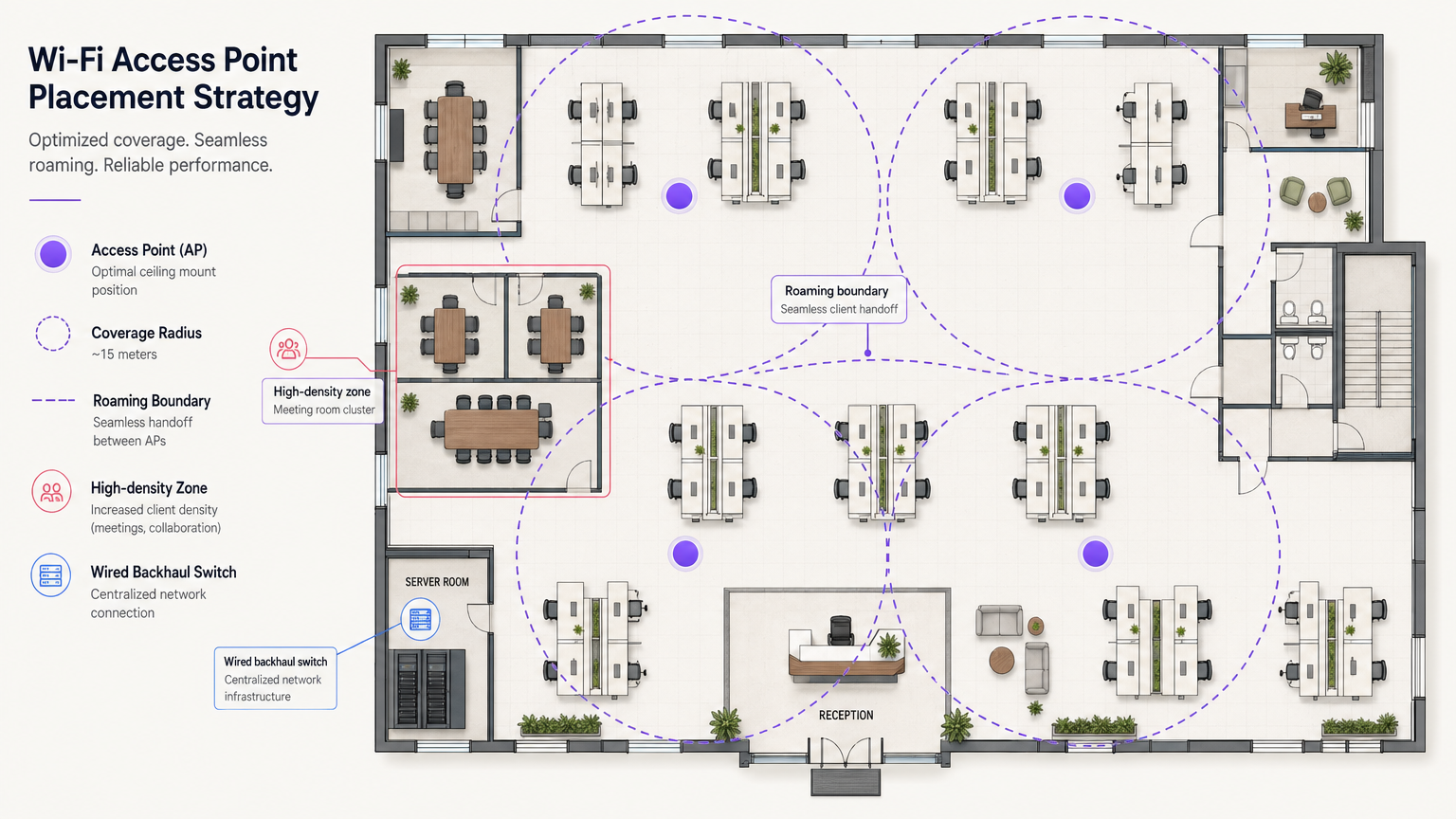
"हॉलवे डिप्लॉयमेंट" एंटी-पैटर्न से बचें। APs को गलियारों में रखने से सिग्नल को कार्यालयों के अंदर उपयोगकर्ताओं तक पहुंचने के लिए तिरछे कोणों पर दीवारों को भेदना पड़ता है, जिससे सिग्नल में भारी गिरावट आती है। APs को उन कमरों में रखा जाना चाहिए जहां उपयोगकर्ता वास्तव में काम करते हैं। इसके अलावा, वर्टिकल को-चैनल इंटरफेरेंस को कम करने के लिए AP प्लेसमेंट को अलग-अलग मंजिलों पर स्टैगर (stagger) करें।
3. वायर्ड बैकहॉल को अपग्रेड करना
यदि अंतर्निहित वायर्ड इंफ्रास्ट्रक्चर एक बाधा है, तो उच्च-प्रदर्शन वाले Wi-Fi 6E APs को तैनात करना व्यर्थ है। सुनिश्चित करें कि एज स्विच मल्टी-गीगाबिट ईथरनेट (2.5Gbps या 5Gbps) का समर्थन करते हैं और आधुनिक, रेडियो-सघन एक्सेस पॉइंट्स को पावर देने के लिए पर्याप्त पावर ओवर ईथरनेट (PoE++ / 802.3bt) बजट रखते हैं।
सर्वोत्तम प्रथाएं
- क्लाइंट रोमिंग ऑप्टिमाइज़ेशन: APs नहीं, बल्कि डिवाइस तय करते हैं कि कब रोम (roam) करना है। न्यूनतम बुनियादी दरों को समायोजित करके "स्टिकी क्लाइंट्स" को कम करें और क्लाइंट्स को बुद्धिमानी से रोमिंग निर्णय लेने में सहायता करने के लिए 802.11k/v/r जैसे मानकों को लागू करें।
- IoT नेटवर्क रणनीति: 2.4GHz बैंड को पूरी तरह से अक्षम न करें। लेगेसी और हेडलेस IoT उपकरणों को अभी भी इसकी आवश्यकता होती है। 2.4GHz पर IoT के लिए एक समर्पित SSID बनाएं और 802.1X की जटिलता के बिना इन उपकरणों को सुरक्षित रूप से सेगमेंट करने के लिए आइडेंटिटी PSK (iPSK) का उपयोग करें।
- OpenRoaming का लाभ उठाएं: घर्षण रहित, सुरक्षित गेस्ट एक्सेस के लिए, OpenRoaming को लागू करने पर विचार करें। Purple कनेक्ट लाइसेंस के तहत आइडेंटिटी प्रोवाइडर सेवाएं प्रदान करता है, जिससे उपयोगकर्ताओं के लिए निर्बाध ऑनबोर्डिंग की अनुमति मिलती है。
समस्या निवारण और जोखिम न्यूनीकरण
स्टिकी क्लाइंट की समस्या
लक्षण: एक उपयोगकर्ता लॉबी से मीटिंग रूम में जाता है, लेकिन एक नए AP के ठीक नीचे होने के बावजूद उनका कनेक्शन टूट जाता है या बहुत धीमा हो जाता है। मूल कारण: क्लाइंट डिवाइस लॉबी AP से कमजोर सिग्नल को पकड़े हुए है। न्यूनीकरण: सेल आकार को छोटा करने के लिए AP ट्रांसमिट पावर को कम करें, और लेगेसी कम डेटा दरों (जैसे, 1, 2, 5.5, 11 Mbps) को अक्षम करें। यह क्लाइंट को कमजोर कनेक्शन छोड़ने और करीब, मजबूत AP से जुड़ने के लिए मजबूर करता है।
को-चैनल इंटरफेरेंस (CCI)
लक्षण: मजबूत सिग्नल शक्ति के बावजूद उच्च चैनल उपयोग और खराब थ्रूपुट। मूल कारण: एक ही चैनल पर बहुत सारे APs एक-दूसरे को "सुन" रहे हैं, जिससे उन्हें स्पष्ट एयरटाइम (CSMA/CA) की प्रतीक्षा करने के लिए मजबूर होना पड़ता है। न्यूनीकरण: डायनेमिक चैनल असाइनमेंट लागू करें, 5GHz और 6GHz में उपलब्ध व्यापक स्पेक्ट्रम का उपयोग करें, और APs को भौतिक रूप से उचित दूरी पर रखें।
ROI और व्यावसायिक प्रभाव
एंटरप्राइज़-ग्रेड WiFi इंफ्रास्ट्रक्चर में निवेश करने से बुनियादी कनेक्टिविटी से परे मापने योग्य रिटर्न मिलता है। WiFi एनालिटिक्स को एकीकृत करके, नेटवर्क एक सेंसर बन जाता है। एक ट्रांसपोर्ट हब या रिटेल स्पेस में, यह इंफ्रास्ट्रक्चर फुटफॉल, ड्वेल टाइम और उपयोगकर्ता व्यवहार पर कार्रवाई योग्य डेटा प्रदान करता है।
इसके अलावा, एक विश्वसनीय नेटवर्क कनेक्टिविटी समस्याओं से संबंधित IT सपोर्ट टिकटों को कम करता है, जिससे परिचालन व्यय (OpEx) कम होता है। स्थान सेवाओं जैसी उन्नत सुविधाओं को तैनात करते समय, आप भौतिक स्थान का मुद्रीकरण कैसे करें, यह समझने के लिए हमारी इंडोर पोजिशनिंग सिस्टम: UWB, BLE, और WiFi गाइड की समीक्षा कर सकते हैं।
मुख्य शब्द और परिभाषाएं
802.1X
An IEEE standard for port-based network access control (PNAC). It provides an authentication mechanism to devices wishing to attach to a LAN or WLAN.
Used to secure corporate networks by ensuring only authenticated devices and users can access internal resources.
Co-Channel Interference (CCI)
Occurs when two or more access points operate on the same frequency channel and can 'hear' each other, causing them to share airtime and reduce overall throughput.
A critical issue in high-density deployments that must be mitigated through careful channel planning and transmit power tuning.
VLAN (Virtual Local Area Network)
A logical grouping of devices on the same physical network infrastructure, isolating traffic at Layer 2.
Essential for security, ensuring guest traffic cannot interact with corporate servers or payment systems.
Captive Portal
A web page that the user of a public-access network is obliged to view and interact with before access is granted.
Used by platforms like Purple to capture user data, enforce terms of service, and provide secure onboarding for guests.
Wired Backhaul
The physical wired network (switches, cabling) that connects wireless access points back to the core network and the internet.
A common bottleneck; high-speed Wi-Fi 6/6E APs require multi-gigabit wired backhaul to perform optimally.
PoE (Power over Ethernet)
A technology that allows network cables to carry electrical power to devices like access points and IP cameras.
Crucial for AP deployment; modern APs often require higher power standards (PoE+ or PoE++) to operate all radios.
Band Steering
A technique used by wireless networks to encourage dual-band capable clients to connect to the less congested 5GHz or 6GHz bands rather than 2.4GHz.
Improves overall network performance by clearing congestion on the legacy 2.4GHz spectrum.
OpenRoaming
A federation of networks allowing users to automatically and securely connect to participating Wi-Fi networks without manual authentication.
Provides a frictionless cellular-like experience for users while maintaining enterprise-grade security.
केस स्टडीज
A 200-room corporate hotel needs to upgrade its wireless network to support conference attendees and internal operations. The current network suffers from severe congestion during keynote speeches in the main hall.
- Redesign for Density: Shift from a coverage model to a high-density capacity model in the main hall. Deploy directional patch antennas rather than omnidirectional APs to create smaller, focused coverage cells.
- Spectrum Management: Disable 2.4GHz in the main hall entirely to force all client devices onto the cleaner 5GHz and 6GHz bands.
- Network Segmentation: Implement strict VLANs. Corporate operational devices use 802.1X. Guest traffic is routed through Purple's captive portal on an isolated VLAN, ensuring PCI DSS compliance for the hotel's payment terminals.
A public-sector organization is moving to a new multi-floor open-plan office and needs to support a BYOD policy alongside corporate-issued laptops.
- Authentication Strategy: Implement 802.1X with certificate-based authentication (EAP-TLS) for corporate laptops, ensuring they connect automatically to the secure internal VLAN.
- BYOD Onboarding: Utilize a captive portal for BYOD devices, requiring users to authenticate with their corporate credentials (e.g., via SAML integration with Azure AD) before being placed on a restricted internet-only VLAN.
- Infrastructure: Deploy Wi-Fi 6 APs in a staggered formation across floors to prevent vertical interference, backed by multi-gigabit PoE+ switches.
परिदृश्य विश्लेषण
Q1. You are deploying APs in a long, narrow corporate corridor flanked by private offices. Where should the APs be mounted to ensure optimal performance for the users inside the offices?
💡 संकेत:Consider the angle at which RF signals must penetrate the walls if APs are placed in the corridor.
अनुशंसित दृष्टिकोण दिखाएं
APs should be placed inside the offices themselves, not in the corridor. Placing them in the hallway forces the signal to penetrate walls at oblique angles, causing significant attenuation. Designing for capacity requires placing the APs where the users actually are.
Q2. A client complains that their laptop maintains a poor connection to an AP on the first floor even after they have moved to the boardroom on the second floor, which has its own AP. How do you resolve this?
💡 संकेत:The client device is making the roaming decision based on the signal it receives.
अनुशंसित दृष्टिकोण दिखाएं
This is a 'sticky client' issue. You must tune the RF environment to encourage roaming. This involves reducing the transmit power of the APs to shrink cell sizes and disabling legacy minimum basic rates (e.g., 1, 2, 5.5 Mbps). This forces the client to drop the weak connection sooner and associate with the closer, stronger AP in the boardroom.
Q3. Your organization needs to deploy hundreds of headless IoT devices (e.g., smart thermostats, sensors) that do not support 802.1X authentication. How do you secure them on the wireless network?
💡 संकेत:Consider how to uniquely identify devices without certificates while keeping them off the corporate VLAN.
अनुशंसित दृष्टिकोण दिखाएं
Create a dedicated SSID for IoT devices, typically on the 2.4GHz band. Implement Identity PSK (iPSK) or Multiple Pre-Shared Keys (MPSK) to assign a unique password to each device or device group. Tie these credentials to a specific, isolated IoT VLAN that has no access to the corporate network, restricting lateral movement.




