

Configuración de WiFi en la Oficina: Cómo Construir una Red Inalámbrica Fiable
Esta guía autorizada detalla la arquitectura técnica y el despliegue estratégico de WiFi de grado empresarial para oficinas. Cubre el diseño basado en capacidad, la ubicación de los puntos de acceso, la segmentación segura de usuarios y cómo aprovechar la infraestructura de red para la inteligencia de negocio.
🎧 Escuchar esta guía
Ver transcripción

Resumen Ejecutivo
Para las empresas modernas, la red inalámbrica ya no es meramente un medio de acceso; es una infraestructura de misión crítica. Ya sea que soporte una sede corporativa, un entorno retail de alta densidad o un extenso complejo hospitality , los arquitectos de red se enfrentan al mismo desafío fundamental: ofrecer conectividad fluida, segura y de alta capacidad.
Esta guía describe los requisitos técnicos para diseñar y desplegar una red WiFi de oficina fiable. Yendo más allá de la cobertura básica, abordamos el diseño centrado en la capacidad, la necesidad de un backhaul cableado robusto y la importancia crítica de la segmentación de la red. Exploraremos cómo la transición de controladores locales heredados a arquitecturas gestionadas en la nube mejora la escalabilidad, y cómo la integración de plataformas como el Guest WiFi de Purple transforma un centro de costes en una fuente de inteligencia de negocio accionable y gestión segura de usuarios.
Análisis Técnico Detallado
Diseño por Capacidad vs. por Cobertura
Históricamente, las redes inalámbricas se diseñaban para la cobertura, colocando Puntos de Acceso (APs) para asegurar que una señal llegara a cada rincón del edificio. Hoy en día, la principal limitación es la capacidad. Una oficina estándar de planta abierta puede ver a los usuarios llevando de tres a cuatro dispositivos conectados (portátiles, smartphones, smartwatches).
El diseño de redes moderno requiere planificar la densidad de dispositivos. Esto implica desplegar APs Wi-Fi 6 (802.11ax) o Wi-Fi 6E para utilizar las bandas de 5GHz y 6GHz de manera efectiva. Para gestionar la interferencia cocanal en áreas de alta densidad, los ingenieros deben ajustar cuidadosamente la potencia de transmisión a la baja y deshabilitar las tasas de datos más bajas, forzando a los clientes a conectarse a APs más cercanos en lugar de aferrarse a los distantes.
Arquitectura: Gestión en la Nube vs. Local
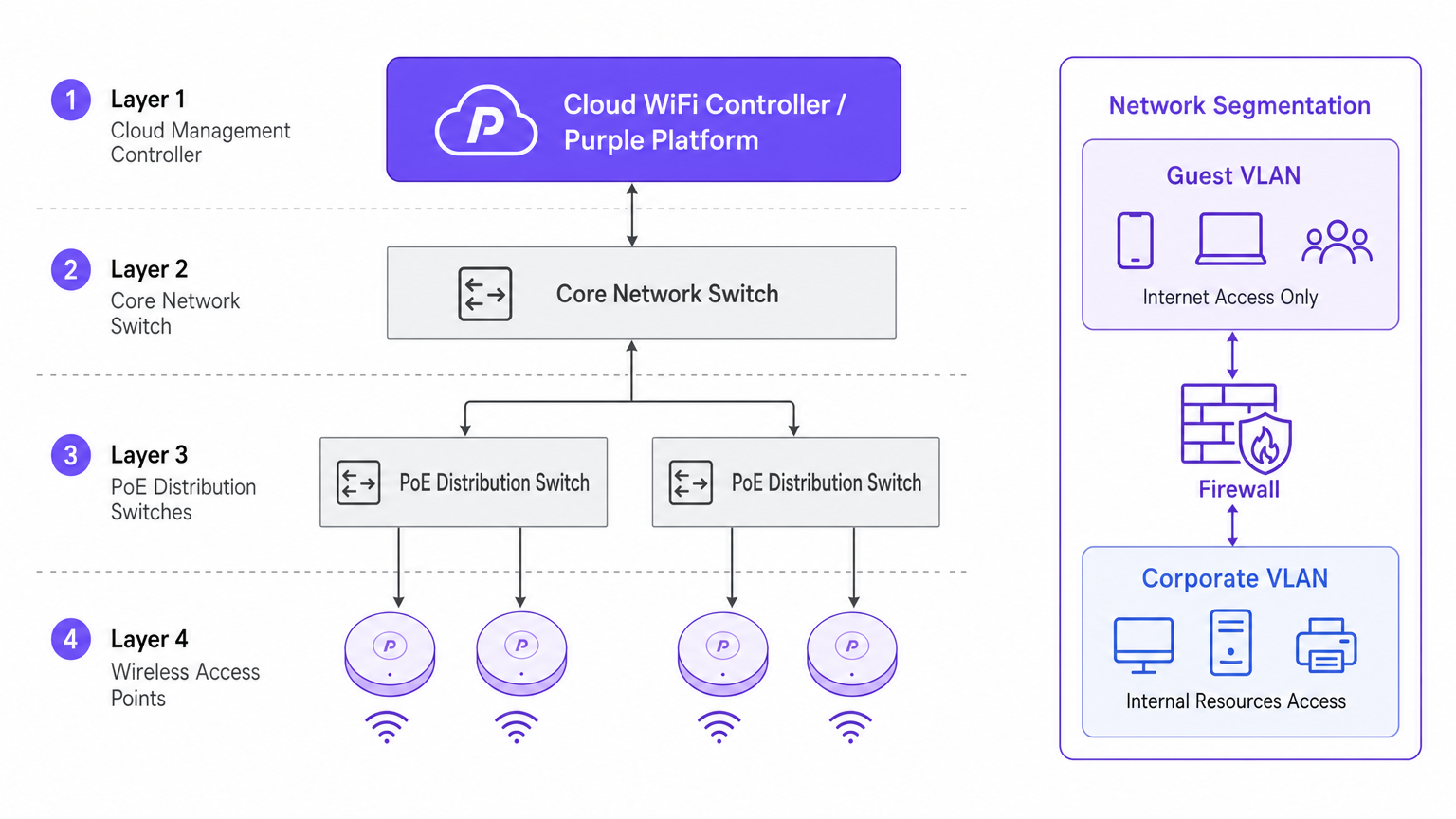
El cambio arquitectónico hacia los controladores gestionados en la nube está impulsado por la escalabilidad y la visibilidad. A diferencia de los Controladores de Red de Área Local Inalámbrica (WLCs) físicos tradicionales que tunelizan todo el tráfico a un punto central, las arquitecturas en la nube distribuyen el plano de datos al borde mientras centralizan el plano de control. Esto asegura que si el enlace WAN al controlador en la nube se cae, los APs locales continúan conmutando el tráfico localmente, una característica de redundancia vital para los despliegues empresariales.
Seguridad y Segmentación
Una segmentación de red estricta es innegociable. Los activos corporativos deben residir en una VLAN segura, autenticados a través de 802.1X contra un servidor RADIUS o un proveedor de identidad.
Por el contrario, el tráfico de invitados y BYOD debe estar aislado. Aquí es donde una solución de Captive Portal se vuelve crítica. Al dirigir los dispositivos no gestionados a una VLAN de invitados separada que enruta directamente a internet, se mitigan los riesgos de movimiento lateral. En entornos como el healthcare , asegurar una segmentación segura es vital para el cumplimiento normativo; se pueden encontrar más detalles en nuestra guía sobre WiFi in Hospitals: A Guide to Secure Clinical Networks .
Guía de Implementación
1. Estudio de Campo Activo
No confíe únicamente en el modelado predictivo. Si bien las herramientas de software son excelentes para la elaboración de presupuestos iniciales, no pueden tener en cuenta anomalías estructurales no documentadas (por ejemplo, conductos de HVAC o paredes revestidas de plomo). Un estudio de campo RF activo mide la propagación real de la señal, la interferencia y la atenuación, asegurando una colocación precisa de los APs.
2. Ubicación de los Puntos de Acceso
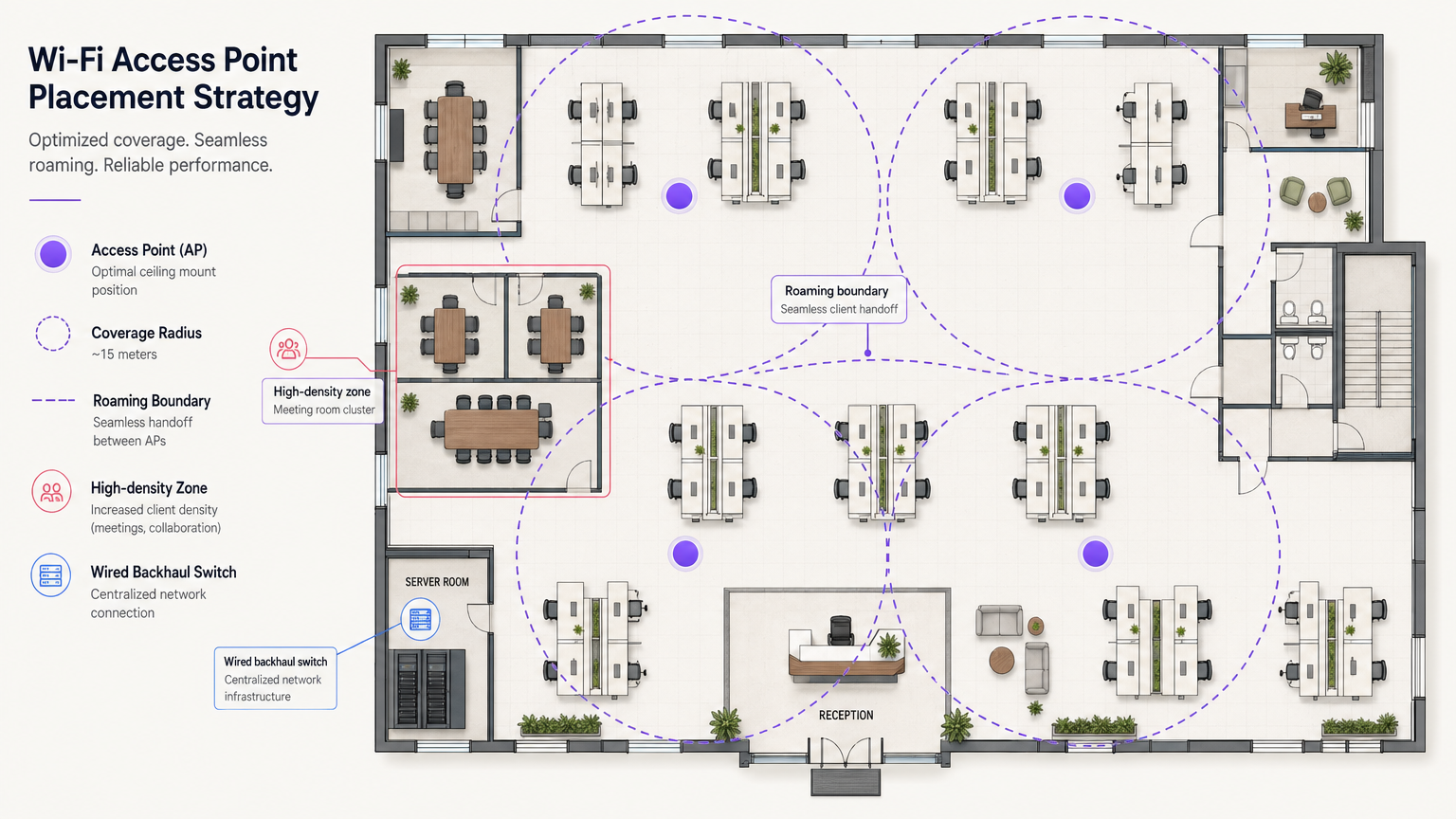
Evite el antipatrón de "despliegue en pasillos". Colocar los APs en los pasillos obliga a las señales a penetrar las paredes en ángulos oblicuos para llegar a los usuarios dentro de las oficinas, causando una degradación significativa de la señal. Los APs deben colocarse en las habitaciones donde los usuarios realmente trabajan. Además, escalone la ubicación de los APs entre pisos para minimizar la interferencia cocanal vertical.
3. Actualización del Backhaul Cableado
El despliegue de APs Wi-Fi 6E de alto rendimiento es inútil si la infraestructura cableada subyacente es un cuello de botella. Asegúrese de que los switches de borde soporten Ethernet Multi-Gigabit (2.5Gbps o 5Gbps) y tengan presupuestos de Power over Ethernet (PoE++ / 802.3bt) suficientes para alimentar puntos de acceso modernos y densos en radio.
Mejores Prácticas
- Optimización del Roaming de Clientes: Los dispositivos, no los APs, deciden cuándo hacer roaming. Mitigue los "clientes pegajosos" ajustando las tasas básicas mínimas e implementando estándares como 802.11k/v/r para ayudar a los clientes a tomar decisiones de roaming inteligentes.
- Estrategia de Red IoT: No deshabilite la banda de 2.4GHz por completo. Los dispositivos IoT heredados y sin interfaz de usuario aún la requieren. Cree un SSID dedicado para IoT en 2.4GHz y utilice Identity PSK (iPSK) para segmentar de forma segura estos dispositivos sin la complejidad de 802.1X.
- Aproveche OpenRoaming: Para un acceso de invitados seguro y sin fricciones, considere implementar OpenRoaming. Purple ofrece servicios de proveedor de identidad bajo la licencia Connect, permitiendo una incorporación de usuarios sin problemas.
Resolución de Problemas y Mitigación de Riesgos
El Problema del Cliente Pegajoso
Síntoma: Un usuario camina desde el vestíbulo a una sala de reuniones, pero su conexión se cae o se ralentiza a pesar de estar directamente debajo de un nuevo AP. Causa Raíz: El dispositivo cliente se aferra a la señal débil del AP del vestíbulo. Mitigación: Reduzca la potencia de transmisión del AP para reducir el tamaño de las celdas y deshabilite las tasas de datos bajas heredadas (por ejemplo, 1, 2, 5.5, 11 Mbps). Esto obliga al cliente a soltar la conexión débil y asociarse con el AP más cercano y fuerte.
Interferencia Cocanal (CCI)
Síntoma: Alta utilización del canal y bajo rendimiento a pesar de una fuerte intensidad de señal. Causa Raíz: Demasiados APs en el mismo canal "escuchándose" entre sí, obligándolos a esperar tiempo de aire libre (CSMA/CA). Mitigación: Implementar la asignación dinámica de canales, utilizar el espectro más amplio disponible en 5GHz y 6GHz, y espaciar físicamente los AP de forma adecuada.
ROI e Impacto Empresarial
Invertir en infraestructura WiFi de nivel empresarial produce retornos medibles más allá de la conectividad básica. Al integrar WiFi Analytics , la red se convierte en un sensor. En un centro de transporte o espacio comercial, esta infraestructura proporciona datos procesables sobre el flujo de personas, los tiempos de permanencia y el comportamiento del usuario.
Además, una red fiable reduce los tickets de soporte de TI relacionados con problemas de conectividad, disminuyendo los gastos operativos (OpEx). Al implementar funciones avanzadas como los servicios de ubicación, puede consultar nuestra Guía del sistema de posicionamiento interior: UWB, BLE y WiFi para comprender cómo monetizar el espacio físico.
Términos clave y definiciones
802.1X
An IEEE standard for port-based network access control (PNAC). It provides an authentication mechanism to devices wishing to attach to a LAN or WLAN.
Used to secure corporate networks by ensuring only authenticated devices and users can access internal resources.
Co-Channel Interference (CCI)
Occurs when two or more access points operate on the same frequency channel and can 'hear' each other, causing them to share airtime and reduce overall throughput.
A critical issue in high-density deployments that must be mitigated through careful channel planning and transmit power tuning.
VLAN (Virtual Local Area Network)
A logical grouping of devices on the same physical network infrastructure, isolating traffic at Layer 2.
Essential for security, ensuring guest traffic cannot interact with corporate servers or payment systems.
Captive Portal
A web page that the user of a public-access network is obliged to view and interact with before access is granted.
Used by platforms like Purple to capture user data, enforce terms of service, and provide secure onboarding for guests.
Wired Backhaul
The physical wired network (switches, cabling) that connects wireless access points back to the core network and the internet.
A common bottleneck; high-speed Wi-Fi 6/6E APs require multi-gigabit wired backhaul to perform optimally.
PoE (Power over Ethernet)
A technology that allows network cables to carry electrical power to devices like access points and IP cameras.
Crucial for AP deployment; modern APs often require higher power standards (PoE+ or PoE++) to operate all radios.
Band Steering
A technique used by wireless networks to encourage dual-band capable clients to connect to the less congested 5GHz or 6GHz bands rather than 2.4GHz.
Improves overall network performance by clearing congestion on the legacy 2.4GHz spectrum.
OpenRoaming
A federation of networks allowing users to automatically and securely connect to participating Wi-Fi networks without manual authentication.
Provides a frictionless cellular-like experience for users while maintaining enterprise-grade security.
Casos de éxito
A 200-room corporate hotel needs to upgrade its wireless network to support conference attendees and internal operations. The current network suffers from severe congestion during keynote speeches in the main hall.
- Redesign for Density: Shift from a coverage model to a high-density capacity model in the main hall. Deploy directional patch antennas rather than omnidirectional APs to create smaller, focused coverage cells.
- Spectrum Management: Disable 2.4GHz in the main hall entirely to force all client devices onto the cleaner 5GHz and 6GHz bands.
- Network Segmentation: Implement strict VLANs. Corporate operational devices use 802.1X. Guest traffic is routed through Purple's captive portal on an isolated VLAN, ensuring PCI DSS compliance for the hotel's payment terminals.
A public-sector organization is moving to a new multi-floor open-plan office and needs to support a BYOD policy alongside corporate-issued laptops.
- Authentication Strategy: Implement 802.1X with certificate-based authentication (EAP-TLS) for corporate laptops, ensuring they connect automatically to the secure internal VLAN.
- BYOD Onboarding: Utilize a captive portal for BYOD devices, requiring users to authenticate with their corporate credentials (e.g., via SAML integration with Azure AD) before being placed on a restricted internet-only VLAN.
- Infrastructure: Deploy Wi-Fi 6 APs in a staggered formation across floors to prevent vertical interference, backed by multi-gigabit PoE+ switches.
Análisis de escenarios
Q1. You are deploying APs in a long, narrow corporate corridor flanked by private offices. Where should the APs be mounted to ensure optimal performance for the users inside the offices?
💡 Sugerencia:Consider the angle at which RF signals must penetrate the walls if APs are placed in the corridor.
Mostrar enfoque recomendado
APs should be placed inside the offices themselves, not in the corridor. Placing them in the hallway forces the signal to penetrate walls at oblique angles, causing significant attenuation. Designing for capacity requires placing the APs where the users actually are.
Q2. A client complains that their laptop maintains a poor connection to an AP on the first floor even after they have moved to the boardroom on the second floor, which has its own AP. How do you resolve this?
💡 Sugerencia:The client device is making the roaming decision based on the signal it receives.
Mostrar enfoque recomendado
This is a 'sticky client' issue. You must tune the RF environment to encourage roaming. This involves reducing the transmit power of the APs to shrink cell sizes and disabling legacy minimum basic rates (e.g., 1, 2, 5.5 Mbps). This forces the client to drop the weak connection sooner and associate with the closer, stronger AP in the boardroom.
Q3. Your organization needs to deploy hundreds of headless IoT devices (e.g., smart thermostats, sensors) that do not support 802.1X authentication. How do you secure them on the wireless network?
💡 Sugerencia:Consider how to uniquely identify devices without certificates while keeping them off the corporate VLAN.
Mostrar enfoque recomendado
Create a dedicated SSID for IoT devices, typically on the 2.4GHz band. Implement Identity PSK (iPSK) or Multiple Pre-Shared Keys (MPSK) to assign a unique password to each device or device group. Tie these credentials to a specific, isolated IoT VLAN that has no access to the corporate network, restricting lateral movement.




