

Portales Cautivos HTTPS en 2026: Por qué HSTS y el Reforzamiento del Navegador Están Rompiendo los Viejos Patrones
Esta guía detalla cómo HSTS y las políticas de prioridad HTTPS del navegador están rompiendo los portales cautivos de intercepción HTTP heredados en 2026. Proporciona orientación técnica práctica para que los arquitectos de red implementen alternativas modernas, incluyendo la API CAPPORT y Passpoint (Hotspot 2.0), asegurando un acceso WiFi seguro y confiable para invitados.
🎧 Escucha esta guía
Ver transcripción
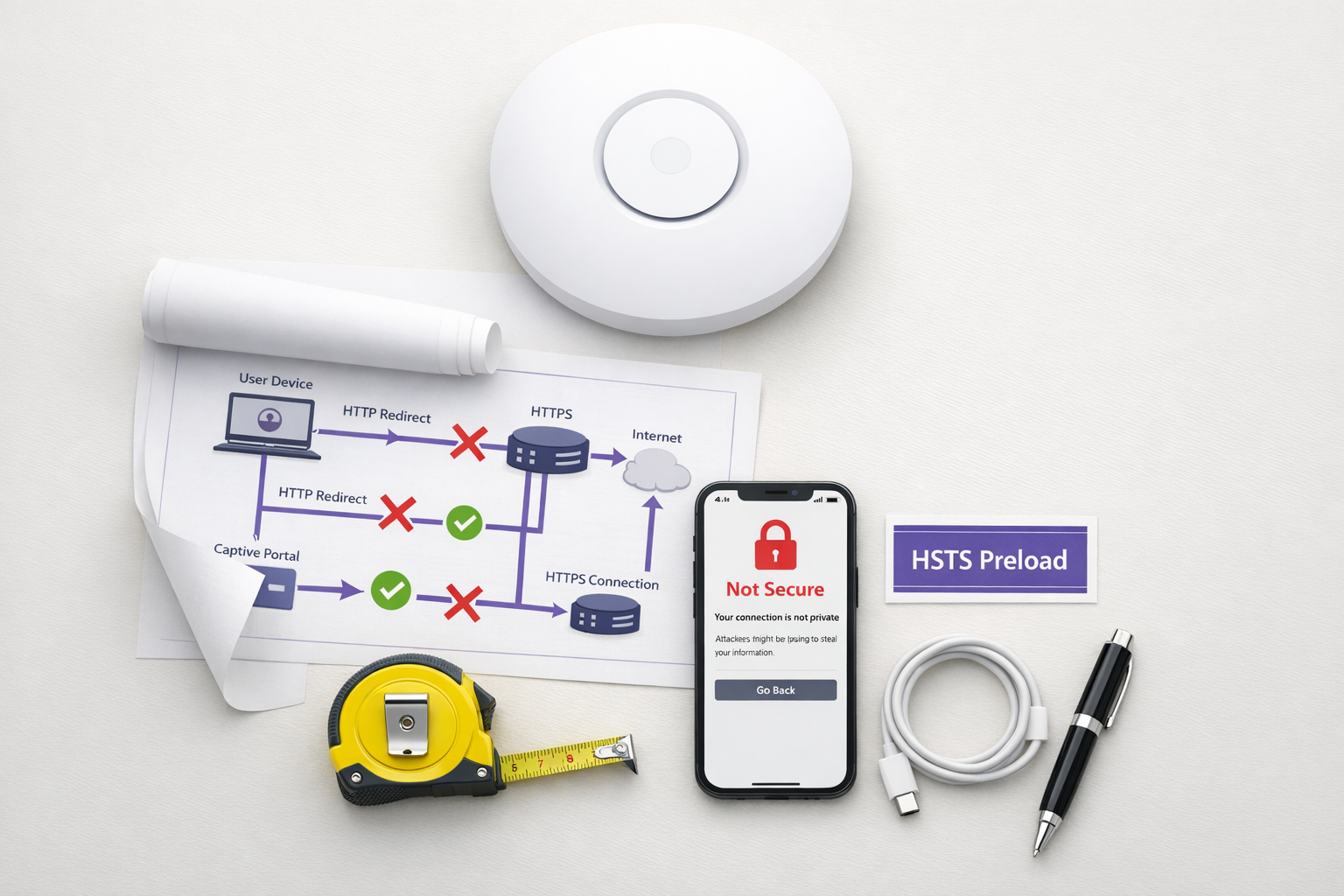
Resumen Ejecutivo
El patrón de portal cautivo heredado —interceptar el tráfico HTTP y emitir una redirección 302— está obsoleto. Impulsado por HTTP Strict Transport Security (HSTS) y el reforzamiento agresivo de los navegadores, el mecanismo tradicional de 'intercepción y redirección' está fallando a gran escala en entornos de Hospitalidad , Comercio Minorista y empresariales. A partir de 2026, con Chrome aplicando el comportamiento HTTPS-first por defecto y la lista de precarga HSTS superando los 100,000 dominios, los controladores de red ya no pueden depender de las solicitudes HTTP no cifradas para activar la detección del portal.
Para los gerentes de TI y arquitectos de red, esto representa un cambio arquitectónico crítico. Mantener un acceso WiFi para Invitados sin interrupciones ahora requiere modernizar su flujo de incorporación. Esta guía detalla los mecanismos técnicos que están rompiendo los portales heredados y describe el camino de implementación neutral para el proveedor: desplegar la API CAPPORT (RFC 8908/8910) para una estabilidad inmediata, y migrar a Passpoint (Hotspot 2.0) y OpenRoaming para una conectividad segura y sin contacto.
Análisis Técnico Detallado: Por qué HSTS Rompe el Patrón de Intercepción
El portal cautivo tradicional se basa en una suposición fundamental: el dispositivo cliente realizará una solicitud HTTP no cifrada en el puerto 80 que el servidor de acceso a la red (NAS) o el controlador puede interceptar y redirigir a la página de inicio del portal.
Esta suposición ya no es válida.
El Problema de la Precarga HSTS
HTTP Strict Transport Security (HSTS), definido en RFC 6797, permite a un servidor web declarar que los navegadores web solo deben interactuar con él utilizando conexiones HTTPS seguras. Cuando un usuario intenta acceder a un dominio protegido por HSTS a través de HTTP, el navegador actualiza internamente la solicitud a HTTPS antes de que se envíe cualquier tráfico de red.
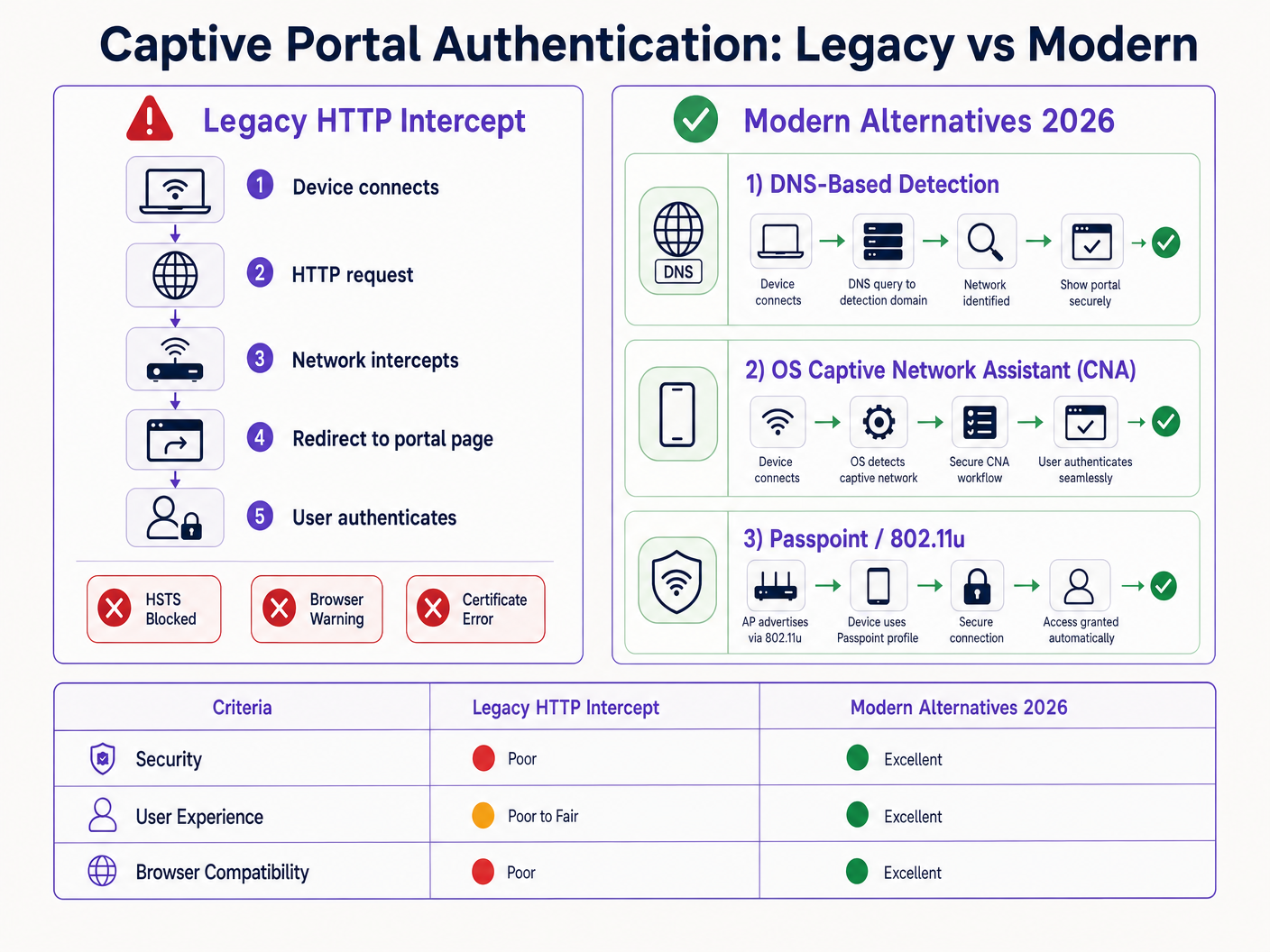
Debido a que la solicitud está cifrada, el controlador de red no puede inspeccionar el encabezado del host ni emitir una redirección HTTP 302. En su lugar, el controlador intercepta el tráfico HTTPS y presenta su propio certificado de portal. Dado que este certificado no coincide con el dominio solicitado (por ejemplo, google.com), el navegador arroja un error fatal NET::ERR_CERT_AUTHORITY_INVALID. El usuario es bloqueado y el portal nunca carga.
La lista de precarga HSTS exacerba este problema. Los navegadores codifican una lista de dominios a los que siempre se debe acceder a través de HTTPS, incluso en la primera visita. En 2026, esta lista incluye prácticamente todos los principales destinos de consumo. Cuando un invitado se conecta a su red y escribe una URL común, el navegador fuerza HTTPS, lo que activa el error de certificado y rompe el flujo del portal cautivo.
Reforzamiento del Navegador: Modo HTTPS-First
Más allá de HSTS, los proveedores de navegadores han reforzado sistemáticamente sus comportamientos predeterminados. A finales de 2025, Google anunció que Chrome 154 (lanzado en octubre de 2026) habilitaría "Usar siempre conexiones seguras" por defecto para todos los usuarios en sitios públicos. Safari y Firefox han implementado modos HTTPS-first similares.
Esto significa que, incluso para dominios que no están en la lista de precarga HSTS, el navegador intentará una conexión HTTPS primero. El patrón de intercepción HTTP está efectivamente obsoleto.
Alternativas Modernas: CAPPORT y Passpoint
Para restaurar la funcionalidad y mejorar la experiencia del usuario, los arquitectos de red deben hacer la transición a mecanismos modernos de detección de portales cautivos y marcos de autenticación.
1. La API CAPPORT (RFC 8908 y RFC 8910)
El Grupo de Trabajo de Ingeniería de Internet (IETF) abordó el problema de la detección de portales cautivos con la arquitectura CAPPORT. En lugar de depender del tráfico web interceptado, CAPPORT proporciona un mecanismo de señalización explícito.
- RFC 8910 (Identificación de Portal Cautivo): La red utiliza DHCP (Opción 114) o Anuncios de Router IPv6 para proporcionar al dispositivo cliente la URI de la API del portal cautivo.
- RFC 8908 (API de Portal Cautivo): El cliente consulta la URI proporcionada (un endpoint JSON) para determinar si está cautivo y para obtener la URL de la página del portal orientada al usuario.
Cuando se implementa, el sistema operativo cliente (iOS, Android, Windows) detecta el portal de forma nativa antes de que el usuario abra un navegador. El sistema operativo lanza su Asistente de Red Cautiva (CNA) y carga la URL del portal directamente a través de una conexión HTTPS segura. Esto elimina la necesidad de intercepción HTTP y evita errores de certificado.
2. Passpoint (Hotspot 2.0) y OpenRoaming
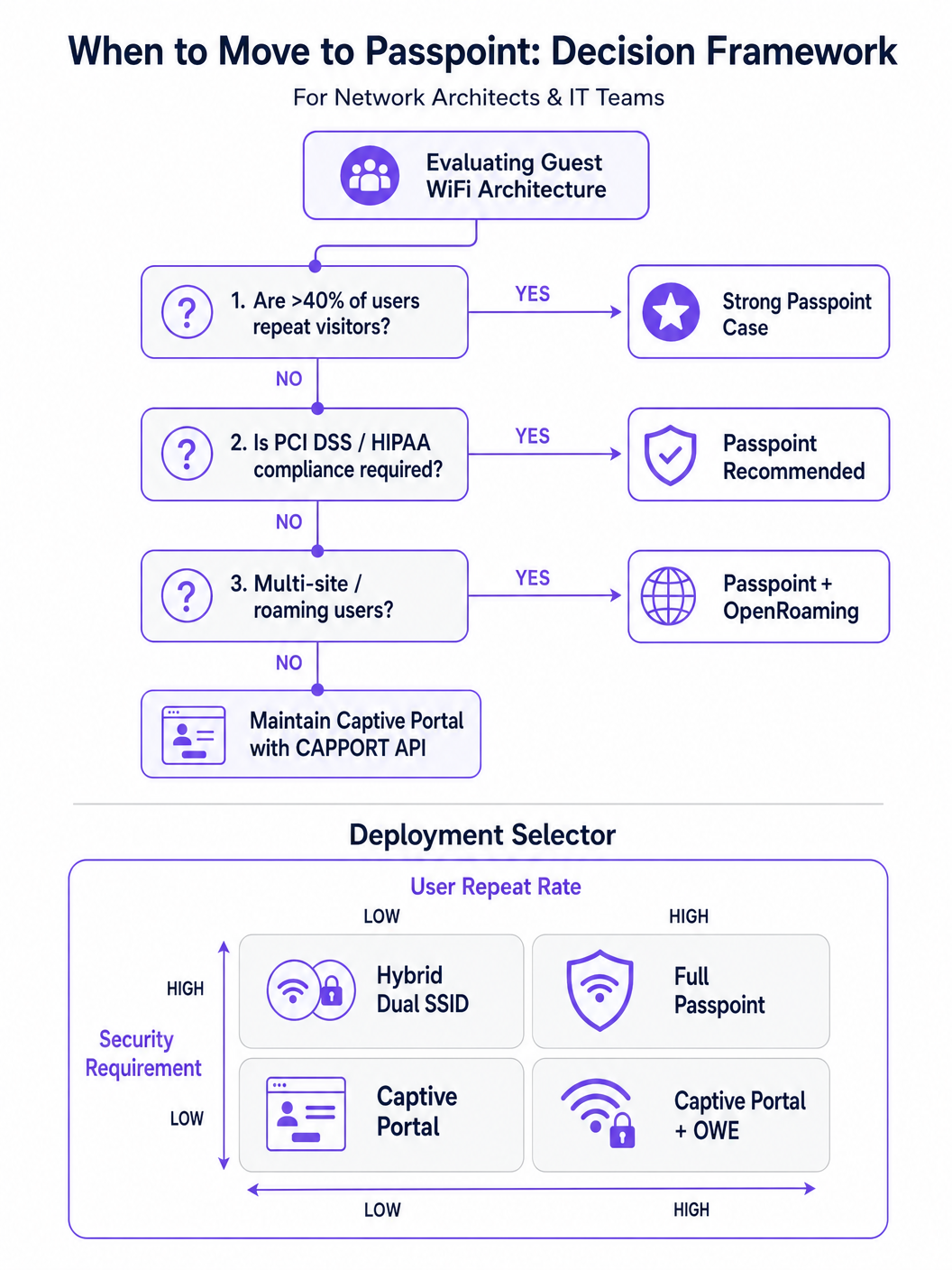
Para entornos con visitantes recurrentes o altos requisitos de seguridad, Passpoint (basado en IEEE 802.11u) es el reemplazo definitivo para el portal cautivo.
Passpoint opera en la capa MAC. Antes de asociarse con el Punto de Acceso (AP), el dispositivo cliente utiliza el Protocolo de Consulta de Red de Acceso (ANQP) para descubrir las capacidades de la red y los consorcios de roaming. Si el dispositivo posee una credencial coincidente (por ejemplo, un perfil instalado durante una visita anterior o a través de un proveedor de identidad), se autentica automáticamente utilizando 802.1X y WPA2/WPA3-Enterprise.
Este enfoque proporciona conectividad tipo celular, sin contacto. Cifra el tráfico por aire, mitigando los riesgos de redes abiertas y ataques de gemelo malvado. OpenRoaming, construido sobre Passpoint, extiende esto al federar proveedores de identidad, permitiendo a los usuarios moverse sin problemas entre diferentes ubicaciones. Cabe destacar que Purple actúa como un proveedor de identidad gratuito para servicios como OpenRoaming bajo la licencia Connect, facilitando una amplia adopción sin tarifas de licencia por usuario.
Guía de Implementación
Implementar una arquitectura de acceso para invitados resiliente requiere un enfoque por fases, pasando de la remediación inmediata a la transformación estratégica.
Fase 1: Estabilizar Portales Existentes con CAPPORT
Si debe mantener un Captive Portal tradicional para la captura de datos o WiFi Analytics , debe implementar CAPPORT para evitar la ruptura de HSTS.
- Configurar la Opción DHCP 114: Actualice su servidor DHCP o controlador de red para difundir la Opción 114, apuntando al endpoint de la API de su portal (p. ej.,
https://portal.yourvenue.com/capport). - Implementar la API RFC 8908: Asegúrese de que su servidor de portal responda a la solicitud de la API con JSON válido que indique el estado cautivo y la URL de cara al usuario.
- Usar un Nombre de Host Dedicado y Válido: El portal debe servirse a través de HTTPS utilizando un certificado válido firmado por una CA. Nunca utilice un certificado autofirmado o un nombre de host que esté en la lista de precarga HSTS.
- Permitir Sondas del SO: Asegúrese de que las sondas de detección de Captive Portal a nivel del SO (p. ej.,
captive.apple.com,connectivitycheck.gstatic.com) estén permitidas a través del "walled garden" de preautenticación.
Fase 2: Implementar Passpoint para un Acceso Seguro y Sin Interrupciones
La transición a Passpoint mejora significativamente la seguridad y la experiencia del usuario, particularmente en implementaciones de Salud y Transporte .
- Verificar el Soporte de Infraestructura: Asegúrese de que sus APs y controladores soporten Hotspot 2.0/Passpoint y autenticación 802.1X.
- Configurar Perfiles ANQP: Defina el nombre del lugar, los OIs del consorcio de roaming y los reinos NAI en su controlador de red.
- Establecer un Backend RADIUS/AAA: Implemente un servidor RADIUS capaz de manejar la autenticación EAP (p. ej., EAP-TLS, EAP-TTLS).
- Implementar el Aprovisionamiento de Perfiles: Utilice un servidor de Registro en Línea (OSU) o integre con una plataforma como Purple SecurePass para aprovisionar perfiles Passpoint en los dispositivos de los usuarios.
Fase 3: El Modelo de Incorporación Progresiva Híbrido
Para lugares que requieren tanto acceso sin interrupciones como captura inicial de datos (p. ej., entornos minoristas que buscan impulsar la lealtad), un enfoque híbrido es óptimo.
- Primera Visita: El usuario se conecta a un SSID abierto y es dirigido a un Captive Portal habilitado para CAPPORT. El portal captura los datos necesarios (p. ej., correo electrónico, aceptación de términos) y aprovisiona un perfil Passpoint en el dispositivo.
- Visitas Posteriores: El dispositivo del usuario detecta automáticamente la red Passpoint a través de ANQP y se autentica sin problemas utilizando 802.1X. El Captive Portal se omite por completo.
Mejores Prácticas
- Evite el Lenguaje de Marketing 'Sin Fricción': Concéntrese en la realidad técnica. Passpoint requiere una fricción de aprovisionamiento inicial para lograr una fluidez a largo plazo.
- Segmentar el Tráfico de Invitados: Independientemente del método de autenticación, el tráfico de invitados debe separarse lógicamente de las redes corporativas utilizando VLANs y firewalls, en línea con Arquitectura de Internet de las Cosas: Una Guía Completa .
- Monitorear la Caducidad de Certificados: Un certificado TLS caducado en su portal o servidor RADIUS causará fallos catastróficos de autenticación. Implemente la renovación y el monitoreo automatizados.
- Cumplir con las Regulaciones de Privacidad de Datos: Asegúrese de que sus políticas de captura y retención de datos se alineen con las leyes locales. Para obtener orientación regional específica, consulte recursos como la LGPD de Brasil y WiFi para Invitados: Una Guía de Cumplimiento .
Solución de Problemas y Mitigación de Riesgos
- Síntoma: Los dispositivos iOS muestran una pantalla CNA en blanco.
- Causa: La página del portal contiene recursos (imágenes, scripts) alojados en dominios externos que están bloqueados por el "walled garden".
- Solución: Aloje todos los activos esenciales del portal localmente o añada los dominios externos requeridos a la lista de permitidos de preautenticación.
- Síntoma: Los dispositivos Android muestran una advertencia de certificado en lugar del portal.
- Causa: El controlador está interceptando el tráfico HTTPS a un dominio HSTS precargado, o el certificado TLS del portal es inválido/autofirmado.
- Solución: Implemente CAPPORT y asegúrese de que el portal utilice un certificado firmado por una CA en un nombre de host dedicado.
- Síntoma: La instalación del perfil Passpoint falla en Windows 11.
- Causa: La cadena de certificados del servidor de aprovisionamiento está incompleta o no es de confianza para el SO.
- Solución: Verifique que la cadena de certificados completa (incluidas las CA intermedias) se sirva durante el handshake TLS.
ROI e Impacto Comercial
La transición de portales de intercepción HTTP heredados a arquitecturas modernas de CAPPORT y Passpoint ofrece un valor comercial medible:
- Reducción de Tickets de Soporte: La eliminación de errores de certificado relacionados con HSTS reduce directamente el volumen del servicio de asistencia de TI en cuanto a problemas de conectividad de invitados.
- Mayores Tasas de Conexión: La detección fiable del portal a nivel del SO garantiza que más invitados completen con éxito el flujo de incorporación, expandiendo su audiencia alcanzable para iniciativas de marketing.
- Postura de Seguridad Mejorada: La transición a Passpoint y WPA3-Enterprise mitiga los riesgos asociados con las redes abiertas, protegiendo contra la escucha y los ataques de "evil twin", lo cual es crítico para el cumplimiento en sectores como finanzas y salud.
- Mejora de la Experiencia del Usuario: El roaming sin contacto a través de Passpoint impulsa una mayor satisfacción del usuario y un compromiso repetido, apoyando iniciativas digitales más amplias como Sistema de Posicionamiento Interior: Guía UWB, BLE y WiFi y Su Guía para Soluciones Empresariales de Wi-Fi en el Coche .
Términos clave y definiciones
HSTS (HTTP Strict Transport Security)
A web security policy mechanism that forces web browsers to interact with domains only via secure HTTPS connections, preventing protocol downgrade attacks and HTTP interception.
When IT teams see an increase in certificate errors on guest networks, HSTS enforcement on popular domains is typically the root cause, breaking legacy redirect mechanisms.
HSTS Preload List
A hardcoded list built into modern web browsers containing domains that must always be accessed via HTTPS, even on the very first visit.
If a user attempts to navigate to a preloaded domain (like google.com) while behind a legacy captive portal, the browser will refuse the HTTP connection, preventing the portal redirect.
CAPPORT (Captive Portal Architecture)
An IETF standard (RFC 8908 and 8910) that uses DHCP or IPv6 Router Advertisements to explicitly signal the presence and URL of a captive portal to a client device.
Implementing CAPPORT is the primary remediation strategy for network architects to fix broken portal detection on modern iOS, Android, and Windows devices.
Passpoint (Hotspot 2.0)
A Wi-Fi Alliance specification based on IEEE 802.11u that enables devices to automatically discover and securely authenticate to Wi-Fi networks without user intervention.
Used in enterprise and multi-site deployments to replace captive portals entirely, providing cellular-like roaming and WPA3-Enterprise security.
ANQP (Access Network Query Protocol)
A layer 2 protocol used by client devices to query Access Points for network information (like roaming partners and supported authentication types) before associating.
ANQP is the discovery mechanism that allows a Passpoint-enabled device to determine if it has the correct credentials to join a specific network silently.
CNA (Captive Network Assistant)
The OS-level pseudo-browser that automatically opens when a device detects it is behind a captive portal, allowing the user to authenticate before gaining full internet access.
IT teams must ensure their walled garden allows access to the OS-specific probe URLs (e.g., captive.apple.com) so the CNA triggers correctly.
OpenRoaming
A global Wi-Fi roaming federation that allows users to connect automatically and securely across different venues using a single set of credentials provided by an identity provider.
Venues adopt OpenRoaming to provide seamless access for guests, leveraging identity providers like Purple to manage authentication without complex bilateral agreements.
Walled Garden
A restricted network environment where unauthenticated users can only access a specific set of pre-approved IP addresses or domains necessary for the login process.
Misconfigured walled gardens that block OS detection probes or external portal assets are a leading cause of blank screens and failed guest onboarding.
Casos de éxito
A 400-room enterprise hotel is experiencing a 30% drop in successful guest WiFi connections. Users report seeing 'Your connection is not private' (NET::ERR_CERT_AUTHORITY_INVALID) errors on their smartphones when trying to access the network. The hotel currently uses a legacy open SSID that intercepts port 80 traffic to redirect to a branded splash page.
The IT team must immediately implement the CAPPORT API (RFC 8908/8910). First, configure the network controller's DHCP server to broadcast Option 114, providing the URI of the captive portal API. Second, deploy the RFC 8908 JSON endpoint on the portal server. Third, ensure the portal is hosted on a dedicated subdomain (e.g., wifi.hoteldomain.com) with a valid, CA-signed TLS certificate. Finally, verify that OS detection URLs (like captive.apple.com) are allowed pre-authentication.
A large retail chain with 500 locations wants to implement seamless WiFi roaming for their loyalty app users, eliminating the need for customers to interact with a captive portal on every visit, while still maintaining high security standards (WPA3).
The architect should deploy a Passpoint (Hotspot 2.0) architecture. The initial onboarding can occur via the retailer's loyalty app, which provisions a Passpoint profile (credential) to the user's device. The APs across all 500 locations must be configured to broadcast the appropriate ANQP roaming consortium OIs. A centralized RADIUS infrastructure will handle the 802.1X EAP authentication when the device automatically associates with the network.
Análisis de escenarios
Q1. Your organisation is deploying a new guest WiFi network across 50 regional offices. Security policy mandates that all wireless traffic must be encrypted over the air, but the marketing team insists on capturing user email addresses upon first connection. Which architecture should you propose?
💡 Sugerencia:Consider how to balance the requirement for initial data capture with the mandate for over-the-air encryption.
Mostrar enfoque recomendado
Propose a hybrid progressive onboarding architecture. First-time users connect to an open SSID and are directed to a CAPPORT-enabled captive portal to provide their email address. Upon submission, the portal provisions a Passpoint profile to the device. The device then automatically transitions to a secure, WPA3-Enterprise encrypted Passpoint SSID for all subsequent traffic and future visits. This satisfies marketing's data capture requirement while enforcing security policy for the vast majority of network usage.
Q2. A client complains that their newly designed, highly customized captive portal page is displaying a blank white screen on all modern iOS devices, although it works perfectly on older Android phones. The portal relies heavily on external web fonts and a third-party analytics script.
💡 Sugerencia:Think about how the iOS Captive Network Assistant (CNA) interacts with external resources before the device is fully authenticated.
Mostrar enfoque recomendado
The issue is a misconfigured walled garden. The iOS CNA is attempting to render the portal page, but the external domains hosting the web fonts and analytics scripts are blocked by the network controller pre-authentication. Because these resources cannot load, the CNA stalls and displays a blank screen. The solution is to either host all required assets locally on the portal server or add the specific external domains (FQDNs) to the controller's pre-authentication allowlist.
Q3. During a network audit, you discover that the legacy captive portal is intercepting traffic and serving a self-signed certificate. You are tasked with upgrading the system to use the CAPPORT API. What specific certificate requirements must be met for the new portal server?
💡 Sugerencia:Consider how modern browsers and OS CNAs handle certificate validation during the captive portal detection phase.
Mostrar enfoque recomendado
The new portal server must be accessed via a dedicated Fully Qualified Domain Name (FQDN) that is NOT on the HSTS preload list. Furthermore, it must use a valid TLS certificate issued by a publicly trusted Certificate Authority (CA). Self-signed certificates will be rejected by the OS CNA and modern browsers, preventing the portal from loading and halting the onboarding process.




