

Portails captifs HTTPS en 2026 : Pourquoi HSTS et le renforcement des navigateurs brisent les anciens modèles
Ce guide détaille comment HSTS et les politiques HTTPS-first des navigateurs brisent les portails captifs HTTP d'interception hérités en 2026. Il fournit des conseils techniques exploitables aux architectes réseau pour implémenter des alternatives modernes, y compris l'API CAPPORT et Passpoint (Hotspot 2.0), garantissant un accès WiFi invité sécurisé et fiable.
🎧 Écouter ce guide
Voir la transcription
Résumé Exécutif
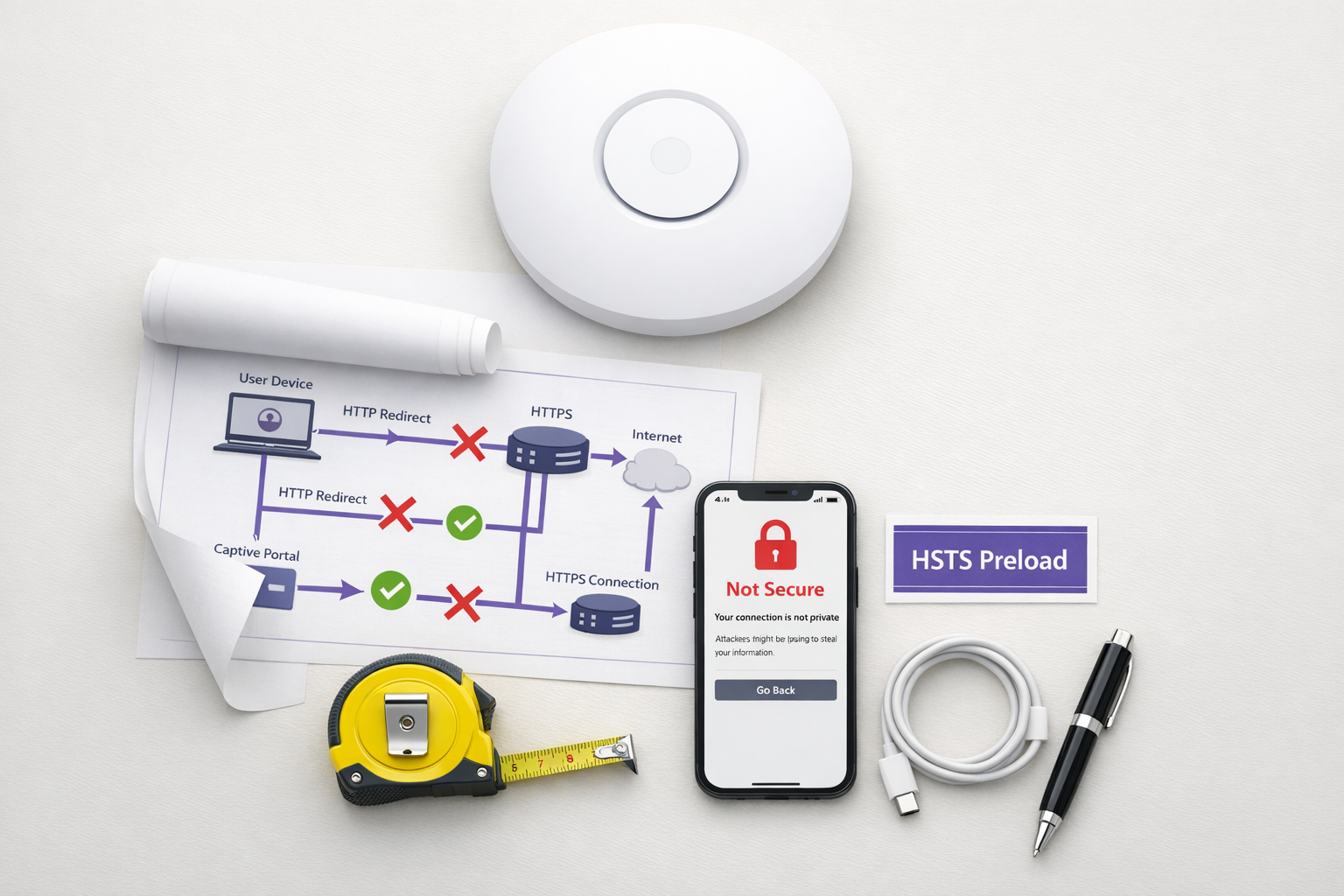
Le modèle de portail captif hérité — interceptant le trafic HTTP et émettant une redirection 302 — est obsolète. Poussé par HTTP Strict Transport Security (HSTS) et le renforcement agressif des navigateurs, le mécanisme traditionnel d'« interception et redirection » échoue à grande échelle dans les environnements Hôtellerie , Commerce de détail et d'entreprise. En 2026, avec Chrome imposant un comportement HTTPS-first par défaut et la liste de préchargement HSTS dépassant les 100 000 domaines, les contrôleurs réseau ne peuvent plus compter sur les requêtes HTTP non chiffrées pour déclencher la détection de portail.
Pour les responsables informatiques et les architectes réseau, cela représente un changement architectural critique. Maintenir un accès WiFi invité fluide nécessite désormais de moderniser votre flux d'intégration. Ce guide détaille les mécanismes techniques qui brisent les portails hérités et décrit la voie d'implémentation neutre vis-à-vis des fournisseurs : le déploiement de l'API CAPPORT (RFC 8908/8910) pour une stabilité immédiate, et la migration vers Passpoint (Hotspot 2.0) et OpenRoaming pour une connectivité sécurisée et sans contact.
Approfondissement technique : Pourquoi HSTS brise le modèle d'interception
Le portail captif traditionnel repose sur une hypothèse fondamentale : le périphérique client effectuera une requête HTTP non chiffrée sur le port 80 que le serveur d'accès réseau (NAS) ou le contrôleur pourra intercepter et rediriger vers la page d'accueil du portail.
Cette hypothèse n'est plus valide.
Le problème du préchargement HSTS
HTTP Strict Transport Security (HSTS), défini dans le RFC 6797, permet à un serveur web de déclarer que les navigateurs web ne doivent interagir avec lui qu'en utilisant des connexions HTTPS sécurisées. Lorsqu'un utilisateur tente d'accéder à un domaine protégé par HSTS via HTTP, le navigateur met à niveau la requête en HTTPS en interne avant l'envoi de tout trafic réseau.
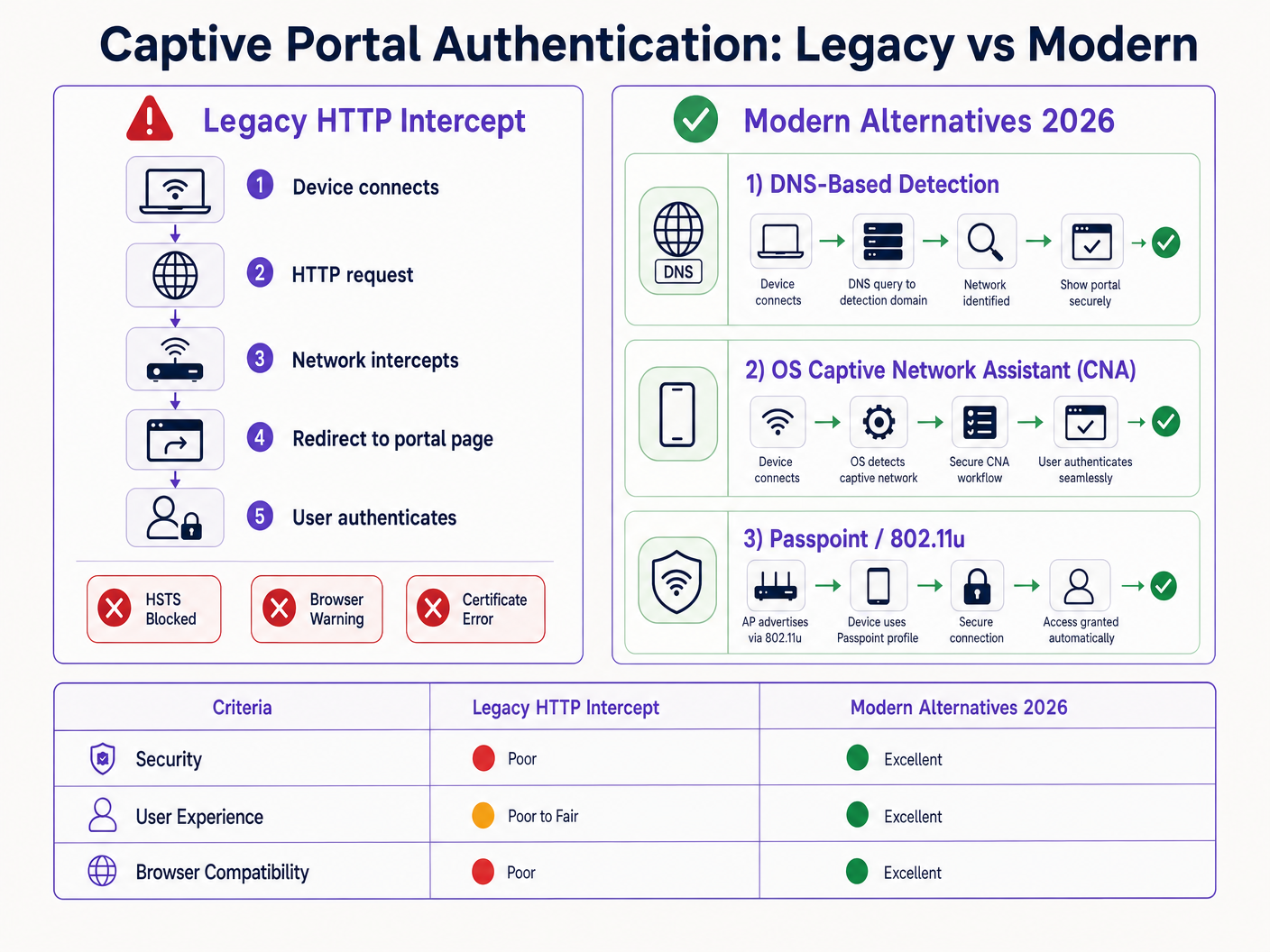
Parce que la requête est chiffrée, le contrôleur réseau ne peut pas inspecter l'en-tête d'hôte ni émettre une redirection HTTP 302. Au lieu de cela, le contrôleur intercepte le trafic HTTPS et présente son propre certificat de portail. Étant donné que ce certificat ne correspond pas au domaine demandé (par exemple, google.com), le navigateur génère une erreur fatale NET::ERR_CERT_AUTHORITY_INVALID. L'utilisateur est bloqué et le portail ne se charge jamais.
La liste de préchargement HSTS exacerbe ce problème. Les navigateurs codent en dur une liste de domaines qui doivent toujours être accessibles via HTTPS, même lors de la première visite. En 2026, cette liste inclut pratiquement toutes les principales destinations grand public. Lorsqu'un invité se connecte à votre réseau et tape une URL courante, le navigateur force le HTTPS, déclenchant l'erreur de certificat et interrompant le flux du portail captif.
Renforcement des navigateurs : Mode HTTPS-First
Au-delà de HSTS, les fournisseurs de navigateurs ont systématiquement renforcé leurs comportements par défaut. Fin 2025, Google a annoncé que Chrome 154 (publié en octobre 2026) activerait par défaut « Toujours utiliser des connexions sécurisées » pour tous les utilisateurs sur les sites publics. Safari et Firefox ont implémenté des modes HTTPS-first similaires.
Cela signifie que même pour les domaines ne figurant pas sur la liste de préchargement HSTS, le navigateur tentera d'abord une connexion HTTPS. Le modèle d'interception HTTP est effectivement obsolète.
Alternatives modernes : CAPPORT et Passpoint
Pour restaurer la fonctionnalité et améliorer l'expérience utilisateur, les architectes réseau doivent passer à des mécanismes modernes de détection de portail captif et à des cadres d'authentification.
1. L'API CAPPORT (RFC 8908 et RFC 8910)
L'Internet Engineering Task Force (IETF) a abordé le problème de la détection des portails captifs avec l'architecture CAPPORT. Au lieu de s'appuyer sur le trafic web intercepté, CAPPORT fournit un mécanisme de signalisation explicite.
- RFC 8910 (Identification de portail captif) : Le réseau utilise DHCP (Option 114) ou les annonces de routeur IPv6 pour fournir au périphérique client l'URI de l'API du portail captif.
- RFC 8908 (API de portail captif) : Le client interroge l'URI fournie (un point de terminaison JSON) pour déterminer s'il est captif et pour obtenir l'URL de la page du portail destinée à l'utilisateur.
Lorsqu'il est implémenté, le système d'exploitation client (iOS, Android, Windows) détecte nativement le portail avant que l'utilisateur n'ouvre un navigateur. Le système d'exploitation lance son assistant de réseau captif (CNA) et charge l'URL du portail directement via une connexion HTTPS sécurisée. Cela élimine le besoin d'interception HTTP et évite les erreurs de certificat.
2. Passpoint (Hotspot 2.0) et OpenRoaming
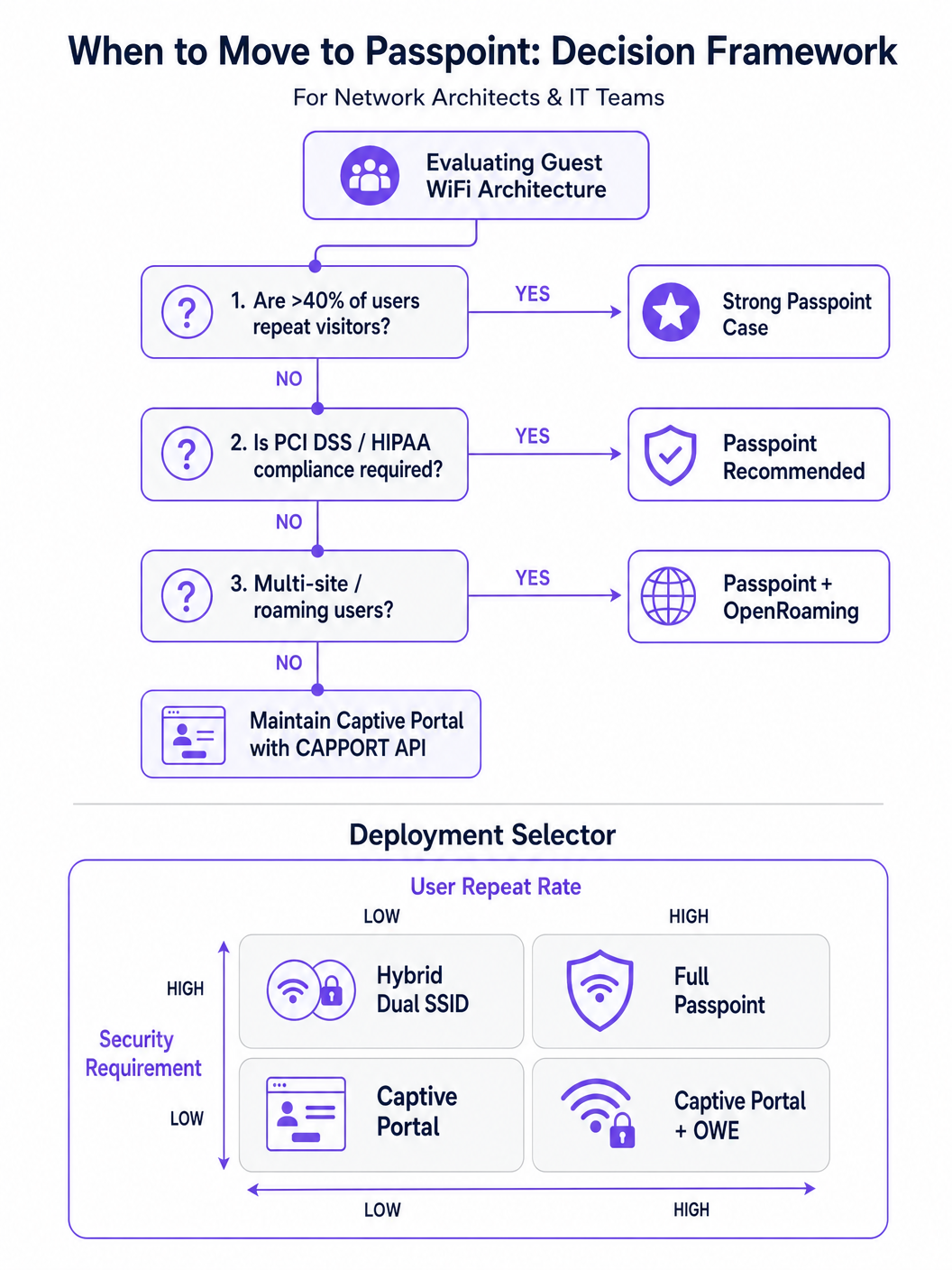
Pour les environnements avec des visiteurs réguliers ou des exigences de sécurité élevées, Passpoint (basé sur IEEE 802.11u) est le remplacement définitif du portail captif.
Passpoint fonctionne au niveau de la couche MAC. Avant de s'associer au point d'accès (AP), le périphérique client utilise l'Access Network Query Protocol (ANQP) pour découvrir les capacités du réseau et les consortiums d'itinérance. Si le périphérique détient une accréditation correspondante (par exemple, un profil installé lors d'une visite précédente ou via un fournisseur d'identité), il s'authentifie automatiquement en utilisant 802.1X et WPA2/WPA3-Enterprise.
Cette approche offre une connectivité de type cellulaire, sans contact. Elle chiffre le trafic en direct, atténuant les risques des réseaux ouverts et des attaques par faux jumeaux. OpenRoaming, basé sur Passpoint, étend cela en fédérant les fournisseurs d'identité, permettant aux utilisateurs de se déplacer de manière transparente entre différents lieux. Notamment, Purple agit comme un fournisseur d'identité gratuit pour des services comme OpenRoaming sous la licence Connect, facilitant une large adoption sans frais de licence par utilisateur.
Guide d'implémentation
Le déploiement d'une architecture d'accès invité résiliente nécessite une approche progressive, passant d'une remédiation immédiate à une transformation stratégique.
Phase 1 : Stabiliser les portails existants avec CAPPORT
Si vous devez maintenir un Captive Portal traditionnel pour la capture de données ou l' analyse WiFi , vous devez implémenter CAPPORT pour contourner les ruptures HSTS.
- Configurer l'option DHCP 114 : Mettez à jour votre serveur DHCP ou votre contrôleur réseau pour diffuser l'option 114, en la faisant pointer vers le point de terminaison API de votre portail (par exemple,
https://portal.yourvenue.com/capport). - Implémenter l'API RFC 8908 : Assurez-vous que votre serveur de portail répond à la requête API avec un JSON valide indiquant l'état Captive Portal et l'URL visible par l'utilisateur.
- Utiliser un nom d'hôte dédié et valide : Le portail doit être servi via HTTPS en utilisant un certificat valide, signé par une CA. N'utilisez jamais un certificat auto-signé ou un nom d'hôte figurant sur la liste de préchargement HSTS.
- Autoriser les sondes OS : Assurez-vous que les sondes de détection de Captive Portal au niveau du système d'exploitation (par exemple,
captive.apple.com,connectivitycheck.gstatic.com) sont autorisées via le jardin clos de pré-authentification.
Phase 2 : Déployer Passpoint pour un accès sécurisé et fluide
La transition vers Passpoint améliore considérablement la sécurité et l'expérience utilisateur, en particulier dans les déploiements Santé et Transport .
- Vérifier le support de l'infrastructure : Assurez-vous que vos points d'accès et contrôleurs prennent en charge Hotspot 2.0/Passpoint et l'authentification 802.1X.
- Configurer les profils ANQP : Définissez le nom du lieu, les OI du consortium d'itinérance et les domaines NAI dans votre contrôleur réseau.
- Établir un backend RADIUS/AAA : Implémentez un serveur RADIUS capable de gérer l'authentification EAP (par exemple, EAP-TLS, EAP-TTLS).
- Implémenter le provisionnement de profils : Utilisez un serveur d'inscription en ligne (OSU) ou intégrez-vous à une plateforme comme Purple SecurePass pour provisionner les profils Passpoint sur les appareils des utilisateurs.
Phase 3 : Le modèle d'intégration progressive hybride
Pour les lieux qui nécessitent à la fois un accès fluide et une capture de données initiale (par exemple, les environnements de vente au détail cherchant à fidéliser), une approche hybride est optimale.
- Première visite : L'utilisateur se connecte à un SSID ouvert et est dirigé vers un Captive Portal compatible CAPPORT. Le portail capture les données nécessaires (par exemple, e-mail, acceptation des conditions) et provisionne un profil Passpoint sur l'appareil.
- Visites ultérieures : L'appareil de l'utilisateur détecte automatiquement le réseau Passpoint via ANQP et s'authentifie de manière fluide à l'aide de 802.1X. Le Captive Portal est entièrement contourné.
Bonnes pratiques
- Évitez le jargon marketing « sans friction » : Concentrez-vous sur la réalité technique. Passpoint nécessite une friction de provisionnement initiale pour atteindre une fluidité à long terme.
- Segmenter le trafic invité : Quelle que soit la méthode d'authentification, le trafic invité doit être logiquement séparé des réseaux d'entreprise à l'aide de VLAN et de pare-feu, conformément à Architecture de l'Internet des objets : Un guide complet .
- Surveiller l'expiration des certificats : Un certificat TLS expiré sur votre portail ou serveur RADIUS entraînera des échecs d'authentification catastrophiques. Mettez en œuvre un renouvellement et une surveillance automatisés.
- Se conformer aux réglementations sur la confidentialité des données : Assurez-vous que vos politiques de capture et de rétention des données sont conformes aux lois locales. Pour des conseils régionaux spécifiques, consultez des ressources telles que le Brésil LGPD et le WiFi invité : Un guide de conformité .
Dépannage et atténuation des risques
- Symptôme : Les appareils iOS affichent un écran CNA vide.
- Cause : La page du portail contient des ressources (images, scripts) hébergées sur des domaines externes qui sont bloqués par le jardin clos.
- Solution : Hébergez tous les actifs essentiels du portail localement ou ajoutez les domaines externes requis à la liste d'autorisation de pré-authentification.
- Symptôme : Les appareils Android affichent un avertissement de certificat au lieu du portail.
- Cause : Le contrôleur intercepte le trafic HTTPS vers un domaine HSTS préchargé, ou le certificat TLS du portail est invalide/auto-signé.
- Solution : Implémentez CAPPORT et assurez-vous que le portail utilise un certificat signé par une CA sur un nom d'hôte dédié.
- Symptôme : L'installation du profil Passpoint échoue sur Windows 11.
- Cause : La chaîne de certificats du serveur de provisionnement est incomplète ou non fiable pour le système d'exploitation.
- Solution : Vérifiez que la chaîne de certificats complète (y compris les CA intermédiaires) est servie lors de l'établissement de la liaison TLS.
ROI et impact commercial
La transition des portails d'interception HTTP hérités vers les architectures modernes CAPPORT et Passpoint offre une valeur commerciale mesurable :
- Réduction des tickets de support : L'élimination des erreurs de certificat liées à HSTS réduit directement le volume des demandes d'assistance informatique concernant les problèmes de connectivité des invités.
- Augmentation des taux de connexion : Une détection fiable du portail au niveau du système d'exploitation garantit que davantage d'invités terminent avec succès le processus d'intégration, élargissant ainsi votre audience atteignable pour les initiatives marketing.
- Amélioration de la posture de sécurité : Le passage à Passpoint et WPA3-Enterprise atténue les risques associés aux réseaux ouverts, protégeant contre l'écoute clandestine et les attaques de type « evil twin », ce qui est essentiel pour la conformité dans des secteurs comme la finance et la santé.
- Expérience utilisateur améliorée : L'itinérance sans contact via Passpoint génère une satisfaction utilisateur et un engagement répété plus élevés, soutenant des initiatives numériques plus larges telles que Système de positionnement intérieur : Guide UWB, BLE et WiFi et Votre guide des solutions Wi-Fi d'entreprise embarquées .
Termes clés et définitions
HSTS (HTTP Strict Transport Security)
A web security policy mechanism that forces web browsers to interact with domains only via secure HTTPS connections, preventing protocol downgrade attacks and HTTP interception.
When IT teams see an increase in certificate errors on guest networks, HSTS enforcement on popular domains is typically the root cause, breaking legacy redirect mechanisms.
HSTS Preload List
A hardcoded list built into modern web browsers containing domains that must always be accessed via HTTPS, even on the very first visit.
If a user attempts to navigate to a preloaded domain (like google.com) while behind a legacy captive portal, the browser will refuse the HTTP connection, preventing the portal redirect.
CAPPORT (Captive Portal Architecture)
An IETF standard (RFC 8908 and 8910) that uses DHCP or IPv6 Router Advertisements to explicitly signal the presence and URL of a captive portal to a client device.
Implementing CAPPORT is the primary remediation strategy for network architects to fix broken portal detection on modern iOS, Android, and Windows devices.
Passpoint (Hotspot 2.0)
A Wi-Fi Alliance specification based on IEEE 802.11u that enables devices to automatically discover and securely authenticate to Wi-Fi networks without user intervention.
Used in enterprise and multi-site deployments to replace captive portals entirely, providing cellular-like roaming and WPA3-Enterprise security.
ANQP (Access Network Query Protocol)
A layer 2 protocol used by client devices to query Access Points for network information (like roaming partners and supported authentication types) before associating.
ANQP is the discovery mechanism that allows a Passpoint-enabled device to determine if it has the correct credentials to join a specific network silently.
CNA (Captive Network Assistant)
The OS-level pseudo-browser that automatically opens when a device detects it is behind a captive portal, allowing the user to authenticate before gaining full internet access.
IT teams must ensure their walled garden allows access to the OS-specific probe URLs (e.g., captive.apple.com) so the CNA triggers correctly.
OpenRoaming
A global Wi-Fi roaming federation that allows users to connect automatically and securely across different venues using a single set of credentials provided by an identity provider.
Venues adopt OpenRoaming to provide seamless access for guests, leveraging identity providers like Purple to manage authentication without complex bilateral agreements.
Walled Garden
A restricted network environment where unauthenticated users can only access a specific set of pre-approved IP addresses or domains necessary for the login process.
Misconfigured walled gardens that block OS detection probes or external portal assets are a leading cause of blank screens and failed guest onboarding.
Études de cas
A 400-room enterprise hotel is experiencing a 30% drop in successful guest WiFi connections. Users report seeing 'Your connection is not private' (NET::ERR_CERT_AUTHORITY_INVALID) errors on their smartphones when trying to access the network. The hotel currently uses a legacy open SSID that intercepts port 80 traffic to redirect to a branded splash page.
The IT team must immediately implement the CAPPORT API (RFC 8908/8910). First, configure the network controller's DHCP server to broadcast Option 114, providing the URI of the captive portal API. Second, deploy the RFC 8908 JSON endpoint on the portal server. Third, ensure the portal is hosted on a dedicated subdomain (e.g., wifi.hoteldomain.com) with a valid, CA-signed TLS certificate. Finally, verify that OS detection URLs (like captive.apple.com) are allowed pre-authentication.
A large retail chain with 500 locations wants to implement seamless WiFi roaming for their loyalty app users, eliminating the need for customers to interact with a captive portal on every visit, while still maintaining high security standards (WPA3).
The architect should deploy a Passpoint (Hotspot 2.0) architecture. The initial onboarding can occur via the retailer's loyalty app, which provisions a Passpoint profile (credential) to the user's device. The APs across all 500 locations must be configured to broadcast the appropriate ANQP roaming consortium OIs. A centralized RADIUS infrastructure will handle the 802.1X EAP authentication when the device automatically associates with the network.
Analyse de scénario
Q1. Your organisation is deploying a new guest WiFi network across 50 regional offices. Security policy mandates that all wireless traffic must be encrypted over the air, but the marketing team insists on capturing user email addresses upon first connection. Which architecture should you propose?
💡 Astuce :Consider how to balance the requirement for initial data capture with the mandate for over-the-air encryption.
Afficher l'approche recommandée
Propose a hybrid progressive onboarding architecture. First-time users connect to an open SSID and are directed to a CAPPORT-enabled captive portal to provide their email address. Upon submission, the portal provisions a Passpoint profile to the device. The device then automatically transitions to a secure, WPA3-Enterprise encrypted Passpoint SSID for all subsequent traffic and future visits. This satisfies marketing's data capture requirement while enforcing security policy for the vast majority of network usage.
Q2. A client complains that their newly designed, highly customized captive portal page is displaying a blank white screen on all modern iOS devices, although it works perfectly on older Android phones. The portal relies heavily on external web fonts and a third-party analytics script.
💡 Astuce :Think about how the iOS Captive Network Assistant (CNA) interacts with external resources before the device is fully authenticated.
Afficher l'approche recommandée
The issue is a misconfigured walled garden. The iOS CNA is attempting to render the portal page, but the external domains hosting the web fonts and analytics scripts are blocked by the network controller pre-authentication. Because these resources cannot load, the CNA stalls and displays a blank screen. The solution is to either host all required assets locally on the portal server or add the specific external domains (FQDNs) to the controller's pre-authentication allowlist.
Q3. During a network audit, you discover that the legacy captive portal is intercepting traffic and serving a self-signed certificate. You are tasked with upgrading the system to use the CAPPORT API. What specific certificate requirements must be met for the new portal server?
💡 Astuce :Consider how modern browsers and OS CNAs handle certificate validation during the captive portal detection phase.
Afficher l'approche recommandée
The new portal server must be accessed via a dedicated Fully Qualified Domain Name (FQDN) that is NOT on the HSTS preload list. Furthermore, it must use a valid TLS certificate issued by a publicly trusted Certificate Authority (CA). Self-signed certificates will be rejected by the OS CNA and modern browsers, preventing the portal from loading and halting the onboarding process.




