

2026 में HTTPS Captive Portals: HSTS और ब्राउज़र हार्डनिंग पुराने पैटर्नों को क्यों तोड़ रहे हैं
यह मार्गदर्शिका बताती है कि कैसे HSTS और ब्राउज़र की HTTPS-फर्स्ट नीतियां 2026 में पुराने HTTP-इंटरसेप्ट Captive Portals को तोड़ रही हैं। यह नेटवर्क आर्किटेक्ट्स के लिए CAPPORT API और Passpoint (Hotspot 2.0) सहित आधुनिक विकल्पों को लागू करने के लिए कार्रवाई योग्य तकनीकी मार्गदर्शन प्रदान करती है, जिससे सुरक्षित और विश्वसनीय गेस्ट WiFi एक्सेस सुनिश्चित होता है।
🎧 इस गाइड को सुनें
ट्रांसक्रिप्ट देखें
कार्यकारी सारांश
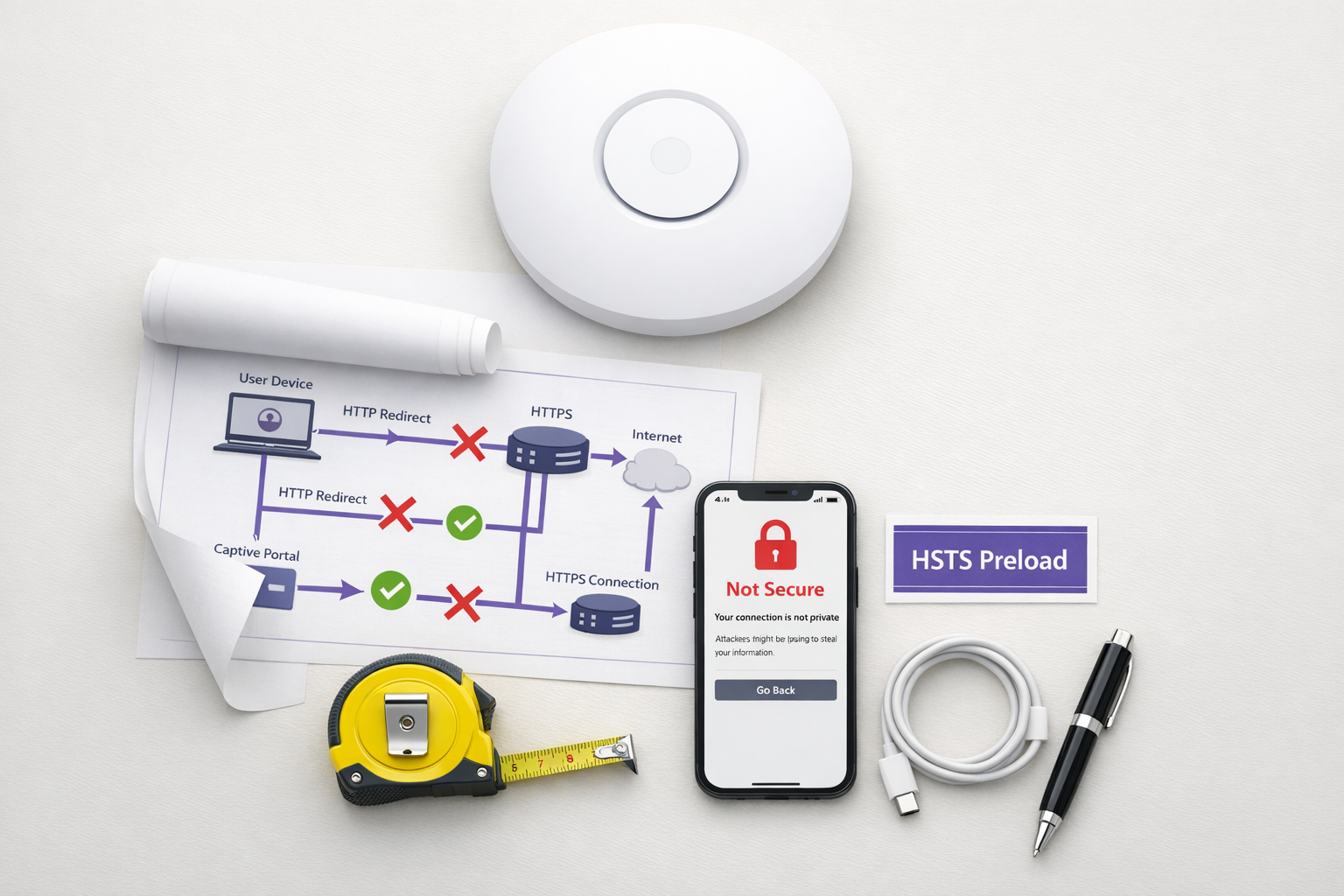
पुराना Captive Portal पैटर्न—HTTP ट्रैफ़िक को इंटरसेप्ट करना और 302 रीडायरेक्ट जारी करना—अब खत्म हो चुका है। HTTP Strict Transport Security (HSTS) और आक्रामक ब्राउज़र हार्डनिंग के कारण, पारंपरिक 'इंटरसेप्ट और रीडायरेक्ट' तंत्र हॉस्पिटैलिटी , रिटेल , और एंटरप्राइज़ वातावरण में बड़े पैमाने पर विफल हो रहा है। 2026 तक, Chrome द्वारा डिफ़ॉल्ट रूप से HTTPS-फर्स्ट व्यवहार लागू करने और HSTS प्रीलोड सूची में 100,000 से अधिक डोमेन होने के कारण, नेटवर्क नियंत्रक अब पोर्टल का पता लगाने के लिए अनएन्क्रिप्टेड HTTP अनुरोधों पर निर्भर नहीं रह सकते हैं।
IT प्रबंधकों और नेटवर्क आर्किटेक्ट्स के लिए, यह एक महत्वपूर्ण वास्तुशिल्प बदलाव का प्रतिनिधित्व करता है। निर्बाध गेस्ट WiFi एक्सेस बनाए रखने के लिए अब आपके ऑनबोर्डिंग प्रवाह को आधुनिक बनाने की आवश्यकता है। यह मार्गदर्शिका पुराने पोर्टलों को तोड़ने वाले तकनीकी तंत्रों का विवरण देती है और विक्रेता-तटस्थ कार्यान्वयन पथ को रेखांकित करती है: तत्काल स्थिरता के लिए CAPPORT API (RFC 8908/8910) को तैनात करना, और सुरक्षित, ज़ीरो-टच कनेक्टिविटी के लिए Passpoint (Hotspot 2.0) और OpenRoaming पर माइग्रेट करना।
तकनीकी गहन-विश्लेषण: HSTS इंटरसेप्ट पैटर्न को क्यों तोड़ता है
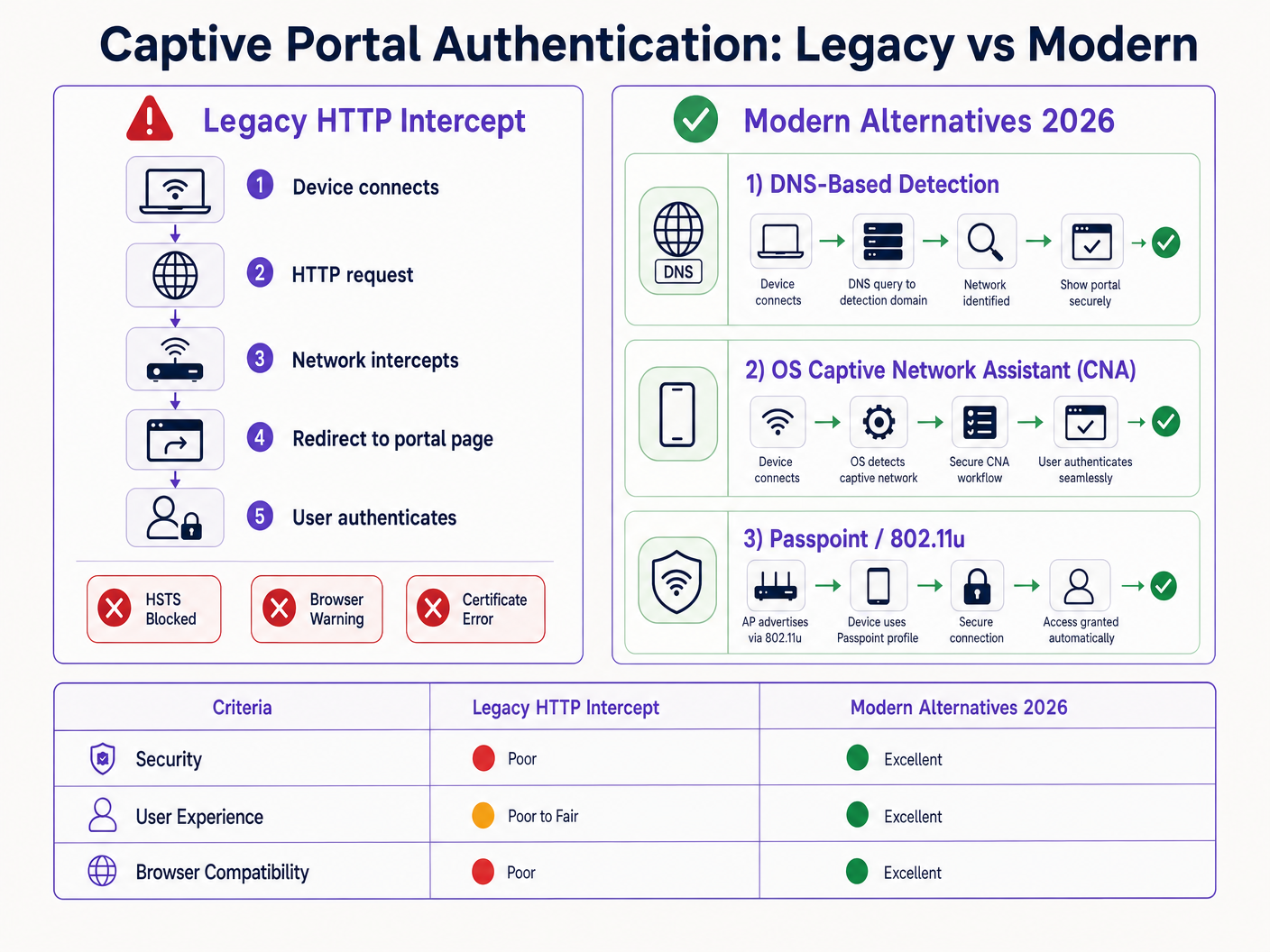
पारंपरिक Captive Portal एक मूलभूत धारणा पर निर्भर करता है: क्लाइंट डिवाइस पोर्ट 80 पर एक अनएन्क्रिप्टेड HTTP अनुरोध करेगा जिसे नेटवर्क एक्सेस सर्वर (NAS) या नियंत्रक इंटरसेप्ट करके पोर्टल के स्प्लैश पेज पर रीडायरेक्ट कर सकता है।
यह धारणा अब मान्य नहीं है।
HSTS प्रीलोड समस्या
RFC 6797 में परिभाषित HTTP Strict Transport Security (HSTS), एक वेब सर्वर को यह घोषित करने की अनुमति देता है कि वेब ब्राउज़र को केवल सुरक्षित HTTPS कनेक्शन का उपयोग करके ही उसके साथ इंटरैक्ट करना चाहिए। जब कोई उपयोगकर्ता HTTP के माध्यम से HSTS-संरक्षित डोमेन तक पहुंचने का प्रयास करता है, तो ब्राउज़र किसी भी नेटवर्क ट्रैफ़िक भेजे जाने से पहले अनुरोध को आंतरिक रूप से HTTPS में अपग्रेड कर देता है।
क्योंकि अनुरोध एन्क्रिप्टेड है, नेटवर्क नियंत्रक होस्ट हेडर का निरीक्षण नहीं कर सकता है या HTTP 302 रीडायरेक्ट जारी नहीं कर सकता है। इसके बजाय, नियंत्रक HTTPS ट्रैफ़िक को इंटरसेप्ट करता है और अपना स्वयं का पोर्टल प्रमाणपत्र प्रस्तुत करता है। चूंकि यह प्रमाणपत्र अनुरोधित डोमेन (उदाहरण के लिए, google.com) से मेल नहीं खाता है, ब्राउज़र एक गंभीर NET::ERR_CERT_AUTHORITY_INVALID त्रुटि देता है। उपयोगकर्ता अवरुद्ध हो जाता है, और पोर्टल कभी लोड नहीं होता है।
HSTS प्रीलोड सूची इस समस्या को और बढ़ा देती है। ब्राउज़र उन डोमेन की एक सूची को हार्डकोड करते हैं जिन्हें हमेशा HTTPS के माध्यम से एक्सेस किया जाना चाहिए, यहां तक कि पहली विज़िट पर भी। 2026 में, इस सूची में वस्तुतः सभी प्रमुख उपभोक्ता गंतव्य शामिल हैं। जब कोई अतिथि आपके नेटवर्क से जुड़ता है और एक सामान्य URL टाइप करता है, तो ब्राउज़र HTTPS को बाध्य करता है, जिससे प्रमाणपत्र त्रुटि ट्रिगर होती है और Captive Portal प्रवाह टूट जाता है।
ब्राउज़र हार्डनिंग: HTTPS-फर्स्ट मोड
HSTS के अलावा, ब्राउज़र विक्रेताओं ने व्यवस्थित रूप से अपने डिफ़ॉल्ट व्यवहारों को मजबूत किया है। 2025 के अंत में, Google ने घोषणा की कि Chrome 154 (अक्टूबर 2026 में जारी) सार्वजनिक साइटों पर सभी उपयोगकर्ताओं के लिए डिफ़ॉल्ट रूप से "हमेशा सुरक्षित कनेक्शन का उपयोग करें" को सक्षम करेगा। Safari और Firefox ने भी इसी तरह के HTTPS-फर्स्ट मोड लागू किए हैं।
इसका मतलब है कि HSTS प्रीलोड सूची में न होने वाले डोमेन के लिए भी, ब्राउज़र पहले एक HTTPS कनेक्शन का प्रयास करेगा। HTTP इंटरसेप्ट पैटर्न प्रभावी रूप से अप्रचलित हो चुका है।
आधुनिक विकल्प: CAPPORT और Passpoint
कार्यक्षमता को बहाल करने और उपयोगकर्ता अनुभव को बेहतर बनाने के लिए, नेटवर्क आर्किटेक्ट्स को आधुनिक Captive Portal डिटेक्शन तंत्र और प्रमाणीकरण फ्रेमवर्क में संक्रमण करना होगा।
1. CAPPORT API (RFC 8908 और RFC 8910)
इंटरनेट इंजीनियरिंग टास्क फोर्स (IETF) ने CAPPORT आर्किटेक्चर के साथ Captive Portal डिटेक्शन समस्या का समाधान किया। इंटरसेप्टेड वेब ट्रैफ़िक पर निर्भर रहने के बजाय, CAPPORT एक स्पष्ट सिग्नलिंग तंत्र प्रदान करता है।
- RFC 8910 (Captive-Portal पहचान): नेटवर्क क्लाइंट डिवाइस को Captive Portal API का URI प्रदान करने के लिए DHCP (विकल्प 114) या IPv6 राउटर विज्ञापनों का उपयोग करता है।
- RFC 8908 (Captive Portal API): क्लाइंट यह निर्धारित करने के लिए प्रदान किए गए URI (एक JSON एंडपॉइंट) को क्वेरी करता है कि क्या यह Captive है और उपयोगकर्ता-सामने वाले पोर्टल पेज का URL प्राप्त करने के लिए।
जब इसे लागू किया जाता है, तो क्लाइंट OS (iOS, Android, Windows) उपयोगकर्ता द्वारा ब्राउज़र खोलने से पहले पोर्टल का मूल रूप से पता लगा लेता है। OS अपना Captive Network Assistant (CNA) लॉन्च करता है और सुरक्षित HTTPS कनेक्शन पर सीधे पोर्टल URL लोड करता है। यह HTTP इंटरसेप्शन की आवश्यकता को समाप्त करता है और प्रमाणपत्र त्रुटियों से बचाता है।
2. Passpoint (Hotspot 2.0) और OpenRoaming
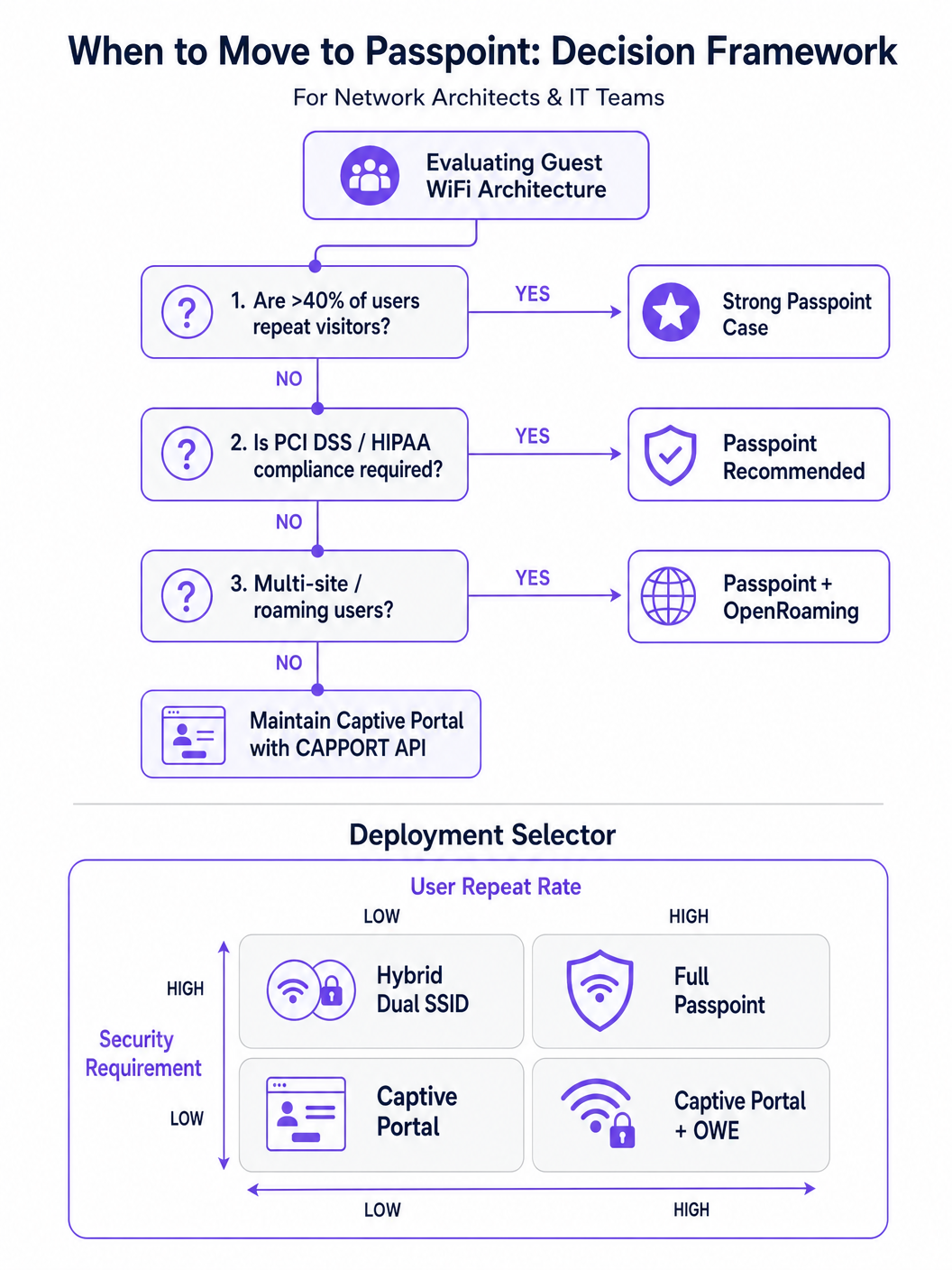
बार-बार आने वाले आगंतुकों या उच्च सुरक्षा आवश्यकताओं वाले वातावरण के लिए, Passpoint (IEEE 802.11u पर आधारित) Captive Portal का निश्चित प्रतिस्थापन है।
Passpoint MAC लेयर पर काम करता है। एक्सेस पॉइंट (AP) से जुड़ने से पहले, क्लाइंट डिवाइस नेटवर्क की क्षमताओं और रोमिंग कंसोर्टियम का पता लगाने के लिए एक्सेस नेटवर्क क्वेरी प्रोटोकॉल (ANQP) का उपयोग करता है। यदि डिवाइस में एक मेल खाने वाला क्रेडेंशियल है (उदाहरण के लिए, पिछली विज़िट के दौरान या एक पहचान प्रदाता के माध्यम से स्थापित एक प्रोफ़ाइल), तो यह 802.1X और WPA2/WPA3-Enterprise का उपयोग करके स्वचालित रूप से प्रमाणित होता है।
यह दृष्टिकोण सेलुलर-जैसी, ज़ीरो-टच कनेक्टिविटी प्रदान करता है। यह हवा में ट्रैफ़िक को एन्क्रिप्ट करता है, खुले नेटवर्क और ईविल ट्विन हमलों के जोखिमों को कम करता है। Passpoint पर निर्मित OpenRoaming, पहचान प्रदाताओं को संघटित करके इसे विस्तारित करता है, जिससे उपयोगकर्ता विभिन्न स्थानों पर निर्बाध रूप से घूम सकते हैं। विशेष रूप से, Purple Connect लाइसेंस के तहत OpenRoaming जैसी सेवाओं के लिए एक मुफ्त पहचान प्रदाता के रूप में कार्य करता है, जिससे प्रति-उपयोगकर्ता लाइसेंसिंग शुल्क के बिना व्यापक अपनाने की सुविधा मिलती है।
कार्यान्वयन मार्गदर्शिका
एक सुदृढ़ अतिथि एक्सेस आर्किटेक्चर को तैनात करने के लिए एक चरणबद्ध दृष्टिकोण की आवश्यकता होती है, जिसमें तत्काल सुधार से लेकर रणनीतिक परिवर्तन तक शामिल है।
चरण 1: CAPPORT के साथ मौजूदा पोर्टलों को स्थिर करें
यदि आपको डेटा कैप्चर या WiFi Analytics के लिए एक पारंपरिक Captive Portal बनाए रखना है, तो आपको HSTS ब्रेकेज को बायपास करने के लिए CAPPORT लागू करना होगा।
- DHCP Option 114 कॉन्फ़िगर करें: अपने DHCP सर्वर या नेटवर्क कंट्रोलर को Option 114 प्रसारित करने के लिए अपडेट करें, जो आपके पोर्टल के API एंडपॉइंट (उदाहरण के लिए,
https://portal.yourvenue.com/capport) की ओर इंगित करता है। - RFC 8908 API लागू करें: सुनिश्चित करें कि आपका पोर्टल सर्वर Captive स्थिति और उपयोगकर्ता-सामने वाले URL को इंगित करने वाले वैध JSON के साथ API अनुरोध का जवाब देता है।
- एक समर्पित, वैध होस्टनाम का उपयोग करें: पोर्टल को एक वैध, CA-signed certificate का उपयोग करके HTTPS पर परोसा जाना चाहिए। कभी भी एक स्व-हस्ताक्षरित प्रमाणपत्र या एक होस्टनाम का उपयोग न करें जो HSTS प्रीलोड सूची में है।
- OS प्रोब को अनुमति दें: सुनिश्चित करें कि OS-स्तर के Captive Portal डिटेक्शन प्रोब (उदाहरण के लिए,
captive.apple.com,connectivitycheck.gstatic.com) को वॉल्ड गार्डन प्री-ऑथेंटिकेशन के माध्यम से अनुमति दी गई है।
चरण 2: सुरक्षित, निर्बाध एक्सेस के लिए Passpoint तैनात करें
Passpoint में संक्रमण सुरक्षा और उपयोगकर्ता अनुभव को महत्वपूर्ण रूप से बढ़ाता है, विशेष रूप से Healthcare और Transport परिनियोजन में।
- बुनियादी ढांचा समर्थन सत्यापित करें: सुनिश्चित करें कि आपके AP और कंट्रोलर Hotspot 2.0/Passpoint और 802.1X ऑथेंटिकेशन का समर्थन करते हैं।
- ANQP प्रोफाइल कॉन्फ़िगर करें: अपने नेटवर्क कंट्रोलर में वेन्यू का नाम, रोमिंग कंसोर्टियम OI और NAI रील्म परिभाषित करें।
- एक RADIUS/AAA बैकएंड स्थापित करें: एक RADIUS सर्वर लागू करें जो EAP ऑथेंटिकेशन (उदाहरण के लिए, EAP-TLS, EAP-TTLS) को संभालने में सक्षम हो।
- प्रोफाइल प्रोविजनिंग लागू करें: उपयोगकर्ता उपकरणों को Passpoint प्रोफाइल प्रदान करने के लिए एक Online Sign-Up (OSU) सर्वर का उपयोग करें या Purple SecurePass जैसे प्लेटफॉर्म के साथ एकीकृत करें।
चरण 3: हाइब्रिड प्रोग्रेसिव ऑनबोर्डिंग मॉडल
उन स्थानों के लिए जिन्हें निर्बाध एक्सेस और प्रारंभिक डेटा कैप्चर दोनों की आवश्यकता होती है (उदाहरण के लिए, खुदरा वातावरण जो वफादारी बढ़ाना चाहते हैं), एक हाइब्रिड दृष्टिकोण इष्टतम है।
- पहली विज़िट: उपयोगकर्ता एक खुले SSID से जुड़ता है और उसे CAPPORT-सक्षम Captive Portal पर निर्देशित किया जाता है। पोर्टल आवश्यक डेटा (उदाहरण के लिए, ईमेल, शर्तों की स्वीकृति) कैप्चर करता है और डिवाइस को एक Passpoint प्रोफाइल प्रदान करता है।
- बाद की विज़िट: उपयोगकर्ता का डिवाइस ANQP के माध्यम से Passpoint नेटवर्क का स्वचालित रूप से पता लगाता है और 802.1X का उपयोग करके निर्बाध रूप से प्रमाणित होता है। Captive Portal पूरी तरह से बायपास हो जाता है।
सर्वोत्तम अभ्यास
- 'घर्षण रहित' मार्केटिंग भाषा से बचें: तकनीकी वास्तविकता पर ध्यान केंद्रित करें। Passpoint को दीर्घकालिक निर्बाधता प्राप्त करने के लिए प्रारंभिक प्रोविजनिंग घर्षण की आवश्यकता होती है।
- अतिथि ट्रैफ़िक को खंडित करें: प्रमाणीकरण विधि के बावजूद, अतिथि ट्रैफ़िक को VLANs और firewalls का उपयोग करके कॉर्पोरेट नेटवर्क से तार्किक रूप से अलग किया जाना चाहिए, जो Internet of Things Architecture: A Complete Guide के अनुरूप हो।
- प्रमाणपत्र की समय-सीमा समाप्त होने की निगरानी करें: आपके पोर्टल या RADIUS सर्वर पर समाप्त TLS certificate विनाशकारी प्रमाणीकरण विफलताओं का कारण बनेगा। स्वचालित नवीनीकरण और निगरानी लागू करें।
- डेटा गोपनीयता विनियमों का पालन करें: सुनिश्चित करें कि आपकी डेटा कैप्चर और प्रतिधारण नीतियां स्थानीय कानूनों के अनुरूप हों। विशिष्ट क्षेत्रीय मार्गदर्शन के लिए, Brazil LGPD and Guest WiFi: A Compliance Guide जैसे संसाधनों का संदर्भ लें।
समस्या निवारण और जोखिम न्यूनीकरण
- लक्षण: iOS डिवाइस एक खाली CNA स्क्रीन दिखाते हैं।
- कारण: पोर्टल पृष्ठ में बाहरी डोमेन पर होस्ट किए गए संसाधन (छवियां, स्क्रिप्ट) शामिल हैं जिन्हें वॉल्ड गार्डन द्वारा अवरुद्ध किया गया है।
- समाधान: सभी आवश्यक पोर्टल संपत्तियों को स्थानीय रूप से होस्ट करें या आवश्यक बाहरी डोमेन को प्री-ऑथ अनुमति सूची में जोड़ें।
- लक्षण: Android डिवाइस पोर्टल के बजाय एक प्रमाणपत्र चेतावनी प्रदर्शित करते हैं।
- कारण: कंट्रोलर एक प्रीलोडेड HSTS डोमेन पर HTTPS ट्रैफ़िक को इंटरसेप्ट कर रहा है, या पोर्टल का TLS certificate अमान्य/स्व-हस्ताक्षरित है।
- समाधान: CAPPORT लागू करें और सुनिश्चित करें कि पोर्टल एक समर्पित होस्टनाम पर CA-signed certificate का उपयोग करता है।
- लक्षण: Windows 11 पर Passpoint प्रोफाइल इंस्टॉलेशन विफल हो जाता है।
- कारण: प्रोविजनिंग सर्वर की प्रमाणपत्र श्रृंखला अधूरी है या OS द्वारा अविश्वसनीय है।
- समाधान: सत्यापित करें कि TLS हैंडशेक के दौरान पूरी प्रमाणपत्र श्रृंखला (मध्यवर्ती CA सहित) परोसी जाती है।
ROI और व्यावसायिक प्रभाव
विरासत HTTP इंटरसेप्ट पोर्टलों से आधुनिक CAPPORT और Passpoint आर्किटेक्चर में संक्रमण मापने योग्य व्यावसायिक मूल्य प्रदान करता है:
- कम हुए सपोर्ट टिकट: HSTS-संबंधित प्रमाणपत्र त्रुटियों को समाप्त करने से अतिथि कनेक्टिविटी समस्याओं से संबंधित IT हेल्पडेस्क की मात्रा सीधे कम हो जाती है।
- बढ़ी हुई कनेक्शन दरें: विश्वसनीय OS-स्तर पोर्टल डिटेक्शन यह सुनिश्चित करता है कि अधिक अतिथि सफलतापूर्वक ऑनबोर्डिंग प्रवाह को पूरा करें, जिससे मार्केटिंग पहलों के लिए आपके पहुंच योग्य दर्शकों का विस्तार होता है।
- बढ़ी हुई सुरक्षा स्थिति: Passpoint और WPA3-Enterprise पर जाने से खुले नेटवर्क से जुड़े जोखिम कम होते हैं, जिससे जासूसी और ईविल ट्विन हमलों से बचाव होता है, जो वित्त और Healthcare जैसे क्षेत्रों में अनुपालन के लिए महत्वपूर्ण है।
- बेहतर उपयोगकर्ता अनुभव: Passpoint के माध्यम से ज़ीरो-टच रोमिंग उच्च उपयोगकर्ता संतुष्टि और बार-बार जुड़ाव को बढ़ावा देता है, जो Indoor Positioning System: UWB, BLE, & WiFi Guide और Your Guide to Enterprise In Car Wi Fi Solutions जैसी व्यापक डिजिटल पहलों का समर्थन करता है।
मुख्य शब्द और परिभाषाएं
HSTS (HTTP Strict Transport Security)
A web security policy mechanism that forces web browsers to interact with domains only via secure HTTPS connections, preventing protocol downgrade attacks and HTTP interception.
When IT teams see an increase in certificate errors on guest networks, HSTS enforcement on popular domains is typically the root cause, breaking legacy redirect mechanisms.
HSTS Preload List
A hardcoded list built into modern web browsers containing domains that must always be accessed via HTTPS, even on the very first visit.
If a user attempts to navigate to a preloaded domain (like google.com) while behind a legacy captive portal, the browser will refuse the HTTP connection, preventing the portal redirect.
CAPPORT (Captive Portal Architecture)
An IETF standard (RFC 8908 and 8910) that uses DHCP or IPv6 Router Advertisements to explicitly signal the presence and URL of a captive portal to a client device.
Implementing CAPPORT is the primary remediation strategy for network architects to fix broken portal detection on modern iOS, Android, and Windows devices.
Passpoint (Hotspot 2.0)
A Wi-Fi Alliance specification based on IEEE 802.11u that enables devices to automatically discover and securely authenticate to Wi-Fi networks without user intervention.
Used in enterprise and multi-site deployments to replace captive portals entirely, providing cellular-like roaming and WPA3-Enterprise security.
ANQP (Access Network Query Protocol)
A layer 2 protocol used by client devices to query Access Points for network information (like roaming partners and supported authentication types) before associating.
ANQP is the discovery mechanism that allows a Passpoint-enabled device to determine if it has the correct credentials to join a specific network silently.
CNA (Captive Network Assistant)
The OS-level pseudo-browser that automatically opens when a device detects it is behind a captive portal, allowing the user to authenticate before gaining full internet access.
IT teams must ensure their walled garden allows access to the OS-specific probe URLs (e.g., captive.apple.com) so the CNA triggers correctly.
OpenRoaming
A global Wi-Fi roaming federation that allows users to connect automatically and securely across different venues using a single set of credentials provided by an identity provider.
Venues adopt OpenRoaming to provide seamless access for guests, leveraging identity providers like Purple to manage authentication without complex bilateral agreements.
Walled Garden
A restricted network environment where unauthenticated users can only access a specific set of pre-approved IP addresses or domains necessary for the login process.
Misconfigured walled gardens that block OS detection probes or external portal assets are a leading cause of blank screens and failed guest onboarding.
केस स्टडीज
A 400-room enterprise hotel is experiencing a 30% drop in successful guest WiFi connections. Users report seeing 'Your connection is not private' (NET::ERR_CERT_AUTHORITY_INVALID) errors on their smartphones when trying to access the network. The hotel currently uses a legacy open SSID that intercepts port 80 traffic to redirect to a branded splash page.
The IT team must immediately implement the CAPPORT API (RFC 8908/8910). First, configure the network controller's DHCP server to broadcast Option 114, providing the URI of the captive portal API. Second, deploy the RFC 8908 JSON endpoint on the portal server. Third, ensure the portal is hosted on a dedicated subdomain (e.g., wifi.hoteldomain.com) with a valid, CA-signed TLS certificate. Finally, verify that OS detection URLs (like captive.apple.com) are allowed pre-authentication.
A large retail chain with 500 locations wants to implement seamless WiFi roaming for their loyalty app users, eliminating the need for customers to interact with a captive portal on every visit, while still maintaining high security standards (WPA3).
The architect should deploy a Passpoint (Hotspot 2.0) architecture. The initial onboarding can occur via the retailer's loyalty app, which provisions a Passpoint profile (credential) to the user's device. The APs across all 500 locations must be configured to broadcast the appropriate ANQP roaming consortium OIs. A centralized RADIUS infrastructure will handle the 802.1X EAP authentication when the device automatically associates with the network.
परिदृश्य विश्लेषण
Q1. Your organisation is deploying a new guest WiFi network across 50 regional offices. Security policy mandates that all wireless traffic must be encrypted over the air, but the marketing team insists on capturing user email addresses upon first connection. Which architecture should you propose?
💡 संकेत:Consider how to balance the requirement for initial data capture with the mandate for over-the-air encryption.
अनुशंसित दृष्टिकोण दिखाएं
Propose a hybrid progressive onboarding architecture. First-time users connect to an open SSID and are directed to a CAPPORT-enabled captive portal to provide their email address. Upon submission, the portal provisions a Passpoint profile to the device. The device then automatically transitions to a secure, WPA3-Enterprise encrypted Passpoint SSID for all subsequent traffic and future visits. This satisfies marketing's data capture requirement while enforcing security policy for the vast majority of network usage.
Q2. A client complains that their newly designed, highly customized captive portal page is displaying a blank white screen on all modern iOS devices, although it works perfectly on older Android phones. The portal relies heavily on external web fonts and a third-party analytics script.
💡 संकेत:Think about how the iOS Captive Network Assistant (CNA) interacts with external resources before the device is fully authenticated.
अनुशंसित दृष्टिकोण दिखाएं
The issue is a misconfigured walled garden. The iOS CNA is attempting to render the portal page, but the external domains hosting the web fonts and analytics scripts are blocked by the network controller pre-authentication. Because these resources cannot load, the CNA stalls and displays a blank screen. The solution is to either host all required assets locally on the portal server or add the specific external domains (FQDNs) to the controller's pre-authentication allowlist.
Q3. During a network audit, you discover that the legacy captive portal is intercepting traffic and serving a self-signed certificate. You are tasked with upgrading the system to use the CAPPORT API. What specific certificate requirements must be met for the new portal server?
💡 संकेत:Consider how modern browsers and OS CNAs handle certificate validation during the captive portal detection phase.
अनुशंसित दृष्टिकोण दिखाएं
The new portal server must be accessed via a dedicated Fully Qualified Domain Name (FQDN) that is NOT on the HSTS preload list. Furthermore, it must use a valid TLS certificate issued by a publicly trusted Certificate Authority (CA). Self-signed certificates will be rejected by the OS CNA and modern browsers, preventing the portal from loading and halting the onboarding process.




