

Captive Portal HTTPS nel 2026: Perché HSTS e il rafforzamento dei browser stanno rompendo i vecchi schemi
Questa guida descrive in dettaglio come HSTS e le politiche HTTPS-first dei browser stiano rompendo i Captive Portal HTTP legacy nel 2026. Fornisce indicazioni tecniche attuabili per gli architetti di rete per implementare alternative moderne, inclusi l'API CAPPORT e Passpoint (Hotspot 2.0), garantendo un accesso WiFi sicuro e affidabile per gli ospiti.
🎧 Ascolta questa guida
Visualizza trascrizione
Riepilogo Esecutivo
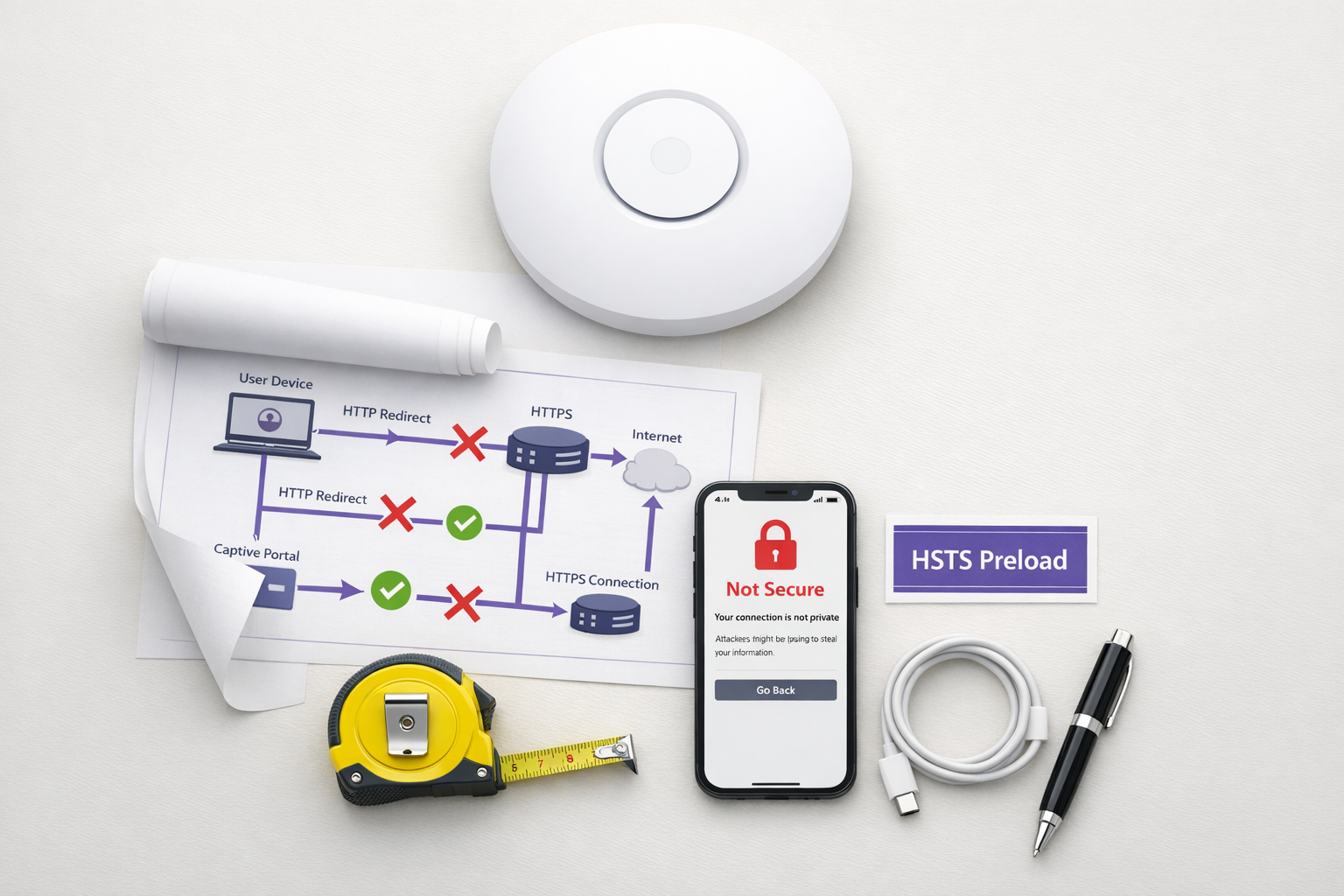
Il modello legacy di Captive Portal — intercettare il traffico HTTP ed emettere un reindirizzamento 302 — è superato. Spinto da HTTP Strict Transport Security (HSTS) e da un aggressivo rafforzamento dei browser, il tradizionale meccanismo di 'intercettazione e reindirizzamento' sta fallendo su larga scala negli ambienti Ospitalità , Retail e aziendali. A partire dal 2026, con Chrome che impone il comportamento HTTPS-first per impostazione predefinita e l'elenco di precaricamento HSTS che supera i 100.000 domini, i controller di rete non possono più fare affidamento su richieste HTTP non crittografate per attivare il rilevamento del portale.
Per i responsabili IT e gli architetti di rete, questo rappresenta un cambiamento architettonico critico. Mantenere un accesso Guest WiFi senza interruzioni richiede ora la modernizzazione del flusso di onboarding. Questa guida descrive i meccanismi tecnici che stanno rompendo i portali legacy e delinea il percorso di implementazione futuro, indipendente dal fornitore: l'implementazione dell'API CAPPORT (RFC 8908/8910) per una stabilità immediata e la migrazione a Passpoint (Hotspot 2.0) e OpenRoaming per una connettività sicura e zero-touch.
Approfondimento Tecnico: Perché HSTS Rompe il Modello di Intercettazione
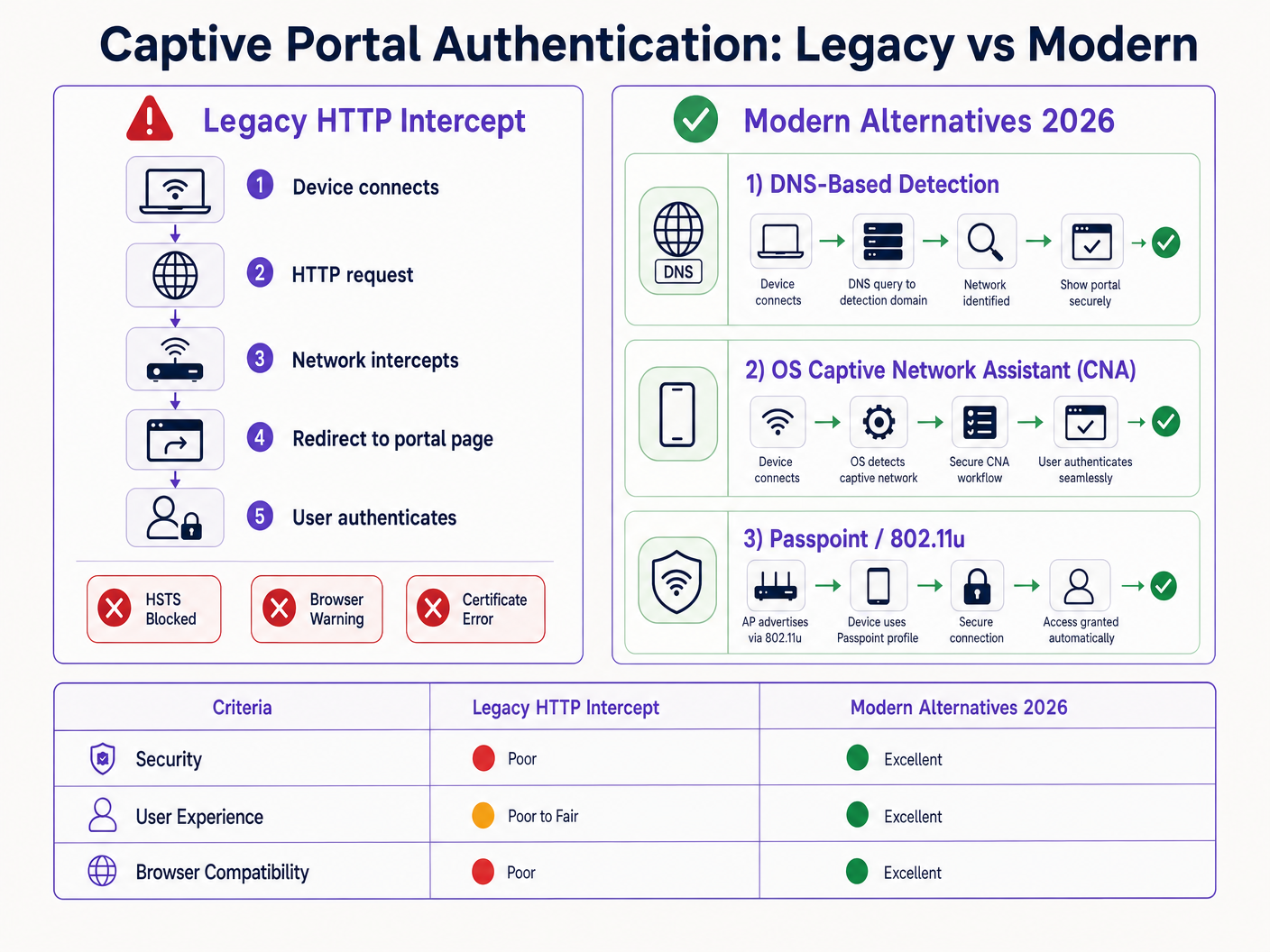
Il Captive Portal tradizionale si basa su un'ipotesi fondamentale: il dispositivo client effettuerà una richiesta HTTP non crittografata sulla porta 80 che il server di accesso alla rete (NAS) o il controller possono intercettare e reindirizzare alla splash page del portale.
Questa ipotesi non è più valida.
Il Problema del Precaricamento HSTS
HTTP Strict Transport Security (HSTS), definito nella RFC 6797, consente a un server web di dichiarare che i browser web dovrebbero interagire con esso solo utilizzando connessioni HTTPS sicure. Quando un utente tenta di accedere a un dominio protetto da HSTS tramite HTTP, il browser aggiorna internamente la richiesta a HTTPS prima che venga inviato qualsiasi traffico di rete.
Poiché la richiesta è crittografata, il controller di rete non può ispezionare l'intestazione host o emettere un reindirizzamento HTTP 302. Invece, il controller intercetta il traffico HTTPS e presenta il proprio certificato del portale. Poiché questo certificato non corrisponde al dominio richiesto (ad esempio, google.com), il browser genera un errore fatale NET::ERR_CERT_AUTHORITY_INVALID. L'utente viene bloccato e il portale non si carica mai.
L'elenco di precaricamento HSTS aggrava questo problema. I browser codificano un elenco di domini che devono essere sempre accessibili tramite HTTPS, anche alla prima visita. Nel 2026, questo elenco include praticamente tutte le principali destinazioni consumer. Quando un ospite si connette alla tua rete e digita un URL comune, il browser forza HTTPS, attivando l'errore del certificato e interrompendo il flusso del Captive Portal.
Rafforzamento del Browser: Modalità HTTPS-First
Oltre a HSTS, i fornitori di browser hanno sistematicamente rafforzato i loro comportamenti predefiniti. Alla fine del 2025, Google ha annunciato che Chrome 154 (rilasciato nell'ottobre 2026) avrebbe abilitato "Usa sempre connessioni sicure" per impostazione predefinita per tutti gli utenti sui siti pubblici. Safari e Firefox hanno implementato modalità HTTPS-first simili.
Ciò significa che anche per i domini non presenti nell'elenco di precaricamento HSTS, il browser tenterà prima una connessione HTTPS. Il modello di intercettazione HTTP è di fatto obsoleto.
Alternative Moderne: CAPPORT e Passpoint
Per ripristinare la funzionalità e migliorare l'esperienza utente, gli architetti di rete devono passare a meccanismi moderni di rilevamento del Captive Portal e framework di autenticazione.
1. L'API CAPPORT (RFC 8908 e RFC 8910)
L'Internet Engineering Task Force (IETF) ha affrontato il problema del rilevamento del Captive Portal con l'architettura CAPPORT. Invece di fare affidamento sul traffico web intercettato, CAPPORT fornisce un meccanismo di segnalazione esplicito.
- RFC 8910 (Captive-Portal Identification): La rete utilizza DHCP (Opzione 114) o IPv6 Router Advertisements per fornire al dispositivo client l'URI dell'API del Captive Portal.
- RFC 8908 (Captive Portal API): Il client interroga l'URI fornito (un endpoint JSON) per determinare se è captive e per ottenere l'URL della pagina del portale rivolta all'utente.
Quando implementato, il sistema operativo client (iOS, Android, Windows) rileva nativamente il portale prima che l'utente apra un browser. Il sistema operativo avvia il suo Captive Network Assistant (CNA) e carica l'URL del portale direttamente tramite una connessione HTTPS sicura. Ciò elimina la necessità di intercettazione HTTP ed evita errori di certificato.
2. Passpoint (Hotspot 2.0) e OpenRoaming
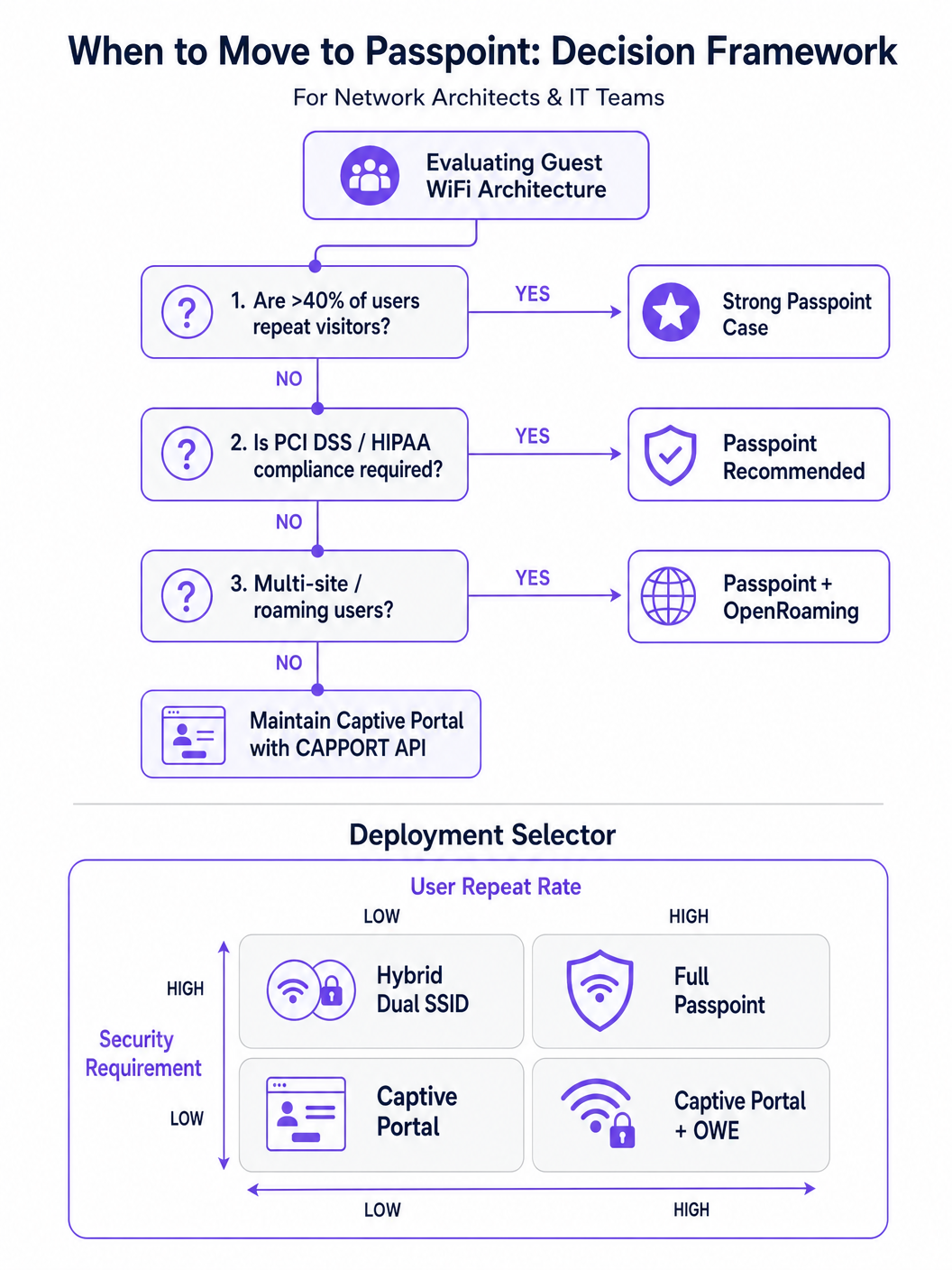
Per ambienti con visitatori abituali o requisiti di alta sicurezza, Passpoint (basato su IEEE 802.11u) è il sostituto definitivo del Captive Portal.
Passpoint opera a livello MAC. Prima di associarsi all'Access Point (AP), il dispositivo client utilizza l'Access Network Query Protocol (ANQP) per scoprire le capacità della rete e i consorzi di roaming. Se il dispositivo detiene una credenziale corrispondente (ad esempio, un profilo installato durante una visita precedente o tramite un provider di identità), si autentica automaticamente utilizzando 802.1X e WPA2/WPA3-Enterprise.
Questo approccio fornisce una connettività zero-touch, simile a quella cellulare. Crittografa il traffico via etere, mitigando i rischi delle reti aperte e degli attacchi evil twin. OpenRoaming, basato su Passpoint, estende questo concetto federando i provider di identità, consentendo agli utenti di effettuare il roaming senza interruzioni tra diverse sedi. In particolare, Purple agisce come provider di identità gratuito per servizi come OpenRoaming sotto la licenza Connect, facilitando un'ampia adozione senza costi di licenza per utente.
Guida all'Implementazione
Il deployment di un'architettura di accesso ospite resiliente richiede un approccio graduale, passando dalla risoluzione immediata alla trasformazione strategica.
Fase 1: Stabilizzare i Portali Esistenti con CAPPORT
Se è necessario mantenere un tradizionale captive portal per l'acquisizione di dati o WiFi Analytics , è obbligatorio implementare CAPPORT per aggirare i problemi di HSTS.
- Configurare DHCP Option 114: Aggiornare il server DHCP o il controller di rete per trasmettere DHCP Option 114, puntando all'API endpoint del portale (es.
https://portal.yourvenue.com/capport). - Implementare l'API RFC 8908: Assicurarsi che il server del portale risponda alla richiesta API con un JSON valido che indichi lo stato di captive e l'URL visibile all'utente.
- Utilizzare un Hostname Dedicato e Valido: Il portale deve essere servito tramite HTTPS utilizzando un certificato valido e firmato da CA. Non utilizzare mai un certificato auto-firmato o un hostname presente nell'elenco di precaricamento HSTS.
- Consentire le Probe del Sistema Operativo: Assicurarsi che le probe di rilevamento del captive portal a livello di sistema operativo (es.
captive.apple.com,connectivitycheck.gstatic.com) siano consentite attraverso il walled garden pre-autenticazione.
Fase 2: Implementare Passpoint per un Accesso Sicuro e Senza Interruzioni
Il passaggio a Passpoint migliora significativamente la sicurezza e l'esperienza utente, in particolare nelle implementazioni Healthcare e Transport .
- Verificare il Supporto dell'Infrastruttura: Assicurarsi che gli AP e i controller supportino Hotspot 2.0/Passpoint e l'autenticazione 802.1X.
- Configurare i Profili ANQP: Definire il nome della sede, gli OIs del consorzio di roaming e i realm NAI nel controller di rete.
- Stabilire un Backend RADIUS/AAA: Implementare un server RADIUS in grado di gestire l'autenticazione EAP (es. EAP-TLS, EAP-TTLS).
- Implementare il Provisioning dei Profili: Utilizzare un server Online Sign-Up (OSU) o integrare con una piattaforma come Purple SecurePass per il provisioning dei profili Passpoint sui dispositivi degli utenti.
Fase 3: Il Modello di Onboarding Progressivo Ibrido
Per le sedi che richiedono sia un accesso senza interruzioni sia l'acquisizione iniziale dei dati (es. ambienti retail che cercano di promuovere la fedeltà), un approccio ibrido è ottimale.
- Prima Visita: L'utente si connette a un SSID aperto e viene indirizzato a un captive portal abilitato per CAPPORT. Il portale acquisisce i dati necessari (es. email, accettazione dei termini) e provvede al provisioning di un profilo Passpoint sul dispositivo.
- Visite Successive: Il dispositivo dell'utente rileva automaticamente la rete Passpoint tramite ANQP e si autentica senza interruzioni utilizzando 802.1X. Il captive portal viene completamente aggirato.
Migliori Pratiche
- Evitare il Linguaggio Marketing 'Senza Attrito': Concentrarsi sulla realtà tecnica. Passpoint richiede un attrito iniziale nel provisioning per ottenere una fluidità a lungo termine.
- Segmentare il Traffico Ospite: Indipendentemente dal metodo di autenticazione, il traffico ospite deve essere logicamente separato dalle reti aziendali utilizzando VLAN e firewall, in linea con Architettura dell'Internet delle Cose: Una Guida Completa .
- Monitorare la Scadenza dei Certificati: Un certificato TLS scaduto sul portale o sul server RADIUS causerà errori di autenticazione catastrofici. Implementare il rinnovo e il monitoraggio automatizzati.
- Conformarsi alle Normative sulla Privacy dei Dati: Assicurarsi che le politiche di acquisizione e conservazione dei dati siano allineate alle leggi locali. Per indicazioni regionali specifiche, fare riferimento a risorse come la LGPD brasiliana e il WiFi Ospite: Una Guida alla Conformità .
Risoluzione dei Problemi e Mitigazione dei Rischi
- Sintomo: i dispositivi iOS mostrano una schermata CNA vuota.
- Causa: La pagina del portale contiene risorse (immagini, script) ospitate su domini esterni bloccate dal walled garden.
- Soluzione: Ospitare tutte le risorse essenziali del portale localmente o aggiungere i domini esterni richiesti alla allowlist di pre-autenticazione.
- Sintomo: i dispositivi Android visualizzano un avviso di certificato invece del portale.
- Causa: Il controller sta intercettando il traffico HTTPS verso un dominio HSTS precaricato, oppure il certificato TLS del portale non è valido/auto-firmato.
- Soluzione: Implementare CAPPORT e assicurarsi che il portale utilizzi un certificato firmato da CA su un hostname dedicato.
- Sintomo: l'installazione del profilo Passpoint fallisce su Windows 11.
- Causa: La catena di certificati del server di provisioning è incompleta o non è considerata attendibile dal sistema operativo.
- Soluzione: Verificare che l'intera catena di certificati (incluse le CA intermedie) sia servita durante l'handshake TLS.
ROI e Impatto sul Business
Il passaggio dai portali di intercettazione HTTP legacy alle moderne architetture CAPPORT e Passpoint offre un valore aziendale misurabile:
- Riduzione dei Ticket di Supporto: L'eliminazione degli errori di certificato relativi a HSTS riduce direttamente il volume di richieste all'helpdesk IT relative a problemi di connettività degli ospiti.
- Aumento dei Tassi di Connessione: Il rilevamento affidabile del portale a livello di sistema operativo garantisce che più ospiti completino con successo il flusso di onboarding, ampliando il pubblico raggiungibile per le iniziative di marketing.
- Miglioramento della Postura di Sicurezza: Il passaggio a Passpoint e WPA3-Enterprise mitiga i rischi associati alle reti aperte, proteggendo da intercettazioni e attacchi evil twin, il che è fondamentale per la conformità in settori come la finanza e l'assistenza sanitaria.
- Miglioramento dell'Esperienza Utente: Il roaming zero-touch tramite Passpoint favorisce una maggiore soddisfazione dell'utente e un coinvolgimento ripetuto, supportando iniziative digitali più ampie come Sistema di Posizionamento Indoor: Guida UWB, BLE e WiFi e La Tua Guida alle Soluzioni Wi Fi In-Car per Aziende .
Termini chiave e definizioni
HSTS (HTTP Strict Transport Security)
A web security policy mechanism that forces web browsers to interact with domains only via secure HTTPS connections, preventing protocol downgrade attacks and HTTP interception.
When IT teams see an increase in certificate errors on guest networks, HSTS enforcement on popular domains is typically the root cause, breaking legacy redirect mechanisms.
HSTS Preload List
A hardcoded list built into modern web browsers containing domains that must always be accessed via HTTPS, even on the very first visit.
If a user attempts to navigate to a preloaded domain (like google.com) while behind a legacy captive portal, the browser will refuse the HTTP connection, preventing the portal redirect.
CAPPORT (Captive Portal Architecture)
An IETF standard (RFC 8908 and 8910) that uses DHCP or IPv6 Router Advertisements to explicitly signal the presence and URL of a captive portal to a client device.
Implementing CAPPORT is the primary remediation strategy for network architects to fix broken portal detection on modern iOS, Android, and Windows devices.
Passpoint (Hotspot 2.0)
A Wi-Fi Alliance specification based on IEEE 802.11u that enables devices to automatically discover and securely authenticate to Wi-Fi networks without user intervention.
Used in enterprise and multi-site deployments to replace captive portals entirely, providing cellular-like roaming and WPA3-Enterprise security.
ANQP (Access Network Query Protocol)
A layer 2 protocol used by client devices to query Access Points for network information (like roaming partners and supported authentication types) before associating.
ANQP is the discovery mechanism that allows a Passpoint-enabled device to determine if it has the correct credentials to join a specific network silently.
CNA (Captive Network Assistant)
The OS-level pseudo-browser that automatically opens when a device detects it is behind a captive portal, allowing the user to authenticate before gaining full internet access.
IT teams must ensure their walled garden allows access to the OS-specific probe URLs (e.g., captive.apple.com) so the CNA triggers correctly.
OpenRoaming
A global Wi-Fi roaming federation that allows users to connect automatically and securely across different venues using a single set of credentials provided by an identity provider.
Venues adopt OpenRoaming to provide seamless access for guests, leveraging identity providers like Purple to manage authentication without complex bilateral agreements.
Walled Garden
A restricted network environment where unauthenticated users can only access a specific set of pre-approved IP addresses or domains necessary for the login process.
Misconfigured walled gardens that block OS detection probes or external portal assets are a leading cause of blank screens and failed guest onboarding.
Casi di studio
A 400-room enterprise hotel is experiencing a 30% drop in successful guest WiFi connections. Users report seeing 'Your connection is not private' (NET::ERR_CERT_AUTHORITY_INVALID) errors on their smartphones when trying to access the network. The hotel currently uses a legacy open SSID that intercepts port 80 traffic to redirect to a branded splash page.
The IT team must immediately implement the CAPPORT API (RFC 8908/8910). First, configure the network controller's DHCP server to broadcast Option 114, providing the URI of the captive portal API. Second, deploy the RFC 8908 JSON endpoint on the portal server. Third, ensure the portal is hosted on a dedicated subdomain (e.g., wifi.hoteldomain.com) with a valid, CA-signed TLS certificate. Finally, verify that OS detection URLs (like captive.apple.com) are allowed pre-authentication.
A large retail chain with 500 locations wants to implement seamless WiFi roaming for their loyalty app users, eliminating the need for customers to interact with a captive portal on every visit, while still maintaining high security standards (WPA3).
The architect should deploy a Passpoint (Hotspot 2.0) architecture. The initial onboarding can occur via the retailer's loyalty app, which provisions a Passpoint profile (credential) to the user's device. The APs across all 500 locations must be configured to broadcast the appropriate ANQP roaming consortium OIs. A centralized RADIUS infrastructure will handle the 802.1X EAP authentication when the device automatically associates with the network.
Analisi degli scenari
Q1. Your organisation is deploying a new guest WiFi network across 50 regional offices. Security policy mandates that all wireless traffic must be encrypted over the air, but the marketing team insists on capturing user email addresses upon first connection. Which architecture should you propose?
💡 Suggerimento:Consider how to balance the requirement for initial data capture with the mandate for over-the-air encryption.
Mostra l'approccio consigliato
Propose a hybrid progressive onboarding architecture. First-time users connect to an open SSID and are directed to a CAPPORT-enabled captive portal to provide their email address. Upon submission, the portal provisions a Passpoint profile to the device. The device then automatically transitions to a secure, WPA3-Enterprise encrypted Passpoint SSID for all subsequent traffic and future visits. This satisfies marketing's data capture requirement while enforcing security policy for the vast majority of network usage.
Q2. A client complains that their newly designed, highly customized captive portal page is displaying a blank white screen on all modern iOS devices, although it works perfectly on older Android phones. The portal relies heavily on external web fonts and a third-party analytics script.
💡 Suggerimento:Think about how the iOS Captive Network Assistant (CNA) interacts with external resources before the device is fully authenticated.
Mostra l'approccio consigliato
The issue is a misconfigured walled garden. The iOS CNA is attempting to render the portal page, but the external domains hosting the web fonts and analytics scripts are blocked by the network controller pre-authentication. Because these resources cannot load, the CNA stalls and displays a blank screen. The solution is to either host all required assets locally on the portal server or add the specific external domains (FQDNs) to the controller's pre-authentication allowlist.
Q3. During a network audit, you discover that the legacy captive portal is intercepting traffic and serving a self-signed certificate. You are tasked with upgrading the system to use the CAPPORT API. What specific certificate requirements must be met for the new portal server?
💡 Suggerimento:Consider how modern browsers and OS CNAs handle certificate validation during the captive portal detection phase.
Mostra l'approccio consigliato
The new portal server must be accessed via a dedicated Fully Qualified Domain Name (FQDN) that is NOT on the HSTS preload list. Furthermore, it must use a valid TLS certificate issued by a publicly trusted Certificate Authority (CA). Self-signed certificates will be rejected by the OS CNA and modern browsers, preventing the portal from loading and halting the onboarding process.




