

HTTPS Captive Portals im Jahr 2026: Warum HSTS und Browser-Härtung alte Muster aufbrechen
Dieser Leitfaden erläutert, wie HSTS und HTTPS-First-Richtlinien von Browsern veraltete HTTP-Intercept Captive Portals im Jahr 2026 aufbrechen. Er bietet umsetzbare technische Anleitungen für Netzwerkarchitekten zur Implementierung moderner Alternativen, einschließlich der CAPPORT API und Passpoint (Hotspot 2.0), um einen sicheren und zuverlässigen Gast-WiFi-Zugang zu gewährleisten.
🎧 Diesen Leitfaden anhören
Transkript anzeigen
Zusammenfassung
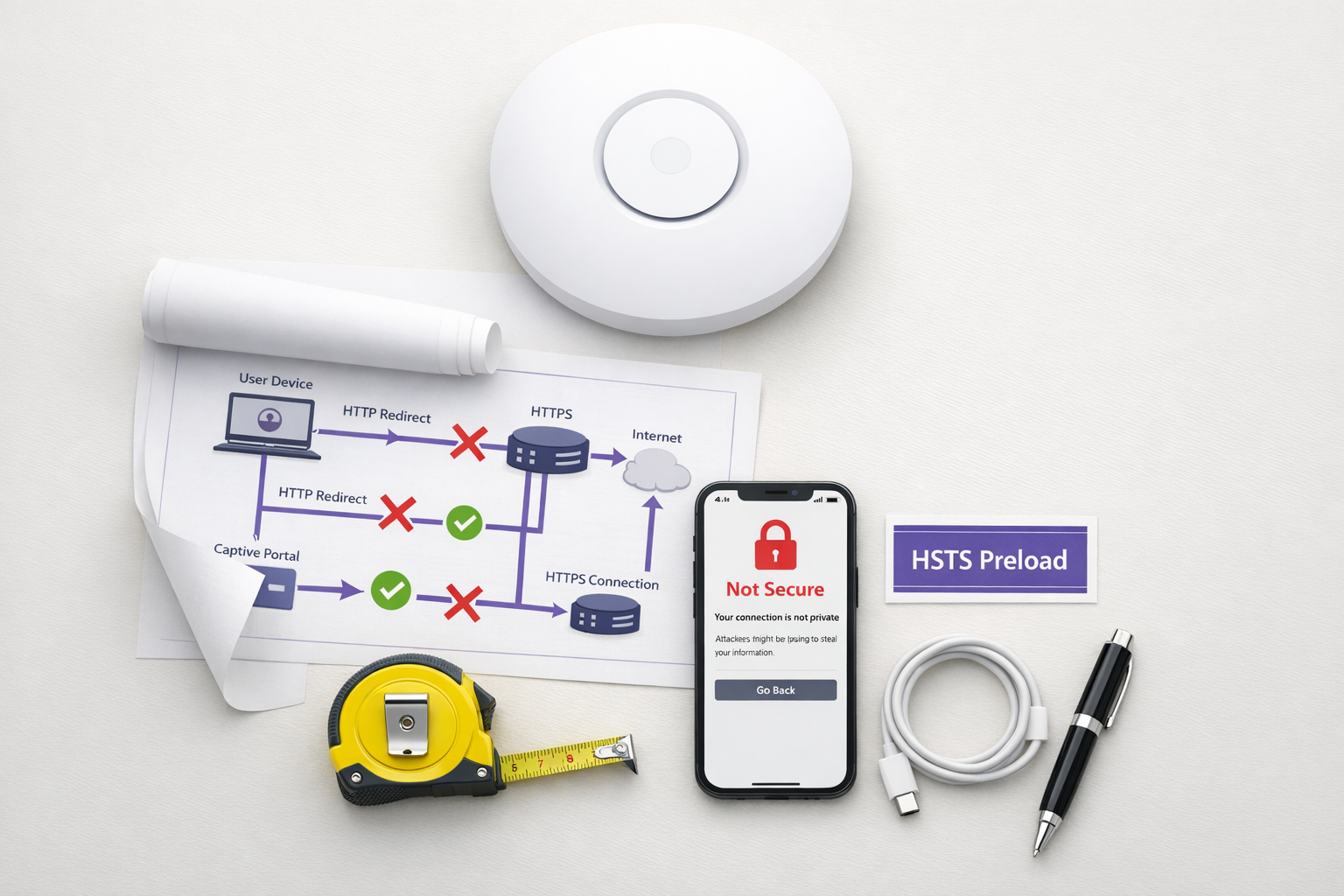
Das veraltete Captive Portal-Muster – das Abfangen von HTTP-Verkehr und das Ausgeben einer 302-Weiterleitung – ist tot. Angetrieben durch HTTP Strict Transport Security (HSTS) und aggressive Browser-Härtung versagt der traditionelle „Abfangen und Weiterleiten“-Mechanismus in großem Umfang in den Bereichen Hospitality , Retail und Unternehmensumgebungen. Ab 2026, da Chrome standardmäßig HTTPS-First-Verhalten erzwingt und die HSTS-Preload-Liste 100.000 Domains überschreitet, können Netzwerk-Controller sich nicht mehr auf unverschlüsselte HTTP-Anfragen verlassen, um die Portalerkennung auszulösen.
Für IT-Manager und Netzwerkarchitekten stellt dies eine kritische architektonische Verschiebung dar. Die Aufrechterhaltung eines nahtlosen Gast-WiFi -Zugangs erfordert nun die Modernisierung Ihres Onboarding-Flows. Dieser Leitfaden beschreibt die technischen Mechanismen, die veraltete Portale aufbrechen, und skizziert den herstellerneutralen Implementierungspfad: die Bereitstellung der CAPPORT API (RFC 8908/8910) für sofortige Stabilität und die Migration zu Passpoint (Hotspot 2.0) und OpenRoaming für sichere, berührungslose Konnektivität.
Technischer Deep-Dive: Warum HSTS das Intercept-Muster aufbricht
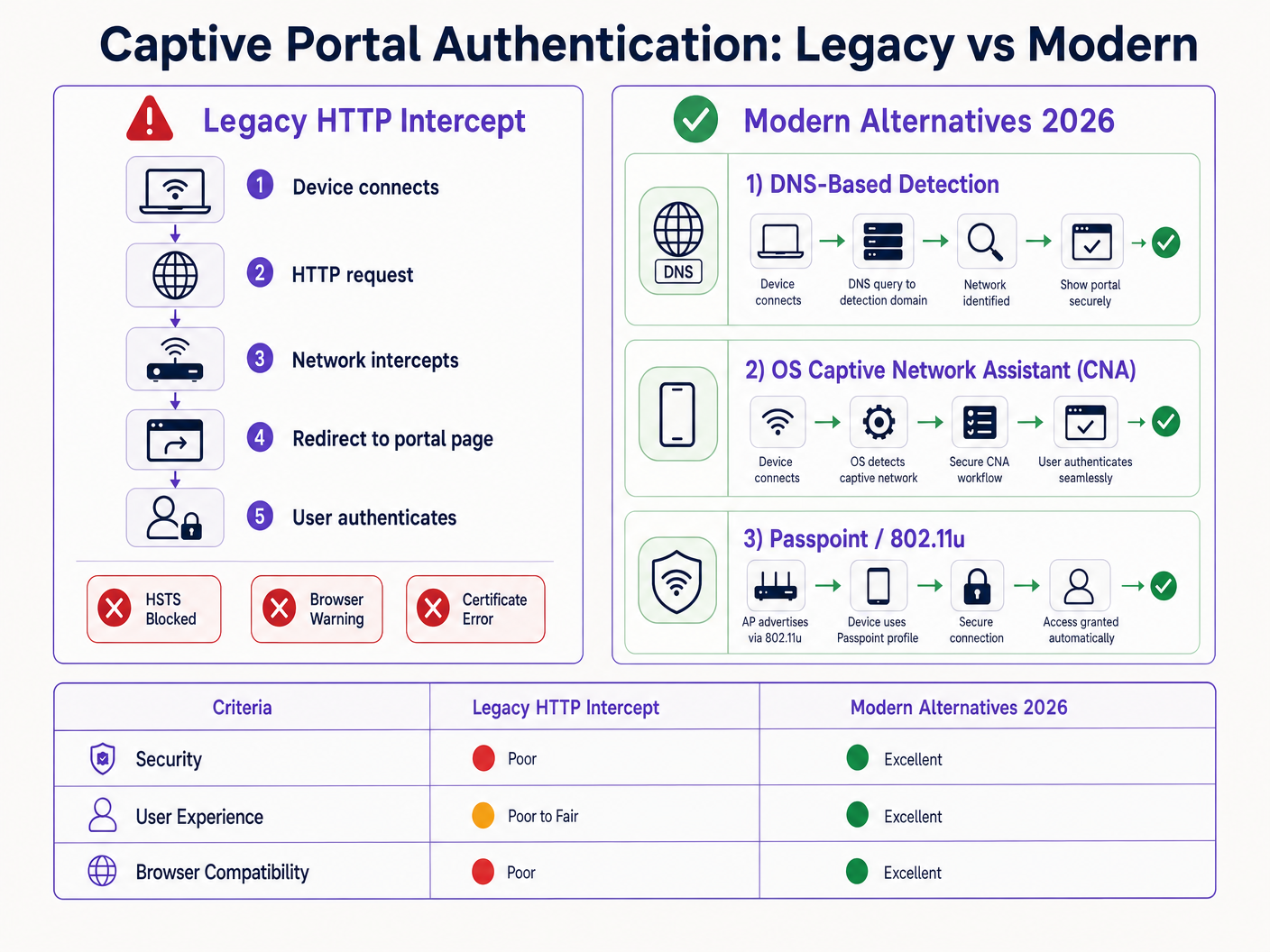
Das traditionelle Captive Portal basiert auf einer grundlegenden Annahme: Das Client-Gerät wird eine unverschlüsselte HTTP-Anfrage auf Port 80 stellen, die der Network Access Server (NAS) oder Controller abfangen und auf die Splash-Seite des Portals umleiten kann.
Diese Annahme ist nicht länger gültig.
Das HSTS-Preload-Problem
HTTP Strict Transport Security (HSTS), definiert in RFC 6797, ermöglicht es einem Webserver zu deklarieren, dass Webbrowser nur über sichere HTTPS-Verbindungen mit ihm interagieren sollen. Wenn ein Benutzer versucht, auf eine HSTS-geschützte Domain über HTTP zuzugreifen, aktualisiert der Browser die Anfrage intern auf HTTPS, bevor Netzwerkverkehr gesendet wird.
Da die Anfrage verschlüsselt ist, kann der Netzwerk-Controller den Host-Header nicht inspizieren oder eine HTTP 302-Weiterleitung ausgeben. Stattdessen fängt der Controller den HTTPS-Verkehr ab und präsentiert sein eigenes Portalzertifikat. Da dieses Zertifikat nicht mit der angeforderten Domain (z.B. google.com) übereinstimmt, wirft der Browser einen fatalen Fehler NET::ERR_CERT_AUTHORITY_INVALID. Der Benutzer wird blockiert, und das Portal lädt nie.
Die HSTS-Preload-Liste verschärft dieses Problem. Browser hardcodieren eine Liste von Domains, auf die immer über HTTPS zugegriffen werden muss, selbst beim ersten Besuch. Im Jahr 2026 umfasst diese Liste praktisch alle wichtigen Konsumentenziele. Wenn ein Gast sich mit Ihrem Netzwerk verbindet und eine gängige URL eingibt, erzwingt der Browser HTTPS, was den Zertifikatsfehler auslöst und den Captive Portal-Flow unterbricht.
Browser-Härtung: HTTPS-First-Modus
Über HSTS hinaus haben Browser-Anbieter ihre Standardverhaltensweisen systematisch gehärtet. Ende 2025 kündigte Google an, dass Chrome 154 (veröffentlicht im Oktober 2026) standardmäßig „Immer sichere Verbindungen verwenden“ für alle Benutzer auf öffentlichen Websites aktivieren würde. Safari und Firefox haben ähnliche HTTPS-First-Modi implementiert.
Das bedeutet, dass der Browser selbst für Domains, die nicht auf der HSTS-Preload-Liste stehen, zuerst eine HTTPS-Verbindung versuchen wird. Das HTTP-Intercept-Muster ist damit faktisch obsolet.
Moderne Alternativen: CAPPORT und Passpoint
Um die Funktionalität wiederherzustellen und die Benutzererfahrung zu verbessern, müssen Netzwerkarchitekten auf moderne Captive Portal-Erkennungsmechanismen und Authentifizierungs-Frameworks umstellen.
1. Die CAPPORT API (RFC 8908 und RFC 8910)
Die Internet Engineering Task Force (IETF) hat das Problem der Captive Portal-Erkennung mit der CAPPORT-Architektur angegangen. Anstatt sich auf abgefangenen Webverkehr zu verlassen, bietet CAPPORT einen expliziten Signalmechanismus.
- RFC 8910 (Captive-Portal-Identifikation): Das Netzwerk verwendet DHCP (Option 114) oder IPv6 Router Advertisements, um dem Client-Gerät die URI der Captive Portal API bereitzustellen.
- RFC 8908 (Captive Portal API): Der Client fragt die bereitgestellte URI (einen JSON-Endpunkt) ab, um festzustellen, ob er sich in einem Captive-Zustand befindet und um die URL der benutzerorientierten Portalseite zu erhalten.
Bei Implementierung erkennt das Client-Betriebssystem (iOS, Android, Windows) das Portal nativ, bevor der Benutzer einen Browser öffnet. Das Betriebssystem startet seinen Captive Network Assistant (CNA) und lädt die Portal-URL direkt über eine sichere HTTPS-Verbindung. Dies eliminiert die Notwendigkeit des HTTP-Abfangens und vermeidet Zertifikatsfehler.
2. Passpoint (Hotspot 2.0) und OpenRoaming
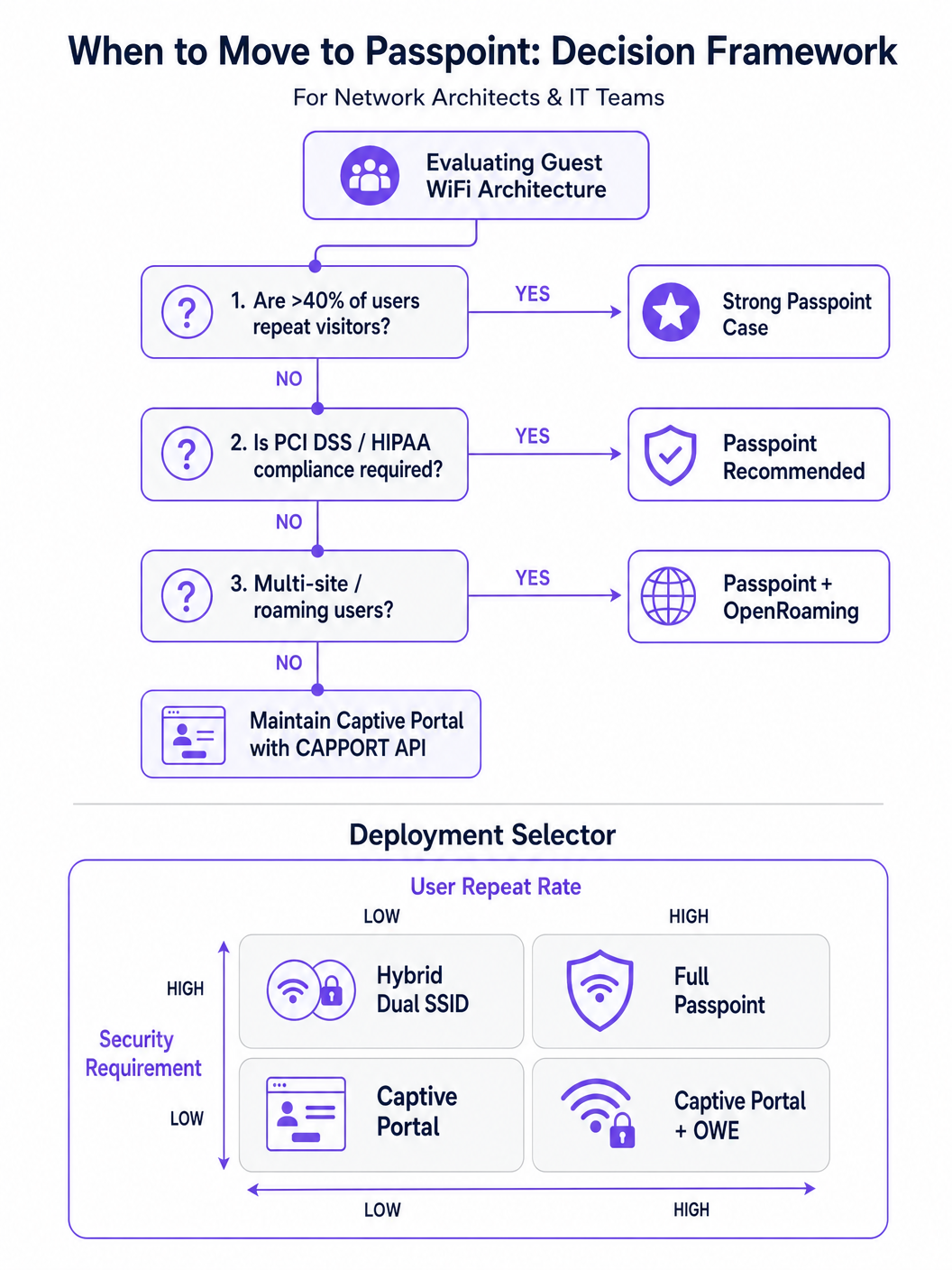
Für Umgebungen mit wiederkehrenden Besuchern oder hohen Sicherheitsanforderungen ist Passpoint (basierend auf IEEE 802.11u) der definitive Ersatz für das Captive Portal.
Passpoint arbeitet auf der MAC-Schicht. Bevor es sich mit dem Access Point (AP) verbindet, verwendet das Client-Gerät das Access Network Query Protocol (ANQP), um die Fähigkeiten des Netzwerks und Roaming-Konsortien zu ermitteln. Wenn das Gerät über passende Anmeldeinformationen verfügt (z.B. ein Profil, das bei einem früheren Besuch oder über einen Identitätsanbieter installiert wurde), authentifiziert es sich automatisch mittels 802.1X und WPA2/WPA3-Enterprise.
Dieser Ansatz bietet zellulär-ähnliche, berührungslose Konnektivität. Er verschlüsselt den Datenverkehr über die Luftschnittstelle und mindert die Risiken offener Netzwerke und Evil Twin-Angriffe. OpenRoaming, basierend auf Passpoint, erweitert dies durch die Föderation von Identitätsanbietern, wodurch Benutzer nahtlos zwischen verschiedenen Standorten wechseln können. Bemerkenswert ist, dass Purple als kostenloser Identitätsanbieter für Dienste wie OpenRoaming unter der Connect-Lizenz fungiert und so eine breite Akzeptanz ohne Pro-Benutzer-Lizenzgebühren ermöglicht.
Implementierungsleitfaden
Der Aufbau einer robusten Gastzugangsarchitektur erfordert einen schrittweisen Ansatz, der von der sofortigen Problembehebung zu einer strategischen Transformation übergeht.
Phase 1: Bestehende Portale mit CAPPORT stabilisieren
Wenn Sie ein traditionelles Captive Portal zur Datenerfassung oder für WiFi Analytics beibehalten müssen, müssen Sie CAPPORT implementieren, um HSTS-Fehler zu umgehen.
- DHCP Option 114 konfigurieren: Aktualisieren Sie Ihren DHCP-Server oder Netzwerk-Controller, um Option 114 zu senden, die auf den API-Endpunkt Ihres Portals verweist (z.B.
https://portal.yourvenue.com/capport). - Die RFC 8908 API implementieren: Stellen Sie sicher, dass Ihr Portal-Server auf die API-Anfrage mit gültigem JSON antwortet, das den Captive-Status und die benutzerseitige URL anzeigt.
- Einen dedizierten, gültigen Hostnamen verwenden: Das Portal muss über HTTPS mit einem gültigen, von einer CA signierten Zertifikat bereitgestellt werden. Verwenden Sie niemals ein selbstsigniertes Zertifikat oder einen Hostnamen, der auf der HSTS-Preload-Liste steht.
- OS-Probes auf die Positivliste setzen: Stellen Sie sicher, dass die OS-level Captive Portal Erkennungssonden (z.B.
captive.apple.com,connectivitycheck.gstatic.com) durch die Walled Garden Pre-Authentifizierung zugelassen werden.
Phase 2: Passpoint für sicheren, nahtlosen Zugang bereitstellen
Der Übergang zu Passpoint verbessert die Sicherheit und das Benutzererlebnis erheblich, insbesondere bei Implementierungen im Gesundheitswesen und Transport .
- Infrastrukturunterstützung überprüfen: Stellen Sie sicher, dass Ihre APs und Controller Hotspot 2.0/Passpoint und 802.1X-Authentifizierung unterstützen.
- ANQP-Profile konfigurieren: Definieren Sie den Veranstaltungsortnamen, Roaming-Konsortium-OIs und NAI-Realms in Ihrem Netzwerk-Controller.
- Ein RADIUS/AAA-Backend einrichten: Implementieren Sie einen RADIUS-Server, der EAP-Authentifizierung (z.B. EAP-TLS, EAP-TTLS) verarbeiten kann.
- Profilbereitstellung implementieren: Verwenden Sie einen Online Sign-Up (OSU)-Server oder integrieren Sie sich in eine Plattform wie Purple SecurePass, um Passpoint-Profile auf Benutzergeräte bereitzustellen.
Phase 3: Das hybride progressive Onboarding-Modell
Für Veranstaltungsorte, die sowohl nahtlosen Zugang als auch anfängliche Datenerfassung benötigen (z.B. Einzelhandelsumgebungen, die die Kundenbindung fördern möchten), ist ein hybrider Ansatz optimal.
- Erster Besuch: Der Benutzer verbindet sich mit einer offenen SSID und wird zu einem CAPPORT-fähigen Captive Portal weitergeleitet. Das Portal erfasst die notwendigen Daten (z.B. E-Mail, Akzeptanz der Bedingungen) und stellt ein Passpoint-Profil auf dem Gerät bereit.
- Folgebesuche: Das Gerät des Benutzers erkennt das Passpoint-Netzwerk automatisch über ANQP und authentifiziert sich nahtlos über 802.1X. Das Captive Portal wird vollständig umgangen.
Best Practices
- Vermeiden Sie 'reibungslose' Marketingsprache: Konzentrieren Sie sich auf die technische Realität. Passpoint erfordert anfängliche Bereitstellungsreibung, um langfristige Nahtlosigkeit zu erreichen.
- Gast-Traffic segmentieren: Unabhängig von der Authentifizierungsmethode muss der Gast-Traffic logisch von Unternehmensnetzwerken mithilfe von VLANs und Firewalls getrennt werden, im Einklang mit Internet of Things Architecture: A Complete Guide .
- Zertifikatsablauf überwachen: Ein abgelaufenes TLS-Zertifikat auf Ihrem Portal oder RADIUS-Server führt zu katastrophalen Authentifizierungsfehlern. Implementieren Sie eine automatisierte Erneuerung und Überwachung.
- Datenschutzbestimmungen einhalten: Stellen Sie sicher, dass Ihre Datenerfassungs- und Aufbewahrungsrichtlinien den lokalen Gesetzen entsprechen. Für spezifische regionale Hinweise verweisen wir auf Ressourcen wie den Brazil LGPD and Guest WiFi: A Compliance Guide .
Fehlerbehebung & Risikominderung
- Symptom: iOS-Geräte zeigen einen leeren CNA-Bildschirm an.
- Ursache: Die Portalseite enthält Ressourcen (Bilder, Skripte), die auf externen Domains gehostet werden und vom Walled Garden blockiert sind.
- Behebung: Hosten Sie alle wesentlichen Portal-Assets lokal oder fügen Sie die erforderlichen externen Domains zur Pre-Auth-Allowlist hinzu.
- Symptom: Android-Geräte zeigen eine Zertifikatswarnung anstelle des Portals an.
- Ursache: Der Controller fängt HTTPS-Traffic zu einer vorgeladenen HSTS-Domain ab, oder das TLS-Zertifikat des Portals ist ungültig/selbstsigniert.
- Behebung: Implementieren Sie CAPPORT und stellen Sie sicher, dass das Portal ein CA-signiertes Zertifikat auf einem dedizierten Hostnamen verwendet.
- Symptom: Die Installation des Passpoint-Profils schlägt unter Windows 11 fehl.
- Ursache: Die Zertifikatskette des Bereitstellungsservers ist unvollständig oder wird vom OS nicht als vertrauenswürdig eingestuft.
- Behebung: Überprüfen Sie, ob die vollständige Zertifikatskette (einschließlich Zwischen-CAs) während des TLS-Handshakes bereitgestellt wird.
ROI & Geschäftsauswirkungen
Der Übergang von älteren HTTP-Intercept-Portalen zu modernen CAPPORT- und Passpoint-Architekturen liefert messbaren Geschäftswert:
- Reduzierte Support-Tickets: Die Beseitigung HSTS-bezogener Zertifikatsfehler reduziert direkt das Volumen des IT-Helpdesks bezüglich Gastkonnektivitätsproblemen.
- Erhöhte Verbindungsraten: Eine zuverlässige OS-level Portalerkennung stellt sicher, dass mehr Gäste den Onboarding-Prozess erfolgreich abschließen, wodurch Ihr erreichbares Publikum für Marketinginitiativen erweitert wird.
- Verbesserte Sicherheitslage: Der Übergang zu Passpoint und WPA3-Enterprise mindert die Risiken offener Netzwerke und schützt vor Abhören und Evil Twin-Angriffen, was für die Compliance in Sektoren wie Finanzen und Gesundheitswesen entscheidend ist.
- Verbessertes Benutzererlebnis: Zero-Touch-Roaming über Passpoint führt zu höherer Benutzerzufriedenheit und wiederholter Interaktion und unterstützt breitere digitale Initiativen wie Indoor Positioning System: UWB, BLE, & WiFi Guide und Your Guide to Enterprise In Car Wi Fi Solutions .
Schlüsselbegriffe & Definitionen
HSTS (HTTP Strict Transport Security)
A web security policy mechanism that forces web browsers to interact with domains only via secure HTTPS connections, preventing protocol downgrade attacks and HTTP interception.
When IT teams see an increase in certificate errors on guest networks, HSTS enforcement on popular domains is typically the root cause, breaking legacy redirect mechanisms.
HSTS Preload List
A hardcoded list built into modern web browsers containing domains that must always be accessed via HTTPS, even on the very first visit.
If a user attempts to navigate to a preloaded domain (like google.com) while behind a legacy captive portal, the browser will refuse the HTTP connection, preventing the portal redirect.
CAPPORT (Captive Portal Architecture)
An IETF standard (RFC 8908 and 8910) that uses DHCP or IPv6 Router Advertisements to explicitly signal the presence and URL of a captive portal to a client device.
Implementing CAPPORT is the primary remediation strategy for network architects to fix broken portal detection on modern iOS, Android, and Windows devices.
Passpoint (Hotspot 2.0)
A Wi-Fi Alliance specification based on IEEE 802.11u that enables devices to automatically discover and securely authenticate to Wi-Fi networks without user intervention.
Used in enterprise and multi-site deployments to replace captive portals entirely, providing cellular-like roaming and WPA3-Enterprise security.
ANQP (Access Network Query Protocol)
A layer 2 protocol used by client devices to query Access Points for network information (like roaming partners and supported authentication types) before associating.
ANQP is the discovery mechanism that allows a Passpoint-enabled device to determine if it has the correct credentials to join a specific network silently.
CNA (Captive Network Assistant)
The OS-level pseudo-browser that automatically opens when a device detects it is behind a captive portal, allowing the user to authenticate before gaining full internet access.
IT teams must ensure their walled garden allows access to the OS-specific probe URLs (e.g., captive.apple.com) so the CNA triggers correctly.
OpenRoaming
A global Wi-Fi roaming federation that allows users to connect automatically and securely across different venues using a single set of credentials provided by an identity provider.
Venues adopt OpenRoaming to provide seamless access for guests, leveraging identity providers like Purple to manage authentication without complex bilateral agreements.
Walled Garden
A restricted network environment where unauthenticated users can only access a specific set of pre-approved IP addresses or domains necessary for the login process.
Misconfigured walled gardens that block OS detection probes or external portal assets are a leading cause of blank screens and failed guest onboarding.
Fallstudien
A 400-room enterprise hotel is experiencing a 30% drop in successful guest WiFi connections. Users report seeing 'Your connection is not private' (NET::ERR_CERT_AUTHORITY_INVALID) errors on their smartphones when trying to access the network. The hotel currently uses a legacy open SSID that intercepts port 80 traffic to redirect to a branded splash page.
The IT team must immediately implement the CAPPORT API (RFC 8908/8910). First, configure the network controller's DHCP server to broadcast Option 114, providing the URI of the captive portal API. Second, deploy the RFC 8908 JSON endpoint on the portal server. Third, ensure the portal is hosted on a dedicated subdomain (e.g., wifi.hoteldomain.com) with a valid, CA-signed TLS certificate. Finally, verify that OS detection URLs (like captive.apple.com) are allowed pre-authentication.
A large retail chain with 500 locations wants to implement seamless WiFi roaming for their loyalty app users, eliminating the need for customers to interact with a captive portal on every visit, while still maintaining high security standards (WPA3).
The architect should deploy a Passpoint (Hotspot 2.0) architecture. The initial onboarding can occur via the retailer's loyalty app, which provisions a Passpoint profile (credential) to the user's device. The APs across all 500 locations must be configured to broadcast the appropriate ANQP roaming consortium OIs. A centralized RADIUS infrastructure will handle the 802.1X EAP authentication when the device automatically associates with the network.
Szenarioanalyse
Q1. Your organisation is deploying a new guest WiFi network across 50 regional offices. Security policy mandates that all wireless traffic must be encrypted over the air, but the marketing team insists on capturing user email addresses upon first connection. Which architecture should you propose?
💡 Hinweis:Consider how to balance the requirement for initial data capture with the mandate for over-the-air encryption.
Empfohlenen Ansatz anzeigen
Propose a hybrid progressive onboarding architecture. First-time users connect to an open SSID and are directed to a CAPPORT-enabled captive portal to provide their email address. Upon submission, the portal provisions a Passpoint profile to the device. The device then automatically transitions to a secure, WPA3-Enterprise encrypted Passpoint SSID for all subsequent traffic and future visits. This satisfies marketing's data capture requirement while enforcing security policy for the vast majority of network usage.
Q2. A client complains that their newly designed, highly customized captive portal page is displaying a blank white screen on all modern iOS devices, although it works perfectly on older Android phones. The portal relies heavily on external web fonts and a third-party analytics script.
💡 Hinweis:Think about how the iOS Captive Network Assistant (CNA) interacts with external resources before the device is fully authenticated.
Empfohlenen Ansatz anzeigen
The issue is a misconfigured walled garden. The iOS CNA is attempting to render the portal page, but the external domains hosting the web fonts and analytics scripts are blocked by the network controller pre-authentication. Because these resources cannot load, the CNA stalls and displays a blank screen. The solution is to either host all required assets locally on the portal server or add the specific external domains (FQDNs) to the controller's pre-authentication allowlist.
Q3. During a network audit, you discover that the legacy captive portal is intercepting traffic and serving a self-signed certificate. You are tasked with upgrading the system to use the CAPPORT API. What specific certificate requirements must be met for the new portal server?
💡 Hinweis:Consider how modern browsers and OS CNAs handle certificate validation during the captive portal detection phase.
Empfohlenen Ansatz anzeigen
The new portal server must be accessed via a dedicated Fully Qualified Domain Name (FQDN) that is NOT on the HSTS preload list. Furthermore, it must use a valid TLS certificate issued by a publicly trusted Certificate Authority (CA). Self-signed certificates will be rejected by the OS CNA and modern browsers, preventing the portal from loading and halting the onboarding process.




