

Captive Portals HTTPS em 2026: Por que o HSTS e o Fortalecimento de Navegadores Estão Quebrando os Padrões Antigos
This guide details how HSTS and browser HTTPS-first policies are breaking legacy HTTP-intercept captive portals in 2026. It provides actionable technical guidance for network architects to implement modern alternatives, including the CAPPORT API and Passpoint (Hotspot 2.0), ensuring secure and reliable guest WiFi access.
🎧 Ouça este Guia
Ver Transcrição
Resumo Executivo
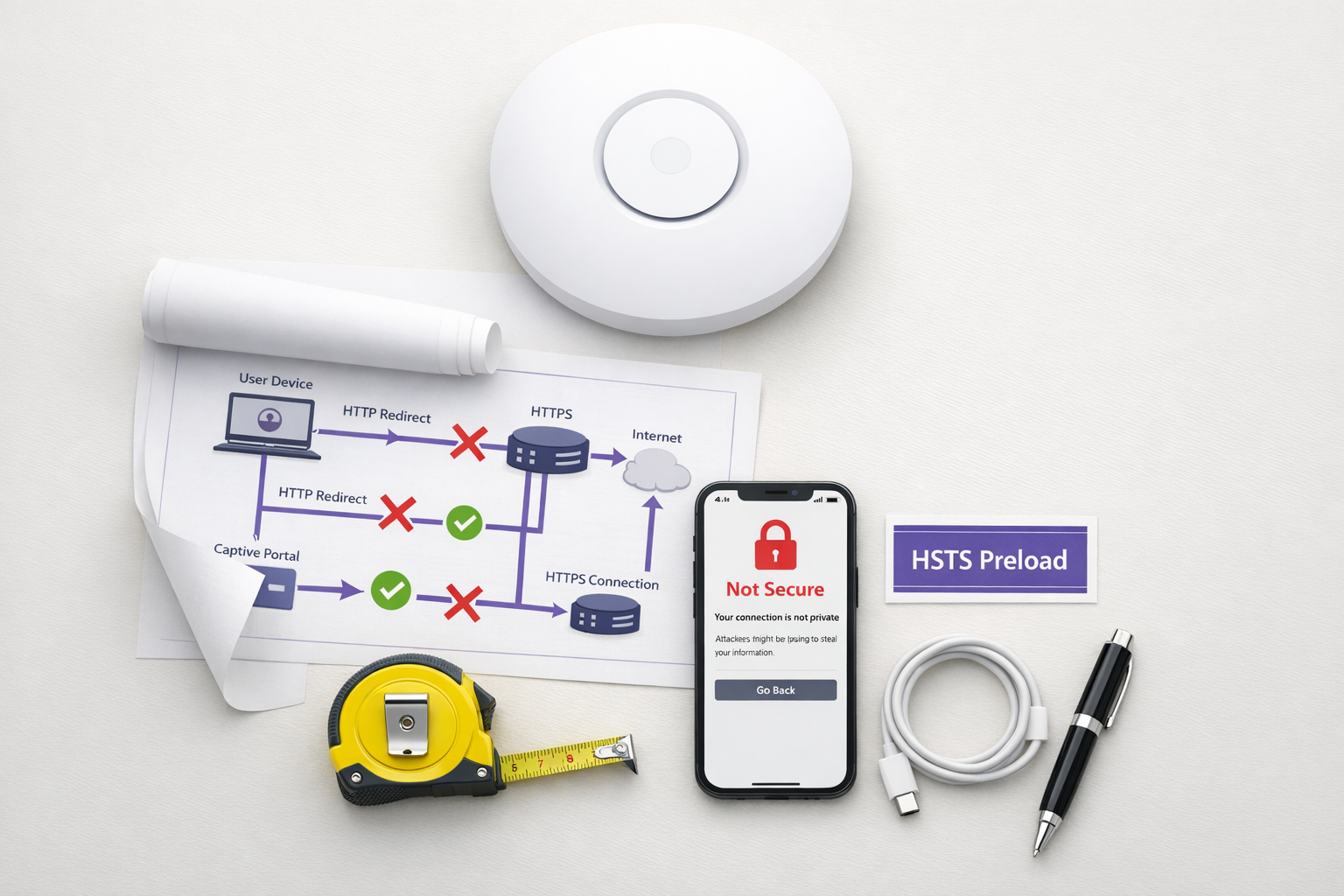
O padrão legado de Captive Portal — interceptar tráfego HTTP e emitir um redirecionamento 302 — está morto. Impulsionado pelo HTTP Strict Transport Security (HSTS) e pelo fortalecimento agressivo de navegadores, o mecanismo tradicional de 'interceptar e redirecionar' está falhando em escala em ambientes de Hospitalidade , Varejo e corporativos. A partir de 2026, com o Chrome forçando o comportamento HTTPS-first por padrão e a lista de pré-carregamento HSTS excedendo 100.000 domínios, os controladores de rede não podem mais depender de solicitações HTTP não criptografadas para acionar a detecção do portal.
Para gerentes de TI e arquitetos de rede, isso representa uma mudança arquitetônica crítica. Manter o acesso contínuo ao Guest WiFi agora exige a modernização do seu fluxo de integração (onboarding). Este guia detalha os mecanismos técnicos que estão quebrando os portais legados e descreve o caminho de implementação neutro em relação a fornecedores: implantar a API CAPPORT (RFC 8908/8910) para estabilidade imediata e migrar para Passpoint (Hotspot 2.0) e OpenRoaming para conectividade segura e zero-touch.
Análise Técnica Aprofundada: Por que o HSTS Quebra o Padrão de Interceptação
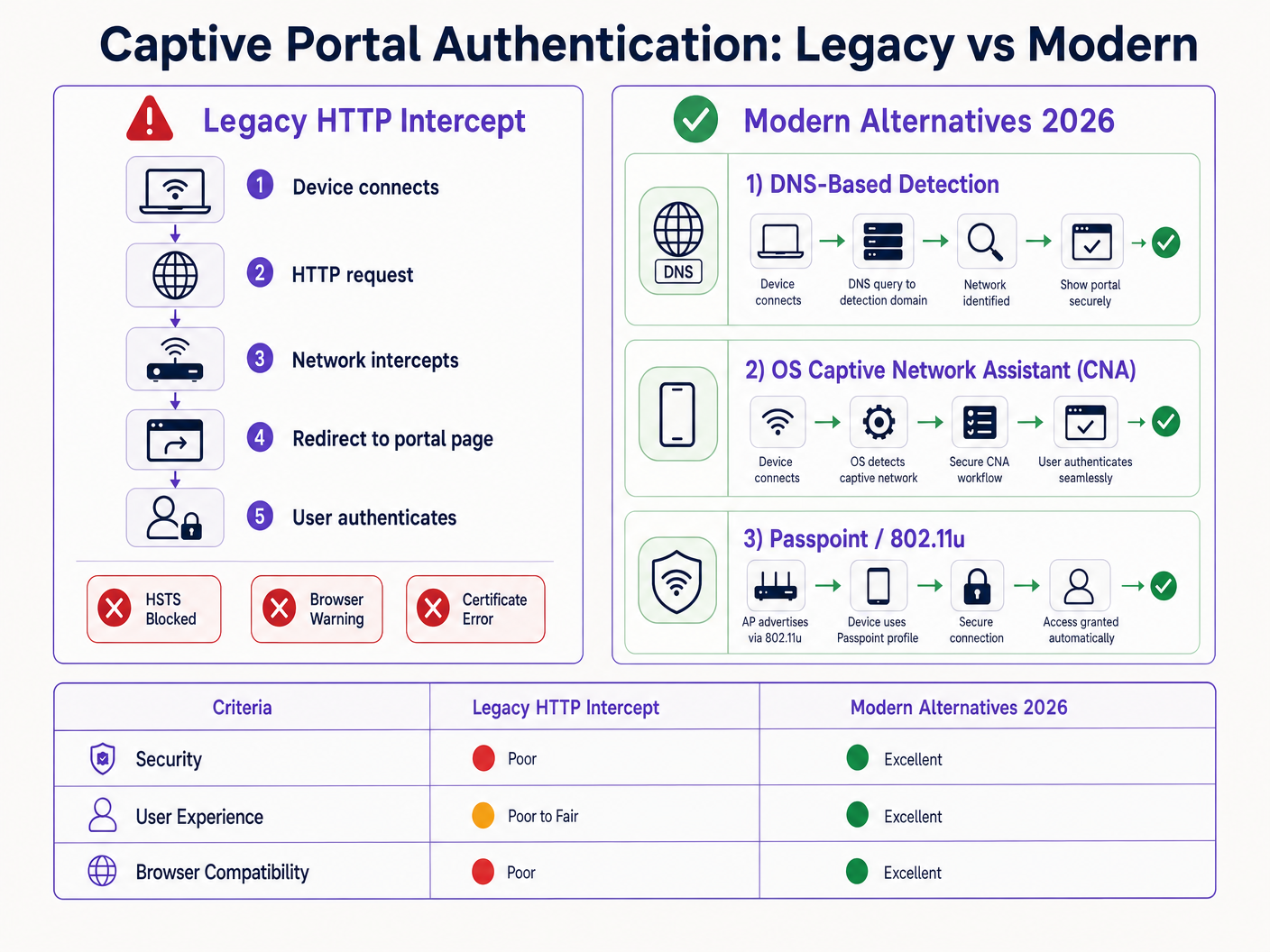
O Captive Portal tradicional baseia-se em uma premissa fundamental: o dispositivo cliente fará uma solicitação HTTP não criptografada na porta 80 que o servidor de acesso à rede (NAS) ou controlador poderá interceptar e redirecionar para a splash page do portal.
Essa premissa não é mais válida.
O Problema do Pré-carregamento HSTS
O HTTP Strict Transport Security (HSTS), definido na RFC 6797, permite que um servidor web declare que os navegadores web devem interagir com ele apenas usando conexões HTTPS seguras. Quando um usuário tenta acessar um domínio protegido por HSTS via HTTP, o navegador atualiza internamente a solicitação para HTTPS antes que qualquer tráfego de rede seja enviado.
Como a solicitação é criptografada, o controlador de rede não pode inspecionar o cabeçalho do host ou emitir um redirecionamento HTTP 302. Em vez disso, o controlador intercepta o tráfego HTTPS e apresenta o certificado do seu próprio portal. Como este certificado não corresponde ao domínio solicitado (por exemplo, google.com), o navegador lança um erro fatal NET::ERR_CERT_AUTHORITY_INVALID. O usuário é bloqueado e o portal nunca carrega.
A lista de pré-carregamento HSTS agrava esse problema. Os navegadores codificam (hardcode) uma lista de domínios que devem sempre ser acessados via HTTPS, mesmo na primeira visita. Em 2026, essa lista inclui praticamente todos os principais destinos de consumidores. Quando um visitante se conecta à sua rede e digita uma URL comum, o navegador força o HTTPS, acionando o erro de certificado e quebrando o fluxo do Captive Portal.
Fortalecimento de Navegadores: Modo HTTPS-First
Além do HSTS, os fornecedores de navegadores fortaleceram sistematicamente seus comportamentos padrão. No final de 2025, o Google anunciou que o Chrome 154 (lançado em outubro de 2026) ativaria "Sempre usar conexões seguras" por padrão para todos os usuários em sites públicos. Safari e Firefox implementaram modos HTTPS-first semelhantes.
Isso significa que, mesmo para domínios que não estão na lista de pré-carregamento HSTS, o navegador tentará uma conexão HTTPS primeiro. O padrão de interceptação HTTP está efetivamente obsoleto.
Alternativas Modernas: CAPPORT e Passpoint
Para restaurar a funcionalidade e melhorar a experiência do usuário, os arquitetos de rede devem fazer a transição para mecanismos modernos de detecção de Captive Portal e frameworks de autenticação.
1. A API CAPPORT (RFC 8908 e RFC 8910)
A Internet Engineering Task Force (IETF) abordou o problema de detecção de Captive Portal com a arquitetura CAPPORT. Em vez de depender do tráfego web interceptado, o CAPPORT fornece um mecanismo de sinalização explícito.
- RFC 8910 (Identificação de Captive Portal): A rede usa DHCP (Opção 114) ou Anúncios de Roteador IPv6 para fornecer ao dispositivo cliente o URI da API do Captive Portal.
- RFC 8908 (API de Captive Portal): O cliente consulta o URI fornecido (um endpoint JSON) para determinar se está cativo e para obter a URL da página do portal voltada para o usuário.
Quando implementado, o sistema operacional do cliente (iOS, Android, Windows) detecta nativamente o portal antes que o usuário abra um navegador. O sistema operacional inicia seu Captive Network Assistant (CNA) e carrega a URL do portal diretamente por meio de uma conexão HTTPS segura. Isso elimina a necessidade de interceptação HTTP e evita erros de certificado.
2. Passpoint (Hotspot 2.0) e OpenRoaming
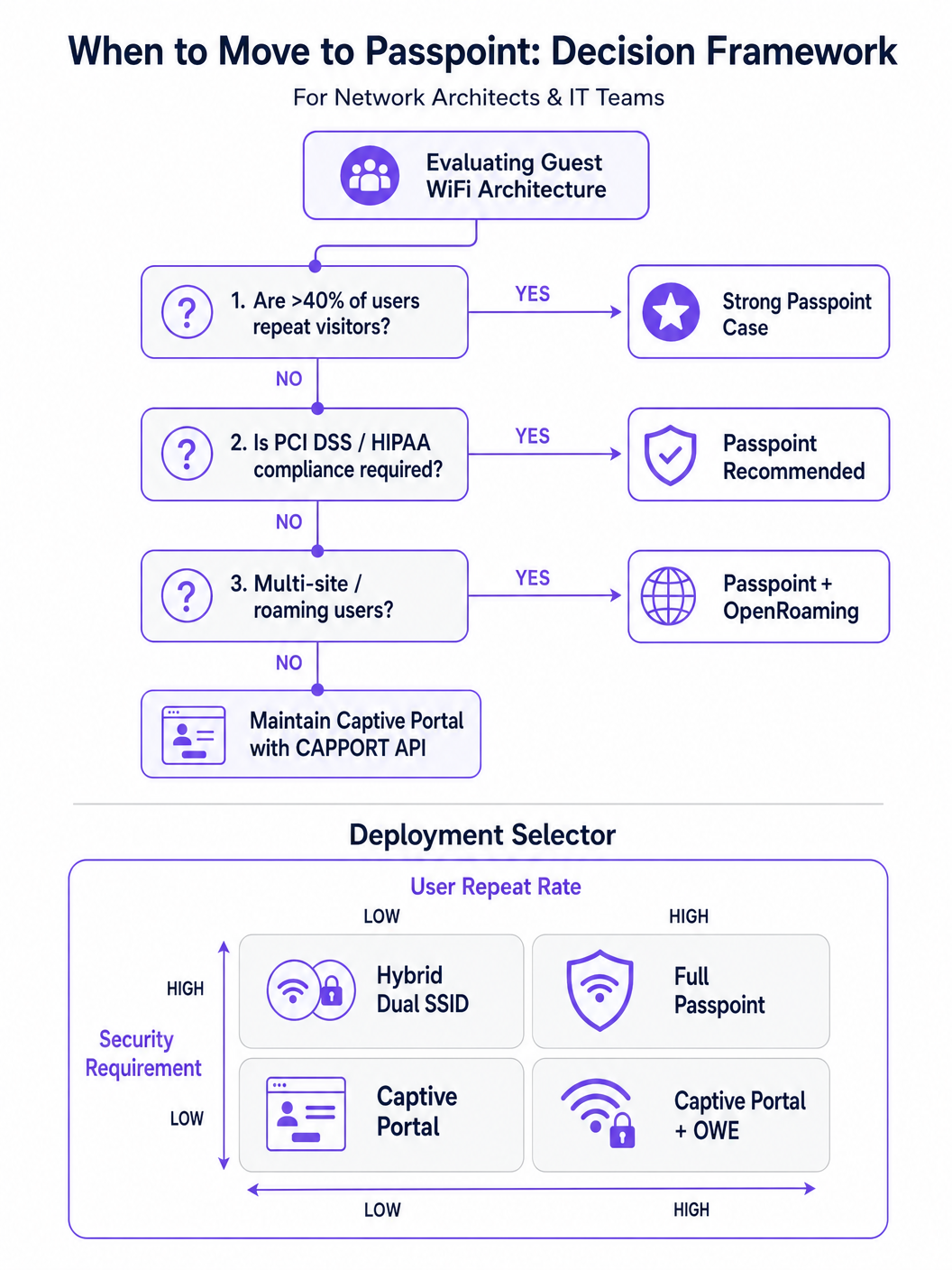
Para ambientes com visitantes recorrentes ou altos requisitos de segurança, o Passpoint (baseado no IEEE 802.11u) é o substituto definitivo para o Captive Portal.
O Passpoint opera na camada MAC. Antes de se associar ao Access Point (AP), o dispositivo cliente usa o Access Network Query Protocol (ANQP) para descobrir os recursos da rede e os consórcios de roaming. Se o dispositivo possuir uma credencial correspondente (por exemplo, um perfil instalado durante uma visita anterior ou por meio de um provedor de identidade), ele se autentica automaticamente usando 802.1X e WPA2/WPA3-Enterprise.
Essa abordagem fornece conectividade zero-touch semelhante à de redes celulares. Ela criptografa o tráfego pelo ar (over-the-air), mitigando os riscos de redes abertas e ataques evil twin. O OpenRoaming, construído sobre o Passpoint, estende isso federando provedores de identidade, permitindo que os usuários façam roaming de forma contínua em diferentes locais. Notavelmente, a Purple atua como um provedor de identidade gratuito para serviços como o OpenRoaming sob a licença Connect, facilitando a ampla adoção sem taxas de licenciamento por usuário.
Guia de Implementação
A implantação de uma arquitetura resiliente de acesso para visitantes exige uma abordagem em fases, passando da remediação imediata para a transformação estratégica.
Fase 1: Estabilizar Portais Existentes com CAPPORT
Se você precisar manter um Captive Portal tradicional para captura de dados ou WiFi Analytics , deverá implementar o CAPPORT para contornar as quebras causadas pelo HSTS.
- Configurar a Opção DHCP 114: Atualize seu servidor DHCP ou controlador de rede para transmitir a Opção 114, apontando para o endpoint da API do seu portal (por exemplo,
https://portal.yourvenue.com/capport). - Implementar a API RFC 8908: Certifique-se de que o servidor do seu portal responda à solicitação da API com um JSON válido indicando o estado cativo e a URL voltada para o usuário.
- Usar um Hostname Dedicado e Válido: O portal deve ser servido via HTTPS usando um certificado válido e assinado por uma CA. Nunca use um certificado autoassinado ou um hostname que esteja na lista de pré-carregamento HSTS.
- Lista de Permissões (Allowlist) para Sondas do SO: Certifique-se de que as sondas de detecção de Captive Portal no nível do sistema operacional (por exemplo,
captive.apple.com,connectivitycheck.gstatic.com) sejam permitidas através do walled garden pré-autenticação.
Fase 2: Implantar Passpoint para Acesso Seguro e Contínuo
A transição para o Passpoint melhora significativamente a segurança e a experiência do usuário, particularmente em implantações de Saúde e Transporte .
- Verificar o Suporte da Infraestrutura: Certifique-se de que seus APs e controladores suportem Hotspot 2.0/Passpoint e autenticação 802.1X.
- Configurar Perfis ANQP: Defina o nome do local, os OIs do consórcio de roaming e os realms NAI no seu controlador de rede.
- Estabelecer um Backend RADIUS/AAA: Implemente um servidor RADIUS capaz de lidar com a autenticação EAP (por exemplo, EAP-TLS, EAP-TTLS).
- Implementar o Provisionamento de Perfil: Use um servidor Online Sign-Up (OSU) ou integre-se a uma plataforma como o Purple SecurePass para provisionar perfis Passpoint nos dispositivos dos usuários.
Fase 3: O Modelo Híbrido de Integração Progressiva
Para locais que exigem acesso contínuo e captura inicial de dados (por exemplo, ambientes de varejo que buscam impulsionar a fidelidade), uma abordagem híbrida é ideal.
- Primeira Visita: O usuário se conecta a um SSID aberto e é direcionado a um Captive Portal habilitado para CAPPORT. O portal captura os dados necessários (por exemplo, e-mail, aceitação de termos) e provisiona um perfil Passpoint no dispositivo.
- Visitas Subsequentes: O dispositivo do usuário detecta automaticamente a rede Passpoint via ANQP e se autentica de forma contínua usando 802.1X. O Captive Portal é totalmente ignorado.
Melhores Práticas
- Evite o Discurso de Marketing 'Sem Atrito': Concentre-se na realidade técnica. O Passpoint requer um atrito inicial de provisionamento para alcançar a continuidade a longo prazo.
- Segmente o Tráfego de Visitantes: Independentemente do método de autenticação, o tráfego de visitantes deve ser logicamente separado das redes corporativas usando VLANs e firewalls, alinhando-se com o Guia Completo de Arquitetura da Internet das Coisas .
- Monitore a Expiração de Certificados: Um certificado TLS expirado no seu portal ou servidor RADIUS causará falhas catastróficas de autenticação. Implemente a renovação e o monitoramento automatizados.
- Cumpra as Regulamentações de Privacidade de Dados: Certifique-se de que suas políticas de captura e retenção de dados estejam alinhadas com as leis locais. Para orientações regionais específicas, consulte recursos como o Guia de Conformidade: LGPD no Brasil e Guest WiFi .
Solução de Problemas e Mitigação de Riscos
- Sintoma: Dispositivos iOS mostram uma tela CNA em branco.
- Causa: A página do portal contém recursos (imagens, scripts) hospedados em domínios externos que estão bloqueados pelo walled garden.
- Correção: Hospede todos os ativos essenciais do portal localmente ou adicione os domínios externos necessários à lista de permissões (allowlist) de pré-autenticação.
- Sintoma: Dispositivos Android exibem um aviso de certificado em vez do portal.
- Causa: O controlador está interceptando o tráfego HTTPS para um domínio HSTS pré-carregado, ou o certificado TLS do portal é inválido/autoassinado.
- Correção: Implemente o CAPPORT e certifique-se de que o portal use um certificado assinado por uma CA em um hostname dedicado.
- Sintoma: A instalação do perfil Passpoint falha no Windows 11.
- Causa: A cadeia de certificados do servidor de provisionamento está incompleta ou não é confiável para o sistema operacional.
- Correção: Verifique se a cadeia de certificados completa (incluindo CAs intermediárias) é servida durante o handshake TLS.
ROI e Impacto nos Negócios
A transição de portais legados de interceptação HTTP para arquiteturas modernas CAPPORT e Passpoint entrega valor de negócio mensurável:
- Redução de Chamados de Suporte: A eliminação de erros de certificado relacionados ao HSTS reduz diretamente o volume de chamados no helpdesk de TI referentes a problemas de conectividade de visitantes.
- Aumento nas Taxas de Conexão: A detecção confiável do portal no nível do sistema operacional garante que mais visitantes concluam com sucesso o fluxo de integração, expandindo seu público alcançável para iniciativas de marketing.
- Postura de Segurança Aprimorada: A mudança para Passpoint e WPA3-Enterprise mitiga os riscos associados a redes abertas, protegendo contra interceptação de dados (eavesdropping) e ataques evil twin, o que é crítico para a conformidade em setores como finanças e saúde.
- Melhoria na Experiência do Usuário: O roaming zero-touch via Passpoint impulsiona maior satisfação do usuário e engajamento repetido, apoiando iniciativas digitais mais amplas como o Guia de Sistema de Posicionamento Interno: UWB, BLE e WiFi e o Seu Guia para Soluções Corporativas de Wi-Fi em Veículos .
Termos-Chave e Definições
HSTS (HTTP Strict Transport Security)
A web security policy mechanism that forces web browsers to interact with domains only via secure HTTPS connections, preventing protocol downgrade attacks and HTTP interception.
When IT teams see an increase in certificate errors on guest networks, HSTS enforcement on popular domains is typically the root cause, breaking legacy redirect mechanisms.
HSTS Preload List
A hardcoded list built into modern web browsers containing domains that must always be accessed via HTTPS, even on the very first visit.
If a user attempts to navigate to a preloaded domain (like google.com) while behind a legacy captive portal, the browser will refuse the HTTP connection, preventing the portal redirect.
CAPPORT (Captive Portal Architecture)
An IETF standard (RFC 8908 and 8910) that uses DHCP or IPv6 Router Advertisements to explicitly signal the presence and URL of a captive portal to a client device.
Implementing CAPPORT is the primary remediation strategy for network architects to fix broken portal detection on modern iOS, Android, and Windows devices.
Passpoint (Hotspot 2.0)
A Wi-Fi Alliance specification based on IEEE 802.11u that enables devices to automatically discover and securely authenticate to Wi-Fi networks without user intervention.
Used in enterprise and multi-site deployments to replace captive portals entirely, providing cellular-like roaming and WPA3-Enterprise security.
ANQP (Access Network Query Protocol)
A layer 2 protocol used by client devices to query Access Points for network information (like roaming partners and supported authentication types) before associating.
ANQP is the discovery mechanism that allows a Passpoint-enabled device to determine if it has the correct credentials to join a specific network silently.
CNA (Captive Network Assistant)
The OS-level pseudo-browser that automatically opens when a device detects it is behind a captive portal, allowing the user to authenticate before gaining full internet access.
IT teams must ensure their walled garden allows access to the OS-specific probe URLs (e.g., captive.apple.com) so the CNA triggers correctly.
OpenRoaming
A global Wi-Fi roaming federation that allows users to connect automatically and securely across different venues using a single set of credentials provided by an identity provider.
Venues adopt OpenRoaming to provide seamless access for guests, leveraging identity providers like Purple to manage authentication without complex bilateral agreements.
Walled Garden
A restricted network environment where unauthenticated users can only access a specific set of pre-approved IP addresses or domains necessary for the login process.
Misconfigured walled gardens that block OS detection probes or external portal assets are a leading cause of blank screens and failed guest onboarding.
Estudos de Caso
A 400-room enterprise hotel is experiencing a 30% drop in successful guest WiFi connections. Users report seeing 'Your connection is not private' (NET::ERR_CERT_AUTHORITY_INVALID) errors on their smartphones when trying to access the network. The hotel currently uses a legacy open SSID that intercepts port 80 traffic to redirect to a branded splash page.
The IT team must immediately implement the CAPPORT API (RFC 8908/8910). First, configure the network controller's DHCP server to broadcast Option 114, providing the URI of the captive portal API. Second, deploy the RFC 8908 JSON endpoint on the portal server. Third, ensure the portal is hosted on a dedicated subdomain (e.g., wifi.hoteldomain.com) with a valid, CA-signed TLS certificate. Finally, verify that OS detection URLs (like captive.apple.com) are allowed pre-authentication.
A large retail chain with 500 locations wants to implement seamless WiFi roaming for their loyalty app users, eliminating the need for customers to interact with a captive portal on every visit, while still maintaining high security standards (WPA3).
The architect should deploy a Passpoint (Hotspot 2.0) architecture. The initial onboarding can occur via the retailer's loyalty app, which provisions a Passpoint profile (credential) to the user's device. The APs across all 500 locations must be configured to broadcast the appropriate ANQP roaming consortium OIs. A centralized RADIUS infrastructure will handle the 802.1X EAP authentication when the device automatically associates with the network.
Análise de Cenário
Q1. Your organisation is deploying a new guest WiFi network across 50 regional offices. Security policy mandates that all wireless traffic must be encrypted over the air, but the marketing team insists on capturing user email addresses upon first connection. Which architecture should you propose?
💡 Dica:Consider how to balance the requirement for initial data capture with the mandate for over-the-air encryption.
Mostrar Abordagem Recomendada
Propose a hybrid progressive onboarding architecture. First-time users connect to an open SSID and are directed to a CAPPORT-enabled captive portal to provide their email address. Upon submission, the portal provisions a Passpoint profile to the device. The device then automatically transitions to a secure, WPA3-Enterprise encrypted Passpoint SSID for all subsequent traffic and future visits. This satisfies marketing's data capture requirement while enforcing security policy for the vast majority of network usage.
Q2. A client complains that their newly designed, highly customized captive portal page is displaying a blank white screen on all modern iOS devices, although it works perfectly on older Android phones. The portal relies heavily on external web fonts and a third-party analytics script.
💡 Dica:Think about how the iOS Captive Network Assistant (CNA) interacts with external resources before the device is fully authenticated.
Mostrar Abordagem Recomendada
The issue is a misconfigured walled garden. The iOS CNA is attempting to render the portal page, but the external domains hosting the web fonts and analytics scripts are blocked by the network controller pre-authentication. Because these resources cannot load, the CNA stalls and displays a blank screen. The solution is to either host all required assets locally on the portal server or add the specific external domains (FQDNs) to the controller's pre-authentication allowlist.
Q3. During a network audit, you discover that the legacy captive portal is intercepting traffic and serving a self-signed certificate. You are tasked with upgrading the system to use the CAPPORT API. What specific certificate requirements must be met for the new portal server?
💡 Dica:Consider how modern browsers and OS CNAs handle certificate validation during the captive portal detection phase.
Mostrar Abordagem Recomendada
The new portal server must be accessed via a dedicated Fully Qualified Domain Name (FQDN) that is NOT on the HSTS preload list. Furthermore, it must use a valid TLS certificate issued by a publicly trusted Certificate Authority (CA). Self-signed certificates will be rejected by the OS CNA and modern browsers, preventing the portal from loading and halting the onboarding process.




