
Authentification WiFi par certificat : Comment les certificats numériques sécurisent les réseaux sans fil
Ce guide faisant autorité détaille comment les certificats numériques X.509 et EAP-TLS remplacent les mots de passe vulnérables dans les réseaux WiFi d'entreprise. Il fournit aux architectes réseau et aux responsables informatiques des étapes de mise en œuvre pratiques, la conception de l'architecture PKI et une analyse du retour sur investissement commercial.
Écouter ce guide
Voir la transcription du podcast
Résumé Exécutif
L'ère de la clé pré-partagée (PSK) dans les réseaux sans fil d'entreprise est fonctionnellement révolue. Pour les responsables informatiques, les architectes réseau et les DSI supervisant les environnements d'entreprise, les établissements hôteliers et les chaînes de magasins, s'appuyer sur des mots de passe partagés introduit des risques inacceptables, des frais généraux opérationnels et des échecs de conformité. L'authentification WiFi par certificat — spécifiquement via IEEE 802.1X et EAP-TLS — remplace les mots de passe devinables par des certificats numériques X.509 cryptographiquement sécurisés.
En liant mathématiquement une identité à un appareil spécifique, l'authentification par certificat permet l'authentification mutuelle, l'accès réseau zéro confiance (ZTNA) et la révocation instantanée. Ce guide fournit une référence technique définitive sur la manière dont les certificats numériques sécurisent les réseaux sans fil, détaillant l'infrastructure à clé publique (PKI) sous-jacente, l'architecture de déploiement et l'impact commercial concret de la transition vers un modèle basé sur les certificats. Pour les organisations utilisant le Guest WiFi en parallèle des réseaux d'entreprise, segmenter correctement ces environnements tout en maintenant une gestion robuste des identités est une exigence de conformité critique.
Plongée Technique : L'Architecture de la Confiance
Certificats X.509 et Hiérarchie PKI
Au cœur de l'authentification WiFi par certificat se trouve le certificat numérique X.509. Contrairement à un mot de passe, un certificat n'est pas un secret partagé. Il repose sur la cryptographie asymétrique : une clé publique intégrée au certificat et une clé privée stockée en toute sécurité dans le matériel de l'appareil (tel qu'un TPM ou Secure Enclave).
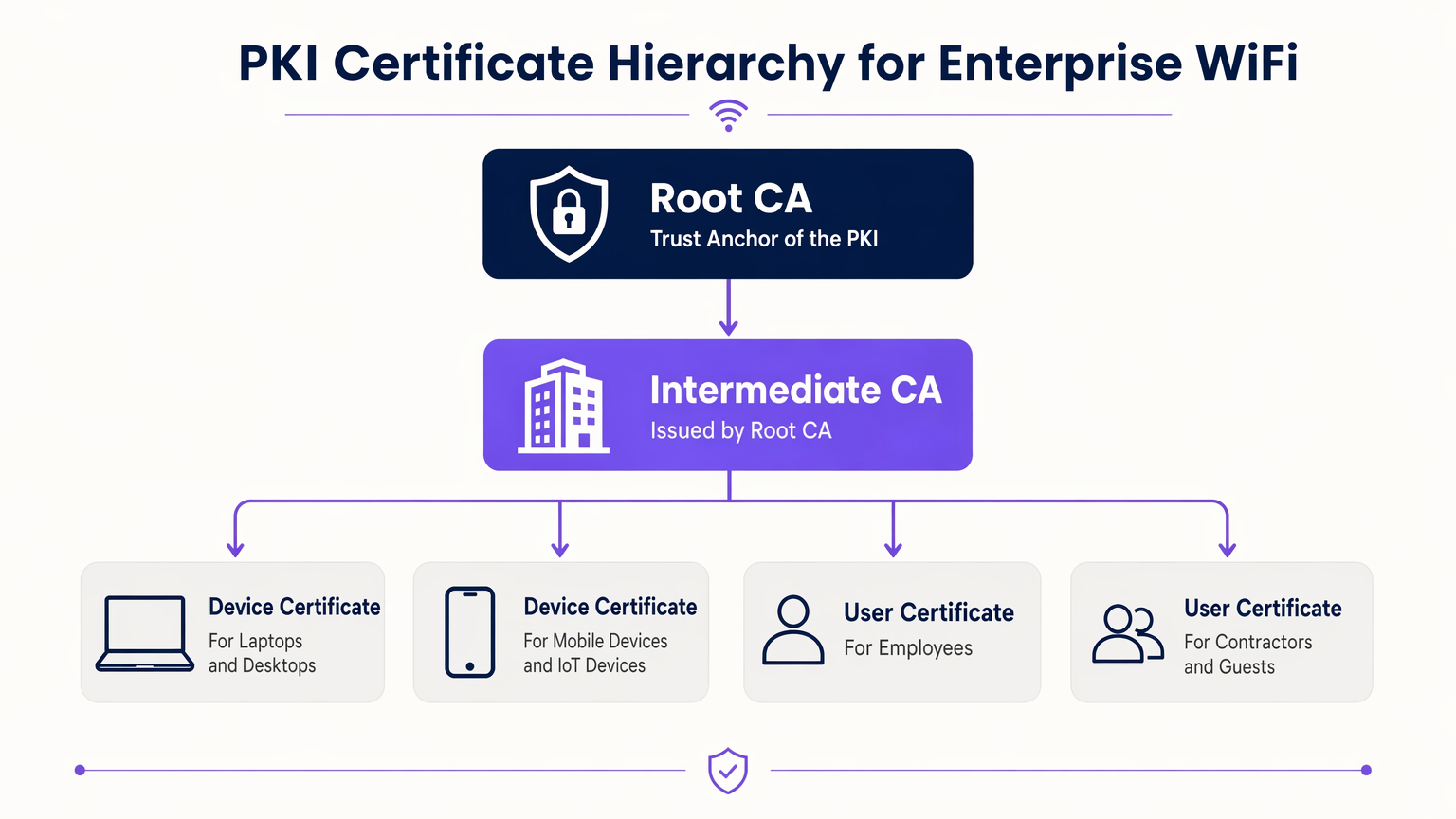
Le modèle de confiance régissant ces certificats est l'Infrastructure à Clé Publique (PKI). Dans un environnement d'entreprise, une hiérarchie PKI à plusieurs niveaux est une bonne pratique :
- Autorité de Certification Racine (CA) : L'ancre de confiance ultime, maintenue hors ligne pour éviter toute compromission.
- CA Intermédiaire : Émise par la CA Racine, ce serveur reste en ligne pour émettre et révoquer activement des certificats pour les entités finales.
- Certificats d'Entité Finale : Déployés sur les appareils clients (ordinateurs portables, téléphones, capteurs IoT) et l'infrastructure (serveurs RADIUS, points d'accès).
Flux d'Authentification 802.1X et EAP-TLS
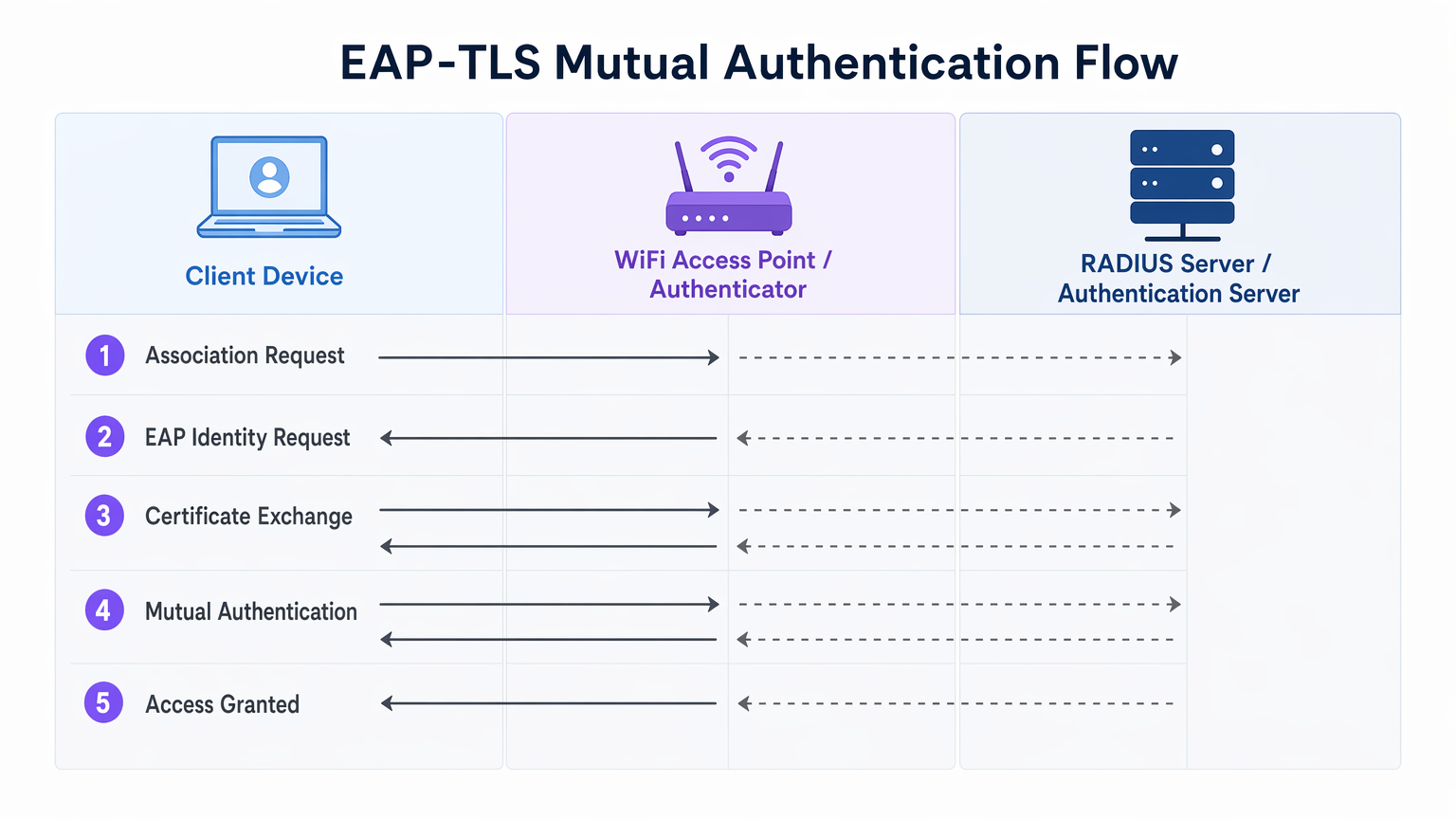
La sécurité WiFi d'entreprise repose sur la norme IEEE 802.1X pour le contrôle d'accès réseau basé sur les ports. Lorsqu'il est associé à EAP-TLS (Extensible Authentication Protocol - Transport Layer Security), il offre une authentification mutuelle.
- Association : L'appareil client se connecte au point d'accès (Authentificateur). L'accès réseau est bloqué au niveau du port.
- Demande d'Identité : L'AP demande l'identité du client et transmet le trafic EAP au serveur RADIUS (Serveur d'Authentification).
- Authentification du Serveur : Le serveur RADIUS présente son certificat au client. Le client vérifie le certificat du serveur par rapport à ses CA Racines de confiance, empêchant les attaques d'AP malveillants (Evil Twin).
- Authentification du Client : Le client présente son certificat au serveur RADIUS. Le serveur valide la signature du certificat, sa période de validité et son statut de révocation.
- Accès Accordé : Après une authentification mutuelle réussie, le serveur RADIUS envoie un message
Access-Accept, incluant souvent des attributs spécifiques au fournisseur (VSAs) pour attribuer dynamiquement le client à un VLAN spécifique.
Le Rôle de Purple dans l'Écosystème d'Identité
Alors que les appareils d'entreprise utilisent la PKI d'entreprise et EAP-TLS, les utilisateurs invités et BYOD (Bring Your Own Device) nécessitent une approche différente. C'est là que les plateformes Guest WiFi comme Purple s'intègrent à l'architecture. Purple agit comme un fournisseur d'identité robuste pour les SSIDs publics, capturant des données de première partie et activant des services comme OpenRoaming sous la licence Connect. Cela garantit un onboarding fluide et sécurisé pour les invités sans compromettre le SSID d'entreprise sécurisé par certificat.
Guide d'Implémentation
Le déploiement de l'authentification par certificat nécessite une orchestration minutieuse entre vos silos de gestion de réseau, d'identité et d'appareils.
1. Concevoir l'Infrastructure PKI et RADIUS
- Déployer une PKI à deux niveaux : N'utilisez jamais une PKI plate. Maintenez la CA Racine hors ligne.
- Implémenter un RADIUS Redondant : Déployez au moins deux serveurs RADIUS (par exemple, FreeRADIUS, Cisco ISE, Aruba ISE) dans un cluster actif-actif ou actif-passif.
- Configurer la Vérification de Révocation : Décidez entre CRL (Certificate Revocation List) et OCSP (Online Certificate Status Protocol). Pour les exigences de haute sécurité et de faible latence, OCSP est obligatoire.
2. Automatiser l'Enrôlement des Certificats
Le provisionnement manuel des certificats n'est pas évolutif. Intégrez votre PKI à votre solution de gestion des appareils mobiles (MDM) ou de gestion unifiée des terminaux (UEM) (par exemple, Microsoft Intune, Jamf).
- Utilisez SCEP (Simple Certificate Enrolment Protocol) ou le moderne EST (Enrolment over Secure Transport) pour pousser automatiquement les certificats vers les appareils joints au domaine et gérés.
- Assurez-vous que la charge utile MDM inclut à la fois le certificat client et le certificat CA Racine de confiance pour le serveur RADIUS.
3. Configuration et Segmentation du Réseau
- Configurez vos contrôleurs WLAN et points d'accès pour utiliser WPA3-Enterprise (ou WPA2-Enterprise en tant que solution de repli).
- Mappez les réponses RADIUS aux attributions VLAN dynamiques pour appliquer la micro-segmentation.
- Assurez une séparation stricte par pare-feu entre le SSID 802.1X d'entreprise et le SSID du Captive Portal géré par votre plateforme WiFi Analytics .
Bonnes Pratiques
- Aligner les Périodes de Validité : Définissez les durées de vie des certificats clients (par exemple, 1 anpour s'aligner sur vos cycles d'enregistrement MDM et de renouvellement des appareils.
- Mettre en cache les réponses OCSP : Configurez votre serveur RADIUS pour mettre en cache les réponses OCSP (OCSP Stapling) afin d'éviter les délais d'authentification si le répondeur OCSP externe est inaccessible.
- Surveiller la périphérie : Utilisez votre système de gestion de réseau pour surveiller les taux de temporisation et de rejet 802.1X. Une augmentation soudaine indique souvent une CA intermédiaire expirée ou une charge utile MDM mal configurée.
- Adopter OpenRoaming : Pour les réseaux invités, exploitez les technologies Passpoint/OpenRoaming où Purple agit comme fournisseur d'identité, étendant l'itinérance transparente de type certificat aux utilisateurs publics.
Dépannage et atténuation des risques
| Mode de défaillance | Cause première | Stratégie d'atténuation |
|---|---|---|
| Le client rejette le certificat du serveur | L'autorité de certification racine du serveur RADIUS ne se trouve pas dans le magasin de confiance du client. | Poussez l'autorité de certification racine via la charge utile MDM avant d'appliquer le 802.1X. |
| L'authentification expire | Le serveur RADIUS ne peut pas atteindre le répondeur OCSP ou la CRL est trop grande. | Implémentez la mise en cache OCSP sur le serveur RADIUS ; assurez-vous que le répondeur OCSP est hautement disponible. |
| Attaques de points d'accès non autorisés | Les clients sont configurés pour contourner la validation du certificat du serveur. | Appliquez une validation stricte du serveur dans le profil du demandeur MDM. Ne permettez jamais aux utilisateurs de cliquer sur « Faire confiance » pour des certificats inconnus. |
| L'attribution de VLAN échoue | Les VSA RADIUS ne correspondent pas à la configuration du commutateur/AP. | Standardisez les conventions de nommage VSA chez tous vos fournisseurs de matériel réseau. |
Retour sur investissement et impact commercial
La transition vers l'authentification par certificat WiFi offre des résultats commerciaux mesurables pour les opérateurs d'entreprise :
- Réduction des coûts du service d'assistance : Les réinitialisations de mot de passe représentent jusqu'à 30 % des tickets du service d'assistance informatique. L'auto-inscription des certificats élimine les appels d'assistance liés aux mots de passe WiFi.
- Accélération de la conformité : L'exigence 8 du PCI DSS impose des identifiants uniques pour tous les utilisateurs. EAP-TLS fournit une piste d'audit cryptographique indiquant exactement quel appareil a accédé au réseau, simplifiant les audits de conformité dans les environnements de commerce de détail et d' hôtellerie .
- Confinement des violations : En cas de perte ou de vol d'un appareil, la révocation d'un seul certificat met fin instantanément à l'accès au réseau, tandis qu'une clé PSK compromise nécessite une rotation globale du mot de passe.
Définitions clés
EAP-TLS
Extensible Authentication Protocol with Transport Layer Security. The most secure WiFi authentication method, requiring digital certificates on both the client and the server.
Used when an organisation mandates zero-trust network access and wants to eliminate password-based vulnerabilities.
PKI (Public Key Infrastructure)
The framework of hardware, software, policies, and procedures needed to create, manage, distribute, and revoke digital certificates.
The foundational architecture IT teams must build or procure before deploying certificate-based WiFi.
RADIUS
Remote Authentication Dial-In User Service. A networking protocol that provides centralized Authentication, Authorization, and Accounting (AAA) management.
The server that sits between your WiFi Access Points and your Active Directory/PKI to make the actual 'allow or deny' decision.
802.1X
An IEEE standard for port-based Network Access Control (PNAC). It provides an authentication mechanism to devices wishing to attach to a LAN or WLAN.
The protocol configured on the Access Point that blocks network traffic until the RADIUS server confirms the device is authenticated.
OCSP (Online Certificate Status Protocol)
An internet protocol used for obtaining the revocation status of an X.509 digital certificate in real-time.
Preferred over CRLs in enterprise environments to ensure a stolen device's certificate is rejected instantly.
MDM / UEM
Mobile Device Management / Unified Endpoint Management. Software used to manage, secure, and deploy policies to corporate devices.
The delivery mechanism used to push digital certificates to laptops and phones without manual IT intervention.
Supplicant
The software client on the end-user device that handles the 802.1X authentication process.
Configured via MDM to ensure the device knows which certificates to present and which RADIUS servers to trust.
VSA (Vendor-Specific Attribute)
Custom attributes passed in RADIUS messages to provide specific instructions to network hardware, such as assigning a specific VLAN.
Used to dynamically segment users (e.g., putting an IoT sensor on a restricted VLAN and a CEO's laptop on the corporate VLAN) based on their certificate.
Exemples concrets
A 400-room luxury hotel needs to secure its back-of-house corporate WiFi for staff tablets and POS terminals, while maintaining a separate guest network. They currently use a single WPA2-PSK for staff.
- Deploy a two-tier PKI and redundant RADIUS servers.\n2. Use the hotel's MDM to push device certificates via SCEP to all staff tablets and POS terminals.\n3. Configure the corporate SSID for WPA3-Enterprise with EAP-TLS.\n4. Segment the network: Corporate traffic routes internally; guest traffic routes to a separate VLAN managed by Purple's captive portal for analytics.
A large public-sector organisation is experiencing high helpdesk volume due to 90-day WiFi password rotation policies on their corporate network.
Transition from PEAP-MSCHAPv2 (username/password) to EAP-TLS (certificates). Issue 1-year device certificates via Active Directory Certificate Services (AD CS) and Group Policy to all Windows laptops. Configure RADIUS to validate the certificates against AD.
Questions d'entraînement
Q1. Your network monitoring tool alerts you to a sudden 100% failure rate for all 802.1X authentications across your [Retail](/industries/retail) stores. The RADIUS server logs show 'Unknown CA'. What is the most likely cause?
Conseil : Consider the lifecycle of the certificates in your PKI hierarchy.
Voir la réponse type
The Intermediate CA certificate installed on the RADIUS server has expired. When the Intermediate CA expires, the RADIUS server can no longer validate the chain of trust for the client certificates, causing all authentications to fail. The mitigation is to renew the Intermediate CA and update the RADIUS server.
Q2. You are designing the WiFi architecture for a new corporate headquarters. You need to support corporate laptops, BYOD smartphones, and guest users. How should you structure the SSIDs and authentication?
Conseil : Remember the rule: Segment the Guests from the Certs.
Voir la réponse type
Deploy two distinct SSIDs. 1) 'Corp-WiFi': Uses WPA3-Enterprise with EAP-TLS for corporate laptops, authenticated via certificates pushed by MDM. 2) 'Guest-WiFi': Uses an open network with a captive portal managed by Purple for BYOD and guests, providing client isolation and routing directly to the internet.
Q3. During an audit of your [Healthcare](/industries/healthcare) network, the auditor notes that users are occasionally prompted to 'Accept' a new certificate when connecting to the corporate WiFi. Why is this a security risk?
Conseil : Think about what mutual authentication is designed to prevent.
Voir la réponse type
This indicates that the client supplicant is not configured to strictly validate the server certificate. If users can manually accept unknown certificates, an attacker can set up a rogue Access Point (Evil Twin) and trick devices into connecting, potentially intercepting traffic or harvesting credentials. The fix is to push a strict MDM profile that hardcodes the trusted Root CA and prevents user overrides.
Continuer la lecture de cette série
PSK par appareil par fournisseur : comparaison entre iPSK, DPSK, MPSK et PPSK (et support WPA3)
Une comparaison complète des implémentations PSK par appareil chez Cisco Meraki, HPE Aruba, Ruckus, Juniper Mist, Extreme, Fortinet et Ubiquiti UniFi. Découvrez comment le WPA3-SAE impacte les stratégies de clés par appareil et quand déployer des modes de transition plutôt que de passer au 802.1X.
Qu'est-ce que l'authentification par adresse MAC ? Quand l'utiliser et quand l'éviter
Ce guide de référence technique fait autorité sur l'authentification par adresse MAC dans les environnements WiFi d'entreprise – comment l'authentification MAC basée sur RADIUS fonctionne à la Couche 2, ses vulnérabilités de sécurité inhérentes (y compris l'usurpation d'adresse MAC et l'impact de la randomisation MAC au niveau du système d'exploitation), et les contextes opérationnels précis où elle reste un outil valide pour la gestion des appareils IoT et sans tête. Il fournit des conseils de déploiement exploitables pour les responsables informatiques et les architectes réseau dans les secteurs de l'hôtellerie, du commerce de détail, de la santé et des lieux publics, avec des exemples concrets, des cadres de décision et un contexte d'intégration pour la plateforme de WiFi invité et d'analyse de Purple.
Comment configurer le WiFi d'entreprise sur iOS et macOS avec 802.1X
This authoritative guide provides senior IT leaders with actionable steps for deploying 802.1X enterprise WiFi on iOS and macOS devices. It covers certificate-based authentication (EAP-TLS), MDM configuration profiles, and architecture integration to secure corporate networks while supporting BYOD initiatives.