
Café WiFi : comment configurer, sécuriser et monétiser votre réseau invité
Une référence technique complète pour les responsables informatiques et les exploitants d'établissements sur la conception, la sécurisation et la monétisation des réseaux WiFi de café. Elle couvre la segmentation essentielle du réseau, le déploiement de matériel WiFi 6, les portails captifs conformes au GDPR et l'automatisation du marketing pour générer un ROI mesurable.
Video overview
Écouter ce guide
Voir la transcription du podcast
Fait partie de notre série principale : Guide du WiFi invité →
Synthèse opérationnelle
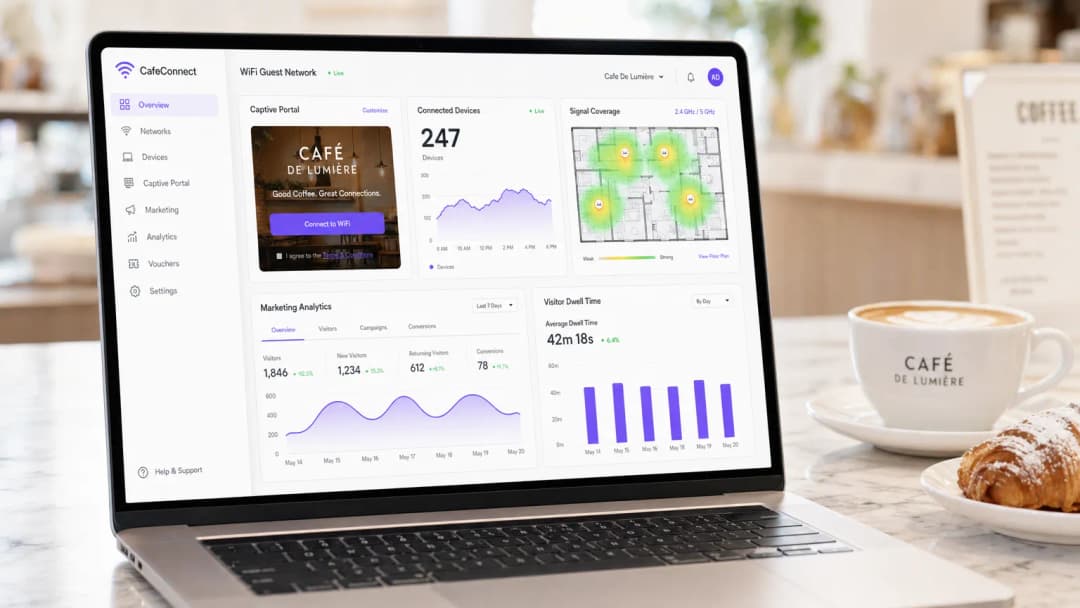
Pour les établissements de restauration modernes, le WiFi de café n'est plus un simple service opérationnel - c'est un actif de données propriétaires essentiel, un canal d'automatisation marketing et une obligation stricte de conformité. Ce guide de référence technique fournit aux responsables informatiques, architectes réseau et directeurs des opérations un cadre complet pour concevoir, déployer et monétiser un réseau invités.
Des cafés indépendants aux chaînes d'entreprises multi-sites, les principes architecturaux restent les mêmes. Vous devez imposer une segmentation réseau stricte pour maintenir la conformité PCI-DSS, déployer un matériel de classe entreprise 802.11ax (Wi-Fi 6) pour gérer les environnements clients à haute densité, et implémenter un Captive Portal robuste pour capturer un consentement marketing explicite et conforme au GDPR.
En passant de routeurs grand public non managés à une plateforme d'entreprise de guest WiFi, les établissements peuvent transformer un centre de coûts en un moteur de revenus mesurable. Ce guide détaille les spécifications matérielles exactes, les normes de sécurité, les calculs de bande passante et les flux de travail d'automatisation marketing nécessaires pour concevoir un réseau invités résilient et rentable.
Analyse technique approfondie
Architecture et segmentation réseau
Le principe fondamental de tout réseau ouvert au public est la séparation logique absolue des infrastructures opérationnelles. Le déploiement d'un réseau unique et plat qui transporte à la fois vos systèmes de point de vente (POS) et le trafic des invités est une grave défaillance en matière de sécurité et de conformité.
Implémentation des VLAN : Votre infrastructure de routage et de commutation doit prendre en charge le marquage VLAN IEEE 802.1Q. Un déploiement standard nécessite au minimum deux réseaux locaux virtuels :
- VLAN 10 (Opérationnel) : dédié aux terminaux POS, aux PC du back-office et aux appareils IoT.
- VLAN 20 (Invité) : dédié au réseau invités du WiFi de café.
Le trafic entre ces VLAN doit être bloqué au niveau du pare-feu. Les points d'accès (AP) diffuseront des Service Set Identifiers (SSID) distincts qui s'associent directement à leurs VLAN respectifs. Cette isolation est une exigence obligatoire pour la conformité PCI-DSS, garantissant que l'environnement des données de titulaires de cartes (CDE) ne puisse pas être compromis par un acteur malveillant connecté au réseau invités.
Normes sans fil et sélection du matériel
Pour les environnements à forte densité d'appareils - comme un café animé où 40 à 80 clients peuvent simultanément regarder des vidéos, naviguer et synchroniser des données - le matériel grand public se dégradera rapidement.
Exigences 802.11ax (Wi-Fi 6) : Les déploiements modernes doivent utiliser exclusivement des points d'accès WiFi 6. L'avantage clé du WiFi 6 dans les environnements hôteliers est l'accès multiple par répartition en fréquences orthogonales (OFDMA). Contrairement aux anciennes normes qui desservent les clients de manière séquentielle, l'OFDMA permet à un seul point d'accès de communiquer simultanément avec plusieurs appareils en divisant le canal en sous-porteuses plus petites. Cela réduit considérablement la latence et améliore le débit dans les environnements encombrés.
Dimensionnement du matériel :
- Site unique (50 à 150 mètres carrés) : 1 à 2 points d'accès WiFi 6 montés au plafond, un commutateur géré PoE+ et un pare-feu/routeur de qualité professionnelle.
- Déploiements multi-sites : une infrastructure gérée par le cloud est obligatoire pour une visibilité centralisée, la gestion des firmwares et le dépannage à distance sur l'ensemble des points de vente distribués.
Protocoles de sécurité
L'ère du WiFi public ouvert et non crypté touche à sa fin. Bien que le WPA2-Personal reste courant, les nouveaux déploiements devraient exploiter le WPA3.
Pour les réseaux d'invités utilisant un Captive Portal, le transport sans fil sous-jacent doit tout de même être crypté. Le WPA3-SAE (Simultaneous Authentication of Equals) assure une confidentialité persistante et limite les attaques par dictionnaire hors ligne. Si vous déployez un réseau ouvert avec un Captive Portal (souvent fait pour une compatibilité maximale), assurez-vous que l'isolation des clients est activée au niveau du point d'accès afin que les appareils ne puissent pas communiquer entre eux sur le sous-réseau local.
Vous avez des questions sur votre configuration spécifique ?
Notre équipe collabore avec des exploitants de sites, des responsables informatiques et des ingénieurs réseau au sein de 80 000 sites. Réservez un appel de 20 minutes et nous vous montrerons comment d'autres professionnels comme vous ont résolu ce problème.
Guide de mise en œuvre
Le déploiement d'un réseau WiFi de café sécurisé et monétisable nécessite une approche structurée. Suivez cette séquence de déploiement indépendante des fournisseurs :
Étape une : étude de site et planification de la bande passante
Avant d'acheter du matériel, effectuez une étude de site physique pour identifier les sources d'interférences RF (telles que les fours à micro-ondes et les structures métalliques) et déterminer l'emplacement optimal des points d'accès.
Calculez vos besoins en bande passante. Une règle empirique standard est de 2 Mbps par utilisateur simultané pour la navigation générale, ou 5 Mbps là où la diffusion vidéo est courante. Pour un café prévoyant 50 utilisateurs simultanés, une connexion symétrique minimale de 100 Mbps est recommandée. Si votre établissement accueille des événements professionnels ou nécessite un temps de fonctionnement garanti, consultez notre guide sur Qu'est-ce qu'une ligne dédiée ? Connectivité Internet professionnelle dédiée pour connaître les options de connectivité d'entreprise. Pour des calculs détaillés de bande passante, reportez-vous à notre guide Vitesse WiFi d'hôtel : ce que les clients attendent et comment y répondre.
Étape deux : configuration de l'infrastructure
Installez votre routeur, votre commutateur géré et vos points d'accès. Configurez vos VLAN et vos règles de pare-feu avant de connecter les points d'accès. Assurez-vous que le pool d'adresses DHCP pour le VLAN invité est correctement dimensionné (par exemple, un sous-réseau /23 fournissant 510 adresses IP) et définissez des temps de bail courts (par exemple, 2 heures) pour éviter l'épuisement des adresses IP pendant les heures de pointe.
Étape trois : déploiement du Captive Portal
Le Captive Portal est l'interface critique entre le réseau et la base de données marketing.

Plutôt que d'héberger un serveur de portail sur site, intégrez vos AP à une plateforme de WiFi invité basée sur le cloud telle que Purple via RADIUS ou API. Configurez la page d'accueil avec l'image de marque de votre établissement et configurez les méthodes d'authentification (par exemple, e-mail, connexion via les réseaux sociaux ou authentification transparente basée sur les profils telle que OpenRoaming).
Étape quatre : gestion de la conformité et du consentement
Configurez les champs de capture de données. Conformément au GDPR, le consentement marketing doit être explicite, éclairé et univoque. Assurez-vous que votre Captive Portal comprend une case à cocher d'opt-in marketing non cochée par défaut. La plateforme doit enregistrer l'horodatage, l'adresse IP, l'adresse MAC et le texte de consentement exact présenté à l'utilisateur, fournissant ainsi une piste d'audit vérifiable.
Étape cinq : intégration de l'automatisation du marketing
Connectez la plateforme WiFi à votre CRM, ou utilisez les outils d'analyses WiFi natifs de la plateforme pour créer des campagnes automatisées. Configurez des déclencheurs pour :
- Les nouveaux visiteurs : envoyez un e-mail de bienvenue contenant une offre de fidélité.
- Les visiteurs perdus de vue : envoyez une offre de réengagement après 30 jours d'absence.
- Les clients réguliers : envoyez une invitation à un programme VIP.
Bonnes pratiques
- Activer l'isolation des clients : activez toujours l'isolation des clients de niveau 2 sur l'SSID invité. Cela empêche les appareils connectés de se voir ou de communiquer entre eux, réduisant ainsi le risque de propagation latérale de logiciels malveillants ou de capture de paquets.
- Mettre en œuvre la qualité de service (QoS) : configurez des règles de QoS sur le routeur pour donner la priorité au trafic opérationnel (POS, VoIP) sur le trafic invité. Limitez la bande passante par client (par exemple, en limitant les invités à 5 Mbps en flux descendant/montant) pour éviter qu'un seul utilisateur ne sature la liaison WAN.
- Raccourcir les baux DHCP : dans les environnements à forte rotation comme les cafés, définissez des durées de bail DHCP de 1 à 2 heures plutôt que les 24 heures standard afin d'éviter l'épuisement du pool d'adresses IP.
- Exploiter l'authentification basée sur les profils : pour les chaînes multi-sites ou les environnements de commerce de détail, mettez en œuvre des protocoles d'authentification transparente (tels que Passpoint/OpenRoaming) qui permettent aux clients réguliers de se connecter automatiquement sans avoir à se réauthentifier sur le portail, améliorant ainsi considérablement l'expérience utilisateur tout en conservant le suivi des données.
Dépannage et atténuation des risques
| Mode de défaillance | Cause racine | Stratégie d'atténuation |
|---|---|---|
| Épuisement des adresses IP | Les clients ne peuvent pas se connecter car le serveur DHCP n'a plus d'adresses IP disponibles. | Élargissez le masque de sous-réseau (par exemple, de /24 à /23) et raccourcissez les durées de bail DHCP à 1 ou 2 heures. |
| Interférences cocanal | Plusieurs AP émettent sur le même canal, provoquant une latence élevée et des pertes de paquets. | Mettez en œuvre l'attribution dynamique des canaux sur le contrôleur sans fil ; évitez les canaux 2.4GHz autres que 1, 6 et 11. |
| Contournement du Captive Portal | Les appareils se connectent mais la redirection vers la page d'accueil ne se déclenche jamais, laissant les utilisateurs hors ligne. | Assurez-vous que le pare-feu autorise le trafic DNS et HTTP/HTTPS vers les adresses IP du walled garden du portail avant l'authentification. |
| Violation de conformité | Des e-mails sont collectés via un formulaire ouvert sans enregistrement de consentement explicite. | Utilisez une plateforme de Captive Portal certifiée qui gère nativement les enregistrements de consentement GDPR et les politiques de conservation des données. |
ROI et impact commercial
Passer d'un réseau WiFi non géré à un réseau d'invités d'entreprise transforme l'infrastructure informatique d'un coût irrécupérable en un actif marketing mesurable.
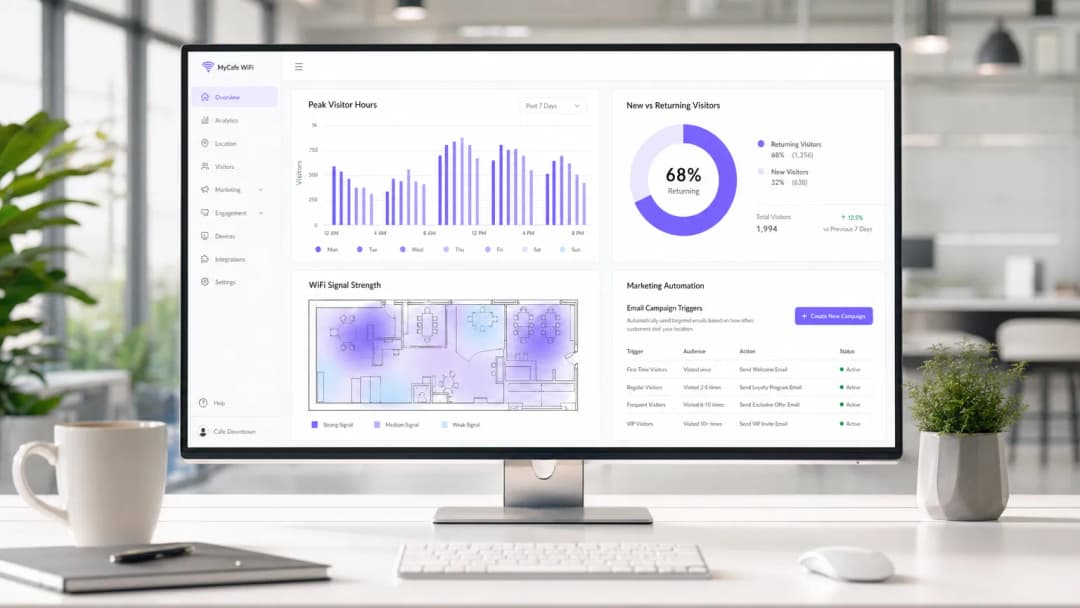
Mesurer le succès : Le retour sur investissement d'un déploiement WiFi dans un café se calcule à travers trois indicateurs clés :
- Taux de capture de données : le pourcentage d'utilisateurs connectés qui acceptent de recevoir des communications marketing. Un portail bien optimisé devrait atteindre un taux de capture de 30 à 40 %.
- Conversion des campagnes : la fréquentation générée par les campagnes automatisées par e-mail/SMS déclenchées par la plateforme WiFi. Par exemple, en suivant combien d'utilisateurs reviennent dans les 7 jours suivant la réception d'une offre "vous nous manquez".
- Optimisation du temps de présence : utiliser les analyses pour corréler le temps de présence des clients avec la valeur moyenne des transactions, permettant aux équipes opérationnelles d'optimiser l'attribution des places et la rapidité du service.
En capturant des données de première partie et en favorisant les visites répétées grâce à un marketing ciblé, une solution de WiFi invité gérée atteint généralement son retour sur investissement dans les 3 à 6 mois suivant son déploiement, en particulier dans les environnements compétitifs de l'hôtellerie.
Définitions clés
VLAN (Virtual Local Area Network)
Un sous-réseau logique qui regroupe un ensemble d'appareils provenant de différents réseaux locaux physiques. Utilisé pour séparer de manière sécurisée le trafic invité du trafic opérationnel.
Indispensable pour maintenir la conformité PCI DSS et empêcher les invités d'accéder aux systèmes de back-office.
Captive Portal
Une page web que l'utilisateur d'un réseau public est obligé de consulter et avec laquelle il doit interagir avant de pouvoir accéder à Internet.
Le mécanisme principal pour capturer les données des utilisateurs, présenter les conditions d'utilisation et obtenir le consentement marketing conforme au GDPR.
Isolation des clients
Une fonctionnalité de sécurité sans fil qui empêche les appareils connectés au même point d'accès de communiquer entre eux.
Crucial pour les réseaux publics afin d'empêcher les utilisateurs malveillants d'analyser ou d'attaquer les appareils des autres invités.
OFDMA (Orthogonal Frequency-Division Multiple Access)
Une fonctionnalité du WiFi 6 qui permet à un point d'accès de subdiviser un canal pour communiquer avec plusieurs appareils simultanément.
Résout le problème de latence dans les environnements de café denses où des dizaines d'appareils se disputent la bande passante.
PCI DSS
Payment Card Industry Data Security Standard. Un ensemble de normes de sécurité conçues pour garantir que toutes les entreprises qui acceptent, traitent, stockent ou transmettent des informations de carte de crédit maintiennent un environnement sécurisé.
La raison réglementaire pour laquelle la segmentation du réseau entre les systèmes de paiement et le WiFi invité est légalement requise.
Données de première partie (First-Party Data)
Informations qu'une entreprise collecte directement auprès de ses clients et qu'elle possède entièrement.
L'actif principal généré par une plateforme de WiFi invité, protégeant les établissements contre la disparition des cookies tiers.
QoS (Quality of Service)
Technologies qui gèrent le trafic de données afin de réduire la perte de paquets, la latence et la gigue sur le réseau.
Utilisé pour prioriser le trafic professionnel critique (comme le traitement des paiements) par rapport au streaming Netflix des invités.
Walled Garden
Un environnement restreint qui contrôle l'accès des utilisateurs aux contenus et services web.
Configuration requise sur le pare-feu pour permettre aux utilisateurs non authentifiés d'accéder au Captive Portal et à ses ressources associées (telles que les API d'authentification par réseaux sociaux) avant d'accorder un accès complet à Internet.
Exemples concrets
Une chaîne de cafés indépendants en pleine croissance comptant 3 établissements subit des coupures de réseau pendant les heures de pointe. Leurs terminaux de paiement se déconnectent fréquemment et les clients se plaignent de la lenteur de la connexion. Ils utilisent actuellement des routeurs grand public fournis par leur fournisseur d'accès Internet, diffusant un unique SSID pour le personnel et les invités.
- Remplacer les routeurs grand public par une passerelle professionnelle gérée dans le cloud et des points d'accès WiFi 6 dans chaque établissement.
- Implémenter le marquage VLAN : VLAN 10 pour le paiement/personnel, VLAN 20 pour les invités.
- Configurer des règles de pare-feu pour bloquer le routage inter-VLAN, sécurisant ainsi le réseau de paiement.
- Configurer la QoS pour donner la priorité au trafic du VLAN 10 par rapport au VLAN 20, et appliquer une limite de bande passante de 5 Mbps par client sur le réseau invité.
- Déployer un Captive Portal centralisé pour gérer l'accès des invités et collecter des données marketing conformes au GDPR.
Le café d'un grand centre de conférences doit fournir un WiFi fluide aux délégués réguliers sans les obliger à se connecter via le Captive Portal chaque jour, tout en suivant leur présence à des fins d'analyse.
Déployer un système d'authentification basé sur des profils utilisant Passpoint (Hotspot 2.0) ou OpenRoaming. Les invités s'authentifient via le Captive Portal lors de leur première visite, téléchargeant un profil sécurisé sur leur appareil. Lors des visites suivantes, leur appareil s'authentifie automatiquement via WPA2/3-Enterprise en utilisant EAP-TTLS, contournant la page de connexion tout en enregistrant leur adresse MAC et leur présence dans le tableau de bord d'analyse.
Questions d'entraînement
Q1. Une chaîne de cafés souhaite mettre en place un réseau WiFi pour les invités. Le directeur marketing insiste pour que la collecte des adresses e-mail soit obligatoire afin de maximiser la croissance de la base de données. Le directeur informatique s'inquiète de la conformité. Quelle est la bonne approche architecturale ?
Conseil : Prenez en compte les exigences spécifiques du GDPR concernant le consentement "librement donné".
Voir la réponse type
Sous le GDPR, le consentement au marketing ne peut pas être une condition préalable à l'obtention d'un service. Le Captive Portal doit permettre aux utilisateurs d'accéder au WiFi sans avoir à accepter les e-mails marketing. La bonne approche consiste à proposer une case à cocher claire et non pré-cochée pour le consentement marketing, tout en permettant aux utilisateurs de se connecter simplement en acceptant les conditions générales. L'équipe marketing devrait plutôt encourager l'inscription en proposant un échange de valeur clair (par exemple, "Inscrivez-vous pour bénéficier de 10 % de réduction sur votre prochain café").
Q2. Pendant les heures de pointe (de 12h00 à 14h00), les clients d'un café animé du centre-ville signalent qu'ils captent le réseau WiFi avec un signal fort, mais qu'ils ne peuvent pas s'y connecter ni obtenir d'adresse IP. Le réseau fonctionne parfaitement le matin et le soir. Quels sont la cause et le remède les plus probables ?
Conseil : Pensez au cycle de vie d'une connexion dans un environnement à forte rotation.
Voir la réponse type
La cause la plus probable est l'épuisement du pool d'adresses IP DHCP. Comme le café enregistre une fréquentation élevée mais des temps de présence courts, les baux DHCP par défaut de 24 heures mobilisent les adresses IP bien après le départ des clients. La solution consiste à réduire la durée du bail DHCP pour le VLAN invité à 1 ou 2 heures, et éventuellement à étendre le sous-réseau d'un /24 (254 adresses) à un /23 (510 adresses).
Q3. Un exploitant de site souhaite déployer un réseau unique et unifié pour ses systèmes de caisse (EPOS) et le WiFi invité afin de réduire les coûts de matériel, en utilisant un routeur haut débit grand public standard. Quels sont les risques techniques et commerciaux spécifiques de cette approche ?
Conseil : Évaluez le scénario par rapport aux exigences du PCI DSS et aux normes de performance sans fil.
Voir la réponse type
- Non-conformité : Un réseau plat enfreint les exigences du PCI DSS concernant l'isolation de l'environnement des données de titulaires de carte, ce qui expose à de lourdes amendes et à la perte de la capacité à traiter les cartes bancaires. 2. Risque de sécurité : En l'absence d'isolation des clients et de VLAN, les invités peuvent potentiellement accéder aux systèmes de caisse ou les attaquer. 3. Dégradation des performances : Les routeurs grand public manquent de fonctions de qualité de service (QoS) pour donner la priorité au trafic des caisses, ce qui signifie que le streaming d'un invité pourrait provoquer l'expiration des sessions de paiement. 4. Limites matérielles : Les routeurs grand public ne peuvent pas gérer le nombre de connexions simultanées typique d'un café, ce qui entraîne des pannes de réseau.
Continuer la lecture de cette série
Comment configurer un WiFi invité : un guide de configuration d'entreprise sécurisé
Ce guide de référence offre aux responsables informatiques et architectes réseau un modèle définitif pour déployer un WiFi invité d'entreprise sécurisé. Il couvre l'architecture essentielle, la migration WPA3, la segmentation VLAN et l'intégration de captive portal pour protéger les systèmes internes tout en collectant des données de premier niveau conformes.
Comment résoudre les lenteurs de votre WiFi sans augmenter le débit de votre forfait Internet
Un guide de référence technique complet pour les responsables informatiques et les architectes réseau sur l'optimisation des performances WiFi d'entreprise sans augmenter la bande passante du FAI. Couvre le réglage RF, la gestion de la densité des clients, la mise en œuvre de la QoS et l'utilisation de l'analyse WiFi pour diagnostiquer et résoudre les goulots d'étranglement.
Comment concevoir un réseau WiFi de campus : Un guide informatique pour les universités
Ce guide technique fournit un plan complet pour concevoir et déployer des réseaux WiFi de campus à haute densité, couvrant tous les aspects, des études de site actives et de l'emplacement des points d'accès à l'architecture des contrôleurs, au roaming transparent et à l'authentification sécurisée des invités. Il est rédigé pour les responsables informatiques, les architectes réseau et les directeurs de la technologie des universités et des grands sites qui ont besoin de conseils pratiques pour planifier et exécuter un déploiement sans fil ce trimestre. Ce guide intègre également la plateforme de Guest WiFi et d'analyses de Purple aux points d'intégration réels du cycle de vie du déploiement.
Vous avez des questions sur votre configuration spécifique ?
Notre équipe collabore avec des exploitants de sites, des responsables informatiques et des ingénieurs réseau au sein de 80 000 sites. Réservez un appel de 20 minutes et nous vous montrerons comment d'autres professionnels comme vous ont résolu ce problème.