
Comment améliorer la vitesse du WiFi sans acheter de nouveaux points d'accès
Ce guide explique en détail comment les grands espaces d'entreprise peuvent récupérer plus de 30 % de leur bande passante WiFi sans acheter de nouveaux points d'accès. En implémentant le filtrage DNS, le band steering et des règles de QoS, les équipes informatiques peuvent prolonger la durée de vie du matériel, réduire le CapEx et améliorer les performances ainsi que la sécurité du réseau.
Video overview
Écouter ce guide
Voir la transcription du podcast
Fait partie de notre série principale : Guide Guest WiFi →

Synthèse
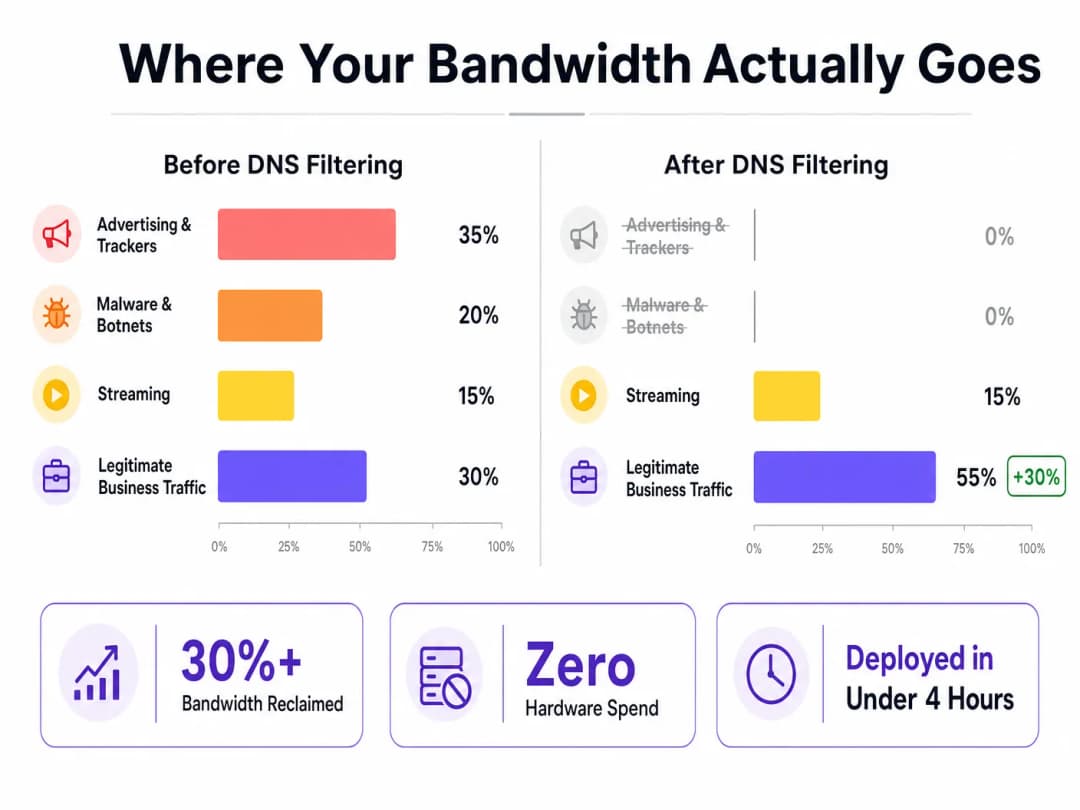
Pour les directeurs informatiques et les CTO qui gèrent des réseaux de sites à grande échelle, l'achat de nouveaux équipements est souvent l'option par défaut la plus coûteuse lorsque la bande passante vient à manquer. Pourtant, jusqu'à 40 % de la bande passante du réseau invité est généralement consommée par de la télémétrie en arrière-plan inutile, des traqueurs publicitaires et du trafic de logiciels malveillants. En mettant en œuvre une optimisation au niveau de la couche logicielle - notamment via le filtrage DNS, le band steering intelligent et l'application de politiques QoS - les sites peuvent récupérer plus de 30 % et plus de leur bande passante existante sans ajouter un seul point d'accès supplémentaire.
Ce guide détaille comment mettre en œuvre ces optimisations pour prolonger la durée de vie du matériel existant, réduire le CapEx et améliorer l'expérience utilisateur dans les secteurs de l'Hébergement, du Commerce de détail, de la Santé et des Transports.
Analyse Technique Approfondie
Gaspillage de la Bande Passante : Télémétrie et Traqueurs
Lors de l'examen du profil de trafic d'un réseau Guest WiFi type, le volume de trafic non initié par l'utilisateur est significatif. Les réseaux publicitaires et les traqueurs tiers représentent 25 % à 40 % du volume des requêtes DNS. À chaque lancement d'application, des dizaines de requêtes sont initiées en arrière-plan pour des plateformes d'analyse et des pixels de suivi, qui n'apportent aucun avantage à l'invité mais consomment la capacité de la liaison montante.
De plus, les appareils compromis sur le réseau génèrent du trafic de logiciels malveillants et de botnets, qui tentent constamment de contacter des serveurs de commande et de contrôle. Cela gaspille la bande passante et crée de graves risques en matière de conformité et de sécurité.
La Solution de Filtrage DNS
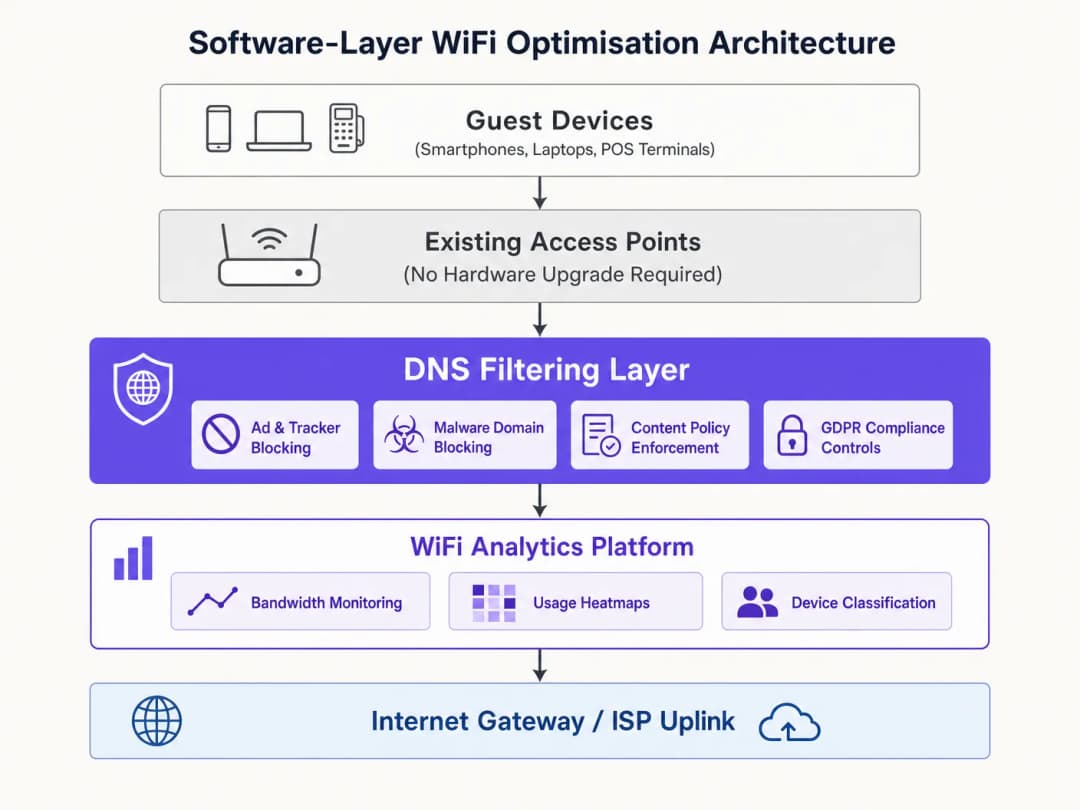
Le filtrage DNS fonctionne au niveau de la couche de résolution. Il intercepte les requêtes DNS avant même qu'elles n'atteignent la liaison montante. Si un domaine est associé à un réseau publicitaire, à un hôte de logiciel malveillant connu ou à une catégorie restreinte par la politique, la requête est bloquée et l'appareil reçoit une réponse nulle. Aucune donnée n'est transférée ; aucune bande passante n'est consommée.
Contrairement aux pare-feu qui inspectent les paquets après leur arrivée ou aux proxys qui les interceptent en cours de transit, le filtrage DNS empêche la requête d'être initiée dès le départ. Cet avantage architectural est extrêmement efficace pour récupérer de la bande passante.
Gestion du DNS over HTTPS (DoH)
Une considération technique clé est l'utilisation croissante du DNS over HTTPS (DoH). Le DoH chiffre les requêtes DNS, contournant le DNS au niveau du réseau et évitant les règles de filtrage traditionnelles. Pour maintenir l'efficacité du filtrage, les réseaux doivent implémenter l'interception du DoH en identifiant le trafic DoH (généralement sur le port 443 des résolveurs connus) et en le redirigeant vers un résolveur de filtrage compatible DoH. Pour plus de détails, consultez notre guide DNS Over HTTPS (DoH): Implications for Public WiFi Filtering (ou la version portugaise : DNS Over HTTPS (DoH): Implicações para a Filtragem de WiFi Público).
Vous avez des questions sur votre configuration spécifique ?
Notre équipe collabore avec des exploitants de sites, des responsables informatiques et des ingénieurs réseau au sein de 80 000 sites. Réservez un appel de 20 minutes et nous vous montrerons comment d'autres professionnels comme vous ont résolu ce problème.
Guide d'implémentation
Le déploiement de l'optimisation au niveau de la couche logicielle est simple et peut être géré de manière centralisée pour les opérateurs multi-sites en utilisant des plateformes comme WiFi Analytics pour surveiller l'impact.
- Mesure de référence : Configurez le réseau pour capturer le volume de requêtes DNS par catégorie et l'utilisation de la bande passante par client. Cela établit une base de référence pour le calcul du ROI.
- Mode surveillance : Déployez le filtrage DNS en mode de surveillance passive pendant 48 à 72 heures afin de comprendre les schémas de trafic sans blocage et d'éviter les faux positifs.
- Blocage progressif : Activez d'abord le blocage pour les catégories à haut niveau de confiance (par exemple, les malwares connus, les botnets, les réseaux publicitaires). Examinez les journaux quotidiennement pour ajuster les politiques.
- Optimisations complémentaires :
- Band Steering : Orientez les appareils compatibles vers la bande 5GHz afin de réduire la congestion sur la bande 2.4GHz encombrée.
- Consolidation des SSID : Réduisez les frais de gestion en consolidant les SSID et en utilisant le marquage VLAN pour la segmentation.
- Application de la QoS : Implémentez des limites de débit par client pour protéger le trafic stratégique de l'entreprise (par exemple, la VoIP, les terminaux de point de vente) contre le streaming intensif.
- Documentation et mesure : Après 30 jours, comparez l'utilisation de la bande passante par rapport à la base de référence pour quantifier le ROI.
Bonnes pratiques
- Segmenter le trafic IoT : Les appareils IoT génèrent souvent de grands volumes de télémétrie. Maintenez-les sur un VLAN séparé avec des politiques de filtrage appropriées afin d'éviter de perturber leur fonctionnement tout en resserrant les règles.
- Éviter le sur-blocage : Commencez par des politiques de blocage conservatrices pour éviter de perturber les applications SaaS légitimes de l'entreprise, et élargissez-les progressivement en vous basant sur l'examen des journaux.
- Analyses RF régulières : Réoptimisez périodiquement l'attribution des canaux et la puissance de transmission pour minimiser les interférences de co-canal à mesure que les environnements physiques évoluent.
Dépannage et atténuation des risques
- Services légitimes bloqués : Si les utilisateurs signalent que des applications ne fonctionnent pas, vérifiez les journaux DNS pour détecter les blocages de catégories larges affectant les domaines requis (par exemple, le stockage cloud, les passerelles de paiement) et ajoutez-les à la liste blanche.* Efficacité de filtrage dégradée : si l'utilisation de la bande passante augmente à nouveau, vérifiez si les politiques de contournement DoH interceptent et redirigent activement les requêtes DNS chiffrées.
- Problèmes de connectivité sur les appareils existants : si les anciens appareils ont des difficultés à se connecter après l'activation de la répartition de bande (band steering), assurez-vous que la bande 2.4GHz reste suffisamment disponible et envisagez d'ajuster l'agressivité de la répartition.
ROI et impact commercial
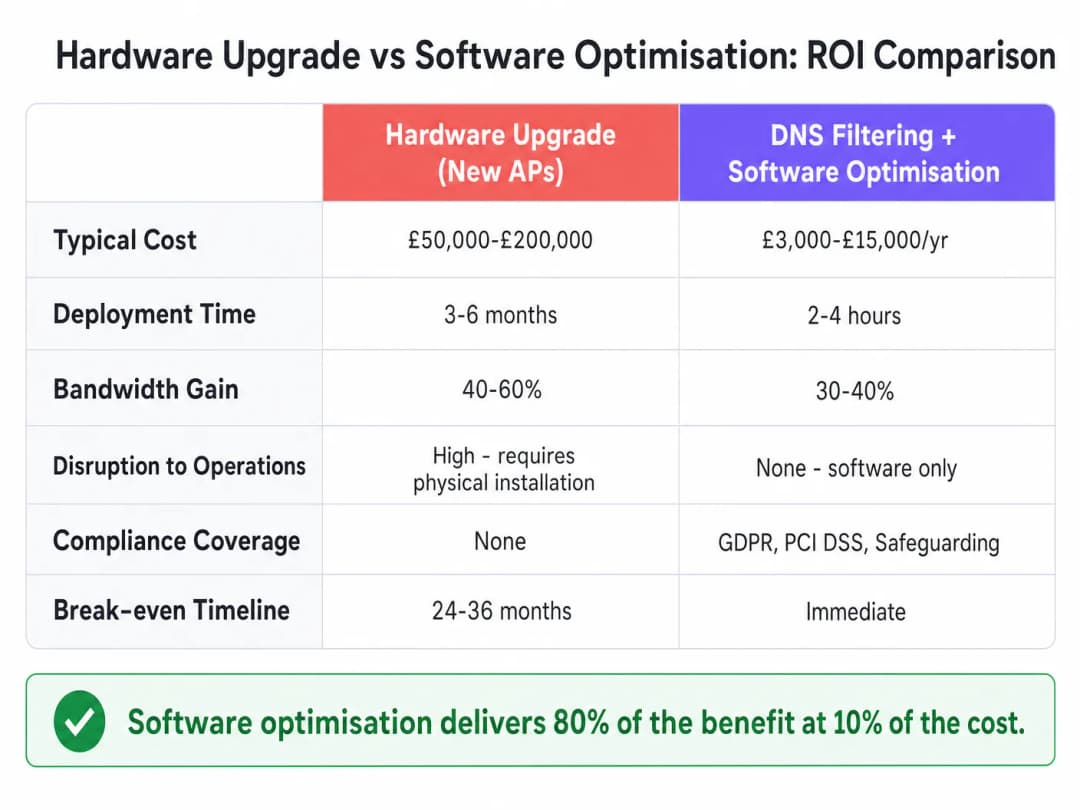
L'optimisation logicielle offre un ROI immédiat. Alors que les mises à niveau matérielles peuvent coûter entre 50 000 £ et 200 000 £ et prendre des mois à être déployées, le coût du filtrage DNS et des modifications de configuration ne représente qu'une fraction de cette somme, et ils peuvent être déployés en quelques heures. Les sites constatent généralement une réduction de 30 à 40 % de l'utilisation de la liaison montante, prolongeant la durée de vie des points d'accès existants de 2 à 4 ans tout en renforçant la conformité GDPR et PCI-DSS.
Écoutez notre briefing technique complet :
Définitions clés
Filtrage DNS
Processus consistant à bloquer l'accès à certains domaines lors de l'étape de résolution DNS, empêchant la connexion avant tout transfert de données.
Utilisé pour récupérer de la bande passante en bloquant le trafic lié aux publicités, aux traceurs et aux logiciels malveillants avant qu'il ne consomme la capacité de la liaison montante.
Band Steering
Fonctionnalité de réseau sans fil qui incite les clients compatibles double bande à se connecter à la bande 5 GHz, moins encombrée, plutôt qu'à la bande 2,4 GHz.
Crucial pour optimiser le temps d'antenne (airtime) et améliorer le débit dans les environnements à forte densité.
DNS sur HTTPS (DoH)
Protocole permettant d'effectuer une résolution DNS à distance via le protocole HTTPS, chiffrant ainsi les données.
Pose des défis aux administrateurs réseau car il peut contourner les contrôles de filtrage DNS traditionnels non chiffrés.
Consolidation des SSIDs
Action de réduire le nombre de noms de réseau diffusés (SSIDs) afin de minimiser la surcharge liée aux trames d'administration.
Chaque SSID consomme du temps d'antenne ; réduire le nombre de SSIDs permet de libérer du temps d'antenne pour la transmission réelle des données.
Qualité de Service (QoS)
Technologies qui gèrent le trafic de données afin de réduire la perte de paquets, la latence et la gigue sur le réseau.
Utilisée pour prioriser le trafic critique de l'entreprise (comme les transactions POS) par rapport au streaming des invités.
Marquage VLAN
Pratique consistant à insérer un identifiant VLAN dans l'en-tête d'un paquet pour identifier le réseau local virtuel auquel le paquet appartient.
Permet la segmentation logique du trafic réseau (par exemple, Invités vs Personnel) sans nécessiter de réseaux physiques ou de SSIDs distincts.
Trames balises (Beacon Frames)
Trames de gestion dans les réseaux WLAN basés sur la norme IEEE 802.11 qui contiennent des informations sur le réseau.
La diffusion d'un trop grand nombre de SSIDs génère un excès de trames balises, ce qui consomme un temps d'antenne précieux et ralentit le réseau.
Interférence co-canal
Diaphonie provenant de deux émetteurs radio différents utilisant le même canal de fréquence.
Atténuée par une planification appropriée des canaux et une optimisation de la puissance d'émission pour éviter que les AP n'interfèrent entre eux.
Exemples concrets
Un hôtel de 200 chambres fait face à de graves plaintes concernant le WiFi lors des pics de soirée. Le fournisseur d'infrastructure recommande une mise à niveau des AP pour un coût de 80 000 £. Comment l'optimisation logicielle peut-elle résoudre ce problème ?
- Déployer le filtrage DNS pour bloquer les réseaux publicitaires et les logiciels malveillants, récupérant environ 30 % de bande passante. 2. Activer le band steering pour orienter les appareils compatibles vers la bande 5 GHz. 3. Implémenter la QoS pour limiter le débit du streaming vidéo à 5 Mbps par client, en priorisant la VoIP et le trafic opérationnel. 4. Consolider les 8 SSIDs existants pour n'en garder que 3 en utilisant le marquage VLAN.
Une grande chaîne de vente au détail comptant 500 magasins doit améliorer les performances réseau des terminaux POS tout en continuant à proposer un service Guest WiFi.
- Segmenter les terminaux POS et le Guest WiFi sur des VLAN distincts. 2. Appliquer un filtrage DNS strict sur le VLAN invité pour bloquer le trafic non essentiel à forte consommation de bande passante. 3. Configurer des règles de QoS strictes pour prioriser le trafic du VLAN POS par rapport au VLAN invité. 4. Gérer les politiques de manière centralisée via un tableau de bord unifié.
Questions d'entraînement
Q1. Le réseau d'un stade subit une forte congestion sur la bande 2,4 GHz, tandis que la bande 5 GHz est sous-utilisée. Quelle est l'action la plus immédiate à entreprendre au niveau de la couche logicielle ?
Conseil : Pensez à la manière de forcer les appareils compatibles à utiliser la meilleure fréquence.
Voir la réponse type
Activer et configurer le Band Steering sur le contrôleur sans fil pour pousser activement les clients compatibles double bande vers la bande 5 GHz, libérant ainsi de la capacité sur la bande 2,4 GHz pour les appareils plus anciens.
Q2. Après le déploiement du filtrage DNS, vous constatez que la consommation globale de bande passante n'a baissé que de 5 %, bien en dessous des 30 % attendus. Quelle est la cause technique la plus probable ?
Conseil : Pensez aux comportements par défaut des navigateurs modernes concernant le DNS.
Voir la réponse type
Les appareils clients utilisent probablement le DNS over HTTPS (DoH), contournant ainsi le résolveur DNS standard du réseau. Le réseau doit être configuré pour intercepter le trafic DoH et le rediriger vers le résolveur de filtrage.
Q3. Une équipe informatique hospitalière souhaite implémenter le filtrage DNS mais craint de bloquer la télémétrie médicale critique des appareils IoT. Comment doivent-ils concevoir le déploiement ?
Conseil : Comment pouvez-vous appliquer des règles différentes à différents types d'appareils ?
Voir la réponse type
Segmentez les appareils IoT sur un VLAN dédié. Appliquez une politique de filtrage DNS très spécifique et permissive au VLAN IoT pour autoriser la télémétrie requise, tout en appliquant la politique plus stricte de blocage des publicités et des logiciels malveillants aux VLAN Invités et Personnel.
Continuer la lecture de cette série
Comment analyser les interférences WiFi et trouver le meilleur canal
Ce guide technique complet fournit aux responsables informatiques d'entreprise des méthodologies exploitables pour identifier les interférences RF et sélectionner les canaux 5GHz optimaux. Il couvre l'analyse du spectre, les considérations DFS et les stratégies de déploiement pratiques pour maximiser le débit et réduire la latence sans nécessiter de nouveaux investissements matériels.
Réduction de la latence sur les réseaux WiFi à haute densité
Ce guide explique en détail comment l'élimination des requêtes DNS inutiles pour les domaines de suivi réduit considérablement la latence sur les réseaux WiFi à haute densité. Il fournit des conseils pratiques en matière d'architecture, de mise en œuvre et de retour sur investissement pour les responsables informatiques gérant des environnements de sites congestionnés.
Comprendre la signification de la vitesse WiFi : débit réel vs bande passante
Ce guide de référence technique fait autorité pour démystifier les mesures de vitesse WiFi auprès des responsables informatiques d'entreprise, en distinguant clairement la vitesse de liaison, la bande passante et le débit réel. Il fournit des méthodologies concrètes pour mesurer les performances en conditions réelles, atténuer la congestion RF et optimiser l'infrastructure WLAN au sein des déploiements sur des sites à haute densité. Les directeurs informatiques, architectes réseau et directeurs des opérations sur site en retireront des cadres concrets pour aligner les investissements d'infrastructure avec des résultats commerciaux mesurables.
Vous avez des questions sur votre configuration spécifique ?
Notre équipe collabore avec des exploitants de sites, des responsables informatiques et des ingénieurs réseau au sein de 80 000 sites. Réservez un appel de 20 minutes et nous vous montrerons comment d'autres professionnels comme vous ont résolu ce problème.