
Comment analyser et modifier votre canal WiFi pour une vitesse maximale
Ce guide de référence technique fait autorité et fournit aux responsables informatiques et aux architectes réseau les méthodologies nécessaires pour analyser les environnements RF et mettre en œuvre des plans de canaux WiFi optimaux. Il offre des cadres exploitables pour atténuer les interférences de co-canal, maximiser le débit et garantir une connectivité robuste dans les déploiements d'entreprise à haute densité.
Écouter ce guide
Voir la transcription du podcast
Fait partie de notre série principale : Guest WiFi Guide →
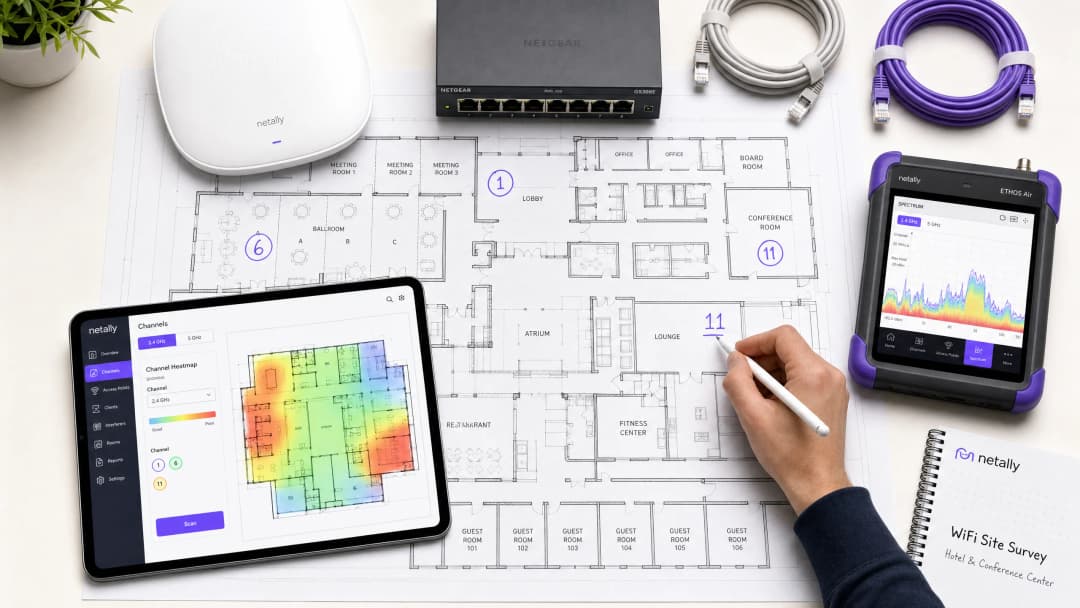
Synthèse opérationnelle
Dans les environnements d'entreprise à haute densité - qu'il s'agisse d'un hôtel de 500 chambres, d'un domaine de vente au détail sur plusieurs étages ou d'un campus du secteur public - les performances du réseau sans fil ne sont plus un simple service d'appoint ; il s'agit d'une infrastructure opérationnelle critique. Pourtant, de nombreux déploiements souffrent d'un faible débit, de taux de retransmission élevés et de problèmes de connectivité intermittents, tous issus d'une seule et même cause racine modifiable : une planification des canaux sous-optimale. S'en remettre aux configurations par défaut des constructeurs ou à de simples algorithmes de sélection automatique des canaux dans des environnements RF complexes mène inévitablement à des interférences cocanal et à une congestion du spectre.
Ce guide de référence technique fournit une méthodologie neutre vis-à-vis des constructeurs et basée sur l'ingénierie pour analyser votre environnement RF actuel et mettre en œuvre un plan de canaux définitif. Nous examinerons la physique opérationnelle des bandes 2,4 GHz, 5 GHz et 6 GHz, détaillerons une approche structurée de l'analyse du spectre et fournirons des cadres pratiques pour atténuer les interférences. En traitant l'optimisation des canaux comme une discipline opérationnelle continue plutôt que comme une tâche de déploiement unique, les équipes réseau peuvent obtenir des améliorations mesurables du débit, réduire le volume de tickets de support et garantir une connectivité fiable pour les appareils des clients ainsi que pour les infrastructures opérationnelles critiques.
Analyse technique approfondie : Comprendre le spectre RF
Pour prendre des décisions éclairées concernant l'allocation des canaux, les architectes réseau doivent comprendre les mécanismes sous-jacents des normes 802.11 et le comportement des différentes bandes de fréquences dans l'environnement physique.
La bande 2,4 GHz : Gérer la pénurie
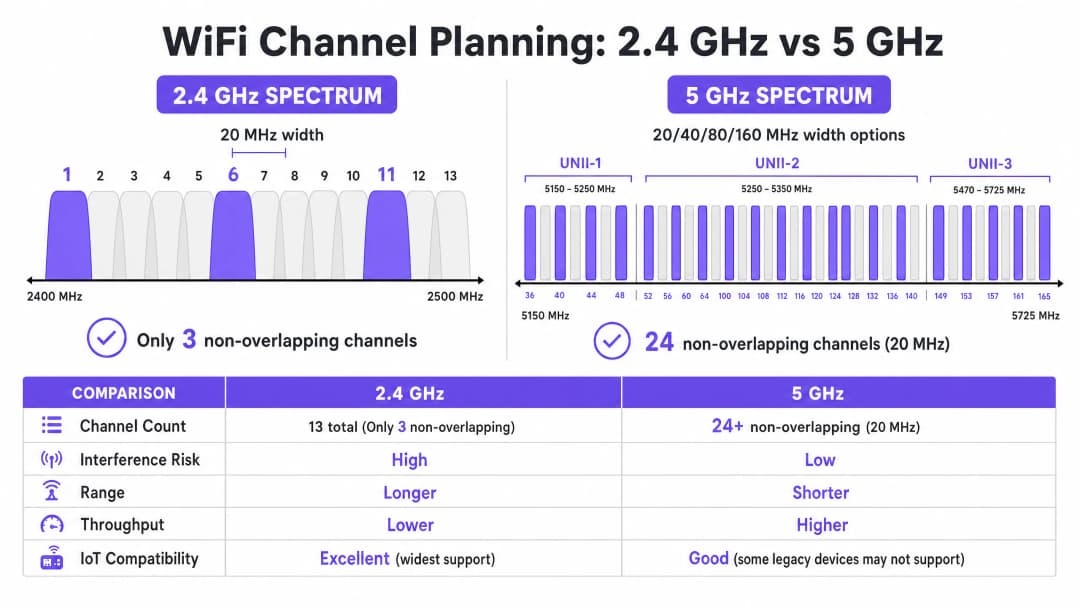
La bande 2,4 GHz est la tranche de spectre sans licence la plus encombrée. Bien qu'elle offre des caractéristiques de propagation supérieures - permettant aux signaux de pénétrer plus efficacement les murs et les sols que les fréquences plus élevées - la structure de ses canaux est fondamentalement limitée. Dans la plupart des domaines réglementaires (y compris l'Europe et l'Amérique du Nord), cette bande propose des canaux de 20 MHz de large mais espacés de seulement 5 MHz.
Cette logique mathématique impose que seuls trois canaux non chevauchants soient disponibles : 1, 6 et 11. Tout déploiement utilisant des canaux en dehors de ce trio (par exemple, les canaux 2, 3 ou 4) introduit des interférences de canaux adjacents. Contrairement aux interférences cocanal, où les appareils peuvent coordonner le temps d'antenne à l'aide de CSMA/CA, les interférences de canaux adjacents corrompent les transmissions, ce qui entraîne des taux de retransmission élevés et une grave dégradation du débit.
De plus, la bande 2,4 GHz est partagée avec de nombreuses sources d'interférences non-WiFi, notamment les appareils Bluetooth, les fours à micro-ondes et les anciens capteurs IoT. Lors de l'optimisation de cette bande, l'objectif principal est l'atténuation des interférences plutôt que l'obtention d'un débit maximal.
La bande 5 GHz : Capacité et complexité
La bande 5 GHz offre une capacité nettement supérieure, fournissant 24 canaux ou plus de 20 MHz sans chevauchement, selon le domaine réglementaire. Ce spectre est divisé en sous-bandes UNII (Unlicensed National Information Infrastructure) :
- UNII-1 (Canaux 36 à 48) : Ces canaux ne nécessitent pas de sélection dynamique de fréquence (DFS) et constituent le point de départ le plus sûr pour les déploiements à haute densité.
- UNII-2 (Canaux 52 à 144) : Ces canaux nécessitent le DFS, ce qui signifie que les points d'accès doivent surveiller les signatures radar (telles que les radars météorologiques ou militaires) et libérer le canal si l'une d'elles est détectée. Bien que le DFS ajoute de la complexité opérationnelle, l'utilisation de l'UNII-2 est essentielle pour obtenir la réutilisation des canaux nécessaire dans les environnements denses.
- UNII-3 (Canaux 149 à 165) : Ces canaux ne sont généralement pas soumis au DFS, mais font l'objet de restrictions de puissance variables selon la région.
Dans la bande 5 GHz, les architectes réseau doivent équilibrer la largeur et la disponibilité des canaux. Bien que les canaux de 80 MHz (le choix par défaut pour le 802.11ac et le WiFi 6) offrent un débit de pointe plus élevé pour les clients individuels, ils consomment quatre canaux de 20 MHz, ce qui réduit considérablement le nombre de canaux sans chevauchement disponibles pour la réutilisation. Dans les espaces à haute densité, les canaux plus larges provoquent souvent des interférences co-canal, réduisant ainsi la capacité globale.
La nouvelle frontière du 6 GHz (WiFi 6E et WiFi 7)
L'introduction de la bande 6 GHz représente l'expansion la plus importante du spectre WiFi depuis deux décennies, ajoutant jusqu'à 1200 MHz de nouveau spectre vierge. Elle fournit 59 canaux de 20 MHz supplémentaires, totalement exempts d'interférences avec les anciens appareils et de toute exigence DFS. Pour les sites qui mettent à niveau leur matériel, le 6 GHz permet le déploiement pratique de canaux de 80 MHz ou 160 MHz dans les zones à haute densité. Cependant, sa longueur d'onde plus courte implique une portée et une pénétration plus réduites, ce qui nécessite un positionnement plus dense des points d'accès.
Vous avez des questions sur votre configuration spécifique ?
Notre équipe collabore avec des exploitants de sites, des responsables informatiques et des ingénieurs réseau au sein de 80 000 sites. Réservez un appel de 20 minutes et nous vous montrerons comment d'autres professionnels comme vous ont résolu ce problème.
Guide de mise en œuvre : Processus d'optimisation des canaux
L'optimisation de votre plan de canaux WiFi nécessite une approche systématique, allant de la mesure de référence à la conception technique et au déploiement validé.
Étape 1 : Audit RF de référence
Avant d'apporter des modifications à la configuration, vous devez comprendre l'état actuel de l'environnement RF. Cela nécessite des outils de mesure complets, et pas seulement une application sur smartphone.
- Analyse de spectre passive : Utilisez un analyseur de spectre dédié (par exemple, Ekahau Sidekick, NetAlly AirCheck) pour mesurer le bruit de fond et identifier les sources d'interférences non WiFi. Un environnement propre affiche généralement un bruit de fond d'environ -95 dBm.
- Audit des réseaux voisins : Dressez la liste de tous les BSSID (Basic Service Set Identifiers) visibles, de leurs canaux d'exploitation et de leurs indicateurs de force du signal reçu (RSSI). Dans les environnements tels que les parcs d'activités commerciales ou les immeubles de bureaux multi-locataires, les réseaux externes constituent une source majeure d'interférences incontrôlables.
- Métriques de performance des clients : Analysez le rapport signal sur bruit (SNR) plutôt que le simple RSSI. Un SNR inférieur à 20 dB obligera les clients à utiliser un indice MCS (Modulation and Coding Scheme) inférieur, ce qui réduira le débit. Visez un SNR de 25 dB ou plus pour des performances fiables.
Étape 2 : Conception du plan de canaux
Une fois équipé des données de référence, concevez un plan de canaux définitif.
- Stratégie 2,4 GHz : Imposez strictement l'utilisation des canaux 1, 6 et 11. Si la densité est extrêmement élevée, désactivez de manière sélective les radios 2,4 GHz sur certains points d'accès afin de créer une configuration en damier, réduisant ainsi les interférences cocanal tout en maintenant la couverture pour les appareils IoT existants.
- Stratégie 5 GHz : Utilisez le nombre maximal de canaux non chevauchants, y compris les canaux DFS si l'activité radar est faible dans votre zone.
- Sélection de la largeur de canal : Standardisez sur des canaux de 20 MHz pour les zones à haute densité (par exemple, les salles de conférence, les stades). Utilisez des canaux de 40 MHz dans les zones de densité moyenne (par exemple, les chambres d'hôtel, les bureaux en open space). Évitez les canaux de 80 MHz, sauf dans le cas de déploiements dans des scénarios à très faible densité et à très haut débit.
- Réglage de la puissance de transmission : La planification des canaux et la puissance de transmission sont intrinsèquement liées. Réduisez la puissance de transmission pour réduire la taille de la cellule de chaque point d'accès, minimisant ainsi le chevauchement (et donc les interférences) entre les points d'accès sur le même canal. Visez une séparation de 15 - 20 dBm entre les points d'accès cocanal.

Étape 3 : Déploiement progressif et validation
N'appliquez jamais de modifications globales de canaux simultanément sur l'ensemble du parc ou pendant les heures de bureau.
- Fenêtres de maintenance : Planifiez les modifications pendant les périodes d'utilisation les plus faibles (généralement entre 02h00 et 05h00) afin de minimiser les perturbations liées aux réinitialisations radio.
- Déploiement par zone : Déployez le nouveau plan par zones logiques (par exemple, un étage ou une aile à la fois).
- Validation post-modification : Après avoir appliqué le nouveau plan, validez les modifications à l'aide des mêmes outils que ceux utilisés lors de l'audit de référence. Assurez-vous que les interférences cocanal ont diminué et que les objectifs de SNR sont atteints.
Écoutez notre briefing technique de 10 minutes sur les stratégies d'optimisation des canaux :
Bonnes pratiques et atténuation des risques
Les pièges des algorithmes de sélection automatique des canaux
\nLa plupart des contrôleurs WLAN d'entreprise intègrent une gestion automatique des ressources radio (RRM) ou une sélection automatique des canaux. Bien que pratiques pour les petits déploiements, ces algorithmes sont souvent préjudiciables dans les environnements à haute densité. Ils prennent des décisions basées sur la perspective d'un AP local plutôt que sur une vision globale de l'environnement RF, ce qui entraîne fréquemment des attributions de canaux sous-optimales et des changements de canaux perturbateurs et en cascade pendant les heures d'activité.
Meilleure pratique : Dans les espaces complexes, désactivez la sélection automatique des canaux. Implémentez un plan de canaux statique, conçu manuellement et basé sur des études de site rigoureuses. Utilisez les fonctionnalités RRM du contrôleur uniquement pour alerter sur les changements RF significatifs, et non pour une correction automatisée.
Résolution des interférences de co-canal (CCI)
La CCI est le principal facteur de dégradation des performances dans les déploiements denses. Pour une compréhension approfondie des techniques d'atténuation, consultez notre guide complet sur la Résolution des interférences de co-canal dans les déploiements d'entreprise.
L'importance d'une surveillance continue
Un plan de canaux statique se dégradera avec le temps à mesure que l'environnement RF évolue - de nouveaux réseaux voisins apparaissent, des modifications structurelles surviennent ou de nouveaux appareils IoT sont déployés. L'optimisation des canaux n'est pas une tâche que l'on effectue une fois pour toutes.
Meilleure pratique : Mettez en place une surveillance continue à l'aide d'une plateforme d'analyse. Purple's WiFi Analytics offre une visibilité essentielle sur la densité des clients, la qualité des sessions et les tendances de débit à l'échelle du site. Définissez des alertes de seuil pour la dégradation du SNR ou l'augmentation des taux de retransmission afin d'identifier de manière proactive le moment où le plan de canaux doit être révisé.
ROI et impact commercial
Investir du temps et des outils dans l'optimisation de votre plan de canaux WiFi demande des efforts, mais le retour sur investissement (ROI) est substantiel et mesurable.
- Augmentation du débit global : En minimisant les interférences de co-canal et en optimisant la largeur des canaux, les sites peuvent souvent obtenir une augmentation de 20 à 40 % de la capacité globale du réseau sans déployer de nouveau matériel.
- Réduction des coûts de support : Un environnement RF stable réduit considérablement les tickets d'assistance liés à un "WiFi lent" ou à des déconnexions intermittentes, réduisant ainsi les coûts de support opérationnel.
- Expérience utilisateur améliorée : Pour les environnements qui s'appuient sur le Guest WiFi, comme l'Hôtellerie ou le Commerce de détail, une connectivité fiable est directement corrélée à des scores de satisfaction client plus élevés et à un engagement accru avec le Captive Portal.
- Fiabilité opérationnelle : Des terminaux de point de vente aux scanners d'inventaire portables, les systèmes d'entreprise critiques dépendent d'une connectivité sans fil robuste. Un plan de canaux propre garantit le fonctionnement de ces systèmes sans interruption, protégeant ainsi les revenus et l'efficacité opérationnelle.En traitant le spectre RF comme une ressource critique et gérable, les leaders informatiques peuvent transformer leur infrastructure sans fil d'une source de frustration en une fondation fiable pour les opérations de l'entreprise.
Définitions clés
Interférence Co-Canal (CCI)
Interférence qui se produit lorsque deux points d'accès ou plus fonctionnent sur le même canal de fréquence à portée l'un de l'autre, forçant les appareils à partager le temps d'antenne et à attendre que le support soit libéré.
La CCI est la cause principale de la dégradation du débit dans les déploiements denses où la réutilisation des canaux est mal planifiée.
Interférence de Canal Adjacent (ACI)
Interférence causée par le chevauchement de fréquences (par exemple, l'utilisation des canaux 1 et 3 dans la bande 2.4 GHz), qui corrompt les transmissions au lieu de partager le temps d'antenne.
L'ACI est extrêmement destructrice et doit être évitée en respectant strictement l'attribution de canaux sans chevauchement.
Sélection Dynamique de Fréquence (DFS)
Une exigence réglementaire dans la bande 5 GHz selon laquelle les points d'accès doivent surveiller les signaux radar et libérer le canal si un signal est détecté.
Bien que les canaux DFS (UNII-2) ajoutent de la complexité opérationnelle, ils sont essentiels pour obtenir une réutilisation adéquate des canaux dans les environnements à haute densité.
Rapport Signal sur Bruit (SNR)
La différence en décibels (dB) entre la force du signal reçu et le niveau de bruit de fond.
Le SNR est un indicateur plus précis des performances du client que le seul RSSI. Un SNR plus élevé permet des taux de modulation plus rapides.
Schéma de Modulation et de Codage (MCS)
Une valeur d'indice représentant la combinaison du type de modulation et du taux de codage utilisés pour une transmission, ce qui détermine le débit de données.
Un environnement RF propre avec un SNR élevé permet aux clients de négocier des indices MCS supérieurs, offrant ainsi un débit plus rapide.
Carrier Sense Multiple Access with Collision Avoidance (CSMA/CA)
Le protocole utilisé par les réseaux 802.11 dans lequel les appareils écoutent le support sans fil avant de transmettre afin d'éviter les collisions.
Le CSMA/CA gère le temps d'antenne sur les canaux partagés mais génère une surcharge importante et réduit le débit dans les environnements à forte CCI.
Bruit de fond (Noise Floor)
La mesure de l'énergie RF de fond dans l'environnement, généralement exprimée en dBm.
Un bruit de fond élevé réduit le SNR effectif, dégradant les performances. L'identification et l'atténuation des sources de bruit RF constituent une étape essentielle de l'optimisation des canaux.
Received Signal Strength Indicator (RSSI)
Une mesure de la puissance présente dans un signal radio reçu.
Bien qu'utile pour la cartographie de base de la couverture, le RSSI doit être évalué en parallèle avec le bruit de fond (pour déterminer le SNR) afin d'obtenir une analyse précise des performances.
Exemples concrets
Un hôtel de 300 chambres situé dans un environnement urbain dense subit de mauvaises performances WiFi pendant les heures de pointe en soirée. Le déploiement actuel utilise des canaux de 80 MHz sur la bande 5 GHz, et la sélection automatique des canaux est activée. Les clients signalent des déconnexions fréquentes et des vitesses de streaming lentes.
- Effectuer une analyse spectrale de référence pendant les heures de pointe pour quantifier les interférences.
- Désactiver la sélection automatique des canaux sur le contrôleur WLAN afin d'éviter les réinitialisations radio perturbatrices.
- Reconfigurer les radios 5 GHz pour passer de largeurs de canal de 80 MHz à 20 MHz. Cela augmente le nombre de canaux sans chevauchement disponibles de 6 à plus de 24.
- Mettre en œuvre un plan de canaux statiques, en veillant à ce que les points d'accès adjacents fonctionnent sur des canaux différents et que les points d'accès co-canal soient séparés par au moins 15 à 20 dBm d'atténuation de signal.
- Valider la nouvelle configuration en mesurant le SNR et les taux de retransmission dans les zones précédemment problématiques.
Un grand entrepôt de vente au détail s'appuie sur des scanners portables 2.4 GHz pour la gestion des stocks. Les scanners perdent fréquemment leur connexion au réseau, ce qui oblige le personnel à redémarrer les appareils. Les points d'accès sont actuellement configurés pour utiliser les canaux 1, 4, 8 et 11.
- Effectuer un balayage RF passif pour identifier les sources d'interférences non-WiFi dans la bande 2.4 GHz (par exemple, balises Bluetooth, caméras de sécurité héritées).
- Reconfigurer toutes les radios 2.4 GHz pour utiliser uniquement les canaux sans chevauchement : 1, 6 et 11.
- Ajuster la puissance d'émission pour minimiser le chevauchement des cellules, garantissant ainsi que les scanners basculent de manière transparente entre les points d'accès sans rester connectés à des signaux faibles et lointains (clients collants).
- Mettre en œuvre une surveillance pour suivre le comportement d'itinérance et les taux de retransmission des scanners portables.
Questions d'entraînement
Q1. Vous concevez le déploiement WiFi pour un centre de conférence à haute densité. Le site nécessite une capacité globale maximale pour prendre en charge des milliers d'appareils clients simultanés. Quelle stratégie de largeur de canal devez-vous adopter pour la bande 5 GHz ?
Conseil : Prenez en compte le compromis entre le débit individuel maximal et le nombre de canaux non chevauchants disponibles pour la réutilisation.
Voir la réponse type
Standardisez sur des canaux de 20 MHz. Bien que les canaux de 80 MHz offrent un débit maximal plus élevé pour un seul utilisateur, ils réduisent considérablement le nombre de canaux non chevauchants disponibles. Dans un environnement à haute densité, l'utilisation de canaux de 20 MHz maximise la réutilisation des canaux, réduit les interférences co-canal et offre la capacité globale la plus élevée pour le site.
Q2. Lors de l'étude de site d'un parc commercial, vous découvrez que plusieurs entreprises voisines exploitent leurs points d'accès sur le canal 4 de la bande 2.4 GHz. Comment devez-vous configurer vos points d'accès en réponse ?
Conseil : Évaluez l'impact des interférences de canaux adjacents par rapport aux interférences co-canal.
Voir la réponse type
Vous devez configurer vos points d'accès pour utiliser les canaux 1, 6 ou 11, en sélectionnant spécifiquement le canal (probablement le 11) qui est le plus éloigné du canal perturbateur 4. L'exploitation sur le canal 4 provoquerait de graves interférences de canaux adjacents. Même l'exploitation sur le canal 6 pourrait subir un certain chevauchement dû aux signaux forts du canal 4. Il est préférable d'accepter quelques interférences co-canal sur un canal standard (1, 6, 11) plutôt que d'introduire des interférences de canaux adjacents.
Q3. Après avoir déployé un plan de canaux statique dans un hôpital, vous remarquez que les clients d'un service spécifique subissent des lenteurs, malgré un RSSI fort (-65 dBm). Quelle est la cause la plus probable et comment menez-vous l'enquête ?
Conseil : Le RSSI mesure uniquement la force du signal, pas sa qualité. Quelle métrique détermine le signal réellement utilisable ?
Voir la réponse type
La cause la plus probable est un bruit de fond élevé entraînant un faible rapport signal sur bruit (SNR). Même avec un RSSI fort, si le bruit de fond est élevé (par exemple, -75 dBm), le SNR qui en résulte (10 dB) est trop faible pour une modulation à haut débit. Vous devez utiliser un analyseur de spectre pour identifier la source du bruit RF dans ce service spécifique et l'atténuer.
Continuer la lecture de cette série
Comprendre l'RSSI et la puissance du signal pour une planification optimale des canaux
Ce guide propose une analyse technique approfondie de l'RSSI, du rapport signal sur bruit (SNR) et des principes de propagation RF pour une planification optimale des canaux. Il fournit aux responsables informatiques, architectes réseau et directeurs d'exploitation de sites des stratégies concrètes pour atténuer les interférences co-canal et de canaux adjacents, optimiser le positionnement des AP et exploiter les données analytiques pour un impact commercial mesurable dans les secteurs de l'hôtellerie, du commerce de détail et du secteur public.
WiFi 6 vs WiFi 5 : résout-il les interférences de canaux ?
Ce guide propose une analyse technique approfondie de la manière dont le WiFi 6 (802.11ax) résout les interférences de canaux dans les environnements d'entreprise à forte densité grâce à l'OFDMA et au BSS Coloring. Il fournit aux responsables informatiques, architectes réseau et CTO des stratégies de déploiement concrètes, des études de cas réels dans l'hôtellerie et la santé, ainsi qu'un cadre pour évaluer le ROI des mises à niveau d'infrastructures dans les lieux où les performances sans fil sont critiques pour l'activité.
Meilleurs canaux WiFi pour les sites à haute densité
Une référence technique incontournable pour sélectionner et optimiser les canaux WiFi dans les environnements à haute densité tels que les stades, les arènes et les grands espaces publics. Ce document traite de la physique RF, des stratégies de réutilisation des canaux sur les bandes 5 GHz et 6 GHz, ainsi que des conseils de déploiement concrets pour les responsables informatiques.
Vous avez des questions sur votre configuration spécifique ?
Notre équipe collabore avec des exploitants de sites, des responsables informatiques et des ingénieurs réseau au sein de 80 000 sites. Réservez un appel de 20 minutes et nous vous montrerons comment d'autres professionnels comme vous ont résolu ce problème.