
Comment analyser les interférences WiFi et trouver le meilleur canal
Ce guide technique complet fournit aux responsables informatiques d'entreprise des méthodologies concrètes pour identifier les interférences RF et sélectionner les canaux 5GHz optimaux. Il couvre l'analyse de spectre, les considérations liées au DFS, et les stratégies de déploiement pratiques pour maximiser le débit et réduire la latence sans nécessiter de nouveaux investissements matériels.
Video overview
Écouter ce guide
Voir la transcription du podcast
Fait partie de notre série principale : Guide Guest WiFi →
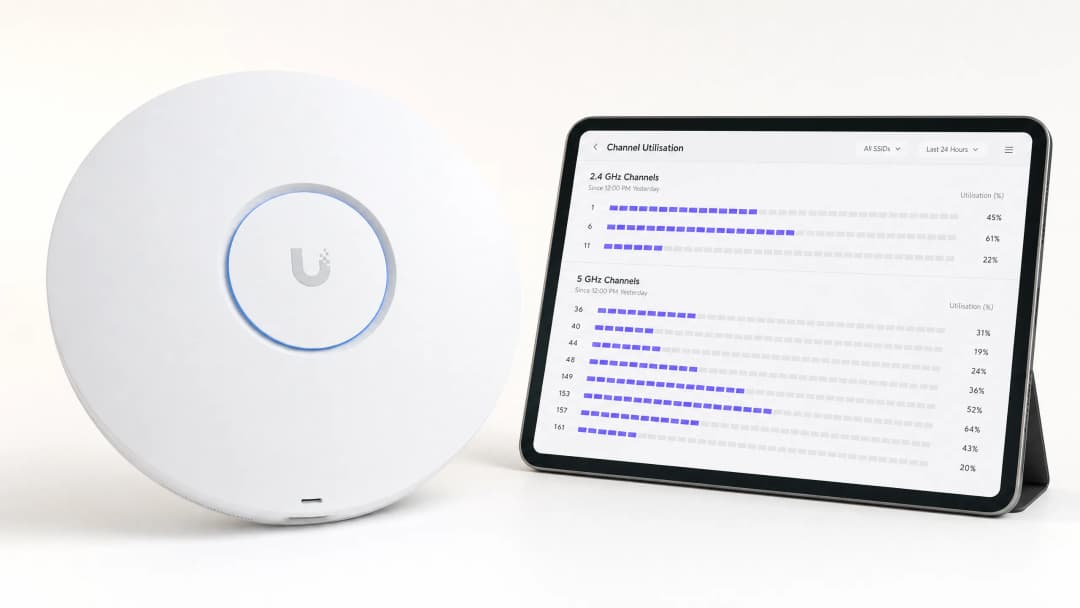
Synthèse opérationnelle
Pour les directeurs informatiques d'entreprise qui gèrent des sites à haute densité, l'identification du meilleur canal pour les déploiements 5GHz est un impératif opérationnel critique. Un mauvais choix de canal entraîne des pics de latence, des échecs d'itinérance et une dégradation du débit, ce qui impacte directement l'expérience utilisateur et les opérations du site.
Ce guide de référence technique présente une méthodologie structurée pour identifier les interférences RF, exécuter des analyses de spectre et sélectionner les canaux optimaux dans la bande 5GHz. En passant d'un dépannage réactif à une gestion RF proactive, les équipes informatiques peuvent maximiser le débit, atténuer la contention co-canal et prendre en charge des densités d'appareils plus élevées sans l'investissement en capital lié à l'achat de nouveaux points d'accès.
Que vous déployiez du Guest WiFi sur un parc de points de vente ou que vous sécurisiez les technologies opérationnelles back-office, la compréhension de l'utilisation des canaux est le fondement d'une architecture sans fil robuste.
``` Use of
Analyse technique approfondie : Le spectre 5GHz et les vecteurs d'interférence
Comprendre le paysage du 5GHz
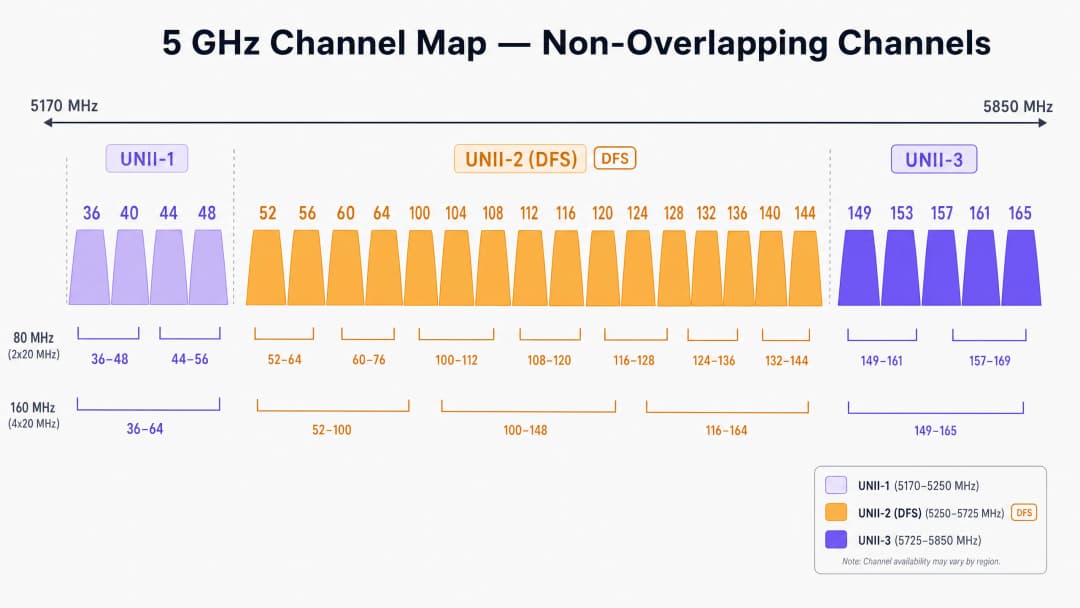
Contrairement à la bande restreinte de 2.4GHz, qui n'offre que trois canaux sans chevauchement, le spectre 5GHz fournit jusqu'à 25 canaux de 20MHz sans chevauchement (selon le domaine réglementaire). Cependant, tous les canaux 5GHz ne se valent pas. Ils sont divisés en bandes spécifiques d'infrastructure d'information nationale sans licence (UNII), chacune ayant des règles opérationnelles distinctes.
UNII-1 et UNII-3 : Les havres de paix
Les canaux des bandes UNII-1 (36, 40, 44, 48) et UNII-3 (149, 153, 157, 161, 165) sont généralement exempts de contraintes d'interférence radar dans la plupart des régions. Pour les déploiements à haute densité dans le Retail ou l'Hospitality, ces canaux représentent le point de départ le moins risqué pour votre plan de canaux. Comme la bande UNII-3 fonctionne à une fréquence légèrement plus élevée, elle subit une atténuation marginalement plus forte à travers les murs, ce qui peut en réalité s'avérer avantageux pour limiter les interférences co-canal entre des pièces ou des étages adjacents.
UNII-2 et DFS (Dynamic Frequency Selection)
Les bandes UNII-2 (canaux 52 à 144) partagent le spectre avec des systèmes de radars militaires et météorologiques existants. Pour utiliser ces canaux, les points d'accès doivent prendre en charge le DFS. Si un AP détecte une impulsion radar, il doit immédiatement libérer le canal et ne peut pas y revenir pendant 30 minutes.
Dans les environnements proches des aéroports, des ports ou des stations météorologiques, les événements DFS peuvent provoquer des déconnexions de clients soudaines et inexpliquées. Si votre site subit des coupures intermittentes, l'examen des journaux du contrôleur à la recherche d'événements DFS est une première étape obligatoire.
Types d'interférences
Les interférences dans les réseaux sans fil d'entreprise se divisent généralement en deux catégories :
- Interférence co-canal (CCI) : Cela se produit lorsque plusieurs AP (les vôtres ou ceux d'un voisin) fonctionnent sur le même canal. Le WiFi étant un support half-duplex régi par le protocole Carrier Sense Multiple Access with Collision Avoidance (CSMA/CA), tous les appareils sur le même canal doivent attendre leur tour pour transmettre. Une CCI élevée entraîne une augmentation de la contention du temps d'antenne et une hausse de la latence.
- Interférence non-WiFi : Appareils émettant de l'énergie RF dans la bande 5GHz sans respecter les protocoles 802.11. Les coupables les plus courants sont les téléphones sans fil, les émetteurs AV sans fil et les capteurs IoT propriétaires. Contrairement à la CCI, l'interférence non-WiFi augmente le bruit de fond, corrompant les trames WiFi et déclenchant des retransmissions.
Vous avez des questions sur votre configuration spécifique ?
Notre équipe collabore avec des exploitants de sites, des responsables informatiques et des ingénieurs réseau au sein de 80 000 sites. Réservez un appel de 20 minutes et nous vous montrerons comment d'autres professionnels comme vous ont résolu ce problème.
Guide de mise en œuvre : Analyse et sélection des canaux
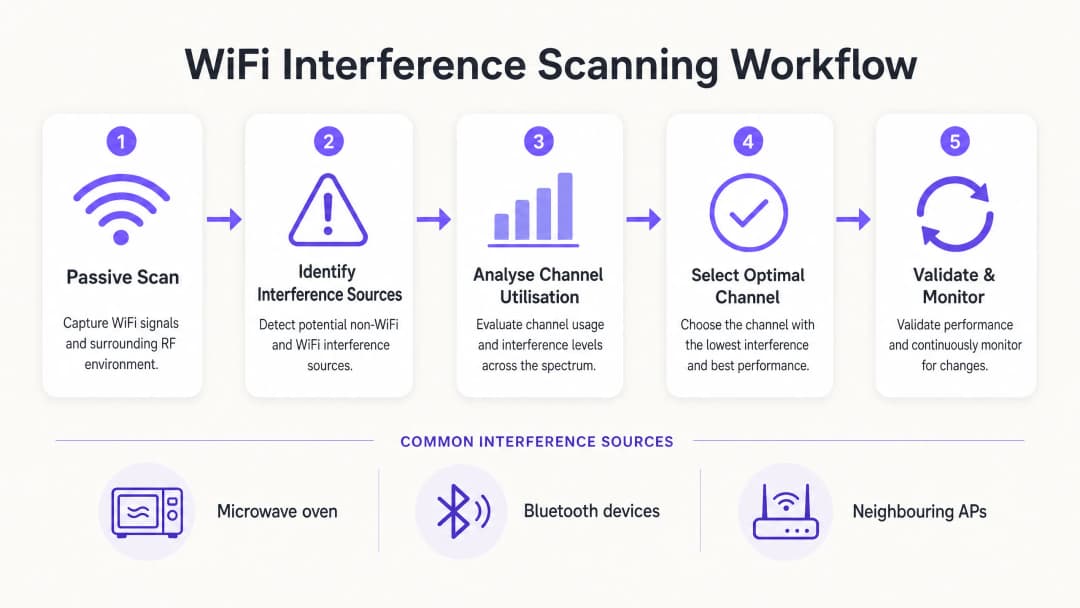
Pour déterminer le meilleur canal pour le 5GHz, vous devez aller au-delà des paramètres "Auto-RF" par défaut et mettre en œuvre une méthodologie d'analyse structurée.
Étape 1 : Établir la base de référence de l'environnement
Avant d'apporter des modifications, établissez une base de référence. Utilisez les outils de surveillance intégrés de votre contrôleur ou intégrez-vous à une plateforme de WiFi Analytics pour capturer :
- Les pourcentages d'utilisation moyenne et maximale des canaux.
- Les taux d'association des clients et les indicateurs de réussite du roaming.
- Le débit de référence pendant les heures de pointe opérationnelles.
Règle cruciale : Ne réalisez jamais votre balayage RF initial dans un lieu vide. Un balayage à 2h00 du matin un dimanche ne révélera pas les interférences générées par 5 000 participants lors d'une conférence.
Étape 2 : Exécuter l'analyse de spectre
Se fier uniquement au balayage standard des AP détecte seulement les autres réseaux 802.11. Pour identifier les interférences non-WiFi, vous devez effectuer une analyse de spectre matérielle.
- Niveau 1 (De base) : Moniteurs de spectre d'AP basés sur un contrôleur. De nombreux AP d'entreprise disposent d'une radio de balayage dédiée capable d'identifier les signatures non-WiFi.
- Niveau 2 (Avancé) : Matériel dédié comme le Ekahau Sidekick ou le MetaGeek Chanalyzer. Ces outils capturent l'énergie RF brute à travers le spectre, permettant aux ingénieurs d'identifier les signatures spécifiques des appareils Bluetooth, des émetteurs AV ou du matériel défectueux.
Étape 3 : Analyser l'utilisation des canaux
L'utilisation des canaux est la mesure la plus critique pour la performance. Elle représente le pourcentage de temps pendant lequel le canal est occupé (soit en transmettant des données, soit bloqué par des interférences).
- < 20 % : Excellent. Grande capacité disponible pour les applications à haut débit.
- 20 % - 50 % : Normal pour les environnements d'entreprise actifs.
- > 70 % : Seuil critique. À 70 % d'utilisation, la latence augmente de manière exponentielle et l'expérience client se dégrade rapidement.
Si un AP signale une utilisation > 70 % sur son canal 5GHz, une correction immédiate est requise.
Étape 4 : Sélectionner le canal optimal
Lors de la sélection du meilleur canal pour le 5GHz, suivez cette matrice de décision :
- Identifiez les canaux avec une utilisation < 20 % pendant les heures de pointe.
- Priorisez les canaux UNII-1 et UNII-3 afin d'éviter les déconnexions liées au DFS, en particulier dans les zones critiques telles que les services d'urgence des hôpitaux (Healthcare) ou les hubs de transport à fort trafic (Transport).
- Si UNII-1/3 sont saturés, activez de manière sélective les canaux DFS (UNII-2), mais surveillez activement les journaux pour détecter les événements de détection radar au cours des 14 jours suivants.
- Standardisez sur des largeurs de canal de 20MHz dans les environnements à très haute densité (comme les stades). Utilisez uniquement des canaux liés de 40MHz ou 80MHz dans les zones à faible densité où un débit individuel maximal est requis.
Bonnes pratiques et dépannage
Désactiver le canal automatique dans les zones à haute densité
Bien que la gestion des ressources radio (RRM) et les algorithmes de sélection automatique des canaux soient adaptés aux environnements de bureau standard, ils échouent fréquemment dans les lieux complexes. Les changements de canaux non contrôlés pendant un événement en direct peuvent provoquer des déconnexions massives d'utilisateurs. Dans les stades ou les grands centres de conférence, une planification statique et méticuleuse des canaux est obligatoire.
Réduire la taille de la cellule
Si tous les canaux 5GHz affichent une utilisation élevée, changer de canal ne résoudra pas le problème. Vous devez plutôt réduire les interférences cocanal en réduisant l'empreinte RF de vos points d'accès. Diminuez la puissance de transmission (Tx) des points d'accès et augmentez le débit de données minimal obligatoire (par exemple, désactivez les débits inférieurs à 12 Mbps ou 24 Mbps). Cela oblige les clients à basculer plus rapidement d'une borne à l'autre et empêche les clients éloignés de consommer trop de temps d'antenne.
Lectures connexes
Pour d'autres stratégies sur l'optimisation des infrastructures, lisez notre guide sur Comment améliorer la vitesse du WiFi sans acheter de nouveaux points d'accès (ou la version allemande : Wie man die WiFi-Geschwindigkeit verbessert, ohne neue Access Points zu kaufen). Pour des informations sur l'accès moderne, consultez Comment un assistant WiFi permet un accès sans mot de passe en 2026 ainsi que notre récent Lancement du mode cartes hors ligne. Lisez également notre orientation stratégique dans l'Annonce concernant Iain Fox.
-
ROI et impact commercial
L'optimisation de l'attribution des canaux 5GHz apporte une valeur commerciale mesurable sans investissement de type CapEx :
| Métrique | Pré-optimisation (Typique) | Cible post-optimisation | Impact commercial |
|---|---|---|---|
| Utilisation du canal | > 75% | < 40% | Élimine les pics de latence pendant les heures de pointe. |
| Échecs de roaming | 10 - 15% | < 2% | Appels voix/vidéo fluides pour le personnel en déplacement. |
| Tickets de support | Volume élevé (Déconnexions) | Minimal | Réduit les dépenses opérationnelles informatiques (OpEx). |
| Évitement de CapEx | N/A | Élevé | Retarde la nécessité de renouveler le matériel coûteux. |
En traitant le spectre RF comme un actif géré plutôt que comme une ressource invisible, les responsables informatiques peuvent garantir que leur infrastructure sans fil répond aux exigences croissantes des opérations des entreprises modernes.
Définitions clés
Interférence co-canal (CCI)
Interférence causée lorsque plusieurs points d'accès fonctionnent sur le même canal exact, les obligeant à partager le temps d'antenne.
L'interférence co-canal est la cause principale de lenteur du WiFi dans les déploiements denses. Les équipes informatiques doivent la gérer en planifiant soigneusement la réutilisation des canaux et en contrôlant la puissance d'émission des AP.
Dynamic Frequency Selection (DFS)
Une exigence réglementaire pour les appareils fonctionnant sur les bandes UNII-2 afin de détecter les systèmes radars et de libérer automatiquement le canal.
Bien que les canaux DFS offrent un spectre supplémentaire précieux, la détection de signaux radars peut provoquer des déconnexions soudaines des clients, ce qui les rend risqués à proximité des aéroports ou des stations météorologiques.
Utilisation des canaux
Le pourcentage de temps durant lequel un canal RF spécifique est occupé à émettre ou recevoir des données, ou bloqué par des interférences.
Il s'agit de la métrique la plus critique pour la santé d'un réseau WiFi. Une utilisation élevée (>70 %) est directement corrélée à une mauvaise expérience utilisateur et à une latence élevée.
Bandes UNII
Bandes radio Unlicensed National Information Infrastructure. Le spectre 5GHz est divisé en UNII-1, UNII-2 (DFS), et UNII-3.
La compréhension des règles des bandes UNII est essentielle pour la planification des canaux, car les différentes bandes ont des limites de puissance d'émission et des exigences d'évitement des radars distinctes.
CSMA/CA
Carrier Sense Multiple Access with Collision Avoidance. Le protocole utilisé par le WiFi pour garantir qu'un seul appareil transmet sur un canal à la fois.
Le WiFi fonctionnant en half-duplex et utilisant le protocole CSMA/CA, il est extrêmement sensible aux interférences. Si le canal est encombré, les appareils attendront indéfiniment avant de transmettre.
Analyse de spectre
Processus de mesure de l'énergie RF brute sur une bande de fréquences, plutôt que le simple décodage des trames WiFi.
Indispensable pour localiser les sources de brouillage non-WiFi comme les micro-ondes, les appareils Bluetooth ou les équipements audiovisuels défectueux que les scans AP standards ne détectent pas.
RSSI
Received Signal Strength Indicator. Mesure de la qualité de réception du signal d'un point d'accès par un appareil.
Bien qu'un RSSI fort soit nécessaire, il ne suffit pas à garantir de bonnes performances si l'utilisation des canaux est élevée ou en présence d'interférences.
Canaux Agrégés
Combinaison de plusieurs canaux de 20MHz en un canal plus large (ex. 40MHz, 80MHz) afin d'augmenter le débit théorique maximal.
L'agrégation de canaux réduit le nombre total de canaux non chevauchants disponibles, ce qui en fait un mauvais choix pour les déploiements d'entreprise à haute densité.
Exemples concrets
Un hôtel de 400 chambres situé dans un centre urbain dense fait face à de nombreuses plaintes de clients concernant des coupures WiFi pendant les heures de pointe en soirée (19h00 - 22h00). Le contrôleur indique que les AP changent de canal de manière aléatoire, et l'utilisation des canaux sur la bande 5GHz dépasse fréquemment 85 %.
- Désactiver la fonctionnalité Auto-RF/RRM du contrôleur pour stopper les changements de canaux imprévisibles pendant les heures de pointe. 2. Effectuer un scan RF passif spécifiquement entre 19h00 et 22h00 pour capturer le véritable niveau d'interférence de base. 3. Identifier que les routeurs résidentiels voisins saturent les canaux UNII-1. 4. Réassigner manuellement les AP des couloirs de l'hôtel vers des canaux DFS (UNII-2), l'établissement n'étant pas situé à proximité d'un aéroport. 5. Réduire la puissance de transmission des AP de 3dBm pour restreindre la taille des cellules et limiter les interférences co-canal entre chambres adjacentes.
Un centre de distribution logistique s'appuie sur des scanners portables pour la gestion des stocks. Les terminaux se déconnectent fréquemment lors des déplacements entre les allées, malgré un signal fort (-60 dBm). Les AP sont configurés pour utiliser des largeurs de canal de 80MHz sur la bande 5GHz.
- Reconfigurer l'ensemble du plan de fréquences 5GHz pour utiliser des largeurs de canal de 20MHz au lieu de 80MHz. 2. Augmenter le débit de données minimal obligatoire à 24 Mbps pour écarter les clients lents et libérer du temps d'antenne plus rapidement. 3. Inspecter l'environnement à la recherche d'interférences non-WiFi à l'aide d'un analyseur de spectre, les environnements industriels abritant souvent d'anciens équipements RF.
Questions d'entraînement
Q1. Vous déployez du WiFi dans un hôpital situé à 3 kilomètres d'un grand aéroport international. Le directeur informatique souhaite utiliser tous les canaux 5GHz disponibles pour maximiser la capacité. Recommandez-vous d'utiliser les canaux UNII-2 (DFS) ?
Conseil : Prenez en compte l'impact des systèmes de radar météorologiques et de l'aviation sur les canaux UNII-2.
Voir la réponse type
Non, cela est fortement déconseillé. La proximité d'un grand aéroport rend les détections de radars très probables. Lorsqu'un AP détecte un radar, il doit immédiatement déconnecter tous les clients et libérer le canal. Dans un environnement hospitalier où la télémétrie médicale critique peut dépendre du WiFi, ces déconnexions soudaines représentent un risque opérationnel inacceptable. Limitez-vous aux canaux UNII-1 et UNII-3.
Q2. Un déploiement dans un stade souffre d'interférences co-canal (CCI) massives pendant les matchs. Les AP sont actuellement configurés sur des largeurs de canal de 80MHz sur la bande 5GHz pour « maximiser la vitesse ». Quel changement d'architecture devez-vous mettre en œuvre ?
Conseil : Pensez à la relation entre la largeur du canal et le nombre de canaux non chevauchants disponibles.
Voir la réponse type
Réduisez la largeur de canal de 80MHz à 20MHz sur l'ensemble du déploiement. L'utilisation de canaux de 80MHz consomme quatre canaux standards de 20MHz par AP, ce qui réduit considérablement le nombre de canaux non chevauchants disponibles. Dans un stade, la capacité (gérer des milliers d'appareils) est bien plus importante que le débit de pointe pour un seul appareil. Revenir à des canaux de 20MHz offre jusqu'à 25 canaux non chevauchants, réduisant ainsi massivement les CCI.
Q3. Un magasin signale que ses terminaux de point de vente (POS) sans fil se déconnectent fréquemment, mais uniquement entre 12 h 00 et 14 h 00. Les journaux système des AP indiquent pourtant un signal fort. Quelle est la prochaine étape de dépannage ?
Conseil : Que se passe-t-il dans un commerce ou un bureau entre midi et 14 h ?
Voir la réponse type
Effectuez une analyse de spectre matériel (en utilisant un outil tel que Ekahau Sidekick) durant la plage horaire de 12 h 00 à 14 h 00. Ce créneau horaire spécifique suggère fortement une interférence non-WiFi, probablement causée par un four à micro-ondes dans la salle de pause du personnel. Les scans AP standards ne font que décoder les trames WiFi et ne détecteront pas l'énergie RF brute d'un micro-ondes, qui fonctionne dans la bande 2,4GHz et peut saturer complètement les transmissions WiFi.
Continuer la lecture de cette série
Comprendre l'RSSI et la puissance du signal pour une planification optimale des canaux
Ce guide propose une analyse technique approfondie de l'RSSI, du rapport signal sur bruit (SNR) et des principes de propagation RF pour une planification optimale des canaux. Il apporte aux responsables informatiques, architectes réseau et directeurs d'exploitation des stratégies exploitables pour atténuer les interférences cocanal et de canaux adjacents, optimiser l'emplacement des points d'accès et exploiter les analyses pour un impact commercial mesurable dans les secteurs de l'hôtellerie, de l'immobilier commercial et du secteur public.
WiFi 6 vs WiFi 5 : résout-il les interférences de canaux ?
Ce guide propose une analyse technique approfondie de la manière dont le WiFi 6 (802.11ax) résout les interférences de canaux dans les environnements d'entreprise à forte densité grâce à l'OFDMA et au BSS Coloring. Il fournit aux responsables informatiques, architectes réseau et CTO des stratégies de déploiement concrètes, des études de cas réels dans l'hôtellerie et la santé, ainsi qu'un cadre pour évaluer le ROI des mises à niveau d'infrastructures dans les lieux où les performances sans fil sont critiques pour l'activité.
Meilleurs canaux WiFi pour les sites à haute densité
Une référence technique incontournable pour sélectionner et optimiser les canaux WiFi dans les environnements à haute densité tels que les stades, les arènes et les grands espaces publics. Ce document traite de la physique RF, des stratégies de réutilisation des canaux sur les bandes 5 GHz et 6 GHz, ainsi que des conseils de déploiement concrets pour les responsables informatiques.
Vous avez des questions sur votre configuration spécifique ?
Notre équipe collabore avec des exploitants de sites, des responsables informatiques et des ingénieurs réseau au sein de 80 000 sites. Réservez un appel de 20 minutes et nous vous montrerons comment d'autres professionnels comme vous ont résolu ce problème.