
Comment configurer l'authentification WiFi 802.1X : un guide étape par étape
Ce guide technique fournit une procédure pas à pas pour configurer l'authentification WiFi d'entreprise 802.1X. Il couvre la configuration du serveur RADIUS, le déploiement de certificats et des stratégies de déploiement pratiques pour les responsables informatiques des sites à forte fréquentation.
Écouter ce guide
Voir la transcription du podcast
Fait partie de notre série principale : Enterprise WiFi Security Guide →
Synthèse
Pour les réseaux d'entreprise, une clé partagée PSK n'est plus suffisante pour protéger l'infrastructure d'entreprise. Alors que les organisations font face à des exigences de conformité plus strictes (PCI DSS, GDPR) et à une surface d'attaque en constante expansion, la transition vers l'authentification 802.1X est devenue un impératif de sécurité critique.
Ce guide propose un parcours de déploiement pratique et indépendant des constructeurs pour configurer 802.1X sur des points d'accès d'entreprise. Nous couvrons l'architecture de base (supplicant, authentificateur et serveur d'authentification) ainsi que la gestion des certificats, la configuration RADIUS et les pièges de déploiement les plus courants. Pour les responsables informatiques et les architectes réseau opérant dans le commerce, l'hôtellerie ou le secteur public, cette référence fournit les étapes concrètes nécessaires pour mettre en œuvre un contrôle d'accès réseau robuste basé sur l'identité, tout en maintenant les trafics d'entreprise et invités strictement séparés.
Écoutez notre podcast d'accompagnement ci-dessous pour un aperçu de 10 minutes de l'architecture et des stratégies de déploiement.
Analyse approfondie : Architecture 802.1X
La norme IEEE 802.1X définit le contrôle d'accès réseau basé sur les ports. Dans un environnement sans fil, elle empêche les appareils clients d'envoyer ou de recevoir du trafic de données tant qu'ils ne se sont pas authentifiés avec succès auprès d'un annuaire central.
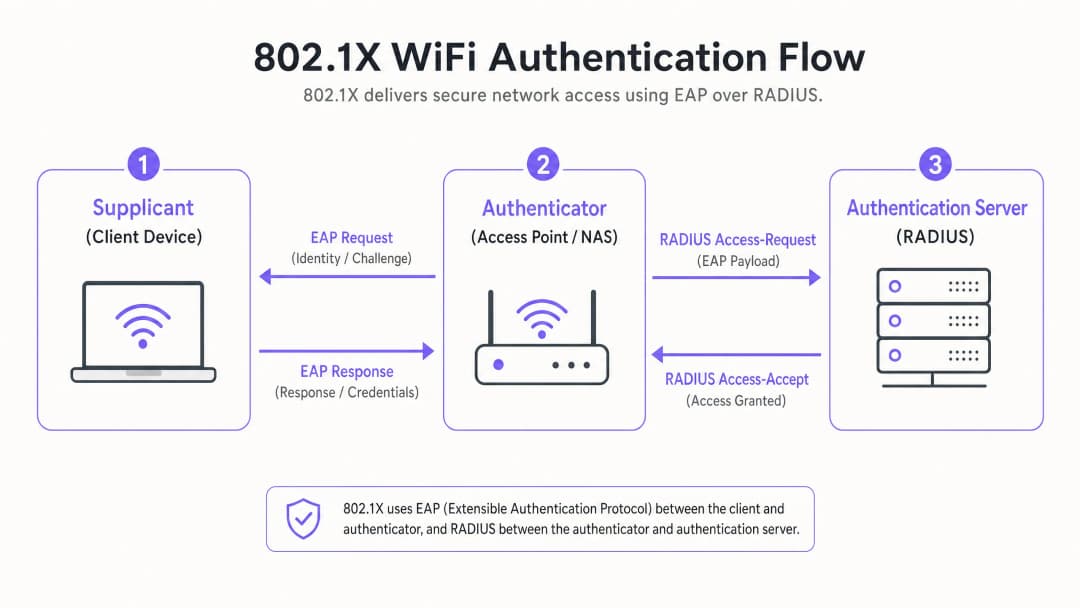
Les trois composants clés
- Supplicant (appareil client) : Le logiciel sur l'ordinateur portable, le smartphone ou l'appareil IoT qui demande l'accès. Il doit prendre en charge la méthode EAP (Extensible Authentication Protocol) choisie.
- Authentificateur (point d'accès/contrôleur WLC) : L'équipement réseau qui fait office de gardien. Il ouvre un "port contrôlé" qui n'autorise que le trafic EAP jusqu'à ce que l'authentification soit réussie.
- Serveur d'authentification (RADIUS) : Le serveur central (par exemple, Microsoft NPS, FreeRADIUS, Cisco ISE) qui valide les identifiants par rapport à un annuaire d'identités (comme Active Directory) et renvoie un message Access-Accept ou Access-Reject.
Méthodes EAP : Choisir le bon niveau de sécurité
Le choix de la méthode EAP détermine votre niveau de sécurité et la complexité de votre déploiement.
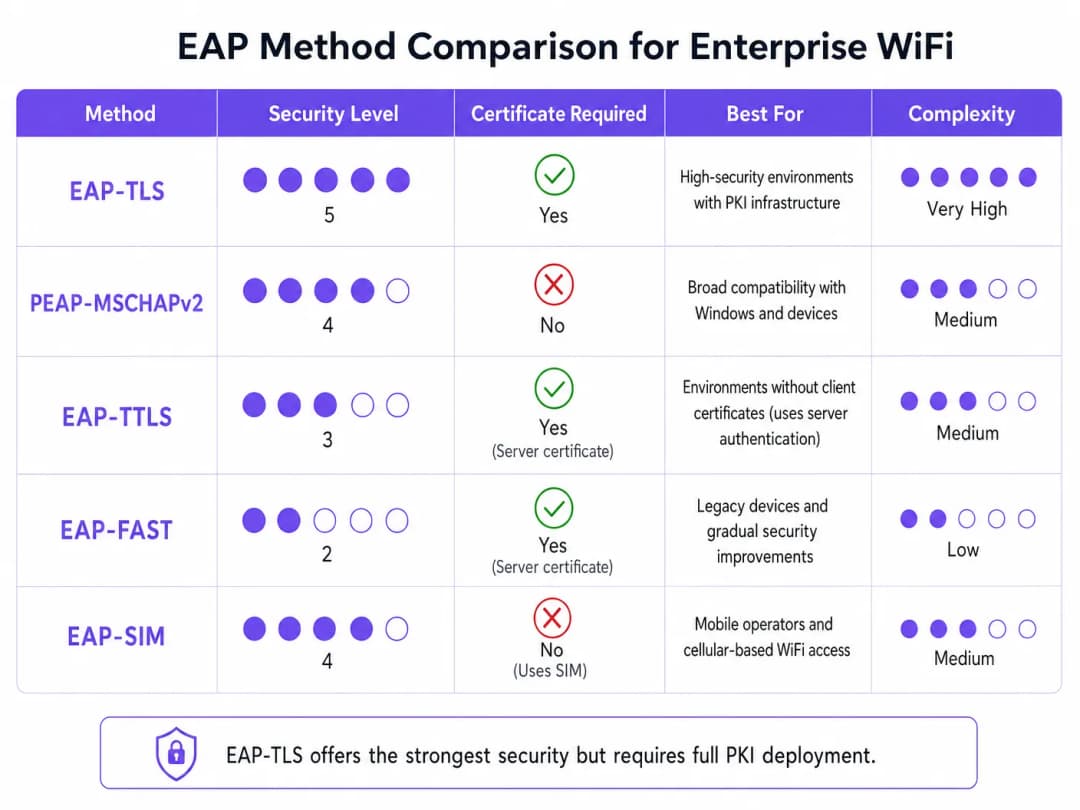
- EAP-TLS (Transport Layer Security) : Le standard absolu. Nécessite des certificats à la fois sur le serveur et sur le client. Aucun mot de passe n'est transmis. Crucial pour les environnements de haute sécurité, mais nécessite une infrastructure à clés publiques (PKI) complète.
- PEAP-MSCHAPv2 (Protected EAP) : Le déploiement d'entreprise le plus courant. Utilise un certificat côté serveur pour créer un tunnel TLS sécurisé au sein duquel le client envoie un nom d'utilisateur et un mot de passe. Plus simple à déployer, mais vulnérable au vol d'identifiants si les appareils clients ne sont pas configurés pour valider strictement le certificat du serveur.
- EAP-SIM/AKA : Utilise les identifiants de la carte SIM pour l'authentification. De plus en plus pertinent dans les hubs de transport et les grands espaces publics pour un accès fluide.
Vous avez des questions sur votre configuration spécifique ?
Notre équipe collabore avec des exploitants de sites, des responsables informatiques et des ingénieurs réseau au sein de 80 000 sites. Réservez un appel de 20 minutes et nous vous montrerons comment d'autres professionnels comme vous ont résolu ce problème.
Guide de mise en œuvre : Configuration étape par étape
Le déploiement de 802.1X nécessite une configuration coordonnée sur votre serveur RADIUS, vos points d'accès et vos appareils clients.
Étape 1 : Préparation du serveur RADIUS
Que vous utilisiez Microsoft Network Policy Server (NPS) ou une autre solution, les principes fondamentaux restent les mêmes.
- Définir les clients RADIUS : Enregistrez chaque point d'accès (ou contrôleur sans fil) dans le serveur RADIUS. Attribuez un secret partagé fort, généré de manière aléatoire (au moins 22 caractères), pour sécuriser la communication entre le point d'accès et le serveur RADIUS.
- Installer le certificat du serveur : Pour PEAP ou EAP-TLS, installez un certificat X.509 sur le serveur RADIUS. L'utilisation d'un certificat provenant d'une autorité de certification (CA) publique de confiance simplifie les déploiements BYOD, car le certificat racine est déjà approuvé par les systèmes d'exploitation des clients.
Étape 2 : Configuration des règles
Configurez les règles réseau pour dicter l'accès en fonction de l'identité.
- Règles de demande de connexion : Définissez la manière dont le serveur RADIUS gère les demandes entrantes. Généralement, cela implique de faire correspondre le NAS-Port-Type (Wireless - IEEE 802.11) et d'authentifier les demandes localement.
- Règles réseau : Associez les groupes Active Directory aux privilèges d'accès réseau. Par exemple, associez le groupe "Domain Computers" au VLAN de l'entreprise. Utilisez les attributs RADIUS (
Tunnel-Type=VLAN,Tunnel-Medium-Type=802,Tunnel-Private-Group-ID=[VLAN_ID]) pour attribuer dynamiquement des VLANs après une authentification réussie.
Étape 3 : Configuration du point d'accès
Configurez l'SSID sur votre infrastructure sans fil (par exemple, Meraki, Aruba, Cisco).
- Créez un nouvel SSID et sélectionnez WPA2-Enterprise ou WPA3-Enterprise comme type de sécurité.
- Saisissez les adresses IP de vos serveurs RADIUS principal et secondaire.
- Saisissez le secret partagé défini à l'étape 1.
- Activez l'attribution dynamique de VLAN (Dynamic VLAN Assignment) si votre serveur RADIUS transmet des attributs de VLAN.
Étape 4 : Configuration du logiciel client (Supplicant)
C'est l'étape la plus critique et la plus souvent négligée. Ne comptez pas sur les utilisateurs pour configurer manuellement leurs appareils.
- Appareils d'entreprise : Utilisez des objets de stratégie de groupe (GPO) ou votre plateforme de gestion des appareils mobiles (MDM) pour déployer les profils WiFi. Les profils doivent spécifier l'autorité de certification (CA) racine de confiance et les noms de serveur exacts des serveurs RADIUS pour empêcher les attaques de l'homme du milieu (evil twin).
- BYOD : Implémentez un portail d'intégration ou une solution MDM pour déployer des profils sécurisés sur les appareils appartenant aux employés.
Bonnes pratiques et normes du secteur
Pour garantir un déploiement robuste, suivez ces bonnes pratiques architecturales :
- Imposer une validation stricte des certificats : Ne permettez jamais aux clients d'accepter aveuglément n'importe quel certificat de serveur. C'est le principal vecteur de collecte d'identifiants PEAP.
- Isoler le trafic invité : Votre infrastructure 802.1X est destinée à l'accès d'entreprise. Le trafic invité doit rester totalement isolé. Déployez une plateforme Guest WiFi dédiée, équipée de son propre Captive Portal et de sa propre couche analytique. Comme indiqué dans notre guide Sécuriser votre réseau : DNS robuste et sécurité, l'isolation logique est fondamentale pour la défense du réseau.
- Mettre en œuvre la redondance : Le service RADIUS est un service critique. Déployez des serveurs RADIUS principaux et secondaires. Dans les environnements distribués, comme les grandes chaînes de commerce de détail, envisagez des proxys RADIUS locaux pour maintenir la continuité d'activité en cas de coupure de la liaison WAN.
Dépannage et atténuation des risques
Lorsque les déploiements échouent, cela est généralement dû à quelques erreurs de configuration courantes :
- Erreurs de délai d'attente (timeout) RADIUS : Généralement causées par une incompatibilité de clé secrète partagée entre la borne d'accès et le serveur RADIUS, ou par des règles de pare-feu bloquant les ports UDP 1812 (authentification) et 1813 (comptabilité).
- Rejets de clients : Vérifiez les journaux d'événements RADIUS (par exemple, l'Observateur d'événements Windows -> Affichages personnalisés -> Rôles de serveur -> Services de stratégie et d'accès réseau). Recherchez l'ID d'événement 6273. Les causes courantes incluent des certificats clients expirés ou le fait que le client ne fasse pas confiance à la chaîne de certificats du serveur.
- Échecs d'attribution de VLAN : Si l'authentification réussit mais que le client n'obtient pas d'adresse IP, vérifiez que le port du commutateur connecté à la borne d'accès est configuré comme un port trunk, autorisant les VLAN attribués de manière dynamique.
ROI et impact commercial
La mise en œuvre de 802.1X offre un retour sur investissement opérationnel et de sécurité significatif :
- Atténuation des risques : Élimine le risque qu'une seule clé PSK compromise ne compromette l'ensemble du réseau d'entreprise, soutenant directement les efforts de conformité PCI-DSS et GDPR.
- Efficacité opérationnelle : Centralise le contrôle d'accès. Lorsqu'un employé s'en va, la désactivation de son compte Active Directory révoque immédiatement son accès WiFi. Plus besoin de renouveler les clés PSK à l'échelle de l'entreprise.
- Visibilité du réseau : Offre une visibilité granulaire sur l'identité exacte des personnes présentes sur le réseau et les appareils qu'elles utilisent, permettant une planification de la capacité et une recherche de menaces optimales. Pour les environnements complexes et à haute densité comme les stades de sport ou le secteur de l'hôtellerie, gérer la sécurité de l'entreprise tout en fournissant un accès invité est un défi. En sécurisant les actifs de l'entreprise avec 802.1X et en exploitant une plateforme robuste d'analyses WiFi pour gérer le trafic invité, les responsables informatiques peuvent offrir une connectivité sécurisée et évolutive qui sert à la fois l'entreprise et ses clients. Pour en savoir plus sur la gestion des environnements à haute densité, consultez notre guide WiFi pour zoos et parcs d'attractions : Guide de connectivité pour les lieux à forte fréquentation.
Définitions clés
802.1X
Une norme IEEE pour le contrôle d'accès réseau basé sur les ports qui fournit un mécanisme d'authentification aux appareils souhaitant se connecter à un réseau LAN ou WLAN.
Le protocole fondamental pour la sécurité du WiFi d'entreprise, remplaçant les mots de passe partagés vulnérables.
Supplicant
L'appareil client ou l'application logicielle demandant l'accès au réseau.
Les équipes informatiques doivent gérer la configuration du supplicant via un MDM pour garantir des connexions sécurisées.
Authentificateur
L'appareil réseau (point d'accès ou commutateur) qui facilite le processus d'authentification en agissant comme un proxy entre le supplicant et le serveur d'authentification.
Configuré avec l'IP du serveur RADIUS et un secret partagé pour transférer de manière sécurisée le trafic EAP.
RADIUS
Remote Authentication Dial-In User Service ; un protocole réseau qui fournit une gestion centralisée de l'authentification, de l'autorisation et de la comptabilisation (AAA).
Le serveur principal (comme Microsoft NPS) qui valide réellement les identifiants de l'utilisateur par rapport à un annuaire.
EAP (Extensible Authentication Protocol)
Un framework d'authentification fréquemment utilisé dans les réseaux sans fil et les connexions point à point, prenant en charge plusieurs méthodes d'authentification.
La « langue » parlée entre le supplicant et le serveur RADIUS.
EAP-TLS
Une méthode EAP qui utilise la sécurité de la couche de transport, nécessitant des certificats côté serveur et côté client pour une authentification mutuelle.
La méthode la plus sécurisée disponible, souvent imposée pour les environnements hautement sécurisés ou classifiés.
PEAP
Protected Extensible Authentication Protocol ; encapsule EAP dans un tunnel TLS chiffré et authentifié.
La méthode d'entreprise la plus largement déployée, équilibrant la sécurité et la facilité de déploiement en n'exigeant qu'un certificat côté serveur.
Dynamic VLAN Assignment
Le processus par lequel un serveur RADIUS indique au point d'accès de placer un utilisateur authentifié sur un VLAN spécifique en fonction de son appartenance à un groupe d'annuaire.
Crucial pour segmenter le trafic réseau (par exemple, séparer les RH, l'ingénierie et les appareils IoT) tout en ne diffusant qu'un seul SSID d'entreprise.
Exemples concrets
Un hôtel de luxe de 300 chambres doit sécuriser son réseau opérationnel interne (tablettes du personnel, téléphones VoIP, ordinateurs portables de gestion) tout en le séparant complètement du réseau invités. Ils utilisent actuellement une clé PSK unique pour le personnel.
- Déployer Microsoft NPS lié à l'Active Directory existant de l'hôtel.
- Configurer PEAP-MSCHAPv2, en utilisant un certificat public (par exemple, DigiCert) sur le serveur NPS pour simplifier l'intégration des tablettes.
- Créer un SSID 802.1X (« Hotel_Ops ») sur les AP.
- Utiliser la plateforme MDM de l'hôtel pour pousser le profil WiFi « Hotel_Ops » sur toutes les tablettes et ordinateurs portables du personnel, en configurant explicitement le profil pour faire confiance à l'autorité de certification racine DigiCert et valider le nom du serveur NPS.
- Maintenir le SSID invité ouvert existant, en le routant via le Captive Portal de Purple pour l'acceptation des conditions d'utilisation et les analyses, en veillant à ce que les VLAN invités ne puissent pas router vers les VLAN opérationnels.
Un campus universitaire migre vers le 802.1X et doit prendre en charge un environnement BYOD massif pour 15 000 étudiants sur divers systèmes d'exploitation.
- Déployer un cluster RADIUS robuste (par exemple, FreeRADIUS ou Cisco ISE) avec répartition de charge.
- Implémenter PEAP-MSCHAPv2 pour une large compatibilité avec les appareils.
- Déployer un portail d'intégration (par exemple, SecureW2) qui configure automatiquement le supplicant de l'appareil de l'étudiant pour utiliser les paramètres EAP corrects et faire confiance au certificat du serveur RADIUS de l'université.
- Utiliser l'attribution dynamique de VLAN via les attributs RADIUS pour placer les étudiants dans les sous-réseaux appropriés en fonction de leur emplacement sur le campus afin de gérer les domaines de diffusion.
Questions d'entraînement
Q1. Votre organisation déploie 802.1X à l'aide de PEAP-MSCHAPv2. Lors des tests, les utilisateurs signalent qu'ils sont invités à "Accepter un certificat" lors de leur première connexion. Comment devez-vous résoudre ce problème ?
Conseil : Considérez les implications de sécurité liées au fait de permettre aux utilisateurs de prendre des décisions de confiance concernant l'infrastructure réseau.
Voir la réponse type
Vous devez configurer les profils de suppliant client (via MDM ou stratégie de groupe) pour faire explicitement confiance à l'autorité de certification racine (Root CA) qui a émis le certificat du serveur RADIUS, et pour valider le nom de serveur spécifique. Compter sur les utilisateurs pour accepter manuellement les certificats les habitue à ignorer les avertissements de sécurité et laisse le réseau vulnérable aux attaques de type Evil Twin (collecte d'identifiants).
Q2. Vous devez sécuriser une flotte de scanners de codes-barres d'entrepôt. Ils prennent en charge WPA2-Enterprise mais ne disposent pas de mécanisme pour installer des certificats clients ou rejoindre Active Directory. Quelle est l'approche de déploiement la plus sécurisée ?
Conseil : Évaluez les méthodes EAP qui ne nécessitent pas de certificats côté client mais fournissent tout de même une authentification chiffrée.
Voir la réponse type
Déployez PEAP-MSCHAPv2. Créez un compte de service dédié dans votre annuaire pour les scanners. Configurez le serveur RADIUS avec un certificat de serveur pour établir le tunnel TLS, et configurez les scanners pour qu'ils s'authentifient à l'aide des identifiants du compte de service à l'intérieur du tunnel. Assurez-vous que la stratégie RADIUS limite ce compte de service à un VLAN d'entrepôt spécifique et isolé.
Q3. Après avoir configuré les points d'accès et le serveur RADIUS, les appareils clients s'authentifient avec succès (vérifié dans les journaux RADIUS avec un Access-Accept), mais ils ne parviennent pas à recevoir une adresse IP et ne peuvent pas accéder au réseau. Quel est le problème d'infrastructure le plus probable ?
Conseil : L'authentification a réussi, ce qui signifie que la phase 802.1X est terminée. Le problème réside dans la phase suivante de provisionnement du réseau.
Voir la réponse type
Le problème le plus probable est une mauvaise configuration de VLAN sur le réseau filaire. Si le serveur RADIUS utilise le Dynamic VLAN Assignment pour placer le client sur un VLAN spécifique (par exemple, le VLAN 20), le port du commutateur connectant le point d'accès doit être configuré comme un port de trunk 802.1Q qui autorise le VLAN 20. Si le VLAN n'est pas acheminé en trunk vers le point d'accès, les requêtes DHCP du client seront rejetées.
Continuer la lecture de cette série
Guide de l'administrateur réseau pour la configuration de l'authentification RADIUS pour le WiFi invité
Une référence technique complète pour les administrateurs réseau sur le déploiement de l'authentification RADIUS pour le WiFi invité. Couvre l'architecture, les étapes de configuration indépendantes du constructeur, les meilleures pratiques de sécurité et le dépannage des échecs de déploiement courants.
Mise en œuvre de SCEP pour un accès WiFi 802.1X et BYOD sécurisé dans l'enseignement supérieur
Ce guide technique explique en détail comment les équipes informatiques de l'enseignement supérieur peuvent automatiser l'inscription aux certificats 802.1X pour des milliers d'appareils BYOD à l'aide de SCEP. Il présente l'architecture, les avantages en matière de sécurité et les étapes de déploiement concrètes pour remplacer l'intégration manuelle par un modèle d'accès réseau sécurisé et sans contact.
Configuration de l'authentification RADIUS pour les réseaux WiFi invités et collaborateurs
Ce guide de référence technique présente l'architecture, la configuration et le déploiement de l'authentification RADIUS pour les réseaux WiFi d'entreprise destinés aux invités et aux collaborateurs. Il fournit aux architectes réseau et aux responsables informatiques les protocoles exacts, les normes de sécurité et les méthodologies de dépannage requis pour concevoir des systèmes de contrôle d'accès sans fil sécurisés et évolutifs.
Vous avez des questions sur votre configuration spécifique ?
Notre équipe collabore avec des exploitants de sites, des responsables informatiques et des ingénieurs réseau au sein de 80 000 sites. Réservez un appel de 20 minutes et nous vous montrerons comment d'autres professionnels comme vous ont résolu ce problème.