

Comment configurer les politiques NAC pour l'orientation VLAN dans Cisco Meraki
Ce guide faisant autorité fournit aux dirigeants informatiques, aux architectes réseau et aux directeurs des opérations de site un cadre pratique et étape par étape pour configurer les politiques NAC et l'orientation VLAN dans les environnements Cisco Meraki. Il couvre la mise en œuvre du 802.1X, l'isolation des appareils IoT via le MAC Authentication Bypass, et l'intégration transparente avec la plateforme d'analyse WiFi invité de Purple pour assurer une segmentation réseau sécurisée, conforme et performante dans les déploiements hôteliers, de vente au détail et du secteur public.
Listen to this guide
View podcast transcript
Résumé Exécutif
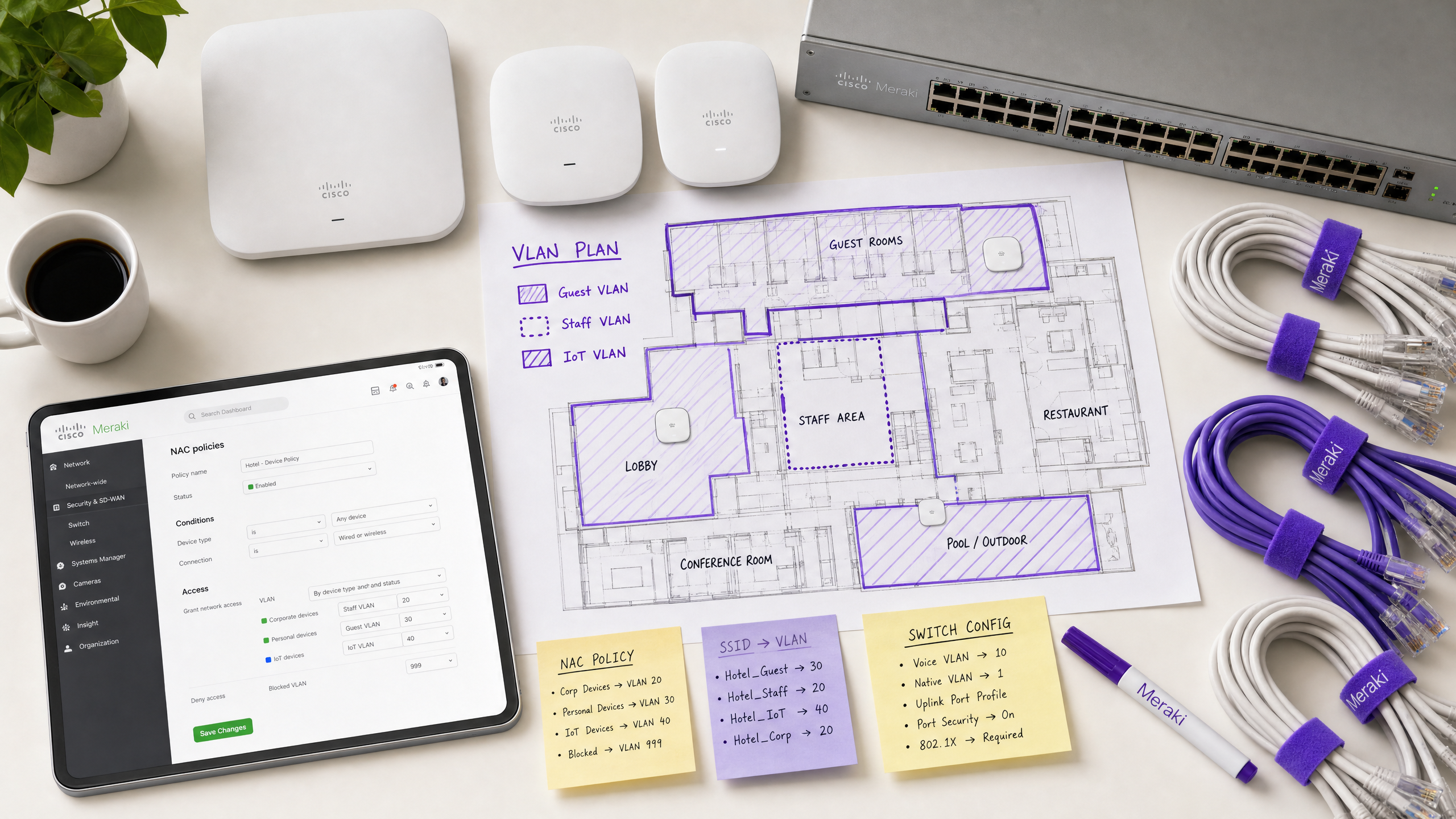
Pour les sites d'entreprise — des stades à haute densité aux vastes complexes hôteliers — un réseau plat est un réseau compromis. Diffuser plusieurs SSID pour segmenter le trafic dégrade les performances RF, gaspille un temps d'antenne précieux et crée une charge administrative qui s'adapte mal aux déploiements multi-sites. La norme moderne est la segmentation dynamique : diffuser un seul SSID sécurisé et s'appuyer sur le contrôle d'accès réseau (NAC) pour profiler, authentifier et orienter automatiquement les appareils vers le bon VLAN.
Ce guide fournit aux architectes informatiques seniors et aux directeurs des opérations un plan pratique pour configurer les politiques NAC pour l'orientation VLAN dans Cisco Meraki. Nous contournons la théorie académique pour nous concentrer sur les réalités du déploiement : la mise en œuvre de l'IEEE 802.1X pour les appareils d'entreprise, l'utilisation du MAC Authentication Bypass (MAB) pour les systèmes IoT sans interface utilisateur, et l'intégration transparente avec des plateformes WiFi invité comme Purple pour assurer un accès sécurisé et conforme dans les environnements de vente au détail , d' hôtellerie et autres environnements d'entreprise. En maîtrisant ces configurations, les organisations peuvent atténuer les risques de sécurité, assurer la conformité PCI DSS et optimiser le débit réseau — le tout à partir d'un seul SSID géré de manière centralisée.
Approfondissement Technique
L'Architecture de l'Orientation VLAN Dynamique
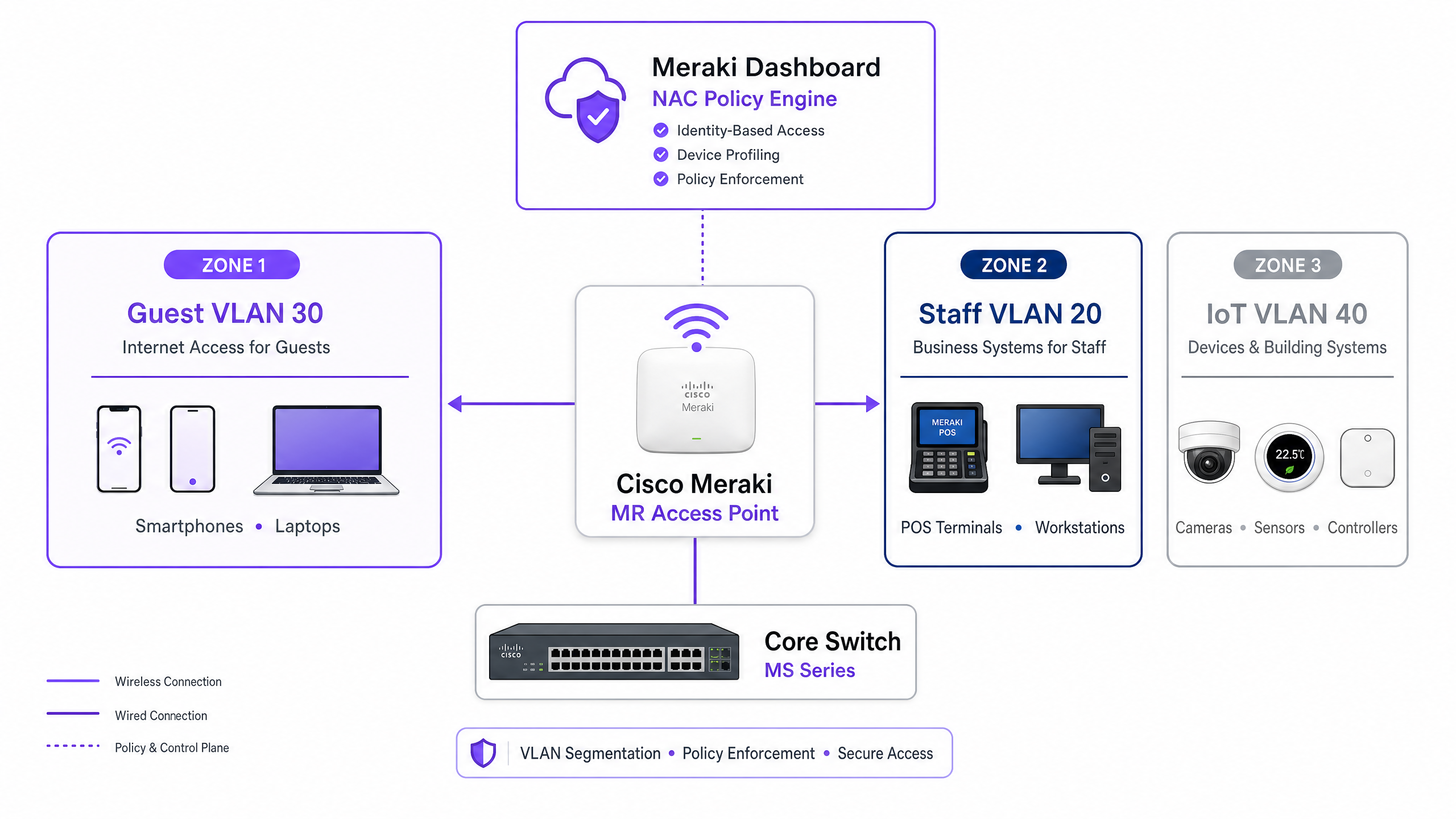
L'orientation VLAN dans un environnement Meraki repose sur l'interaction entre trois composants principaux : le point d'accès Meraki (agissant comme l'authentificateur), l'appareil client (le demandeur) et le serveur NAC/RADIUS (le serveur d'authentification). Ce modèle tripartite est défini par la norme IEEE 802.1X et constitue l'épine dorsale de tout déploiement de contrôle d'accès de niveau entreprise.
Lorsqu'un appareil s'associe au réseau, le point d'accès intercepte le trafic et transmet une requête d'accès (Access-Request) au serveur RADIUS. En cas d'authentification réussie, le serveur RADIUS répond par un message d'acceptation d'accès (Access-Accept). Il est crucial que, pour que l'orientation VLAN ait lieu, ce message inclue des attributs RADIUS spécifiques de la norme IETF qui indiquent au point d'accès quel VLAN appliquer :
| Attribut RADIUS | ID | Valeur | Objectif |
|---|---|---|---|
| Tunnel-Type | 64 | 13 (VLAN) | Spécifie le protocole de tunnellisation |
| Tunnel-Medium-Type | 65 | 6 (802) | Spécifie le support de transport |
| Tunnel-Private-Group-ID | 81 | e.g., 20 |
Spécifie l'ID VLAN cible |
Lorsque le point d'accès Meraki reçoit ces attributs, il étiquette dynamiquement le trafic du client avec l'ID VLAN spécifié avant de le transmettre au port du commutateur. Ce processus est transparent pour l'utilisateur final et se termine en quelques millisecondes après l'association.
Mécanismes d'Authentification
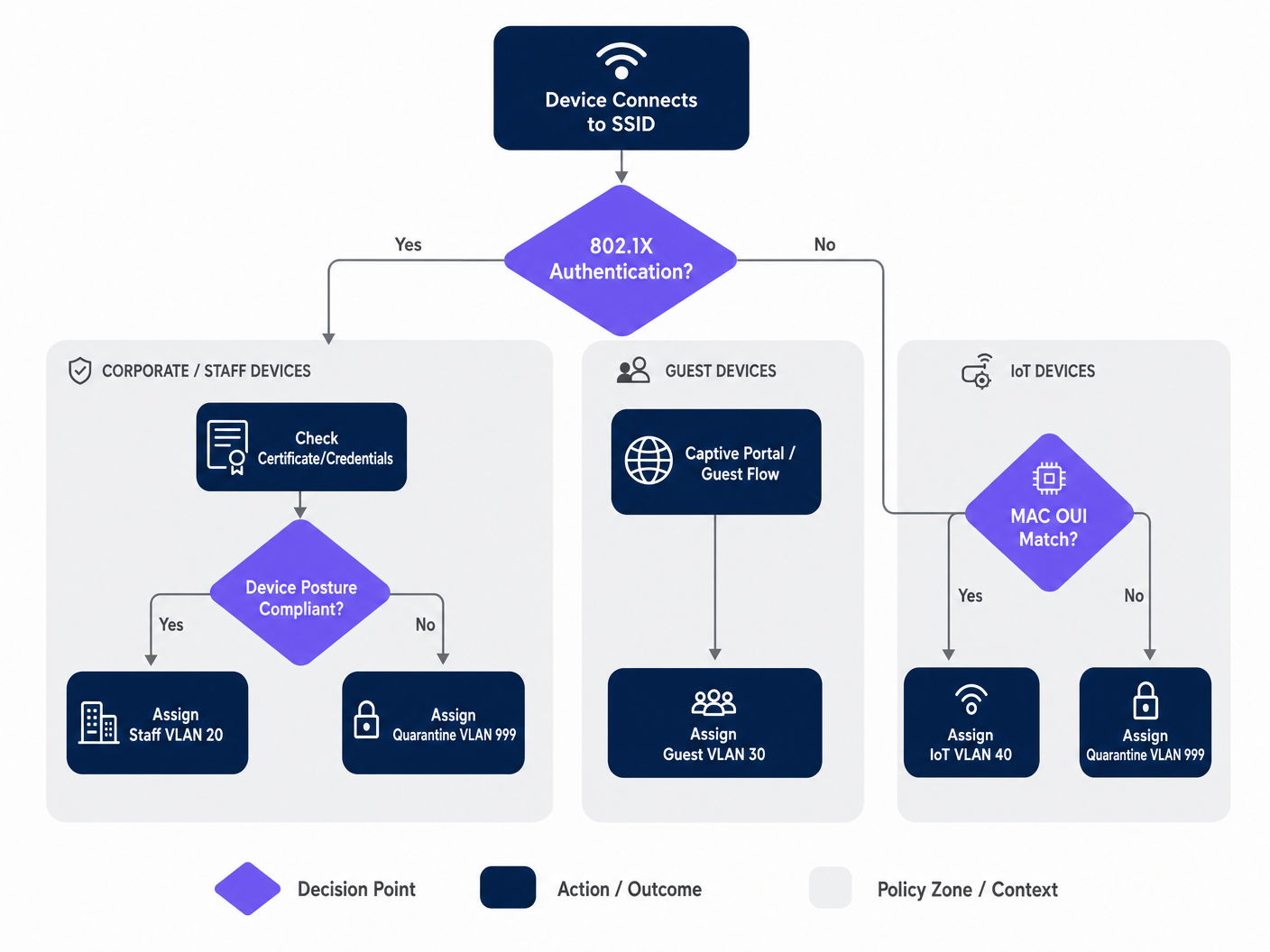
Les réseaux d'entreprise nécessitent généralement une approche d'authentification à plusieurs niveaux, car la population d'appareils dans un site donné est hétérogène. Les trois mécanismes principaux sont :
IEEE 802.1X (EAP-TLS ou PEAP) est la norme d'or pour les appareils d'entreprise et du personnel. L'authentification est basée sur des certificats numériques (EAP-TLS) ou des identifiants sécurisés (PEAP-MSCHAPv2), offrant un chiffrement robuste et une validation d'identité. C'est l'approche recommandée pour tout appareil géré par la plateforme MDM de l'organisation.
MAC Authentication Bypass (MAB) est essentiel pour les appareils sans interface utilisateur — caméras IP, terminaux POS, capteurs de gestion de bâtiment et téléviseurs intelligents — qui ne peuvent pas exécuter un demandeur 802.1X. L'adresse MAC est utilisée comme identifiant. Bien que moins sécurisé que l'authentification basée sur des certificats (les adresses MAC peuvent être usurpées), le MAB combiné à des ACL VLAN strictes offre une posture de sécurité acceptable pour les segments IoT isolés. Pour un traitement complet de ce sujet, consultez notre guide sur la gestion de la sécurité des appareils IoT avec NAC et MPSK .
L'authentification par Captive Portal est utilisée pour l'accès invité. Les appareils sont placés dans un état de pré-authentification restreint jusqu'à ce que l'utilisateur complète un flux de connexion — généralement une connexion sociale, une inscription par e-mail ou un simple clic — hébergé par une plateforme comme Purple. Cela capture les données de première partie tout en orientant l'appareil vers un VLAN invité isolé.
Guide d'Implémentation
Étape 1 : Planifiez votre Architecture VLAN
Avant de toucher au Meraki Dashboard, définissez votre stratégie de segmentation VLAN. Un déploiement typique pour un site d'entreprise utilise la structure suivante :
| VLAN ID | Nom | Objectif | Méthode d'Authentification |
|---|---|---|---|
| 10 | Gestion | Infrastructure réseau | Statique |
| 20 | Personnel | Appareils d'entreprise, systèmes internes | 802.1X (EAP-TLS) |
| 30 | Invité | Accès internet visiteurs | Captive Portal (Purple) |
| 40 | IoT | Caméras, capteurs, appareils intelligents | MAB |
| 50 | POS | Terminaux de paiement (périmètre PCI) | 802.1X (Certificat) |
| 999 | Quarantaine | Authentification échouée, appareils inconnus | Aucune |
Étape 2 : Configurez l'Infrastructure du Commutateur
Avant de configurer les paramètres sans fil, l'infrastructure câblée doit être préparée. Les ports de commutateur connectés aux points d'accès Meraki doivent être configurés comme des ports trunk, permettant tous les VLAN que le point d'accès pourrait attribuer dynamiquement. C'est l'oubli le plus courant dans les déploiements échoués.
Dans le Meraki Dashboard, naviguez vers Switch > Monitor > Switch ports, sélectionnez les ports connectés à vos points d'accès, définissez le Type sur Trunk, configurez le VLAN natif (généralement votre VLAN de gestion), et dans le champ VLANs autorisés, spécifiez tous les potentiles VLANs clients explicitement (par exemple, 20,30,40,50,999).
Étape 3 : Configurer le SSID Meraki pour 802.1X
Accédez à Wireless > Configure > Access control et sélectionnez le SSID cible. Sous Network access, sélectionnez Enterprise with 802.1X. Faites défiler jusqu'à la section RADIUS servers et ajoutez les détails de votre serveur NAC : adresse IP, port (par défaut 1812 pour l'authentification, 1813 pour la comptabilité) et le secret partagé. Pour la redondance, ajoutez un serveur RADIUS secondaire.
Étape 4 : Activer l'écrasement RADIUS pour le marquage VLAN
C'est l'étape critique qui permet au point d'accès Meraki d'accepter les attributions de VLAN du serveur NAC. Sur la même page Access control, faites défiler jusqu'à la section Addressing and traffic. Définissez Client IP assignment sur Bridge mode — cela garantit que les clients reçoivent des adresses IP du serveur DHCP local sur leur VLAN attribué, et non du NAT du point d'accès. Sous VLAN tagging, sélectionnez Use VLAN tag from RADIUS.
Étape 5 : Configurer l'accès invité avec Purple
Pour les réseaux invités, créez un SSID séparé configuré avec une association ouverte et une intégration de Captive Portal. Définissez Network access sur Open (no encryption) et configurez la Splash page pour qu'elle pointe vers l'URL de votre portail Purple. Définissez le VLAN tagging pour attribuer tout le trafic pré-authentifié à un VLAN invité dédié et isolé (par exemple, VLAN 30) et activez l'Client isolation pour empêcher les mouvements latéraux entre les appareils invités. La plateforme WiFi Analytics de Purple gérera le flux d'authentification et la capture de données.
Bonnes pratiques
Mettre en œuvre une posture de sécurité fermée (Fail-Closed) avec des VLANs d'authentification critiques. Si le serveur RADIUS devient inaccessible, ne pas ouvrir l'accès et accorder un accès réseau complet. Configurez un VLAN d'authentification critique qui fournit une connectivité Internet de base mais bloque l'accès à toutes les ressources internes jusqu'à ce que le serveur NAC soit restauré. Ceci est particulièrement important pour les environnements de vente au détail où les terminaux de point de vente doivent continuer à traiter les paiements même en cas de panne RADIUS.
Activer la transition rapide BSS (802.11r) pour un roaming fluide. L'attribution dynamique de VLAN peut introduire de la latence pendant le roaming, car l'appareil doit se réauthentifier à chaque point d'accès. L'activation de la norme 802.11r assure des transferts fluides pour les applications vocales et vidéo sur l'ensemble du site. Ceci est non négociable pour les environnements hôteliers où les clients se déplacent continuellement dans la propriété. Comprendre Wi Fi Frequencies: A Guide to Wi-Fi Frequencies in 2026 peut également aider à optimiser la planification des canaux pour les déploiements denses.
Segmenter agressivement le trafic IoT. Ne jamais mélanger les appareils IoT avec le trafic d'entreprise ou invité. Utilisez le MAB pour identifier ces appareils et les diriger vers des VLANs dédiés avec des règles de pare-feu de couche 3 strictes n'autorisant que les ports et destinations spécifiques requis pour le fonctionnement de l'appareil. Une caméra IP compromise ne devrait jamais pouvoir atteindre votre réseau de point de vente ou vos serveurs de fichiers d'entreprise.
Appliquer WPA3 sur les SSID d'entreprise. Lorsque la compatibilité des appareils le permet, configurez les SSID d'entreprise pour utiliser WPA3-Enterprise. Cela offre un chiffrement plus fort et élimine les vulnérabilités associées aux attaques WPA2 PMKID.
Dépannage et atténuation des risques
Modes de défaillance courants
Les clients ne parviennent pas à obtenir une adresse IP. Il s'agit presque toujours d'un problème de configuration de port de commutateur. Vérifiez que le port de commutateur connecté au point d'accès est configuré comme un trunk et que le VLAN attribué dynamiquement est autorisé sur ce trunk. Vérifiez également que le serveur DHCP dispose d'une étendue active pour ce VLAN et que l'agent de relais DHCP (le cas échéant) est configuré correctement.
Délais d'authentification. Si les appareils expirent pendant l'établissement de liaison 802.1X, vérifiez la latence du réseau entre les points d'accès Meraki et le serveur RADIUS. Une latence élevée peut entraîner l'expiration des temporisateurs EAP. Le Event Log du tableau de bord Meraki affichera les événements 8021x_auth_timeout si cela se produit.
Attribution de VLAN incorrecte. Utilisez le Event Log du tableau de bord Meraki pour afficher les messages RADIUS Access-Accept. Vérifiez que le serveur NAC envoie l'attribut Tunnel-Private-Group-ID correct. S'il est manquant ou incorrect, le problème réside dans la configuration de la politique NAC, et non dans le point d'accès Meraki. La plupart des plateformes NAC (Cisco ISE, ClearPass) fournissent des journaux d'authentification RADIUS détaillés qui montreront exactement quels attributs ont été renvoyés.
La randomisation MAC perturbe le MAB. Les appareils iOS et Android modernes randomisent leurs adresses MAC par défaut. Pour les réseaux invités gérés par Purple, cela est géré avec élégance via le flux du Captive Portal — l'identité est établie par la connexion de l'utilisateur, et non par l'adresse MAC. Pour les appareils IoT utilisant le MAB, assurez-vous que l'adresse MAC matérielle réelle est enregistrée dans la base de données des terminaux, car ces appareils ne randomisent pas.
Retour sur investissement et impact commercial
La mise en œuvre de la direction de VLAN basée sur NAC offre une valeur commerciale mesurable pour les sites d'entreprise à travers plusieurs dimensions :
| Résultat commercial | Mécanisme | Impact mesurable |
|---|---|---|
| Réduction des frais généraux d'exploitation | Moins de SSID à gérer | Réduction de 60 à 70 % du nombre de SSID |
| Posture de sécurité améliorée | Micro-segmentation automatisée | Rayon d'impact des brèches contenu |
| Facilitation de la conformité | Contrôle d'accès basé sur l'identité | Alignement PCI DSS, GDPR, ISO 27001 |
| Capture de données invités | Intégration du Captive Portal Purple | Données de première partie à grande échelle |
| Performance réseau | Réduction de la surcharge des trames de gestion | Débit amélioré dans les zones à forte densité |
Pour les opérateurs de Healthcare et de Transport , l'argument de la conformité justifie à lui seul l'investissement. La capacité de démontrer que les dossiers des patients se trouvent sur un VLAN strictement isolé, ou que les systèmes de billetterie sont séparés du WiFi public, est une atténuation des risques matérielle qui satisfait à la fois les audits internes et les exigences réglementaires externes.
Pour les opérateurs hôteliers et de vente au détail, l'intégration avec la plateforme WiFi invité de Purple transforme le réseau invité d'un centre de coûts en un générateur de revenusactif générateur de revenus. Chaque session invité authentifiée devient un point de données, alimentant l'automatisation du marketing, les programmes de fidélité et l'analyse des lieux — tout en garantissant que la politique NAC sous-jacente empêche le trafic invité d'atteindre les systèmes internes.
Écoutez le briefing
Pour une exploration plus approfondie des stratégies de déploiement et des pièges courants, écoutez notre podcast de briefing technique de 10 minutes :
Key Definitions
Network Access Control (NAC)
A security architecture that enforces policy on devices seeking to access network resources, typically evaluating identity, device posture, and compliance status before granting access and assigning a network segment.
IT teams deploy NAC platforms (such as Cisco ISE or Aruba ClearPass) to act as the central policy engine, deciding which VLAN a device belongs in based on who or what it is, and what state it is in.
VLAN Steering (Dynamic VLAN Assignment)
The process of automatically assigning a client device to a specific Virtual Local Area Network (VLAN) upon successful authentication, regardless of which physical port or SSID they connect to.
Essential for high-density venues to reduce the number of broadcasted SSIDs while maintaining strict security segmentation between guest, staff, and IoT device populations.
IEEE 802.1X
An IEEE standard for port-based network access control that provides an authentication mechanism to devices wishing to attach to a LAN or WLAN, using the Extensible Authentication Protocol (EAP) framework.
The gold standard for authenticating corporate laptops and staff smartphones, ensuring only verified users with valid credentials or certificates can access internal resources.
MAC Authentication Bypass (MAB)
A fallback authentication method where a device's MAC address is used as its identity credential when it cannot support 802.1X. The MAC address is sent to the RADIUS server as both the username and password.
Crucial for onboarding headless IoT devices — printers, cameras, sensors, and POS terminals — onto a secure, segmented network without requiring user intervention.
RADIUS (Remote Authentication Dial-In User Service)
A networking protocol that provides centralised Authentication, Authorisation, and Accounting (AAA) management for users and devices connecting to a network service.
The protocol used by the Meraki AP to communicate with the NAC server. The AP sends Access-Request messages; the NAC server responds with Access-Accept (including VLAN attributes) or Access-Reject.
Captive Portal
A web page that a user of a public-access network is obliged to view and interact with before full network access is granted. Typically used for terms acceptance, login, or data capture.
The primary method for onboarding guest users in hospitality, retail, and public-sector environments. Platforms like Purple host the captive portal, capturing analytics data and enforcing terms of service.
Client Isolation
A wireless security feature that prevents devices connected to the same SSID or VLAN from communicating directly with each other, forcing all traffic through the gateway.
A mandatory setting for Guest VLANs to prevent malicious actors from scanning or attacking other guests' devices. Should be enabled on any SSID where untrusted devices are expected.
Fast BSS Transition (802.11r)
An IEEE 802.11 amendment that enables fast and secure handoffs from one access point to another by pre-caching authentication keys, reducing roaming latency from hundreds of milliseconds to under 50ms.
Must be enabled when using 802.1X and dynamic VLAN assignment in venues where users are mobile, to prevent voice calls or video streams from dropping as users move between access points.
EAP-TLS (Extensible Authentication Protocol - Transport Layer Security)
A mutual authentication method within the 802.1X framework that uses digital certificates on both the client and the authentication server, providing the highest level of security for wireless authentication.
The recommended authentication method for PCI DSS-scoped devices and any environment where credential theft is a significant risk. Requires a PKI infrastructure to issue and manage client certificates.
Worked Examples
A 400-room hotel needs to deploy a secure wireless network. They require staff to access internal booking systems securely, guests to access the internet via a branded captive portal, and smart TVs in the rooms to connect to a local media server. They want to minimise SSID broadcast overhead to ensure optimal performance in high-density areas.
The IT team should deploy two SSIDs. SSID 1: 'Hotel_Secure' configured for 802.1X. Staff authenticate using EAP-TLS with corporate certificates issued by the hotel's PKI. The NAC server (Cisco ISE) recognises the staff identity and returns RADIUS attributes assigning them to VLAN 20 (Staff), which has full access to the PMS and booking systems. The Smart TVs, lacking 802.1X capabilities, are profiled using MAC Authentication Bypass (MAB). The NAC server recognises the TV MAC OUI prefixes and assigns them to VLAN 40 (IoT), which has ACLs permitting access only to the media server on port 8080 and the internet. SSID 2: 'Hotel_Guest' configured as Open with a Purple captive portal. Guests connect, are redirected to the Purple splash page, and upon successful social login or email registration, are assigned to VLAN 30 (Guest) with client isolation enabled. The Purple platform captures first-party data for the hotel's CRM and marketing automation.
A retail chain is rolling out new wireless Point-of-Sale (POS) terminals across 50 locations. These devices must be strictly segmented to comply with PCI DSS requirements. However, the IT team is concerned about what happens if the central RADIUS server goes offline during peak trading hours.
The POS terminals should connect to an 802.1X-enabled SSID, utilising certificate-based authentication (EAP-TLS) to ensure strong identity validation. The NAC policy will steer these devices into a dedicated, highly restricted POS VLAN (VLAN 50) with Layer 3 firewall rules permitting traffic only to the payment gateway IPs on the required ports. To mitigate the risk of RADIUS server failure, the IT team must configure a Critical Authentication VLAN on the Meraki access points. If the AP cannot reach the RADIUS server within the configured timeout, it will automatically drop the POS terminals into this critical VLAN. This VLAN should be configured with strict ACLs that allow traffic only to the essential payment processing gateways, ensuring transactions can continue while blocking all other network access. A secondary RADIUS server at each location provides an additional layer of redundancy.
Practice Questions
Q1. A hospital IT director reports that newly installed wireless IP cameras are failing to connect to the 'Med_Secure' SSID, which is configured for 802.1X. The cameras do not support certificate-based authentication and have no user interface. How should the network architecture be adjusted to securely onboard these devices?
Hint: Consider how headless devices are profiled and authenticated when they cannot run an 802.1X supplicant.
View model answer
The IT team must utilise MAC Authentication Bypass (MAB) on the NAC server. The cameras' MAC addresses should be added to the endpoint database and profiled as 'IoT_Camera'. When a camera attempts to connect, the NAC server will use the MAC address as the authentication credential and return the RADIUS attributes to steer the camera into an isolated IoT VLAN. Strict Layer 3 ACLs should be applied to this VLAN, permitting traffic only to the camera management server and blocking all other internal network access. The hospital should also consider using DHCP fingerprinting as a secondary profiling method to verify the device type matches the expected profile for the registered MAC address.
Q2. During a network audit at a retail chain, it is discovered that staff laptops on the dynamic VLAN are successfully authenticating via 802.1X (the Event Log shows Access-Accept messages with the correct VLAN ID) but are not receiving IP addresses. Guest devices on a separate SSID are functioning normally. What is the most likely configuration error and how would you resolve it?
Hint: The authentication is succeeding — the issue is in the data path after the VLAN tag is applied.
View model answer
The most likely issue is that the physical switchport connecting the Meraki AP to the core switch is not configured correctly. While the AP is successfully authenticating the client and tagging the traffic with the Staff VLAN ID, the switchport is likely configured as an access port (or a trunk port that is missing the Staff VLAN in its allowed list). The switchport must be configured as a trunk, and the dynamically assigned Staff VLAN must be explicitly listed in the allowed VLANs. The IT team should navigate to Switch > Monitor > Switch ports in the Meraki Dashboard, select the port connected to the AP, verify it is set to Trunk type, and confirm the Staff VLAN ID is included in the Allowed VLANs field.
Q3. A stadium wants to offer seamless WiFi to 50,000 fans during events while securely connecting point-of-sale terminals and digital signage. The current network team proposes broadcasting five different SSIDs to separate the traffic. Why is this a poor design for a high-density environment, and what is the recommended architecture?
Hint: Consider the impact of management frames on wireless airtime in a high-density environment.
View model answer
Broadcasting five SSIDs creates excessive management frame overhead — each SSID requires its own beacon frames broadcast at regular intervals by every access point. In a high-density environment like a stadium with hundreds of APs, this management frame overhead consumes a significant proportion of available airtime, directly reducing the throughput available for user data. The recommended approach is to broadcast a maximum of two SSIDs: one Open SSID with a Purple captive portal for the 50,000 fans, steering them to a Guest VLAN with client isolation; and one 802.1X-enabled secure SSID for all corporate devices. The NAC policy will then dynamically steer POS terminals into a PCI-compliant VLAN and digital signage into an IoT VLAN based on their identity, without requiring additional SSIDs.