
Comment configurer WPA2-Enterprise sur les plateformes de points d'accès courants (Cisco, Aruba, Ubiquiti)
Ce guide de référence technique fournit aux professionnels de l'informatique seniors et aux architectes réseau un guide détaillé et spécifique au fournisseur pour le déploiement de WPA2-Enterprise sur les plateformes Cisco, Aruba et Ubiquiti. Il détaille l'architecture, l'intégration RADIUS, les exigences de conformité et les scénarios de déploiement réels dans les environnements d'entreprise et de lieux publics.
Écouter ce guide
Voir la transcription du podcast
Résumé Exécutif
Le déploiement de WPA2-Enterprise n'est plus une mise à niveau de sécurité optionnelle ; il constitue la base fondamentale de tout réseau sans fil d'entreprise. Pour les responsables informatiques et les architectes réseau opérant dans les secteurs de l'hôtellerie, du commerce de détail et du secteur public, le passage des clés pré-partagées à l'authentification 802.1X est motivé par des exigences de conformité strictes, notamment PCI DSS et GDPR. Ce guide de référence technique fournit des étapes de configuration exploitables et spécifiques à la plateforme pour les trois principaux fournisseurs de points d'accès : Cisco, Aruba et Ubiquiti.
En passant à WPA2-Enterprise, les organisations éliminent les risques associés aux identifiants partagés, obtiennent des pistes d'audit granulaires par session et permettent une segmentation dynamique du réseau. Lorsqu'elle est correctement mise en œuvre, cette architecture sécurise non seulement le périmètre de l'entreprise, mais s'intègre également de manière transparente aux réseaux visiteurs gérés par une plateforme complète Guest WiFi . Les sections suivantes détaillent l'architecture technique, les étapes de déploiement et les stratégies d'atténuation des risques nécessaires à un déploiement réussi.
Approfondissement Technique
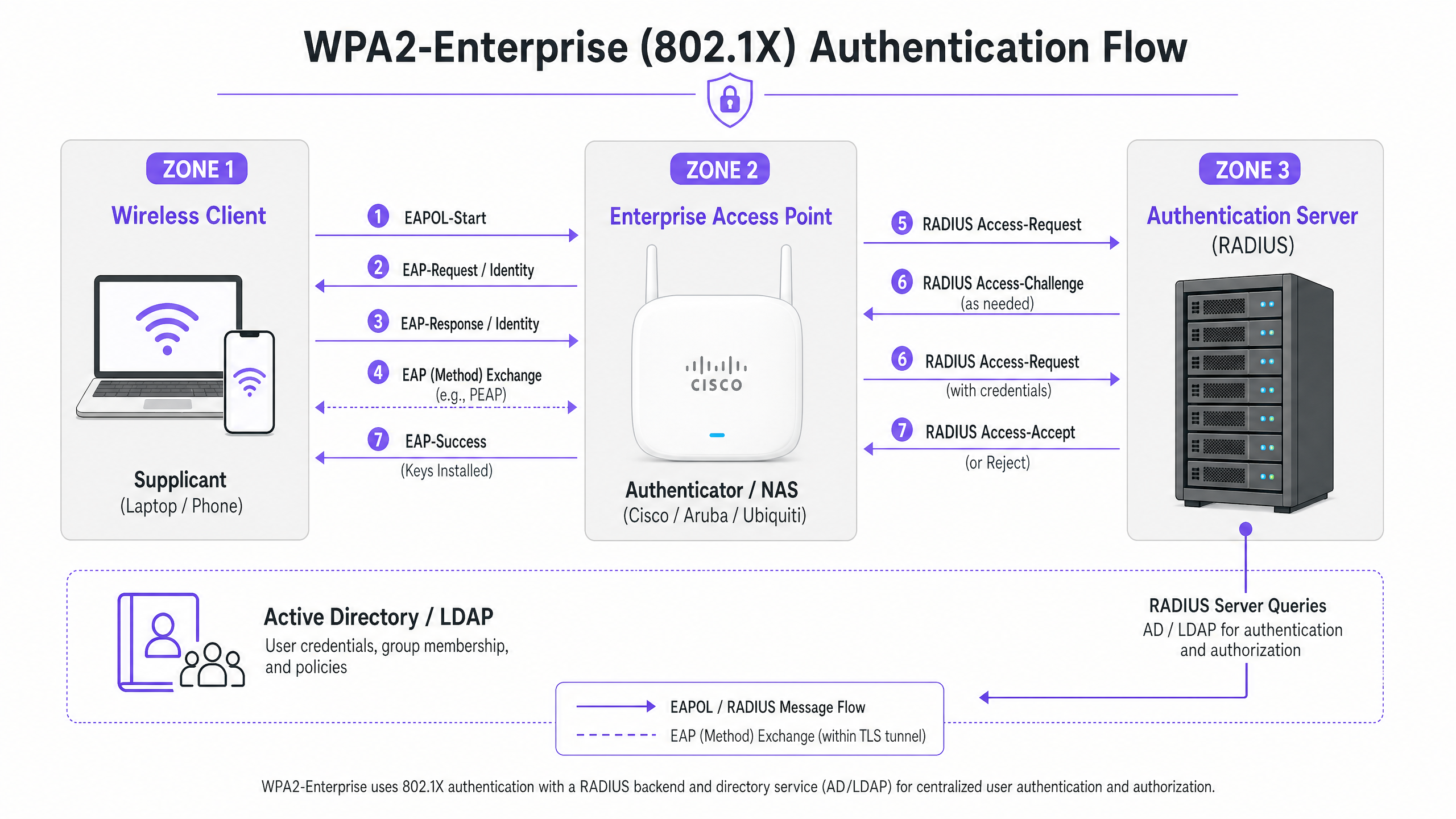
WPA2-Enterprise s'appuie sur la norme IEEE 802.1X pour fournir un contrôle d'accès réseau basé sur les ports. Contrairement à WPA2-Personal, qui utilise une clé pré-partagée statique (PSK), WPA2-Enterprise exige que chaque demandeur (appareil client) s'authentifie individuellement auprès d'un serveur d'authentification externe (généralement un serveur RADIUS) avant que l'accès au réseau ne soit accordé.
L'architecture se compose de trois composants principaux :
- Le Demandeur : L'appareil client tentant de se connecter au réseau.
- L'Authentificateur : Le point d'accès d'entreprise ou le contrôleur de réseau local sans fil (par exemple, Cisco WLC, Aruba Mobility Controller) qui facilite le processus d'authentification.
- Le Serveur d'Authentification : Le serveur RADIUS backend (par exemple, Cisco ISE, Aruba ClearPass, Windows NPS) qui valide les identifiants par rapport à un service d'annuaire comme Active Directory ou LDAP.
Le Processus d'Échange EAP
Le processus d'authentification utilise le protocole d'authentification extensible (EAP) encapsulé sur LAN (EAPOL). L'authentificateur agit purement comme un proxy de passage pendant la phase initiale. Une fois que le serveur RADIUS valide les identifiants, il renvoie un message Access-Accept à l'authentificateur, qui dérive ensuite les clés de chiffrement nécessaires pour sécuriser la session sans fil.
Le choix de la méthode EAP est crucial. PEAP-MSCHAPv2 est la méthode la plus largement déployée car elle prend en charge l'authentification par mot de passe Active Directory héritée tout en sécurisant l'échange au sein d'un tunnel TLS établi par le certificat du serveur. Cependant, pour une sécurité maximale, EAP-TLS est recommandé. EAP-TLS nécessite une authentification mutuelle par certificat – le serveur et le client doivent tous deux présenter des certificats valides – ce qui atténue le vol d'identifiants mais nécessite une infrastructure à clé publique (PKI) ou une solution de gestion des appareils mobiles (MDM) robuste pour la distribution des certificats.
Guide d'Implémentation
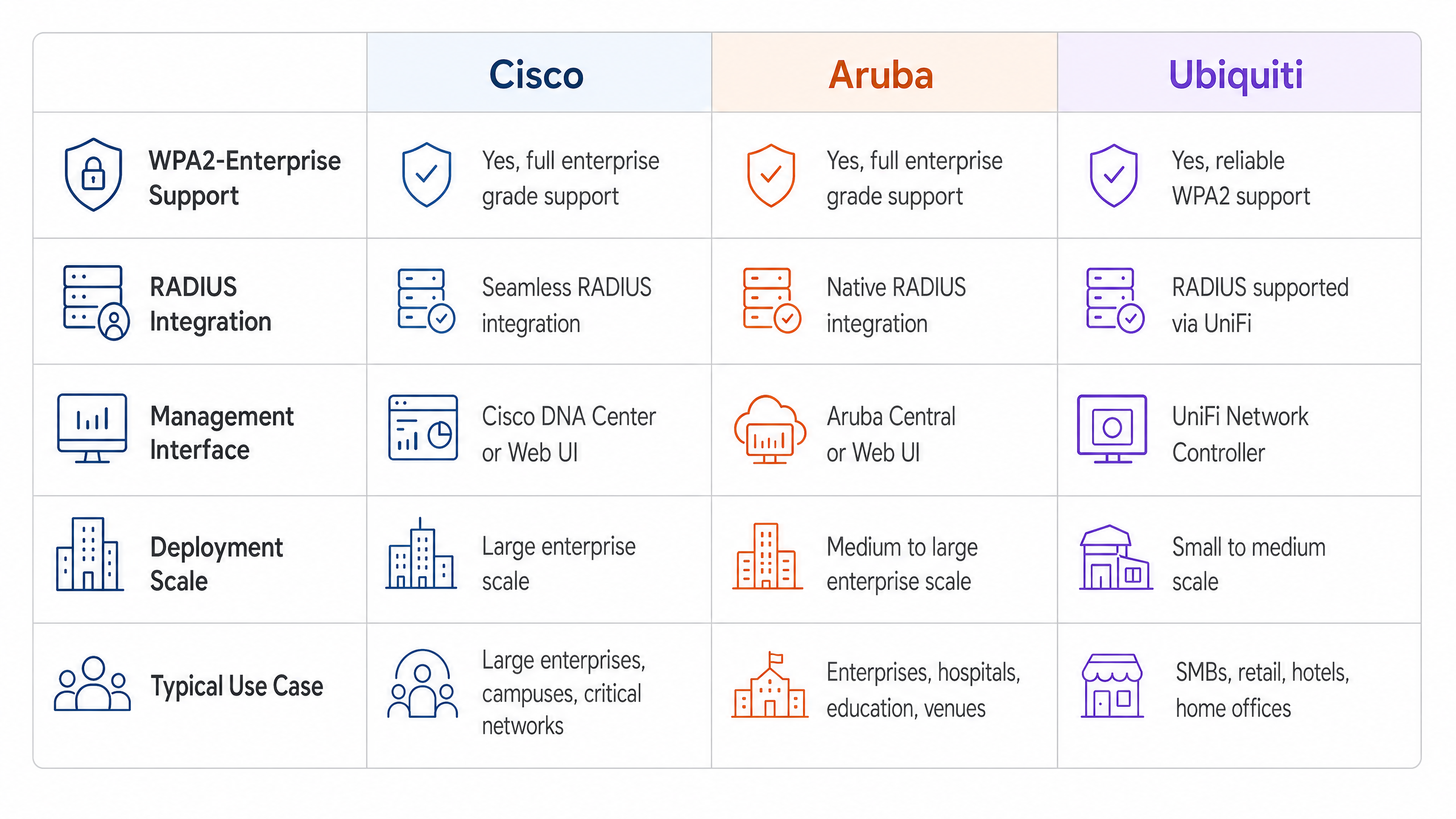
Les principes fondamentaux de la configuration de WPA2-Enterprise sont cohérents entre les fournisseurs, mais l'exécution varie en fonction de l'interface de gestion et de l'écosystème.
Cisco (Catalyst et Meraki)
Les environnements Cisco s'étendent généralement des déploiements sur campus aux réseaux d'entreprise distribués.
Cisco Catalyst (WLC/DNA Center) :
- Définir les serveurs RADIUS : Accédez à l'onglet Sécurité, sélectionnez AAA, et configurez les serveurs RADIUS d'authentification et de comptabilité primaires et secondaires. Assurez-vous que le secret partagé correspond à la configuration du serveur RADIUS.
- Créer un profil WLAN : Sous l'onglet WLANs, créez un nouveau profil.
- Configurer les politiques de sécurité : Définissez la sécurité de couche 2 sur WPA+WPA2 et activez 802.1X comme méthode de gestion des clés d'authentification (AKM).
- Lier les serveurs AAA : Mappez les serveurs RADIUS précédemment définis au profil WLAN. Activez 'AAA Override' si une attribution dynamique de VLAN est requise.
Cisco Meraki :
- Configuration SSID : Dans le tableau de bord Meraki, accédez à Wireless > SSIDs et sélectionnez le réseau cible.
- Contrôle d'accès : Définissez l'exigence d'association sur 'WPA2-Enterprise avec mon serveur RADIUS'.
- Paramètres RADIUS : Saisissez les adresses IP, le port d'authentification (généralement 1812), le port de comptabilité (1813) et les secrets partagés pour votre infrastructure RADIUS. Le tableau de bord de Meraki comprend un outil de test intégré pour vérifier la connectivité RADIUS avant le déploiement.
Aruba Networks
Aruba est la plateforme dominante dans l' Hôtellerie et l'enseignement supérieur, tirant fortement parti de son ClearPass Policy Manager pour un contrôle d'accès avancé.
- Définir le profil AAA : Dans Aruba Central ou l'interface utilisateur du contrôleur de mobilité, créez un nouveau profil AAA. Ce profil dicte la manière dont l'authentification est gérée.
- Configurer le groupe de serveurs RADIUS : Ajoutez vos serveurs RADIUS à un groupe de serveurs, en spécifiant les règles de basculement et les valeurs de délai d'attente. Attachez ce groupe au profil AAA.
- Configuration de l'AP Virtuel : Créez ou modifiez un profil d'AP Virtuel (SSID). Définissez le type de sécurité sur WPA2-Enterprise.
- Attacher les profils : Liez le profil AAA au profil d'AP Virtuel. Si vous utilisez ClearPass, assurez-vous que le port RADIUS CoA (Change of Authorization) (3799) est autorisé à travers tout pare-feu intermédiaire pour permettre l'application dynamique des politiques.
Ubiquiti (UniFi)
Ubiquiti offre une solution rentable pour les environnements de Détail et de PME via le contrôleur réseau UniFi.
- Profil RADIUS Création : Naviguez vers Paramètres > Profils > RADIUS. Créez un nouveau profil avec l'adresse IP, les ports (1812/1813) et le secret partagé de votre serveur RADIUS externe.
- Configuration du SSID : Allez dans Paramètres > WiFi et créez un nouveau réseau sans fil.
- Paramètres de sécurité : Sélectionnez 'WPA2 Enterprise' comme protocole de sécurité et associez le profil RADIUS nouvellement créé.
- Remarque sur l'infrastructure RADIUS : Contrairement aux contrôleurs d'entreprise qui peuvent offrir un RADIUS localisé et résilient, UniFi s'appuie fortement sur des serveurs externes (par exemple, FreeRADIUS, Windows NPS). Assurez une connectivité fiable entre les AP UniFi et le backend RADIUS.
Bonnes pratiques
Pour garantir un déploiement résilient et sécurisé, les architectes réseau doivent adhérer à plusieurs bonnes pratiques essentielles :
- Appliquer la validation des certificats : Les appareils clients doivent être explicitement configurés pour valider le certificat du serveur RADIUS par rapport à une autorité de certification (CA) de confiance. Ne pas le faire expose le réseau aux attaques de type 'Evil Twin' où des points d'accès non autorisés collectent les identifiants des utilisateurs.
- Mettre en œuvre la redondance RADIUS : Le serveur RADIUS est un élément critique pour l'accès au réseau. Configurez toujours des serveurs RADIUS primaires et secondaires. Dans les environnements distribués, envisagez des solutions RADIUS hébergées dans le cloud pour une haute disponibilité.
- Tirer parti de l'attribution dynamique de VLAN : Utilisez les attributs RADIUS (par exemple,
Tunnel-Pvt-Group-ID) pour attribuer dynamiquement les utilisateurs à des VLAN spécifiques en fonction de leur appartenance à un groupe Active Directory. Cela renforce la segmentation du réseau sans diffuser plusieurs SSID. - Activer la comptabilité RADIUS : Ne configurez pas uniquement l'authentification. La comptabilité RADIUS (Port 1813) est obligatoire pour générer les pistes d'audit requises par les cadres de conformité.
- Protéger la périphérie du réseau : Pour en savoir plus sur la sécurisation de votre infrastructure, consultez notre guide sur la façon de Protéger votre réseau avec un DNS et une sécurité robustes .
Dépannage et atténuation des risques
Même avec une planification minutieuse, les déploiements peuvent rencontrer des problèmes. Les modes de défaillance courants incluent :
- Incohérences du secret partagé : Une simple faute de frappe dans le secret partagé RADIUS entraînera des échecs d'authentification silencieux. Vérifiez les secrets à la fois sur l'authentificateur et sur le serveur RADIUS.
- Erreurs de synchronisation horaire : La validation des certificats nécessite une synchronisation horaire précise. Assurez-vous que tous les AP, contrôleurs et serveurs RADIUS sont synchronisés via une source NTP fiable.
- Pare-feu bloquant le trafic RADIUS : Assurez-vous que les ports UDP 1812 (Authentification) et 1813 (Comptabilité) sont ouverts entre les AP/Contrôleurs et le serveur RADIUS. Si vous utilisez CoA, assurez-vous que le port UDP 3799 est ouvert.
- Mauvaise configuration du supplicant client : Le problème le plus courant est que l'appareil client n'est pas configuré pour faire confiance à l'autorité de certification qui a émis le certificat du serveur RADIUS. Utilisez MDM ou une stratégie de groupe pour pousser les profils sans fil corrects vers les appareils d'entreprise.
Pour une compréhension plus large des protocoles d'authentification, consultez Comment configurer l'authentification WiFi 802.1X : Un guide étape par étape .
ROI et impact commercial
La transition vers WPA2-Enterprise offre une valeur commerciale significative au-delà des simples améliorations de sécurité.
- Atténuation des risques : L'élimination des mots de passe partagés réduit drastiquement la surface d'attaque et le risque de violation de données, ce qui peut entraîner de lourdes sanctions financières et réputationnelles.
- Efficacité opérationnelle : L'intégration de l'authentification WiFi avec les fournisseurs d'identité existants (comme Active Directory) automatise l'intégration et le départ des employés. Lorsqu'un employé quitte l'entreprise, la désactivation de son compte AD révoque instantanément son accès WiFi.
- Facilitation de la conformité : Des pistes d'audit granulaires et une authentification par utilisateur sont des prérequis pour la conformité PCI DSS et ISO 27001.
- Infrastructure unifiée : En utilisant l'attribution dynamique de VLAN, les sites peuvent faire transiter le trafic d'entreprise, de back-office et IoT de manière sécurisée sur le même matériel physique utilisé pour l'accès invité. Le réseau invité peut ensuite être monétisé et analysé à l'aide d'une solution dédiée de WiFi Analytics , maximisant ainsi le retour sur investissement matériel. Assurez-vous de disposer de la bande passante nécessaire en comprenant Qu'est-ce qu'une ligne louée ? Internet d'entreprise dédié .
Définitions clés
WPA2-Enterprise
A security protocol for wireless networks that uses IEEE 802.1X to provide per-user authentication via an external server, rather than a single shared password.
The mandatory standard for securing corporate and operational WiFi networks in enterprise environments.
802.1X
An IEEE standard for port-based network access control that provides an authentication mechanism to devices wishing to attach to a LAN or WLAN.
The underlying framework that makes WPA2-Enterprise work.
RADIUS
Remote Authentication Dial-In User Service; a networking protocol that provides centralized Authentication, Authorization, and Accounting (AAA) management.
The server component that validates user credentials against a database like Active Directory.
Supplicant
The software client on a device (laptop, smartphone) that communicates with the authenticator to request network access.
The endpoint that must be configured with the correct EAP settings and certificate trust.
Authenticator
The network device (Access Point or Switch) that facilitates the authentication process by passing messages between the supplicant and the authentication server.
The Cisco, Aruba, or Ubiquiti hardware managed by the IT team.
EAP (Extensible Authentication Protocol)
An authentication framework frequently used in wireless networks and point-to-point connections, supporting multiple authentication methods.
The protocol used to encapsulate the credential exchange.
PEAP-MSCHAPv2
An EAP method that encapsulates the MSCHAPv2 password exchange within a secure TLS tunnel established by the server's certificate.
The most common deployment method as it balances security with the convenience of using standard AD passwords.
Dynamic VLAN Assignment
The process where a RADIUS server instructs the access point to place an authenticated user onto a specific VLAN based on their identity or group membership.
Crucial for network segmentation, allowing different user types to share the same physical APs securely.
Exemples concrets
A 200-room hotel needs to deploy secure WiFi for its back-of-house staff (housekeeping, management) using existing Aruba access points, while keeping the staff traffic strictly separated from the guest network.
The IT team configures a single 'Hotel_Staff' SSID using WPA2-Enterprise. They integrate Aruba ClearPass with the hotel's Active Directory. In ClearPass, they configure enforcement policies: if a user is in the 'Management' AD group, ClearPass returns a RADIUS attribute assigning them to VLAN 10 (Management Network). If the user is in the 'Housekeeping' group, they are assigned to VLAN 20 (Operations Network). The APs are configured to enforce these dynamic VLAN assignments.
A national retail chain with 50 locations uses Cisco Meraki. They need to secure their point-of-sale (POS) terminals over WiFi to meet PCI DSS compliance, replacing their old WPA2-Personal setup.
The network architect deploys a cloud-hosted RADIUS service to avoid deploying local servers at each store. In the Meraki dashboard, they configure the 'Retail_POS' SSID for WPA2-Enterprise and point it to the cloud RADIUS IPs. They generate unique client certificates for each POS terminal via their MDM platform and configure the RADIUS server to require EAP-TLS. The Meraki APs are configured to send both RADIUS Authentication and Accounting data to the cloud service.
Questions d'entraînement
Q1. Your organisation is deploying WPA2-Enterprise using Ubiquiti UniFi access points. During testing, clients can connect successfully, but the compliance team notes that there are no logs of user session durations or data usage in the central logging system. What is the most likely configuration omission?
Conseil : Authentication grants access, but another process tracks usage.
Voir la réponse type
The RADIUS Accounting port (1813) has not been configured or is being blocked by a firewall. While Authentication (port 1812) is working, Accounting must be explicitly enabled to generate session audit trails.
Q2. A user reports they cannot connect to the corporate WPA2-Enterprise network. You check the Cisco WLC logs and see the AP is passing the EAP-Request, but the RADIUS server logs show an 'Access-Reject' due to 'Unknown CA'. What needs to be fixed?
Conseil : Think about the trust relationship established during the TLS tunnel setup.
Voir la réponse type
The client device's supplicant is not configured to trust the Certificate Authority (CA) that issued the RADIUS server's certificate. The client is terminating the connection to prevent a potential Evil Twin attack. The CA certificate must be pushed to the client device.
Q3. You are designing a network for a stadium. You need to support corporate staff, ticketing terminals, and guest WiFi. How should you architect the SSIDs to minimize RF interference while maintaining security?
Conseil : Avoid broadcasting an SSID for every single use case.
Voir la réponse type
Deploy a maximum of two SSIDs. One SSID for Guests using a captive portal (like Purple). A second SSID for all corporate operations using WPA2-Enterprise. Use Dynamic VLAN Assignment via the RADIUS server to segment the corporate staff onto one VLAN and the ticketing terminals onto another based on their authentication credentials.
Continuer la lecture de cette série
PSK par appareil par fournisseur : comparaison entre iPSK, DPSK, MPSK et PPSK (et support WPA3)
Une comparaison complète des implémentations PSK par appareil chez Cisco Meraki, HPE Aruba, Ruckus, Juniper Mist, Extreme, Fortinet et Ubiquiti UniFi. Découvrez comment le WPA3-SAE impacte les stratégies de clés par appareil et quand déployer des modes de transition plutôt que de passer au 802.1X.
Qu'est-ce que l'authentification par adresse MAC ? Quand l'utiliser et quand l'éviter
Ce guide de référence technique fait autorité sur l'authentification par adresse MAC dans les environnements WiFi d'entreprise – comment l'authentification MAC basée sur RADIUS fonctionne à la Couche 2, ses vulnérabilités de sécurité inhérentes (y compris l'usurpation d'adresse MAC et l'impact de la randomisation MAC au niveau du système d'exploitation), et les contextes opérationnels précis où elle reste un outil valide pour la gestion des appareils IoT et sans tête. Il fournit des conseils de déploiement exploitables pour les responsables informatiques et les architectes réseau dans les secteurs de l'hôtellerie, du commerce de détail, de la santé et des lieux publics, avec des exemples concrets, des cadres de décision et un contexte d'intégration pour la plateforme de WiFi invité et d'analyse de Purple.
Comment configurer le WiFi d'entreprise sur iOS et macOS avec 802.1X
This authoritative guide provides senior IT leaders with actionable steps for deploying 802.1X enterprise WiFi on iOS and macOS devices. It covers certificate-based authentication (EAP-TLS), MDM configuration profiles, and architecture integration to secure corporate networks while supporting BYOD initiatives.