

Comment offrir aux clients de détail une expérience personnalisée grâce au WiFi
Ce guide de référence technique explique comment les équipes informatiques et opérationnelles du commerce de détail peuvent tirer parti de l'infrastructure WiFi invité existante pour offrir des expériences client personnalisées et basées sur la localisation. Il couvre l'architecture, la capture de données, l'intégration CRM et la conformité, démontrant comment transformer le trafic anonyme en données propriétaires exploitables.
Listen to this guide
View podcast transcript
Résumé Exécutif
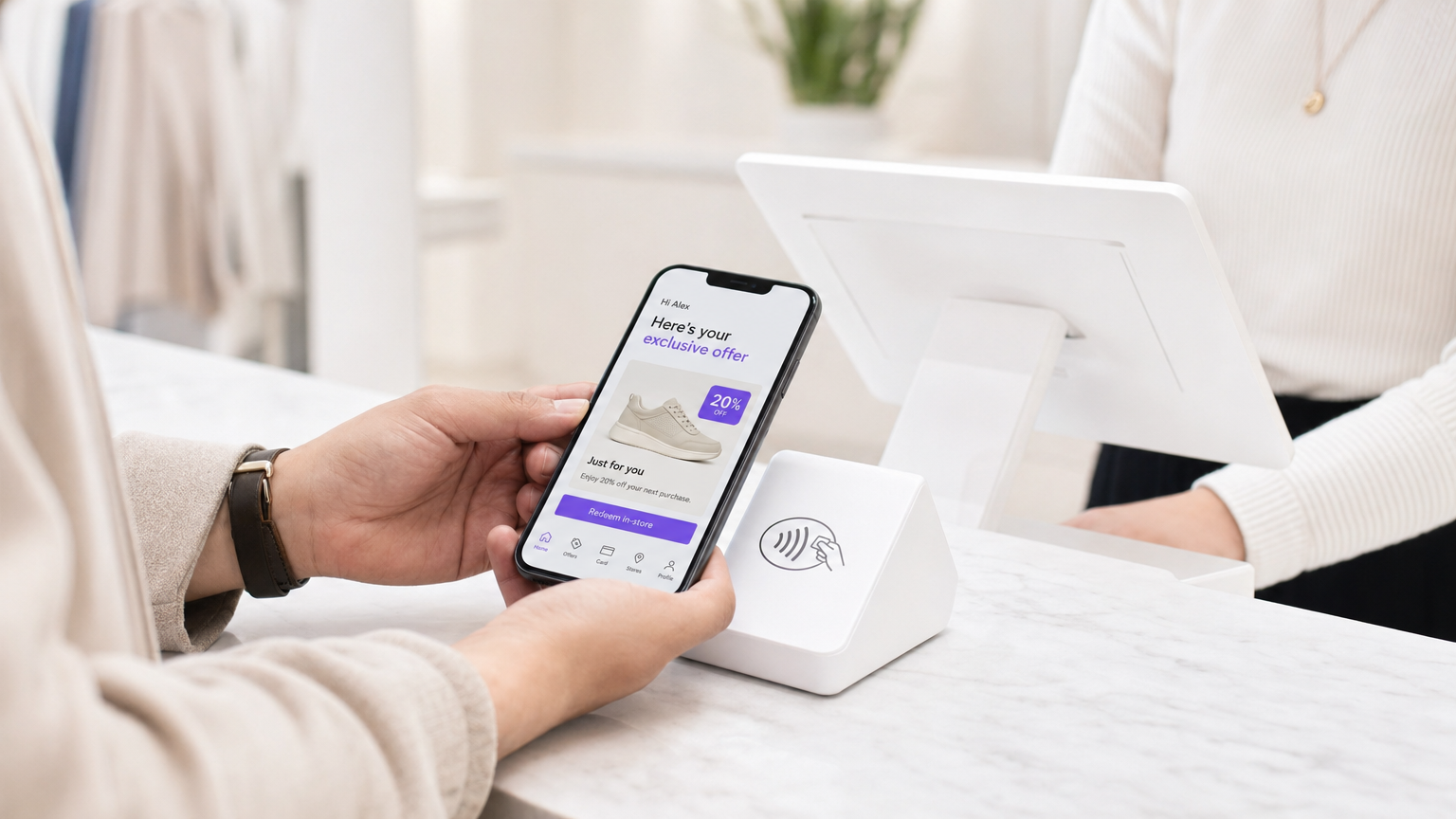
Pour les responsables informatiques et les directeurs des opérations de site, le mandat d'offrir des expériences client personnalisées se traduit souvent par des projets d'intégration complexes impliquant plusieurs fournisseurs. Cependant, la base la plus efficace pour la personnalisation en magasin est probablement déjà déployée dans vos faux plafonds : votre réseau WiFi invité d'entreprise.
En superposant une plateforme d'analyse et d'authentification sophistiquée sur le matériel existant (tel que Cisco Meraki, Aruba ou Ruckus), les détaillants peuvent transformer une simple commodité de connectivité en un puissant moteur de capture de données propriétaires. Ce guide détaille comment concevoir, déployer et faire évoluer une stratégie de personnalisation basée sur le WiFi. Nous explorons les mécanismes de résolution d'identité via les Captive Portals, l'intégration du temps de présence et de l'analyse spatiale dans les systèmes CRM, et le déclenchement automatisé d'offres contextuellement pertinentes, tout en maintenant une stricte conformité aux normes GDPR et PCI DSS.
Que vous gériez un magasin phare unique ou un vaste parc de magasins, l'objectif reste le même : convertir le trafic anonyme en clients connus et adressables, permettant aux équipes marketing de délivrer le bon message au moment précis de la plus haute intention.
Approfondissement Technique
Architecture et Flux de Données
La base de WiFi Analytics repose sur une architecture robuste qui capture et traite les données client en toute sécurité. Le modèle de déploiement typique implique des points d'accès (APs) légers rapportant à un contrôleur cloud ou sur site. La plateforme d'analyse ingère les données de ce contrôleur via des API ou des flux Syslog.
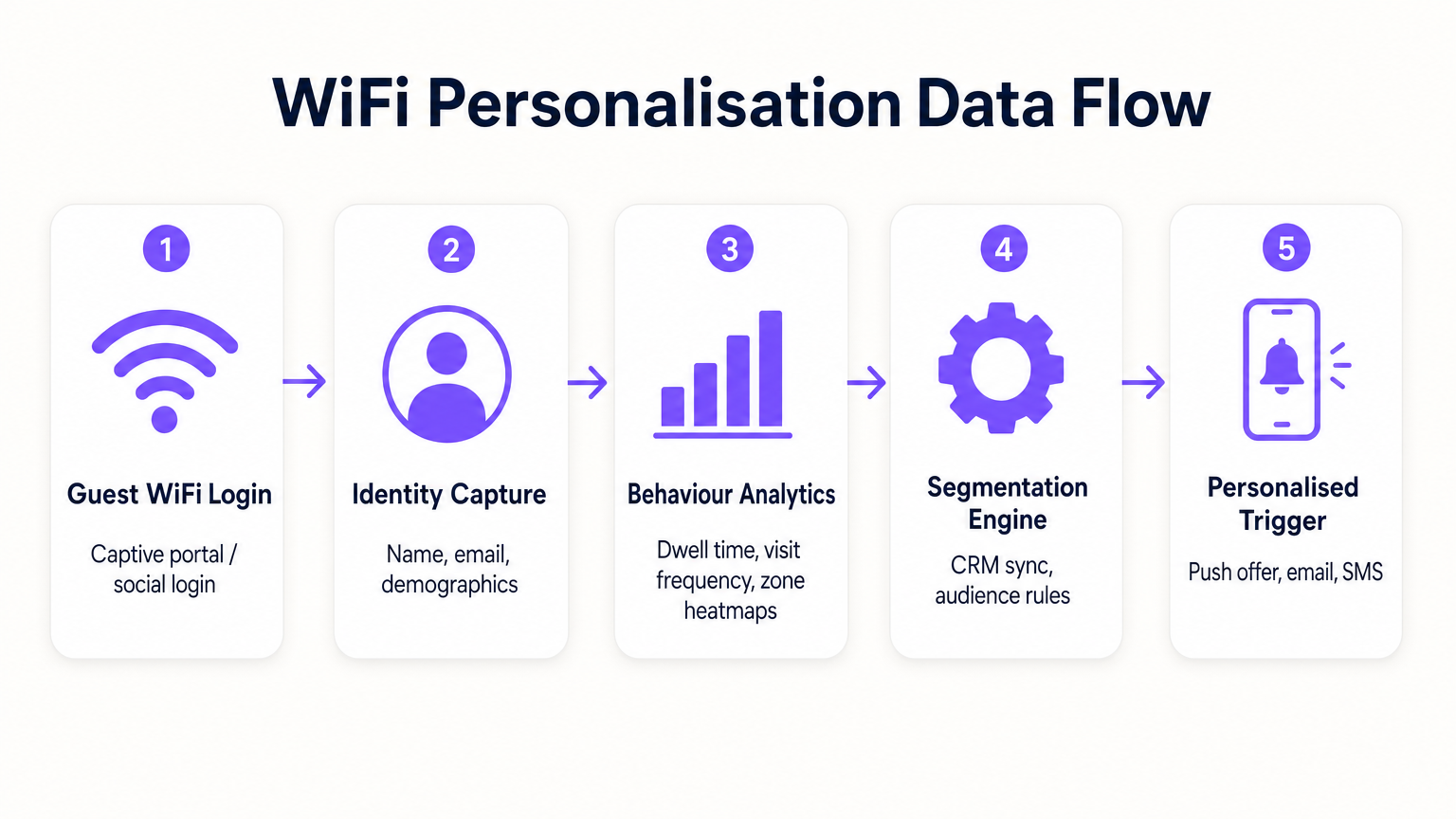
- Requêtes de Sonde et Association : Même avant l'authentification, les APs détectent les requêtes de sonde des appareils mobiles, capturant les adresses MAC et la force du signal (RSSI). Cela fournit des données de base sur le trafic et les zones.
- Authentification (Le Captive Portal) : Lorsqu'un utilisateur s'associe au SSID Guest WiFi , il est redirigé vers un Captive Portal. C'est le point critique de la capture d'identité. En offrant une authentification par e-mail, médias sociaux ou SMS, le système lie l'adresse MAC précédemment anonyme à une identité vérifiée.
- Moteur d'Analyse : La plateforme corrèle les données de localisation en temps réel (calculées par trilatération ou cartographie thermique RSSI) avec l'identité authentifiée, construisant un profil complet du temps de présence, de la fréquence des visites et des préférences de zone.
- Couche d'Intégration : Les webhooks ou les API REST transmettent ces données de profil enrichies à des systèmes externes (CRM, automatisation du marketing, plateformes de fidélisation).
Résolution d'Identité et Randomisation MAC
Les systèmes d'exploitation mobiles modernes (iOS 14+, Android 10+) implémentent la randomisation des adresses MAC pour empêcher le suivi persistant. Cela rend obsolète le fait de se fier uniquement aux adresses MAC pour l'analyse à long terme. La solution est l'authentification basée sur le profil. Une fois qu'un utilisateur s'authentifie via le Captive Portal, son adresse e-mail ou son numéro de téléphone devient l'identifiant persistant. Les visites ultérieures, même avec une nouvelle adresse MAC randomisée, peuvent être reliées au profil principal lors de la réauthentification, assurant la continuité dans le dossier client.
Segmentation Réseau et Sécurité
La sécurité est primordiale. Le trafic invité doit être strictement séparé du réseau d'entreprise, généralement via des VLAN dédiés. Cela garantit la conformité PCI DSS en empêchant tout chevauchement entre l'accès internet public et les environnements de données de point de vente (POS). Le SSID invité devrait idéalement utiliser WPA3-Personal ou WPA3-Enterprise (lorsque pris en charge) pour chiffrer le trafic sans fil, protégeant ainsi les données utilisateur contre l'interception.
Guide d'Implémentation
Le déploiement d'une stratégie de personnalisation nécessite un effort coordonné entre l'informatique et le marketing.
Phase 1 : Évaluation de l'Infrastructure
Avant de déployer des analyses avancées, assurez-vous que l'environnement RF sous-jacent est sain. Effectuez une étude de site pour vérifier la densité de couverture, en particulier dans les zones à forte valeur ajoutée. L'analyse du temps de présence repose sur une réception de signal constante ; les zones mortes fausseront les données.
Phase 2 : Configuration du Captive Portal
Concevez le Captive Portal pour maximiser les taux d'adhésion tout en assurant la conformité GDPR. L'échange de valeur doit être clair. Au lieu d'une connexion générique, offrez une incitation : « Connectez-vous pour des offres exclusives en magasin. » Il est crucial que le consentement pour l'accès au réseau soit dissocié du consentement pour les communications marketing. Le portail doit clairement présenter les conditions générales et les politiques de confidentialité.
Phase 3 : Intégration et Segmentation
Connectez la plateforme WiFi à votre pile marketing existante. Cela vous permet de combiner les données comportementales en magasin (par exemple, « a visité le rayon chaussures pendant 20 minutes ») avec les données transactionnelles (par exemple, « a acheté des baskets le mois dernier »). Créez des segments exploitables, tels que « Risque d'attrition élevé » (visiteurs fréquents qui ne se sont pas connectés depuis 60 jours).
Phase 4 : Déclencheurs Automatisés
Configurez des flux de travail automatisés. Lorsqu'un client appartenant à un segment spécifique s'authentifie, déclenchez une action via API. Il peut s'agir d'une offre SMS, d'une notification push via l'application du détaillant, ou d'un e-mail. La latence entre l'authentification et l'exécution du déclencheur doit être minimale (moins de 30 secondes) pour garantir que le message est reçu pendant que le client est encore engagé.
Pour des stratégies plus détaillées sur la création de ces profils, consultez notre guide sur WiFi in Retail Stores: Building Customer Profiles From Footfall Data ou son équivalent français, Le WiFi dans les magasins de détail : Créer des profils clients à partir des données de fréquentation .
Bonnes pratiques
- Prioriser l'échange de valeur : Les clients ne partageront leurs données que s'ils en perçoivent un avantage. Assurez-vous que le WiFi est rapide et fiable, et que toutes les offres déclenchées sont réellement précieuses.
- Respecter les plafonds de fréquence : Ne bombardez pas les clients de notifications à chaque connexion. Mettez en œuvre des plafonds de fréquence (par exemple, un message maximum par semaine) pour éviter la lassitude et les désabonnements.
- Tirer parti des investissements existants : Évitez les scénarios de remplacement complet. Les plateformes d'analyse modernes s'intègrent parfaitement aux principaux fournisseurs de matériel, vous permettant d'extraire plus de valeur de votre infrastructure actuelle.
- Croiser les données : Les données WiFi sont plus puissantes lorsqu'elles sont combinées à d'autres sources. Intégrez-les à votre programme de fidélité pour comprendre comment le comportement en magasin est corrélé à la valeur vie client globale. Cette approche est très pertinente dans divers secteurs, notamment le Commerce de détail , l' Hôtellerie et même la Santé .
Dépannage et atténuation des risques
- Faibles taux d'adhésion : Si moins de 20 % des visiteurs s'authentifient, examinez la conception du Captive Portal. Simplifiez le processus de connexion, clarifiez la proposition de valeur et assurez-vous que le portail est adapté aux mobiles.
- Données de localisation imprécises : Si les analyses de zone semblent faussées, vérifiez le placement des AP et effectuez une nouvelle étude RF. Les interférences dues aux obstacles physiques ou aux réseaux voisins peuvent affecter les calculs RSSI.
- Échecs d'intégration : Assurez-vous qu'une gestion robuste des erreurs est en place pour les connexions API aux CRM. Surveillez les taux de réussite de livraison des webhooks et mettez en œuvre des mécanismes de réessai pour les charges utiles échouées.
- Risques de conformité : Auditez régulièrement vos flux de consentement et vos politiques de conservation des données. Assurez-vous de disposer d'un processus rationalisé pour gérer les demandes d'accès des personnes concernées (DSAR) en vertu du GDPR.
ROI et impact commercial
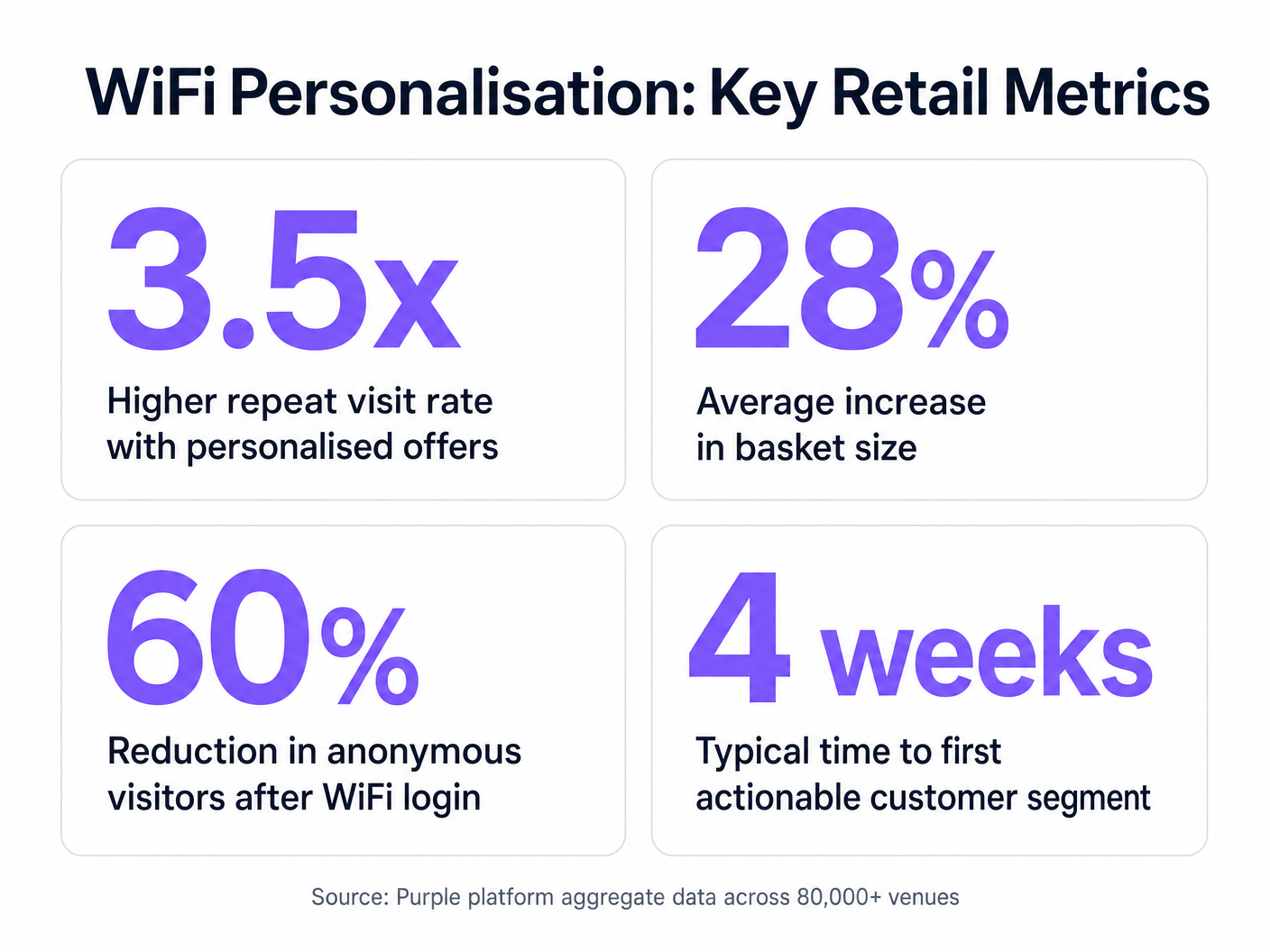
L'analyse de rentabilisation de la personnalisation basée sur le WiFi est convaincante. En identifiant les visiteurs anonymes, les détaillants peuvent considérablement étendre leur base de données commercialisable. Les métriques clés à suivre incluent :
- Taux de croissance de la base de données : Le volume de nouvelles identités vérifiées capturées par mois.
- Taux de conversion des offres déclenchées : Le pourcentage de clients qui utilisent une offre qui leur a été proposée en magasin.
- Augmentation du temps de présence : Mesurer si l'engagement personnalisé conduit à des visites en magasin plus longues.
- Fréquence des visites répétées : Suivre l'impact des campagnes de réengagement ciblées sur la fidélité des clients.
En allant au-delà de la connectivité de base, les équipes informatiques peuvent se positionner comme des catalyseurs de revenus, fournissant l'infrastructure essentielle pour des opérations de vente au détail modernes et axées sur les données.
Key Definitions
Captive Portal
A web page that a user is forced to view and interact with before access is granted to a public network.
The primary interface for capturing user identity and establishing consent for data processing.
MAC Address Randomisation
A privacy feature where mobile devices use a temporary, randomly generated hardware address when scanning for or connecting to networks.
Forces IT teams to rely on authenticated profiles rather than hardware identifiers for long-term customer tracking.
Dwell Time
The duration a connected or probing device remains within the coverage area of a specific access point or defined zone.
A critical metric for understanding customer engagement with specific displays, departments, or the store as a whole.
Trilateration
A method of determining the location of a device by measuring its signal strength (RSSI) relative to three or more access points.
Used by spatial analytics platforms to generate accurate heatmaps and track customer movement patterns.
Probe Request
A frame sent by a client device to discover available wireless networks in its vicinity.
Allows analytics platforms to estimate footfall and capture anonymous presence data even if the user does not authenticate.
VLAN (Virtual Local Area Network)
A logical subnetwork that groups a collection of devices, isolating their traffic from other devices on the same physical network.
Essential for security and PCI DSS compliance, ensuring guest WiFi traffic is completely segregated from corporate systems.
Webhook
A method for one application to provide real-time information to another application, typically triggered by a specific event.
Used to instantly push authentication events from the WiFi platform to a CRM, enabling real-time triggered marketing.
RSSI (Received Signal Strength Indicator)
A measurement of the power present in a received radio signal.
The fundamental metric used by access points to estimate the distance of a client device, enabling location analytics.
Worked Examples
A mid-sized high street fashion retailer with 50 locations wants to reduce customer churn. They have Cisco Meraki APs deployed but are only offering a simple 'click-to-accept' splash page. How should the IT team approach upgrading this to a personalisation engine?
- Platform Integration: Integrate a dedicated WiFi analytics platform with the existing Meraki dashboard via API. No new hardware is required.
- Portal Upgrade: Replace the 'click-to-accept' page with a branded captive portal offering Social Login (Facebook/Google) or email authentication, coupled with an explicit marketing opt-in checkbox.
- CRM Sync: Configure a webhook to push newly authenticated identities and their visit data into the retailer's CRM (e.g., Salesforce).
- Campaign Execution: The marketing team creates a segment in the CRM for 'Customers who haven't visited in 90 days'. When a customer in this segment connects to the WiFi, an automated email offering a 15% discount is triggered immediately.
A large shopping centre operator needs to understand the flow of visitors between different anchor stores to optimize tenant placement and rent models. They currently rely on manual footfall counting at entrances.
- Network Tuning: The IT team optimizes the AP density to ensure consistent coverage across all concourses and store entrances, focusing on overlapping coverage for accurate trilateration.
- Analytics Deployment: Deploy a spatial analytics platform that ingests probe request data from the APs.
- Zone Mapping: Define specific zones within the analytics dashboard corresponding to key areas (e.g., 'Food Court', 'Anchor Store A', 'North Entrance').
- Data Analysis: Utilize the platform to generate heatmaps and flow diagrams, analyzing the typical paths taken by visitors and the dwell time in specific zones.
Practice Questions
Q1. A retail client wants to trigger an immediate SMS discount to any customer who spends more than 15 minutes in the high-margin electronics section. They currently have a single access point covering the entire store. What is the primary technical constraint?
Hint: Consider how the system determines location and dwell time.
View model answer
The primary constraint is a lack of spatial resolution. With only a single access point, the system can determine that the customer is in the store (associated with the AP), but it cannot use trilateration to pinpoint their location to a specific zone like the electronics section. The retailer must deploy additional access points to provide overlapping coverage, enabling accurate location analytics.
Q2. The marketing director is concerned that MAC address randomisation in iOS will prevent them from tracking repeat visitors. How should the IT architect respond?
Hint: Focus on the transition from hardware-based tracking to identity-based tracking.
View model answer
The architect should explain that while MAC randomisation disrupts passive tracking of anonymous devices, it does not impact authenticated users. By implementing a captive portal that requires email or social login, the system creates a persistent profile based on the user's identity. When the user returns and reconnects (even with a new MAC address), they re-authenticate, and the new session is linked to their existing persistent profile.
Q3. A stadium operator wants to deploy guest WiFi but is concerned about PCI DSS compliance, as POS terminals for concessions share the same physical network switches. What network design principle must be enforced?
Hint: Think about logical separation of network traffic.
View model answer
The IT team must enforce strict network segmentation using Virtual Local Area Networks (VLANs). The guest WiFi traffic must be placed on a dedicated VLAN that is completely isolated from the VLAN used by the POS terminals. Firewall rules must ensure that no traffic can route between the guest VLAN and the Cardholder Data Environment (CDE), thereby maintaining PCI DSS compliance.