
Comment utiliser les données de première partie dans les campagnes marketing
Ce guide de référence explique comment les équipes informatiques et marketing des entreprises peuvent transformer leur infrastructure WiFi invité en un puissant moteur de données de première partie. Il couvre l'architecture technique de la capture de données, la gestion du consentement conforme au GDPR, les stratégies de segmentation et l'activation concrète via l'e-mail, les SMS, la publicité sociale et l'affichage programmatique. Les exploitants de sites et les équipes informatiques y trouveront des conseils de mise en œuvre concrets, des exemples pratiques issus de l'hôtellerie et du commerce de détail, ainsi que des cadres de mesure du retour sur investissement.
Écouter ce guide
Voir la transcription du podcast
Résumé Exécutif
Pour les sites d'entreprise — hôtels, chaînes de magasins, stades et centres de conférence — le réseau WiFi invité n'est plus seulement un centre de coûts ou un service de base. Alors que les cookies tiers disparaissent et que les réglementations en matière de confidentialité se renforcent, les sites physiques possèdent un avantage unique et sous-exploité : la capacité de capturer des données de première partie très précises et consenties directement auprès des visiteurs au point de connexion.
Ce guide explique comment les responsables informatiques et les CTO peuvent concevoir leur infrastructure sans fil pour qu'elle serve de moteur d'acquisition de données conforme pour les équipes marketing. En déployant un Captive Portal robuste intégré aux plateformes CRM et d'automatisation marketing, les sites peuvent collecter de manière transparente des données démographiques et comportementales à grande échelle. Nous explorerons le déploiement technique des mécanismes de capture de données, l'intégration des analyses Guest WiFi et l'exécution de campagnes marketing ciblées via l'e-mail, les SMS et la publicité sociale, générant ainsi un ROI mesurable et des expériences client améliorées. La plateforme de Purple dessert actuellement plus de 80 000 sites et près de deux millions d'utilisateurs quotidiens, fournissant la couche d'intégration qui connecte l'infrastructure réseau à l'activation marketing.
Approfondissement Technique : L'Architecture d'Acquisition de Données
La collecte de données de première partie dans un site physique repose sur l'interaction entre l'appareil mobile de l'utilisateur, le point d'accès sans fil (AP) et l'infrastructure du Captive Portal. Comprendre cette architecture est essentiel avant toute activation marketing.
Le Captive Portal et l'Authentification
Lorsqu'un utilisateur se connecte à un SSID ouvert, le contrôleur réseau redirige sa requête HTTP initiale vers un Captive Portal. Cette page d'accueil est le point critique de l'échange de valeur : le site fournit un accès Internet haut débit, et l'utilisateur fournit ses données et son consentement. Pour maximiser la qualité des données et l'expérience utilisateur, le processus d'authentification doit être à la fois fluide et techniquement robuste.
Les déploiements modernes exploitent trois méthodes d'authentification principales. L'OAuth Social permet aux utilisateurs de s'authentifier via Facebook, Google ou Apple, fournissant instantanément des données démographiques riches et réduisant l'abandon de formulaire. L'authentification par formulaire demande des champs spécifiques tels que l'adresse e-mail, le numéro de téléphone et le code postal, donnant au site un contrôle direct sur les données capturées. L'authentification transparente via Passpoint (Hotspot 2.0), utilisant la norme IEEE 802.11u, permet des connexions automatiques et sécurisées pour les utilisateurs récurrents, contournant entièrement le Captive Portal après la configuration initiale — une capacité critique pour les environnements à haut débit tels que les pôles de transport et les stades, comme exploré dans Wi Fi in Auto: The Complete 2026 Enterprise Guide .
Surmonter la Randomisation MAC
Historiquement, les sites suivaient les utilisateurs via l'adresse MAC (Media Access Control) de leur appareil. Cependant, les systèmes d'exploitation modernes — iOS 14 et supérieur, Android 10 et supérieur — implémentent la randomisation MAC, générant une adresse MAC unique et temporaire pour chaque SSID. Cela rompt fondamentalement le suivi centré sur l'appareil et est l'une des causes les plus courantes de dégradation de la qualité des données dans les déploiements hérités.
Pour construire un profil utilisateur persistant, l'architecture doit s'appuyer sur la session authentifiée plutôt que sur l'identifiant matériel. Une fois qu'un utilisateur s'authentifie via le Captive Portal, ses données de session — y compris le MAC randomisé — sont liées à son profil CRM au sein de la plateforme WiFi Analytics . Les visites ultérieures utilisant la même méthode d'authentification seront liées au profil unifié, préservant ainsi les données comportementales longitudinales.
Flux de Données et Architecture d'Intégration
Les données capturées doivent circuler de manière transparente de la périphérie du réseau vers la pile marketing. Ceci est réalisé via des API REST ou des Webhooks sécurisés, permettant une synchronisation des données en temps réel plutôt que des exportations par lots.
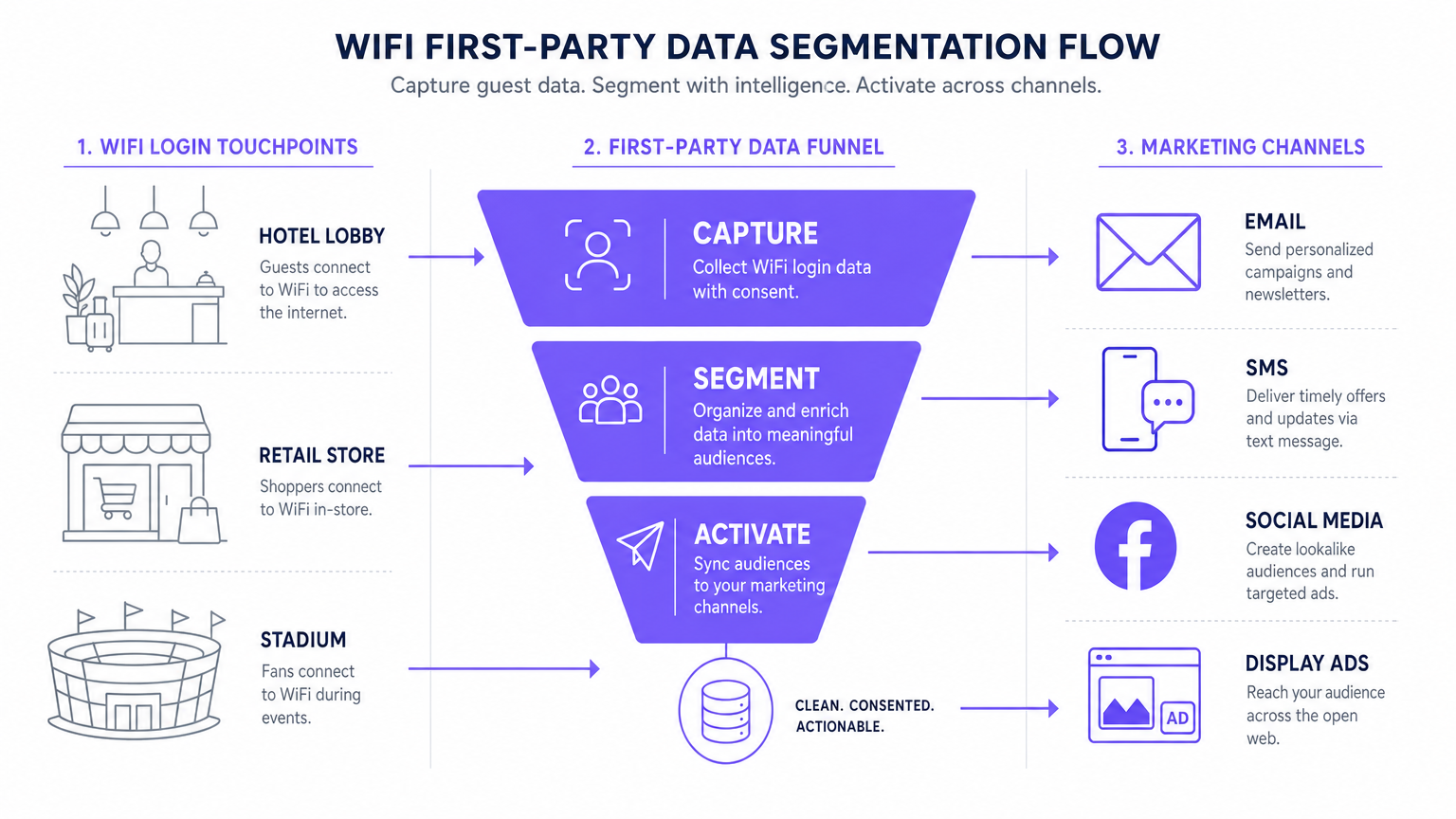
Le flux de données standard suit cinq étapes : Capture (données collectées au Captive Portal), Normalisation (la plateforme d'analyse déduplique et fusionne les profils), Synchronisation (les Webhooks transmettent des mises à jour en temps réel au CRM), Segmentation (les équipes marketing définissent des cohortes d'audience basées sur des critères comportementaux et démographiques), et Activation (les campagnes sont déclenchées via l'e-mail, les SMS et les canaux programmatiques).
Guide d'Implémentation : Activer les Données
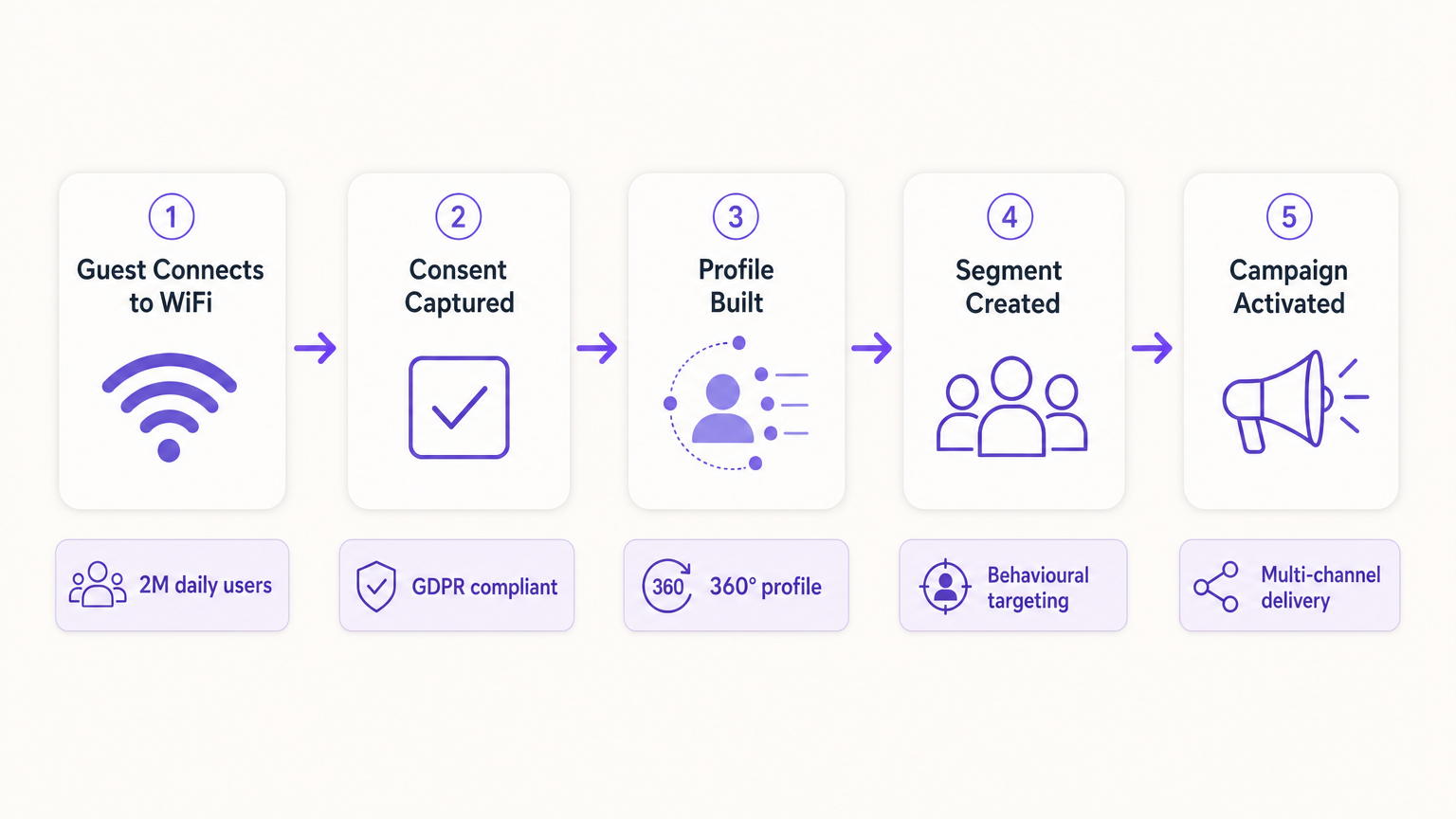
La collecte des données n'est que la première étape. La véritable valeur commerciale réside dans l'activation. La section suivante détaille comment déployer les données WiFi de première partie sur les quatre principaux canaux marketing.
1. Marketing par E-mail et Campagnes Drip
L'e-mail reste un canal très efficace pour les environnements hôteliers et de commerce de détail . Les e-mails de bienvenue déclenchés, configurés via Webhook pour être envoyés immédiatement après la première connexion d'un utilisateur, sont idéaux pour offrir des incitations promises telles que des codes de réduction ou des points de fidélité. Les e-mails d'enquête post-visite, automatisés 24 heures après la déconnexion d'un utilisateur du réseau, stimulent la génération d'avis et la mesure du NPS. Les campagnes de réengagement ciblant les utilisateurs qui ne se sont pas connectés depuis plus de 90 jours sont efficaces pour stimuler les visites répétées, en particulier dans l' hôpitalité où les promotions saisonnières sont pertinentes.
2. SMS et déclencheurs basés sur la localisation
Pour un engagement immédiat et à forte intention, le SMS est inégalé. Ce canal nécessite de recueillir un consentement explicite pour le marketing par SMS pendant le processus d'authentification — une case à cocher distincte et non pré-cochée du consentement au marketing par e-mail. En utilisant l'analyse de localisation — telle que décrite dans Indoor Positioning System: UWB, BLE, & WiFi Guide — la plateforme peut déclencher un SMS lorsqu'un utilisateur reste dans une zone spécifique pendant une période définie, créant ainsi un marketing de micro-moments contextuellement pertinent.
3. Publicité sociale et audiences personnalisées
Les données de première partie sont inestimables pour l'affichage programmatique et la publicité sociale, d'autant plus que le suivi par des tiers diminue. Les audiences similaires sont créées en exportant des segments d'utilisateurs WiFi très engagés — par exemple, les utilisateurs qui visitent le lieu plus de deux fois par mois — vers Facebook Ads Manager ou Google Ads en tant qu'audience personnalisée source. La plateforme identifie ensuite de nouveaux utilisateurs ayant des profils démographiques et comportementaux similaires. Le reciblage diffuse des publicités ciblées aux utilisateurs qui ont récemment visité le lieu, renforçant la notoriété de la marque sur le web ouvert.
4. Affichage programmatique
En synchronisant les segments d'audience de première partie avec une plateforme côté demande (DSP), les lieux peuvent diffuser des publicités ciblées aux visiteurs connus sur l'inventaire des éditeurs premium. Ceci est particulièrement efficace pour les lieux de transport et de santé où la fréquence des visites et les signaux d'intention sont forts.
Pour les stratégies fondamentales de collecte de données, consultez How to Collect First-Party Data Through WiFi .
Bonnes pratiques pour la conformité et l'expérience utilisateur
Confidentialité et consentement (GDPR et CCPA)
La conformité est non négociable et doit être intégrée au déploiement dès le premier jour, et non ajoutée après coup. Le Captive Portal doit respecter des réglementations strictes en matière de protection des données. Le consentement dissocié est obligatoire : la case à cocher pour les communications marketing doit être entièrement séparée de l'acceptation des conditions générales. Les opt-ins granulaires doivent proposer des cases à cocher distinctes pour le marketing par e-mail et par SMS. Un lien vers une politique de confidentialité claire doit être affiché de manière proéminente, détaillant exactement comment les données seront utilisées, stockées et partagées. Les données doivent être chiffrées en transit à l'aide de TLS 1.2 ou supérieur, et au repos à l'aide du chiffrement AES-256, conformément à la norme PCI DSS lorsque des transactions sont impliquées.
Optimisation du Captive Portal pour la conversion
La page d'accueil doit se charger en moins de trois secondes. Au-delà, les taux d'abandon augmentent considérablement, entraînant des pertes d'opportunités d'acquisition de données. Le portail doit être entièrement adapté aux mobiles et conçu avec une proposition de valeur claire et convaincante. Le profilage progressif est l'approche recommandée : ne demander que l'adresse e-mail lors de la première visite, et enrichir le profil avec des champs supplémentaires — date de naissance, code postal, préférences — lors des visites ultérieures. Cette approche produit systématiquement des taux d'opt-in de 60 à 80 % dans les déploiements bien configurés.
Dépannage et atténuation des risques
| Mode de défaillance | Symptôme | Stratégie d'atténuation |
|---|---|---|
| Captive Portal non affiché | Les utilisateurs se connectent au SSID mais ne sont pas redirigés vers le portail. | Vérifiez la configuration DNS et les paramètres du Walled Garden. Assurez-vous que l'IP et l'URL du portail sont accessibles avant la fin de l'authentification. |
| Faibles taux d'opt-in | Volume de connexions élevé mais faible capture de consentement marketing. | Examinez la clarté de la proposition de valeur. Simplifiez le formulaire. Assurez-vous que l'opt-in marketing est proéminent mais non trompeur. Testez le temps de chargement du portail. |
| Échecs de synchronisation des données | Profils mis à jour dans Purple mais non reflétés dans le CRM. | Surveillez les journaux de livraison des Webhooks. Vérifiez les clés API et les limites de débit sur la plateforme de destination. Implémentez une logique de réessai pour les livraisons échouées. |
| Randomisation MAC dégradant les données | Pic de 'nouveaux' visiteurs ; les métriques de visiteurs récurrents s'effondrent. | Passez à un suivi centré sur l'identité. Implémentez Passpoint pour une réauthentification transparente. Encouragez l'authentification basée sur une application pour une identité persistante. |
| Mauvaise configuration du Walled Garden | La connexion Social OAuth échoue ; les utilisateurs ne peuvent pas terminer l'authentification. | Mettez sur liste blanche tous les points d'extrémité d'authentification requis (par exemple, accounts.google.com, graph.facebook.com) dans la configuration du Walled Garden sur le contrôleur LAN sans fil. |
ROI et impact commercial
La mise en œuvre d'une stratégie de données de première partie via le WiFi transforme le réseau d'une dépense informatique en un actif marketing mesurable avec des retours quantifiables.
Coût par acquisition (CPA) : Le coût d'acquisition d'un nouvel abonné e-mail consenti via un Captive Portal est généralement une fraction du coût équivalent via la publicité sociale payante ou la publicité de recherche. L'infrastructure est déjà déployée ; le coût incrémental est la licence de la plateforme et la configuration du portail.
Attribution de campagne : En suivant le moment où un utilisateur reçoit une offre par e-mail et se connecte ensuite au WiFi du lieu, les équipes marketing peuvent prouver de manière définitive l'attribution hors ligne pour les campagnes numériques — une capacité de plus en plus précieuse à mesure que les modèles d'attribution numérique deviennent moins fiables.
Augmentation de la valeur vie client (CLV) : L'engagement personnalisé, alimenté par des données de première partie précises, est directement corrélé à une augmentation de la fréquence des visites et à des dépenses plus élevées par visite. Un hôtel capable d'identifier un client d'affaires récurrent et de lui proposer de manière proactive une surclassement pertinent offre une expérience matériellement meilleure qu'un hôtel qui traite chaque client comme anonyme.
Pour les considérations complexes concernant l'IoT et l'architecture des données, consultez Internet of Things Architecture: A Complete Guide .
Définitions clés
Captive Portal
A web page that a user of a public-access network is obliged to view and interact with before internet access is granted. It serves as the primary interface for data capture and consent collection.
This is the critical point of value exchange between the venue and the guest. Its design, load speed, and form structure directly determine the quality and volume of first-party data captured.
MAC Randomisation
A privacy feature in modern operating systems (iOS 14+, Android 10+) that generates a temporary, unique MAC address for each wireless network the device connects to, preventing persistent device-level tracking.
This is the most common cause of data quality degradation in legacy WiFi analytics deployments. It necessitates a shift from device-centric to identity-centric tracking architectures.
First-Party Data
Information that an organisation collects directly from its own customers or users, with their explicit consent, through its own channels and touchpoints.
This is the most valuable and compliant data source for marketing, particularly as third-party cookies are phased out across major browsers and advertising platforms.
Webhook
An HTTP-based callback mechanism that sends a structured data payload to a pre-configured endpoint when a specific event occurs in the source system.
Used to push real-time data from the WiFi analytics platform to a CRM or marketing automation tool immediately after a user authenticates, enabling real-time campaign triggers.
Walled Garden
A network configuration that restricts unauthenticated users to a limited set of pre-approved domains and IP addresses, preventing full internet access until authentication is complete.
Correct Walled Garden configuration is essential for allowing the captive portal to load and for enabling social OAuth logins (e.g., whitelisting Facebook and Google authentication endpoints) before the user has completed the login process.
Passpoint (Hotspot 2.0)
An industry standard based on IEEE 802.11u that enables automatic, secure WiFi connections without requiring manual portal interaction after the initial device provisioning.
Improves user experience for returning visitors and ensures consistent, persistent identity-based connections, facilitating seamless data capture and profile enrichment across multiple visits.
Lookalike Audience
A targeting segment created by advertising platforms (such as Facebook Ads or Google Ads) that identifies new users who share similar characteristics with an existing Custom Audience seed list.
Allows venues to leverage their high-quality offline visitor data — captured via WiFi — to find new, highly qualified prospects online, bridging the gap between physical and digital marketing.
Progressive Profiling
A data collection strategy that gathers customer information incrementally across multiple interactions, rather than requesting all data fields in a single form submission.
Increases captive portal conversion rates by reducing friction on the initial login, while still building a comprehensive, enriched customer profile over subsequent visits.
Dwell Time
The duration for which a device remains associated with a WiFi access point or within a defined location zone, used as a proxy for physical presence and engagement.
A critical signal for location-based marketing triggers. A user dwelling in a specific retail zone for more than ten minutes is a high-intent prospect for a contextually relevant offer.
Exemples concrets
A 200-room luxury hotel wants to increase bookings for its on-site spa. They currently offer free WiFi but do not capture any guest data beyond the room booking system. How should the IT and Marketing teams collaborate to deploy a first-party data solution?
Phase 1 — IT Deployment: The IT team configures the wireless LAN controller to redirect all unauthenticated guest traffic on the 'Hotel_Guest_WiFi' SSID to the Purple captive portal. The Walled Garden is configured to allow access to the portal's CDN and the OAuth endpoints for social login providers.
Phase 2 — Portal Design: Marketing designs a branded splash page with a clear value proposition: 'Complimentary high-speed WiFi — connect in seconds.' The authentication form requests Name and Email, with a separate, unticked checkbox for marketing consent. A link to the privacy policy is displayed prominently.
Phase 3 — Integration: IT configures a secure Webhook to push new authenticated profiles to the hotel's CRM (e.g., Salesforce). A custom field 'WiFi_Opt_In' is mapped to the marketing consent flag.
Phase 4 — Campaign Execution: Marketing configures an automated trigger in the CRM. If a guest authenticates and their profile indicates they have not previously visited the spa (cross-referenced with the booking system), an automated email is sent two hours after check-in offering a 15% discount on spa treatments, valid for the duration of their stay.
Phase 5 — Measurement: Track the email open rate, click-through rate, and spa booking conversion rate. Compare spa revenue per guest for WiFi-opted-in guests versus non-opted-in guests to quantify ROI.
A national retail chain with 50 locations wants to build a Lookalike Audience for Facebook Ads based on their most frequent in-store shoppers, without relying on third-party pixel data.
Step 1 — Baseline Capture: Confirm that the captive portal at all 50 locations is capturing email addresses and marketing consent. Ensure the portal is configured consistently across all sites using a centralised management platform.
Step 2 — Segment Definition: Within the Purple analytics platform, create a segment defined as 'Users who have authenticated at any location more than three times in the last 60 days.' This cohort represents the brand's most loyal physical shoppers.
Step 3 — Secure Export: Export this segment as a hashed (SHA-256) email list. Hashing ensures the raw email addresses are never transmitted to the advertising platform, maintaining GDPR compliance.
Step 4 — Custom Audience Upload: Upload the hashed list to Facebook Ads Manager as a Custom Audience. Facebook matches the hashes against its own user database.
Step 5 — Lookalike Generation: Generate a 1% Lookalike Audience based on this Custom Audience. This targets new Facebook users who share similar characteristics — demographics, interests, and online behaviours — with the brand's most loyal physical shoppers.
Step 6 — Campaign Deployment: Run a prospecting campaign targeting the Lookalike Audience with a new customer acquisition offer.
Questions d'entraînement
Q1. Your venue is experiencing a 40% drop-off rate at the captive portal. Users are connecting to the SSID but not completing the authentication process. What are the two most likely technical causes and how would you diagnose and resolve each?
Conseil : Consider both the network configuration layer and the user experience layer independently.
Voir la réponse type
Cause 1 — Slow Portal Load Time: The splash page is taking too long to render on mobile devices. Diagnosis: Use browser developer tools to measure Time to First Byte (TTFB) and total page load time from a mobile device on the guest network. Resolution: Compress all images, remove non-essential JavaScript, and serve the portal from a CDN. Target sub-3-second load time.
Cause 2 — Walled Garden Misconfiguration: The portal is loading but social OAuth authentication is failing because the authentication provider endpoints are not whitelisted in the Walled Garden. Diagnosis: Attempt a social login and inspect the network requests in developer tools for blocked connections. Resolution: Add the required OAuth endpoints (e.g., accounts.google.com, graph.facebook.com, appleid.apple.com) to the Walled Garden whitelist on the wireless LAN controller.
Q2. A marketing director wants to send an SMS offer to users exactly 15 minutes after they enter the flagship retail store. How would you architect this solution using the existing WiFi infrastructure, and what compliance considerations apply?
Conseil : Think about how presence is detected, how the event is communicated to the marketing platform, and what consent is required.
Voir la réponse type
Architecture: 1) Ensure the captive portal explicitly captures mobile phone numbers with a separate, unticked SMS marketing opt-in checkbox. 2) Configure the WiFi analytics platform to track dwell time based on device association with the store's access points. 3) Set up a Webhook triggered by the event 'Dwell Time > 15 minutes AND SMS_Opt_In = True.' 4) The Webhook payload — containing the user's phone number and the store identifier — is sent to the SMS platform (e.g., Twilio), which dispatches the pre-configured offer.
Compliance: The SMS opt-in must be explicit and separate from the WiFi terms of service. The message must include a clear opt-out mechanism (e.g., 'Reply STOP to unsubscribe'). Under GDPR, the user must have been informed at the point of consent that their location within the store would be used to trigger marketing messages.
Q3. Following an iOS update rollout across your user base, your analytics platform shows a 60% spike in 'new' visitors while 'returning' visitor metrics have collapsed. Physical footfall counters show no change in actual visitor numbers. What has happened, and what is the long-term architectural response?
Conseil : Consider recent privacy features introduced by mobile operating systems and their impact on device-level tracking.
Voir la réponse type
Diagnosis: This is caused by MAC randomisation. The iOS update has enabled per-network MAC randomisation, meaning each device presents a new, temporary MAC address on each visit. The analytics platform is interpreting each new MAC as a new visitor, breaking device-centric tracking.
Immediate Response: Communicate to the marketing team that historical 'returning visitor' metrics are temporarily unreliable and should not be used for campaign decisions until the identity-centric architecture is in place.
Long-Term Architecture: 1) Ensure all returning users are prompted to re-authenticate via the captive portal. When they log in with their existing email or social account, the new randomised MAC is linked to their existing CRM profile, restoring longitudinal data. 2) Deploy Passpoint profiles to authenticated users' devices. Passpoint uses certificate-based authentication that is not affected by MAC randomisation, ensuring seamless, persistent identity on future visits. 3) Encourage users to download the venue's app, which provides a persistent, app-level identity that is also immune to MAC randomisation.
Continuer la lecture de cette série
Marketing WiFi pour restaurants : Comment transformer le WiFi gratuit en clients fidèles
Ce guide de référence technique et faisant autorité explore l'architecture et la mise en œuvre du marketing WiFi pour restaurants — la pratique consistant à utiliser l'accès au réseau invité comme un canal structuré d'acquisition de données et d'automatisation marketing. Il fournit aux responsables informatiques, aux architectes réseau et aux directeurs d'exploitation de sites un plan tactique pour déployer des captive portals, s'intégrer aux plateformes CRM et déclencher des campagnes automatisées qui génèrent des affaires récurrentes mesurables. De la capture de données conforme au GDPR aux flux de travail d'e-mails basés sur des événements, ce guide couvre le cycle de vie complet du déploiement avec des métriques de ROI concrètes.
Comment se connecter avec les clients : Stratégies numériques pour les entreprises physiques
This authoritative technical reference guide details how physical-location businesses — hotels, retail chains, stadiums, and public-sector venues — can deploy enterprise WiFi infrastructure as a first-party data capture and customer engagement engine. It covers the full architecture from captive portal design and seamless authentication (IEEE 802.11u/Passpoint) through to CRM integration, GDPR compliance, and measurable ROI. IT leaders and venue operators will find actionable deployment guidance, real-world case studies, and a compliance-first risk mitigation framework.
Pourquoi utiliser le marketing WiFi ? L'analyse de rentabilité avec des données réelles
Ce guide de référence technique présente l'analyse de rentabilité basée sur des preuves pour le marketing WiFi. Il fournit aux responsables informatiques et aux opérateurs de sites des données exploitables sur le ROI, le temps de présence et les métriques de visites répétées, issues de déploiements réels.