
Comment configurer un Captive Portal sur Starlink : Un guide pour les sites isolés et maritimes
Ce guide explique en détail comment contourner le matériel Starlink natif et intégrer un Captive Portal géré dans le cloud à l'aide d'équipements de routage d'entreprise. Vous apprendrez à surmonter les limites du CGNAT, à appliquer la segmentation VLAN, à gérer les contraintes de bande passante par satellite et à garantir la conformité réglementaire.
Écouter ce guide
Voir la transcription du podcast
Fait partie de notre série principale : Captive Portal Guide →
Résumé exécutif
Starlink fournit une connectivité de 220 Mbps dans des endroits inaccessibles par la fibre, transformant complètement le paysage réseau des sites isolés et maritimes. Cependant, pour les environnements ouverts au public, la simple connectivité ne suffit pas. Lorsque vous déployez Starlink pour des invités, des passagers ou des membres d'équipage, vous devez mettre en œuvre l'authentification, le contrôle d'accès, le consentement conforme au GDPR et la gestion de la bande passante. Le routeur natif Starlink ne fournit aucune de ces fonctionnalités.
Ce guide explique en détail comment contourner le matériel natif Starlink et intégrer un Captive Portal géré dans le cloud à l'aide d'équipements de routage d'entreprise. Vous apprendrez à surmonter les limites du Carrier Grade NAT (CGNAT), à mettre en œuvre la segmentation VLAN, à gérer les contraintes de bande passante satellite et à garantir la conformité réglementaire.
En mettant en œuvre cette architecture, les exploitants de sites transforment une ligne internet non gérée en un réseau sécurisé et segmenté qui capture des données de première main et protège l'infrastructure commerciale centrale.
Analyse technique approfondie
La contrainte du CGNAT
Le principal obstacle technique lors du déploiement d'un Captive Portal sur Starlink est le Carrier Grade NAT (CGNAT). L'antenne Starlink standard se connecte à un routeur propriétaire qui gère le DHCP et le NAT. Par défaut, l'adresse IP WAN attribuée à votre équipement se situe dans la plage 100.64.0.0/10. Comme il ne s'agit pas d'une adresse IP publique, votre routeur ne peut pas recevoir de connexions entrantes depuis internet.
Les architectures de Captive Portal standards supposent souvent que le portail cloud peut interroger votre réseau pour authentifier les utilisateurs ou mettre à jour les listes de contrôle d'accès. Avec le CGNAT, les connexions entrantes échouent.
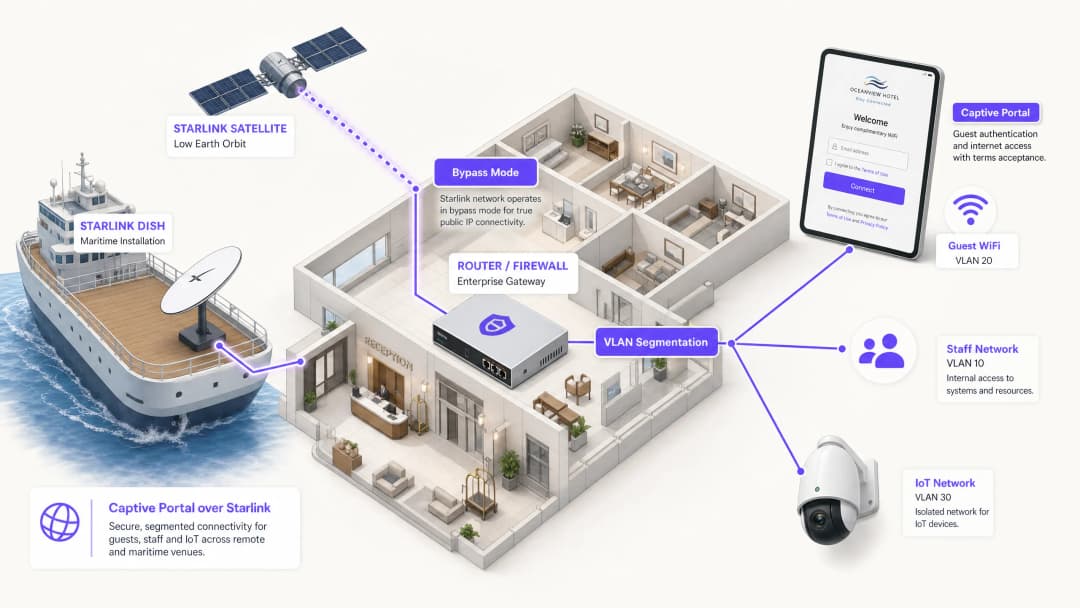
Pour résoudre ce problème, vous devez configurer l'antenne Starlink en mode Bypass (souvent appelé mode pont). En mode Bypass, les fonctions du routeur Starlink sont désactivées, et l'antenne envoie directement l'adresse CGNAT au port WAN de votre routeur d'entreprise. Votre routeur d'entreprise prend alors le contrôle total de la couche de routage.

Architecture de tunnel inversé (Reverse Tunnel)
Même lorsque le routeur d'entreprise gère le trafic, la restriction entrante du CGNAT persiste. La solution réside dans une architecture de tunnel inversé. Votre routeur établit une connexion sortante vers le portail cloud et la maintient en permanence. Tout le trafic d'authentification passe par ce tunnel établi. L'infrastructure cloud n'a jamais besoin d'initier de connexion entrante.
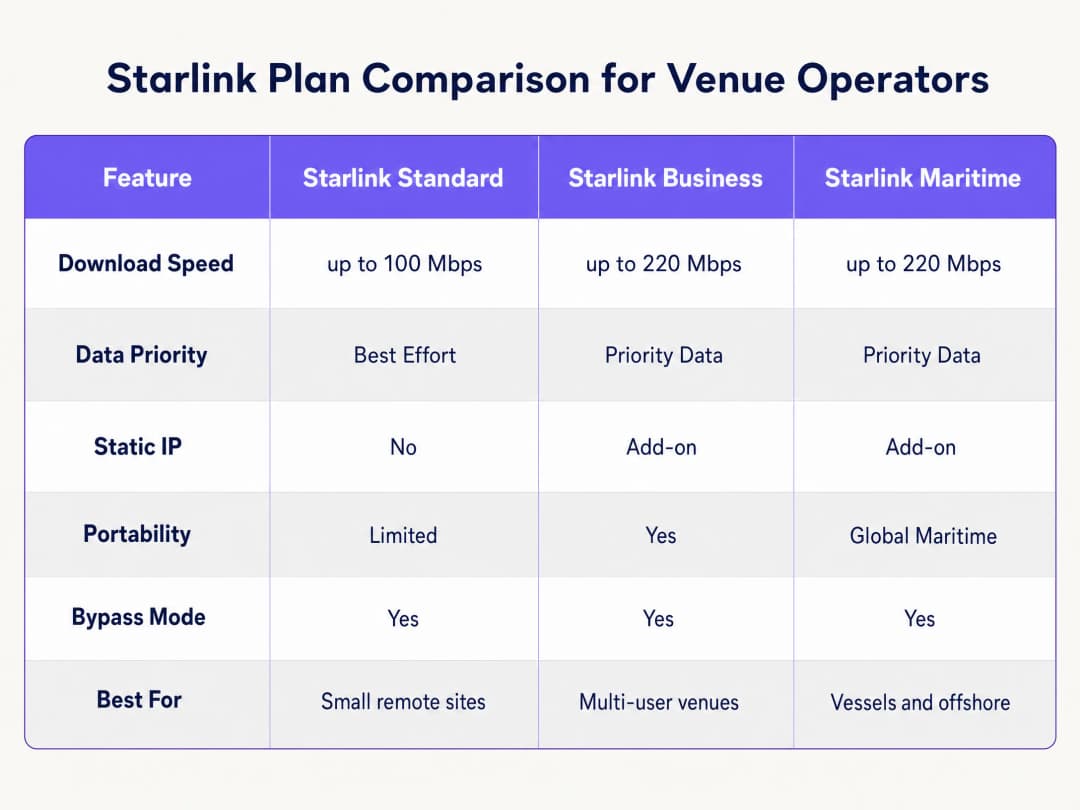
L'architecture d'overlay cloud de Purple gère cela de manière native. Vous n'avez pas besoin de configurer manuellement des tunnels VPN. Si votre déploiement nécessite une IP statique pour des serveurs RADIUS existants sur site ou un filtrage d'IP strict avec liste d'autorisation, les forfaits Starlink Business et Maritime proposent une IP statique en option payante.
Contraintes de bande passante et mise en forme du trafic
La bande passante par satellite est une ressource partagée et limitée. Un seul utilisateur diffusant du contenu vidéo en 4K peut consommer en continu 25 Mbps. Sur un navire de 50 passagers partageant une connexion Starlink de 220 Mbps, un seul utilisateur pourrait consommer 11 % de la capacité totale.
Vous devez traiter ce problème au niveau du Captive Portal et du routeur grâce à une mise en forme rigoureuse du trafic :
- Limites par appareil : Restreignez les appareils des clients individuels à 5 Mbps en téléchargement et 2 Mbps en transfert.
- Politiques d'utilisation équitable : Imposez des quotas de données quotidiens (par exemple, 2 Go par 24 heures).
- Contrôle des applications : Priorisez la navigation web et les protocoles de messagerie par rapport à la diffusion vidéo et au partage de fichiers en pair-à-pair.
- Accès hiérarchisé : Proposez un niveau gratuit pour la connectivité de base et un niveau payant premium pour le streaming, transformant ainsi l'infrastructure WiFi d'un centre de coûts en une source de revenus.
Vous avez des questions sur votre configuration spécifique ?
Notre équipe collabore avec des exploitants de sites, des responsables informatiques et des ingénieurs réseau au sein de 80 000 sites. Réservez un appel de 20 minutes et nous vous montrerons comment d'autres professionnels comme vous ont résolu ce problème.
Guide d'implémentation
Suivez ces étapes pour déployer un Captive Portal sécurisé sur Starlink à l'aide de matériel d'entreprise.
Étape 1 : Activer le mode Bypass
- Installez le matériel Starlink et vérifiez la connectivité à l'aide du routeur d'origine.
- Ouvrez l'application mobile Starlink et accédez à Paramètres.
- Sélectionnez et confirmez Bypass Starlink WiFi router.
- Connectez l'adaptateur Ethernet Starlink au port WAN de votre routeur d'entreprise (Cisco Meraki, HPE Aruba, Ruckus, Juniper Mist, Ubiquiti UniFi, Cambium, Extreme Networks ou Fortinet).
Remarque : Si l'antenne Starlink subit une réinitialisation d'usine, le mode Bypass est automatiquement désactivé. Documentez cela dans votre carnet de route du site et configurez une alerte de surveillance sur l'interface WAN de votre routeur.
Étape 2 : Configurer la segmentation VLAN
Vous devez isoler le trafic des invités de vos systèmes d'entreprise centraux. Configurez au moins trois VLAN sur votre commutateur central et vos points d'accès :
- VLAN 10 (Personnel) : Transporte les systèmes de point de vente, les applications de back-office et le trafic de gestion.
- VLAN 20 (Invité) : Segment uniquement Internet qui redirige vers le Captive Portal.
- VLAN 30 (IoT) : Réseau isolé pour les caméras, les thermostats intelligents et les systèmes de gestion technique du bâtiment.
Configurez des règles de pare-feu pour bloquer tout routage inter-VLAN. Un appareil invité sur le VLAN 20 ne doit jamais pouvoir envoyer de ping à un terminal de point de vente sur le VLAN 10. Cette segmentation est une exigence stricte pour la conformité PCI-DSS.
Étape 3 : Déployer le Captive Portal Cloud
- Configurez vos points d'accès pour diffuser le SSID Invité sur le VLAN 20.
- Définissez la méthode d'authentification sur un serveur RADIUS externe ou utilisez l'intégration API du fournisseur.3. Pointez le serveur d'authentification vers l'infrastructure cloud de Purple.
- Configurez le walled garden (liste d'autorisation) pour autoriser le trafic vers les domaines de Purple avant que l'authentification ne soit terminée.
- Concevez la page d'accueil (splash page) dans le portail Purple, en veillant à ce que l'image de marque corresponde à votre site et que les conditions d'utilisation soient clairement affichées.
Étape 4 : Tester le parcours utilisateur
Testez le flux d'authentification sur les appareils iOS et Android. L'assistant réseau captif (CNA) d'Apple et la sonde réseau d'Android se comportent différemment. Vérifiez que la splash page se charge en moins de 10 secondes et que l'appareil accède à Internet immédiatement après l'authentification.
Bonnes pratiques
- Interception HTTPS : Assurez-vous que votre routeur gère correctement l'interception HTTPS. Les appareils modernes utilisent le HTTPS par défaut. Si le routeur ne peut pas rediriger proprement les requêtes HTTPS, les invités rencontreront des erreurs de certificat avant d'accéder au portail.
- Session Keepalive : La constellation de satellites en orbite terrestre basse (LEO) de Starlink offre des latences de 20 à 40 millisecondes, mais de brèves pointes de latence se produisent lors des transferts de satellites. Définissez l'intervalle de keepalive de session de votre Captive Portal sur 60 secondes ou moins pour éviter une déconnexion prématurée.
- Mise en cache hors ligne : Configurez votre routeur pour mettre en cache localement les sessions actives. Si la connexion Starlink s'interrompt temporairement, les invités déjà authentifiés resteront en ligne lorsque la connectivité sera rétablie, plutôt que d'être contraints de se reconnecter.
Dépannage et atténuation des risques
| Mode de défaillance | Cause racine | Atténuation |
|---|---|---|
| Échec du chargement du Captive Portal | Configuration incorrecte du walled garden | Vérifiez que tous les domaines Purple et les points de terminaison CDN requis sont ajoutés à la liste d'autorisation de pré-authentification sur le routeur. |
| Erreurs de double NAT | Le mode Bypass est désactivé | Vérifiez l'application Starlink pour confirmer que le mode Bypass est actif. Des fluctuations d'alimentation ou des réinitialisations manuelles peuvent avoir rétabli les paramètres par défaut de l'antenne. |
| Vitesses lentes pour les invités | Bande passante non restreinte | Appliquez des limites de bande passante par appareil (par exemple, 5 Mbps) et bloquez les applications gourmandes en bande passante comme BitTorrent sur le pare-feu. |
| Échec de l'audit de sécurité | Le routage inter-VLAN est activé | Inspectez les règles du pare-feu pour vous assurer que le trafic provenant du VLAN Invité ne peut pas être routé vers le VLAN Personnel ou d'Administration. |
Retour sur investissement et impact commercial
Le déploiement d'un Captive Portal managé sur Starlink transforme une simple connexion Internet en un actif commercial mesurable.
Pour un navire de croisière de 120 cabines équipé de Starlink Maritime à 220 Mbps, un accès brut génère un retour commercial nul. En déployant des points d'accès Cisco Meraki et le Captive Portal de Purple, l'opérateur peut imposer un forfait quotidien de 2 Go pour les passagers standard tout en proposant une formule premium payante de 10 Go. Les revenus WiFi qui en découlent couvrent le coût de l'abonnement mensuel Starlink de plus de 250 $. De plus, le portail capture des données d'e-mail de première partie (first-party) entièrement conformes, enrichissant ainsi la liste de marketing direct de l'opérateur pour ses futurs voyages. Dans un environnement hôtelier isolé, le déploiement d'un portail doté de politiques de bande passante strictes réduit les plaintes des clients concernant la lenteur du WiFi jusqu'à 60 %, car les utilisateurs gourmands en données ne peuvent plus monopoliser la liaison satellite.
" />
Définitions clés
Bypass Mode
Un paramètre de configuration qui désactive les fonctions DHCP et NAT du routeur Starlink natif, transmettant directement l'IP WAN à un routeur d'entreprise tiers.
Requis lors de l'intégration d'équipements réseau d'entreprise avec une antenne Starlink afin d'éviter le double NAT et les conflits de routage.
CGNAT (Carrier Grade NAT)
Une méthode utilisée par les FAI pour partager une seule adresse IP publique entre plusieurs clients. Le routeur du client reçoit une adresse IP privée (généralement 100.64.0.0/10).
Starlink utilise le CGNAT par défaut, ce qui empêche les connexions entrantes depuis Internet et nécessite des architectures de tunnel inverse pour la gestion cloud.
VLAN (Virtual Local Area Network)
Un sous-réseau logique qui regroupe un ensemble d'appareils provenant de différents LAN physiques.
Utilisé pour isoler le trafic WiFi des clients de celui du personnel et des réseaux IoT, garantissant ainsi la sécurité et la conformité.
Captive Portal
Une page web qu'un utilisateur d'un réseau d'accès public est obligé de consulter et avec laquelle il doit interagir avant de se voir accorder l'accès.
Utilisé pour appliquer les conditions d'utilisation, collecter des données marketing et authentifier les utilisateurs sur les réseaux WiFi invités.
Walled Garden
Un environnement limité qui contrôle l'accès de l'utilisateur aux contenus et services web avant qu'il ne se soit pleinement authentifié.
Requis pour permettre aux appareils des clients d'accéder au Captive Portal cloud et aux serveurs d'authentification avant de bénéficier d'un accès complet à Internet.
RADIUS
Un protocole réseau qui fournit une gestion centralisée de l'authentification, de l'autorisation et de la comptabilisation pour les utilisateurs qui se connectent et utilisent un service réseau.
Le protocole sous-jacent utilisé par les points d'accès d'entreprise pour communiquer avec le Captive Portal cloud afin de vérifier les identifiants des utilisateurs.
Traffic Shaping
La manipulation et la hiérarchisation du trafic réseau afin de réduire l'impact des utilisateurs intensifs ou des applications sensibles à la latence.
Essentiel sur les réseaux Starlink pour donner la priorité à la navigation web sur les activités à forte consommation de bande passante comme le streaming vidéo.
Données de première partie
Informations qu'une entreprise collecte directement auprès de ses clients et dont elle est propriétaire.
Capturées via le processus de connexion du Captive Portal (par exemple, les adresses e-mail) et utilisées pour le marketing direct et les campagnes de fidélisation.
Exemples concrets
Un navire de croisière de 120 cabines utilisant Starlink Maritime à 220 Mbps doit fournir un accès WiFi aux passagers sans dégrader les opérations du navire. Ils ont besoin d'un mécanisme pour monétiser la connexion et collecter des données marketing.
L'opérateur déploie des points d'accès Cisco Meraki dans tout le navire avec trois VLAN stricts : équipage, passagers et systèmes du navire. Le Captive Portal de Purple gère l'authentification des passagers par e-mail ou par recherche de numéro de cabine intégrée au PMS. Chaque passager bénéficie d'un quota quotidien de 2 Go. Les passagers de la catégorie Premium peuvent acheter une allocation de 10 Go. Le portail collecte des données e-mail de première partie pour le marketing post-voyage.
Un hôtel isolé dans les Highlands, sans infrastructure fibre, utilise Starlink Business à 150 Mbps. Les clients se plaignent fréquemment de la lenteur de la connexion en soirée, et l'hôtel n'a aucune visibilité sur les personnes qui utilisent le réseau.
L'hôtel déploie des points d'accès HPE Aruba dans le bâtiment principal et les dépendances. Ils configurent l'antenne Starlink en Bypass Mode et la connectent à une passerelle Aruba. Les clients s'authentifient par e-mail sur le portail de Purple. L'hôtel applique une limite stricte de bande passante de 5 Mbps par appareil et utilise les outils d'analyse de Purple pour surveiller les heures de pointe.
Questions d'entraînement
Q1. Un camp minier isolé a déployé Starlink Business. Ils ont connecté un pare-feu Cisco Meraki MX au routeur Starlink. Les clients peuvent se connecter au WiFi, mais la page du Captive Portal expire et ne parvient pas à se charger. Quelle est la cause la plus probable ?
Conseil : Réfléchissez à la manière dont le matériel Starlink gère le routage par défaut et à ce que le pare-feu Meraki requiert pour gérer efficacement le trafic.
Voir la réponse type
L'antenne Starlink n'a pas été configurée en mode bypass (Bypass Mode). Par conséquent, le réseau subit un double NAT (le routeur Starlink et le pare-feu Meraki tentent tous deux d'effectuer une traduction d'adresse réseau). L'administrateur doit utiliser l'application Starlink pour activer le Bypass Mode, permettant ainsi au pare-feu Meraki de recevoir directement l'IP CGNAT et de gérer le routage ainsi que l'interception du Captive Portal.
Q2. Vous déployez un Captive Portal pour un hôtel utilisant Starlink. Vous avez configuré le Bypass Mode et la segmentation VLAN. Lors des tests, vous remarquez que les appareils Apple invitent immédiatement l'utilisateur à se connecter, mais certains appareils Android affichent une erreur de certificat lorsque l'utilisateur tente de naviguer sur un site Web sécurisé avant de s'authentifier. Comment résolvez-vous cela ?
Conseil : Pensez à la manière dont les navigateurs modernes gèrent les demandes de connexion initiales et à ce que le routeur doit faire pour les intercepter proprement.
Voir la réponse type
Le routeur d'entreprise n'est pas configuré pour gérer correctement l'interception HTTPS pour la redirection du Captive Portal. Les navigateurs modernes utilisent le protocole HTTPS par défaut. Lorsque l'utilisateur tente de visiter un site HTTPS avant de s'authentifier, le routeur intercepte le trafic et présente son propre certificat, que le navigateur rejette comme non valide. Vous devez vous assurer que les paramètres du Captive Portal du routeur sont configurés pour utiliser un certificat SSL valide pour la redirection, ou vous appuyer sur les sondes réseau au niveau du système d'exploitation (comme le CNA d'Apple) qui utilisent des points de terminaison HTTP pour déclencher automatiquement le portail.
Q3. Un opérateur maritime se plaint que sa connexion Starlink Maritime (220 Mbps) devient inutilisable tous les soirs. Il propose actuellement un réseau invité ouvert et sans mot de passe. Quelles sont les trois configurations spécifiques que vous devriez implémenter sur le routeur d'entreprise et le Captive Portal pour résoudre ce problème ?
Conseil : Concentrez-vous sur le contrôle de la quantité de données que les utilisateurs individuels peuvent consommer et sur la priorisation des types de trafic critiques.
Voir la réponse type
- Implémenter un Captive Portal exigeant une authentification pour suivre et gérer les utilisateurs individuels. 2. Appliquer des limites de bande passante par appareil (par exemple, 5 Mbps en descente / 2 Mbps en montée) pour empêcher un seul utilisateur de monopoliser la connexion. 3. Appliquer des règles de mise en forme du trafic (traffic shaping) au niveau du pare-feu afin de prioriser la navigation Web et les protocoles de messagerie tout en limitant ou en bloquant les applications gourmandes en bande passante comme le streaming vidéo et le partage de fichiers en P2P.
Continuer la lecture de cette série
Le portail captif Ubiquiti UniFi ne redirige pas : causes et correctifs
Ce guide isole un échec de redirection du portail captif UniFi en suivant dans l'ordre l'état de l'invité, la redirection, la route de pré-autorisation et l'autorisation du contrôleur. Il offre aux équipes informatiques des sites une méthode éprouvée pour résoudre la confusion entre réseau invité et Hotspot, les transferts vers un portail externe, les exigences actuelles de compte UniFi OS et les tests d'isolation DNS.
La page splash Cisco Meraki ne fonctionne pas : un organigramme de dépannage
Ce guide pratique de niveau 2 permet d'isoler l'endroit où un flux de splash Cisco Meraki a échoué : autorisation du client, initiation de la redirection HTTP, accessibilité du walled garden ou authentification RADIUS. Il offre aux équipes informatiques des sites un parcours de vérification contrôlé pour restaurer le WiFi invité sans modifier l'ensemble du parc de production.
Guide de configuration d'un réseau Guest WiFi d'entreprise : segmentation VLAN, sécurité et portails captifs
Ce guide technique explique aux équipes informatiques comment configurer un réseau Guest WiFi en tant que service d'accès internet contrôlé, en utilisant la segmentation VLAN, les politiques de pare-feu et un portail captif. Il montre également comment les formulaires d'inscription et les contrôles d'accès de Purple permettent de proposer une expérience visiteur fluide sans affaiblir la sécurité autour des systèmes du personnel, de paiement et opérationnels.
Vous avez des questions sur votre configuration spécifique ?
Notre équipe collabore avec des exploitants de sites, des responsables informatiques et des ingénieurs réseau au sein de 80 000 sites. Réservez un appel de 20 minutes et nous vous montrerons comment d'autres professionnels comme vous ont résolu ce problème.