
Authentification WiFi d'entreprise sans Active Directory ni serveur sur site
Ce guide explique comment déployer une authentification WiFi WPA2/3-Enterprise sécurisée sans Active Directory sur site, sans Windows NPS ni serveur RADIUS. Il aborde l'incompatibilité de protocole entre les fournisseurs d'identité cloud et le protocole 802.1X, les arguments en faveur d'EAP-TLS par rapport à PEAP-MSCHAPv2, et comment déployer un serveur RADIUS cloud avec des certificats émis par MDM par rapport à Microsoft Entra ID, Okta ou Google Workspace. Écrit pour les responsables informatiques des organisations cloud-first et à forte utilisation de Mac/Chromebook prêtes à retirer leur infrastructure sur site.
Video overview
Écouter ce guide
Voir la transcription du podcast
Fait partie de notre série principale : Guide de sécurité WiFi d'entreprise →
Executive summary
Most organisations have moved their identity to the cloud. Microsoft Entra ID, Okta, and Google Workspace now manage users, groups, and access policies for email, SaaS apps, and device management. But enterprise WiFi has not kept pace. Access points still expect a RADIUS server, and that RADIUS server has historically been Windows Network Policy Server (NPS) connected to an on-premises Active Directory domain controller.
This mismatch forces IT teams to maintain redundant on-premises infrastructure purely to keep the WiFi running. The solution is cloud RADIUS: a fully managed authentication service that speaks RADIUS to your access points and speaks OAuth2, SCIM, and SAML to your cloud identity provider. Pair it with EAP-TLS certificate delivery via your MDM, and you have a complete 802.1X deployment with no on-premises servers, no OS patching, and instant access revocation tied directly to your cloud directory.
Purple operates cloud RADIUS across 80,000+ venues globally, with 99.999% uptime (Purple internal data, 2024) and native integrations with Microsoft Entra ID, Okta, and Google Workspace. You can be live on your existing Cisco Meraki, HPE Aruba, Ruckus, Juniper Mist, Ubiquiti UniFi, Cambium, Extreme, or Fortinet access points in under an hour.
Technical deep-dive
The protocol mismatch at the heart of the problem
The fundamental challenge is that cloud identity providers and WiFi access points speak entirely different languages. Microsoft Entra ID (formerly Azure AD) authenticates users via SAML, OIDC, and OAuth2 - the protocols that browsers and SaaS apps use. WiFi access points use RADIUS (Remote Authentication Dial-In User Service, RFC 2865), a UDP-based protocol designed in the 1990s for dial-up and VPN. Microsoft has never shipped a native RADIUS endpoint for Entra ID. You cannot point a Meraki or Aruba access point directly at Azure and expect 802.1X to work.
This is the wall that every cloud-first IT team hits when they try to secure Staff WiFi with WPA2-Enterprise or WPA3-Enterprise. Something has to bridge the gap between the access point and the cloud identity provider. That something is cloud RADIUS.
Why PEAP-MSCHAPv2 fails without Active Directory
Historically, 802.1X deployments relied on PEAP-MSCHAPv2 (Protected Extensible Authentication Protocol with Microsoft Challenge Handshake Authentication Protocol version 2). The user typed their username and password, the access point forwarded the request to the RADIUS server, and the RADIUS server validated the password against an NTLM hash stored in Active Directory.
Microsoft Entra ID does not store NTLM hashes. This is not a configuration gap - it is a deliberate architectural decision. Entra ID is a modern cloud identity provider, not a domain controller. Consequently, a RADIUS server pointed at Entra ID cannot validate a PEAP-MSCHAPv2 challenge. The only way to make PEAP work with Entra ID is to deploy Entra Domain Services, a paid managed Active Directory that synchronises from Entra ID, and then run NPS against that. This reintroduces most of what you were trying to eliminate: Windows Server VMs, OS patching, NTLM hash storage, and manual certificate management.
EAP-TLS: the right answer for cloud-first organisations
EAP-TLS (Extensible Authentication Protocol-Transport Layer Security, RFC 5216) replaces passwords with X.509 digital certificates. The device presents a certificate to the RADIUS server. The RADIUS server validates the certificate against a trusted Certificate Authority (CA). Because there is no password in the exchange, the RADIUS server does not need an NTLM hash store. It needs only to trust the CA and to check the user's group membership in the identity provider to apply the correct VLAN and access policy.
EAP-TLS is phishing-resistant by design. There is no credential to steal. It satisfies CISA guidance on phishing-resistant multi-factor authentication and aligns with PCI DSS requirements for strong authentication on networks that handle cardholder data. It is the authentication method recommended by IEEE 802.1X for managed device fleets.
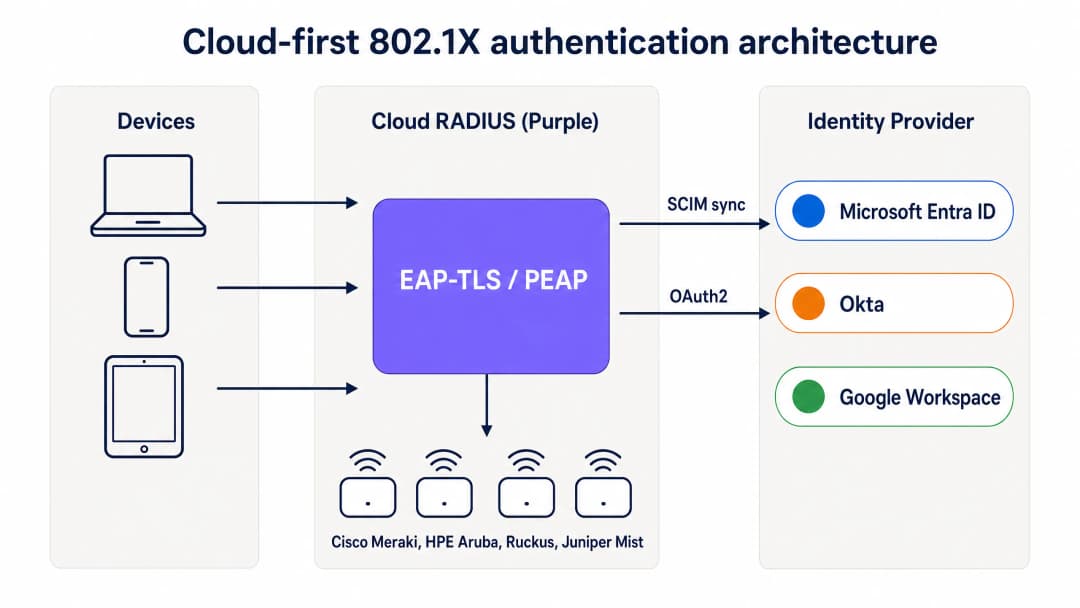
Cloud-first 802.1X authentication architecture: devices authenticate via EAP-TLS through Purple's cloud RADIUS, which validates certificates and applies group-based policy from Entra ID, Okta, or Google Workspace.
How MDM replaces the on-premises CA
In a traditional 802.1X deployment, certificates were issued by an on-premises Certificate Authority running Active Directory Certificate Services (AD CS). In a cloud-first deployment, the MDM takes over this role using SCEP (Simple Certificate Enrollment Protocol). Microsoft Intune, Jamf Pro, and other MDM platforms can request certificates from a cloud-hosted CA and push them silently to managed devices.
The flow works as follows. The IT administrator creates a SCEP certificate profile in the MDM, scoped to the device groups that require WiFi access. The MDM pushes the certificate to Windows, macOS, iOS, iPadOS, Android Enterprise, and ChromeOS devices automatically. The user sees nothing. The certificate is bound to the device identity in the MDM and renews automatically before expiry. When the device connects to the WiFi, it presents the certificate to the cloud RADIUS server, which validates it against the CA and applies the correct network policy.
For organisations using Microsoft Intune, Microsoft Cloud PKI provides a fully managed CA that integrates directly with Intune SCEP profiles, eliminating the need for an on-premises NDES (Network Device Enrollment Service) server. For Jamf-managed Mac and iOS fleets, Jamf's built-in CA or a third-party cloud CA serves the same purpose.
SCIM and instant access revocation
One of the most operationally important aspects of cloud RADIUS is SCIM (System for Cross-domain Identity Management) provisioning. SCIM is an open standard that pushes identity changes from the source of truth - your cloud identity provider - to dependent systems in real time. When an employee is disabled in Entra ID or Okta, SCIM pushes that change to the cloud RADIUS service immediately. The next time the device attempts to authenticate, the RADIUS server returns Access-Reject. With a short session timeout configured on the access point, the device is removed from the network within minutes of the account being disabled.
This is a material security improvement over shared PSK networks, where the only way to revoke access is to change the password across every device, and over legacy RADIUS deployments that rely on periodic LDAP syncs with a window of hours or days.
RadSec: securing RADIUS traffic over the internet
Traditional RADIUS uses UDP and provides only basic message authentication. When your RADIUS server is in the same data centre as your access points, this is acceptable. When your RADIUS server is a cloud service, the authentication traffic traverses the public internet. RadSec (RADIUS over TLS, RFC 6614) encrypts the RADIUS exchange using TLS, providing confidentiality and integrity for authentication traffic. Purple supports RadSec natively, with IPsec fallback for access points that do not yet support RadSec.
Vous avez des questions sur votre configuration spécifique ?
Notre équipe collabore avec des exploitants de sites, des responsables informatiques et des ingénieurs réseau au sein de 80 000 sites. Réservez un appel de 20 minutes et nous vous montrerons comment d'autres professionnels comme vous ont résolu ce problème.
Implementation guide
Deploying cloud RADIUS with EAP-TLS requires four coordinated steps. A pilot SSID can be live in under an hour if Entra ID and an MDM are already in place.
Step 1: Connect cloud RADIUS to your identity provider
Connect Purple to your identity provider via OAuth2 admin consent (for Entra ID) or API token (for Okta and Google Workspace). This authorises Purple to read users, groups, and group memberships from the directory. Configure SCIM provisioning to push user state changes to Purple in real time. No service principal credentials are stored on disk. Group changes propagate on the next authentication event, not on a sync schedule.
Step 2: Configure your MDM and SCEP profile
In Microsoft Intune, create a Trusted Certificate Profile for the CA root, then create a SCEP certificate profile pointing at the Purple-managed CA. Scope both profiles to the device groups that require WiFi access. For Jamf, configure a SCEP payload in a configuration profile. The MDM pushes the certificates silently. Verify certificate delivery in the MDM compliance dashboard before proceeding.
Step 3: Define network policies in the cloud RADIUS dashboard
Create RADIUS policies that map identity provider groups to specific VLANs and access controls. For example, map the Entra ID group "Staff-Finance" to VLAN 20 with full internet access, and map "Staff-Contractors" to VLAN 30 with time-limited access that expires automatically. Purple's dashboard applies these policies at the point of authentication, with no firewall changes required.
Step 4: Update access point configuration
Update the SSID configuration on your access points to use WPA2-Enterprise or WPA3-Enterprise with 802.1X. Enter the Purple cloud RADIUS primary and secondary endpoint hostnames or IP addresses, along with the shared secret. Configure the access points to use dynamic VLAN assignment based on the RADIUS attributes returned by Purple. Test with a single SSID on a subset of access points before rolling out across the estate.

Cloud RADIUS vs on-premises RADIUS: a direct comparison across deployment time, Active Directory dependency, high availability, OS patching, identity integration, and certificate lifecycle management.
Best practices
These recommendations reflect IEEE 802.1X standards, PCI DSS v4.0 requirements, and operational experience across Purple's 80,000+ venue estate.
Mandate EAP-TLS for managed devices. Passwords are susceptible to phishing and credential stuffing. Certificates provide cryptographic proof of identity and device compliance. EAP-TLS is the only 802.1X method that is phishing-resistant by design.
Use SCIM for instant revocation. Periodic LDAP syncs leave a window where a terminated employee retains network access. SCIM ensures access is revoked the moment the account is disabled in the identity provider.
Deploy multi-region RADIUS. Configure your access points with at least two RADIUS endpoints in different geographic regions. Purple provides active-active multi-region failover by default, with failover completing in seconds.
Segment traffic with dynamic VLANs. Use identity provider group memberships to assign users to specific VLANs dynamically. This isolates sensitive traffic and limits the blast radius of a compromised device without requiring manual firewall changes.
Enable RadSec. If your access points support RadSec, enable it to encrypt authentication traffic between the access point and the cloud RADIUS server. This is particularly important for branch offices and venues where the access point is on an untrusted network segment.
Monitor certificate lifecycle. Set MDM auto-renewal to trigger at 80% of the certificate lifetime. For a one-year certificate, renewal begins at the 10-month mark. Alert on devices that fail to renew before the certificate expires.
For a broader treatment of enterprise WiFi security standards and frameworks, see our Enterprise WiFi Security: A Complete Guide for 2026 .
Troubleshooting and risk mitigation
Transitioning to cloud RADIUS introduces new dependencies. Prepare for these common failure modes before they affect production.
Certificate expiration. If a device certificate expires before the MDM renews it, the device fails authentication silently. The user sees a connection error with no explanation. Mitigate by configuring MDM auto-renewal at 80% of certificate lifetime and monitoring the MDM compliance dashboard for devices with expiring certificates.
MDM sync failures. A device that falls out of MDM compliance or fails to check in may not receive a renewed certificate. Implement compliance policies that flag unhealthy devices and alert administrators before the certificate expires.
Firewall blocking RADIUS traffic. The access points must reach the cloud RADIUS endpoints on UDP port 1812 (authentication) and UDP port 1813 (accounting), or TCP port 2083 for RadSec. Outbound firewall rules at branch offices frequently block these ports. Test reachability from the access point management VLAN before deployment.
SCIM provisioning failures. If the SCIM connection between the identity provider and Purple is interrupted, user state changes will not propagate. Monitor SCIM sync status in both the identity provider and the Purple dashboard. Configure alerting for sync failures.
Legacy devices without certificate support. IoT devices, printers, and older hardware may not support EAP-TLS. For these devices, use iPSK (individual pre-shared keys) rather than a shared PSK. Purple supports iPSK natively, assigning a unique key per device and placing each device on the correct VLAN without requiring 802.1X supplicant support.
ROI and business impact
Migrating from on-premises RADIUS to cloud RADIUS delivers measurable value across infrastructure, operations, and security.
| Dimension | On-premises NPS | Cloud RADIUS (Purple) |
|---|---|---|
| Infrastructure cost | Windows Server licences, VM compute, storage | Per-AP subscription, no server hardware |
| Time to deploy | Days to weeks | Under one hour |
| High availability | Manual - two servers plus replication | Multi-region active-active, default |
| OS patching | Monthly, your team | Vendor-managed |
| WiFi helpdesk tickets | High - password resets, manual onboarding | Down 80% (Purple customer data) |
| Access revocation | Hours to days via LDAP sync | Seconds via SCIM |
IT teams using Purple's Staff WiFi typically see WiFi support tickets drop by 80% (Purple internal data, 2024), driven by the elimination of password resets and manual device onboarding. Certificate-based authentication also satisfies PCI DSS requirement 8.3 for strong authentication and ISO 27001 control A.9.4 for system and application access control, reducing the audit burden on your security team.
For organisations in retail and hospitality , the ability to manage Staff WiFi and Guest WiFi from a single cloud dashboard - with a unified identity layer - reduces operational complexity across multi-site estates. For transport operators and healthcare providers, the instant revocation capability and full audit trail satisfy regulatory requirements without additional tooling.
Purple's WiFi Analytics layer adds occupancy and hybrid working data on top of the authentication infrastructure, turning Staff WiFi from a cost centre into a source of operational intelligence.
Related reading: Enterprise WiFi Security: A Complete Guide for 2026 - OpenWrt Custom Firmware Integration with Purple WiFi
Définitions clés
802.1X
Une norme IEEE (IEEE 802.1X-2020) pour le contrôle d'accès réseau basé sur les ports. Elle exige que les appareils s'authentifient avant que le point d'accès n'accorde l'accès au réseau, en utilisant un échange EAP médié par un serveur RADIUS.
Les équipes IT utilisent 802.1X pour s'assurer que seuls les utilisateurs et appareils autorisés se connectent au réseau de l'entreprise. Il fournit un chiffrement par utilisateur, des clés par session et un historique d'audit complet de chaque événement de connexion.
RADIUS
Remote Authentication Dial-In User Service (RFC 2865). Un protocole réseau qui fournit une gestion centralisée de l'authentification, de l'autorisation et de la comptabilité (AAA) pour l'accès au réseau.
Les points d'accès transmettent chaque demande de connexion au serveur RADIUS, qui décide d'autoriser l'appareil et de lui attribuer un VLAN. Le RADIUS-as-a-Service cloud remplace les serveurs NPS ou FreeRADIUS sur site.
EAP-TLS
Extensible Authentication Protocol-Transport Layer Security (RFC 5216). Une méthode d'authentification 802.1X qui utilise un échange mutuel de certificats X.509 à la place des mots de passe.
EAP-TLS est la référence absolue pour les parcs d'appareils gérés. Il résiste au phishing, ne nécessite aucun stockage de hachage de mot de passe et est la seule méthode 802.1X conforme aux directives MFA de la CISA sur la résistance au phishing.
PEAP-MSCHAPv2
Protected Extensible Authentication Protocol avec Microsoft Challenge Handshake Authentication Protocol version 2. Une méthode 802.1X héritée qui valide les mots de passe par rapport aux hachages NTLM stockés dans l'Active Directory.
PEAP-MSCHAPv2 échoue dans les environnements cloud uniquement car Microsoft Entra ID ne stocke pas les hachages NTLM. Les organisations qui migrent depuis un AD sur site doivent remplacer PEAP par EAP-TLS.
SCEP
Simple Certificate Enrollment Protocol. Un protocole utilisé par les plateformes MDM pour demander et installer automatiquement des certificats numériques sur les appareils, sans interaction de l'utilisateur.
Les équipes IT utilisent SCEP avec Intune ou Jamf pour déployer silencieusement des certificats WiFi sur les appareils des employés. SCEP remplace le serveur NDES (Network Device Enrollment Service) sur site dans les déploiements cloud-first.
SCIM
System for Cross-domain Identity Management (RFC 7644). Un standard ouvert qui automatise l'échange en temps réel d'informations d'identité utilisateur entre les systèmes informatiques.
Le protocole SCIM garantit que lorsqu'un employé est désactivé dans Microsoft Entra ID ou Okta, ce changement est immédiatement transmis au service RADIUS cloud, révoquant l'accès WiFi en quelques secondes plutôt qu'en plusieurs heures.
NPS
Network Policy Server. L'implémentation RADIUS de Microsoft, généralement exécutée sur Windows Server dans le cadre d'un environnement Active Directory sur site.
Les organisations cloud-first abandonnent NPS pour éliminer les VM Windows Server, les correctifs d'OS et la dépendance à l'Active Directory sur site. Le RADIUS cloud est son remplaçant direct.
RadSec
RADIUS sur TLS (RFC 6614). Un protocole qui chiffre le trafic d'authentification RADIUS à l'aide de TLS, remplaçant le transport en texte clair basé sur UDP utilisé par le RADIUS traditionnel.
Le protocole RadSec est essentiel lors de l'utilisation d'un RADIUS cloud, car le trafic d'authentification doit traverser l'internet public entre le point d'accès et le service cloud. Purple prend en charge RadSec nativement.
iPSK
Individual Pre-Shared Key. Une variante de WPA2-Personal qui attribue une clé pré-partagée unique à chaque appareil, plutôt qu'une clé partagée unique pour tous les appareils.
La technologie iPSK est utilisée pour les appareils IoT, les imprimantes et d'autres matériels ne prenant pas en charge EAP-TLS de la norme 802.1X. Elle offre une traçabilité par appareil et une affectation VLAN sans nécessiter de prise en charge des certificats.
VLAN dynamique
Une technique de segmentation réseau où le serveur RADIUS renvoie un identifiant de VLAN dans la réponse Access-Accept, et le point d'accès place automatiquement l'appareil sur ce VLAN.
Les VLAN dynamiques permettent aux équipes IT de segmenter le personnel, les prestataires, les appareils IoT et les invités sur des segments réseau distincts en fonction de leur appartenance à un groupe de fournisseurs d'identité, sans modification manuelle du pare-feu.
Exemples concrets
Une chaîne de vente au détail de 400 sites doit sécuriser le WiFi du personnel sur l'ensemble de ses sites. Elle utilise des points d'accès Cisco Meraki et exploite Microsoft Entra ID avec Intune pour la gestion des appareils. Elle utilise actuellement un PSK WPA2-Personal partagé car elle ne dispose pas d'Active Directory sur site pour exécuter NPS. Un audit interne récent a signalé ce PSK partagé comme un écart de conformité PCI-DSS.
La chaîne déploie le RADIUS cloud de Purple. Tout d'abord, elle connecte Purple à Entra ID via le consentement administrateur OAuth et configure le provisionnement SCIM. Dans Intune, elle crée un profil de certificat de confiance pour la racine de l'autorité de certification (CA) Purple et un profil de certificat SCEP étendu au groupe d'appareils 'Staff-Retail'. Intune pousse silencieusement les certificats vers tous les terminaux de point de vente et tablettes du personnel gérés. Dans le tableau de bord Meraki, elle met à jour le SSID du personnel en WPA2-Enterprise, saisit les points de terminaison principal et secondaire du RADIUS cloud de Purple, et active l'attribution dynamique de VLAN. Lorsqu'un appareil se connecte, il présente son certificat émis par Intune, Purple le valide par rapport à la CA et vérifie le groupe Entra ID, puis l'appareil est placé sur le VLAN 10 (réseau du personnel) ou le VLAN 20 (réseau de gestion) en fonction de l'appartenance au groupe. Le PSK partagé est retiré. Le déploiement sur les 400 sites prend un seul week-end, car aucun matériel sur site n'est déployé - seules des modifications de configuration SSID dans Meraki sont requises.
Une université de 15 000 étudiants utilise Google Workspace comme principal fournisseur d'identité. L'équipe informatique souhaite fournir un WiFi sécurisé pour le personnel et les étudiants sur un parc d'appareils personnels (BYOD) composé de MacBooks, Chromebooks et téléphones Android. Elle ne dispose pas d'Active Directory sur site et ne souhaite pas gérer de serveurs.
L'université intègre le RADIUS cloud de Purple à Google Workspace. Pour les Chromebooks gérés, elle utilise Google Admin pour pousser un profil de certificat WiFi via SCEP, inscrivant silencieusement chaque appareil. Pour les MacBooks et téléphones Android personnels (BYOD), elle déploie une application d'intégration légère qui authentifie l'utilisateur avec ses identifiants Google et installe un certificat sur l'appareil en un seul clic. Les connexions suivantes utilisent EAP-TLS de manière transparente. Purple associe les unités d'organisation de Google Workspace à des VLAN : le personnel se connecte au VLAN 10, les étudiants au VLAN 20 et les visiteurs invités sur un SSID avec Captive Portal. Lorsqu'un étudiant obtient son diplôme et que son compte Google est suspendu, SCIM pousse la modification vers Purple et son accès WiFi est révoqué en quelques minutes.
Questions d'entraînement
Q1. Votre organisation a entièrement migré de son Active Directory local vers Microsoft Entra ID. Votre WiFi personnel actuel utilise PEAP-MSCHAPv2 avec un serveur NPS qui était joint à l'ancien domaine. Après le démantèlement du contrôleur de domaine, le personnel signale qu'il ne peut plus se connecter au WiFi. Quelle est la cause première et quelle est la solution correcte à long terme ?
Conseil : Réfléchissez à ce que PEAP-MSCHAPv2 requiert de la part de l'annuaire, et si Microsoft Entra ID le fournit.
Voir la réponse type
La cause première est que PEAP-MSCHAPv2 exige que le serveur RADIUS valide le mot de passe de l'utilisateur par rapport à un hachage NTLM stocké dans Active Directory. Le contrôleur de domaine étant démantelé, NPS n'a plus d'annuaire par rapport auquel valider. Entra ID ne stocke pas les hachages NTLM, NPS ne peut donc pas être redirigé vers Entra ID. La bonne solution à long terme consiste à remplacer NPS par un service cloud RADIUS, à migrer de PEAP-MSCHAPv2 vers EAP-TLS et à utiliser le MDM (Intune) pour émettre des certificats d'appareil via SCEP. Cela élimine toute dépendance vis-à-vis d'un annuaire local.
Q2. Vous déployez cloud RADIUS pour une flotte de 200 terminaux MacBooks d'entreprise gérés par Jamf Pro. Votre fournisseur d'identité est Okta. Quelle est la méthode la plus sécurisée et la plus efficace sur le plan opérationnel pour attribuer les identifiants WiFi à ces appareils ?
Conseil : Recherchez une méthode qui ne nécessite aucune interaction de l'utilisateur, évite les mots de passe et s'intègre à votre MDM existant.
Voir la réponse type
Configurez Jamf Pro pour utiliser SCEP afin de pousser silencieusement les certificats d'appareil vers les MacBooks. Créez une charge utile SCEP dans un profil de configuration Jamf, pointant vers l'autorité de certification gérée par votre fournisseur cloud RADIUS. Ciblez le profil sur le groupe d'appareils concerné. Jamf déploiera le certificat sur chaque MacBook automatiquement, sans aucune interaction de l'utilisateur. Configurez le profil WiFi dans le même profil de configuration pour utiliser EAP-TLS avec le certificat émis par SCEP. Connectez le service cloud RADIUS à Okta via SCIM pour vous assurer que lorsqu'un employé est désactivé dans Okta, son accès WiFi soit révoqué immédiatement.
Q3. Un employé est licencié à 9h00 un lundi. Son compte Microsoft Entra ID est désactivé par les RH à 9h05. À 9h30, une alerte de sécurité indique que l'ordinateur portable de l'employé est toujours connecté au WiFi de l'entreprise depuis le parking. Quelle configuration manque-t-il, et comment y remédier ?
Conseil : Comment le serveur RADIUS apprend-il que le statut de l'utilisateur a changé chez le fournisseur d'identité ?
Voir la réponse type
Le déploiement repose sur des synchronisations LDAP périodiques plutôt que sur le provisionnement SCIM. La synchronisation LDAP n'a pas encore été exécutée depuis que le compte a été désactivé, le service cloud RADIUS considère donc toujours l'utilisateur comme actif. La solution consiste à activer le provisionnement SCIM entre Microsoft Entra ID et le service cloud RADIUS. SCIM pousse les changements d'état des utilisateurs en temps réel, de sorte que lorsque le compte est désactivé dans Microsoft Entra ID à 9h05, le service RADIUS reçoit le changement immédiatement. La prochaine fois que l'appareil tente de se réauthentifier (ce qui est contrôlé par le délai d'expiration de la session sur le point d'accès), il reçoit un Access-Reject. Définir un délai d'expiration de session court (15 à 30 minutes) sur le point d'accès limite la fenêtre maximale entre la désactivation du compte et l'exclusion du réseau.
Q4. Votre site dispose de 50 appareils IoT - lecteurs d'affichage dynamique, capteurs environnementaux et imprimantes - qui ne prennent pas en charge 802.1X EAP-TLS. Comment sécurisez-vous ces appareils sur la même infrastructure WiFi que le réseau de votre personnel en EAP-TLS ?
Conseil : Déterminez quelle méthode d'authentification offre une traçabilité par appareil sans nécessiter de prise en charge des certificats.
Voir la réponse type
Utilisez iPSK (clés pré-partagées individuelles) pour les appareils IoT. Attribuez une clé pré-partagée unique à chaque appareil dans le tableau de bord cloud RADIUS, ainsi qu'une attribution de VLAN. Chaque appareil s'authentifie avec sa clé unique, que le serveur RADIUS valide et utilise pour placer l'appareil sur le VLAN IoT, isolé du réseau du personnel. Si un appareil est compromis ou mis hors service, vous révoquez uniquement la clé de cet appareil sans affecter les autres. Cette approche offre une traçabilité par appareil et une segmentation du réseau sans nécessiter de support de suppliant 802.1X sur le matériel IoT.
Continuer la lecture de cette série
Comment révoquer l'accès WiFi lorsqu'un employé s'en va
Ce guide montre aux équipes informatiques et opérationnelles comment supprimer l'accès WiFi du personnel lorsqu'un employé s'en va, sans perturber le reste des collaborateurs. Il compare le protocole 802.1X basé sur des certificats, l'iPSK spécifique à l'identité et le déprovisionnement via SCIM, puis fournit un plan d'action pour le jour même, une méthode de test et un modèle de preuves d'audit.
WiFi BYOD sécurisé : intégration de certificats Passpoint vs xPSK (iPSK)
Un guide technique complet pour les équipes informatiques sur la sécurisation des appareils non gérés des employés et des étudiants (BYOD) à l'aide de certificats Passpoint EAP-TLS sans intervention vs les solutions xPSK spécifiques aux constructeurs (iPSK/easyPSK, DPSK, PPSK, MPSK).
WPA2 Personal vs Enterprise : quelle est la différence et lequel devriez-vous utiliser ?
Ce guide de référence technique propose une comparaison complète des protocoles de sécurité WPA2 Personal et WPA2 Enterprise au sein des environnements WiFi d'entreprise. Il détaille les différences d'architecture, les méthodologies de déploiement et les implications en matière de sécurité de chaque norme afin d'aider les architectes réseau et les responsables informatiques à prendre des décisions de déploiement éclairées.
Vous avez des questions sur votre configuration spécifique ?
Notre équipe collabore avec des exploitants de sites, des responsables informatiques et des ingénieurs réseau au sein de 80 000 sites. Réservez un appel de 20 minutes et nous vous montrerons comment d'autres professionnels comme vous ont résolu ce problème.